Salesforce Automation Explained: SFA Software vs. Flow Builder, Tools, Use Cases & Best Practices
Written by
Ishan Chhabra
Last Updated :
June 12, 2026
Skim in :
13
mins
In this article
Revenue teams love Oliv
Here’s why:
All your deal data unified (from 30+ tools and tabs).
Insights are delivered to you directly, no digging.
AI agents automate tasks for you.
Thank you! Your submission has been received!
Oops! Something went wrong while submitting the form.
Meet Oliv’s AI Agents
Hi! I’m, Deal Driver
I track deals, flag risks, send weekly pipeline updates and give sales managers full visibility into deal progress
Hi! I’m, CRM Manager
I maintain CRM hygiene by updating core, custom and qualification fields all without your team lifting a finger
Hi! I’m, Forecaster
I build accurate forecasts based on real deal movement and tell you which deals to pull in to hit your number
Hi! I’m, Coach
I believe performance fuels revenue. I spot skill gaps, score calls and build coaching plans to help every rep level up
Hi! I’m, Prospector
I dig into target accounts to surface the right contacts, tailor and time outreach so you always strike when it counts
Hi! I’m, Pipeline tracker
I call reps to get deal updates, and deliver a real-time, CRM-synced roll-up view of deal progress
Hi! I’m, Analyst
I answer complex pipeline questions, uncover deal patterns, and build reports that guide strategic decisions
TL;DR
Salesforce ended support for Workflow Rules and Process Builder on December 31, 2025, making legacy automation an unsupported liability you must inventory and migrate to Flow Builder.
Flow Builder excels at deterministic, rules-based work but breaks on ambiguous data like duplicate accounts, where reasoning agents outperform brittle rules.
SFA automates the selling motion while CRM manages the full lifecycle; both legacy systems depend on humans for clean data, which is where they fail.
Agentforce is strong for B2C support, but complex B2B sales execution often needs heavy Data Cloud setup and prompt engineering before value appears.
Around 76% of teams hit ROI within 12 months, yet most fail to reinvest the freed hours, forfeiting the real upside of automation.
AI-native platforms like Oliv update structured CRM fields autonomously, stitch deal narratives across channels, and consolidate a stack that often exceeds $500 per user monthly.
Q1: What Is Salesforce Automation in 2026 (and Why Did the Rules Just Change)? [toc=1. Salesforce Automation 2026]
Salesforce automation is the practice of using native and connected tools to run repetitive sales and business processes inside Salesforce, without a human clicking through every step. In 2026, Flow Builder is the declarative default, because Salesforce ended support for Workflow Rules and Process Builder on December 31, 2025. The new frontier is AI agents that pursue goals, not just trigger fixed rules.
🧩 The day the old rules stopped getting fixed
I talk to a lot of admins who inherited automation built years ago. Most of it still runs fine. The problem is that as of December 31, 2025, Salesforce no longer supports Workflow Rules or Process Builder, and ships no bug fixes for them.
That changes the math overnight. Your old automation is not switched off. It is just unsupported, which means every quiet dependency is now a liability you own alone.
🏗️ The three layers stacked under your CRM
From first principles, automation has three layers, and the value climbs from commoditized data capture to autonomous agents.
When I think about automation from first principles, I see three layers, not one. The bottom layer is data collection, which is now commoditized. Recording a call or logging a field is no longer where the value sits.
The middle layer is intelligence, where context turns raw data into a usable read on a deal. The top layer is the agent, which acts on that context. Salesforce itself is moving up this stack, pushing autonomous agents like Agentforce with built-in audit trails.
🤖 Vending machine versus smart employee
Here is the cleanest way I have found to explain the shift. Traditional Flow automation is a vending machine. You put in a fixed input, you get a fixed output, every single time.
An AI agent is closer to a smart employee. You hand it a goal, and it reasons, acts, and adapts until the goal is met. I might be overstating the gap on simple tasks, but for messy revenue work, the difference is real.
That is the line we drew when we built our AI agents. We did not want software that adds work for the human. We wanted agents that do the work for the system, updating the CRM the way a diligent rep would, without the nagging.
⚠️ What admins actually feel on the ground
The honest read from current users is that "automation" now means very different things across the stack. Native agent tooling is improving, but it is not yet plug-and-play for everyone.
"Agentforce is easy to use, configure, and deploy. It is low code for making a basic agent... The price of Agentforce is not clear and hard to find. Adoption is low because of the lack of knowledge on the subject." Anusha T., Web Developer Salesforce Agentforce G2 Verified Review
"I haven't been impressed by any of the early Salesforce AI tools, and I don't hear anyone talking about them glowingly." u/OffManuscript, r/SalesforceDeveloper Reddit Thread
✅ Your Monday move
Open Setup, go to Process Automation, and list every active Workflow Rule and Process Builder process. That single inventory tells you how much unsupported automation you are quietly carrying, before you decide what to rebuild in Flow or hand to an agent.
Q2: SFA vs. CRM: What's the Real Difference, and Why Does It Still Confuse Buyers? [toc=2. SFA vs CRM]
Sales Force Automation (SFA) automates the selling motion itself, things like lead management, opportunity tracking, forecasting, and activity logging. CRM is the broader system of record that manages the full customer relationship across marketing, sales, and service. SFA is a focused subset of CRM, which is exactly why buyers keep conflating the two and overbuying.
📊 The distinction in one table
I get asked this constantly by RevOps leaders scoping a 2026 stack. The simplest framing is that SFA is about rep productivity and pipeline, while CRM is about lifecycle relationships.
SFA vs CRM at a Glance
Dimension
Sales Force Automation (SFA)
CRM
Core focus
Closing deals, pipeline velocity
Building and tracking relationships
Typical jobs
Lead routing, forecasting, activity tracking
Contact profiles, support, marketing
Primary user
AEs, sales managers
Sales, service, and marketing teams
Scope
A subset of the customer lifecycle
The whole customer lifecycle
Most modern platforms bundle both, so the label matters less than what the system actually does with your data.
🗂️ The dirty secret both share
Here is the part the category avoids saying out loud. Both legacy SFA and CRM were built in a pre-generative-AI era, as databases that depend on a human to keep them clean.
Selling is not contingent on record-keeping. So reps skip the data entry, and the data turns into a graveyard of half-filled fields. I have watched managers forecast off that mess and call it a "system of record."
🧠 Notes versus properties
When we built our CRM Manager, this is the gap we attacked first. Legacy tools tend to log conversations as notes or activities, which are unstructured and nearly useless for reporting.
Our agents update the actual CRM properties instead, the MEDDIC fields, the stage, the close date. A note tells you a call happened. A populated property tells you the deal moved, and why. This is the heart of autonomous CRM hygiene.
⚖️ What buyers say about the native AI layer
The complaints I hear most often are not about whether SFA or CRM is "better." They are about how hard it is to make the intelligence layer work without heavy setup.
"It can be complex to set up and often requires skilled administrators or developers to customize and integrate properly, which adds time and cost. Licensing fees can be high, especially as the number of agents grows." Verified User in Marketing and Advertising, Enterprise Salesforce Agentforce G2 Verified Review
"It has an extremely complicated set up process... it does not allow for data storage or data migration." Verified User, Einstein Salesforce Einstein G2 Verified Review
✅ Your Monday move
Stop arguing SFA versus CRM in your tooling debate. Ask one question instead: does this system keep my structured fields accurate on its own, or does it just store whatever my reps remember to type?
Q3: Is Your Process Builder About to Break? Navigating the Post-EOL Migration [toc=3. Post-EOL Migration]
Your existing Process Builder and Workflow Rules still run, but Salesforce stopped supporting them on December 31, 2025, with no bug fixes or enhancements coming. That makes legacy automation an unsupported liability sitting under your most important workflows. The fix is to migrate eligible logic to Flow Builder using the Migrate to Flow tool, then rebuild what is too complex by hand.
⏰ The deadline already passed
Let me be blunt about the timeline, because the date matters. End of support landed on December 31, 2025, and the broader ecosystem was warned about this shift well ahead of time.
"Unsupported" does not mean "broken tomorrow." It means the safety net is gone, and any future Salesforce change could silently break automation no one is maintaining.
🛠️ The four-step migration sequence
The migration off unsupported automation follows four disciplined steps, ending with a sandbox test before production.
When we audit a customer's org, we run the same disciplined sequence. It is not glamorous, but it prevents nasty surprises.
Inventory every active Workflow Rule and Process Builder process in Setup, under Process Automation.
Run the Migrate to Flow tool to convert eligible processes, including scheduled actions, into flows.
Rebuild and merge the complex logic the tool cannot handle cleanly.
Test in a sandbox before you activate anything in production.
🧯 The risk nobody budgets for
Here is the trap I see mid-market teams fall into. They treat migration as a like-for-like rebuild and recreate the same brittle rules in a new tool.
That is a missed moment. If you are touching every automation anyway, ask whether the logic should be a rule at all, or whether an agent should own the outcome. I might be biased here, but rebuilding fragile rules to last another decade feels like a waste.
🏃 Why DIY agent rebuilds stall
A lot of teams try to skip the migration grind by building their own internal AI agents. From what surfaces when you actually run this, most of those projects stall after six or seven months, because they cannot manage "state" or pass context cleanly between stakeholders.
This is precisely the gap our RevOps platform was built to close. Instead of a multi-month Data Cloud setup, our agents read a customer's existing data and deliver a clean, accurate CRM in days, not quarters. We own the complexity so your admins are not stuck debugging context handoffs at 9 p.m. If you want the deeper playbook, see our RevOps guide to implementing agentic AI.
💬 What admins report about native tooling
The migration headache is compounded by setup friction in the native AI layer that many teams hoped would replace their old rules.
"Setting it up wasn't as smooth as I expected. The UI felt a bit clunky... It's definitely not plug-and-play unless you've worked with similar AI flows before. Also, the pricing caught us off guard." Ayushmaan Y., Senior Associate Salesforce Agentforce G2 Verified Review
"Powerful but Complex... Can be complex to set up and customize. Expensive, especially for smaller teams. Steep learning curve for new users." Shubham G., Senior BDM Salesforce Agentforce G2 Verified Review
✅ Your Monday move
Run the inventory today, then tag each automation as "rebuild in Flow," "retire," or "hand to an agent." That triage list is the cheapest insurance you will buy this quarter.
Q4: How Does Flow Builder Work, and Where Does Declarative Automation Hit Its Ceiling? [toc=4. Flow Builder Ceiling]
Flow Builder is Salesforce's low-code automation engine. Record-triggered flows fire when a record is created or updated, before-save flows handle fast field updates, and screen flows guide users through steps. It is excellent for deterministic, rules-based work. But Flow still runs fixed logic, so it struggles when real-world context gets messy.
⚙️ What Flow does genuinely well
Flow shines at clean, predictable jobs. A record-triggered flow can auto-stamp a close date, route a lead, or update a status the moment a field changes. The official guidance frames Flow as the way to automate processes with clicks instead of code.
For deterministic tasks, this is the right tool. If the rule is "when X happens, always do Y," Flow handles it reliably and cheaply.
🧱 Where the vending machine jams
Flow asks what matches a pattern, while a reasoning agent asks what actually makes sense, which is where declarative automation hits its ceiling.
The ceiling shows up the moment the input is ambiguous. Flow uses rigid rules to map an activity to a deal, and those rules break on real data.
Picture two accounts named "Google US" and "Google India." A rule-based flow cannot reliably reason which opportunity a call belongs to. So it guesses, or it dumps the activity in the wrong place, and your reporting quietly rots.
🧠 Reasoning instead of rules
This is exactly the boundary where our object association takes over. Instead of brittle rules, our agents use LLM-based reasoning, which means they read the deal's history and reason about which opportunity is the logical match.
We saw this clearly with one customer, where rule-based CRM mapping kept failing to identify which product-line opportunity a call related to. AI reasoning sorted it out by looking at context, not just field values. A rule asks "what matches the pattern?" An agent asks "what actually makes sense here?" If you are weighing the native stack against a reasoning layer, our breakdown of why Salesforce AI fails in B2B revenue teams goes deeper.
🔧 When you still need code
I want to be fair to the native stack. When declarative logic runs out, the official escape hatch is Apex, Salesforce's programming language.
Apex gives you full control, but it also pulls you back into developer dependency, testing, and maintenance. That is a real cost, and for many teams it is the moment automation stops being self-serve.
💬 What practitioners say about the AI layer above Flow
The community view is that the native AI sitting on top of Flow is promising but still demanding, especially on reasoning and trust.
"Can be easy but gets highly technical as you go deep in the water... certainty of actions taken by agent, reasoning, trust layer and security, it will be helpful for those big orgs." shivam a., Product Researcher Salesforce Agentforce G2 Verified Review
List the three flows that break most often, usually the ones mapping activities to the wrong deal. Those are your best candidates to hand to a reasoning agent instead of patching the same rule again.
Q5: Flow vs. Agentforce vs. Third-Party Tools: Which Automation Layer Do You Actually Need? [toc=5. Choosing Your Automation Layer]
Use Flow Builder for deterministic, in-platform rules; use integration tools like Workato, MuleSoft Composer, or Celigo to sync data across systems; and use Agentforce for autonomous, goal-driven work. The deciding question is not features. It is whether the task needs fixed logic, connection, or judgment. Sales judgment is where AI-native platforms pull ahead.
🧭 Three layers, three jobs
I keep seeing teams shop for "the best automation tool" as if there is one answer. There isn't. Each layer solves a different problem.
Automation Layers Compared
Layer
Best for
Watch out for
Flow Builder
Fixed in-Salesforce rules
Brittle on messy, ambiguous data
iPaaS (Workato, MuleSoft Composer, Celigo)
Cross-system data sync
Another tool, another bill
Agentforce
Autonomous, goal-driven tasks
Setup cost, per-action pricing
AI-native platform
Reasoning across the deal
Newer category, narrower pilots
iPaaS, by the way, just means "integration platform as a service," the plumbing between apps.
💸 The stacking tax nobody prices in
Here is where cash gets real. Mid-market teams often bolt Salesforce together with Gong and Clari, and the total quietly drifts past $500 per user per month for a 25 to 200 rep team.
You pay three vendors to half-solve one problem: an accurate, current view of every deal. I could be biased, but that math stops making sense fast. We break this down in our analysis of the $500-per-user revenue stack.
🤝 Where we sit in the stack
This is the gap our revenue intelligence platform was built to close. Instead of stacking a recorder, a forecaster, and a CRM, our agents act as the orchestrator across all of them, writing structured fields directly.
We do not ask reps to talk to a chatbot to get data. The agent does the work in the background and nudges you only when something needs a human call. We have around 30 specialized agents in our AI agents marketplace in production, and we deploy one, prove ROI, then expand.
⚠️ What buyers report about the trade-offs
The honest picture from current users is that each tool has a real cost behind the demo.
"It was a big mistake on our part to commit to a two year term. Gong is a really powerful tool but it's probably the highest end option on the market, and now we're stuck with a tool that works technically but isn't the right business decision." Iris P., Head of Marketing, Sales Partnerships Gong G2 Verified Review
"The workflow is clunky and confusing. The platform is missing a ton of features and functionality that I've had with other tools like Outreach.io, Salesloft, Hubspot, etc." Austin N., SDR Clari G2 Verified Review
✅ Your Monday move
List your top three automation jobs and tag each as "rule," "connection," or "judgment." That single sort tells you which layer to buy, and where you are overpaying for overlap.
Q6: What Are AI-Driven Agentforce Workflows, and Are They Ready for B2B Sales? [toc=6. Agentforce B2B Readiness]
Agentforce is Salesforce's autonomous AI-agent platform, and Agentforce Operations extends it to back-office and service work with built-in audit trails. It is strong at B2C support automation. For complex B2B sales execution, reasoning across deals and writing structured fields, native Agentforce often needs heavy setup, which leaves room for specialists.
🔁 The agentic loop, in plain terms
An agent is not a fancy macro. It runs a loop: perceive, reason, act, evaluate, then adapt. Salesforce pushes this hard with Agentforce Operations, which records every agent action to an audit trail.
That is genuinely useful. The shift from fixed rules to goal-seeking agents is real, and Salesforce deserves credit for moving the category here.
🛟 Where it shines, where it strains
Agentforce is excellent for high-volume B2C support, things like returns and case deflection. That is the use case the early reviews celebrate.
The strain shows up in complex B2B selling. Native deployments often lean on Data Cloud and prompt engineering, which means months of work before value appears. I might be underrating recent improvements, but that is the consistent signal I hear. We cover this in depth in our piece on why Salesforce AI fails in B2B revenue teams.
🧠 Assistant versus agent
Here is the line the category blurs. A chatbot answers questions when you ask. An agent pursues an outcome without being asked.
When we built our orchestrating agents, we chose "goal-to-result," not "question-to-answer." We also bet on context engineering over prompt engineering, which means we load agents with deep business data so the prompts stay simple. Giving a rep a chatbot they must query is not adoption. It is a UX tax.
⚠️ What practitioners actually say
The reviews are warm on potential, honest on the learning curve.
"My primary concern... is the significant learning curve involved in truly optimizing Agentforce... Effectively crafting prompts and configuring the underlying actions demands a specific skill set often called prompt engineering." Alessandro N., Salesforce Administrator Salesforce Agentforce G2 Verified Review
"It's definitely not plug-and-play unless you've worked with similar AI flows before. Also, the pricing caught us off guard." Ayushmaan Y., Senior Associate Salesforce Agentforce G2 Verified Review
✅ Your Monday move
Pick one repetitive, text-or-email-closable task and pilot an agent on it. If it cannot reason across your real deal data without weeks of setup, that tells you which category of tool you actually need.
Q7: How Do You Keep Autonomous Agents Trustworthy, Auditable, and Compliant? [toc=7. Agent Trust and Governance]
Trust is now a buying criterion, not an afterthought. Salesforce's Agentforce Operations records every agent action to an audit trail and keeps humans in the loop. The admin role itself is shifting toward agent governance and security. For sales teams, that means deterministic behavior and clear evidence behind every field an agent changes.
🔒 Why governance moved to the front
A year ago, buyers asked "what can the agent do?" Now they ask "how do I prove what it did?" Salesforce answered with audit-trail transparency in Agentforce Operations, and human-in-the-loop checkpoints.
That reframes the admin job. The 2026 admin roadmap puts AI governance and security at the center of the role, not at the edge. Our guide on whether you can trust AI with your CRM walks through the evaluation criteria.
🧾 Deterministic, not mysterious
Admins do not trust a black box. An agent earns trust by acting in a predictable, repeatable way, and by validating its own work before it completes a task.
This is exactly how we designed our CRM Manager. Every field our agent changes carries an audit-friendly change log: which field moved, when, and a timestamped link to the conversational evidence behind it. So when finance or a deal desk asks "why did this deal advance?", the answer is one click away.
🛎️ Nudging, not policing
Here is a contrarian take. The goal is not to catch reps. It is to remove the need for RevOps to police anyone.
Our agents nudge a rep in Slack or email to confirm auto-captured data before it pushes to the CRM. The rep stays in control, the data stays clean, and no one runs a Friday audit. We are SOC 2 Type II, GDPR, and CCPA aligned, which matters once agents touch customer data at scale. For larger teams, our mid-market revenue AI buyer's guide covers the governance bar in detail.
⚠️ What buyers flag on trust and security
The reviews make the trust gap explicit for big orgs.
"Can be easy but gets highly technical as you go deep in the water... certainty of actions taken by agent, reasoning, trust layer and security, it will be helpful for those big orgs." shivam a., Product Researcher Salesforce Agentforce G2 Verified Review
"Many reps also resist using Gong because they feel micromanaged, leading to low adoption." Verified Reviewer Gong G2 Verified Review
✅ Your Monday move
Demand a change log on any agent you evaluate. If it cannot show the field, the timestamp, and the evidence behind a change, it is not enterprise-ready yet.
Q8: What's the Real ROI, and True Cost, of Salesforce Automation? [toc=8. ROI and True Cost]
Automation pays back fast for most teams. Around 76% see ROI within 12 months, and one Nucleus Research study found a 47% average ROI with a 3.8-month payback. But there is a catch. Gartner found AI saves sellers 4.8 hours a week, yet most teams fail to reinvest that time, forfeiting the upside.
💰 The benchmarks worth quoting
Let me give you the numbers a CFO will actually accept.
76% of teams hit ROI within 12 months; automated forecasting reaches roughly 95% accuracy versus a 20% manual baseline.
Nucleus Research: 47% average ROI, 3.8-month payback on Salesforce automation.
Gartner: AI saves sellers 4.8 hours weekly.
🕳️ The reinvestment gap
Automation delivers fast ROI and saved hours, but the real upside is lost when teams fail to reinvest the freed time.
Here is the part most blogs skip. Saved time is not saved money on its own.
Gartner found most organizations fail to reinvest the freed hours into high-value selling. Reps get four hours back, then fill them with more low-value busywork. The ROI lives entirely in what you do with the time. Our revenue intelligence ROI calculation helps you model this properly.
🧮 The true cost side: Agentforce pricing
ROI math needs the cost side, and Agentforce pricing has shifted three times. Flex Credits now run $0.10 per standard action, sold as 100,000 credits for $500, while per-user licenses start around $125 per user per month.
That sounds cheap per action, until a multi-step agent fires dozens of actions per deal. The bill is consumption-based, so heavy use scales fast. We unpack this in our Salesforce Agentforce pricing breakdown.
⚖️ Where we land on value
This is why we built modular pricing, roughly $19 to $120 per user per month, instead of metering every action. The value shifted off call recording, which is now a commodity baked into Zoom, Teams, and Meet.
We process calls in about five minutes, versus the 20 to 30 minutes legacy tools take, so reps get same-day follow-ups. And because our agents update fields autonomously, the ROI shows up before the contract is fully rolled out, not after a six-month pilot.
⚠️ What buyers say about cost and value
"The pricing is probably the biggest obstacle and hence we are looking to change." Miodrag, Enterprise Account Executive Gong LinkedIn Verified Review
"The additional products like forecast or engage come at an additional cost. Would be great to see these tools rolled into the core offering." Scott T., Director of Sales Gong G2 Verified Review
✅ Your Monday move
Before you sign anything, write down the freed hours and exactly where they get reinvested. An automation business case without a reinvestment plan is a cost, not an ROI.
Q9: How Does Oliv AI Handle CRM Hygiene Without Forcing Reps to Do Manual Data Entry? [toc=9. Automated CRM Hygiene]
Oliv keeps your CRM clean by having an AI agent watch every call, email, and Slack thread, then write the right fields back to Salesforce or HubSpot for you. The CRM Manager Agent reads conversation context, maps the activity to the correct account, and populates standard plus custom fields. Reps validate, they do not type. That flips the old model where dirty data was the rep's chore.
🧹 Why CRM hygiene breaks in the first place
Here is the uncomfortable truth most vendors skip. CRMs do not fail because reps are lazy. They fail because the design assumes a human will stop selling to log structured data, and that assumption breaks the moment a rep gets busy.
I have watched this play out across hundreds of deals. The rep finishes a call, jumps to the next one, and the field stays blank. Multiply that by a quarter, and your pipeline is fiction.
The cost is not just messy records. Dirty data is ranked the number one pain in our own severity mapping, because it quietly cripples every forecast and AI model built on top of it. Our guide to autonomous CRM hygiene goes deeper on the mechanics.
⚙️ How the CRM Manager Agent actually works
The agent does three concrete things, and I want to be specific so you can pressure-test it:
It listens to the deal across calls, emails, and Slack, then writes to actual CRM objects, not just a notes log.
It is trained on over 100 sales methodologies, so it can fill MEDDPICC, BANT, or SPICED fields from what was really said.
It uses AI-based object association, meaning it reasons through duplicate records to pick the right account or opportunity instead of relying on brittle rules.
That last point matters. Salesforce Einstein Activity Capture is largely rule-based, so it often misassociates activity when duplicate accounts exist. We built our CRM Manager on reasoning, not rules, and our object association resolves which record an activity truly belongs to.
🔍 Where legacy tools quietly add work
Credit where it is due. Clari built a strong Salesforce overlay, and reps genuinely like updating fields from one view. Gong educated the entire category on conversation intelligence.
But both still lean on humans. Reps tell on the gap themselves.
"I have to maintain my own separate spreadsheet to track deals because I can only capture what my leaders want to see... as a rep, I need to have fields like product interest, last activity notes, key contacts, deal challenges or blockers." Verified User in Human Resources Clari G2 Verified Review
Even when the sync works, the structured fields a rep needs do not fill themselves. Another reviewer flagged the manual ceiling on object setup.
"I find the setup process challenging, especially when migrating fields from Salesforce, as it cant handle formula fields directly. This requires creating and maintaining duplicate fields." Josiah R., Head of Sales Operations Clari G2 Verified Review
💬 What clean-as-it-happens feels like
When the data fixes itself, RevOps stops being a janitor. Our RevOps platform was designed around exactly that shift, and one of our users put it plainly.
"Before switching to Oliv, cleaning up messy CRM fields... used to swallow half my week. Oliv fixes the data as it happens." Darius Kim, Head of RevOps, Driftloop Oliv Verified Review
I might be wrong on the edges here, but from what surfaces when you actually run this, the win is not "less typing." It is that forecasts finally sit on data nobody had to remember to enter. The validate-then-push design also keeps a human in the loop, so reps trust the field before it lands.
One honest limit. Full customization of complex fields and workflows still takes two to four weeks, and baseline value lands in one to two days. So where is my head right now? If reps stop owning data entry, the next question is whether managers will trust an AI-written field more than a rep-written one. My bet is yes, because at least the AI was actually on the call.
Q10: Is Oliv AI a Good Gong Alternative for Conversation Intelligence and Call Recording? [toc=10. Gong Alternative]
For most B2B revenue teams, yes. Oliv records and transcribes calls on every major platform, then returns processed summaries within five minutes, versus the 20 to 30 minute delay teams report with Gong. The bigger difference is what happens next. Oliv does not stop at the meeting. It stitches the call into a full deal narrative and writes the outcome back to your CRM.
🎥 What you get on the recording basics
Let me be fair before I get contrarian. Gong is the benchmark for conversation intelligence, and many managers feel they cannot run a team without it.
Unlimited recording and high-accuracy transcripts across Zoom, Teams, Meet, and Webex.
AI summaries, chapters, and auto-extracted next steps so nobody hunts through a full recording.
Processed output in five minutes, which is the part reps notice first.
🧩 Meeting intelligence versus deal intelligence
Here is where the standard read gets it backwards. The category treats the meeting as the unit of truth. I think the deal is.
Gong understands the call. Our deal intelligence is built to understand the deal across calls, emails, Slack, and Telegram, forming one evolving narrative. That gap shows up most in coverage. A CSM leader described it well.
"I lead the CSM team... with Gong, I have trouble understanding breadth versus depth... Oliv is the first time Ive ever been speechless. Thats incredible." Akil Sharperson, Triple Whale Oliv Verified Review
There is also a technical reason. Gong's Smart Trackers lean on keyword tracking, so they can flag a competitor mention without knowing if it was a passing remark or an active evaluation. Oliv's fine-tuned models read intent, not just words, which is the heart of the difference between revenue intelligence and conversation intelligence.
💰 The cost and lock-in question
This is where the "just buy Gong" playbook gets expensive. Bundled Gong can reach 250 to 270 per user per month, plus mandatory platform fees between 5,000 and 50,000.
Reps and ops leaders feel the rigidity too. Look at the renewal mechanics buyers complain about across the legacy stack.
"Outreach is significantly overpriced for what it offers... their agreements are evergreen, automatically renewing annually... If you miss the cancellation deadline by even a few hours, they enforce renewal for the entire year." Kevin H., CTO and Co-Founder Outreach G2 Verified Review
Our counter is a 19 per user Gong-replacement tier, modular agents, no mandatory platform fee, and a full open CSV export if you leave. You can see the full breakdown on our pricing page.
⚠️ Where Oliv is not the right swap
I will name the anti-fit, because pretending otherwise wastes everyone's time. If you only want a pure call recorder with no agentic nudges, or you are running B2C support workflows, this is not your tool.
Two more honest trade-offs. The Voice Agent that calls reps nightly for off-the-record updates is still in alpha. And enterprise rollouts usually start as a narrow pilot before expanding.
That said, the switching pattern is consistent. Teams leave when stacking tools creates data silos, not because recording fails, a theme we explore in our look at limitations beyond meeting intelligence. So the question I am sitting with: once the call auto-writes structured CRM objects instead of just notes, does "conversation intelligence" even stay a separate category, or does it fold into the deal layer? My honest guess is it folds.
Q11: References [toc=11. References]
Official docs and company source material
Oliv AI. "Comprehensive Company Profile, Product Overview, USPs, ICP, Use Cases by Persona, Competitor and Pain-Point Documentation." Internal source material.
Oliv AI. "Pain Point Agent Map, Internal Sales Enablement Guide." Last updated: 19 May 2026.
Datasets and review corpora
Competitor and Oliv Review Extraction (G2, Gartner, Reddit).
Reviews
Verified User in Human Resources. "Fairly easy to use but could use UI improvements." Clari G2, 2 May 2025. https://www.g2.com/products/clari/reviews/clari-review-11117779
Josiah R., Head of Sales Operations. "Intuitive Analytics, Needs Greater Flexibility." Clari G2, 28 Feb 2025. https://www.g2.com/products/clari/reviews/clari-review-8463040
Kevin H., CTO and Co-Founder. "Predatory Contracts." Outreach G2, 2 Oct 2024. https://www.g2.com/products/outreach/reviews/outreach-review-10332293
Darius Kim, Head of RevOps (Driftloop). Oliv customer reference quote.
Q1: What Is Salesforce Automation in 2026 (and Why Did the Rules Just Change)? [toc=1. Salesforce Automation 2026]
Salesforce automation is the practice of using native and connected tools to run repetitive sales and business processes inside Salesforce, without a human clicking through every step. In 2026, Flow Builder is the declarative default, because Salesforce ended support for Workflow Rules and Process Builder on December 31, 2025. The new frontier is AI agents that pursue goals, not just trigger fixed rules.
🧩 The day the old rules stopped getting fixed
I talk to a lot of admins who inherited automation built years ago. Most of it still runs fine. The problem is that as of December 31, 2025, Salesforce no longer supports Workflow Rules or Process Builder, and ships no bug fixes for them.
That changes the math overnight. Your old automation is not switched off. It is just unsupported, which means every quiet dependency is now a liability you own alone.
🏗️ The three layers stacked under your CRM
From first principles, automation has three layers, and the value climbs from commoditized data capture to autonomous agents.
When I think about automation from first principles, I see three layers, not one. The bottom layer is data collection, which is now commoditized. Recording a call or logging a field is no longer where the value sits.
The middle layer is intelligence, where context turns raw data into a usable read on a deal. The top layer is the agent, which acts on that context. Salesforce itself is moving up this stack, pushing autonomous agents like Agentforce with built-in audit trails.
🤖 Vending machine versus smart employee
Here is the cleanest way I have found to explain the shift. Traditional Flow automation is a vending machine. You put in a fixed input, you get a fixed output, every single time.
An AI agent is closer to a smart employee. You hand it a goal, and it reasons, acts, and adapts until the goal is met. I might be overstating the gap on simple tasks, but for messy revenue work, the difference is real.
That is the line we drew when we built our AI agents. We did not want software that adds work for the human. We wanted agents that do the work for the system, updating the CRM the way a diligent rep would, without the nagging.
⚠️ What admins actually feel on the ground
The honest read from current users is that "automation" now means very different things across the stack. Native agent tooling is improving, but it is not yet plug-and-play for everyone.
"Agentforce is easy to use, configure, and deploy. It is low code for making a basic agent... The price of Agentforce is not clear and hard to find. Adoption is low because of the lack of knowledge on the subject." Anusha T., Web Developer Salesforce Agentforce G2 Verified Review
"I haven't been impressed by any of the early Salesforce AI tools, and I don't hear anyone talking about them glowingly." u/OffManuscript, r/SalesforceDeveloper Reddit Thread
✅ Your Monday move
Open Setup, go to Process Automation, and list every active Workflow Rule and Process Builder process. That single inventory tells you how much unsupported automation you are quietly carrying, before you decide what to rebuild in Flow or hand to an agent.
Q2: SFA vs. CRM: What's the Real Difference, and Why Does It Still Confuse Buyers? [toc=2. SFA vs CRM]
Sales Force Automation (SFA) automates the selling motion itself, things like lead management, opportunity tracking, forecasting, and activity logging. CRM is the broader system of record that manages the full customer relationship across marketing, sales, and service. SFA is a focused subset of CRM, which is exactly why buyers keep conflating the two and overbuying.
📊 The distinction in one table
I get asked this constantly by RevOps leaders scoping a 2026 stack. The simplest framing is that SFA is about rep productivity and pipeline, while CRM is about lifecycle relationships.
SFA vs CRM at a Glance
Dimension
Sales Force Automation (SFA)
CRM
Core focus
Closing deals, pipeline velocity
Building and tracking relationships
Typical jobs
Lead routing, forecasting, activity tracking
Contact profiles, support, marketing
Primary user
AEs, sales managers
Sales, service, and marketing teams
Scope
A subset of the customer lifecycle
The whole customer lifecycle
Most modern platforms bundle both, so the label matters less than what the system actually does with your data.
🗂️ The dirty secret both share
Here is the part the category avoids saying out loud. Both legacy SFA and CRM were built in a pre-generative-AI era, as databases that depend on a human to keep them clean.
Selling is not contingent on record-keeping. So reps skip the data entry, and the data turns into a graveyard of half-filled fields. I have watched managers forecast off that mess and call it a "system of record."
🧠 Notes versus properties
When we built our CRM Manager, this is the gap we attacked first. Legacy tools tend to log conversations as notes or activities, which are unstructured and nearly useless for reporting.
Our agents update the actual CRM properties instead, the MEDDIC fields, the stage, the close date. A note tells you a call happened. A populated property tells you the deal moved, and why. This is the heart of autonomous CRM hygiene.
⚖️ What buyers say about the native AI layer
The complaints I hear most often are not about whether SFA or CRM is "better." They are about how hard it is to make the intelligence layer work without heavy setup.
"It can be complex to set up and often requires skilled administrators or developers to customize and integrate properly, which adds time and cost. Licensing fees can be high, especially as the number of agents grows." Verified User in Marketing and Advertising, Enterprise Salesforce Agentforce G2 Verified Review
"It has an extremely complicated set up process... it does not allow for data storage or data migration." Verified User, Einstein Salesforce Einstein G2 Verified Review
✅ Your Monday move
Stop arguing SFA versus CRM in your tooling debate. Ask one question instead: does this system keep my structured fields accurate on its own, or does it just store whatever my reps remember to type?
Q3: Is Your Process Builder About to Break? Navigating the Post-EOL Migration [toc=3. Post-EOL Migration]
Your existing Process Builder and Workflow Rules still run, but Salesforce stopped supporting them on December 31, 2025, with no bug fixes or enhancements coming. That makes legacy automation an unsupported liability sitting under your most important workflows. The fix is to migrate eligible logic to Flow Builder using the Migrate to Flow tool, then rebuild what is too complex by hand.
⏰ The deadline already passed
Let me be blunt about the timeline, because the date matters. End of support landed on December 31, 2025, and the broader ecosystem was warned about this shift well ahead of time.
"Unsupported" does not mean "broken tomorrow." It means the safety net is gone, and any future Salesforce change could silently break automation no one is maintaining.
🛠️ The four-step migration sequence
The migration off unsupported automation follows four disciplined steps, ending with a sandbox test before production.
When we audit a customer's org, we run the same disciplined sequence. It is not glamorous, but it prevents nasty surprises.
Inventory every active Workflow Rule and Process Builder process in Setup, under Process Automation.
Run the Migrate to Flow tool to convert eligible processes, including scheduled actions, into flows.
Rebuild and merge the complex logic the tool cannot handle cleanly.
Test in a sandbox before you activate anything in production.
🧯 The risk nobody budgets for
Here is the trap I see mid-market teams fall into. They treat migration as a like-for-like rebuild and recreate the same brittle rules in a new tool.
That is a missed moment. If you are touching every automation anyway, ask whether the logic should be a rule at all, or whether an agent should own the outcome. I might be biased here, but rebuilding fragile rules to last another decade feels like a waste.
🏃 Why DIY agent rebuilds stall
A lot of teams try to skip the migration grind by building their own internal AI agents. From what surfaces when you actually run this, most of those projects stall after six or seven months, because they cannot manage "state" or pass context cleanly between stakeholders.
This is precisely the gap our RevOps platform was built to close. Instead of a multi-month Data Cloud setup, our agents read a customer's existing data and deliver a clean, accurate CRM in days, not quarters. We own the complexity so your admins are not stuck debugging context handoffs at 9 p.m. If you want the deeper playbook, see our RevOps guide to implementing agentic AI.
💬 What admins report about native tooling
The migration headache is compounded by setup friction in the native AI layer that many teams hoped would replace their old rules.
"Setting it up wasn't as smooth as I expected. The UI felt a bit clunky... It's definitely not plug-and-play unless you've worked with similar AI flows before. Also, the pricing caught us off guard." Ayushmaan Y., Senior Associate Salesforce Agentforce G2 Verified Review
"Powerful but Complex... Can be complex to set up and customize. Expensive, especially for smaller teams. Steep learning curve for new users." Shubham G., Senior BDM Salesforce Agentforce G2 Verified Review
✅ Your Monday move
Run the inventory today, then tag each automation as "rebuild in Flow," "retire," or "hand to an agent." That triage list is the cheapest insurance you will buy this quarter.
Q4: How Does Flow Builder Work, and Where Does Declarative Automation Hit Its Ceiling? [toc=4. Flow Builder Ceiling]
Flow Builder is Salesforce's low-code automation engine. Record-triggered flows fire when a record is created or updated, before-save flows handle fast field updates, and screen flows guide users through steps. It is excellent for deterministic, rules-based work. But Flow still runs fixed logic, so it struggles when real-world context gets messy.
⚙️ What Flow does genuinely well
Flow shines at clean, predictable jobs. A record-triggered flow can auto-stamp a close date, route a lead, or update a status the moment a field changes. The official guidance frames Flow as the way to automate processes with clicks instead of code.
For deterministic tasks, this is the right tool. If the rule is "when X happens, always do Y," Flow handles it reliably and cheaply.
🧱 Where the vending machine jams
Flow asks what matches a pattern, while a reasoning agent asks what actually makes sense, which is where declarative automation hits its ceiling.
The ceiling shows up the moment the input is ambiguous. Flow uses rigid rules to map an activity to a deal, and those rules break on real data.
Picture two accounts named "Google US" and "Google India." A rule-based flow cannot reliably reason which opportunity a call belongs to. So it guesses, or it dumps the activity in the wrong place, and your reporting quietly rots.
🧠 Reasoning instead of rules
This is exactly the boundary where our object association takes over. Instead of brittle rules, our agents use LLM-based reasoning, which means they read the deal's history and reason about which opportunity is the logical match.
We saw this clearly with one customer, where rule-based CRM mapping kept failing to identify which product-line opportunity a call related to. AI reasoning sorted it out by looking at context, not just field values. A rule asks "what matches the pattern?" An agent asks "what actually makes sense here?" If you are weighing the native stack against a reasoning layer, our breakdown of why Salesforce AI fails in B2B revenue teams goes deeper.
🔧 When you still need code
I want to be fair to the native stack. When declarative logic runs out, the official escape hatch is Apex, Salesforce's programming language.
Apex gives you full control, but it also pulls you back into developer dependency, testing, and maintenance. That is a real cost, and for many teams it is the moment automation stops being self-serve.
💬 What practitioners say about the AI layer above Flow
The community view is that the native AI sitting on top of Flow is promising but still demanding, especially on reasoning and trust.
"Can be easy but gets highly technical as you go deep in the water... certainty of actions taken by agent, reasoning, trust layer and security, it will be helpful for those big orgs." shivam a., Product Researcher Salesforce Agentforce G2 Verified Review
List the three flows that break most often, usually the ones mapping activities to the wrong deal. Those are your best candidates to hand to a reasoning agent instead of patching the same rule again.
Q5: Flow vs. Agentforce vs. Third-Party Tools: Which Automation Layer Do You Actually Need? [toc=5. Choosing Your Automation Layer]
Use Flow Builder for deterministic, in-platform rules; use integration tools like Workato, MuleSoft Composer, or Celigo to sync data across systems; and use Agentforce for autonomous, goal-driven work. The deciding question is not features. It is whether the task needs fixed logic, connection, or judgment. Sales judgment is where AI-native platforms pull ahead.
🧭 Three layers, three jobs
I keep seeing teams shop for "the best automation tool" as if there is one answer. There isn't. Each layer solves a different problem.
Automation Layers Compared
Layer
Best for
Watch out for
Flow Builder
Fixed in-Salesforce rules
Brittle on messy, ambiguous data
iPaaS (Workato, MuleSoft Composer, Celigo)
Cross-system data sync
Another tool, another bill
Agentforce
Autonomous, goal-driven tasks
Setup cost, per-action pricing
AI-native platform
Reasoning across the deal
Newer category, narrower pilots
iPaaS, by the way, just means "integration platform as a service," the plumbing between apps.
💸 The stacking tax nobody prices in
Here is where cash gets real. Mid-market teams often bolt Salesforce together with Gong and Clari, and the total quietly drifts past $500 per user per month for a 25 to 200 rep team.
You pay three vendors to half-solve one problem: an accurate, current view of every deal. I could be biased, but that math stops making sense fast. We break this down in our analysis of the $500-per-user revenue stack.
🤝 Where we sit in the stack
This is the gap our revenue intelligence platform was built to close. Instead of stacking a recorder, a forecaster, and a CRM, our agents act as the orchestrator across all of them, writing structured fields directly.
We do not ask reps to talk to a chatbot to get data. The agent does the work in the background and nudges you only when something needs a human call. We have around 30 specialized agents in our AI agents marketplace in production, and we deploy one, prove ROI, then expand.
⚠️ What buyers report about the trade-offs
The honest picture from current users is that each tool has a real cost behind the demo.
"It was a big mistake on our part to commit to a two year term. Gong is a really powerful tool but it's probably the highest end option on the market, and now we're stuck with a tool that works technically but isn't the right business decision." Iris P., Head of Marketing, Sales Partnerships Gong G2 Verified Review
"The workflow is clunky and confusing. The platform is missing a ton of features and functionality that I've had with other tools like Outreach.io, Salesloft, Hubspot, etc." Austin N., SDR Clari G2 Verified Review
✅ Your Monday move
List your top three automation jobs and tag each as "rule," "connection," or "judgment." That single sort tells you which layer to buy, and where you are overpaying for overlap.
Q6: What Are AI-Driven Agentforce Workflows, and Are They Ready for B2B Sales? [toc=6. Agentforce B2B Readiness]
Agentforce is Salesforce's autonomous AI-agent platform, and Agentforce Operations extends it to back-office and service work with built-in audit trails. It is strong at B2C support automation. For complex B2B sales execution, reasoning across deals and writing structured fields, native Agentforce often needs heavy setup, which leaves room for specialists.
🔁 The agentic loop, in plain terms
An agent is not a fancy macro. It runs a loop: perceive, reason, act, evaluate, then adapt. Salesforce pushes this hard with Agentforce Operations, which records every agent action to an audit trail.
That is genuinely useful. The shift from fixed rules to goal-seeking agents is real, and Salesforce deserves credit for moving the category here.
🛟 Where it shines, where it strains
Agentforce is excellent for high-volume B2C support, things like returns and case deflection. That is the use case the early reviews celebrate.
The strain shows up in complex B2B selling. Native deployments often lean on Data Cloud and prompt engineering, which means months of work before value appears. I might be underrating recent improvements, but that is the consistent signal I hear. We cover this in depth in our piece on why Salesforce AI fails in B2B revenue teams.
🧠 Assistant versus agent
Here is the line the category blurs. A chatbot answers questions when you ask. An agent pursues an outcome without being asked.
When we built our orchestrating agents, we chose "goal-to-result," not "question-to-answer." We also bet on context engineering over prompt engineering, which means we load agents with deep business data so the prompts stay simple. Giving a rep a chatbot they must query is not adoption. It is a UX tax.
⚠️ What practitioners actually say
The reviews are warm on potential, honest on the learning curve.
"My primary concern... is the significant learning curve involved in truly optimizing Agentforce... Effectively crafting prompts and configuring the underlying actions demands a specific skill set often called prompt engineering." Alessandro N., Salesforce Administrator Salesforce Agentforce G2 Verified Review
"It's definitely not plug-and-play unless you've worked with similar AI flows before. Also, the pricing caught us off guard." Ayushmaan Y., Senior Associate Salesforce Agentforce G2 Verified Review
✅ Your Monday move
Pick one repetitive, text-or-email-closable task and pilot an agent on it. If it cannot reason across your real deal data without weeks of setup, that tells you which category of tool you actually need.
Q7: How Do You Keep Autonomous Agents Trustworthy, Auditable, and Compliant? [toc=7. Agent Trust and Governance]
Trust is now a buying criterion, not an afterthought. Salesforce's Agentforce Operations records every agent action to an audit trail and keeps humans in the loop. The admin role itself is shifting toward agent governance and security. For sales teams, that means deterministic behavior and clear evidence behind every field an agent changes.
🔒 Why governance moved to the front
A year ago, buyers asked "what can the agent do?" Now they ask "how do I prove what it did?" Salesforce answered with audit-trail transparency in Agentforce Operations, and human-in-the-loop checkpoints.
That reframes the admin job. The 2026 admin roadmap puts AI governance and security at the center of the role, not at the edge. Our guide on whether you can trust AI with your CRM walks through the evaluation criteria.
🧾 Deterministic, not mysterious
Admins do not trust a black box. An agent earns trust by acting in a predictable, repeatable way, and by validating its own work before it completes a task.
This is exactly how we designed our CRM Manager. Every field our agent changes carries an audit-friendly change log: which field moved, when, and a timestamped link to the conversational evidence behind it. So when finance or a deal desk asks "why did this deal advance?", the answer is one click away.
🛎️ Nudging, not policing
Here is a contrarian take. The goal is not to catch reps. It is to remove the need for RevOps to police anyone.
Our agents nudge a rep in Slack or email to confirm auto-captured data before it pushes to the CRM. The rep stays in control, the data stays clean, and no one runs a Friday audit. We are SOC 2 Type II, GDPR, and CCPA aligned, which matters once agents touch customer data at scale. For larger teams, our mid-market revenue AI buyer's guide covers the governance bar in detail.
⚠️ What buyers flag on trust and security
The reviews make the trust gap explicit for big orgs.
"Can be easy but gets highly technical as you go deep in the water... certainty of actions taken by agent, reasoning, trust layer and security, it will be helpful for those big orgs." shivam a., Product Researcher Salesforce Agentforce G2 Verified Review
"Many reps also resist using Gong because they feel micromanaged, leading to low adoption." Verified Reviewer Gong G2 Verified Review
✅ Your Monday move
Demand a change log on any agent you evaluate. If it cannot show the field, the timestamp, and the evidence behind a change, it is not enterprise-ready yet.
Q8: What's the Real ROI, and True Cost, of Salesforce Automation? [toc=8. ROI and True Cost]
Automation pays back fast for most teams. Around 76% see ROI within 12 months, and one Nucleus Research study found a 47% average ROI with a 3.8-month payback. But there is a catch. Gartner found AI saves sellers 4.8 hours a week, yet most teams fail to reinvest that time, forfeiting the upside.
💰 The benchmarks worth quoting
Let me give you the numbers a CFO will actually accept.
76% of teams hit ROI within 12 months; automated forecasting reaches roughly 95% accuracy versus a 20% manual baseline.
Nucleus Research: 47% average ROI, 3.8-month payback on Salesforce automation.
Gartner: AI saves sellers 4.8 hours weekly.
🕳️ The reinvestment gap
Automation delivers fast ROI and saved hours, but the real upside is lost when teams fail to reinvest the freed time.
Here is the part most blogs skip. Saved time is not saved money on its own.
Gartner found most organizations fail to reinvest the freed hours into high-value selling. Reps get four hours back, then fill them with more low-value busywork. The ROI lives entirely in what you do with the time. Our revenue intelligence ROI calculation helps you model this properly.
🧮 The true cost side: Agentforce pricing
ROI math needs the cost side, and Agentforce pricing has shifted three times. Flex Credits now run $0.10 per standard action, sold as 100,000 credits for $500, while per-user licenses start around $125 per user per month.
That sounds cheap per action, until a multi-step agent fires dozens of actions per deal. The bill is consumption-based, so heavy use scales fast. We unpack this in our Salesforce Agentforce pricing breakdown.
⚖️ Where we land on value
This is why we built modular pricing, roughly $19 to $120 per user per month, instead of metering every action. The value shifted off call recording, which is now a commodity baked into Zoom, Teams, and Meet.
We process calls in about five minutes, versus the 20 to 30 minutes legacy tools take, so reps get same-day follow-ups. And because our agents update fields autonomously, the ROI shows up before the contract is fully rolled out, not after a six-month pilot.
⚠️ What buyers say about cost and value
"The pricing is probably the biggest obstacle and hence we are looking to change." Miodrag, Enterprise Account Executive Gong LinkedIn Verified Review
"The additional products like forecast or engage come at an additional cost. Would be great to see these tools rolled into the core offering." Scott T., Director of Sales Gong G2 Verified Review
✅ Your Monday move
Before you sign anything, write down the freed hours and exactly where they get reinvested. An automation business case without a reinvestment plan is a cost, not an ROI.
Q9: How Does Oliv AI Handle CRM Hygiene Without Forcing Reps to Do Manual Data Entry? [toc=9. Automated CRM Hygiene]
Oliv keeps your CRM clean by having an AI agent watch every call, email, and Slack thread, then write the right fields back to Salesforce or HubSpot for you. The CRM Manager Agent reads conversation context, maps the activity to the correct account, and populates standard plus custom fields. Reps validate, they do not type. That flips the old model where dirty data was the rep's chore.
🧹 Why CRM hygiene breaks in the first place
Here is the uncomfortable truth most vendors skip. CRMs do not fail because reps are lazy. They fail because the design assumes a human will stop selling to log structured data, and that assumption breaks the moment a rep gets busy.
I have watched this play out across hundreds of deals. The rep finishes a call, jumps to the next one, and the field stays blank. Multiply that by a quarter, and your pipeline is fiction.
The cost is not just messy records. Dirty data is ranked the number one pain in our own severity mapping, because it quietly cripples every forecast and AI model built on top of it. Our guide to autonomous CRM hygiene goes deeper on the mechanics.
⚙️ How the CRM Manager Agent actually works
The agent does three concrete things, and I want to be specific so you can pressure-test it:
It listens to the deal across calls, emails, and Slack, then writes to actual CRM objects, not just a notes log.
It is trained on over 100 sales methodologies, so it can fill MEDDPICC, BANT, or SPICED fields from what was really said.
It uses AI-based object association, meaning it reasons through duplicate records to pick the right account or opportunity instead of relying on brittle rules.
That last point matters. Salesforce Einstein Activity Capture is largely rule-based, so it often misassociates activity when duplicate accounts exist. We built our CRM Manager on reasoning, not rules, and our object association resolves which record an activity truly belongs to.
🔍 Where legacy tools quietly add work
Credit where it is due. Clari built a strong Salesforce overlay, and reps genuinely like updating fields from one view. Gong educated the entire category on conversation intelligence.
But both still lean on humans. Reps tell on the gap themselves.
"I have to maintain my own separate spreadsheet to track deals because I can only capture what my leaders want to see... as a rep, I need to have fields like product interest, last activity notes, key contacts, deal challenges or blockers." Verified User in Human Resources Clari G2 Verified Review
Even when the sync works, the structured fields a rep needs do not fill themselves. Another reviewer flagged the manual ceiling on object setup.
"I find the setup process challenging, especially when migrating fields from Salesforce, as it cant handle formula fields directly. This requires creating and maintaining duplicate fields." Josiah R., Head of Sales Operations Clari G2 Verified Review
💬 What clean-as-it-happens feels like
When the data fixes itself, RevOps stops being a janitor. Our RevOps platform was designed around exactly that shift, and one of our users put it plainly.
"Before switching to Oliv, cleaning up messy CRM fields... used to swallow half my week. Oliv fixes the data as it happens." Darius Kim, Head of RevOps, Driftloop Oliv Verified Review
I might be wrong on the edges here, but from what surfaces when you actually run this, the win is not "less typing." It is that forecasts finally sit on data nobody had to remember to enter. The validate-then-push design also keeps a human in the loop, so reps trust the field before it lands.
One honest limit. Full customization of complex fields and workflows still takes two to four weeks, and baseline value lands in one to two days. So where is my head right now? If reps stop owning data entry, the next question is whether managers will trust an AI-written field more than a rep-written one. My bet is yes, because at least the AI was actually on the call.
Q10: Is Oliv AI a Good Gong Alternative for Conversation Intelligence and Call Recording? [toc=10. Gong Alternative]
For most B2B revenue teams, yes. Oliv records and transcribes calls on every major platform, then returns processed summaries within five minutes, versus the 20 to 30 minute delay teams report with Gong. The bigger difference is what happens next. Oliv does not stop at the meeting. It stitches the call into a full deal narrative and writes the outcome back to your CRM.
🎥 What you get on the recording basics
Let me be fair before I get contrarian. Gong is the benchmark for conversation intelligence, and many managers feel they cannot run a team without it.
Unlimited recording and high-accuracy transcripts across Zoom, Teams, Meet, and Webex.
AI summaries, chapters, and auto-extracted next steps so nobody hunts through a full recording.
Processed output in five minutes, which is the part reps notice first.
🧩 Meeting intelligence versus deal intelligence
Here is where the standard read gets it backwards. The category treats the meeting as the unit of truth. I think the deal is.
Gong understands the call. Our deal intelligence is built to understand the deal across calls, emails, Slack, and Telegram, forming one evolving narrative. That gap shows up most in coverage. A CSM leader described it well.
"I lead the CSM team... with Gong, I have trouble understanding breadth versus depth... Oliv is the first time Ive ever been speechless. Thats incredible." Akil Sharperson, Triple Whale Oliv Verified Review
There is also a technical reason. Gong's Smart Trackers lean on keyword tracking, so they can flag a competitor mention without knowing if it was a passing remark or an active evaluation. Oliv's fine-tuned models read intent, not just words, which is the heart of the difference between revenue intelligence and conversation intelligence.
💰 The cost and lock-in question
This is where the "just buy Gong" playbook gets expensive. Bundled Gong can reach 250 to 270 per user per month, plus mandatory platform fees between 5,000 and 50,000.
Reps and ops leaders feel the rigidity too. Look at the renewal mechanics buyers complain about across the legacy stack.
"Outreach is significantly overpriced for what it offers... their agreements are evergreen, automatically renewing annually... If you miss the cancellation deadline by even a few hours, they enforce renewal for the entire year." Kevin H., CTO and Co-Founder Outreach G2 Verified Review
Our counter is a 19 per user Gong-replacement tier, modular agents, no mandatory platform fee, and a full open CSV export if you leave. You can see the full breakdown on our pricing page.
⚠️ Where Oliv is not the right swap
I will name the anti-fit, because pretending otherwise wastes everyone's time. If you only want a pure call recorder with no agentic nudges, or you are running B2C support workflows, this is not your tool.
Two more honest trade-offs. The Voice Agent that calls reps nightly for off-the-record updates is still in alpha. And enterprise rollouts usually start as a narrow pilot before expanding.
That said, the switching pattern is consistent. Teams leave when stacking tools creates data silos, not because recording fails, a theme we explore in our look at limitations beyond meeting intelligence. So the question I am sitting with: once the call auto-writes structured CRM objects instead of just notes, does "conversation intelligence" even stay a separate category, or does it fold into the deal layer? My honest guess is it folds.
Q11: References [toc=11. References]
Official docs and company source material
Oliv AI. "Comprehensive Company Profile, Product Overview, USPs, ICP, Use Cases by Persona, Competitor and Pain-Point Documentation." Internal source material.
Oliv AI. "Pain Point Agent Map, Internal Sales Enablement Guide." Last updated: 19 May 2026.
Datasets and review corpora
Competitor and Oliv Review Extraction (G2, Gartner, Reddit).
Reviews
Verified User in Human Resources. "Fairly easy to use but could use UI improvements." Clari G2, 2 May 2025. https://www.g2.com/products/clari/reviews/clari-review-11117779
Josiah R., Head of Sales Operations. "Intuitive Analytics, Needs Greater Flexibility." Clari G2, 28 Feb 2025. https://www.g2.com/products/clari/reviews/clari-review-8463040
Kevin H., CTO and Co-Founder. "Predatory Contracts." Outreach G2, 2 Oct 2024. https://www.g2.com/products/outreach/reviews/outreach-review-10332293
Darius Kim, Head of RevOps (Driftloop). Oliv customer reference quote.
Q1: What Is Salesforce Automation in 2026 (and Why Did the Rules Just Change)? [toc=1. Salesforce Automation 2026]
Salesforce automation is the practice of using native and connected tools to run repetitive sales and business processes inside Salesforce, without a human clicking through every step. In 2026, Flow Builder is the declarative default, because Salesforce ended support for Workflow Rules and Process Builder on December 31, 2025. The new frontier is AI agents that pursue goals, not just trigger fixed rules.
🧩 The day the old rules stopped getting fixed
I talk to a lot of admins who inherited automation built years ago. Most of it still runs fine. The problem is that as of December 31, 2025, Salesforce no longer supports Workflow Rules or Process Builder, and ships no bug fixes for them.
That changes the math overnight. Your old automation is not switched off. It is just unsupported, which means every quiet dependency is now a liability you own alone.
🏗️ The three layers stacked under your CRM
From first principles, automation has three layers, and the value climbs from commoditized data capture to autonomous agents.
When I think about automation from first principles, I see three layers, not one. The bottom layer is data collection, which is now commoditized. Recording a call or logging a field is no longer where the value sits.
The middle layer is intelligence, where context turns raw data into a usable read on a deal. The top layer is the agent, which acts on that context. Salesforce itself is moving up this stack, pushing autonomous agents like Agentforce with built-in audit trails.
🤖 Vending machine versus smart employee
Here is the cleanest way I have found to explain the shift. Traditional Flow automation is a vending machine. You put in a fixed input, you get a fixed output, every single time.
An AI agent is closer to a smart employee. You hand it a goal, and it reasons, acts, and adapts until the goal is met. I might be overstating the gap on simple tasks, but for messy revenue work, the difference is real.
That is the line we drew when we built our AI agents. We did not want software that adds work for the human. We wanted agents that do the work for the system, updating the CRM the way a diligent rep would, without the nagging.
⚠️ What admins actually feel on the ground
The honest read from current users is that "automation" now means very different things across the stack. Native agent tooling is improving, but it is not yet plug-and-play for everyone.
"Agentforce is easy to use, configure, and deploy. It is low code for making a basic agent... The price of Agentforce is not clear and hard to find. Adoption is low because of the lack of knowledge on the subject." Anusha T., Web Developer Salesforce Agentforce G2 Verified Review
"I haven't been impressed by any of the early Salesforce AI tools, and I don't hear anyone talking about them glowingly." u/OffManuscript, r/SalesforceDeveloper Reddit Thread
✅ Your Monday move
Open Setup, go to Process Automation, and list every active Workflow Rule and Process Builder process. That single inventory tells you how much unsupported automation you are quietly carrying, before you decide what to rebuild in Flow or hand to an agent.
Q2: SFA vs. CRM: What's the Real Difference, and Why Does It Still Confuse Buyers? [toc=2. SFA vs CRM]
Sales Force Automation (SFA) automates the selling motion itself, things like lead management, opportunity tracking, forecasting, and activity logging. CRM is the broader system of record that manages the full customer relationship across marketing, sales, and service. SFA is a focused subset of CRM, which is exactly why buyers keep conflating the two and overbuying.
📊 The distinction in one table
I get asked this constantly by RevOps leaders scoping a 2026 stack. The simplest framing is that SFA is about rep productivity and pipeline, while CRM is about lifecycle relationships.
SFA vs CRM at a Glance
Dimension
Sales Force Automation (SFA)
CRM
Core focus
Closing deals, pipeline velocity
Building and tracking relationships
Typical jobs
Lead routing, forecasting, activity tracking
Contact profiles, support, marketing
Primary user
AEs, sales managers
Sales, service, and marketing teams
Scope
A subset of the customer lifecycle
The whole customer lifecycle
Most modern platforms bundle both, so the label matters less than what the system actually does with your data.
🗂️ The dirty secret both share
Here is the part the category avoids saying out loud. Both legacy SFA and CRM were built in a pre-generative-AI era, as databases that depend on a human to keep them clean.
Selling is not contingent on record-keeping. So reps skip the data entry, and the data turns into a graveyard of half-filled fields. I have watched managers forecast off that mess and call it a "system of record."
🧠 Notes versus properties
When we built our CRM Manager, this is the gap we attacked first. Legacy tools tend to log conversations as notes or activities, which are unstructured and nearly useless for reporting.
Our agents update the actual CRM properties instead, the MEDDIC fields, the stage, the close date. A note tells you a call happened. A populated property tells you the deal moved, and why. This is the heart of autonomous CRM hygiene.
⚖️ What buyers say about the native AI layer
The complaints I hear most often are not about whether SFA or CRM is "better." They are about how hard it is to make the intelligence layer work without heavy setup.
"It can be complex to set up and often requires skilled administrators or developers to customize and integrate properly, which adds time and cost. Licensing fees can be high, especially as the number of agents grows." Verified User in Marketing and Advertising, Enterprise Salesforce Agentforce G2 Verified Review
"It has an extremely complicated set up process... it does not allow for data storage or data migration." Verified User, Einstein Salesforce Einstein G2 Verified Review
✅ Your Monday move
Stop arguing SFA versus CRM in your tooling debate. Ask one question instead: does this system keep my structured fields accurate on its own, or does it just store whatever my reps remember to type?
Q3: Is Your Process Builder About to Break? Navigating the Post-EOL Migration [toc=3. Post-EOL Migration]
Your existing Process Builder and Workflow Rules still run, but Salesforce stopped supporting them on December 31, 2025, with no bug fixes or enhancements coming. That makes legacy automation an unsupported liability sitting under your most important workflows. The fix is to migrate eligible logic to Flow Builder using the Migrate to Flow tool, then rebuild what is too complex by hand.
⏰ The deadline already passed
Let me be blunt about the timeline, because the date matters. End of support landed on December 31, 2025, and the broader ecosystem was warned about this shift well ahead of time.
"Unsupported" does not mean "broken tomorrow." It means the safety net is gone, and any future Salesforce change could silently break automation no one is maintaining.
🛠️ The four-step migration sequence
The migration off unsupported automation follows four disciplined steps, ending with a sandbox test before production.
When we audit a customer's org, we run the same disciplined sequence. It is not glamorous, but it prevents nasty surprises.
Inventory every active Workflow Rule and Process Builder process in Setup, under Process Automation.
Run the Migrate to Flow tool to convert eligible processes, including scheduled actions, into flows.
Rebuild and merge the complex logic the tool cannot handle cleanly.
Test in a sandbox before you activate anything in production.
🧯 The risk nobody budgets for
Here is the trap I see mid-market teams fall into. They treat migration as a like-for-like rebuild and recreate the same brittle rules in a new tool.
That is a missed moment. If you are touching every automation anyway, ask whether the logic should be a rule at all, or whether an agent should own the outcome. I might be biased here, but rebuilding fragile rules to last another decade feels like a waste.
🏃 Why DIY agent rebuilds stall
A lot of teams try to skip the migration grind by building their own internal AI agents. From what surfaces when you actually run this, most of those projects stall after six or seven months, because they cannot manage "state" or pass context cleanly between stakeholders.
This is precisely the gap our RevOps platform was built to close. Instead of a multi-month Data Cloud setup, our agents read a customer's existing data and deliver a clean, accurate CRM in days, not quarters. We own the complexity so your admins are not stuck debugging context handoffs at 9 p.m. If you want the deeper playbook, see our RevOps guide to implementing agentic AI.
💬 What admins report about native tooling
The migration headache is compounded by setup friction in the native AI layer that many teams hoped would replace their old rules.
"Setting it up wasn't as smooth as I expected. The UI felt a bit clunky... It's definitely not plug-and-play unless you've worked with similar AI flows before. Also, the pricing caught us off guard." Ayushmaan Y., Senior Associate Salesforce Agentforce G2 Verified Review
"Powerful but Complex... Can be complex to set up and customize. Expensive, especially for smaller teams. Steep learning curve for new users." Shubham G., Senior BDM Salesforce Agentforce G2 Verified Review
✅ Your Monday move
Run the inventory today, then tag each automation as "rebuild in Flow," "retire," or "hand to an agent." That triage list is the cheapest insurance you will buy this quarter.
Q4: How Does Flow Builder Work, and Where Does Declarative Automation Hit Its Ceiling? [toc=4. Flow Builder Ceiling]
Flow Builder is Salesforce's low-code automation engine. Record-triggered flows fire when a record is created or updated, before-save flows handle fast field updates, and screen flows guide users through steps. It is excellent for deterministic, rules-based work. But Flow still runs fixed logic, so it struggles when real-world context gets messy.
⚙️ What Flow does genuinely well
Flow shines at clean, predictable jobs. A record-triggered flow can auto-stamp a close date, route a lead, or update a status the moment a field changes. The official guidance frames Flow as the way to automate processes with clicks instead of code.
For deterministic tasks, this is the right tool. If the rule is "when X happens, always do Y," Flow handles it reliably and cheaply.
🧱 Where the vending machine jams
Flow asks what matches a pattern, while a reasoning agent asks what actually makes sense, which is where declarative automation hits its ceiling.
The ceiling shows up the moment the input is ambiguous. Flow uses rigid rules to map an activity to a deal, and those rules break on real data.
Picture two accounts named "Google US" and "Google India." A rule-based flow cannot reliably reason which opportunity a call belongs to. So it guesses, or it dumps the activity in the wrong place, and your reporting quietly rots.
🧠 Reasoning instead of rules
This is exactly the boundary where our object association takes over. Instead of brittle rules, our agents use LLM-based reasoning, which means they read the deal's history and reason about which opportunity is the logical match.
We saw this clearly with one customer, where rule-based CRM mapping kept failing to identify which product-line opportunity a call related to. AI reasoning sorted it out by looking at context, not just field values. A rule asks "what matches the pattern?" An agent asks "what actually makes sense here?" If you are weighing the native stack against a reasoning layer, our breakdown of why Salesforce AI fails in B2B revenue teams goes deeper.
🔧 When you still need code
I want to be fair to the native stack. When declarative logic runs out, the official escape hatch is Apex, Salesforce's programming language.
Apex gives you full control, but it also pulls you back into developer dependency, testing, and maintenance. That is a real cost, and for many teams it is the moment automation stops being self-serve.
💬 What practitioners say about the AI layer above Flow
The community view is that the native AI sitting on top of Flow is promising but still demanding, especially on reasoning and trust.
"Can be easy but gets highly technical as you go deep in the water... certainty of actions taken by agent, reasoning, trust layer and security, it will be helpful for those big orgs." shivam a., Product Researcher Salesforce Agentforce G2 Verified Review
List the three flows that break most often, usually the ones mapping activities to the wrong deal. Those are your best candidates to hand to a reasoning agent instead of patching the same rule again.
Q5: Flow vs. Agentforce vs. Third-Party Tools: Which Automation Layer Do You Actually Need? [toc=5. Choosing Your Automation Layer]
Use Flow Builder for deterministic, in-platform rules; use integration tools like Workato, MuleSoft Composer, or Celigo to sync data across systems; and use Agentforce for autonomous, goal-driven work. The deciding question is not features. It is whether the task needs fixed logic, connection, or judgment. Sales judgment is where AI-native platforms pull ahead.
🧭 Three layers, three jobs
I keep seeing teams shop for "the best automation tool" as if there is one answer. There isn't. Each layer solves a different problem.
Automation Layers Compared
Layer
Best for
Watch out for
Flow Builder
Fixed in-Salesforce rules
Brittle on messy, ambiguous data
iPaaS (Workato, MuleSoft Composer, Celigo)
Cross-system data sync
Another tool, another bill
Agentforce
Autonomous, goal-driven tasks
Setup cost, per-action pricing
AI-native platform
Reasoning across the deal
Newer category, narrower pilots
iPaaS, by the way, just means "integration platform as a service," the plumbing between apps.
💸 The stacking tax nobody prices in
Here is where cash gets real. Mid-market teams often bolt Salesforce together with Gong and Clari, and the total quietly drifts past $500 per user per month for a 25 to 200 rep team.
You pay three vendors to half-solve one problem: an accurate, current view of every deal. I could be biased, but that math stops making sense fast. We break this down in our analysis of the $500-per-user revenue stack.
🤝 Where we sit in the stack
This is the gap our revenue intelligence platform was built to close. Instead of stacking a recorder, a forecaster, and a CRM, our agents act as the orchestrator across all of them, writing structured fields directly.
We do not ask reps to talk to a chatbot to get data. The agent does the work in the background and nudges you only when something needs a human call. We have around 30 specialized agents in our AI agents marketplace in production, and we deploy one, prove ROI, then expand.
⚠️ What buyers report about the trade-offs
The honest picture from current users is that each tool has a real cost behind the demo.
"It was a big mistake on our part to commit to a two year term. Gong is a really powerful tool but it's probably the highest end option on the market, and now we're stuck with a tool that works technically but isn't the right business decision." Iris P., Head of Marketing, Sales Partnerships Gong G2 Verified Review
"The workflow is clunky and confusing. The platform is missing a ton of features and functionality that I've had with other tools like Outreach.io, Salesloft, Hubspot, etc." Austin N., SDR Clari G2 Verified Review
✅ Your Monday move
List your top three automation jobs and tag each as "rule," "connection," or "judgment." That single sort tells you which layer to buy, and where you are overpaying for overlap.
Q6: What Are AI-Driven Agentforce Workflows, and Are They Ready for B2B Sales? [toc=6. Agentforce B2B Readiness]
Agentforce is Salesforce's autonomous AI-agent platform, and Agentforce Operations extends it to back-office and service work with built-in audit trails. It is strong at B2C support automation. For complex B2B sales execution, reasoning across deals and writing structured fields, native Agentforce often needs heavy setup, which leaves room for specialists.
🔁 The agentic loop, in plain terms
An agent is not a fancy macro. It runs a loop: perceive, reason, act, evaluate, then adapt. Salesforce pushes this hard with Agentforce Operations, which records every agent action to an audit trail.
That is genuinely useful. The shift from fixed rules to goal-seeking agents is real, and Salesforce deserves credit for moving the category here.
🛟 Where it shines, where it strains
Agentforce is excellent for high-volume B2C support, things like returns and case deflection. That is the use case the early reviews celebrate.
The strain shows up in complex B2B selling. Native deployments often lean on Data Cloud and prompt engineering, which means months of work before value appears. I might be underrating recent improvements, but that is the consistent signal I hear. We cover this in depth in our piece on why Salesforce AI fails in B2B revenue teams.
🧠 Assistant versus agent
Here is the line the category blurs. A chatbot answers questions when you ask. An agent pursues an outcome without being asked.
When we built our orchestrating agents, we chose "goal-to-result," not "question-to-answer." We also bet on context engineering over prompt engineering, which means we load agents with deep business data so the prompts stay simple. Giving a rep a chatbot they must query is not adoption. It is a UX tax.
⚠️ What practitioners actually say
The reviews are warm on potential, honest on the learning curve.
"My primary concern... is the significant learning curve involved in truly optimizing Agentforce... Effectively crafting prompts and configuring the underlying actions demands a specific skill set often called prompt engineering." Alessandro N., Salesforce Administrator Salesforce Agentforce G2 Verified Review
"It's definitely not plug-and-play unless you've worked with similar AI flows before. Also, the pricing caught us off guard." Ayushmaan Y., Senior Associate Salesforce Agentforce G2 Verified Review
✅ Your Monday move
Pick one repetitive, text-or-email-closable task and pilot an agent on it. If it cannot reason across your real deal data without weeks of setup, that tells you which category of tool you actually need.
Q7: How Do You Keep Autonomous Agents Trustworthy, Auditable, and Compliant? [toc=7. Agent Trust and Governance]
Trust is now a buying criterion, not an afterthought. Salesforce's Agentforce Operations records every agent action to an audit trail and keeps humans in the loop. The admin role itself is shifting toward agent governance and security. For sales teams, that means deterministic behavior and clear evidence behind every field an agent changes.
🔒 Why governance moved to the front
A year ago, buyers asked "what can the agent do?" Now they ask "how do I prove what it did?" Salesforce answered with audit-trail transparency in Agentforce Operations, and human-in-the-loop checkpoints.
That reframes the admin job. The 2026 admin roadmap puts AI governance and security at the center of the role, not at the edge. Our guide on whether you can trust AI with your CRM walks through the evaluation criteria.
🧾 Deterministic, not mysterious
Admins do not trust a black box. An agent earns trust by acting in a predictable, repeatable way, and by validating its own work before it completes a task.
This is exactly how we designed our CRM Manager. Every field our agent changes carries an audit-friendly change log: which field moved, when, and a timestamped link to the conversational evidence behind it. So when finance or a deal desk asks "why did this deal advance?", the answer is one click away.
🛎️ Nudging, not policing
Here is a contrarian take. The goal is not to catch reps. It is to remove the need for RevOps to police anyone.
Our agents nudge a rep in Slack or email to confirm auto-captured data before it pushes to the CRM. The rep stays in control, the data stays clean, and no one runs a Friday audit. We are SOC 2 Type II, GDPR, and CCPA aligned, which matters once agents touch customer data at scale. For larger teams, our mid-market revenue AI buyer's guide covers the governance bar in detail.
⚠️ What buyers flag on trust and security
The reviews make the trust gap explicit for big orgs.
"Can be easy but gets highly technical as you go deep in the water... certainty of actions taken by agent, reasoning, trust layer and security, it will be helpful for those big orgs." shivam a., Product Researcher Salesforce Agentforce G2 Verified Review
"Many reps also resist using Gong because they feel micromanaged, leading to low adoption." Verified Reviewer Gong G2 Verified Review
✅ Your Monday move
Demand a change log on any agent you evaluate. If it cannot show the field, the timestamp, and the evidence behind a change, it is not enterprise-ready yet.
Q8: What's the Real ROI, and True Cost, of Salesforce Automation? [toc=8. ROI and True Cost]
Automation pays back fast for most teams. Around 76% see ROI within 12 months, and one Nucleus Research study found a 47% average ROI with a 3.8-month payback. But there is a catch. Gartner found AI saves sellers 4.8 hours a week, yet most teams fail to reinvest that time, forfeiting the upside.
💰 The benchmarks worth quoting
Let me give you the numbers a CFO will actually accept.
76% of teams hit ROI within 12 months; automated forecasting reaches roughly 95% accuracy versus a 20% manual baseline.
Nucleus Research: 47% average ROI, 3.8-month payback on Salesforce automation.
Gartner: AI saves sellers 4.8 hours weekly.
🕳️ The reinvestment gap
Automation delivers fast ROI and saved hours, but the real upside is lost when teams fail to reinvest the freed time.
Here is the part most blogs skip. Saved time is not saved money on its own.
Gartner found most organizations fail to reinvest the freed hours into high-value selling. Reps get four hours back, then fill them with more low-value busywork. The ROI lives entirely in what you do with the time. Our revenue intelligence ROI calculation helps you model this properly.
🧮 The true cost side: Agentforce pricing
ROI math needs the cost side, and Agentforce pricing has shifted three times. Flex Credits now run $0.10 per standard action, sold as 100,000 credits for $500, while per-user licenses start around $125 per user per month.
That sounds cheap per action, until a multi-step agent fires dozens of actions per deal. The bill is consumption-based, so heavy use scales fast. We unpack this in our Salesforce Agentforce pricing breakdown.
⚖️ Where we land on value
This is why we built modular pricing, roughly $19 to $120 per user per month, instead of metering every action. The value shifted off call recording, which is now a commodity baked into Zoom, Teams, and Meet.
We process calls in about five minutes, versus the 20 to 30 minutes legacy tools take, so reps get same-day follow-ups. And because our agents update fields autonomously, the ROI shows up before the contract is fully rolled out, not after a six-month pilot.
⚠️ What buyers say about cost and value
"The pricing is probably the biggest obstacle and hence we are looking to change." Miodrag, Enterprise Account Executive Gong LinkedIn Verified Review
"The additional products like forecast or engage come at an additional cost. Would be great to see these tools rolled into the core offering." Scott T., Director of Sales Gong G2 Verified Review
✅ Your Monday move
Before you sign anything, write down the freed hours and exactly where they get reinvested. An automation business case without a reinvestment plan is a cost, not an ROI.
Q9: How Does Oliv AI Handle CRM Hygiene Without Forcing Reps to Do Manual Data Entry? [toc=9. Automated CRM Hygiene]
Oliv keeps your CRM clean by having an AI agent watch every call, email, and Slack thread, then write the right fields back to Salesforce or HubSpot for you. The CRM Manager Agent reads conversation context, maps the activity to the correct account, and populates standard plus custom fields. Reps validate, they do not type. That flips the old model where dirty data was the rep's chore.
🧹 Why CRM hygiene breaks in the first place
Here is the uncomfortable truth most vendors skip. CRMs do not fail because reps are lazy. They fail because the design assumes a human will stop selling to log structured data, and that assumption breaks the moment a rep gets busy.
I have watched this play out across hundreds of deals. The rep finishes a call, jumps to the next one, and the field stays blank. Multiply that by a quarter, and your pipeline is fiction.
The cost is not just messy records. Dirty data is ranked the number one pain in our own severity mapping, because it quietly cripples every forecast and AI model built on top of it. Our guide to autonomous CRM hygiene goes deeper on the mechanics.
⚙️ How the CRM Manager Agent actually works
The agent does three concrete things, and I want to be specific so you can pressure-test it:
It listens to the deal across calls, emails, and Slack, then writes to actual CRM objects, not just a notes log.
It is trained on over 100 sales methodologies, so it can fill MEDDPICC, BANT, or SPICED fields from what was really said.
It uses AI-based object association, meaning it reasons through duplicate records to pick the right account or opportunity instead of relying on brittle rules.
That last point matters. Salesforce Einstein Activity Capture is largely rule-based, so it often misassociates activity when duplicate accounts exist. We built our CRM Manager on reasoning, not rules, and our object association resolves which record an activity truly belongs to.
🔍 Where legacy tools quietly add work
Credit where it is due. Clari built a strong Salesforce overlay, and reps genuinely like updating fields from one view. Gong educated the entire category on conversation intelligence.
But both still lean on humans. Reps tell on the gap themselves.
"I have to maintain my own separate spreadsheet to track deals because I can only capture what my leaders want to see... as a rep, I need to have fields like product interest, last activity notes, key contacts, deal challenges or blockers." Verified User in Human Resources Clari G2 Verified Review
Even when the sync works, the structured fields a rep needs do not fill themselves. Another reviewer flagged the manual ceiling on object setup.
"I find the setup process challenging, especially when migrating fields from Salesforce, as it cant handle formula fields directly. This requires creating and maintaining duplicate fields." Josiah R., Head of Sales Operations Clari G2 Verified Review
💬 What clean-as-it-happens feels like
When the data fixes itself, RevOps stops being a janitor. Our RevOps platform was designed around exactly that shift, and one of our users put it plainly.
"Before switching to Oliv, cleaning up messy CRM fields... used to swallow half my week. Oliv fixes the data as it happens." Darius Kim, Head of RevOps, Driftloop Oliv Verified Review
I might be wrong on the edges here, but from what surfaces when you actually run this, the win is not "less typing." It is that forecasts finally sit on data nobody had to remember to enter. The validate-then-push design also keeps a human in the loop, so reps trust the field before it lands.
One honest limit. Full customization of complex fields and workflows still takes two to four weeks, and baseline value lands in one to two days. So where is my head right now? If reps stop owning data entry, the next question is whether managers will trust an AI-written field more than a rep-written one. My bet is yes, because at least the AI was actually on the call.
Q10: Is Oliv AI a Good Gong Alternative for Conversation Intelligence and Call Recording? [toc=10. Gong Alternative]
For most B2B revenue teams, yes. Oliv records and transcribes calls on every major platform, then returns processed summaries within five minutes, versus the 20 to 30 minute delay teams report with Gong. The bigger difference is what happens next. Oliv does not stop at the meeting. It stitches the call into a full deal narrative and writes the outcome back to your CRM.
🎥 What you get on the recording basics
Let me be fair before I get contrarian. Gong is the benchmark for conversation intelligence, and many managers feel they cannot run a team without it.
Unlimited recording and high-accuracy transcripts across Zoom, Teams, Meet, and Webex.
AI summaries, chapters, and auto-extracted next steps so nobody hunts through a full recording.
Processed output in five minutes, which is the part reps notice first.
🧩 Meeting intelligence versus deal intelligence
Here is where the standard read gets it backwards. The category treats the meeting as the unit of truth. I think the deal is.
Gong understands the call. Our deal intelligence is built to understand the deal across calls, emails, Slack, and Telegram, forming one evolving narrative. That gap shows up most in coverage. A CSM leader described it well.
"I lead the CSM team... with Gong, I have trouble understanding breadth versus depth... Oliv is the first time Ive ever been speechless. Thats incredible." Akil Sharperson, Triple Whale Oliv Verified Review
There is also a technical reason. Gong's Smart Trackers lean on keyword tracking, so they can flag a competitor mention without knowing if it was a passing remark or an active evaluation. Oliv's fine-tuned models read intent, not just words, which is the heart of the difference between revenue intelligence and conversation intelligence.
💰 The cost and lock-in question
This is where the "just buy Gong" playbook gets expensive. Bundled Gong can reach 250 to 270 per user per month, plus mandatory platform fees between 5,000 and 50,000.
Reps and ops leaders feel the rigidity too. Look at the renewal mechanics buyers complain about across the legacy stack.
"Outreach is significantly overpriced for what it offers... their agreements are evergreen, automatically renewing annually... If you miss the cancellation deadline by even a few hours, they enforce renewal for the entire year." Kevin H., CTO and Co-Founder Outreach G2 Verified Review
Our counter is a 19 per user Gong-replacement tier, modular agents, no mandatory platform fee, and a full open CSV export if you leave. You can see the full breakdown on our pricing page.
⚠️ Where Oliv is not the right swap
I will name the anti-fit, because pretending otherwise wastes everyone's time. If you only want a pure call recorder with no agentic nudges, or you are running B2C support workflows, this is not your tool.
Two more honest trade-offs. The Voice Agent that calls reps nightly for off-the-record updates is still in alpha. And enterprise rollouts usually start as a narrow pilot before expanding.
That said, the switching pattern is consistent. Teams leave when stacking tools creates data silos, not because recording fails, a theme we explore in our look at limitations beyond meeting intelligence. So the question I am sitting with: once the call auto-writes structured CRM objects instead of just notes, does "conversation intelligence" even stay a separate category, or does it fold into the deal layer? My honest guess is it folds.
Q11: References [toc=11. References]
Official docs and company source material
Oliv AI. "Comprehensive Company Profile, Product Overview, USPs, ICP, Use Cases by Persona, Competitor and Pain-Point Documentation." Internal source material.
Oliv AI. "Pain Point Agent Map, Internal Sales Enablement Guide." Last updated: 19 May 2026.
Datasets and review corpora
Competitor and Oliv Review Extraction (G2, Gartner, Reddit).
Reviews
Verified User in Human Resources. "Fairly easy to use but could use UI improvements." Clari G2, 2 May 2025. https://www.g2.com/products/clari/reviews/clari-review-11117779
Josiah R., Head of Sales Operations. "Intuitive Analytics, Needs Greater Flexibility." Clari G2, 28 Feb 2025. https://www.g2.com/products/clari/reviews/clari-review-8463040
Kevin H., CTO and Co-Founder. "Predatory Contracts." Outreach G2, 2 Oct 2024. https://www.g2.com/products/outreach/reviews/outreach-review-10332293
Darius Kim, Head of RevOps (Driftloop). Oliv customer reference quote.
Q1: What Is Salesforce Automation in 2026 (and Why Did the Rules Just Change)? [toc=1. Salesforce Automation 2026]
Salesforce automation is the practice of using native and connected tools to run repetitive sales and business processes inside Salesforce, without a human clicking through every step. In 2026, Flow Builder is the declarative default, because Salesforce ended support for Workflow Rules and Process Builder on December 31, 2025. The new frontier is AI agents that pursue goals, not just trigger fixed rules.
🧩 The day the old rules stopped getting fixed
I talk to a lot of admins who inherited automation built years ago. Most of it still runs fine. The problem is that as of December 31, 2025, Salesforce no longer supports Workflow Rules or Process Builder, and ships no bug fixes for them.
That changes the math overnight. Your old automation is not switched off. It is just unsupported, which means every quiet dependency is now a liability you own alone.
🏗️ The three layers stacked under your CRM
From first principles, automation has three layers, and the value climbs from commoditized data capture to autonomous agents.
When I think about automation from first principles, I see three layers, not one. The bottom layer is data collection, which is now commoditized. Recording a call or logging a field is no longer where the value sits.
The middle layer is intelligence, where context turns raw data into a usable read on a deal. The top layer is the agent, which acts on that context. Salesforce itself is moving up this stack, pushing autonomous agents like Agentforce with built-in audit trails.
🤖 Vending machine versus smart employee
Here is the cleanest way I have found to explain the shift. Traditional Flow automation is a vending machine. You put in a fixed input, you get a fixed output, every single time.
An AI agent is closer to a smart employee. You hand it a goal, and it reasons, acts, and adapts until the goal is met. I might be overstating the gap on simple tasks, but for messy revenue work, the difference is real.
That is the line we drew when we built our AI agents. We did not want software that adds work for the human. We wanted agents that do the work for the system, updating the CRM the way a diligent rep would, without the nagging.
⚠️ What admins actually feel on the ground
The honest read from current users is that "automation" now means very different things across the stack. Native agent tooling is improving, but it is not yet plug-and-play for everyone.
"Agentforce is easy to use, configure, and deploy. It is low code for making a basic agent... The price of Agentforce is not clear and hard to find. Adoption is low because of the lack of knowledge on the subject." Anusha T., Web Developer Salesforce Agentforce G2 Verified Review
"I haven't been impressed by any of the early Salesforce AI tools, and I don't hear anyone talking about them glowingly." u/OffManuscript, r/SalesforceDeveloper Reddit Thread
✅ Your Monday move
Open Setup, go to Process Automation, and list every active Workflow Rule and Process Builder process. That single inventory tells you how much unsupported automation you are quietly carrying, before you decide what to rebuild in Flow or hand to an agent.
Q2: SFA vs. CRM: What's the Real Difference, and Why Does It Still Confuse Buyers? [toc=2. SFA vs CRM]
Sales Force Automation (SFA) automates the selling motion itself, things like lead management, opportunity tracking, forecasting, and activity logging. CRM is the broader system of record that manages the full customer relationship across marketing, sales, and service. SFA is a focused subset of CRM, which is exactly why buyers keep conflating the two and overbuying.
📊 The distinction in one table
I get asked this constantly by RevOps leaders scoping a 2026 stack. The simplest framing is that SFA is about rep productivity and pipeline, while CRM is about lifecycle relationships.
SFA vs CRM at a Glance
Dimension
Sales Force Automation (SFA)
CRM
Core focus
Closing deals, pipeline velocity
Building and tracking relationships
Typical jobs
Lead routing, forecasting, activity tracking
Contact profiles, support, marketing
Primary user
AEs, sales managers
Sales, service, and marketing teams
Scope
A subset of the customer lifecycle
The whole customer lifecycle
Most modern platforms bundle both, so the label matters less than what the system actually does with your data.
🗂️ The dirty secret both share
Here is the part the category avoids saying out loud. Both legacy SFA and CRM were built in a pre-generative-AI era, as databases that depend on a human to keep them clean.
Selling is not contingent on record-keeping. So reps skip the data entry, and the data turns into a graveyard of half-filled fields. I have watched managers forecast off that mess and call it a "system of record."
🧠 Notes versus properties
When we built our CRM Manager, this is the gap we attacked first. Legacy tools tend to log conversations as notes or activities, which are unstructured and nearly useless for reporting.
Our agents update the actual CRM properties instead, the MEDDIC fields, the stage, the close date. A note tells you a call happened. A populated property tells you the deal moved, and why. This is the heart of autonomous CRM hygiene.
⚖️ What buyers say about the native AI layer
The complaints I hear most often are not about whether SFA or CRM is "better." They are about how hard it is to make the intelligence layer work without heavy setup.
"It can be complex to set up and often requires skilled administrators or developers to customize and integrate properly, which adds time and cost. Licensing fees can be high, especially as the number of agents grows." Verified User in Marketing and Advertising, Enterprise Salesforce Agentforce G2 Verified Review
"It has an extremely complicated set up process... it does not allow for data storage or data migration." Verified User, Einstein Salesforce Einstein G2 Verified Review
✅ Your Monday move
Stop arguing SFA versus CRM in your tooling debate. Ask one question instead: does this system keep my structured fields accurate on its own, or does it just store whatever my reps remember to type?
Q3: Is Your Process Builder About to Break? Navigating the Post-EOL Migration [toc=3. Post-EOL Migration]
Your existing Process Builder and Workflow Rules still run, but Salesforce stopped supporting them on December 31, 2025, with no bug fixes or enhancements coming. That makes legacy automation an unsupported liability sitting under your most important workflows. The fix is to migrate eligible logic to Flow Builder using the Migrate to Flow tool, then rebuild what is too complex by hand.
⏰ The deadline already passed
Let me be blunt about the timeline, because the date matters. End of support landed on December 31, 2025, and the broader ecosystem was warned about this shift well ahead of time.
"Unsupported" does not mean "broken tomorrow." It means the safety net is gone, and any future Salesforce change could silently break automation no one is maintaining.
🛠️ The four-step migration sequence
The migration off unsupported automation follows four disciplined steps, ending with a sandbox test before production.
When we audit a customer's org, we run the same disciplined sequence. It is not glamorous, but it prevents nasty surprises.
Inventory every active Workflow Rule and Process Builder process in Setup, under Process Automation.
Run the Migrate to Flow tool to convert eligible processes, including scheduled actions, into flows.
Rebuild and merge the complex logic the tool cannot handle cleanly.
Test in a sandbox before you activate anything in production.
🧯 The risk nobody budgets for
Here is the trap I see mid-market teams fall into. They treat migration as a like-for-like rebuild and recreate the same brittle rules in a new tool.
That is a missed moment. If you are touching every automation anyway, ask whether the logic should be a rule at all, or whether an agent should own the outcome. I might be biased here, but rebuilding fragile rules to last another decade feels like a waste.
🏃 Why DIY agent rebuilds stall
A lot of teams try to skip the migration grind by building their own internal AI agents. From what surfaces when you actually run this, most of those projects stall after six or seven months, because they cannot manage "state" or pass context cleanly between stakeholders.
This is precisely the gap our RevOps platform was built to close. Instead of a multi-month Data Cloud setup, our agents read a customer's existing data and deliver a clean, accurate CRM in days, not quarters. We own the complexity so your admins are not stuck debugging context handoffs at 9 p.m. If you want the deeper playbook, see our RevOps guide to implementing agentic AI.
💬 What admins report about native tooling
The migration headache is compounded by setup friction in the native AI layer that many teams hoped would replace their old rules.
"Setting it up wasn't as smooth as I expected. The UI felt a bit clunky... It's definitely not plug-and-play unless you've worked with similar AI flows before. Also, the pricing caught us off guard." Ayushmaan Y., Senior Associate Salesforce Agentforce G2 Verified Review
"Powerful but Complex... Can be complex to set up and customize. Expensive, especially for smaller teams. Steep learning curve for new users." Shubham G., Senior BDM Salesforce Agentforce G2 Verified Review
✅ Your Monday move
Run the inventory today, then tag each automation as "rebuild in Flow," "retire," or "hand to an agent." That triage list is the cheapest insurance you will buy this quarter.
Q4: How Does Flow Builder Work, and Where Does Declarative Automation Hit Its Ceiling? [toc=4. Flow Builder Ceiling]
Flow Builder is Salesforce's low-code automation engine. Record-triggered flows fire when a record is created or updated, before-save flows handle fast field updates, and screen flows guide users through steps. It is excellent for deterministic, rules-based work. But Flow still runs fixed logic, so it struggles when real-world context gets messy.
⚙️ What Flow does genuinely well
Flow shines at clean, predictable jobs. A record-triggered flow can auto-stamp a close date, route a lead, or update a status the moment a field changes. The official guidance frames Flow as the way to automate processes with clicks instead of code.
For deterministic tasks, this is the right tool. If the rule is "when X happens, always do Y," Flow handles it reliably and cheaply.
🧱 Where the vending machine jams
Flow asks what matches a pattern, while a reasoning agent asks what actually makes sense, which is where declarative automation hits its ceiling.
The ceiling shows up the moment the input is ambiguous. Flow uses rigid rules to map an activity to a deal, and those rules break on real data.
Picture two accounts named "Google US" and "Google India." A rule-based flow cannot reliably reason which opportunity a call belongs to. So it guesses, or it dumps the activity in the wrong place, and your reporting quietly rots.
🧠 Reasoning instead of rules
This is exactly the boundary where our object association takes over. Instead of brittle rules, our agents use LLM-based reasoning, which means they read the deal's history and reason about which opportunity is the logical match.
We saw this clearly with one customer, where rule-based CRM mapping kept failing to identify which product-line opportunity a call related to. AI reasoning sorted it out by looking at context, not just field values. A rule asks "what matches the pattern?" An agent asks "what actually makes sense here?" If you are weighing the native stack against a reasoning layer, our breakdown of why Salesforce AI fails in B2B revenue teams goes deeper.
🔧 When you still need code
I want to be fair to the native stack. When declarative logic runs out, the official escape hatch is Apex, Salesforce's programming language.
Apex gives you full control, but it also pulls you back into developer dependency, testing, and maintenance. That is a real cost, and for many teams it is the moment automation stops being self-serve.
💬 What practitioners say about the AI layer above Flow
The community view is that the native AI sitting on top of Flow is promising but still demanding, especially on reasoning and trust.
"Can be easy but gets highly technical as you go deep in the water... certainty of actions taken by agent, reasoning, trust layer and security, it will be helpful for those big orgs." shivam a., Product Researcher Salesforce Agentforce G2 Verified Review
List the three flows that break most often, usually the ones mapping activities to the wrong deal. Those are your best candidates to hand to a reasoning agent instead of patching the same rule again.
Q5: Flow vs. Agentforce vs. Third-Party Tools: Which Automation Layer Do You Actually Need? [toc=5. Choosing Your Automation Layer]
Use Flow Builder for deterministic, in-platform rules; use integration tools like Workato, MuleSoft Composer, or Celigo to sync data across systems; and use Agentforce for autonomous, goal-driven work. The deciding question is not features. It is whether the task needs fixed logic, connection, or judgment. Sales judgment is where AI-native platforms pull ahead.
🧭 Three layers, three jobs
I keep seeing teams shop for "the best automation tool" as if there is one answer. There isn't. Each layer solves a different problem.
Automation Layers Compared
Layer
Best for
Watch out for
Flow Builder
Fixed in-Salesforce rules
Brittle on messy, ambiguous data
iPaaS (Workato, MuleSoft Composer, Celigo)
Cross-system data sync
Another tool, another bill
Agentforce
Autonomous, goal-driven tasks
Setup cost, per-action pricing
AI-native platform
Reasoning across the deal
Newer category, narrower pilots
iPaaS, by the way, just means "integration platform as a service," the plumbing between apps.
💸 The stacking tax nobody prices in
Here is where cash gets real. Mid-market teams often bolt Salesforce together with Gong and Clari, and the total quietly drifts past $500 per user per month for a 25 to 200 rep team.
You pay three vendors to half-solve one problem: an accurate, current view of every deal. I could be biased, but that math stops making sense fast. We break this down in our analysis of the $500-per-user revenue stack.
🤝 Where we sit in the stack
This is the gap our revenue intelligence platform was built to close. Instead of stacking a recorder, a forecaster, and a CRM, our agents act as the orchestrator across all of them, writing structured fields directly.
We do not ask reps to talk to a chatbot to get data. The agent does the work in the background and nudges you only when something needs a human call. We have around 30 specialized agents in our AI agents marketplace in production, and we deploy one, prove ROI, then expand.
⚠️ What buyers report about the trade-offs
The honest picture from current users is that each tool has a real cost behind the demo.
"It was a big mistake on our part to commit to a two year term. Gong is a really powerful tool but it's probably the highest end option on the market, and now we're stuck with a tool that works technically but isn't the right business decision." Iris P., Head of Marketing, Sales Partnerships Gong G2 Verified Review
"The workflow is clunky and confusing. The platform is missing a ton of features and functionality that I've had with other tools like Outreach.io, Salesloft, Hubspot, etc." Austin N., SDR Clari G2 Verified Review
✅ Your Monday move
List your top three automation jobs and tag each as "rule," "connection," or "judgment." That single sort tells you which layer to buy, and where you are overpaying for overlap.
Q6: What Are AI-Driven Agentforce Workflows, and Are They Ready for B2B Sales? [toc=6. Agentforce B2B Readiness]
Agentforce is Salesforce's autonomous AI-agent platform, and Agentforce Operations extends it to back-office and service work with built-in audit trails. It is strong at B2C support automation. For complex B2B sales execution, reasoning across deals and writing structured fields, native Agentforce often needs heavy setup, which leaves room for specialists.
🔁 The agentic loop, in plain terms
An agent is not a fancy macro. It runs a loop: perceive, reason, act, evaluate, then adapt. Salesforce pushes this hard with Agentforce Operations, which records every agent action to an audit trail.
That is genuinely useful. The shift from fixed rules to goal-seeking agents is real, and Salesforce deserves credit for moving the category here.
🛟 Where it shines, where it strains
Agentforce is excellent for high-volume B2C support, things like returns and case deflection. That is the use case the early reviews celebrate.
The strain shows up in complex B2B selling. Native deployments often lean on Data Cloud and prompt engineering, which means months of work before value appears. I might be underrating recent improvements, but that is the consistent signal I hear. We cover this in depth in our piece on why Salesforce AI fails in B2B revenue teams.
🧠 Assistant versus agent
Here is the line the category blurs. A chatbot answers questions when you ask. An agent pursues an outcome without being asked.
When we built our orchestrating agents, we chose "goal-to-result," not "question-to-answer." We also bet on context engineering over prompt engineering, which means we load agents with deep business data so the prompts stay simple. Giving a rep a chatbot they must query is not adoption. It is a UX tax.
⚠️ What practitioners actually say
The reviews are warm on potential, honest on the learning curve.
"My primary concern... is the significant learning curve involved in truly optimizing Agentforce... Effectively crafting prompts and configuring the underlying actions demands a specific skill set often called prompt engineering." Alessandro N., Salesforce Administrator Salesforce Agentforce G2 Verified Review
"It's definitely not plug-and-play unless you've worked with similar AI flows before. Also, the pricing caught us off guard." Ayushmaan Y., Senior Associate Salesforce Agentforce G2 Verified Review
✅ Your Monday move
Pick one repetitive, text-or-email-closable task and pilot an agent on it. If it cannot reason across your real deal data without weeks of setup, that tells you which category of tool you actually need.
Q7: How Do You Keep Autonomous Agents Trustworthy, Auditable, and Compliant? [toc=7. Agent Trust and Governance]
Trust is now a buying criterion, not an afterthought. Salesforce's Agentforce Operations records every agent action to an audit trail and keeps humans in the loop. The admin role itself is shifting toward agent governance and security. For sales teams, that means deterministic behavior and clear evidence behind every field an agent changes.
🔒 Why governance moved to the front
A year ago, buyers asked "what can the agent do?" Now they ask "how do I prove what it did?" Salesforce answered with audit-trail transparency in Agentforce Operations, and human-in-the-loop checkpoints.
That reframes the admin job. The 2026 admin roadmap puts AI governance and security at the center of the role, not at the edge. Our guide on whether you can trust AI with your CRM walks through the evaluation criteria.
🧾 Deterministic, not mysterious
Admins do not trust a black box. An agent earns trust by acting in a predictable, repeatable way, and by validating its own work before it completes a task.
This is exactly how we designed our CRM Manager. Every field our agent changes carries an audit-friendly change log: which field moved, when, and a timestamped link to the conversational evidence behind it. So when finance or a deal desk asks "why did this deal advance?", the answer is one click away.
🛎️ Nudging, not policing
Here is a contrarian take. The goal is not to catch reps. It is to remove the need for RevOps to police anyone.
Our agents nudge a rep in Slack or email to confirm auto-captured data before it pushes to the CRM. The rep stays in control, the data stays clean, and no one runs a Friday audit. We are SOC 2 Type II, GDPR, and CCPA aligned, which matters once agents touch customer data at scale. For larger teams, our mid-market revenue AI buyer's guide covers the governance bar in detail.
⚠️ What buyers flag on trust and security
The reviews make the trust gap explicit for big orgs.
"Can be easy but gets highly technical as you go deep in the water... certainty of actions taken by agent, reasoning, trust layer and security, it will be helpful for those big orgs." shivam a., Product Researcher Salesforce Agentforce G2 Verified Review
"Many reps also resist using Gong because they feel micromanaged, leading to low adoption." Verified Reviewer Gong G2 Verified Review
✅ Your Monday move
Demand a change log on any agent you evaluate. If it cannot show the field, the timestamp, and the evidence behind a change, it is not enterprise-ready yet.
Q8: What's the Real ROI, and True Cost, of Salesforce Automation? [toc=8. ROI and True Cost]
Automation pays back fast for most teams. Around 76% see ROI within 12 months, and one Nucleus Research study found a 47% average ROI with a 3.8-month payback. But there is a catch. Gartner found AI saves sellers 4.8 hours a week, yet most teams fail to reinvest that time, forfeiting the upside.
💰 The benchmarks worth quoting
Let me give you the numbers a CFO will actually accept.
76% of teams hit ROI within 12 months; automated forecasting reaches roughly 95% accuracy versus a 20% manual baseline.
Nucleus Research: 47% average ROI, 3.8-month payback on Salesforce automation.
Gartner: AI saves sellers 4.8 hours weekly.
🕳️ The reinvestment gap
Automation delivers fast ROI and saved hours, but the real upside is lost when teams fail to reinvest the freed time.
Here is the part most blogs skip. Saved time is not saved money on its own.
Gartner found most organizations fail to reinvest the freed hours into high-value selling. Reps get four hours back, then fill them with more low-value busywork. The ROI lives entirely in what you do with the time. Our revenue intelligence ROI calculation helps you model this properly.
🧮 The true cost side: Agentforce pricing
ROI math needs the cost side, and Agentforce pricing has shifted three times. Flex Credits now run $0.10 per standard action, sold as 100,000 credits for $500, while per-user licenses start around $125 per user per month.
That sounds cheap per action, until a multi-step agent fires dozens of actions per deal. The bill is consumption-based, so heavy use scales fast. We unpack this in our Salesforce Agentforce pricing breakdown.
⚖️ Where we land on value
This is why we built modular pricing, roughly $19 to $120 per user per month, instead of metering every action. The value shifted off call recording, which is now a commodity baked into Zoom, Teams, and Meet.
We process calls in about five minutes, versus the 20 to 30 minutes legacy tools take, so reps get same-day follow-ups. And because our agents update fields autonomously, the ROI shows up before the contract is fully rolled out, not after a six-month pilot.
⚠️ What buyers say about cost and value
"The pricing is probably the biggest obstacle and hence we are looking to change." Miodrag, Enterprise Account Executive Gong LinkedIn Verified Review
"The additional products like forecast or engage come at an additional cost. Would be great to see these tools rolled into the core offering." Scott T., Director of Sales Gong G2 Verified Review
✅ Your Monday move
Before you sign anything, write down the freed hours and exactly where they get reinvested. An automation business case without a reinvestment plan is a cost, not an ROI.
Q9: How Does Oliv AI Handle CRM Hygiene Without Forcing Reps to Do Manual Data Entry? [toc=9. Automated CRM Hygiene]
Oliv keeps your CRM clean by having an AI agent watch every call, email, and Slack thread, then write the right fields back to Salesforce or HubSpot for you. The CRM Manager Agent reads conversation context, maps the activity to the correct account, and populates standard plus custom fields. Reps validate, they do not type. That flips the old model where dirty data was the rep's chore.
🧹 Why CRM hygiene breaks in the first place
Here is the uncomfortable truth most vendors skip. CRMs do not fail because reps are lazy. They fail because the design assumes a human will stop selling to log structured data, and that assumption breaks the moment a rep gets busy.
I have watched this play out across hundreds of deals. The rep finishes a call, jumps to the next one, and the field stays blank. Multiply that by a quarter, and your pipeline is fiction.
The cost is not just messy records. Dirty data is ranked the number one pain in our own severity mapping, because it quietly cripples every forecast and AI model built on top of it. Our guide to autonomous CRM hygiene goes deeper on the mechanics.
⚙️ How the CRM Manager Agent actually works
The agent does three concrete things, and I want to be specific so you can pressure-test it:
It listens to the deal across calls, emails, and Slack, then writes to actual CRM objects, not just a notes log.
It is trained on over 100 sales methodologies, so it can fill MEDDPICC, BANT, or SPICED fields from what was really said.
It uses AI-based object association, meaning it reasons through duplicate records to pick the right account or opportunity instead of relying on brittle rules.
That last point matters. Salesforce Einstein Activity Capture is largely rule-based, so it often misassociates activity when duplicate accounts exist. We built our CRM Manager on reasoning, not rules, and our object association resolves which record an activity truly belongs to.
🔍 Where legacy tools quietly add work
Credit where it is due. Clari built a strong Salesforce overlay, and reps genuinely like updating fields from one view. Gong educated the entire category on conversation intelligence.
But both still lean on humans. Reps tell on the gap themselves.
"I have to maintain my own separate spreadsheet to track deals because I can only capture what my leaders want to see... as a rep, I need to have fields like product interest, last activity notes, key contacts, deal challenges or blockers." Verified User in Human Resources Clari G2 Verified Review
Even when the sync works, the structured fields a rep needs do not fill themselves. Another reviewer flagged the manual ceiling on object setup.
"I find the setup process challenging, especially when migrating fields from Salesforce, as it cant handle formula fields directly. This requires creating and maintaining duplicate fields." Josiah R., Head of Sales Operations Clari G2 Verified Review
💬 What clean-as-it-happens feels like
When the data fixes itself, RevOps stops being a janitor. Our RevOps platform was designed around exactly that shift, and one of our users put it plainly.
"Before switching to Oliv, cleaning up messy CRM fields... used to swallow half my week. Oliv fixes the data as it happens." Darius Kim, Head of RevOps, Driftloop Oliv Verified Review
I might be wrong on the edges here, but from what surfaces when you actually run this, the win is not "less typing." It is that forecasts finally sit on data nobody had to remember to enter. The validate-then-push design also keeps a human in the loop, so reps trust the field before it lands.
One honest limit. Full customization of complex fields and workflows still takes two to four weeks, and baseline value lands in one to two days. So where is my head right now? If reps stop owning data entry, the next question is whether managers will trust an AI-written field more than a rep-written one. My bet is yes, because at least the AI was actually on the call.
Q10: Is Oliv AI a Good Gong Alternative for Conversation Intelligence and Call Recording? [toc=10. Gong Alternative]
For most B2B revenue teams, yes. Oliv records and transcribes calls on every major platform, then returns processed summaries within five minutes, versus the 20 to 30 minute delay teams report with Gong. The bigger difference is what happens next. Oliv does not stop at the meeting. It stitches the call into a full deal narrative and writes the outcome back to your CRM.
🎥 What you get on the recording basics
Let me be fair before I get contrarian. Gong is the benchmark for conversation intelligence, and many managers feel they cannot run a team without it.
Unlimited recording and high-accuracy transcripts across Zoom, Teams, Meet, and Webex.
AI summaries, chapters, and auto-extracted next steps so nobody hunts through a full recording.
Processed output in five minutes, which is the part reps notice first.
🧩 Meeting intelligence versus deal intelligence
Here is where the standard read gets it backwards. The category treats the meeting as the unit of truth. I think the deal is.
Gong understands the call. Our deal intelligence is built to understand the deal across calls, emails, Slack, and Telegram, forming one evolving narrative. That gap shows up most in coverage. A CSM leader described it well.
"I lead the CSM team... with Gong, I have trouble understanding breadth versus depth... Oliv is the first time Ive ever been speechless. Thats incredible." Akil Sharperson, Triple Whale Oliv Verified Review
There is also a technical reason. Gong's Smart Trackers lean on keyword tracking, so they can flag a competitor mention without knowing if it was a passing remark or an active evaluation. Oliv's fine-tuned models read intent, not just words, which is the heart of the difference between revenue intelligence and conversation intelligence.
💰 The cost and lock-in question
This is where the "just buy Gong" playbook gets expensive. Bundled Gong can reach 250 to 270 per user per month, plus mandatory platform fees between 5,000 and 50,000.
Reps and ops leaders feel the rigidity too. Look at the renewal mechanics buyers complain about across the legacy stack.
"Outreach is significantly overpriced for what it offers... their agreements are evergreen, automatically renewing annually... If you miss the cancellation deadline by even a few hours, they enforce renewal for the entire year." Kevin H., CTO and Co-Founder Outreach G2 Verified Review
Our counter is a 19 per user Gong-replacement tier, modular agents, no mandatory platform fee, and a full open CSV export if you leave. You can see the full breakdown on our pricing page.
⚠️ Where Oliv is not the right swap
I will name the anti-fit, because pretending otherwise wastes everyone's time. If you only want a pure call recorder with no agentic nudges, or you are running B2C support workflows, this is not your tool.
Two more honest trade-offs. The Voice Agent that calls reps nightly for off-the-record updates is still in alpha. And enterprise rollouts usually start as a narrow pilot before expanding.
That said, the switching pattern is consistent. Teams leave when stacking tools creates data silos, not because recording fails, a theme we explore in our look at limitations beyond meeting intelligence. So the question I am sitting with: once the call auto-writes structured CRM objects instead of just notes, does "conversation intelligence" even stay a separate category, or does it fold into the deal layer? My honest guess is it folds.
Q11: References [toc=11. References]
Official docs and company source material
Oliv AI. "Comprehensive Company Profile, Product Overview, USPs, ICP, Use Cases by Persona, Competitor and Pain-Point Documentation." Internal source material.
Oliv AI. "Pain Point Agent Map, Internal Sales Enablement Guide." Last updated: 19 May 2026.
Datasets and review corpora
Competitor and Oliv Review Extraction (G2, Gartner, Reddit).
Reviews
Verified User in Human Resources. "Fairly easy to use but could use UI improvements." Clari G2, 2 May 2025. https://www.g2.com/products/clari/reviews/clari-review-11117779
Josiah R., Head of Sales Operations. "Intuitive Analytics, Needs Greater Flexibility." Clari G2, 28 Feb 2025. https://www.g2.com/products/clari/reviews/clari-review-8463040
Kevin H., CTO and Co-Founder. "Predatory Contracts." Outreach G2, 2 Oct 2024. https://www.g2.com/products/outreach/reviews/outreach-review-10332293
Darius Kim, Head of RevOps (Driftloop). Oliv customer reference quote.
What happens to my Workflow Rules and Process Builder now that Salesforce ended support?
Your existing Workflow Rules and Process Builder automation still runs, but as of December 31, 2025, Salesforce no longer supports it and ships no bug fixes. That makes it an unsupported liability sitting under your most important workflows.
We recommend a disciplined migration sequence:
Inventory every active rule and process in Setup, under Process Automation.
Run the Migrate to Flow tool to convert eligible logic into flows.
Rebuild and merge complex logic the tool cannot handle cleanly.
Test in a sandbox before activating anything in production.
Here is the trap we see most teams fall into. They treat migration as a like-for-like rebuild and recreate the same brittle rules in a new tool. If you are touching every automation anyway, ask whether the logic should be a rule at all, or whether an agent should own the outcome.
Many DIY agent rebuilds stall after six or seven months because they cannot manage state or pass context cleanly. Our RevOps platform reads existing data and delivers a clean, accurate CRM in days, not quarters, so your admins are not debugging context handoffs at 9 p.m.
What is the difference between SFA and CRM, and does it matter for my 2026 stack?
Sales Force Automation (SFA) automates the selling motion itself, things like lead management, opportunity tracking, forecasting, and activity logging. CRM is the broader system of record that manages the full customer relationship across marketing, sales, and service. SFA is a focused subset of CRM, which is exactly why buyers keep conflating the two and overbuying.
SFA focus: rep productivity, pipeline velocity, and closing deals.
CRM focus: lifecycle relationships across the whole customer journey.
Here is the part the category avoids saying out loud. Both legacy SFA and CRM were built as databases that depend on a human to keep them clean. Selling is not contingent on record-keeping, so reps skip data entry, and the data turns into a graveyard of half-filled fields.
Legacy tools tend to log conversations as notes, which are unstructured and nearly useless for reporting. Our CRM Manager updates the actual CRM properties instead, the MEDDIC fields, the stage, and the close date. The real question is not SFA versus CRM. It is whether your system keeps structured fields accurate on its own, or just stores whatever reps remember to type.
Are AI-driven Agentforce workflows ready for B2B sales execution?
Agentforce is Salesforce's autonomous AI-agent platform, and Agentforce Operations extends it to back-office and service work with built-in audit trails. It is genuinely strong for high-volume B2C support, things like returns and case deflection.
The strain shows up in complex B2B selling. Native deployments often lean on Data Cloud and prompt engineering, which means months of work before value appears. An agent should pursue an outcome without being asked, not just answer questions when you query it.
Assistant: answers questions when prompted.
Agent: pursues a goal, reasons, acts, and adapts on its own.
When we built our platform, we chose goal-to-result over question-to-answer, and we bet on context engineering over prompt engineering, loading agents with deep business data so prompts stay simple. Giving a rep a chatbot they must query is not adoption. It is a UX tax.
Our advice is to pilot one repetitive, text-or-email-closable task. If a tool cannot reason across your real deal data without weeks of setup, that tells you which category you need. Explore how our AI agents reason across the full deal, not just a single meeting.
What is the real ROI and true cost of Salesforce automation?
Automation pays back fast for most teams. Around 76% see ROI within 12 months, and one Nucleus Research study found a 47% average ROI with a 3.8-month payback. Automated forecasting can reach roughly 95% accuracy versus a 20% manual baseline.
But there is a catch most blogs skip. Gartner found AI saves sellers about 4.8 hours a week, yet most organizations fail to reinvest those hours into high-value selling. The ROI lives entirely in what you do with the freed time.
The cost side matters too. Agentforce pricing has shifted multiple times, with Flex Credits around $0.10 per standard action and per-user licenses starting near $125 per user per month. That sounds cheap per action, until a multi-step agent fires dozens of actions per deal.
Watch: consumption-based bills scale fast under heavy use.
Watch: stacking Gong and Clari can push past $500 per user monthly.
This is why we built modular pricing, roughly $19 to $120 per user per month, instead of metering every action. Before signing anything, write down where the freed hours get reinvested.
How do we keep autonomous sales agents trustworthy, auditable, and compliant?
Trust is now a buying criterion, not an afterthought. A year ago buyers asked what an agent could do. Now they ask how to prove what it did. Salesforce answered with audit-trail transparency in Agentforce Operations and human-in-the-loop checkpoints, and the 2026 admin roadmap puts AI governance at the center of the role.
Admins do not trust a black box. An agent earns trust by acting in a predictable, repeatable way, and by validating its own work before completing a task.
Change log: which field moved, when, and why.
Evidence: a timestamped link to the conversation behind the change.
Control: the rep confirms auto-captured data before it pushes.
Here is our contrarian take. The goal is not to catch reps. It is to remove the need for RevOps to police anyone. Our agents nudge a rep in Slack or email to confirm data before it lands in the CRM, and we are SOC 2 Type II, GDPR, and CCPA aligned. See how we approach autonomous CRM hygiene with a full audit trail behind every field. Demand a change log on any agent you evaluate.
How do we keep autonomous sales agents trustworthy, auditable, and compliant?
Trust is now a buying criterion, not an afterthought. A year ago buyers asked what an agent could do. Now they ask how to prove what it did. Salesforce answered with audit-trail transparency in Agentforce Operations and human-in-the-loop checkpoints, and the 2026 admin roadmap puts AI governance at the center of the role.
Admins do not trust a black box. An agent earns trust by acting in a predictable, repeatable way, and by validating its own work before completing a task.
Change log: which field moved, when, and why.
Evidence: a timestamped link to the conversation behind the change.
Control: the rep confirms auto-captured data before it pushes.
Here is our contrarian take. The goal is not to catch reps. It is to remove the need for RevOps to police anyone. Our agents nudge a rep in Slack or email to confirm data before it lands in the CRM, and we are SOC 2 Type II, GDPR, and CCPA aligned. See how we approach autonomous CRM hygiene with a full audit trail behind every field. Demand a change log on any agent you evaluate.
How do we keep autonomous sales agents trustworthy, auditable, and compliant?
Trust is now a buying criterion, not an afterthought. A year ago buyers asked what an agent could do. Now they ask how to prove what it did. Salesforce answered with audit-trail transparency in Agentforce Operations and human-in-the-loop checkpoints, and the 2026 admin roadmap puts AI governance at the center of the role.
Admins do not trust a black box. An agent earns trust by acting in a predictable, repeatable way, and by validating its own work before completing a task.
Change log: which field moved, when, and why.
Evidence: a timestamped link to the conversation behind the change.
Control: the rep confirms auto-captured data before it pushes.
Here is our contrarian take. The goal is not to catch reps. It is to remove the need for RevOps to police anyone. Our agents nudge a rep in Slack or email to confirm data before it lands in the CRM, and we are SOC 2 Type II, GDPR, and CCPA aligned. See how we approach autonomous CRM hygiene with a full audit trail behind every field. Demand a change log on any agent you evaluate.
Enjoyed the read? Join our founder for a quick 7-minute chat — no pitch, just a real conversation on how we’re rethinking RevOps with AI.
Revenue teams love Oliv
Here’s why:
All your deal data unified (from 30+ tools and tabs).
Insights are delivered to you directly, no digging.
AI agents automate tasks for you.
Thank you! Your submission has been received!
Oops! Something went wrong while submitting the form.
Meet Oliv’s AI Agents
Hi! I’m, Deal Driver
I track deals, flag risks, send weekly pipeline updates and give sales managers full visibility into deal progress
Hi! I’m, CRM Manager
I maintain CRM hygiene by updating core, custom and qualification fields, all without your team lifting a finger
Hi! I’m, Forecaster
I build accurate forecasts based on real deal movement and tell you which deals to pull in to hit your number
Hi! I’m, Coach
I believe performance fuels revenue. I spot skill gaps, score calls and build coaching plans to help every rep level up
Hi! I’m, Prospector
I dig into target accounts to surface the right contacts, tailor and time outreach so you always strike when it counts
Hi! I’m, Pipeline tracker
I call reps to get deal updates, and deliver a real-time, CRM-synced roll-up view of deal progress
Hi! I’m, Analyst
I answer complex pipeline questions, uncover deal patterns, and build reports that guide strategic decisions
.avif)
.png)







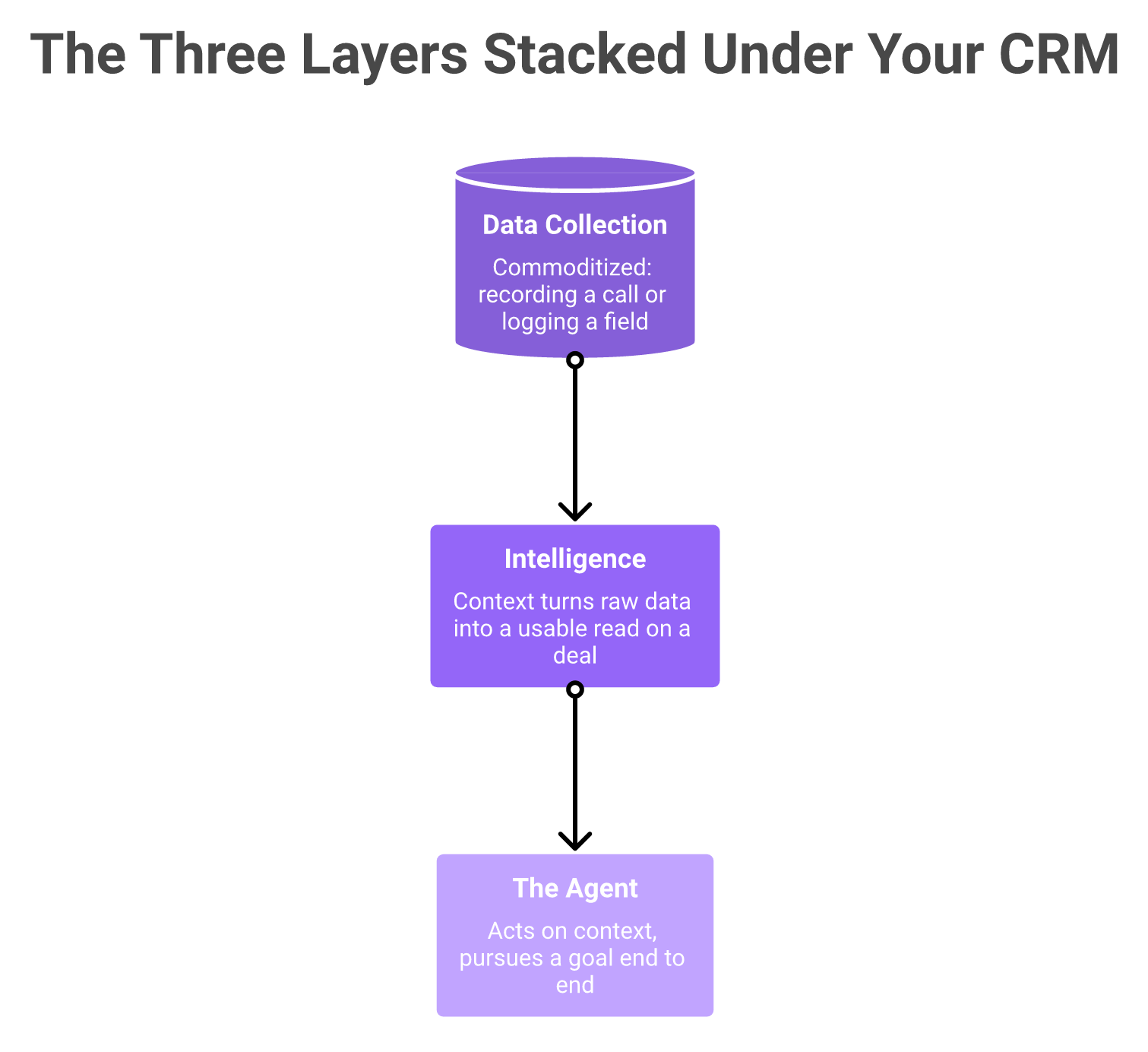
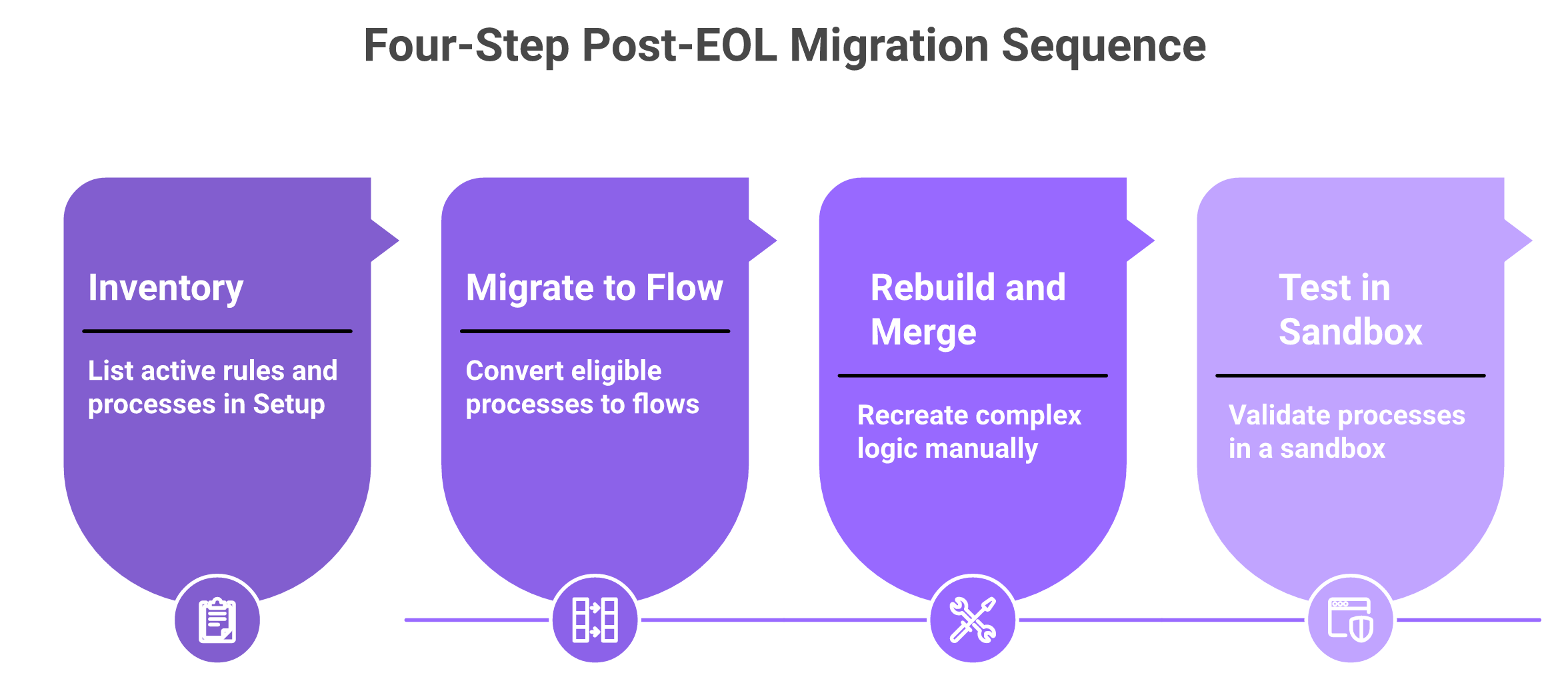
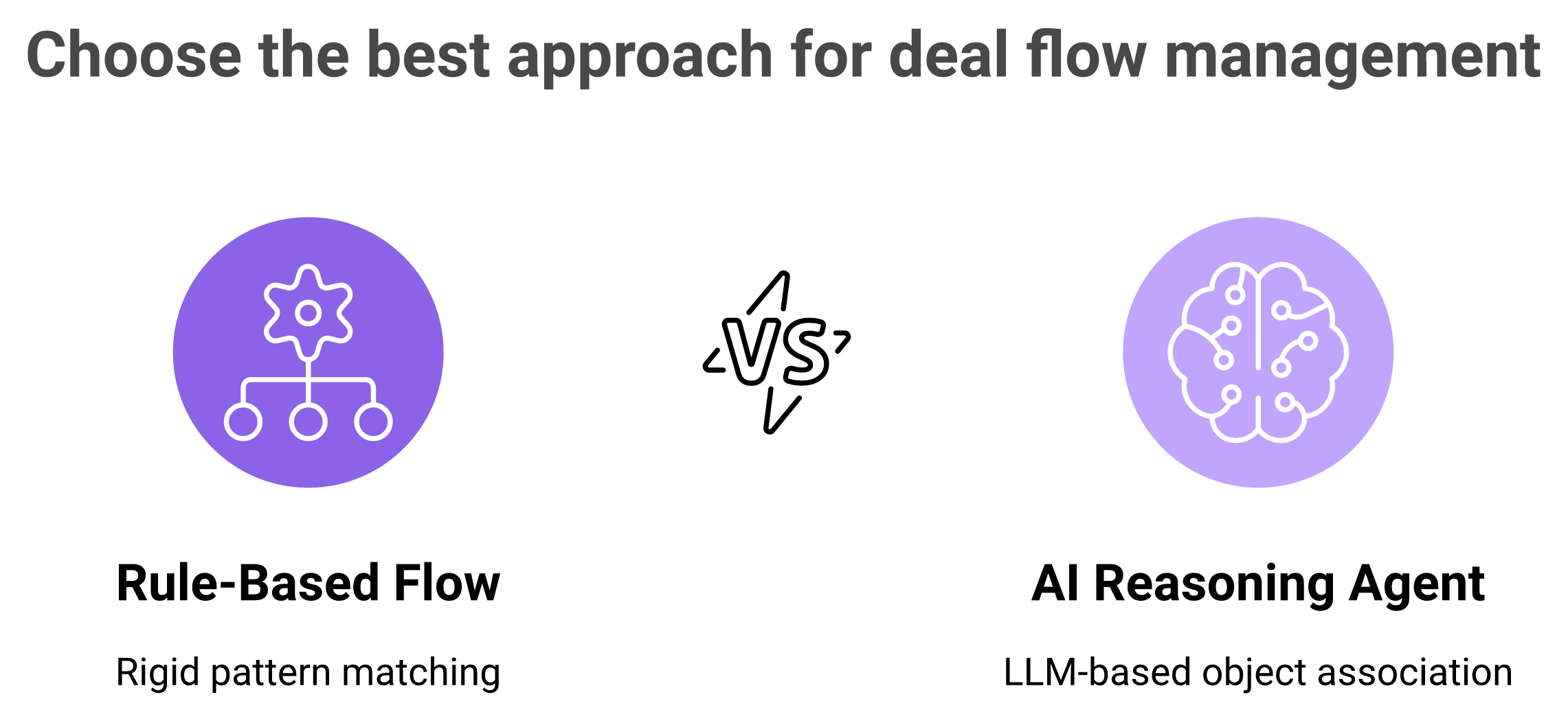
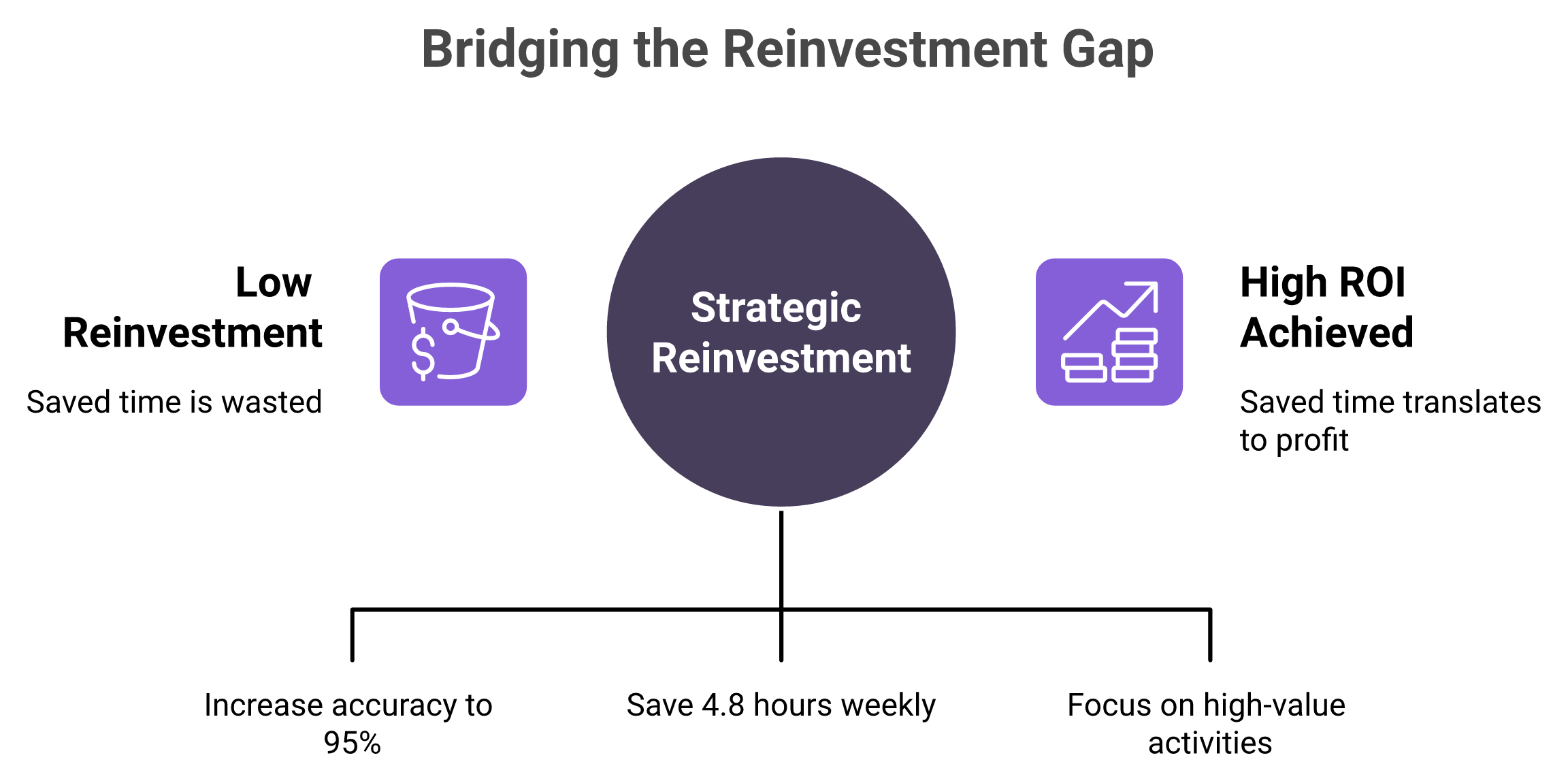

.png)

