10 Best Prospecting Automation Software in 2026: Data Enrichment, Multichannel Outreach, Sequences, and CRM Integration
Written by
Ishan Chhabra
Last Updated :
August 13, 2026
Skim in :
13
mins
In this article
Revenue teams love Oliv
Here’s why:
All your deal data unified (from 30+ tools and tabs).
Insights are delivered to you directly, no digging.
AI agents automate tasks for you.
Thank you! Your submission has been received!
Oops! Something went wrong while submitting the form.
Meet Oliv’s AI Agents
Hi! I’m, Deal Driver
I track deals, flag risks, send weekly pipeline updates and give sales managers full visibility into deal progress
Hi! I’m, CRM Manager
I maintain CRM hygiene by updating core, custom and qualification fields all without your team lifting a finger
Hi! I’m, Forecaster
I build accurate forecasts based on real deal movement and tell you which deals to pull in to hit your number
Hi! I’m, Coach
I believe performance fuels revenue. I spot skill gaps, score calls and build coaching plans to help every rep level up
Hi! I’m, Prospector
I dig into target accounts to surface the right contacts, tailor and time outreach so you always strike when it counts
Hi! I’m, Pipeline tracker
I call reps to get deal updates, and deliver a real-time, CRM-synced roll-up view of deal progress
Hi! I’m, Analyst
I answer complex pipeline questions, uncover deal patterns, and build reports that guide strategic decisions
TL;DR
The 10 best prospecting automation tools in 2026 are Oliv AI, Clay, Apollo.io, ZoomInfo, Cognism, Amplemarket, Lusha, Common Room, Reply.io, and Qualified.
Contact data is now commodity. Signal and context decide reply rates, and the richest context already sits inside your own calls, emails, and notes.
Scoring weights research automation at 30%, enrichment at 25%, CRM write-back at 20%, sequence handoff at 15%, and pricing transparency at 10%.
Clay leads outright on waterfall enrichment depth. Oliv AI runs no waterfall and does not compete on coverage, so re-weight the rubric if coverage is your real gap.
Gartner found AI saves sellers 4.8 hours a week, yet 72% of organisations never reinvest those hours in higher-value selling activity.
Since 2 August 2026, EU AI Act Article 50 requires prospects be told they are interacting with AI, making audit logs a procurement question.
Q1. What are the 10 best prospecting automation software tools in 2026? [toc=1. 10 Best Tools]
The 10 best prospecting automation software tools in 2026 are Oliv AI, Clay, Apollo.io, ZoomInfo, Cognism, Amplemarket, Lusha, Common Room, Reply.io, and Qualified. Oliv AI ranks first because its Prospector agent automates the account research that decides reply rates, working from first-party context. Clay leads on data enrichment depth, and Oliv AI runs no waterfall.
💰 "We already pay for enrichment. Why add another tool?"
Fair question, and it deserves a straight answer before any list. If your gap is coverage, meaning you genuinely cannot find the contacts, a context layer will not fix that. Buy a better sales intelligence platform instead.
For most teams, though, the records are already enriched. The bottleneck sits downstream, in the research a rep does before every call. Oliv AI's published buyer research puts that at over two hours per account, with a BDR reaching maybe 50 of 500 named accounts.
⚠️ Why data alone stopped being an edge
Mobile numbers and firmographics (company size, industry, funding) are commodity inputs now. Every competitor buys from the same providers at falling prices.
What is left is signal, meaning why now, and context, meaning what to say. Context is the part nobody can buy, because it already sits in your own calls, emails, and notes, which is the same argument behind AI sales agents that work on owned data.
Comparison of the 10 Best Prospecting Automation Platforms in 2026
#
Tool
Best for
Pricing model
Native CRM sync
Autonomy model
Rating
1
Oliv AI
Research automation from first-party context
Per seat, agents added one at a time
Salesforce, HubSpot, Dynamics, Pipedrive, Zoho
Rep sends email one, follow-ups automate
⭐⭐⭐⭐⭐
2
Clay
Waterfall enrichment depth
Two self-serve tiers plus dual credit meters
CRM auto-sync on Growth and above
Workflow-triggered, user configured
⭐⭐⭐⭐½
3
Apollo.io
Data plus sequencing in one seat
Per seat with credit limits
Salesforce, HubSpot
Sequence automation, rep approval optional
⭐⭐⭐⭐
4
ZoomInfo
Enterprise coverage and intent
Quote-based annual contract
Salesforce, HubSpot, Dynamics
Workflow rules and alerts
⭐⭐⭐⭐
5
Cognism
Phone-verified EMEA mobiles and compliance
Quote-based annual contract
Salesforce, HubSpot
Data delivery, no autonomous sending
⭐⭐⭐⭐
6
Amplemarket
Stage-scored AI prospecting workflows
Quote-based per seat
Salesforce, HubSpot
AI drafting with human review
⭐⭐⭐½
7
Lusha
Fast self-serve contact lookup
Freemium plus per seat
Salesforce, HubSpot
Manual, extension driven
⭐⭐⭐½
8
Common Room
Signal capture across communities
Quote-based per seat
Salesforce, HubSpot
Signal alerts, rep acts
⭐⭐⭐½
9
Reply.io
Multichannel sequence execution
Per seat with usage tiers
Salesforce, HubSpot, Pipedrive
Configurable AI SDR agents
⭐⭐⭐
10
Qualified
Inbound pipeline capture and routing
Quote-based annual contract
Salesforce-first
Autonomous chat with routing rules
⭐⭐⭐
Ratings apply the scoring rubric from the methodology section. Verify every price against the vendor's own page before you sign, because credit-metered plans move fast.
1.1 Oliv AI: research automation from context you already own [toc=1.1 Oliv AI]
Oliv AI's Content Curator and Meeting Assistant agents collaborate on pre-call research for BDRs and AEs, pulling competitive objection clips from past calls into tomorrow's prep brief automatically.
⭐ What it does
Oliv AI is an AI-native revenue intelligence and revenue orchestration platform for B2B revenue teams. Its Prospector agent handles the prospecting slice, and it runs on top of your CRM rather than replacing it.
The distinction Oliv AI draws is blunt and worth quoting. "Apollo and Clay give you third-party data. Prospector uses your first-party context, every call, email, and note your team has ever created, and runs the outbound motion on top of it."
🔑 Key features and how the workflow runs
Account research assembled from prior calls, emails, notes, and Slack threads, not purchased records.
Human-in-the-loop sending. The rep reviews and sends the first email, and the second and third follow-ups run automatically.
Expansion prospecting into existing accounts, not only net-new, which is where first-party context is deepest.
Named integrations across Salesforce, HubSpot, Dynamics, Pipedrive, Zoho, Slack, Telegram, LinkedIn, and Crunchbase.
CRM field accuracy reported at 95% or better, against roughly 60% for manual entry, which is the same standard applied across CRM data quality automation.
💸 Pricing and implementation
Oliv AI prices per agent rather than as a suite. Conversation Intelligence starts at $19 per seat per month, Engage at $39, and Forecast at $49, with a $0 platform fee and free view-only seats.
Setup is fast by category standards. Reviewers describe connecting CRM and call sources in one session, with onboarding handled by Oliv AI's own team, a pattern covered in more depth in this guide to integrating sales automation in the CRM.
📅 Product updates timeline
Oliv AI Product Update Timeline
Period
What shipped
Through 2025: conversation intelligence base
Call capture, transcripts, summaries, and CRM auto-fill built on the context graph infrastructure, an 18-month build solving entity resolution on messy CRMs. See Oliv integrations.
2026: agent marketplace and Prospector
Out-of-the-box agents including Prospector, with plain-English SOPs, per-agent tool control, and auto-run versus approval gating. See the Prospector agent page.
Expected next: broader orchestration
Agent-to-agent dispatch through the master orchestrator, plus spend governance with pre-deployment credit estimates. See Oliv pricing.
✅ Pros and ❌ cons
✅ Automates pre-call research, the two-hour task no data vendor removes.
✅ First email always reviewed by a rep, so output does not read as bulk AI.
✅ Covers expansion accounts, which most prospecting tools treat as a separate product.
✅ Low entry price and no platform fee, so budget stays free for agents.
❌ Not a data enrichment vendor. No waterfall, no coverage guarantee, so Clay wins that criterion outright.
❌ Context depth is thin on genuinely cold net-new accounts you have never touched.
❌ Reviewers report occasional slowness and glitches.
🗣️ Real user feedback
"I appreciate that Oliv.ai researches prospect accounts before every call and sends deal updates and talking points, which helps me prepare for meetings without sifting through tons of data and emails." — Verified User, Oliv AI G2 - Verified Review, 23 Jun 2026
"The only downside is that the platform can be a bit glitchy at times, but the support team is always quick to address and resolve any bugs." — Verified User, Oliv AI G2 - Verified Review, 2 Jul 2026
🎯 Best fit and anti-fit
Oliv AI fits mid-market B2B revenue teams whose records are already enriched and whose reps still research by hand. It is the wrong buy if your problem is that you cannot find contacts in the first place, and it sits alongside the wider set of AI sales tools rather than replacing your data vendor.
1.2 Clay: the enrichment waterfall benchmark [toc=1.2 Clay]
Clay's prospecting automation flow pulls conference attendee lists, CRM records, and inbound signups through enrichment tools, cleaning and formatting data before syncing updated records back into the CRM.
⭐ What it does
Clay is a spreadsheet-shaped GTM data platform. You build a table of accounts, then chain enrichment providers so that if the first misses an email, the next one tries.
That chain is the waterfall, and Clay is the reference point for it. Its own pricing page lists multi-provider waterfalls, Claygent AI research, and a native email sequencer even on the free tier.
🔑 Key features
Multi-provider waterfalls across a marketplace of data providers, so coverage compounds rather than depending on one vendor.
Claygent, an AI research agent that scrapes and answers custom questions per row.
Job change and buying-signal tracking, plus web intent signals on higher tiers.
CRM auto-sync and enrichment, HTTP API integrations, and webhook automation from the Growth plan upward.
Clay Sequencer for native email sending, which keeps simple motions inside one tool and feeds the copy principles behind sales emails that get responses.
💸 Pricing and the credit reality
Clay overhauled pricing in March 2026. The self-serve tiers are Free, Launch at $185 per month, and Growth at $495 per month, with custom Enterprise pricing.
Two meters now run in parallel. Data Credits cover enrichment lookups, and Actions cover platform activity including sends. Mid-cycle top-ups carry roughly a 30% premium over the plan rate, which is the kind of line item worth modelling before you reduce sales tech stack costs.
📅 Product updates timeline
Clay Product Update Timeline
Period
What changed
Through early 2026: legacy credit-only plans
Starter, Explorer, and Pro tiers ran on a single credit meter at roughly $0.07 to $0.08 per credit on entry tiers, with a 50% top-up premium.
March 2026: dual-meter repricing
Legacy tiers retired for new customers, replaced by Launch and Growth with Actions plus Data Credits, and roughly 50% cheaper data costs on 70-plus enrichments.
Mid-2026 onward: integration and model expansion
Ongoing shipping including a Webflow integration and new open-weight models for Claygent, dated July 2026.
✅ Pros and ❌ cons
✅ Deepest waterfall enrichment available, and the honest first pick on the data criterion.
✅ Claygent handles custom per-row research questions no static database answers.
✅ Free tier includes waterfalls and the sequencer, so you can test before paying.
✅ March 2026 repricing cut data costs on many enrichments.
❌ Steep learning curve. Reviewers say reliable workflows take weeks and usually need a dedicated owner.
❌ Credits burn during learning, because failed lookups still consume them.
❌ CRM auto-sync is gated to the Growth plan and above.
❌ Cost is unpredictable at scale, and 28% of negative G2 reviews cite the learning curve as the main frustration.
🎯 Best fit and anti-fit
Clay fits teams with a GTM engineer who owns the tables and can justify the credit spend. It is a poor fit for a small team with nobody to maintain it, because unused Clay is expensive Clay, and that same ownership question drives every build versus buy decision on revenue AI.
1.3 Apollo.io: data and sequencing in one seat [toc=1.3 Apollo.io]
Apollo's enrichment configuration stacks multiple data sources for waterfall coverage across 240M+ contacts, revealing verified emails and phone numbers directly inside a working prospect list.
⭐ What it does
Apollo.io bundles a contact database with a sequencer, so you can find a prospect and email them without leaving the tool. That bundling is the whole pitch, and it is why Apollo shows up on almost every prospecting shortlist.
Oliv AI's published framing puts Apollo on the data side of the line, alongside Clay, because it sells third-party records rather than research on your own accounts, a split explored further in this guide to AI sales automation.
🔑 Key features
Contact and company search with waterfall enrichment on paid tiers.
Unlimited sequences, A/Z testing, and automated workflows from the Professional plan.
A built-in dialer, with the international dialer reserved for the Organization tier.
Native Salesforce and HubSpot sync, plus Gmail and Chrome extensions.
AI lead scoring and buying-intent topics, gated by plan.
💰 Pricing and implementation
Apollo publishes four tiers. Free is $0, Basic is $49 per user per month annually, Professional is $79, and Organization is $119 with a three-seat minimum.
Credits are the real cost driver. Mobile reveals, exports, and intent all draw down separate pools, so a $49 seat rarely stays $49.
📅 Product updates timeline
Apollo.io Product Update Timeline
Period
What changed
Through 2025: database plus sequencer
Core contact search, sequences, and the Chrome extension established Apollo as the entry-level all-in-one.
2026: credit restructuring and AI layer
Four tiers with upfront annual credit grants, waterfall enrichment on Basic, AI lead scoring, and bring-your-own-LLM keys on Organization.
Expected next: deeper AI research and dialer expansion
Continued expansion of AI research, call recording minutes, and parallel dialing across tiers.
✅ Pros and ❌ cons
✅ Lowest barrier to entry in the category, with a usable free plan.
✅ One vendor covers finding, enriching, and sending.
✅ Waterfall enrichment now reaches the $49 tier.
❌ Credit pools make real spend hard to forecast.
❌ Data accuracy on mobiles is inconsistent outside North America.
❌ Organization tier requires three seats minimum.
🎯 Best fit
Apollo fits small teams that need one tool to do everything at a low starting price. It fits poorly when your ICP sits in EMEA and phone accuracy matters.
1.4 ZoomInfo: enterprise coverage with an enterprise contract [toc=1.4 ZoomInfo]
ZoomInfo's CRM enrichment view dedupes, normalizes, and updates Salesforce account records with verified phone numbers, emails, employee counts, and lead scores that power routing and outreach prioritization.
⭐ What it does
ZoomInfo is the enterprise default for B2B contact and company data. Copilot layers AI account research and signal summaries on top of that database.
Buyers choose it for coverage and for the compliance paperwork that large procurement teams demand. Nobody chooses it for flexibility.
🔑 Key features
Large contact and firmographic database with 300-plus advanced filters on higher tiers.
Copilot AI account summaries, research, and recommended actions.
WebSights website visitor identification and Bombora-style intent topics on Advanced.
ZoomInfo is quote-only and annual. Copilot Pro runs roughly $15,000 to $18,000 per year for one to three seats, and Copilot Advanced runs roughly $25,000 to $30,000.
Extra seats list at $2,000 to $5,000 per user per year, and adding a rep mid-contract often triggers a re-quote, which is exactly the pattern that pushes teams to reduce sales tech stack costs.
📅 Product updates timeline
ZoomInfo Product Update Timeline
Period
What changed
Through 2025: database and intent
Core data platform with intent topics, WebSights visitor tracking, and CRM enrichment as separately licensed modules.
2026: Copilot as the front door
Copilot repositioned as an AI sales agent doing real-time account analysis and research inside the seat.
Expected next: tier consolidation around Copilot
Pricing tiers now named around Copilot, with credit allocations rather than data volume driving the upgrade path.
✅ Pros and ❌ cons
✅ Broadest enterprise coverage and the safest procurement story.
✅ Intent and visitor data in the same contract.
✅ Copilot removes some manual account research inside the platform.
❌ Entry cost near $15,000 per year prices out most small teams.
❌ Seat minimums and mid-contract re-quotes reduce flexibility.
❌ SMB reviewers report outdated records despite the price.
🎯 Best fit
ZoomInfo suits enterprise teams with a procurement process and a real data budget. Skip it if you need month-to-month flexibility.
1.5 Cognism: compliance-first data for EMEA outbound [toc=1.5 Cognism]
⭐ What it does
Cognism sells verified B2B contact data with a compliance posture built for Europe. Its pricing page frames the product around three uses: prospecting, CRM enrichment, and data-as-a-service.
If your reps dial EMEA numbers, this is the vendor that usually wins bake-offs on phone-verified mobiles.
🔑 Key features
Phone-verified mobile numbers, checked against do-not-call lists across major EMEA markets.
CRM enrichment and data-as-a-service delivery, priced separately from prospecting seats.
Intent data and technographic filters as add-ons.
Salesforce and HubSpot integrations with scheduled record refresh, which supports ongoing CRM data quality automation.
💰 Pricing and implementation
Cognism does not publish per-seat numbers. Pricing is quoted around how the team uses data, with prospecting, enrichment, and DaaS as distinct packages.
Expect an annual contract and a platform component on top of seats. Ask for the credit or record cap in writing before signing.
📅 Product updates timeline
Cognism Product Update Timeline
Period
What changed
Through 2025: verified data provider
Positioned as a compliance-first database with phone-verified mobiles and DNC screening for EMEA outbound.
2026: use-case based packaging
Pricing restructured around three consumption modes, prospecting, CRM enrichment, and data-as-a-service.
Expected next: deeper signal layering
Continued expansion of intent and enrichment feeds alongside the core verified dataset.
✅ Pros and ❌ cons
✅ Strongest phone-verified coverage for EMEA territories.
✅ Compliance screening built in rather than bolted on.
✅ Enrichment sold separately, so you can buy data without seats.
❌ No public pricing, so budgeting needs a sales call.
❌ Data only. No research automation and no sending layer.
❌ North American coverage trails ZoomInfo.
🎯 Best fit
Cognism fits teams selling into Europe where dialing the wrong number carries legal risk. It is not a prospecting workflow tool.
1.6 Amplemarket: AI prospecting scored by workflow stage [toc=1.6 Amplemarket]
⭐ What it does
Amplemarket combines a data layer with AI-assisted outbound execution. Its own published research scores prospecting tools across five workflow stages: discovery, research, signal, execution, and automation.
That framework is the most useful thing on the competitive SERP, and it is worth borrowing even if you never buy the product.
🔑 Key features
Contact data and enrichment bundled with sequence execution.
Buying signals including job changes and hiring activity.
Salesforce and HubSpot sync with duplicate handling.
Deliverability tooling including mailbox warm-up.
💰 Pricing and implementation
Amplemarket quotes per seat rather than publishing a full ladder. Expect an annual commitment with credit allocations for data and AI actions.
Implementation is lighter than ZoomInfo but heavier than Apollo. Budget a few weeks to tune signals and sequences before judging results.
📅 Product updates timeline
Amplemarket Product Update Timeline
Period
What changed
Through 2025: data plus outbound execution
Combined contact sourcing, enrichment, and multichannel sequencing in one seat with AI copy assistance.
2026: stage-scored AI prospecting
Published a five-stage evaluation model covering discovery, research, signal, execution, and automation.
Expected next: signal-triggered automation depth
Continued investment in signal detection feeding automated workflow triggers.
✅ Pros and ❌ cons
✅ Clear methodology for evaluating where a tool actually helps.
✅ Signals and execution live in the same product.
✅ AI drafting keeps a human in the send loop.
❌ No published pricing ladder, so comparison takes a call.
❌ Smaller database than ZoomInfo or Apollo.
❌ Overlaps heavily with tools you may already own.
🎯 Best fit
Amplemarket suits mid-market teams that want signals and sending in one contract. Skip it if you already run a sequencer you like.
1.7 Lusha: fast self-serve contact lookup [toc=1.7 Lusha]
⭐ What it does
Lusha is the Chrome extension a rep opens on a LinkedIn profile to reveal an email or phone number. It is deliberately simple, and that simplicity is the product.
It is a data tool, not a prospecting engine. Nothing here researches an account or writes an email.
🔑 Key features
Chrome extension reveals on LinkedIn and company sites.
Bulk enrichment, capped by batch size on lower tiers.
Job change alerts and buyer intent signals on paid plans.
Salesforce and HubSpot integrations.
💰 Pricing and the credit math
Lusha runs a credit-volume slider. Free is $0 with 40 credits a month, Starter is $37.45 per user per month annually with 4,800 credits a year, and Pro is $52.45 with 7,200 credits and two seats.
Watch the reveal costs. An email reveal is 1 credit, and a phone reveal is 5 to 10 credits depending on the published schedule you check.
📅 Product updates timeline
Lusha Product Update Timeline
Period
What changed
Through 2025: extension-first reveals
Simple per-reveal credit model with a free tier, aimed at individual reps rather than teams.
2026: five-tier slider pricing
Restructured into Free, Starter, Pro, Premium, and Scale with annual credit grants and seat bundles. See Lusha pricing on G2.
Expected next: signal and enrichment expansion
Continued build-out of job change alerts, intent topics, and bulk enrichment limits.
✅ Pros and ❌ cons
✅ Cheapest genuine entry point in the list.
✅ Reps adopt it without training.
✅ Annual credits granted upfront on paid tiers.
❌ Phone reveals burn credits fast.
❌ Bulk enrichment capped per batch on lower tiers.
❌ No research automation, signals depth, or sequencing.
🎯 Best fit
Lusha fits solo sellers and small teams doing manual, targeted lookups. It cannot carry a 500-account territory, which is where AI agents for sales teams start to matter.
1.8 Common Room: signals from places your CRM cannot see [toc=1.8 Common Room]
⭐ What it does
Common Room captures buying signals from communities, social platforms, website visits, and product usage. It then matches those signals to people and accounts.
This is the closest thing on the list to a why-now engine. It answers timing rather than coverage.
🔑 Key features
Person and account matching across community, social, and web sources.
RoomieAI research credits for automated account research.
Prospector credits for contact sourcing.
Website IP enrichment, listed at 240,000 per year on the entry plan.
Bombora intent topics, five included on Essential, which feed the kind of AI deal intelligence teams act on.
💸 Pricing and implementation
Common Room publishes an entry tier and quotes the rest. Reported Essential pricing sits between $1,700 and $2,500 per month billed annually, depending on when the page was captured.
Essential includes five seats and up to 100,000 contacts. Advanced and Enterprise move to custom quotes with 15 and 30 seats.
📅 Product updates timeline
Common Room Product Update Timeline
Period
What changed
Through 2025: community signal capture
Focused on capturing and unifying signals from communities, social, and product usage into person and account records.
2026: credit-metered AI research
Packaging now meters RoomieAI research credits and Prospector sourcing credits separately per tier.
Expected next: broader intent and enrichment quotas
Higher contact ceilings and enrichment volumes reserved for Advanced and Enterprise tiers.
✅ Pros and ❌ cons
✅ Best signal coverage outside traditional intent vendors.
✅ AI research credits included rather than sold separately.
✅ Strong fit for product-led and community-led motions.
❌ Entry price above $20,000 a year rules out small teams.
❌ Published pricing has shifted, so verify the current page.
❌ Signals still need someone to act on them.
🎯 Best fit
Common Room fits PLG and community-heavy companies with real signal volume. It is overkill for a pure cold-outbound motion.
1.9 Reply.io: sequence execution with an optional AI agent [toc=1.9 Reply.io]
⭐ What it does
Reply.io is a multichannel sequencer with a separately sold AI SDR called Jason. The sequencer handles email, LinkedIn, calls, and SMS in one cadence.
It sits downstream of prospecting. You feed it a list, and it runs the touches.
🔑 Key features
Multichannel sequences with branching and conditional logic.
Mailbox warm-up and an anti-spam suite for deliverability.
Jason AI SDR for autonomous outreach, priced by active contacts.
Salesforce, HubSpot, and Pipedrive integrations, so the enriched record lands where your sales process automation already runs.
💰 Pricing and implementation
Reply.io publishes per-seat tiers plus a separate AI product. Email plans start near $49 to $59 per user per month, and multichannel runs $89 to $99.
Jason AI SDR is not per seat. It starts around $500 per month for 1,000 active contacts and climbs to $3,000 at 10,000 contacts.
📅 Product updates timeline
Reply.io Product Update Timeline
Period
What changed
Through 2025: per-seat multichannel sequencer
Email, LinkedIn, calls, and SMS cadences sold per user, with channel add-ons billed separately.
2026: AI SDR priced on active contacts
Jason AI SDR split out as a contact-metered product from roughly $500 per month rather than a seat upgrade.
Expected next: agent tiering by volume
Growth and enterprise AI SDR tiers scaling with active contact ceilings.
✅ Pros and ❌ cons
✅ Genuine multichannel execution at a mid-market price.
✅ Deliverability tooling included rather than sold as an add-on.
✅ AI agent can be tested without moving the whole team.
❌ LinkedIn and calling add-ons push real per-user cost higher.
❌ Contact-metered AI pricing gets expensive fast.
❌ It executes sequences. It does not research accounts.
🎯 Best fit
Reply.io fits teams whose gap is execution, not research. Pair it with a data layer, not instead of one.
1.10 Qualified: inbound capture with Piper the AI SDR [toc=1.10 Qualified]
⭐ What it does
Qualified works the inbound side of prospecting. Piper, its AI SDR, engages website visitors, qualifies them, and routes meetings into Salesforce.
It belongs on this list because inbound is where your highest-intent prospects already are. Ignoring them while automating cold outbound is a common mistake.
🔑 Key features
Website visitor identification and real-time conversation.
Piper AI SDR handling qualification and meeting booking.
Salesforce-native architecture and routing rules, comparable to the patterns in this Salesforce automation breakdown.
Campaign and content personalization for known accounts.
💸 Pricing and implementation
Qualified is quote-only and enterprise-priced. Premier lists near $68,000 a year for 25 users, with negotiated deals commonly landing between $40,000 and $50,000.
Enterprise adds roughly $27,500 a year on top. Budget for the required Salesforce stack as well, because the product assumes it.
📅 Product updates timeline
Qualified Product Update Timeline
Period
What changed
Through 2025: conversational inbound platform
Live chat, visitor identification, and Salesforce-native routing formed the core product.
2026: Piper priced as the headline AI SDR
Tiering restructured around Piper across Premier, Enterprise, and Ultimate, with add-ons billed separately.
Expected next: wider agent autonomy on inbound
Continued expansion of autonomous qualification and routing depth within the Salesforce stack.
✅ Pros and ❌ cons
✅ Converts existing traffic, so no cold data required.
✅ Salesforce-native routing removes handoff lag.
✅ Piper works nights and weekends without a rota.
❌ Costs more than most teams' entire outbound stack.
Qualified fits enterprise Salesforce teams with real inbound volume. It solves a different problem from the other nine tools here.
Oliv AI sits at the top of this list for one reason worth restating plainly: nine of these tools automate finding and enriching the record, which has become commodity work. Prospector automates the research and context that decide whether the outreach earns a reply, and it draws that from calls, emails, and notes the revenue team already owns, the approach detailed across Oliv AI agents for sales teams.
Q2. How were these prospecting automation tools scored and ranked? [toc=2. Scoring Methodology]
Five weighted criteria: research automation depth 30%, data enrichment and coverage 25%, CRM integration and write-back quality 20%, sequence and multichannel handoff 15%, and pricing transparency 10%. Scores of 0 to 20 earn one star, 21 to 40 two, and so on to five. Oliv AI scores five stars overall; Clay scores highest on the enrichment criterion alone.
⭐ Why research automation carries the heaviest weight
Database size used to be the deciding criterion. It is not anymore, because mobile numbers and firmographics (company size, industry, and funding stage) now come from the same handful of providers at falling prices.
What still separates tools is how much of the manual research they remove. Oliv AI's published buyer research puts that research burden at over two hours per account before a single call. That is the hour nobody has automated, so it gets 30%.
📊 The rubric, criterion by criterion
Prospecting Automation Scoring Rubric and Weights
Criterion
Weight
What earns points
Disqualifying failure
Research automation depth
30%
Assembles account history, buying committee, and why-now triggers without a rep digging
Outputs a record, not an insight
Data enrichment and coverage
25%
Multi-provider waterfall, verified mobiles, and published match rates
Single provider with no fallback
CRM integration and write-back
20%
Bidirectional sync, entity matching beyond domain, and no duplicate creation
One-way push that overwrites rep edits
Sequence and multichannel handoff
15%
Clean handoff to sending with deliverability guardrails intact
Enriched record dead-ends in an export
Pricing transparency
10%
Published tiers and credit costs on the vendor's own page
Quote-only with no public anchor
🌟 How stars map to scores
The bands are simple. A weighted score of 0 to 20 earns one star, 21 to 40 earns two, 41 to 60 earns three, 61 to 80 earns four, and 81 to 100 earns five.
Oliv AI scores five stars on research automation and CRM write-back, where it reports 95% or better field accuracy against roughly 60% for manual entry. It scores nothing on enrichment, because it runs no waterfall and sells no coverage, a distinction that also shapes any CRM data quality automation programme.
⚠️ Where the pricing criterion punished good products
Ten percent for pricing transparency sounds small. It changed three placements anyway.
Vendors that publish real numbers, like Clay at $185 per month on Launch and Apollo at $49 per seat, are easier to budget against. Quote-only vendors like ZoomInfo, starting near $15,000 a year, force a sales call before you can even model cost, which is why teams end up trying to reduce sales tech stack costs after the fact.
🔁 Re-run this rubric with your own weights
Here is the honest caveat, and it matters more than the ranking. If your actual gap is coverage, meaning your reps cannot find the contacts at all, a context layer will not fix that.
In that case, move the 25% enrichment weight to 40% and drop research automation to 20%. Clay and Cognism climb, and Oliv AI does not stay first. That is the correct answer for that team, and pretending otherwise would waste your budget.
I have watched teams buy a research layer to solve a coverage problem. It never works, and the renewal conversation is painful.
Oliv AI is deliberately scored as a context layer, not a data vendor. It runs on top of Salesforce, HubSpot, Dynamics, Pipedrive, and Zoho rather than replacing them, and it competes on research automation and write-back quality only, in the pattern set out across Oliv AI agents for sales teams.
Q3. Do you need a data enrichment tool, a prospecting automation platform, or both? [toc=3. Data Layer Decision]
An enrichment tool fills fields; a prospecting automation platform decides which accounts deserve the next hour and assembles the context that earns a reply. Enrichment answers who to contact, and automation answers what to say. A waterfall pays off only when your ICP sits outside one provider's strong segment or mobile coverage falls below roughly 40%.
🔍 The two layers, worked through one account
Take a single target account. The data layer returns the VP of Revenue Operations, a verified mobile, headcount, and funding stage.
The context layer answers different questions. What did we discuss with this account eighteen months ago? Who else touched it? What objection killed it last time? Oliv AI assembles that from calls, emails, and notes the revenue team already created, which is why its published framing calls Apollo and Clay a different category.
💰 Is a waterfall worth paying for?
A waterfall chains enrichment providers, so if the first misses an email, the second tries. Clay is the reference implementation, with waterfalls available even on its free tier.
It earns its cost in two situations. Your ICP sits outside one provider's strong geography or segment, or your mobile coverage is low enough that reps cannot dial.
🧪 The 500-account test to run before you sign
Do not buy a second provider on a demo. Pull your top 500 real target accounts and run them through both vendors' trials.
Then measure three things: match rate on emails, match rate on direct dials, and how many records came back stale. If provider two adds less than 15 points of coverage, you are re-buying records you already own.
⚠️ The precondition nobody sells you
Enrichment landing on inaccurate records scales the mess rather than fixing it. Validity's 2025 State of CRM Data Management survey of 602 CRM users found 76% report under half their CRM data is accurate, costing roughly 16 deals a quarter, with 45% saying the data is not AI-ready.
So audit first. Assign field-level ownership, meaning one named person accountable for each field, before you turn on automated writes, a discipline covered in this guide to CRM data strategy and revenue predictability.
For the vendor-by-vendor verdict on data providers themselves, Oliv AI's sales intelligence platform comparison covers that ground properly. This article treats enrichment as a buying criterion, not a category to re-review.
🗣️ What operators report
"The Analyst agent allows me to understand everything I need with just one click, eliminating the long wait time I used to have with RevOps to get answers." — Verified User, Oliv AI G2 - Verified Review, 17 Jun 2026
"I'd love to see few more options to customize dashboards and reports for different teams." — Verified User, Oliv AI G2 - Verified Review, 26 Jun 2026
🎯 So which do you buy?
Most teams need both, layered. Buy the data vendor that covers your ICP, then decide separately whether the research bottleneck justifies a context layer on top.
Oliv AI has nothing to sell on the enrichment criterion, so the honest recommendation here points elsewhere: Apollo and Clay supply third-party data, and the Prospector agent works the context layer above it, alongside the wider set of AI sales agents a revenue team runs.
Q4. How do you cut two hours of account research per rep, and what do you do with the hours you save? [toc=4. Research Automation Payoff]
Automate the four artefacts a rep rebuilds by hand: account history across calls, emails, and notes; the buying committee and prior objections; the competitive and segment picture; and the why-now trigger. Signal-triggered outreach replies at 5 to 18% against 1 to 3% for generic sends, so the trigger matters more than sequence length. Then plan where the reclaimed hours go.
⏰ The pain, in the operator's own words
Oliv AI's buyer research captures the problem more bluntly than any vendor page: "Your BDR has 500 named accounts. They get to maybe 50. The other 450 sit in the CRM."
The reason is not laziness. It is that research gets redone from scratch every time, because nobody can see what the company already knows about the account.
🧱 The four artefacts worth automating
Account history. Every prior call, email, and note, already in your CRM and inbox.
Buying committee and objections. Who was in the room, and what stopped the deal.
Competitive and segment picture. What the last five similar accounts said.
Why-now trigger. Funding, hiring, tech change, or a job move.
Each of these already exists in a system you pay for. The work is assembly, not discovery, which is the premise behind every AI meeting preparation tool worth running.
📈 Signals beat longer sequences
Volume stopped working. Instantly's 2026 benchmark report, drawn from billions of emails, puts the average reply rate at 3.43%, with 58% of all replies landing on the first email.
So adding touches five through nine is not the lever. Rewrite email one around a real trigger instead, and keep it under 80 words, using the principles in this guide to sales emails that get responses.
💸 The reinvestment gap nobody plans for
Here is the finding that should change how you buy. Gartner's May 2026 survey of 210 chief sales officers found AI saves sellers 4.8 hours a week, yet 72% of organisations fail to reinvest that time in high-value work.
Teams that do reinvest are 3.1 times more likely to exceed lead-to-opportunity goals. So write down which activity absorbs the hours before you expand a licence. Calendar-blocked call time counts. Vague intentions do not.
📉 What the numbers look like when it works
Oliv AI's published Swanky outcome puts account research at 15 minutes, down from two hours, with CRM entries populating in real time. Its Turing case reports admin work cut by 95% and six to eight more customer calls weekly.
I read those numbers as directionally right rather than universal. Both are our own measurements, and your mileage depends heavily on how much history sits in your systems already.
🗣️ What reps say about the time saved
"The Revenue Harness and Context Graph are standouts, giving me detailed briefs before every call and saving me over 10 hours a week on admin tasks." — Verified User, Oliv AI G2 - Verified Review, 2 Jul 2026
"The only downside I've noticed is that the mobile app is a bit basic compared to the desktop platform." — Verified User, Oliv AI G2 - Verified Review, 8 Jul 2026
⚠️ The honest limit on cold accounts
Context depth scales with how much your team has already touched an account. On genuinely cold net-new logos, there is no first-party history to draw on.
That means the strongest case is expansion and warm territory, and cold outbound still leans on your data vendor. Saying that plainly is more useful than pretending the agent knows things it cannot know.
Oliv AI reports the sharpest gains where context is richest, which is existing accounts. The Prospector agent covers expansion as well as net-new, and the rep still reviews and sends the first email while follow-ups two and three run automatically, the same review-then-send pattern used across agentic sales automation.
Q5. Where does the enriched record go, and how do you stop it creating duplicates? [toc=5. CRM Sync and Handoff]
Duplicates come from weak entity resolution, because rule-based matching cannot tell which of five open opportunities an activity belongs to. Check three things: match logic beyond domain and email, field-level ownership rules, and whether write-back is bidirectional or a one-way push that overwrites rep edits. Then confirm the record lands in a sequence with warm-up and bounce guardrails intact.
🔧 Why duplicates appear in the first place
Most sync engines match on domain or email address. That works on a clean CRM, and almost nobody has one.
Oliv AI's founder describes the real condition plainly: customers arrive with five open opportunities and three account records for the same company, and something has to decide which one a new activity belongs to. Rule-based matching guesses. Guessing creates the duplicate.
💸 What a duplicate actually costs
A duplicate is not a tidiness problem. It splits activity history, so your research layer sees half the story.
It also breaks reporting. Two records mean two forecasts, two owners, and one very awkward pipeline review on Friday, which is where CRM data quality automation stops being a nice-to-have.
✅ The three questions to put to every vendor
What does your match logic use beyond domain and email? Ask specifically about opportunity-level mapping, not just account-level.
Who owns each field after sync? You want field-level ownership, meaning one named source of truth per field, so the tool never silently overwrites a rep's note.
Is write-back bidirectional or one-way? A one-way push that overwrites rep edits will destroy trust in week two.
Ask for the answers in writing. Vendors answer differently on a call than in a contract.
📊 What good write-back looks like
CRM Write-Back Quality Checklist
Check
Weak implementation
What to require
Entity matching
Domain and email only
Opportunity-level mapping on messy records
Field ownership
Tool wins every conflict
Per-field rules, rep edits protected
Sync direction
One-way push
Bidirectional with change history
Audit
No log
Exportable record of every field change
Oliv AI reports 95% or better CRM field accuracy against roughly 60% for manual entry, and connects to Salesforce, HubSpot, Dynamics, Pipedrive, and Zoho as connected systems rather than replacements, following the approach set out in this guide to integrating sales automation in the CRM.
🗣️ What operators say about write-back
"The CRM writeback is not good; we cannot send MEDDIC values back to Salesforce or update fields in Salesforce from the conversation intelligence." — Verified User, Clari G2 - Verified Review, 13 Jul 2026
"limitations of getting data back into salesforce" — Verified User, Gong G2 - Verified Review, 21 May 2026
"I appreciate that it integrates well with platforms like HubSpot and Salesforce, allowing us to capture insights from calls and maintain a complete view of customer interactions." — Verified User, Oliv AI G2 - Verified Review, 23 Jun 2026
⚠️ The handoff nobody checks until it breaks
A perfectly enriched record still fails if the inbox never sees it. Three guardrails decide that outcome.
Keep hard bounce rate under 2%, warm up new sending domains before volume, and rotate senders so no single mailbox carries the load. Sequencing depth belongs to a different buying decision, so treat these as hygiene, not features.
Oliv AI writes enriched context back into the CRM as the work happens, which is why its Swanky deployment reports CRM entries populating in real time rather than in a weekly cleanup sprint, the same pattern described across RevOps automation deployments.
Q6. How much autonomy should a prospecting agent have, and what does compliance now require? [toc=6. Autonomy and Compliance]
The pattern that survived is human-in-the-loop on first touch: a rep reviews and sends email one, and follow-ups run automatically. Since 2 August 2026, EU AI Act Article 50 requires that prospects be told when they are interacting with an AI system, with machine-readable marking of generated content from 2 December 2026. Ask every vendor for a 30-day AI action log export.
🔄 The autonomy correction of 2025
Fully autonomous AI SDRs were sold hard, and most deployments quietly rolled back. Reviewers described the output as generic and recognizably AI-generated, and reply rates did not justify the reputational cost.
Oliv AI's Prospector reflects that correction in its design: the rep always reviews and sends the first email, while the second and third follow-ups run automatically. I hold that as a considered default rather than a permanent truth, and it could shift as models improve.
❌ What over-automation looks like in the wild
"One-off Scheduled emails are not paused when someone replies." — Verified User, Salesloft G2 - Verified Review, 24 Sep 2025
That is the failure mode in one line. An automation that keeps sending after a human replies is worse than no automation.
✅ The approval-gate questions for your eval doc
Where exactly is the approval gate, and can it be moved per sequence?
Can a rep override or kill a run mid-flight?
Does a reply pause every remaining touch, across channels?
Who is named as the sender, and is that disclosed?
Ask Oliv AI, or any vendor, to demo the gate live rather than describe it. Approval settings look different in a slide than in production, a point covered further in this review of AI CRM trust and governance risk.
⚖️ What changed on 2 August 2026
The transparency chapter of the EU AI Act started to apply on 2 August 2026. Article 50 requires that people be informed when they interact with an AI system, unless it is obvious to a reasonably observant person.
From 2 December 2026, AI-generated content must also carry machine-readable marking. This is not legal advice, and your counsel should read the text. It is a procurement question you can no longer skip.
📋 The compliance checklist for vendor selection
A documented legitimate interest assessment for B2B outreach under GDPR.
Article 30 records of processing activities, maintained and available.
Instant opt-out suppression across every channel, not just email.
An Article 50 disclosure design you can actually see in the sent message.
🧾 What an exportable audit trail should contain
Ask for a 30-day export before you sign, not after an incident. It should show every action an agent took, the timestamp, the data it accessed, the human who approved it, and the version of the instruction it followed.
Oliv AI exposes per-agent run tracking, approval gating, and per-agent tool control, so an automated action can be traced back to the SOP that produced it, which is the operating model behind agentic sales automation.
🗣️ What review-then-send looks like to a rep
"It prepares reply emails to be reviewed and sent right after calls." — Verified User, Oliv AI G2 - Verified Review, 15 Jun 2026
Oliv AI treats autonomy as a configuration with regulatory and reputational cost attached, not a premium tier. That is why the first touch stays human by default.
Q7. What should prospecting automation cost in 2026, and when should you build instead? [toc=7. Cost and Build vs Buy]
Expect three line items: a data seat, a credit pool for enrichment or AI runs, and a platform fee. Data-plus-sequencing platforms cluster around $50 to $100 per seat, and credits vary most, so model burn before signing. Oliv AI charges a $0 platform fee and includes free view-only seats, with agents added one at a time.
💰 The three line items nobody quotes together
Vendors quote the seat. The seat is rarely the biggest number.
Credits cover enrichment lookups and AI runs, and they scale with usage rather than headcount. Platform fees sit on top and are often annual, non-negotiable, and invisible until the order form arrives.
📊 Published price bands, traced to source
Published Prospecting Automation Price Bands in 2026
Tool
Published entry price
Metering model
Oliv AI
$19 per seat monthly for CI, $39 Engage, $49 Forecast, $0 platform fee
Per agent, added individually
Apollo.io
$49 per user monthly, annual billing
Seats plus credit pools
Clay
$185 per month, Launch plan
Data Credits plus Actions
Common Room
Around $2,100 to $2,500 monthly, five seats
Seats plus research credits
Reply.io AI SDR
From about $500 monthly
Active contacts, not seats
ZoomInfo
Roughly $15,000 to $18,000 yearly
Quote-only, seats plus credits
Where a figure comes from Oliv AI's own published comparison, I have said so rather than dressing it up as neutral research.
💸 The hidden costs that break budgets
Platform fees. Incumbents commonly charge $2,000 to $5,000 a year before a single seat.
Billed view-only seats. Managers who only read reports still cost money at most vendors.
Credit overage. Mid-cycle top-ups carry roughly a 30% premium at Clay.
Seat minimums. Apollo's Organization tier requires three seats.
"I cannot download all the data myself unless we upgrade the plan, which isn't ideal and results in me not fully utilizing Gong." — Verified User, Gong G2 - Verified Review, 3 Oct 2025
"It's more affordable compared to other options we previously used." — Verified User, Oliv AI G2 - Verified Review, 23 Jun 2026
🛠️ When building it yourself is the right call
Build while the work is personal. One rep, one territory, workflows that change every week: a general-purpose AI assistant plus a spreadsheet beats any purchase.
Oliv AI's published position draws the line at dependence: start with Claude, and buy once the team relies on it and needs complete context, consistent outputs, and measurable ROI, the same threshold examined in this build versus buy analysis for revenue AI.
⚠️ What breaks when a team depends on your build
Three things fail at once. Outputs drift, because nobody versioned the prompt. Costs swing, because token spend has no ceiling. Nobody notices when a run fails silently at 2am on a Tuesday.
Add governance and observability to a homemade stack and you have rebuilt the product, badly. That is usually the moment the buy decision makes itself.
🔭 Where I think this goes next
My read is that seat pricing for prospecting collapses within two years, and the money moves to runs and outcomes. Data becomes a utility, and the premium sits on context nobody else can copy, a shift traced in this view of the future of revenue intelligence.
The purchase is no longer about knowing who to contact. It is about knowing what to say, and whether your own systems can tell you.
Q1. What are the 10 best prospecting automation software tools in 2026? [toc=1. 10 Best Tools]
The 10 best prospecting automation software tools in 2026 are Oliv AI, Clay, Apollo.io, ZoomInfo, Cognism, Amplemarket, Lusha, Common Room, Reply.io, and Qualified. Oliv AI ranks first because its Prospector agent automates the account research that decides reply rates, working from first-party context. Clay leads on data enrichment depth, and Oliv AI runs no waterfall.
💰 "We already pay for enrichment. Why add another tool?"
Fair question, and it deserves a straight answer before any list. If your gap is coverage, meaning you genuinely cannot find the contacts, a context layer will not fix that. Buy a better sales intelligence platform instead.
For most teams, though, the records are already enriched. The bottleneck sits downstream, in the research a rep does before every call. Oliv AI's published buyer research puts that at over two hours per account, with a BDR reaching maybe 50 of 500 named accounts.
⚠️ Why data alone stopped being an edge
Mobile numbers and firmographics (company size, industry, funding) are commodity inputs now. Every competitor buys from the same providers at falling prices.
What is left is signal, meaning why now, and context, meaning what to say. Context is the part nobody can buy, because it already sits in your own calls, emails, and notes, which is the same argument behind AI sales agents that work on owned data.
Comparison of the 10 Best Prospecting Automation Platforms in 2026
#
Tool
Best for
Pricing model
Native CRM sync
Autonomy model
Rating
1
Oliv AI
Research automation from first-party context
Per seat, agents added one at a time
Salesforce, HubSpot, Dynamics, Pipedrive, Zoho
Rep sends email one, follow-ups automate
⭐⭐⭐⭐⭐
2
Clay
Waterfall enrichment depth
Two self-serve tiers plus dual credit meters
CRM auto-sync on Growth and above
Workflow-triggered, user configured
⭐⭐⭐⭐½
3
Apollo.io
Data plus sequencing in one seat
Per seat with credit limits
Salesforce, HubSpot
Sequence automation, rep approval optional
⭐⭐⭐⭐
4
ZoomInfo
Enterprise coverage and intent
Quote-based annual contract
Salesforce, HubSpot, Dynamics
Workflow rules and alerts
⭐⭐⭐⭐
5
Cognism
Phone-verified EMEA mobiles and compliance
Quote-based annual contract
Salesforce, HubSpot
Data delivery, no autonomous sending
⭐⭐⭐⭐
6
Amplemarket
Stage-scored AI prospecting workflows
Quote-based per seat
Salesforce, HubSpot
AI drafting with human review
⭐⭐⭐½
7
Lusha
Fast self-serve contact lookup
Freemium plus per seat
Salesforce, HubSpot
Manual, extension driven
⭐⭐⭐½
8
Common Room
Signal capture across communities
Quote-based per seat
Salesforce, HubSpot
Signal alerts, rep acts
⭐⭐⭐½
9
Reply.io
Multichannel sequence execution
Per seat with usage tiers
Salesforce, HubSpot, Pipedrive
Configurable AI SDR agents
⭐⭐⭐
10
Qualified
Inbound pipeline capture and routing
Quote-based annual contract
Salesforce-first
Autonomous chat with routing rules
⭐⭐⭐
Ratings apply the scoring rubric from the methodology section. Verify every price against the vendor's own page before you sign, because credit-metered plans move fast.
1.1 Oliv AI: research automation from context you already own [toc=1.1 Oliv AI]
Oliv AI's Content Curator and Meeting Assistant agents collaborate on pre-call research for BDRs and AEs, pulling competitive objection clips from past calls into tomorrow's prep brief automatically.
⭐ What it does
Oliv AI is an AI-native revenue intelligence and revenue orchestration platform for B2B revenue teams. Its Prospector agent handles the prospecting slice, and it runs on top of your CRM rather than replacing it.
The distinction Oliv AI draws is blunt and worth quoting. "Apollo and Clay give you third-party data. Prospector uses your first-party context, every call, email, and note your team has ever created, and runs the outbound motion on top of it."
🔑 Key features and how the workflow runs
Account research assembled from prior calls, emails, notes, and Slack threads, not purchased records.
Human-in-the-loop sending. The rep reviews and sends the first email, and the second and third follow-ups run automatically.
Expansion prospecting into existing accounts, not only net-new, which is where first-party context is deepest.
Named integrations across Salesforce, HubSpot, Dynamics, Pipedrive, Zoho, Slack, Telegram, LinkedIn, and Crunchbase.
CRM field accuracy reported at 95% or better, against roughly 60% for manual entry, which is the same standard applied across CRM data quality automation.
💸 Pricing and implementation
Oliv AI prices per agent rather than as a suite. Conversation Intelligence starts at $19 per seat per month, Engage at $39, and Forecast at $49, with a $0 platform fee and free view-only seats.
Setup is fast by category standards. Reviewers describe connecting CRM and call sources in one session, with onboarding handled by Oliv AI's own team, a pattern covered in more depth in this guide to integrating sales automation in the CRM.
📅 Product updates timeline
Oliv AI Product Update Timeline
Period
What shipped
Through 2025: conversation intelligence base
Call capture, transcripts, summaries, and CRM auto-fill built on the context graph infrastructure, an 18-month build solving entity resolution on messy CRMs. See Oliv integrations.
2026: agent marketplace and Prospector
Out-of-the-box agents including Prospector, with plain-English SOPs, per-agent tool control, and auto-run versus approval gating. See the Prospector agent page.
Expected next: broader orchestration
Agent-to-agent dispatch through the master orchestrator, plus spend governance with pre-deployment credit estimates. See Oliv pricing.
✅ Pros and ❌ cons
✅ Automates pre-call research, the two-hour task no data vendor removes.
✅ First email always reviewed by a rep, so output does not read as bulk AI.
✅ Covers expansion accounts, which most prospecting tools treat as a separate product.
✅ Low entry price and no platform fee, so budget stays free for agents.
❌ Not a data enrichment vendor. No waterfall, no coverage guarantee, so Clay wins that criterion outright.
❌ Context depth is thin on genuinely cold net-new accounts you have never touched.
❌ Reviewers report occasional slowness and glitches.
🗣️ Real user feedback
"I appreciate that Oliv.ai researches prospect accounts before every call and sends deal updates and talking points, which helps me prepare for meetings without sifting through tons of data and emails." — Verified User, Oliv AI G2 - Verified Review, 23 Jun 2026
"The only downside is that the platform can be a bit glitchy at times, but the support team is always quick to address and resolve any bugs." — Verified User, Oliv AI G2 - Verified Review, 2 Jul 2026
🎯 Best fit and anti-fit
Oliv AI fits mid-market B2B revenue teams whose records are already enriched and whose reps still research by hand. It is the wrong buy if your problem is that you cannot find contacts in the first place, and it sits alongside the wider set of AI sales tools rather than replacing your data vendor.
1.2 Clay: the enrichment waterfall benchmark [toc=1.2 Clay]
Clay's prospecting automation flow pulls conference attendee lists, CRM records, and inbound signups through enrichment tools, cleaning and formatting data before syncing updated records back into the CRM.
⭐ What it does
Clay is a spreadsheet-shaped GTM data platform. You build a table of accounts, then chain enrichment providers so that if the first misses an email, the next one tries.
That chain is the waterfall, and Clay is the reference point for it. Its own pricing page lists multi-provider waterfalls, Claygent AI research, and a native email sequencer even on the free tier.
🔑 Key features
Multi-provider waterfalls across a marketplace of data providers, so coverage compounds rather than depending on one vendor.
Claygent, an AI research agent that scrapes and answers custom questions per row.
Job change and buying-signal tracking, plus web intent signals on higher tiers.
CRM auto-sync and enrichment, HTTP API integrations, and webhook automation from the Growth plan upward.
Clay Sequencer for native email sending, which keeps simple motions inside one tool and feeds the copy principles behind sales emails that get responses.
💸 Pricing and the credit reality
Clay overhauled pricing in March 2026. The self-serve tiers are Free, Launch at $185 per month, and Growth at $495 per month, with custom Enterprise pricing.
Two meters now run in parallel. Data Credits cover enrichment lookups, and Actions cover platform activity including sends. Mid-cycle top-ups carry roughly a 30% premium over the plan rate, which is the kind of line item worth modelling before you reduce sales tech stack costs.
📅 Product updates timeline
Clay Product Update Timeline
Period
What changed
Through early 2026: legacy credit-only plans
Starter, Explorer, and Pro tiers ran on a single credit meter at roughly $0.07 to $0.08 per credit on entry tiers, with a 50% top-up premium.
March 2026: dual-meter repricing
Legacy tiers retired for new customers, replaced by Launch and Growth with Actions plus Data Credits, and roughly 50% cheaper data costs on 70-plus enrichments.
Mid-2026 onward: integration and model expansion
Ongoing shipping including a Webflow integration and new open-weight models for Claygent, dated July 2026.
✅ Pros and ❌ cons
✅ Deepest waterfall enrichment available, and the honest first pick on the data criterion.
✅ Claygent handles custom per-row research questions no static database answers.
✅ Free tier includes waterfalls and the sequencer, so you can test before paying.
✅ March 2026 repricing cut data costs on many enrichments.
❌ Steep learning curve. Reviewers say reliable workflows take weeks and usually need a dedicated owner.
❌ Credits burn during learning, because failed lookups still consume them.
❌ CRM auto-sync is gated to the Growth plan and above.
❌ Cost is unpredictable at scale, and 28% of negative G2 reviews cite the learning curve as the main frustration.
🎯 Best fit and anti-fit
Clay fits teams with a GTM engineer who owns the tables and can justify the credit spend. It is a poor fit for a small team with nobody to maintain it, because unused Clay is expensive Clay, and that same ownership question drives every build versus buy decision on revenue AI.
1.3 Apollo.io: data and sequencing in one seat [toc=1.3 Apollo.io]
Apollo's enrichment configuration stacks multiple data sources for waterfall coverage across 240M+ contacts, revealing verified emails and phone numbers directly inside a working prospect list.
⭐ What it does
Apollo.io bundles a contact database with a sequencer, so you can find a prospect and email them without leaving the tool. That bundling is the whole pitch, and it is why Apollo shows up on almost every prospecting shortlist.
Oliv AI's published framing puts Apollo on the data side of the line, alongside Clay, because it sells third-party records rather than research on your own accounts, a split explored further in this guide to AI sales automation.
🔑 Key features
Contact and company search with waterfall enrichment on paid tiers.
Unlimited sequences, A/Z testing, and automated workflows from the Professional plan.
A built-in dialer, with the international dialer reserved for the Organization tier.
Native Salesforce and HubSpot sync, plus Gmail and Chrome extensions.
AI lead scoring and buying-intent topics, gated by plan.
💰 Pricing and implementation
Apollo publishes four tiers. Free is $0, Basic is $49 per user per month annually, Professional is $79, and Organization is $119 with a three-seat minimum.
Credits are the real cost driver. Mobile reveals, exports, and intent all draw down separate pools, so a $49 seat rarely stays $49.
📅 Product updates timeline
Apollo.io Product Update Timeline
Period
What changed
Through 2025: database plus sequencer
Core contact search, sequences, and the Chrome extension established Apollo as the entry-level all-in-one.
2026: credit restructuring and AI layer
Four tiers with upfront annual credit grants, waterfall enrichment on Basic, AI lead scoring, and bring-your-own-LLM keys on Organization.
Expected next: deeper AI research and dialer expansion
Continued expansion of AI research, call recording minutes, and parallel dialing across tiers.
✅ Pros and ❌ cons
✅ Lowest barrier to entry in the category, with a usable free plan.
✅ One vendor covers finding, enriching, and sending.
✅ Waterfall enrichment now reaches the $49 tier.
❌ Credit pools make real spend hard to forecast.
❌ Data accuracy on mobiles is inconsistent outside North America.
❌ Organization tier requires three seats minimum.
🎯 Best fit
Apollo fits small teams that need one tool to do everything at a low starting price. It fits poorly when your ICP sits in EMEA and phone accuracy matters.
1.4 ZoomInfo: enterprise coverage with an enterprise contract [toc=1.4 ZoomInfo]
ZoomInfo's CRM enrichment view dedupes, normalizes, and updates Salesforce account records with verified phone numbers, emails, employee counts, and lead scores that power routing and outreach prioritization.
⭐ What it does
ZoomInfo is the enterprise default for B2B contact and company data. Copilot layers AI account research and signal summaries on top of that database.
Buyers choose it for coverage and for the compliance paperwork that large procurement teams demand. Nobody chooses it for flexibility.
🔑 Key features
Large contact and firmographic database with 300-plus advanced filters on higher tiers.
Copilot AI account summaries, research, and recommended actions.
WebSights website visitor identification and Bombora-style intent topics on Advanced.
ZoomInfo is quote-only and annual. Copilot Pro runs roughly $15,000 to $18,000 per year for one to three seats, and Copilot Advanced runs roughly $25,000 to $30,000.
Extra seats list at $2,000 to $5,000 per user per year, and adding a rep mid-contract often triggers a re-quote, which is exactly the pattern that pushes teams to reduce sales tech stack costs.
📅 Product updates timeline
ZoomInfo Product Update Timeline
Period
What changed
Through 2025: database and intent
Core data platform with intent topics, WebSights visitor tracking, and CRM enrichment as separately licensed modules.
2026: Copilot as the front door
Copilot repositioned as an AI sales agent doing real-time account analysis and research inside the seat.
Expected next: tier consolidation around Copilot
Pricing tiers now named around Copilot, with credit allocations rather than data volume driving the upgrade path.
✅ Pros and ❌ cons
✅ Broadest enterprise coverage and the safest procurement story.
✅ Intent and visitor data in the same contract.
✅ Copilot removes some manual account research inside the platform.
❌ Entry cost near $15,000 per year prices out most small teams.
❌ Seat minimums and mid-contract re-quotes reduce flexibility.
❌ SMB reviewers report outdated records despite the price.
🎯 Best fit
ZoomInfo suits enterprise teams with a procurement process and a real data budget. Skip it if you need month-to-month flexibility.
1.5 Cognism: compliance-first data for EMEA outbound [toc=1.5 Cognism]
⭐ What it does
Cognism sells verified B2B contact data with a compliance posture built for Europe. Its pricing page frames the product around three uses: prospecting, CRM enrichment, and data-as-a-service.
If your reps dial EMEA numbers, this is the vendor that usually wins bake-offs on phone-verified mobiles.
🔑 Key features
Phone-verified mobile numbers, checked against do-not-call lists across major EMEA markets.
CRM enrichment and data-as-a-service delivery, priced separately from prospecting seats.
Intent data and technographic filters as add-ons.
Salesforce and HubSpot integrations with scheduled record refresh, which supports ongoing CRM data quality automation.
💰 Pricing and implementation
Cognism does not publish per-seat numbers. Pricing is quoted around how the team uses data, with prospecting, enrichment, and DaaS as distinct packages.
Expect an annual contract and a platform component on top of seats. Ask for the credit or record cap in writing before signing.
📅 Product updates timeline
Cognism Product Update Timeline
Period
What changed
Through 2025: verified data provider
Positioned as a compliance-first database with phone-verified mobiles and DNC screening for EMEA outbound.
2026: use-case based packaging
Pricing restructured around three consumption modes, prospecting, CRM enrichment, and data-as-a-service.
Expected next: deeper signal layering
Continued expansion of intent and enrichment feeds alongside the core verified dataset.
✅ Pros and ❌ cons
✅ Strongest phone-verified coverage for EMEA territories.
✅ Compliance screening built in rather than bolted on.
✅ Enrichment sold separately, so you can buy data without seats.
❌ No public pricing, so budgeting needs a sales call.
❌ Data only. No research automation and no sending layer.
❌ North American coverage trails ZoomInfo.
🎯 Best fit
Cognism fits teams selling into Europe where dialing the wrong number carries legal risk. It is not a prospecting workflow tool.
1.6 Amplemarket: AI prospecting scored by workflow stage [toc=1.6 Amplemarket]
⭐ What it does
Amplemarket combines a data layer with AI-assisted outbound execution. Its own published research scores prospecting tools across five workflow stages: discovery, research, signal, execution, and automation.
That framework is the most useful thing on the competitive SERP, and it is worth borrowing even if you never buy the product.
🔑 Key features
Contact data and enrichment bundled with sequence execution.
Buying signals including job changes and hiring activity.
Salesforce and HubSpot sync with duplicate handling.
Deliverability tooling including mailbox warm-up.
💰 Pricing and implementation
Amplemarket quotes per seat rather than publishing a full ladder. Expect an annual commitment with credit allocations for data and AI actions.
Implementation is lighter than ZoomInfo but heavier than Apollo. Budget a few weeks to tune signals and sequences before judging results.
📅 Product updates timeline
Amplemarket Product Update Timeline
Period
What changed
Through 2025: data plus outbound execution
Combined contact sourcing, enrichment, and multichannel sequencing in one seat with AI copy assistance.
2026: stage-scored AI prospecting
Published a five-stage evaluation model covering discovery, research, signal, execution, and automation.
Expected next: signal-triggered automation depth
Continued investment in signal detection feeding automated workflow triggers.
✅ Pros and ❌ cons
✅ Clear methodology for evaluating where a tool actually helps.
✅ Signals and execution live in the same product.
✅ AI drafting keeps a human in the send loop.
❌ No published pricing ladder, so comparison takes a call.
❌ Smaller database than ZoomInfo or Apollo.
❌ Overlaps heavily with tools you may already own.
🎯 Best fit
Amplemarket suits mid-market teams that want signals and sending in one contract. Skip it if you already run a sequencer you like.
1.7 Lusha: fast self-serve contact lookup [toc=1.7 Lusha]
⭐ What it does
Lusha is the Chrome extension a rep opens on a LinkedIn profile to reveal an email or phone number. It is deliberately simple, and that simplicity is the product.
It is a data tool, not a prospecting engine. Nothing here researches an account or writes an email.
🔑 Key features
Chrome extension reveals on LinkedIn and company sites.
Bulk enrichment, capped by batch size on lower tiers.
Job change alerts and buyer intent signals on paid plans.
Salesforce and HubSpot integrations.
💰 Pricing and the credit math
Lusha runs a credit-volume slider. Free is $0 with 40 credits a month, Starter is $37.45 per user per month annually with 4,800 credits a year, and Pro is $52.45 with 7,200 credits and two seats.
Watch the reveal costs. An email reveal is 1 credit, and a phone reveal is 5 to 10 credits depending on the published schedule you check.
📅 Product updates timeline
Lusha Product Update Timeline
Period
What changed
Through 2025: extension-first reveals
Simple per-reveal credit model with a free tier, aimed at individual reps rather than teams.
2026: five-tier slider pricing
Restructured into Free, Starter, Pro, Premium, and Scale with annual credit grants and seat bundles. See Lusha pricing on G2.
Expected next: signal and enrichment expansion
Continued build-out of job change alerts, intent topics, and bulk enrichment limits.
✅ Pros and ❌ cons
✅ Cheapest genuine entry point in the list.
✅ Reps adopt it without training.
✅ Annual credits granted upfront on paid tiers.
❌ Phone reveals burn credits fast.
❌ Bulk enrichment capped per batch on lower tiers.
❌ No research automation, signals depth, or sequencing.
🎯 Best fit
Lusha fits solo sellers and small teams doing manual, targeted lookups. It cannot carry a 500-account territory, which is where AI agents for sales teams start to matter.
1.8 Common Room: signals from places your CRM cannot see [toc=1.8 Common Room]
⭐ What it does
Common Room captures buying signals from communities, social platforms, website visits, and product usage. It then matches those signals to people and accounts.
This is the closest thing on the list to a why-now engine. It answers timing rather than coverage.
🔑 Key features
Person and account matching across community, social, and web sources.
RoomieAI research credits for automated account research.
Prospector credits for contact sourcing.
Website IP enrichment, listed at 240,000 per year on the entry plan.
Bombora intent topics, five included on Essential, which feed the kind of AI deal intelligence teams act on.
💸 Pricing and implementation
Common Room publishes an entry tier and quotes the rest. Reported Essential pricing sits between $1,700 and $2,500 per month billed annually, depending on when the page was captured.
Essential includes five seats and up to 100,000 contacts. Advanced and Enterprise move to custom quotes with 15 and 30 seats.
📅 Product updates timeline
Common Room Product Update Timeline
Period
What changed
Through 2025: community signal capture
Focused on capturing and unifying signals from communities, social, and product usage into person and account records.
2026: credit-metered AI research
Packaging now meters RoomieAI research credits and Prospector sourcing credits separately per tier.
Expected next: broader intent and enrichment quotas
Higher contact ceilings and enrichment volumes reserved for Advanced and Enterprise tiers.
✅ Pros and ❌ cons
✅ Best signal coverage outside traditional intent vendors.
✅ AI research credits included rather than sold separately.
✅ Strong fit for product-led and community-led motions.
❌ Entry price above $20,000 a year rules out small teams.
❌ Published pricing has shifted, so verify the current page.
❌ Signals still need someone to act on them.
🎯 Best fit
Common Room fits PLG and community-heavy companies with real signal volume. It is overkill for a pure cold-outbound motion.
1.9 Reply.io: sequence execution with an optional AI agent [toc=1.9 Reply.io]
⭐ What it does
Reply.io is a multichannel sequencer with a separately sold AI SDR called Jason. The sequencer handles email, LinkedIn, calls, and SMS in one cadence.
It sits downstream of prospecting. You feed it a list, and it runs the touches.
🔑 Key features
Multichannel sequences with branching and conditional logic.
Mailbox warm-up and an anti-spam suite for deliverability.
Jason AI SDR for autonomous outreach, priced by active contacts.
Salesforce, HubSpot, and Pipedrive integrations, so the enriched record lands where your sales process automation already runs.
💰 Pricing and implementation
Reply.io publishes per-seat tiers plus a separate AI product. Email plans start near $49 to $59 per user per month, and multichannel runs $89 to $99.
Jason AI SDR is not per seat. It starts around $500 per month for 1,000 active contacts and climbs to $3,000 at 10,000 contacts.
📅 Product updates timeline
Reply.io Product Update Timeline
Period
What changed
Through 2025: per-seat multichannel sequencer
Email, LinkedIn, calls, and SMS cadences sold per user, with channel add-ons billed separately.
2026: AI SDR priced on active contacts
Jason AI SDR split out as a contact-metered product from roughly $500 per month rather than a seat upgrade.
Expected next: agent tiering by volume
Growth and enterprise AI SDR tiers scaling with active contact ceilings.
✅ Pros and ❌ cons
✅ Genuine multichannel execution at a mid-market price.
✅ Deliverability tooling included rather than sold as an add-on.
✅ AI agent can be tested without moving the whole team.
❌ LinkedIn and calling add-ons push real per-user cost higher.
❌ Contact-metered AI pricing gets expensive fast.
❌ It executes sequences. It does not research accounts.
🎯 Best fit
Reply.io fits teams whose gap is execution, not research. Pair it with a data layer, not instead of one.
1.10 Qualified: inbound capture with Piper the AI SDR [toc=1.10 Qualified]
⭐ What it does
Qualified works the inbound side of prospecting. Piper, its AI SDR, engages website visitors, qualifies them, and routes meetings into Salesforce.
It belongs on this list because inbound is where your highest-intent prospects already are. Ignoring them while automating cold outbound is a common mistake.
🔑 Key features
Website visitor identification and real-time conversation.
Piper AI SDR handling qualification and meeting booking.
Salesforce-native architecture and routing rules, comparable to the patterns in this Salesforce automation breakdown.
Campaign and content personalization for known accounts.
💸 Pricing and implementation
Qualified is quote-only and enterprise-priced. Premier lists near $68,000 a year for 25 users, with negotiated deals commonly landing between $40,000 and $50,000.
Enterprise adds roughly $27,500 a year on top. Budget for the required Salesforce stack as well, because the product assumes it.
📅 Product updates timeline
Qualified Product Update Timeline
Period
What changed
Through 2025: conversational inbound platform
Live chat, visitor identification, and Salesforce-native routing formed the core product.
2026: Piper priced as the headline AI SDR
Tiering restructured around Piper across Premier, Enterprise, and Ultimate, with add-ons billed separately.
Expected next: wider agent autonomy on inbound
Continued expansion of autonomous qualification and routing depth within the Salesforce stack.
✅ Pros and ❌ cons
✅ Converts existing traffic, so no cold data required.
✅ Salesforce-native routing removes handoff lag.
✅ Piper works nights and weekends without a rota.
❌ Costs more than most teams' entire outbound stack.
Qualified fits enterprise Salesforce teams with real inbound volume. It solves a different problem from the other nine tools here.
Oliv AI sits at the top of this list for one reason worth restating plainly: nine of these tools automate finding and enriching the record, which has become commodity work. Prospector automates the research and context that decide whether the outreach earns a reply, and it draws that from calls, emails, and notes the revenue team already owns, the approach detailed across Oliv AI agents for sales teams.
Q2. How were these prospecting automation tools scored and ranked? [toc=2. Scoring Methodology]
Five weighted criteria: research automation depth 30%, data enrichment and coverage 25%, CRM integration and write-back quality 20%, sequence and multichannel handoff 15%, and pricing transparency 10%. Scores of 0 to 20 earn one star, 21 to 40 two, and so on to five. Oliv AI scores five stars overall; Clay scores highest on the enrichment criterion alone.
⭐ Why research automation carries the heaviest weight
Database size used to be the deciding criterion. It is not anymore, because mobile numbers and firmographics (company size, industry, and funding stage) now come from the same handful of providers at falling prices.
What still separates tools is how much of the manual research they remove. Oliv AI's published buyer research puts that research burden at over two hours per account before a single call. That is the hour nobody has automated, so it gets 30%.
📊 The rubric, criterion by criterion
Prospecting Automation Scoring Rubric and Weights
Criterion
Weight
What earns points
Disqualifying failure
Research automation depth
30%
Assembles account history, buying committee, and why-now triggers without a rep digging
Outputs a record, not an insight
Data enrichment and coverage
25%
Multi-provider waterfall, verified mobiles, and published match rates
Single provider with no fallback
CRM integration and write-back
20%
Bidirectional sync, entity matching beyond domain, and no duplicate creation
One-way push that overwrites rep edits
Sequence and multichannel handoff
15%
Clean handoff to sending with deliverability guardrails intact
Enriched record dead-ends in an export
Pricing transparency
10%
Published tiers and credit costs on the vendor's own page
Quote-only with no public anchor
🌟 How stars map to scores
The bands are simple. A weighted score of 0 to 20 earns one star, 21 to 40 earns two, 41 to 60 earns three, 61 to 80 earns four, and 81 to 100 earns five.
Oliv AI scores five stars on research automation and CRM write-back, where it reports 95% or better field accuracy against roughly 60% for manual entry. It scores nothing on enrichment, because it runs no waterfall and sells no coverage, a distinction that also shapes any CRM data quality automation programme.
⚠️ Where the pricing criterion punished good products
Ten percent for pricing transparency sounds small. It changed three placements anyway.
Vendors that publish real numbers, like Clay at $185 per month on Launch and Apollo at $49 per seat, are easier to budget against. Quote-only vendors like ZoomInfo, starting near $15,000 a year, force a sales call before you can even model cost, which is why teams end up trying to reduce sales tech stack costs after the fact.
🔁 Re-run this rubric with your own weights
Here is the honest caveat, and it matters more than the ranking. If your actual gap is coverage, meaning your reps cannot find the contacts at all, a context layer will not fix that.
In that case, move the 25% enrichment weight to 40% and drop research automation to 20%. Clay and Cognism climb, and Oliv AI does not stay first. That is the correct answer for that team, and pretending otherwise would waste your budget.
I have watched teams buy a research layer to solve a coverage problem. It never works, and the renewal conversation is painful.
Oliv AI is deliberately scored as a context layer, not a data vendor. It runs on top of Salesforce, HubSpot, Dynamics, Pipedrive, and Zoho rather than replacing them, and it competes on research automation and write-back quality only, in the pattern set out across Oliv AI agents for sales teams.
Q3. Do you need a data enrichment tool, a prospecting automation platform, or both? [toc=3. Data Layer Decision]
An enrichment tool fills fields; a prospecting automation platform decides which accounts deserve the next hour and assembles the context that earns a reply. Enrichment answers who to contact, and automation answers what to say. A waterfall pays off only when your ICP sits outside one provider's strong segment or mobile coverage falls below roughly 40%.
🔍 The two layers, worked through one account
Take a single target account. The data layer returns the VP of Revenue Operations, a verified mobile, headcount, and funding stage.
The context layer answers different questions. What did we discuss with this account eighteen months ago? Who else touched it? What objection killed it last time? Oliv AI assembles that from calls, emails, and notes the revenue team already created, which is why its published framing calls Apollo and Clay a different category.
💰 Is a waterfall worth paying for?
A waterfall chains enrichment providers, so if the first misses an email, the second tries. Clay is the reference implementation, with waterfalls available even on its free tier.
It earns its cost in two situations. Your ICP sits outside one provider's strong geography or segment, or your mobile coverage is low enough that reps cannot dial.
🧪 The 500-account test to run before you sign
Do not buy a second provider on a demo. Pull your top 500 real target accounts and run them through both vendors' trials.
Then measure three things: match rate on emails, match rate on direct dials, and how many records came back stale. If provider two adds less than 15 points of coverage, you are re-buying records you already own.
⚠️ The precondition nobody sells you
Enrichment landing on inaccurate records scales the mess rather than fixing it. Validity's 2025 State of CRM Data Management survey of 602 CRM users found 76% report under half their CRM data is accurate, costing roughly 16 deals a quarter, with 45% saying the data is not AI-ready.
So audit first. Assign field-level ownership, meaning one named person accountable for each field, before you turn on automated writes, a discipline covered in this guide to CRM data strategy and revenue predictability.
For the vendor-by-vendor verdict on data providers themselves, Oliv AI's sales intelligence platform comparison covers that ground properly. This article treats enrichment as a buying criterion, not a category to re-review.
🗣️ What operators report
"The Analyst agent allows me to understand everything I need with just one click, eliminating the long wait time I used to have with RevOps to get answers." — Verified User, Oliv AI G2 - Verified Review, 17 Jun 2026
"I'd love to see few more options to customize dashboards and reports for different teams." — Verified User, Oliv AI G2 - Verified Review, 26 Jun 2026
🎯 So which do you buy?
Most teams need both, layered. Buy the data vendor that covers your ICP, then decide separately whether the research bottleneck justifies a context layer on top.
Oliv AI has nothing to sell on the enrichment criterion, so the honest recommendation here points elsewhere: Apollo and Clay supply third-party data, and the Prospector agent works the context layer above it, alongside the wider set of AI sales agents a revenue team runs.
Q4. How do you cut two hours of account research per rep, and what do you do with the hours you save? [toc=4. Research Automation Payoff]
Automate the four artefacts a rep rebuilds by hand: account history across calls, emails, and notes; the buying committee and prior objections; the competitive and segment picture; and the why-now trigger. Signal-triggered outreach replies at 5 to 18% against 1 to 3% for generic sends, so the trigger matters more than sequence length. Then plan where the reclaimed hours go.
⏰ The pain, in the operator's own words
Oliv AI's buyer research captures the problem more bluntly than any vendor page: "Your BDR has 500 named accounts. They get to maybe 50. The other 450 sit in the CRM."
The reason is not laziness. It is that research gets redone from scratch every time, because nobody can see what the company already knows about the account.
🧱 The four artefacts worth automating
Account history. Every prior call, email, and note, already in your CRM and inbox.
Buying committee and objections. Who was in the room, and what stopped the deal.
Competitive and segment picture. What the last five similar accounts said.
Why-now trigger. Funding, hiring, tech change, or a job move.
Each of these already exists in a system you pay for. The work is assembly, not discovery, which is the premise behind every AI meeting preparation tool worth running.
📈 Signals beat longer sequences
Volume stopped working. Instantly's 2026 benchmark report, drawn from billions of emails, puts the average reply rate at 3.43%, with 58% of all replies landing on the first email.
So adding touches five through nine is not the lever. Rewrite email one around a real trigger instead, and keep it under 80 words, using the principles in this guide to sales emails that get responses.
💸 The reinvestment gap nobody plans for
Here is the finding that should change how you buy. Gartner's May 2026 survey of 210 chief sales officers found AI saves sellers 4.8 hours a week, yet 72% of organisations fail to reinvest that time in high-value work.
Teams that do reinvest are 3.1 times more likely to exceed lead-to-opportunity goals. So write down which activity absorbs the hours before you expand a licence. Calendar-blocked call time counts. Vague intentions do not.
📉 What the numbers look like when it works
Oliv AI's published Swanky outcome puts account research at 15 minutes, down from two hours, with CRM entries populating in real time. Its Turing case reports admin work cut by 95% and six to eight more customer calls weekly.
I read those numbers as directionally right rather than universal. Both are our own measurements, and your mileage depends heavily on how much history sits in your systems already.
🗣️ What reps say about the time saved
"The Revenue Harness and Context Graph are standouts, giving me detailed briefs before every call and saving me over 10 hours a week on admin tasks." — Verified User, Oliv AI G2 - Verified Review, 2 Jul 2026
"The only downside I've noticed is that the mobile app is a bit basic compared to the desktop platform." — Verified User, Oliv AI G2 - Verified Review, 8 Jul 2026
⚠️ The honest limit on cold accounts
Context depth scales with how much your team has already touched an account. On genuinely cold net-new logos, there is no first-party history to draw on.
That means the strongest case is expansion and warm territory, and cold outbound still leans on your data vendor. Saying that plainly is more useful than pretending the agent knows things it cannot know.
Oliv AI reports the sharpest gains where context is richest, which is existing accounts. The Prospector agent covers expansion as well as net-new, and the rep still reviews and sends the first email while follow-ups two and three run automatically, the same review-then-send pattern used across agentic sales automation.
Q5. Where does the enriched record go, and how do you stop it creating duplicates? [toc=5. CRM Sync and Handoff]
Duplicates come from weak entity resolution, because rule-based matching cannot tell which of five open opportunities an activity belongs to. Check three things: match logic beyond domain and email, field-level ownership rules, and whether write-back is bidirectional or a one-way push that overwrites rep edits. Then confirm the record lands in a sequence with warm-up and bounce guardrails intact.
🔧 Why duplicates appear in the first place
Most sync engines match on domain or email address. That works on a clean CRM, and almost nobody has one.
Oliv AI's founder describes the real condition plainly: customers arrive with five open opportunities and three account records for the same company, and something has to decide which one a new activity belongs to. Rule-based matching guesses. Guessing creates the duplicate.
💸 What a duplicate actually costs
A duplicate is not a tidiness problem. It splits activity history, so your research layer sees half the story.
It also breaks reporting. Two records mean two forecasts, two owners, and one very awkward pipeline review on Friday, which is where CRM data quality automation stops being a nice-to-have.
✅ The three questions to put to every vendor
What does your match logic use beyond domain and email? Ask specifically about opportunity-level mapping, not just account-level.
Who owns each field after sync? You want field-level ownership, meaning one named source of truth per field, so the tool never silently overwrites a rep's note.
Is write-back bidirectional or one-way? A one-way push that overwrites rep edits will destroy trust in week two.
Ask for the answers in writing. Vendors answer differently on a call than in a contract.
📊 What good write-back looks like
CRM Write-Back Quality Checklist
Check
Weak implementation
What to require
Entity matching
Domain and email only
Opportunity-level mapping on messy records
Field ownership
Tool wins every conflict
Per-field rules, rep edits protected
Sync direction
One-way push
Bidirectional with change history
Audit
No log
Exportable record of every field change
Oliv AI reports 95% or better CRM field accuracy against roughly 60% for manual entry, and connects to Salesforce, HubSpot, Dynamics, Pipedrive, and Zoho as connected systems rather than replacements, following the approach set out in this guide to integrating sales automation in the CRM.
🗣️ What operators say about write-back
"The CRM writeback is not good; we cannot send MEDDIC values back to Salesforce or update fields in Salesforce from the conversation intelligence." — Verified User, Clari G2 - Verified Review, 13 Jul 2026
"limitations of getting data back into salesforce" — Verified User, Gong G2 - Verified Review, 21 May 2026
"I appreciate that it integrates well with platforms like HubSpot and Salesforce, allowing us to capture insights from calls and maintain a complete view of customer interactions." — Verified User, Oliv AI G2 - Verified Review, 23 Jun 2026
⚠️ The handoff nobody checks until it breaks
A perfectly enriched record still fails if the inbox never sees it. Three guardrails decide that outcome.
Keep hard bounce rate under 2%, warm up new sending domains before volume, and rotate senders so no single mailbox carries the load. Sequencing depth belongs to a different buying decision, so treat these as hygiene, not features.
Oliv AI writes enriched context back into the CRM as the work happens, which is why its Swanky deployment reports CRM entries populating in real time rather than in a weekly cleanup sprint, the same pattern described across RevOps automation deployments.
Q6. How much autonomy should a prospecting agent have, and what does compliance now require? [toc=6. Autonomy and Compliance]
The pattern that survived is human-in-the-loop on first touch: a rep reviews and sends email one, and follow-ups run automatically. Since 2 August 2026, EU AI Act Article 50 requires that prospects be told when they are interacting with an AI system, with machine-readable marking of generated content from 2 December 2026. Ask every vendor for a 30-day AI action log export.
🔄 The autonomy correction of 2025
Fully autonomous AI SDRs were sold hard, and most deployments quietly rolled back. Reviewers described the output as generic and recognizably AI-generated, and reply rates did not justify the reputational cost.
Oliv AI's Prospector reflects that correction in its design: the rep always reviews and sends the first email, while the second and third follow-ups run automatically. I hold that as a considered default rather than a permanent truth, and it could shift as models improve.
❌ What over-automation looks like in the wild
"One-off Scheduled emails are not paused when someone replies." — Verified User, Salesloft G2 - Verified Review, 24 Sep 2025
That is the failure mode in one line. An automation that keeps sending after a human replies is worse than no automation.
✅ The approval-gate questions for your eval doc
Where exactly is the approval gate, and can it be moved per sequence?
Can a rep override or kill a run mid-flight?
Does a reply pause every remaining touch, across channels?
Who is named as the sender, and is that disclosed?
Ask Oliv AI, or any vendor, to demo the gate live rather than describe it. Approval settings look different in a slide than in production, a point covered further in this review of AI CRM trust and governance risk.
⚖️ What changed on 2 August 2026
The transparency chapter of the EU AI Act started to apply on 2 August 2026. Article 50 requires that people be informed when they interact with an AI system, unless it is obvious to a reasonably observant person.
From 2 December 2026, AI-generated content must also carry machine-readable marking. This is not legal advice, and your counsel should read the text. It is a procurement question you can no longer skip.
📋 The compliance checklist for vendor selection
A documented legitimate interest assessment for B2B outreach under GDPR.
Article 30 records of processing activities, maintained and available.
Instant opt-out suppression across every channel, not just email.
An Article 50 disclosure design you can actually see in the sent message.
🧾 What an exportable audit trail should contain
Ask for a 30-day export before you sign, not after an incident. It should show every action an agent took, the timestamp, the data it accessed, the human who approved it, and the version of the instruction it followed.
Oliv AI exposes per-agent run tracking, approval gating, and per-agent tool control, so an automated action can be traced back to the SOP that produced it, which is the operating model behind agentic sales automation.
🗣️ What review-then-send looks like to a rep
"It prepares reply emails to be reviewed and sent right after calls." — Verified User, Oliv AI G2 - Verified Review, 15 Jun 2026
Oliv AI treats autonomy as a configuration with regulatory and reputational cost attached, not a premium tier. That is why the first touch stays human by default.
Q7. What should prospecting automation cost in 2026, and when should you build instead? [toc=7. Cost and Build vs Buy]
Expect three line items: a data seat, a credit pool for enrichment or AI runs, and a platform fee. Data-plus-sequencing platforms cluster around $50 to $100 per seat, and credits vary most, so model burn before signing. Oliv AI charges a $0 platform fee and includes free view-only seats, with agents added one at a time.
💰 The three line items nobody quotes together
Vendors quote the seat. The seat is rarely the biggest number.
Credits cover enrichment lookups and AI runs, and they scale with usage rather than headcount. Platform fees sit on top and are often annual, non-negotiable, and invisible until the order form arrives.
📊 Published price bands, traced to source
Published Prospecting Automation Price Bands in 2026
Tool
Published entry price
Metering model
Oliv AI
$19 per seat monthly for CI, $39 Engage, $49 Forecast, $0 platform fee
Per agent, added individually
Apollo.io
$49 per user monthly, annual billing
Seats plus credit pools
Clay
$185 per month, Launch plan
Data Credits plus Actions
Common Room
Around $2,100 to $2,500 monthly, five seats
Seats plus research credits
Reply.io AI SDR
From about $500 monthly
Active contacts, not seats
ZoomInfo
Roughly $15,000 to $18,000 yearly
Quote-only, seats plus credits
Where a figure comes from Oliv AI's own published comparison, I have said so rather than dressing it up as neutral research.
💸 The hidden costs that break budgets
Platform fees. Incumbents commonly charge $2,000 to $5,000 a year before a single seat.
Billed view-only seats. Managers who only read reports still cost money at most vendors.
Credit overage. Mid-cycle top-ups carry roughly a 30% premium at Clay.
Seat minimums. Apollo's Organization tier requires three seats.
"I cannot download all the data myself unless we upgrade the plan, which isn't ideal and results in me not fully utilizing Gong." — Verified User, Gong G2 - Verified Review, 3 Oct 2025
"It's more affordable compared to other options we previously used." — Verified User, Oliv AI G2 - Verified Review, 23 Jun 2026
🛠️ When building it yourself is the right call
Build while the work is personal. One rep, one territory, workflows that change every week: a general-purpose AI assistant plus a spreadsheet beats any purchase.
Oliv AI's published position draws the line at dependence: start with Claude, and buy once the team relies on it and needs complete context, consistent outputs, and measurable ROI, the same threshold examined in this build versus buy analysis for revenue AI.
⚠️ What breaks when a team depends on your build
Three things fail at once. Outputs drift, because nobody versioned the prompt. Costs swing, because token spend has no ceiling. Nobody notices when a run fails silently at 2am on a Tuesday.
Add governance and observability to a homemade stack and you have rebuilt the product, badly. That is usually the moment the buy decision makes itself.
🔭 Where I think this goes next
My read is that seat pricing for prospecting collapses within two years, and the money moves to runs and outcomes. Data becomes a utility, and the premium sits on context nobody else can copy, a shift traced in this view of the future of revenue intelligence.
The purchase is no longer about knowing who to contact. It is about knowing what to say, and whether your own systems can tell you.
Q1. What are the 10 best prospecting automation software tools in 2026? [toc=1. 10 Best Tools]
The 10 best prospecting automation software tools in 2026 are Oliv AI, Clay, Apollo.io, ZoomInfo, Cognism, Amplemarket, Lusha, Common Room, Reply.io, and Qualified. Oliv AI ranks first because its Prospector agent automates the account research that decides reply rates, working from first-party context. Clay leads on data enrichment depth, and Oliv AI runs no waterfall.
💰 "We already pay for enrichment. Why add another tool?"
Fair question, and it deserves a straight answer before any list. If your gap is coverage, meaning you genuinely cannot find the contacts, a context layer will not fix that. Buy a better sales intelligence platform instead.
For most teams, though, the records are already enriched. The bottleneck sits downstream, in the research a rep does before every call. Oliv AI's published buyer research puts that at over two hours per account, with a BDR reaching maybe 50 of 500 named accounts.
⚠️ Why data alone stopped being an edge
Mobile numbers and firmographics (company size, industry, funding) are commodity inputs now. Every competitor buys from the same providers at falling prices.
What is left is signal, meaning why now, and context, meaning what to say. Context is the part nobody can buy, because it already sits in your own calls, emails, and notes, which is the same argument behind AI sales agents that work on owned data.
Comparison of the 10 Best Prospecting Automation Platforms in 2026
#
Tool
Best for
Pricing model
Native CRM sync
Autonomy model
Rating
1
Oliv AI
Research automation from first-party context
Per seat, agents added one at a time
Salesforce, HubSpot, Dynamics, Pipedrive, Zoho
Rep sends email one, follow-ups automate
⭐⭐⭐⭐⭐
2
Clay
Waterfall enrichment depth
Two self-serve tiers plus dual credit meters
CRM auto-sync on Growth and above
Workflow-triggered, user configured
⭐⭐⭐⭐½
3
Apollo.io
Data plus sequencing in one seat
Per seat with credit limits
Salesforce, HubSpot
Sequence automation, rep approval optional
⭐⭐⭐⭐
4
ZoomInfo
Enterprise coverage and intent
Quote-based annual contract
Salesforce, HubSpot, Dynamics
Workflow rules and alerts
⭐⭐⭐⭐
5
Cognism
Phone-verified EMEA mobiles and compliance
Quote-based annual contract
Salesforce, HubSpot
Data delivery, no autonomous sending
⭐⭐⭐⭐
6
Amplemarket
Stage-scored AI prospecting workflows
Quote-based per seat
Salesforce, HubSpot
AI drafting with human review
⭐⭐⭐½
7
Lusha
Fast self-serve contact lookup
Freemium plus per seat
Salesforce, HubSpot
Manual, extension driven
⭐⭐⭐½
8
Common Room
Signal capture across communities
Quote-based per seat
Salesforce, HubSpot
Signal alerts, rep acts
⭐⭐⭐½
9
Reply.io
Multichannel sequence execution
Per seat with usage tiers
Salesforce, HubSpot, Pipedrive
Configurable AI SDR agents
⭐⭐⭐
10
Qualified
Inbound pipeline capture and routing
Quote-based annual contract
Salesforce-first
Autonomous chat with routing rules
⭐⭐⭐
Ratings apply the scoring rubric from the methodology section. Verify every price against the vendor's own page before you sign, because credit-metered plans move fast.
1.1 Oliv AI: research automation from context you already own [toc=1.1 Oliv AI]
Oliv AI's Content Curator and Meeting Assistant agents collaborate on pre-call research for BDRs and AEs, pulling competitive objection clips from past calls into tomorrow's prep brief automatically.
⭐ What it does
Oliv AI is an AI-native revenue intelligence and revenue orchestration platform for B2B revenue teams. Its Prospector agent handles the prospecting slice, and it runs on top of your CRM rather than replacing it.
The distinction Oliv AI draws is blunt and worth quoting. "Apollo and Clay give you third-party data. Prospector uses your first-party context, every call, email, and note your team has ever created, and runs the outbound motion on top of it."
🔑 Key features and how the workflow runs
Account research assembled from prior calls, emails, notes, and Slack threads, not purchased records.
Human-in-the-loop sending. The rep reviews and sends the first email, and the second and third follow-ups run automatically.
Expansion prospecting into existing accounts, not only net-new, which is where first-party context is deepest.
Named integrations across Salesforce, HubSpot, Dynamics, Pipedrive, Zoho, Slack, Telegram, LinkedIn, and Crunchbase.
CRM field accuracy reported at 95% or better, against roughly 60% for manual entry, which is the same standard applied across CRM data quality automation.
💸 Pricing and implementation
Oliv AI prices per agent rather than as a suite. Conversation Intelligence starts at $19 per seat per month, Engage at $39, and Forecast at $49, with a $0 platform fee and free view-only seats.
Setup is fast by category standards. Reviewers describe connecting CRM and call sources in one session, with onboarding handled by Oliv AI's own team, a pattern covered in more depth in this guide to integrating sales automation in the CRM.
📅 Product updates timeline
Oliv AI Product Update Timeline
Period
What shipped
Through 2025: conversation intelligence base
Call capture, transcripts, summaries, and CRM auto-fill built on the context graph infrastructure, an 18-month build solving entity resolution on messy CRMs. See Oliv integrations.
2026: agent marketplace and Prospector
Out-of-the-box agents including Prospector, with plain-English SOPs, per-agent tool control, and auto-run versus approval gating. See the Prospector agent page.
Expected next: broader orchestration
Agent-to-agent dispatch through the master orchestrator, plus spend governance with pre-deployment credit estimates. See Oliv pricing.
✅ Pros and ❌ cons
✅ Automates pre-call research, the two-hour task no data vendor removes.
✅ First email always reviewed by a rep, so output does not read as bulk AI.
✅ Covers expansion accounts, which most prospecting tools treat as a separate product.
✅ Low entry price and no platform fee, so budget stays free for agents.
❌ Not a data enrichment vendor. No waterfall, no coverage guarantee, so Clay wins that criterion outright.
❌ Context depth is thin on genuinely cold net-new accounts you have never touched.
❌ Reviewers report occasional slowness and glitches.
🗣️ Real user feedback
"I appreciate that Oliv.ai researches prospect accounts before every call and sends deal updates and talking points, which helps me prepare for meetings without sifting through tons of data and emails." — Verified User, Oliv AI G2 - Verified Review, 23 Jun 2026
"The only downside is that the platform can be a bit glitchy at times, but the support team is always quick to address and resolve any bugs." — Verified User, Oliv AI G2 - Verified Review, 2 Jul 2026
🎯 Best fit and anti-fit
Oliv AI fits mid-market B2B revenue teams whose records are already enriched and whose reps still research by hand. It is the wrong buy if your problem is that you cannot find contacts in the first place, and it sits alongside the wider set of AI sales tools rather than replacing your data vendor.
1.2 Clay: the enrichment waterfall benchmark [toc=1.2 Clay]
Clay's prospecting automation flow pulls conference attendee lists, CRM records, and inbound signups through enrichment tools, cleaning and formatting data before syncing updated records back into the CRM.
⭐ What it does
Clay is a spreadsheet-shaped GTM data platform. You build a table of accounts, then chain enrichment providers so that if the first misses an email, the next one tries.
That chain is the waterfall, and Clay is the reference point for it. Its own pricing page lists multi-provider waterfalls, Claygent AI research, and a native email sequencer even on the free tier.
🔑 Key features
Multi-provider waterfalls across a marketplace of data providers, so coverage compounds rather than depending on one vendor.
Claygent, an AI research agent that scrapes and answers custom questions per row.
Job change and buying-signal tracking, plus web intent signals on higher tiers.
CRM auto-sync and enrichment, HTTP API integrations, and webhook automation from the Growth plan upward.
Clay Sequencer for native email sending, which keeps simple motions inside one tool and feeds the copy principles behind sales emails that get responses.
💸 Pricing and the credit reality
Clay overhauled pricing in March 2026. The self-serve tiers are Free, Launch at $185 per month, and Growth at $495 per month, with custom Enterprise pricing.
Two meters now run in parallel. Data Credits cover enrichment lookups, and Actions cover platform activity including sends. Mid-cycle top-ups carry roughly a 30% premium over the plan rate, which is the kind of line item worth modelling before you reduce sales tech stack costs.
📅 Product updates timeline
Clay Product Update Timeline
Period
What changed
Through early 2026: legacy credit-only plans
Starter, Explorer, and Pro tiers ran on a single credit meter at roughly $0.07 to $0.08 per credit on entry tiers, with a 50% top-up premium.
March 2026: dual-meter repricing
Legacy tiers retired for new customers, replaced by Launch and Growth with Actions plus Data Credits, and roughly 50% cheaper data costs on 70-plus enrichments.
Mid-2026 onward: integration and model expansion
Ongoing shipping including a Webflow integration and new open-weight models for Claygent, dated July 2026.
✅ Pros and ❌ cons
✅ Deepest waterfall enrichment available, and the honest first pick on the data criterion.
✅ Claygent handles custom per-row research questions no static database answers.
✅ Free tier includes waterfalls and the sequencer, so you can test before paying.
✅ March 2026 repricing cut data costs on many enrichments.
❌ Steep learning curve. Reviewers say reliable workflows take weeks and usually need a dedicated owner.
❌ Credits burn during learning, because failed lookups still consume them.
❌ CRM auto-sync is gated to the Growth plan and above.
❌ Cost is unpredictable at scale, and 28% of negative G2 reviews cite the learning curve as the main frustration.
🎯 Best fit and anti-fit
Clay fits teams with a GTM engineer who owns the tables and can justify the credit spend. It is a poor fit for a small team with nobody to maintain it, because unused Clay is expensive Clay, and that same ownership question drives every build versus buy decision on revenue AI.
1.3 Apollo.io: data and sequencing in one seat [toc=1.3 Apollo.io]
Apollo's enrichment configuration stacks multiple data sources for waterfall coverage across 240M+ contacts, revealing verified emails and phone numbers directly inside a working prospect list.
⭐ What it does
Apollo.io bundles a contact database with a sequencer, so you can find a prospect and email them without leaving the tool. That bundling is the whole pitch, and it is why Apollo shows up on almost every prospecting shortlist.
Oliv AI's published framing puts Apollo on the data side of the line, alongside Clay, because it sells third-party records rather than research on your own accounts, a split explored further in this guide to AI sales automation.
🔑 Key features
Contact and company search with waterfall enrichment on paid tiers.
Unlimited sequences, A/Z testing, and automated workflows from the Professional plan.
A built-in dialer, with the international dialer reserved for the Organization tier.
Native Salesforce and HubSpot sync, plus Gmail and Chrome extensions.
AI lead scoring and buying-intent topics, gated by plan.
💰 Pricing and implementation
Apollo publishes four tiers. Free is $0, Basic is $49 per user per month annually, Professional is $79, and Organization is $119 with a three-seat minimum.
Credits are the real cost driver. Mobile reveals, exports, and intent all draw down separate pools, so a $49 seat rarely stays $49.
📅 Product updates timeline
Apollo.io Product Update Timeline
Period
What changed
Through 2025: database plus sequencer
Core contact search, sequences, and the Chrome extension established Apollo as the entry-level all-in-one.
2026: credit restructuring and AI layer
Four tiers with upfront annual credit grants, waterfall enrichment on Basic, AI lead scoring, and bring-your-own-LLM keys on Organization.
Expected next: deeper AI research and dialer expansion
Continued expansion of AI research, call recording minutes, and parallel dialing across tiers.
✅ Pros and ❌ cons
✅ Lowest barrier to entry in the category, with a usable free plan.
✅ One vendor covers finding, enriching, and sending.
✅ Waterfall enrichment now reaches the $49 tier.
❌ Credit pools make real spend hard to forecast.
❌ Data accuracy on mobiles is inconsistent outside North America.
❌ Organization tier requires three seats minimum.
🎯 Best fit
Apollo fits small teams that need one tool to do everything at a low starting price. It fits poorly when your ICP sits in EMEA and phone accuracy matters.
1.4 ZoomInfo: enterprise coverage with an enterprise contract [toc=1.4 ZoomInfo]
ZoomInfo's CRM enrichment view dedupes, normalizes, and updates Salesforce account records with verified phone numbers, emails, employee counts, and lead scores that power routing and outreach prioritization.
⭐ What it does
ZoomInfo is the enterprise default for B2B contact and company data. Copilot layers AI account research and signal summaries on top of that database.
Buyers choose it for coverage and for the compliance paperwork that large procurement teams demand. Nobody chooses it for flexibility.
🔑 Key features
Large contact and firmographic database with 300-plus advanced filters on higher tiers.
Copilot AI account summaries, research, and recommended actions.
WebSights website visitor identification and Bombora-style intent topics on Advanced.
ZoomInfo is quote-only and annual. Copilot Pro runs roughly $15,000 to $18,000 per year for one to three seats, and Copilot Advanced runs roughly $25,000 to $30,000.
Extra seats list at $2,000 to $5,000 per user per year, and adding a rep mid-contract often triggers a re-quote, which is exactly the pattern that pushes teams to reduce sales tech stack costs.
📅 Product updates timeline
ZoomInfo Product Update Timeline
Period
What changed
Through 2025: database and intent
Core data platform with intent topics, WebSights visitor tracking, and CRM enrichment as separately licensed modules.
2026: Copilot as the front door
Copilot repositioned as an AI sales agent doing real-time account analysis and research inside the seat.
Expected next: tier consolidation around Copilot
Pricing tiers now named around Copilot, with credit allocations rather than data volume driving the upgrade path.
✅ Pros and ❌ cons
✅ Broadest enterprise coverage and the safest procurement story.
✅ Intent and visitor data in the same contract.
✅ Copilot removes some manual account research inside the platform.
❌ Entry cost near $15,000 per year prices out most small teams.
❌ Seat minimums and mid-contract re-quotes reduce flexibility.
❌ SMB reviewers report outdated records despite the price.
🎯 Best fit
ZoomInfo suits enterprise teams with a procurement process and a real data budget. Skip it if you need month-to-month flexibility.
1.5 Cognism: compliance-first data for EMEA outbound [toc=1.5 Cognism]
⭐ What it does
Cognism sells verified B2B contact data with a compliance posture built for Europe. Its pricing page frames the product around three uses: prospecting, CRM enrichment, and data-as-a-service.
If your reps dial EMEA numbers, this is the vendor that usually wins bake-offs on phone-verified mobiles.
🔑 Key features
Phone-verified mobile numbers, checked against do-not-call lists across major EMEA markets.
CRM enrichment and data-as-a-service delivery, priced separately from prospecting seats.
Intent data and technographic filters as add-ons.
Salesforce and HubSpot integrations with scheduled record refresh, which supports ongoing CRM data quality automation.
💰 Pricing and implementation
Cognism does not publish per-seat numbers. Pricing is quoted around how the team uses data, with prospecting, enrichment, and DaaS as distinct packages.
Expect an annual contract and a platform component on top of seats. Ask for the credit or record cap in writing before signing.
📅 Product updates timeline
Cognism Product Update Timeline
Period
What changed
Through 2025: verified data provider
Positioned as a compliance-first database with phone-verified mobiles and DNC screening for EMEA outbound.
2026: use-case based packaging
Pricing restructured around three consumption modes, prospecting, CRM enrichment, and data-as-a-service.
Expected next: deeper signal layering
Continued expansion of intent and enrichment feeds alongside the core verified dataset.
✅ Pros and ❌ cons
✅ Strongest phone-verified coverage for EMEA territories.
✅ Compliance screening built in rather than bolted on.
✅ Enrichment sold separately, so you can buy data without seats.
❌ No public pricing, so budgeting needs a sales call.
❌ Data only. No research automation and no sending layer.
❌ North American coverage trails ZoomInfo.
🎯 Best fit
Cognism fits teams selling into Europe where dialing the wrong number carries legal risk. It is not a prospecting workflow tool.
1.6 Amplemarket: AI prospecting scored by workflow stage [toc=1.6 Amplemarket]
⭐ What it does
Amplemarket combines a data layer with AI-assisted outbound execution. Its own published research scores prospecting tools across five workflow stages: discovery, research, signal, execution, and automation.
That framework is the most useful thing on the competitive SERP, and it is worth borrowing even if you never buy the product.
🔑 Key features
Contact data and enrichment bundled with sequence execution.
Buying signals including job changes and hiring activity.
Salesforce and HubSpot sync with duplicate handling.
Deliverability tooling including mailbox warm-up.
💰 Pricing and implementation
Amplemarket quotes per seat rather than publishing a full ladder. Expect an annual commitment with credit allocations for data and AI actions.
Implementation is lighter than ZoomInfo but heavier than Apollo. Budget a few weeks to tune signals and sequences before judging results.
📅 Product updates timeline
Amplemarket Product Update Timeline
Period
What changed
Through 2025: data plus outbound execution
Combined contact sourcing, enrichment, and multichannel sequencing in one seat with AI copy assistance.
2026: stage-scored AI prospecting
Published a five-stage evaluation model covering discovery, research, signal, execution, and automation.
Expected next: signal-triggered automation depth
Continued investment in signal detection feeding automated workflow triggers.
✅ Pros and ❌ cons
✅ Clear methodology for evaluating where a tool actually helps.
✅ Signals and execution live in the same product.
✅ AI drafting keeps a human in the send loop.
❌ No published pricing ladder, so comparison takes a call.
❌ Smaller database than ZoomInfo or Apollo.
❌ Overlaps heavily with tools you may already own.
🎯 Best fit
Amplemarket suits mid-market teams that want signals and sending in one contract. Skip it if you already run a sequencer you like.
1.7 Lusha: fast self-serve contact lookup [toc=1.7 Lusha]
⭐ What it does
Lusha is the Chrome extension a rep opens on a LinkedIn profile to reveal an email or phone number. It is deliberately simple, and that simplicity is the product.
It is a data tool, not a prospecting engine. Nothing here researches an account or writes an email.
🔑 Key features
Chrome extension reveals on LinkedIn and company sites.
Bulk enrichment, capped by batch size on lower tiers.
Job change alerts and buyer intent signals on paid plans.
Salesforce and HubSpot integrations.
💰 Pricing and the credit math
Lusha runs a credit-volume slider. Free is $0 with 40 credits a month, Starter is $37.45 per user per month annually with 4,800 credits a year, and Pro is $52.45 with 7,200 credits and two seats.
Watch the reveal costs. An email reveal is 1 credit, and a phone reveal is 5 to 10 credits depending on the published schedule you check.
📅 Product updates timeline
Lusha Product Update Timeline
Period
What changed
Through 2025: extension-first reveals
Simple per-reveal credit model with a free tier, aimed at individual reps rather than teams.
2026: five-tier slider pricing
Restructured into Free, Starter, Pro, Premium, and Scale with annual credit grants and seat bundles. See Lusha pricing on G2.
Expected next: signal and enrichment expansion
Continued build-out of job change alerts, intent topics, and bulk enrichment limits.
✅ Pros and ❌ cons
✅ Cheapest genuine entry point in the list.
✅ Reps adopt it without training.
✅ Annual credits granted upfront on paid tiers.
❌ Phone reveals burn credits fast.
❌ Bulk enrichment capped per batch on lower tiers.
❌ No research automation, signals depth, or sequencing.
🎯 Best fit
Lusha fits solo sellers and small teams doing manual, targeted lookups. It cannot carry a 500-account territory, which is where AI agents for sales teams start to matter.
1.8 Common Room: signals from places your CRM cannot see [toc=1.8 Common Room]
⭐ What it does
Common Room captures buying signals from communities, social platforms, website visits, and product usage. It then matches those signals to people and accounts.
This is the closest thing on the list to a why-now engine. It answers timing rather than coverage.
🔑 Key features
Person and account matching across community, social, and web sources.
RoomieAI research credits for automated account research.
Prospector credits for contact sourcing.
Website IP enrichment, listed at 240,000 per year on the entry plan.
Bombora intent topics, five included on Essential, which feed the kind of AI deal intelligence teams act on.
💸 Pricing and implementation
Common Room publishes an entry tier and quotes the rest. Reported Essential pricing sits between $1,700 and $2,500 per month billed annually, depending on when the page was captured.
Essential includes five seats and up to 100,000 contacts. Advanced and Enterprise move to custom quotes with 15 and 30 seats.
📅 Product updates timeline
Common Room Product Update Timeline
Period
What changed
Through 2025: community signal capture
Focused on capturing and unifying signals from communities, social, and product usage into person and account records.
2026: credit-metered AI research
Packaging now meters RoomieAI research credits and Prospector sourcing credits separately per tier.
Expected next: broader intent and enrichment quotas
Higher contact ceilings and enrichment volumes reserved for Advanced and Enterprise tiers.
✅ Pros and ❌ cons
✅ Best signal coverage outside traditional intent vendors.
✅ AI research credits included rather than sold separately.
✅ Strong fit for product-led and community-led motions.
❌ Entry price above $20,000 a year rules out small teams.
❌ Published pricing has shifted, so verify the current page.
❌ Signals still need someone to act on them.
🎯 Best fit
Common Room fits PLG and community-heavy companies with real signal volume. It is overkill for a pure cold-outbound motion.
1.9 Reply.io: sequence execution with an optional AI agent [toc=1.9 Reply.io]
⭐ What it does
Reply.io is a multichannel sequencer with a separately sold AI SDR called Jason. The sequencer handles email, LinkedIn, calls, and SMS in one cadence.
It sits downstream of prospecting. You feed it a list, and it runs the touches.
🔑 Key features
Multichannel sequences with branching and conditional logic.
Mailbox warm-up and an anti-spam suite for deliverability.
Jason AI SDR for autonomous outreach, priced by active contacts.
Salesforce, HubSpot, and Pipedrive integrations, so the enriched record lands where your sales process automation already runs.
💰 Pricing and implementation
Reply.io publishes per-seat tiers plus a separate AI product. Email plans start near $49 to $59 per user per month, and multichannel runs $89 to $99.
Jason AI SDR is not per seat. It starts around $500 per month for 1,000 active contacts and climbs to $3,000 at 10,000 contacts.
📅 Product updates timeline
Reply.io Product Update Timeline
Period
What changed
Through 2025: per-seat multichannel sequencer
Email, LinkedIn, calls, and SMS cadences sold per user, with channel add-ons billed separately.
2026: AI SDR priced on active contacts
Jason AI SDR split out as a contact-metered product from roughly $500 per month rather than a seat upgrade.
Expected next: agent tiering by volume
Growth and enterprise AI SDR tiers scaling with active contact ceilings.
✅ Pros and ❌ cons
✅ Genuine multichannel execution at a mid-market price.
✅ Deliverability tooling included rather than sold as an add-on.
✅ AI agent can be tested without moving the whole team.
❌ LinkedIn and calling add-ons push real per-user cost higher.
❌ Contact-metered AI pricing gets expensive fast.
❌ It executes sequences. It does not research accounts.
🎯 Best fit
Reply.io fits teams whose gap is execution, not research. Pair it with a data layer, not instead of one.
1.10 Qualified: inbound capture with Piper the AI SDR [toc=1.10 Qualified]
⭐ What it does
Qualified works the inbound side of prospecting. Piper, its AI SDR, engages website visitors, qualifies them, and routes meetings into Salesforce.
It belongs on this list because inbound is where your highest-intent prospects already are. Ignoring them while automating cold outbound is a common mistake.
🔑 Key features
Website visitor identification and real-time conversation.
Piper AI SDR handling qualification and meeting booking.
Salesforce-native architecture and routing rules, comparable to the patterns in this Salesforce automation breakdown.
Campaign and content personalization for known accounts.
💸 Pricing and implementation
Qualified is quote-only and enterprise-priced. Premier lists near $68,000 a year for 25 users, with negotiated deals commonly landing between $40,000 and $50,000.
Enterprise adds roughly $27,500 a year on top. Budget for the required Salesforce stack as well, because the product assumes it.
📅 Product updates timeline
Qualified Product Update Timeline
Period
What changed
Through 2025: conversational inbound platform
Live chat, visitor identification, and Salesforce-native routing formed the core product.
2026: Piper priced as the headline AI SDR
Tiering restructured around Piper across Premier, Enterprise, and Ultimate, with add-ons billed separately.
Expected next: wider agent autonomy on inbound
Continued expansion of autonomous qualification and routing depth within the Salesforce stack.
✅ Pros and ❌ cons
✅ Converts existing traffic, so no cold data required.
✅ Salesforce-native routing removes handoff lag.
✅ Piper works nights and weekends without a rota.
❌ Costs more than most teams' entire outbound stack.
Qualified fits enterprise Salesforce teams with real inbound volume. It solves a different problem from the other nine tools here.
Oliv AI sits at the top of this list for one reason worth restating plainly: nine of these tools automate finding and enriching the record, which has become commodity work. Prospector automates the research and context that decide whether the outreach earns a reply, and it draws that from calls, emails, and notes the revenue team already owns, the approach detailed across Oliv AI agents for sales teams.
Q2. How were these prospecting automation tools scored and ranked? [toc=2. Scoring Methodology]
Five weighted criteria: research automation depth 30%, data enrichment and coverage 25%, CRM integration and write-back quality 20%, sequence and multichannel handoff 15%, and pricing transparency 10%. Scores of 0 to 20 earn one star, 21 to 40 two, and so on to five. Oliv AI scores five stars overall; Clay scores highest on the enrichment criterion alone.
⭐ Why research automation carries the heaviest weight
Database size used to be the deciding criterion. It is not anymore, because mobile numbers and firmographics (company size, industry, and funding stage) now come from the same handful of providers at falling prices.
What still separates tools is how much of the manual research they remove. Oliv AI's published buyer research puts that research burden at over two hours per account before a single call. That is the hour nobody has automated, so it gets 30%.
📊 The rubric, criterion by criterion
Prospecting Automation Scoring Rubric and Weights
Criterion
Weight
What earns points
Disqualifying failure
Research automation depth
30%
Assembles account history, buying committee, and why-now triggers without a rep digging
Outputs a record, not an insight
Data enrichment and coverage
25%
Multi-provider waterfall, verified mobiles, and published match rates
Single provider with no fallback
CRM integration and write-back
20%
Bidirectional sync, entity matching beyond domain, and no duplicate creation
One-way push that overwrites rep edits
Sequence and multichannel handoff
15%
Clean handoff to sending with deliverability guardrails intact
Enriched record dead-ends in an export
Pricing transparency
10%
Published tiers and credit costs on the vendor's own page
Quote-only with no public anchor
🌟 How stars map to scores
The bands are simple. A weighted score of 0 to 20 earns one star, 21 to 40 earns two, 41 to 60 earns three, 61 to 80 earns four, and 81 to 100 earns five.
Oliv AI scores five stars on research automation and CRM write-back, where it reports 95% or better field accuracy against roughly 60% for manual entry. It scores nothing on enrichment, because it runs no waterfall and sells no coverage, a distinction that also shapes any CRM data quality automation programme.
⚠️ Where the pricing criterion punished good products
Ten percent for pricing transparency sounds small. It changed three placements anyway.
Vendors that publish real numbers, like Clay at $185 per month on Launch and Apollo at $49 per seat, are easier to budget against. Quote-only vendors like ZoomInfo, starting near $15,000 a year, force a sales call before you can even model cost, which is why teams end up trying to reduce sales tech stack costs after the fact.
🔁 Re-run this rubric with your own weights
Here is the honest caveat, and it matters more than the ranking. If your actual gap is coverage, meaning your reps cannot find the contacts at all, a context layer will not fix that.
In that case, move the 25% enrichment weight to 40% and drop research automation to 20%. Clay and Cognism climb, and Oliv AI does not stay first. That is the correct answer for that team, and pretending otherwise would waste your budget.
I have watched teams buy a research layer to solve a coverage problem. It never works, and the renewal conversation is painful.
Oliv AI is deliberately scored as a context layer, not a data vendor. It runs on top of Salesforce, HubSpot, Dynamics, Pipedrive, and Zoho rather than replacing them, and it competes on research automation and write-back quality only, in the pattern set out across Oliv AI agents for sales teams.
Q3. Do you need a data enrichment tool, a prospecting automation platform, or both? [toc=3. Data Layer Decision]
An enrichment tool fills fields; a prospecting automation platform decides which accounts deserve the next hour and assembles the context that earns a reply. Enrichment answers who to contact, and automation answers what to say. A waterfall pays off only when your ICP sits outside one provider's strong segment or mobile coverage falls below roughly 40%.
🔍 The two layers, worked through one account
Take a single target account. The data layer returns the VP of Revenue Operations, a verified mobile, headcount, and funding stage.
The context layer answers different questions. What did we discuss with this account eighteen months ago? Who else touched it? What objection killed it last time? Oliv AI assembles that from calls, emails, and notes the revenue team already created, which is why its published framing calls Apollo and Clay a different category.
💰 Is a waterfall worth paying for?
A waterfall chains enrichment providers, so if the first misses an email, the second tries. Clay is the reference implementation, with waterfalls available even on its free tier.
It earns its cost in two situations. Your ICP sits outside one provider's strong geography or segment, or your mobile coverage is low enough that reps cannot dial.
🧪 The 500-account test to run before you sign
Do not buy a second provider on a demo. Pull your top 500 real target accounts and run them through both vendors' trials.
Then measure three things: match rate on emails, match rate on direct dials, and how many records came back stale. If provider two adds less than 15 points of coverage, you are re-buying records you already own.
⚠️ The precondition nobody sells you
Enrichment landing on inaccurate records scales the mess rather than fixing it. Validity's 2025 State of CRM Data Management survey of 602 CRM users found 76% report under half their CRM data is accurate, costing roughly 16 deals a quarter, with 45% saying the data is not AI-ready.
So audit first. Assign field-level ownership, meaning one named person accountable for each field, before you turn on automated writes, a discipline covered in this guide to CRM data strategy and revenue predictability.
For the vendor-by-vendor verdict on data providers themselves, Oliv AI's sales intelligence platform comparison covers that ground properly. This article treats enrichment as a buying criterion, not a category to re-review.
🗣️ What operators report
"The Analyst agent allows me to understand everything I need with just one click, eliminating the long wait time I used to have with RevOps to get answers." — Verified User, Oliv AI G2 - Verified Review, 17 Jun 2026
"I'd love to see few more options to customize dashboards and reports for different teams." — Verified User, Oliv AI G2 - Verified Review, 26 Jun 2026
🎯 So which do you buy?
Most teams need both, layered. Buy the data vendor that covers your ICP, then decide separately whether the research bottleneck justifies a context layer on top.
Oliv AI has nothing to sell on the enrichment criterion, so the honest recommendation here points elsewhere: Apollo and Clay supply third-party data, and the Prospector agent works the context layer above it, alongside the wider set of AI sales agents a revenue team runs.
Q4. How do you cut two hours of account research per rep, and what do you do with the hours you save? [toc=4. Research Automation Payoff]
Automate the four artefacts a rep rebuilds by hand: account history across calls, emails, and notes; the buying committee and prior objections; the competitive and segment picture; and the why-now trigger. Signal-triggered outreach replies at 5 to 18% against 1 to 3% for generic sends, so the trigger matters more than sequence length. Then plan where the reclaimed hours go.
⏰ The pain, in the operator's own words
Oliv AI's buyer research captures the problem more bluntly than any vendor page: "Your BDR has 500 named accounts. They get to maybe 50. The other 450 sit in the CRM."
The reason is not laziness. It is that research gets redone from scratch every time, because nobody can see what the company already knows about the account.
🧱 The four artefacts worth automating
Account history. Every prior call, email, and note, already in your CRM and inbox.
Buying committee and objections. Who was in the room, and what stopped the deal.
Competitive and segment picture. What the last five similar accounts said.
Why-now trigger. Funding, hiring, tech change, or a job move.
Each of these already exists in a system you pay for. The work is assembly, not discovery, which is the premise behind every AI meeting preparation tool worth running.
📈 Signals beat longer sequences
Volume stopped working. Instantly's 2026 benchmark report, drawn from billions of emails, puts the average reply rate at 3.43%, with 58% of all replies landing on the first email.
So adding touches five through nine is not the lever. Rewrite email one around a real trigger instead, and keep it under 80 words, using the principles in this guide to sales emails that get responses.
💸 The reinvestment gap nobody plans for
Here is the finding that should change how you buy. Gartner's May 2026 survey of 210 chief sales officers found AI saves sellers 4.8 hours a week, yet 72% of organisations fail to reinvest that time in high-value work.
Teams that do reinvest are 3.1 times more likely to exceed lead-to-opportunity goals. So write down which activity absorbs the hours before you expand a licence. Calendar-blocked call time counts. Vague intentions do not.
📉 What the numbers look like when it works
Oliv AI's published Swanky outcome puts account research at 15 minutes, down from two hours, with CRM entries populating in real time. Its Turing case reports admin work cut by 95% and six to eight more customer calls weekly.
I read those numbers as directionally right rather than universal. Both are our own measurements, and your mileage depends heavily on how much history sits in your systems already.
🗣️ What reps say about the time saved
"The Revenue Harness and Context Graph are standouts, giving me detailed briefs before every call and saving me over 10 hours a week on admin tasks." — Verified User, Oliv AI G2 - Verified Review, 2 Jul 2026
"The only downside I've noticed is that the mobile app is a bit basic compared to the desktop platform." — Verified User, Oliv AI G2 - Verified Review, 8 Jul 2026
⚠️ The honest limit on cold accounts
Context depth scales with how much your team has already touched an account. On genuinely cold net-new logos, there is no first-party history to draw on.
That means the strongest case is expansion and warm territory, and cold outbound still leans on your data vendor. Saying that plainly is more useful than pretending the agent knows things it cannot know.
Oliv AI reports the sharpest gains where context is richest, which is existing accounts. The Prospector agent covers expansion as well as net-new, and the rep still reviews and sends the first email while follow-ups two and three run automatically, the same review-then-send pattern used across agentic sales automation.
Q5. Where does the enriched record go, and how do you stop it creating duplicates? [toc=5. CRM Sync and Handoff]
Duplicates come from weak entity resolution, because rule-based matching cannot tell which of five open opportunities an activity belongs to. Check three things: match logic beyond domain and email, field-level ownership rules, and whether write-back is bidirectional or a one-way push that overwrites rep edits. Then confirm the record lands in a sequence with warm-up and bounce guardrails intact.
🔧 Why duplicates appear in the first place
Most sync engines match on domain or email address. That works on a clean CRM, and almost nobody has one.
Oliv AI's founder describes the real condition plainly: customers arrive with five open opportunities and three account records for the same company, and something has to decide which one a new activity belongs to. Rule-based matching guesses. Guessing creates the duplicate.
💸 What a duplicate actually costs
A duplicate is not a tidiness problem. It splits activity history, so your research layer sees half the story.
It also breaks reporting. Two records mean two forecasts, two owners, and one very awkward pipeline review on Friday, which is where CRM data quality automation stops being a nice-to-have.
✅ The three questions to put to every vendor
What does your match logic use beyond domain and email? Ask specifically about opportunity-level mapping, not just account-level.
Who owns each field after sync? You want field-level ownership, meaning one named source of truth per field, so the tool never silently overwrites a rep's note.
Is write-back bidirectional or one-way? A one-way push that overwrites rep edits will destroy trust in week two.
Ask for the answers in writing. Vendors answer differently on a call than in a contract.
📊 What good write-back looks like
CRM Write-Back Quality Checklist
Check
Weak implementation
What to require
Entity matching
Domain and email only
Opportunity-level mapping on messy records
Field ownership
Tool wins every conflict
Per-field rules, rep edits protected
Sync direction
One-way push
Bidirectional with change history
Audit
No log
Exportable record of every field change
Oliv AI reports 95% or better CRM field accuracy against roughly 60% for manual entry, and connects to Salesforce, HubSpot, Dynamics, Pipedrive, and Zoho as connected systems rather than replacements, following the approach set out in this guide to integrating sales automation in the CRM.
🗣️ What operators say about write-back
"The CRM writeback is not good; we cannot send MEDDIC values back to Salesforce or update fields in Salesforce from the conversation intelligence." — Verified User, Clari G2 - Verified Review, 13 Jul 2026
"limitations of getting data back into salesforce" — Verified User, Gong G2 - Verified Review, 21 May 2026
"I appreciate that it integrates well with platforms like HubSpot and Salesforce, allowing us to capture insights from calls and maintain a complete view of customer interactions." — Verified User, Oliv AI G2 - Verified Review, 23 Jun 2026
⚠️ The handoff nobody checks until it breaks
A perfectly enriched record still fails if the inbox never sees it. Three guardrails decide that outcome.
Keep hard bounce rate under 2%, warm up new sending domains before volume, and rotate senders so no single mailbox carries the load. Sequencing depth belongs to a different buying decision, so treat these as hygiene, not features.
Oliv AI writes enriched context back into the CRM as the work happens, which is why its Swanky deployment reports CRM entries populating in real time rather than in a weekly cleanup sprint, the same pattern described across RevOps automation deployments.
Q6. How much autonomy should a prospecting agent have, and what does compliance now require? [toc=6. Autonomy and Compliance]
The pattern that survived is human-in-the-loop on first touch: a rep reviews and sends email one, and follow-ups run automatically. Since 2 August 2026, EU AI Act Article 50 requires that prospects be told when they are interacting with an AI system, with machine-readable marking of generated content from 2 December 2026. Ask every vendor for a 30-day AI action log export.
🔄 The autonomy correction of 2025
Fully autonomous AI SDRs were sold hard, and most deployments quietly rolled back. Reviewers described the output as generic and recognizably AI-generated, and reply rates did not justify the reputational cost.
Oliv AI's Prospector reflects that correction in its design: the rep always reviews and sends the first email, while the second and third follow-ups run automatically. I hold that as a considered default rather than a permanent truth, and it could shift as models improve.
❌ What over-automation looks like in the wild
"One-off Scheduled emails are not paused when someone replies." — Verified User, Salesloft G2 - Verified Review, 24 Sep 2025
That is the failure mode in one line. An automation that keeps sending after a human replies is worse than no automation.
✅ The approval-gate questions for your eval doc
Where exactly is the approval gate, and can it be moved per sequence?
Can a rep override or kill a run mid-flight?
Does a reply pause every remaining touch, across channels?
Who is named as the sender, and is that disclosed?
Ask Oliv AI, or any vendor, to demo the gate live rather than describe it. Approval settings look different in a slide than in production, a point covered further in this review of AI CRM trust and governance risk.
⚖️ What changed on 2 August 2026
The transparency chapter of the EU AI Act started to apply on 2 August 2026. Article 50 requires that people be informed when they interact with an AI system, unless it is obvious to a reasonably observant person.
From 2 December 2026, AI-generated content must also carry machine-readable marking. This is not legal advice, and your counsel should read the text. It is a procurement question you can no longer skip.
📋 The compliance checklist for vendor selection
A documented legitimate interest assessment for B2B outreach under GDPR.
Article 30 records of processing activities, maintained and available.
Instant opt-out suppression across every channel, not just email.
An Article 50 disclosure design you can actually see in the sent message.
🧾 What an exportable audit trail should contain
Ask for a 30-day export before you sign, not after an incident. It should show every action an agent took, the timestamp, the data it accessed, the human who approved it, and the version of the instruction it followed.
Oliv AI exposes per-agent run tracking, approval gating, and per-agent tool control, so an automated action can be traced back to the SOP that produced it, which is the operating model behind agentic sales automation.
🗣️ What review-then-send looks like to a rep
"It prepares reply emails to be reviewed and sent right after calls." — Verified User, Oliv AI G2 - Verified Review, 15 Jun 2026
Oliv AI treats autonomy as a configuration with regulatory and reputational cost attached, not a premium tier. That is why the first touch stays human by default.
Q7. What should prospecting automation cost in 2026, and when should you build instead? [toc=7. Cost and Build vs Buy]
Expect three line items: a data seat, a credit pool for enrichment or AI runs, and a platform fee. Data-plus-sequencing platforms cluster around $50 to $100 per seat, and credits vary most, so model burn before signing. Oliv AI charges a $0 platform fee and includes free view-only seats, with agents added one at a time.
💰 The three line items nobody quotes together
Vendors quote the seat. The seat is rarely the biggest number.
Credits cover enrichment lookups and AI runs, and they scale with usage rather than headcount. Platform fees sit on top and are often annual, non-negotiable, and invisible until the order form arrives.
📊 Published price bands, traced to source
Published Prospecting Automation Price Bands in 2026
Tool
Published entry price
Metering model
Oliv AI
$19 per seat monthly for CI, $39 Engage, $49 Forecast, $0 platform fee
Per agent, added individually
Apollo.io
$49 per user monthly, annual billing
Seats plus credit pools
Clay
$185 per month, Launch plan
Data Credits plus Actions
Common Room
Around $2,100 to $2,500 monthly, five seats
Seats plus research credits
Reply.io AI SDR
From about $500 monthly
Active contacts, not seats
ZoomInfo
Roughly $15,000 to $18,000 yearly
Quote-only, seats plus credits
Where a figure comes from Oliv AI's own published comparison, I have said so rather than dressing it up as neutral research.
💸 The hidden costs that break budgets
Platform fees. Incumbents commonly charge $2,000 to $5,000 a year before a single seat.
Billed view-only seats. Managers who only read reports still cost money at most vendors.
Credit overage. Mid-cycle top-ups carry roughly a 30% premium at Clay.
Seat minimums. Apollo's Organization tier requires three seats.
"I cannot download all the data myself unless we upgrade the plan, which isn't ideal and results in me not fully utilizing Gong." — Verified User, Gong G2 - Verified Review, 3 Oct 2025
"It's more affordable compared to other options we previously used." — Verified User, Oliv AI G2 - Verified Review, 23 Jun 2026
🛠️ When building it yourself is the right call
Build while the work is personal. One rep, one territory, workflows that change every week: a general-purpose AI assistant plus a spreadsheet beats any purchase.
Oliv AI's published position draws the line at dependence: start with Claude, and buy once the team relies on it and needs complete context, consistent outputs, and measurable ROI, the same threshold examined in this build versus buy analysis for revenue AI.
⚠️ What breaks when a team depends on your build
Three things fail at once. Outputs drift, because nobody versioned the prompt. Costs swing, because token spend has no ceiling. Nobody notices when a run fails silently at 2am on a Tuesday.
Add governance and observability to a homemade stack and you have rebuilt the product, badly. That is usually the moment the buy decision makes itself.
🔭 Where I think this goes next
My read is that seat pricing for prospecting collapses within two years, and the money moves to runs and outcomes. Data becomes a utility, and the premium sits on context nobody else can copy, a shift traced in this view of the future of revenue intelligence.
The purchase is no longer about knowing who to contact. It is about knowing what to say, and whether your own systems can tell you.
Q1. What are the 10 best prospecting automation software tools in 2026? [toc=1. 10 Best Tools]
The 10 best prospecting automation software tools in 2026 are Oliv AI, Clay, Apollo.io, ZoomInfo, Cognism, Amplemarket, Lusha, Common Room, Reply.io, and Qualified. Oliv AI ranks first because its Prospector agent automates the account research that decides reply rates, working from first-party context. Clay leads on data enrichment depth, and Oliv AI runs no waterfall.
💰 "We already pay for enrichment. Why add another tool?"
Fair question, and it deserves a straight answer before any list. If your gap is coverage, meaning you genuinely cannot find the contacts, a context layer will not fix that. Buy a better sales intelligence platform instead.
For most teams, though, the records are already enriched. The bottleneck sits downstream, in the research a rep does before every call. Oliv AI's published buyer research puts that at over two hours per account, with a BDR reaching maybe 50 of 500 named accounts.
⚠️ Why data alone stopped being an edge
Mobile numbers and firmographics (company size, industry, funding) are commodity inputs now. Every competitor buys from the same providers at falling prices.
What is left is signal, meaning why now, and context, meaning what to say. Context is the part nobody can buy, because it already sits in your own calls, emails, and notes, which is the same argument behind AI sales agents that work on owned data.
Comparison of the 10 Best Prospecting Automation Platforms in 2026
#
Tool
Best for
Pricing model
Native CRM sync
Autonomy model
Rating
1
Oliv AI
Research automation from first-party context
Per seat, agents added one at a time
Salesforce, HubSpot, Dynamics, Pipedrive, Zoho
Rep sends email one, follow-ups automate
⭐⭐⭐⭐⭐
2
Clay
Waterfall enrichment depth
Two self-serve tiers plus dual credit meters
CRM auto-sync on Growth and above
Workflow-triggered, user configured
⭐⭐⭐⭐½
3
Apollo.io
Data plus sequencing in one seat
Per seat with credit limits
Salesforce, HubSpot
Sequence automation, rep approval optional
⭐⭐⭐⭐
4
ZoomInfo
Enterprise coverage and intent
Quote-based annual contract
Salesforce, HubSpot, Dynamics
Workflow rules and alerts
⭐⭐⭐⭐
5
Cognism
Phone-verified EMEA mobiles and compliance
Quote-based annual contract
Salesforce, HubSpot
Data delivery, no autonomous sending
⭐⭐⭐⭐
6
Amplemarket
Stage-scored AI prospecting workflows
Quote-based per seat
Salesforce, HubSpot
AI drafting with human review
⭐⭐⭐½
7
Lusha
Fast self-serve contact lookup
Freemium plus per seat
Salesforce, HubSpot
Manual, extension driven
⭐⭐⭐½
8
Common Room
Signal capture across communities
Quote-based per seat
Salesforce, HubSpot
Signal alerts, rep acts
⭐⭐⭐½
9
Reply.io
Multichannel sequence execution
Per seat with usage tiers
Salesforce, HubSpot, Pipedrive
Configurable AI SDR agents
⭐⭐⭐
10
Qualified
Inbound pipeline capture and routing
Quote-based annual contract
Salesforce-first
Autonomous chat with routing rules
⭐⭐⭐
Ratings apply the scoring rubric from the methodology section. Verify every price against the vendor's own page before you sign, because credit-metered plans move fast.
1.1 Oliv AI: research automation from context you already own [toc=1.1 Oliv AI]
Oliv AI's Content Curator and Meeting Assistant agents collaborate on pre-call research for BDRs and AEs, pulling competitive objection clips from past calls into tomorrow's prep brief automatically.
⭐ What it does
Oliv AI is an AI-native revenue intelligence and revenue orchestration platform for B2B revenue teams. Its Prospector agent handles the prospecting slice, and it runs on top of your CRM rather than replacing it.
The distinction Oliv AI draws is blunt and worth quoting. "Apollo and Clay give you third-party data. Prospector uses your first-party context, every call, email, and note your team has ever created, and runs the outbound motion on top of it."
🔑 Key features and how the workflow runs
Account research assembled from prior calls, emails, notes, and Slack threads, not purchased records.
Human-in-the-loop sending. The rep reviews and sends the first email, and the second and third follow-ups run automatically.
Expansion prospecting into existing accounts, not only net-new, which is where first-party context is deepest.
Named integrations across Salesforce, HubSpot, Dynamics, Pipedrive, Zoho, Slack, Telegram, LinkedIn, and Crunchbase.
CRM field accuracy reported at 95% or better, against roughly 60% for manual entry, which is the same standard applied across CRM data quality automation.
💸 Pricing and implementation
Oliv AI prices per agent rather than as a suite. Conversation Intelligence starts at $19 per seat per month, Engage at $39, and Forecast at $49, with a $0 platform fee and free view-only seats.
Setup is fast by category standards. Reviewers describe connecting CRM and call sources in one session, with onboarding handled by Oliv AI's own team, a pattern covered in more depth in this guide to integrating sales automation in the CRM.
📅 Product updates timeline
Oliv AI Product Update Timeline
Period
What shipped
Through 2025: conversation intelligence base
Call capture, transcripts, summaries, and CRM auto-fill built on the context graph infrastructure, an 18-month build solving entity resolution on messy CRMs. See Oliv integrations.
2026: agent marketplace and Prospector
Out-of-the-box agents including Prospector, with plain-English SOPs, per-agent tool control, and auto-run versus approval gating. See the Prospector agent page.
Expected next: broader orchestration
Agent-to-agent dispatch through the master orchestrator, plus spend governance with pre-deployment credit estimates. See Oliv pricing.
✅ Pros and ❌ cons
✅ Automates pre-call research, the two-hour task no data vendor removes.
✅ First email always reviewed by a rep, so output does not read as bulk AI.
✅ Covers expansion accounts, which most prospecting tools treat as a separate product.
✅ Low entry price and no platform fee, so budget stays free for agents.
❌ Not a data enrichment vendor. No waterfall, no coverage guarantee, so Clay wins that criterion outright.
❌ Context depth is thin on genuinely cold net-new accounts you have never touched.
❌ Reviewers report occasional slowness and glitches.
🗣️ Real user feedback
"I appreciate that Oliv.ai researches prospect accounts before every call and sends deal updates and talking points, which helps me prepare for meetings without sifting through tons of data and emails." — Verified User, Oliv AI G2 - Verified Review, 23 Jun 2026
"The only downside is that the platform can be a bit glitchy at times, but the support team is always quick to address and resolve any bugs." — Verified User, Oliv AI G2 - Verified Review, 2 Jul 2026
🎯 Best fit and anti-fit
Oliv AI fits mid-market B2B revenue teams whose records are already enriched and whose reps still research by hand. It is the wrong buy if your problem is that you cannot find contacts in the first place, and it sits alongside the wider set of AI sales tools rather than replacing your data vendor.
1.2 Clay: the enrichment waterfall benchmark [toc=1.2 Clay]
Clay's prospecting automation flow pulls conference attendee lists, CRM records, and inbound signups through enrichment tools, cleaning and formatting data before syncing updated records back into the CRM.
⭐ What it does
Clay is a spreadsheet-shaped GTM data platform. You build a table of accounts, then chain enrichment providers so that if the first misses an email, the next one tries.
That chain is the waterfall, and Clay is the reference point for it. Its own pricing page lists multi-provider waterfalls, Claygent AI research, and a native email sequencer even on the free tier.
🔑 Key features
Multi-provider waterfalls across a marketplace of data providers, so coverage compounds rather than depending on one vendor.
Claygent, an AI research agent that scrapes and answers custom questions per row.
Job change and buying-signal tracking, plus web intent signals on higher tiers.
CRM auto-sync and enrichment, HTTP API integrations, and webhook automation from the Growth plan upward.
Clay Sequencer for native email sending, which keeps simple motions inside one tool and feeds the copy principles behind sales emails that get responses.
💸 Pricing and the credit reality
Clay overhauled pricing in March 2026. The self-serve tiers are Free, Launch at $185 per month, and Growth at $495 per month, with custom Enterprise pricing.
Two meters now run in parallel. Data Credits cover enrichment lookups, and Actions cover platform activity including sends. Mid-cycle top-ups carry roughly a 30% premium over the plan rate, which is the kind of line item worth modelling before you reduce sales tech stack costs.
📅 Product updates timeline
Clay Product Update Timeline
Period
What changed
Through early 2026: legacy credit-only plans
Starter, Explorer, and Pro tiers ran on a single credit meter at roughly $0.07 to $0.08 per credit on entry tiers, with a 50% top-up premium.
March 2026: dual-meter repricing
Legacy tiers retired for new customers, replaced by Launch and Growth with Actions plus Data Credits, and roughly 50% cheaper data costs on 70-plus enrichments.
Mid-2026 onward: integration and model expansion
Ongoing shipping including a Webflow integration and new open-weight models for Claygent, dated July 2026.
✅ Pros and ❌ cons
✅ Deepest waterfall enrichment available, and the honest first pick on the data criterion.
✅ Claygent handles custom per-row research questions no static database answers.
✅ Free tier includes waterfalls and the sequencer, so you can test before paying.
✅ March 2026 repricing cut data costs on many enrichments.
❌ Steep learning curve. Reviewers say reliable workflows take weeks and usually need a dedicated owner.
❌ Credits burn during learning, because failed lookups still consume them.
❌ CRM auto-sync is gated to the Growth plan and above.
❌ Cost is unpredictable at scale, and 28% of negative G2 reviews cite the learning curve as the main frustration.
🎯 Best fit and anti-fit
Clay fits teams with a GTM engineer who owns the tables and can justify the credit spend. It is a poor fit for a small team with nobody to maintain it, because unused Clay is expensive Clay, and that same ownership question drives every build versus buy decision on revenue AI.
1.3 Apollo.io: data and sequencing in one seat [toc=1.3 Apollo.io]
Apollo's enrichment configuration stacks multiple data sources for waterfall coverage across 240M+ contacts, revealing verified emails and phone numbers directly inside a working prospect list.
⭐ What it does
Apollo.io bundles a contact database with a sequencer, so you can find a prospect and email them without leaving the tool. That bundling is the whole pitch, and it is why Apollo shows up on almost every prospecting shortlist.
Oliv AI's published framing puts Apollo on the data side of the line, alongside Clay, because it sells third-party records rather than research on your own accounts, a split explored further in this guide to AI sales automation.
🔑 Key features
Contact and company search with waterfall enrichment on paid tiers.
Unlimited sequences, A/Z testing, and automated workflows from the Professional plan.
A built-in dialer, with the international dialer reserved for the Organization tier.
Native Salesforce and HubSpot sync, plus Gmail and Chrome extensions.
AI lead scoring and buying-intent topics, gated by plan.
💰 Pricing and implementation
Apollo publishes four tiers. Free is $0, Basic is $49 per user per month annually, Professional is $79, and Organization is $119 with a three-seat minimum.
Credits are the real cost driver. Mobile reveals, exports, and intent all draw down separate pools, so a $49 seat rarely stays $49.
📅 Product updates timeline
Apollo.io Product Update Timeline
Period
What changed
Through 2025: database plus sequencer
Core contact search, sequences, and the Chrome extension established Apollo as the entry-level all-in-one.
2026: credit restructuring and AI layer
Four tiers with upfront annual credit grants, waterfall enrichment on Basic, AI lead scoring, and bring-your-own-LLM keys on Organization.
Expected next: deeper AI research and dialer expansion
Continued expansion of AI research, call recording minutes, and parallel dialing across tiers.
✅ Pros and ❌ cons
✅ Lowest barrier to entry in the category, with a usable free plan.
✅ One vendor covers finding, enriching, and sending.
✅ Waterfall enrichment now reaches the $49 tier.
❌ Credit pools make real spend hard to forecast.
❌ Data accuracy on mobiles is inconsistent outside North America.
❌ Organization tier requires three seats minimum.
🎯 Best fit
Apollo fits small teams that need one tool to do everything at a low starting price. It fits poorly when your ICP sits in EMEA and phone accuracy matters.
1.4 ZoomInfo: enterprise coverage with an enterprise contract [toc=1.4 ZoomInfo]
ZoomInfo's CRM enrichment view dedupes, normalizes, and updates Salesforce account records with verified phone numbers, emails, employee counts, and lead scores that power routing and outreach prioritization.
⭐ What it does
ZoomInfo is the enterprise default for B2B contact and company data. Copilot layers AI account research and signal summaries on top of that database.
Buyers choose it for coverage and for the compliance paperwork that large procurement teams demand. Nobody chooses it for flexibility.
🔑 Key features
Large contact and firmographic database with 300-plus advanced filters on higher tiers.
Copilot AI account summaries, research, and recommended actions.
WebSights website visitor identification and Bombora-style intent topics on Advanced.
ZoomInfo is quote-only and annual. Copilot Pro runs roughly $15,000 to $18,000 per year for one to three seats, and Copilot Advanced runs roughly $25,000 to $30,000.
Extra seats list at $2,000 to $5,000 per user per year, and adding a rep mid-contract often triggers a re-quote, which is exactly the pattern that pushes teams to reduce sales tech stack costs.
📅 Product updates timeline
ZoomInfo Product Update Timeline
Period
What changed
Through 2025: database and intent
Core data platform with intent topics, WebSights visitor tracking, and CRM enrichment as separately licensed modules.
2026: Copilot as the front door
Copilot repositioned as an AI sales agent doing real-time account analysis and research inside the seat.
Expected next: tier consolidation around Copilot
Pricing tiers now named around Copilot, with credit allocations rather than data volume driving the upgrade path.
✅ Pros and ❌ cons
✅ Broadest enterprise coverage and the safest procurement story.
✅ Intent and visitor data in the same contract.
✅ Copilot removes some manual account research inside the platform.
❌ Entry cost near $15,000 per year prices out most small teams.
❌ Seat minimums and mid-contract re-quotes reduce flexibility.
❌ SMB reviewers report outdated records despite the price.
🎯 Best fit
ZoomInfo suits enterprise teams with a procurement process and a real data budget. Skip it if you need month-to-month flexibility.
1.5 Cognism: compliance-first data for EMEA outbound [toc=1.5 Cognism]
⭐ What it does
Cognism sells verified B2B contact data with a compliance posture built for Europe. Its pricing page frames the product around three uses: prospecting, CRM enrichment, and data-as-a-service.
If your reps dial EMEA numbers, this is the vendor that usually wins bake-offs on phone-verified mobiles.
🔑 Key features
Phone-verified mobile numbers, checked against do-not-call lists across major EMEA markets.
CRM enrichment and data-as-a-service delivery, priced separately from prospecting seats.
Intent data and technographic filters as add-ons.
Salesforce and HubSpot integrations with scheduled record refresh, which supports ongoing CRM data quality automation.
💰 Pricing and implementation
Cognism does not publish per-seat numbers. Pricing is quoted around how the team uses data, with prospecting, enrichment, and DaaS as distinct packages.
Expect an annual contract and a platform component on top of seats. Ask for the credit or record cap in writing before signing.
📅 Product updates timeline
Cognism Product Update Timeline
Period
What changed
Through 2025: verified data provider
Positioned as a compliance-first database with phone-verified mobiles and DNC screening for EMEA outbound.
2026: use-case based packaging
Pricing restructured around three consumption modes, prospecting, CRM enrichment, and data-as-a-service.
Expected next: deeper signal layering
Continued expansion of intent and enrichment feeds alongside the core verified dataset.
✅ Pros and ❌ cons
✅ Strongest phone-verified coverage for EMEA territories.
✅ Compliance screening built in rather than bolted on.
✅ Enrichment sold separately, so you can buy data without seats.
❌ No public pricing, so budgeting needs a sales call.
❌ Data only. No research automation and no sending layer.
❌ North American coverage trails ZoomInfo.
🎯 Best fit
Cognism fits teams selling into Europe where dialing the wrong number carries legal risk. It is not a prospecting workflow tool.
1.6 Amplemarket: AI prospecting scored by workflow stage [toc=1.6 Amplemarket]
⭐ What it does
Amplemarket combines a data layer with AI-assisted outbound execution. Its own published research scores prospecting tools across five workflow stages: discovery, research, signal, execution, and automation.
That framework is the most useful thing on the competitive SERP, and it is worth borrowing even if you never buy the product.
🔑 Key features
Contact data and enrichment bundled with sequence execution.
Buying signals including job changes and hiring activity.
Salesforce and HubSpot sync with duplicate handling.
Deliverability tooling including mailbox warm-up.
💰 Pricing and implementation
Amplemarket quotes per seat rather than publishing a full ladder. Expect an annual commitment with credit allocations for data and AI actions.
Implementation is lighter than ZoomInfo but heavier than Apollo. Budget a few weeks to tune signals and sequences before judging results.
📅 Product updates timeline
Amplemarket Product Update Timeline
Period
What changed
Through 2025: data plus outbound execution
Combined contact sourcing, enrichment, and multichannel sequencing in one seat with AI copy assistance.
2026: stage-scored AI prospecting
Published a five-stage evaluation model covering discovery, research, signal, execution, and automation.
Expected next: signal-triggered automation depth
Continued investment in signal detection feeding automated workflow triggers.
✅ Pros and ❌ cons
✅ Clear methodology for evaluating where a tool actually helps.
✅ Signals and execution live in the same product.
✅ AI drafting keeps a human in the send loop.
❌ No published pricing ladder, so comparison takes a call.
❌ Smaller database than ZoomInfo or Apollo.
❌ Overlaps heavily with tools you may already own.
🎯 Best fit
Amplemarket suits mid-market teams that want signals and sending in one contract. Skip it if you already run a sequencer you like.
1.7 Lusha: fast self-serve contact lookup [toc=1.7 Lusha]
⭐ What it does
Lusha is the Chrome extension a rep opens on a LinkedIn profile to reveal an email or phone number. It is deliberately simple, and that simplicity is the product.
It is a data tool, not a prospecting engine. Nothing here researches an account or writes an email.
🔑 Key features
Chrome extension reveals on LinkedIn and company sites.
Bulk enrichment, capped by batch size on lower tiers.
Job change alerts and buyer intent signals on paid plans.
Salesforce and HubSpot integrations.
💰 Pricing and the credit math
Lusha runs a credit-volume slider. Free is $0 with 40 credits a month, Starter is $37.45 per user per month annually with 4,800 credits a year, and Pro is $52.45 with 7,200 credits and two seats.
Watch the reveal costs. An email reveal is 1 credit, and a phone reveal is 5 to 10 credits depending on the published schedule you check.
📅 Product updates timeline
Lusha Product Update Timeline
Period
What changed
Through 2025: extension-first reveals
Simple per-reveal credit model with a free tier, aimed at individual reps rather than teams.
2026: five-tier slider pricing
Restructured into Free, Starter, Pro, Premium, and Scale with annual credit grants and seat bundles. See Lusha pricing on G2.
Expected next: signal and enrichment expansion
Continued build-out of job change alerts, intent topics, and bulk enrichment limits.
✅ Pros and ❌ cons
✅ Cheapest genuine entry point in the list.
✅ Reps adopt it without training.
✅ Annual credits granted upfront on paid tiers.
❌ Phone reveals burn credits fast.
❌ Bulk enrichment capped per batch on lower tiers.
❌ No research automation, signals depth, or sequencing.
🎯 Best fit
Lusha fits solo sellers and small teams doing manual, targeted lookups. It cannot carry a 500-account territory, which is where AI agents for sales teams start to matter.
1.8 Common Room: signals from places your CRM cannot see [toc=1.8 Common Room]
⭐ What it does
Common Room captures buying signals from communities, social platforms, website visits, and product usage. It then matches those signals to people and accounts.
This is the closest thing on the list to a why-now engine. It answers timing rather than coverage.
🔑 Key features
Person and account matching across community, social, and web sources.
RoomieAI research credits for automated account research.
Prospector credits for contact sourcing.
Website IP enrichment, listed at 240,000 per year on the entry plan.
Bombora intent topics, five included on Essential, which feed the kind of AI deal intelligence teams act on.
💸 Pricing and implementation
Common Room publishes an entry tier and quotes the rest. Reported Essential pricing sits between $1,700 and $2,500 per month billed annually, depending on when the page was captured.
Essential includes five seats and up to 100,000 contacts. Advanced and Enterprise move to custom quotes with 15 and 30 seats.
📅 Product updates timeline
Common Room Product Update Timeline
Period
What changed
Through 2025: community signal capture
Focused on capturing and unifying signals from communities, social, and product usage into person and account records.
2026: credit-metered AI research
Packaging now meters RoomieAI research credits and Prospector sourcing credits separately per tier.
Expected next: broader intent and enrichment quotas
Higher contact ceilings and enrichment volumes reserved for Advanced and Enterprise tiers.
✅ Pros and ❌ cons
✅ Best signal coverage outside traditional intent vendors.
✅ AI research credits included rather than sold separately.
✅ Strong fit for product-led and community-led motions.
❌ Entry price above $20,000 a year rules out small teams.
❌ Published pricing has shifted, so verify the current page.
❌ Signals still need someone to act on them.
🎯 Best fit
Common Room fits PLG and community-heavy companies with real signal volume. It is overkill for a pure cold-outbound motion.
1.9 Reply.io: sequence execution with an optional AI agent [toc=1.9 Reply.io]
⭐ What it does
Reply.io is a multichannel sequencer with a separately sold AI SDR called Jason. The sequencer handles email, LinkedIn, calls, and SMS in one cadence.
It sits downstream of prospecting. You feed it a list, and it runs the touches.
🔑 Key features
Multichannel sequences with branching and conditional logic.
Mailbox warm-up and an anti-spam suite for deliverability.
Jason AI SDR for autonomous outreach, priced by active contacts.
Salesforce, HubSpot, and Pipedrive integrations, so the enriched record lands where your sales process automation already runs.
💰 Pricing and implementation
Reply.io publishes per-seat tiers plus a separate AI product. Email plans start near $49 to $59 per user per month, and multichannel runs $89 to $99.
Jason AI SDR is not per seat. It starts around $500 per month for 1,000 active contacts and climbs to $3,000 at 10,000 contacts.
📅 Product updates timeline
Reply.io Product Update Timeline
Period
What changed
Through 2025: per-seat multichannel sequencer
Email, LinkedIn, calls, and SMS cadences sold per user, with channel add-ons billed separately.
2026: AI SDR priced on active contacts
Jason AI SDR split out as a contact-metered product from roughly $500 per month rather than a seat upgrade.
Expected next: agent tiering by volume
Growth and enterprise AI SDR tiers scaling with active contact ceilings.
✅ Pros and ❌ cons
✅ Genuine multichannel execution at a mid-market price.
✅ Deliverability tooling included rather than sold as an add-on.
✅ AI agent can be tested without moving the whole team.
❌ LinkedIn and calling add-ons push real per-user cost higher.
❌ Contact-metered AI pricing gets expensive fast.
❌ It executes sequences. It does not research accounts.
🎯 Best fit
Reply.io fits teams whose gap is execution, not research. Pair it with a data layer, not instead of one.
1.10 Qualified: inbound capture with Piper the AI SDR [toc=1.10 Qualified]
⭐ What it does
Qualified works the inbound side of prospecting. Piper, its AI SDR, engages website visitors, qualifies them, and routes meetings into Salesforce.
It belongs on this list because inbound is where your highest-intent prospects already are. Ignoring them while automating cold outbound is a common mistake.
🔑 Key features
Website visitor identification and real-time conversation.
Piper AI SDR handling qualification and meeting booking.
Salesforce-native architecture and routing rules, comparable to the patterns in this Salesforce automation breakdown.
Campaign and content personalization for known accounts.
💸 Pricing and implementation
Qualified is quote-only and enterprise-priced. Premier lists near $68,000 a year for 25 users, with negotiated deals commonly landing between $40,000 and $50,000.
Enterprise adds roughly $27,500 a year on top. Budget for the required Salesforce stack as well, because the product assumes it.
📅 Product updates timeline
Qualified Product Update Timeline
Period
What changed
Through 2025: conversational inbound platform
Live chat, visitor identification, and Salesforce-native routing formed the core product.
2026: Piper priced as the headline AI SDR
Tiering restructured around Piper across Premier, Enterprise, and Ultimate, with add-ons billed separately.
Expected next: wider agent autonomy on inbound
Continued expansion of autonomous qualification and routing depth within the Salesforce stack.
✅ Pros and ❌ cons
✅ Converts existing traffic, so no cold data required.
✅ Salesforce-native routing removes handoff lag.
✅ Piper works nights and weekends without a rota.
❌ Costs more than most teams' entire outbound stack.
Qualified fits enterprise Salesforce teams with real inbound volume. It solves a different problem from the other nine tools here.
Oliv AI sits at the top of this list for one reason worth restating plainly: nine of these tools automate finding and enriching the record, which has become commodity work. Prospector automates the research and context that decide whether the outreach earns a reply, and it draws that from calls, emails, and notes the revenue team already owns, the approach detailed across Oliv AI agents for sales teams.
Q2. How were these prospecting automation tools scored and ranked? [toc=2. Scoring Methodology]
Five weighted criteria: research automation depth 30%, data enrichment and coverage 25%, CRM integration and write-back quality 20%, sequence and multichannel handoff 15%, and pricing transparency 10%. Scores of 0 to 20 earn one star, 21 to 40 two, and so on to five. Oliv AI scores five stars overall; Clay scores highest on the enrichment criterion alone.
⭐ Why research automation carries the heaviest weight
Database size used to be the deciding criterion. It is not anymore, because mobile numbers and firmographics (company size, industry, and funding stage) now come from the same handful of providers at falling prices.
What still separates tools is how much of the manual research they remove. Oliv AI's published buyer research puts that research burden at over two hours per account before a single call. That is the hour nobody has automated, so it gets 30%.
📊 The rubric, criterion by criterion
Prospecting Automation Scoring Rubric and Weights
Criterion
Weight
What earns points
Disqualifying failure
Research automation depth
30%
Assembles account history, buying committee, and why-now triggers without a rep digging
Outputs a record, not an insight
Data enrichment and coverage
25%
Multi-provider waterfall, verified mobiles, and published match rates
Single provider with no fallback
CRM integration and write-back
20%
Bidirectional sync, entity matching beyond domain, and no duplicate creation
One-way push that overwrites rep edits
Sequence and multichannel handoff
15%
Clean handoff to sending with deliverability guardrails intact
Enriched record dead-ends in an export
Pricing transparency
10%
Published tiers and credit costs on the vendor's own page
Quote-only with no public anchor
🌟 How stars map to scores
The bands are simple. A weighted score of 0 to 20 earns one star, 21 to 40 earns two, 41 to 60 earns three, 61 to 80 earns four, and 81 to 100 earns five.
Oliv AI scores five stars on research automation and CRM write-back, where it reports 95% or better field accuracy against roughly 60% for manual entry. It scores nothing on enrichment, because it runs no waterfall and sells no coverage, a distinction that also shapes any CRM data quality automation programme.
⚠️ Where the pricing criterion punished good products
Ten percent for pricing transparency sounds small. It changed three placements anyway.
Vendors that publish real numbers, like Clay at $185 per month on Launch and Apollo at $49 per seat, are easier to budget against. Quote-only vendors like ZoomInfo, starting near $15,000 a year, force a sales call before you can even model cost, which is why teams end up trying to reduce sales tech stack costs after the fact.
🔁 Re-run this rubric with your own weights
Here is the honest caveat, and it matters more than the ranking. If your actual gap is coverage, meaning your reps cannot find the contacts at all, a context layer will not fix that.
In that case, move the 25% enrichment weight to 40% and drop research automation to 20%. Clay and Cognism climb, and Oliv AI does not stay first. That is the correct answer for that team, and pretending otherwise would waste your budget.
I have watched teams buy a research layer to solve a coverage problem. It never works, and the renewal conversation is painful.
Oliv AI is deliberately scored as a context layer, not a data vendor. It runs on top of Salesforce, HubSpot, Dynamics, Pipedrive, and Zoho rather than replacing them, and it competes on research automation and write-back quality only, in the pattern set out across Oliv AI agents for sales teams.
Q3. Do you need a data enrichment tool, a prospecting automation platform, or both? [toc=3. Data Layer Decision]
An enrichment tool fills fields; a prospecting automation platform decides which accounts deserve the next hour and assembles the context that earns a reply. Enrichment answers who to contact, and automation answers what to say. A waterfall pays off only when your ICP sits outside one provider's strong segment or mobile coverage falls below roughly 40%.
🔍 The two layers, worked through one account
Take a single target account. The data layer returns the VP of Revenue Operations, a verified mobile, headcount, and funding stage.
The context layer answers different questions. What did we discuss with this account eighteen months ago? Who else touched it? What objection killed it last time? Oliv AI assembles that from calls, emails, and notes the revenue team already created, which is why its published framing calls Apollo and Clay a different category.
💰 Is a waterfall worth paying for?
A waterfall chains enrichment providers, so if the first misses an email, the second tries. Clay is the reference implementation, with waterfalls available even on its free tier.
It earns its cost in two situations. Your ICP sits outside one provider's strong geography or segment, or your mobile coverage is low enough that reps cannot dial.
🧪 The 500-account test to run before you sign
Do not buy a second provider on a demo. Pull your top 500 real target accounts and run them through both vendors' trials.
Then measure three things: match rate on emails, match rate on direct dials, and how many records came back stale. If provider two adds less than 15 points of coverage, you are re-buying records you already own.
⚠️ The precondition nobody sells you
Enrichment landing on inaccurate records scales the mess rather than fixing it. Validity's 2025 State of CRM Data Management survey of 602 CRM users found 76% report under half their CRM data is accurate, costing roughly 16 deals a quarter, with 45% saying the data is not AI-ready.
So audit first. Assign field-level ownership, meaning one named person accountable for each field, before you turn on automated writes, a discipline covered in this guide to CRM data strategy and revenue predictability.
For the vendor-by-vendor verdict on data providers themselves, Oliv AI's sales intelligence platform comparison covers that ground properly. This article treats enrichment as a buying criterion, not a category to re-review.
🗣️ What operators report
"The Analyst agent allows me to understand everything I need with just one click, eliminating the long wait time I used to have with RevOps to get answers." — Verified User, Oliv AI G2 - Verified Review, 17 Jun 2026
"I'd love to see few more options to customize dashboards and reports for different teams." — Verified User, Oliv AI G2 - Verified Review, 26 Jun 2026
🎯 So which do you buy?
Most teams need both, layered. Buy the data vendor that covers your ICP, then decide separately whether the research bottleneck justifies a context layer on top.
Oliv AI has nothing to sell on the enrichment criterion, so the honest recommendation here points elsewhere: Apollo and Clay supply third-party data, and the Prospector agent works the context layer above it, alongside the wider set of AI sales agents a revenue team runs.
Q4. How do you cut two hours of account research per rep, and what do you do with the hours you save? [toc=4. Research Automation Payoff]
Automate the four artefacts a rep rebuilds by hand: account history across calls, emails, and notes; the buying committee and prior objections; the competitive and segment picture; and the why-now trigger. Signal-triggered outreach replies at 5 to 18% against 1 to 3% for generic sends, so the trigger matters more than sequence length. Then plan where the reclaimed hours go.
⏰ The pain, in the operator's own words
Oliv AI's buyer research captures the problem more bluntly than any vendor page: "Your BDR has 500 named accounts. They get to maybe 50. The other 450 sit in the CRM."
The reason is not laziness. It is that research gets redone from scratch every time, because nobody can see what the company already knows about the account.
🧱 The four artefacts worth automating
Account history. Every prior call, email, and note, already in your CRM and inbox.
Buying committee and objections. Who was in the room, and what stopped the deal.
Competitive and segment picture. What the last five similar accounts said.
Why-now trigger. Funding, hiring, tech change, or a job move.
Each of these already exists in a system you pay for. The work is assembly, not discovery, which is the premise behind every AI meeting preparation tool worth running.
📈 Signals beat longer sequences
Volume stopped working. Instantly's 2026 benchmark report, drawn from billions of emails, puts the average reply rate at 3.43%, with 58% of all replies landing on the first email.
So adding touches five through nine is not the lever. Rewrite email one around a real trigger instead, and keep it under 80 words, using the principles in this guide to sales emails that get responses.
💸 The reinvestment gap nobody plans for
Here is the finding that should change how you buy. Gartner's May 2026 survey of 210 chief sales officers found AI saves sellers 4.8 hours a week, yet 72% of organisations fail to reinvest that time in high-value work.
Teams that do reinvest are 3.1 times more likely to exceed lead-to-opportunity goals. So write down which activity absorbs the hours before you expand a licence. Calendar-blocked call time counts. Vague intentions do not.
📉 What the numbers look like when it works
Oliv AI's published Swanky outcome puts account research at 15 minutes, down from two hours, with CRM entries populating in real time. Its Turing case reports admin work cut by 95% and six to eight more customer calls weekly.
I read those numbers as directionally right rather than universal. Both are our own measurements, and your mileage depends heavily on how much history sits in your systems already.
🗣️ What reps say about the time saved
"The Revenue Harness and Context Graph are standouts, giving me detailed briefs before every call and saving me over 10 hours a week on admin tasks." — Verified User, Oliv AI G2 - Verified Review, 2 Jul 2026
"The only downside I've noticed is that the mobile app is a bit basic compared to the desktop platform." — Verified User, Oliv AI G2 - Verified Review, 8 Jul 2026
⚠️ The honest limit on cold accounts
Context depth scales with how much your team has already touched an account. On genuinely cold net-new logos, there is no first-party history to draw on.
That means the strongest case is expansion and warm territory, and cold outbound still leans on your data vendor. Saying that plainly is more useful than pretending the agent knows things it cannot know.
Oliv AI reports the sharpest gains where context is richest, which is existing accounts. The Prospector agent covers expansion as well as net-new, and the rep still reviews and sends the first email while follow-ups two and three run automatically, the same review-then-send pattern used across agentic sales automation.
Q5. Where does the enriched record go, and how do you stop it creating duplicates? [toc=5. CRM Sync and Handoff]
Duplicates come from weak entity resolution, because rule-based matching cannot tell which of five open opportunities an activity belongs to. Check three things: match logic beyond domain and email, field-level ownership rules, and whether write-back is bidirectional or a one-way push that overwrites rep edits. Then confirm the record lands in a sequence with warm-up and bounce guardrails intact.
🔧 Why duplicates appear in the first place
Most sync engines match on domain or email address. That works on a clean CRM, and almost nobody has one.
Oliv AI's founder describes the real condition plainly: customers arrive with five open opportunities and three account records for the same company, and something has to decide which one a new activity belongs to. Rule-based matching guesses. Guessing creates the duplicate.
💸 What a duplicate actually costs
A duplicate is not a tidiness problem. It splits activity history, so your research layer sees half the story.
It also breaks reporting. Two records mean two forecasts, two owners, and one very awkward pipeline review on Friday, which is where CRM data quality automation stops being a nice-to-have.
✅ The three questions to put to every vendor
What does your match logic use beyond domain and email? Ask specifically about opportunity-level mapping, not just account-level.
Who owns each field after sync? You want field-level ownership, meaning one named source of truth per field, so the tool never silently overwrites a rep's note.
Is write-back bidirectional or one-way? A one-way push that overwrites rep edits will destroy trust in week two.
Ask for the answers in writing. Vendors answer differently on a call than in a contract.
📊 What good write-back looks like
CRM Write-Back Quality Checklist
Check
Weak implementation
What to require
Entity matching
Domain and email only
Opportunity-level mapping on messy records
Field ownership
Tool wins every conflict
Per-field rules, rep edits protected
Sync direction
One-way push
Bidirectional with change history
Audit
No log
Exportable record of every field change
Oliv AI reports 95% or better CRM field accuracy against roughly 60% for manual entry, and connects to Salesforce, HubSpot, Dynamics, Pipedrive, and Zoho as connected systems rather than replacements, following the approach set out in this guide to integrating sales automation in the CRM.
🗣️ What operators say about write-back
"The CRM writeback is not good; we cannot send MEDDIC values back to Salesforce or update fields in Salesforce from the conversation intelligence." — Verified User, Clari G2 - Verified Review, 13 Jul 2026
"limitations of getting data back into salesforce" — Verified User, Gong G2 - Verified Review, 21 May 2026
"I appreciate that it integrates well with platforms like HubSpot and Salesforce, allowing us to capture insights from calls and maintain a complete view of customer interactions." — Verified User, Oliv AI G2 - Verified Review, 23 Jun 2026
⚠️ The handoff nobody checks until it breaks
A perfectly enriched record still fails if the inbox never sees it. Three guardrails decide that outcome.
Keep hard bounce rate under 2%, warm up new sending domains before volume, and rotate senders so no single mailbox carries the load. Sequencing depth belongs to a different buying decision, so treat these as hygiene, not features.
Oliv AI writes enriched context back into the CRM as the work happens, which is why its Swanky deployment reports CRM entries populating in real time rather than in a weekly cleanup sprint, the same pattern described across RevOps automation deployments.
Q6. How much autonomy should a prospecting agent have, and what does compliance now require? [toc=6. Autonomy and Compliance]
The pattern that survived is human-in-the-loop on first touch: a rep reviews and sends email one, and follow-ups run automatically. Since 2 August 2026, EU AI Act Article 50 requires that prospects be told when they are interacting with an AI system, with machine-readable marking of generated content from 2 December 2026. Ask every vendor for a 30-day AI action log export.
🔄 The autonomy correction of 2025
Fully autonomous AI SDRs were sold hard, and most deployments quietly rolled back. Reviewers described the output as generic and recognizably AI-generated, and reply rates did not justify the reputational cost.
Oliv AI's Prospector reflects that correction in its design: the rep always reviews and sends the first email, while the second and third follow-ups run automatically. I hold that as a considered default rather than a permanent truth, and it could shift as models improve.
❌ What over-automation looks like in the wild
"One-off Scheduled emails are not paused when someone replies." — Verified User, Salesloft G2 - Verified Review, 24 Sep 2025
That is the failure mode in one line. An automation that keeps sending after a human replies is worse than no automation.
✅ The approval-gate questions for your eval doc
Where exactly is the approval gate, and can it be moved per sequence?
Can a rep override or kill a run mid-flight?
Does a reply pause every remaining touch, across channels?
Who is named as the sender, and is that disclosed?
Ask Oliv AI, or any vendor, to demo the gate live rather than describe it. Approval settings look different in a slide than in production, a point covered further in this review of AI CRM trust and governance risk.
⚖️ What changed on 2 August 2026
The transparency chapter of the EU AI Act started to apply on 2 August 2026. Article 50 requires that people be informed when they interact with an AI system, unless it is obvious to a reasonably observant person.
From 2 December 2026, AI-generated content must also carry machine-readable marking. This is not legal advice, and your counsel should read the text. It is a procurement question you can no longer skip.
📋 The compliance checklist for vendor selection
A documented legitimate interest assessment for B2B outreach under GDPR.
Article 30 records of processing activities, maintained and available.
Instant opt-out suppression across every channel, not just email.
An Article 50 disclosure design you can actually see in the sent message.
🧾 What an exportable audit trail should contain
Ask for a 30-day export before you sign, not after an incident. It should show every action an agent took, the timestamp, the data it accessed, the human who approved it, and the version of the instruction it followed.
Oliv AI exposes per-agent run tracking, approval gating, and per-agent tool control, so an automated action can be traced back to the SOP that produced it, which is the operating model behind agentic sales automation.
🗣️ What review-then-send looks like to a rep
"It prepares reply emails to be reviewed and sent right after calls." — Verified User, Oliv AI G2 - Verified Review, 15 Jun 2026
Oliv AI treats autonomy as a configuration with regulatory and reputational cost attached, not a premium tier. That is why the first touch stays human by default.
Q7. What should prospecting automation cost in 2026, and when should you build instead? [toc=7. Cost and Build vs Buy]
Expect three line items: a data seat, a credit pool for enrichment or AI runs, and a platform fee. Data-plus-sequencing platforms cluster around $50 to $100 per seat, and credits vary most, so model burn before signing. Oliv AI charges a $0 platform fee and includes free view-only seats, with agents added one at a time.
💰 The three line items nobody quotes together
Vendors quote the seat. The seat is rarely the biggest number.
Credits cover enrichment lookups and AI runs, and they scale with usage rather than headcount. Platform fees sit on top and are often annual, non-negotiable, and invisible until the order form arrives.
📊 Published price bands, traced to source
Published Prospecting Automation Price Bands in 2026
Tool
Published entry price
Metering model
Oliv AI
$19 per seat monthly for CI, $39 Engage, $49 Forecast, $0 platform fee
Per agent, added individually
Apollo.io
$49 per user monthly, annual billing
Seats plus credit pools
Clay
$185 per month, Launch plan
Data Credits plus Actions
Common Room
Around $2,100 to $2,500 monthly, five seats
Seats plus research credits
Reply.io AI SDR
From about $500 monthly
Active contacts, not seats
ZoomInfo
Roughly $15,000 to $18,000 yearly
Quote-only, seats plus credits
Where a figure comes from Oliv AI's own published comparison, I have said so rather than dressing it up as neutral research.
💸 The hidden costs that break budgets
Platform fees. Incumbents commonly charge $2,000 to $5,000 a year before a single seat.
Billed view-only seats. Managers who only read reports still cost money at most vendors.
Credit overage. Mid-cycle top-ups carry roughly a 30% premium at Clay.
Seat minimums. Apollo's Organization tier requires three seats.
"I cannot download all the data myself unless we upgrade the plan, which isn't ideal and results in me not fully utilizing Gong." — Verified User, Gong G2 - Verified Review, 3 Oct 2025
"It's more affordable compared to other options we previously used." — Verified User, Oliv AI G2 - Verified Review, 23 Jun 2026
🛠️ When building it yourself is the right call
Build while the work is personal. One rep, one territory, workflows that change every week: a general-purpose AI assistant plus a spreadsheet beats any purchase.
Oliv AI's published position draws the line at dependence: start with Claude, and buy once the team relies on it and needs complete context, consistent outputs, and measurable ROI, the same threshold examined in this build versus buy analysis for revenue AI.
⚠️ What breaks when a team depends on your build
Three things fail at once. Outputs drift, because nobody versioned the prompt. Costs swing, because token spend has no ceiling. Nobody notices when a run fails silently at 2am on a Tuesday.
Add governance and observability to a homemade stack and you have rebuilt the product, badly. That is usually the moment the buy decision makes itself.
🔭 Where I think this goes next
My read is that seat pricing for prospecting collapses within two years, and the money moves to runs and outcomes. Data becomes a utility, and the premium sits on context nobody else can copy, a shift traced in this view of the future of revenue intelligence.
The purchase is no longer about knowing who to contact. It is about knowing what to say, and whether your own systems can tell you.
FAQ's
What is the difference between a data enrichment tool and a prospecting automation platform?
An enrichment tool fills fields. A prospecting automation platform decides which accounts deserve a rep's next hour and assembles the context that earns a reply.
Put simply, enrichment answers who to contact. Automation answers what to say.
Take one target account. The data layer returns a name, a verified mobile, headcount, and funding stage. The context layer answers a different set of questions:
What did we discuss with this account eighteen months ago?
Who else on our team has touched it?
What objection killed the deal last time?
What changed recently that makes this worth an hour today?
Oliv AI assembles those answers from calls, emails, and notes the revenue team already created, rather than from purchased records. That is why its published framing places Apollo and Clay in a different category entirely.
Most teams need both layers, stacked. Buy the data vendor that covers your ICP first, then decide separately whether the research bottleneck justifies a context layer on top. If you are still choosing a data provider, our sales intelligence platform comparison covers that decision vendor by vendor.
Is a data waterfall worth it, or is one enrichment provider enough?
A waterfall chains enrichment providers together, so when the first one misses an email, the next one tries. It earns its cost in exactly two situations.
Your ICP sits outside one provider's strong geography or segment.
Your mobile coverage is low enough that reps genuinely cannot dial.
For a single-region, single-segment ICP already matching above 80%, a second provider mostly re-buys records you already own.
Do not decide this on a demo. Run the 500-account test instead: pull your top 500 real target accounts, push them through both vendors' trials, and measure three things.
Match rate on work emails.
Match rate on direct dials.
How many records come back stale or role-changed.
If provider two adds less than 15 points of coverage, the second contract is waste.
One precondition nobody sells you: enrichment landing on inaccurate records scales the mess rather than fixing it. Audit accuracy and assign field-level ownership before you turn on automated writes, which is the groundwork covered in our guide to CRM data quality automation for RevOps.
Does prospecting automation send outreach automatically, or does a rep review the first email?
Ask every vendor exactly where the approval gate sits, because the answer varies wildly and the default rarely matches what the demo showed.
The pattern that survived 2025 is human-in-the-loop on first touch. Fully autonomous AI SDR deployments were sold hard and most quietly rolled back, because reviewers described the output as generic and recognizably AI-generated.
Oliv AI builds its Prospector agent around review-then-send: the rep always reviews and sends email one, while the second and third follow-ups run automatically. That keeps judgement on the opener where it matters and removes the admin on everything after.
Four questions belong in your evaluation document:
Can the approval gate be moved per sequence, or is it global?
Can a rep kill a run mid-flight?
Does a reply pause every remaining touch across all channels?
Who is named as the sender, and is AI involvement disclosed?
Ask for a live demo of the gate rather than a slide. Approval settings behave differently in production, a theme we unpack further in our overview of agentic sales automation.
How do I stop reps spending two hours researching an account before a call?
Automate the four artefacts a rep rebuilds by hand every single time. Each already exists in a system you pay for, so the work is assembly rather than discovery.
Account history. Every prior call, email, and note across CRM and inbox.
Buying committee and objections. Who was in the room, and what stopped the deal.
Competitive and segment picture. What the last five similar accounts said.
Why-now trigger. Funding, hiring, tech change, or a job move.
The bottleneck is not laziness. Research gets redone from scratch because nobody can see what the company already knows about the account.
Oliv AI's published Swanky outcome puts account research at 15 minutes, down from two hours, with CRM entries populating in real time as context is assembled. Its Turing case reports admin work cut by 95% and six to eight more customer calls weekly.
Treat those as directional rather than universal, since results depend heavily on how much history already sits in your systems. If you want the manual version of this craft first, our sales call planning guide covers the technique before the tooling.
How does enriched data get back into Salesforce or HubSpot without creating duplicates?
Duplicates come from weak entity resolution. Most sync engines match on domain or email address, which works on a clean CRM, and almost nobody has one.
The messy reality looks like five open opportunities and three account records for the same company. Something has to decide which one a new activity belongs to, and rule-based matching simply guesses.
Three checks separate good write-back from bad:
Match logic. Ask specifically about opportunity-level mapping, not just account-level matching.
Field ownership. One named source of truth per field, so the tool never silently overwrites a rep's note.
Sync direction. Bidirectional with change history, not a one-way push that flattens rep edits.
Get the answers in writing, because vendors answer differently on a call than in a contract.
Oliv AI reports 95% or better CRM field accuracy against roughly 60% for manual entry, and treats Salesforce, HubSpot, Dynamics, Pipedrive, and Zoho as connected systems rather than replacements. Our walkthrough on integrating sales automation in the CRM covers the sequencing of that rollout.
Is automated prospecting outreach still compliant after the EU AI Act deadline?
Compliance moved from a legal footnote to a procurement question on 2 August 2026, when the transparency chapter of the EU AI Act started to apply.
Article 50 requires that people be informed when they are interacting with an AI system, unless it is obvious to a reasonably observant person. From 2 December 2026, AI-generated content must also carry machine-readable marking. This is not legal advice, and your counsel should read the text directly.
GDPR obligations run in parallel for B2B outbound:
A documented legitimate interest assessment.
Article 30 records of processing activities, maintained and available.
Instant opt-out suppression across every channel, not just email.
SOC 2 evidence and a named subprocessor list.
Ask every vendor for a 30-day AI action log export before you sign, not after an incident. It should show each action an agent took, the timestamp, the data accessed, the human who approved it, and the instruction version it followed.
Oliv AI exposes per-agent run tracking, approval gating, and per-agent tool control, so any automated action traces back to the SOP that produced it. Our AI CRM trust and governance evaluation expands the vendor questionnaire.
What should prospecting automation cost per seat in 2026?
Expect three separate line items, not one. Vendors quote the seat, and the seat is rarely the biggest number.
Data seats. Apollo publishes $49 per user monthly on annual billing; Clay lists $185 per month on Launch.
Credit pools. Enrichment lookups and AI runs are metered separately and scale with usage rather than headcount.
Platform fees. Incumbents commonly charge $2,000 to $5,000 a year before a single seat is activated.
Quote-only vendors sit higher. ZoomInfo starts near $15,000 a year, and Common Room's entry tier runs roughly $2,100 to $2,500 monthly for five seats.
Four hidden costs break budgets most often: billed view-only seats, credit overage at premium rates, seat minimums, and implementation charges quoted after signature.
Oliv AI prices per agent instead of as a suite, at $19 per seat monthly for conversation intelligence, $39 for Engage, and $49 for Forecast, with a $0 platform fee and free view-only seats. Model your credit burn against real volume before committing, and see our breakdown on how to reduce sales tech stack costs ahead of renewal.
Enjoyed the read? Join our founder for a quick 7-minute chat — no pitch, just a real conversation on how we’re rethinking RevOps with AI.
Revenue teams love Oliv
Here’s why:
All your deal data unified (from 30+ tools and tabs).
Insights are delivered to you directly, no digging.
AI agents automate tasks for you.
Thank you! Your submission has been received!
Oops! Something went wrong while submitting the form.
Meet Oliv’s AI Agents
Hi! I’m, Deal Driver
I track deals, flag risks, send weekly pipeline updates and give sales managers full visibility into deal progress
Hi! I’m, CRM Manager
I maintain CRM hygiene by updating core, custom and qualification fields, all without your team lifting a finger
Hi! I’m, Forecaster
I build accurate forecasts based on real deal movement and tell you which deals to pull in to hit your number
Hi! I’m, Coach
I believe performance fuels revenue. I spot skill gaps, score calls and build coaching plans to help every rep level up
Hi! I’m, Prospector
I dig into target accounts to surface the right contacts, tailor and time outreach so you always strike when it counts
Hi! I’m, Pipeline tracker
I call reps to get deal updates, and deliver a real-time, CRM-synced roll-up view of deal progress
Hi! I’m, Analyst
I answer complex pipeline questions, uncover deal patterns, and build reports that guide strategic decisions
.avif)
.png)







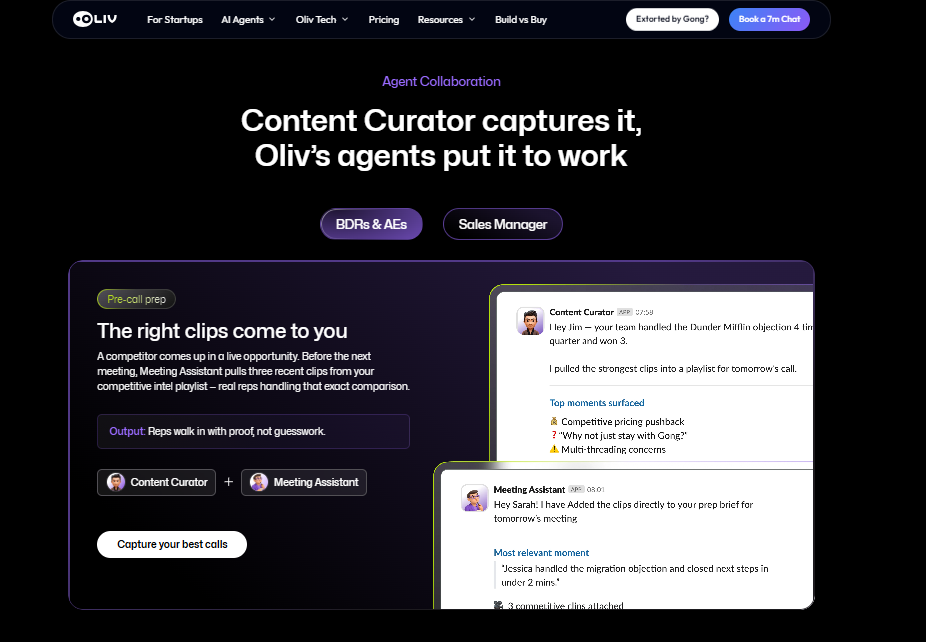
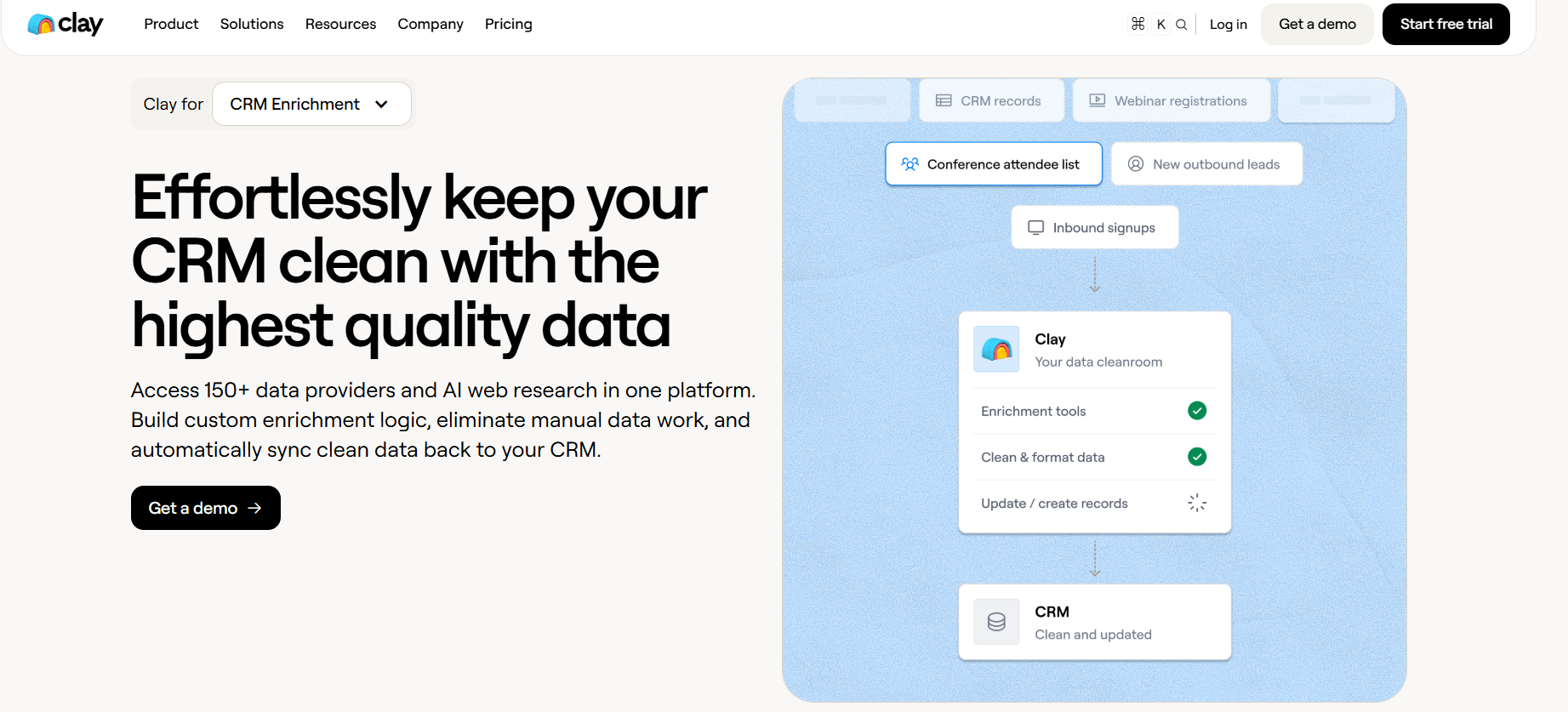
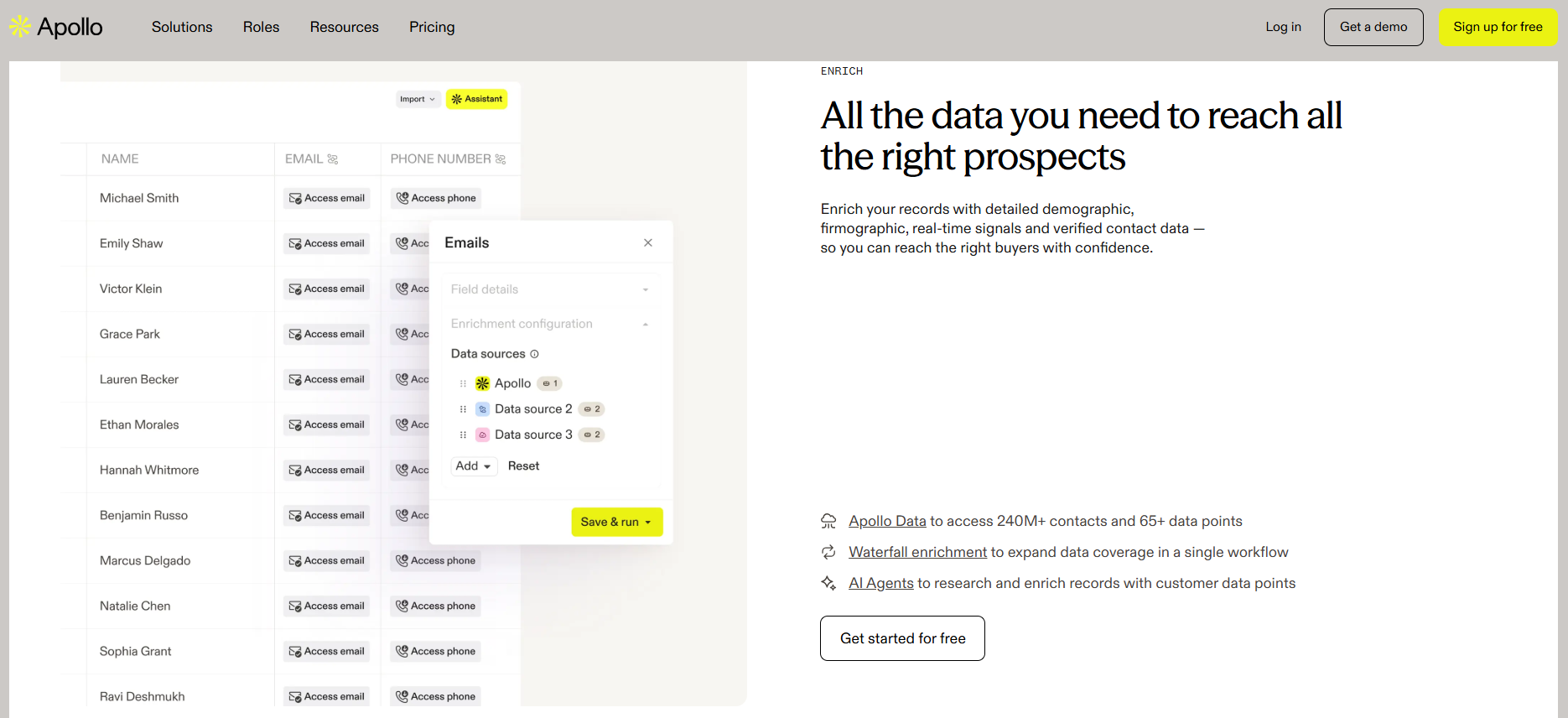
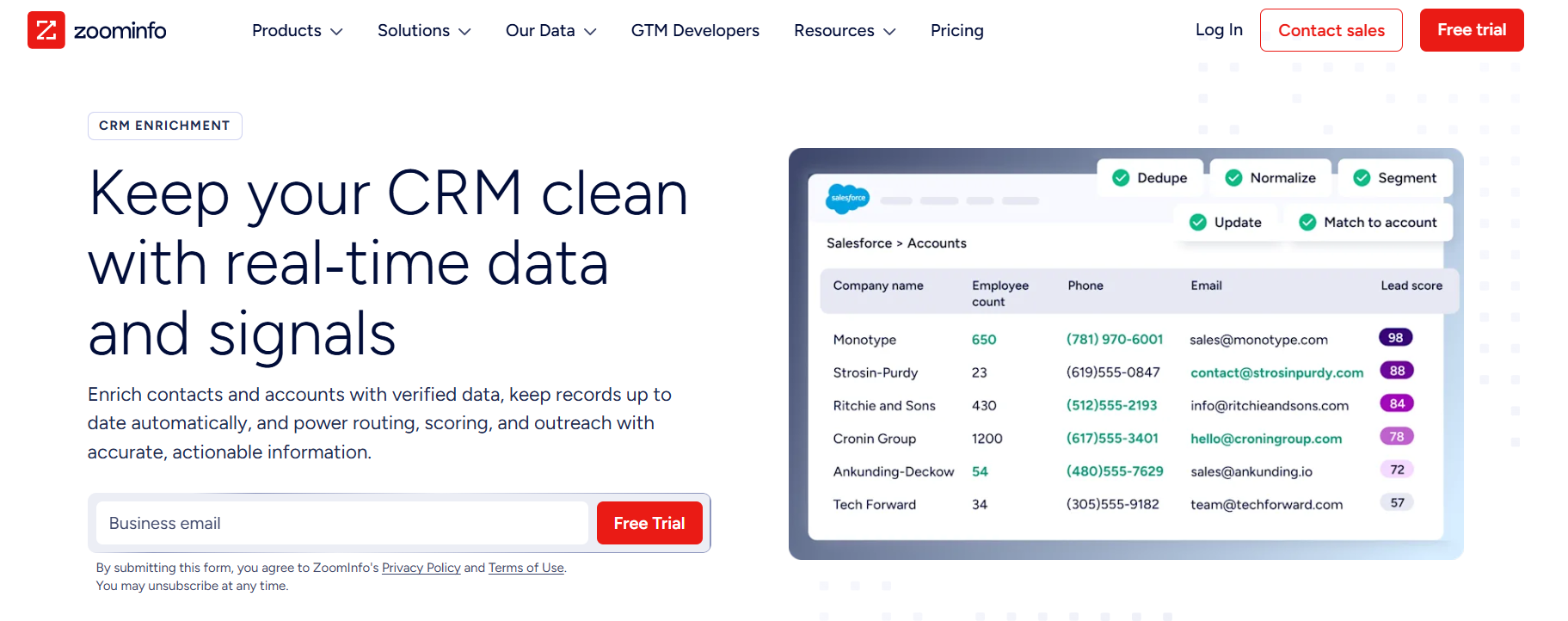

.png)
.png)
.png)

