10 Best Meeting Transcription Software in 2026: Accuracy, Speaker Detection, Language Support, and CRM Integration
Written by
Ishan Chhabra
Last Updated :
August 10, 2026
Skim in :
13
mins
In this article
Revenue teams love Oliv
Here’s why:
All your deal data unified (from 30+ tools and tabs).
Insights are delivered to you directly, no digging.
AI agents automate tasks for you.
Thank you! Your submission has been received!
Oops! Something went wrong while submitting the form.
Meet Oliv’s AI Agents
Hi! I’m, Deal Driver
I track deals, flag risks, send weekly pipeline updates and give sales managers full visibility into deal progress
Hi! I’m, CRM Manager
I maintain CRM hygiene by updating core, custom and qualification fields all without your team lifting a finger
Hi! I’m, Forecaster
I build accurate forecasts based on real deal movement and tell you which deals to pull in to hit your number
Hi! I’m, Coach
I believe performance fuels revenue. I spot skill gaps, score calls and build coaching plans to help every rep level up
Hi! I’m, Prospector
I dig into target accounts to surface the right contacts, tailor and time outreach so you always strike when it counts
Hi! I’m, Pipeline tracker
I call reps to get deal updates, and deliver a real-time, CRM-synced roll-up view of deal progress
Hi! I’m, Analyst
I answer complex pipeline questions, uncover deal patterns, and build reports that guide strategic decisions
TL;DR
Raw word accuracy has converged across vendors. Join reliability, speaker attribution under crosstalk, and CRM write-back are the axes that still separate meeting transcription software in 2026.
Published benchmarks contradict each other. The same tool scored 92.8% in a 500-hour test and far lower in a turn-level study, because scoring design changes the result.
Diarization degrades with meeting size. Tools hold 88 to 95% at two speakers, then most fall below 80% at eight speakers with crosstalk.
Three CRM integration tiers hide behind one badge: transcript attach, activity logging, and field-level write-back. Most tools stop at tier one and save reps no time.
Consent is now a shortlist filter. Eleven to thirteen US states require all-party consent, and EU AI Act Article 50 transparency duties apply from 2 August 2026.
Oliv AI ranks first because it reads from Fireflies, Gong, Avoma, Otter, and Fathom, publishes a $19 to $79 ladder, and charges a $0 platform fee.
Q1. What are the 10 best meeting transcription software tools in 2026? [toc=1. The 10 Tools]
Oliv AI, Gong, Avoma, Fireflies.ai, Otter.ai, Fathom, tl;dv, Notta, Rev, and Sonix are the ten best meeting transcription software tools in 2026. Oliv AI supports Fireflies, Gong, Avoma, Otter, and Fathom as recorders a team can keep, and prices conversation intelligence at $19 per seat per month. Raw word accuracy has largely converged. Join reliability, speaker attribution, and CRM write-back still separate vendors.
Here is the list, in the order this article covers it:
Oliv AI
Gong
Avoma
Fireflies.ai
Otter.ai
Fathom
tl;dv
Notta
Rev
Sonix
⭐ Why the ranking looks different from every other list
Most lists rank on transcript quality. That axis barely separates the field now. Nearly every tool here will hand you a usable transcript of a clean English Zoom call.
The axes that still separate them are unglamorous. Does the bot actually join, stay, and label the right speaker? And what happens to the transcript in the next five minutes?
⚠️ The pain this list is written for
You probably have three note-takers running right now. One rep picked Fathom. Another picked Otter. Someone in customer success is on a free plan nobody approved.
I hear the same numbers from RevOps leads constantly. Fifteen to twenty minutes lost to meeting context per call. Another fifteen writing the follow-up email. CRM updates that depend on whether a rep remembered, which is exactly the CRM data quality problem RevOps teams inherit.
That is the real cost. Not transcription quality.
💰 The cheap-seat trap nobody prices in
Here is the buying pattern I see most often. A team buys a $100 licence for sales only. It is too expensive to extend to customer success or implementation.
So those teams buy $19 tools instead. Now eight or nine people touch a large account each month, across two systems that never talk. The account record is fragmented by design, not by accident, and this is where teams start looking at reducing sales tech stack costs.
📊 Meeting transcription software compared (2026)
Meeting Transcription Software Compared (2026)
Tool
Published accuracy evidence
Speaker handling
CRM write-back depth
Price band (per seat/mo)
Rating
Oliv AI
No published benchmark
Recorder-agnostic, ingests from five named tools
Field-level, accept, edit, or reject per field
$19 to $79, $0 platform fee
⭐⭐⭐⭐⭐
Gong
No published benchmark
Divided transcript, AI highlights
Data Extractor maps AI fields to CRM
Enterprise, plus platform fee
⭐⭐⭐⭐
Avoma
No published benchmark
Reviewers report misattribution
Activity and notes sync
Mid, seat minimums apply
⭐⭐⭐
Fireflies.ai
No comparable vendor benchmark
Strong in third-party diarization tests
Transcript and summary sync
Around $19
⭐⭐⭐⭐
Otter.ai
No published benchmark
Real-time, weaker on crosstalk
Mostly transcript attach
Around $17 to $30
⭐⭐⭐
Fathom
No published benchmark
Solid on small calls
Summary and task sync
Free tier, paid around $19
⭐⭐⭐⭐
tl;dv
Publishes its own tested comparison
Tested across four tools
Summary sync, limited fields
Free tier, paid mid
⭐⭐⭐
Notta
No published benchmark
Strong multilingual claims
Light integration layer
Low to mid
⭐⭐⭐
Rev
Human transcription option
Human review lifts attribution
Minimal CRM behaviour
Per-minute or subscription
⭐⭐⭐
Sonix
No published benchmark
Editor-led correction workflow
Minimal CRM behaviour
Per-hour or subscription
⭐⭐⭐
Ratings reflect the weighted rubric in the next section, not transcript quality alone.
❌ Who this list is not for
If you want a personal transcript app, stop reading here. A free Zoom or Teams transcript will serve you fine. So will Fathom's free tier, and our roundup of AI note-taking tools covers that buyer properly.
This list is written for one person. The RevOps or sales leader standardizing capture across a revenue team, who needs one attributed record that lands in the CRM.
1.1 Oliv AI [toc=1.1 Oliv AI]
Oliv AI shows an agent consuming calls, emails, and Slack threads on every implementation, then producing structured record updates such as ticked subtasks without manual typing.
Oliv AI is an AI-native revenue intelligence and orchestration platform, and its Meeting Assistant agent handles the meeting end to end rather than returning a transcript. It runs on a context graph, a continuously updated model of every account and opportunity, and it accepts recordings from Fireflies, Gong, Avoma, Otter, and Fathom.
⭐ What it actually does
Oliv AI covers the meeting before, during, and after. A pre-meeting brief lands before the call. After the call, activity resolves to the right account, contact, deal, renewal, or expansion.
Proposed CRM updates appear beside the exact moment in the conversation that triggered them. You accept, edit, or reject each field. Nothing changes without a traceable reason.
🔑 Key features
Meeting Assistant agent covering pre-call brief through post-call follow-through
Recorder-agnostic ingestion from Fireflies, Gong, Avoma, Otter, and Fathom
Field-level CRM proposals with per-field review, on HubSpot and Salesforce
Entity resolution across duplicate accounts and multiple open opportunities
Support for structured methodologies including MEDDIC and BANT variants
Coverage across sales, customer success, and onboarding calls
Full open export, with no data lock-in
💰 Pricing and implementation
Oliv AI publishes a per-seat ladder from $19 for conversation intelligence up to $79. The platform fee is $0. View-only seats are free, always.
Implementation is a connect-your-sources session rather than a project. One reviewer set it up in five to fifteen minutes. Another had a forward-deployed engineer finish inside a week.
Oliv AI Product Update Timeline
Period
What changed
Through 2025
Conversation intelligence surface built out: deal views, meeting, email, and call capture, per-item summaries, action items, clipping, and automated coaching scorecards, as described on the Oliv AI product pages.
2026 (current)
Agent marketplace ships with agents across role categories, plus per-seat pricing published from $19 to $79 with a $0 platform fee on the Oliv pricing page, and five capture modalities on the context capture page.
Expected next
Deeper entity resolution work on the object graph, plus ambient in-person capture through the PLAUD NotePin partnership and an evening voice agent, both currently described as consent-first and rep-initiated.
✅ Pros and ❌ cons
✅ Keeps your existing recorder, so no rip-and-replace ✅ Field-level CRM proposals with per-field review and traceability ✅ Free view-only seats and a $0 platform fee ✅ Works across customer success and onboarding, not only sales ✅ Full open export
❌ No published accuracy, diarization, or language-count benchmark ❌ Reviewers report occasional slowness and glitches ❌ Dashboard and analytics customization is limited ❌ Mobile app trails the desktop experience
🎯 Best use case
A 25 to 200 seat revenue team running two or three note-takers, where the CRM still depends on rep memory. Also strong where accounts carry duplicate records and several open opportunities, which is the same failure pattern we cover in AI deal intelligence.
💬 What users say
"I also like how Oliv.ai joins all my meetings flawlessly and gets my transcripts absolutely right, which is more than I can say for other meeting tools I've tried. The transcripts Oliv.ai produces are solid." - Verified reviewer, Oliv AI G2 - Verified Review (15 Jun 2026)
"The biggest value of Oliv AI is its ability to operationalize customer conversations. It doesn't just record meetings; it automatically captures key insights, updates systems of record, identifies next steps, and helps keep teams aligned." - Verified reviewer, Oliv AI G2 - Verified Review (23 Jun 2026)
"The only downside is that the platform can be a bit glitchy at times, but the support team is always quick to address and resolve any bugs." - Verified reviewer, Oliv AI G2 - Verified Review (2 Jul 2026)
Oliv AI ranks first here for one structural reason. It treats transcription as an input, not the product, so a team can standardize the record without ripping out the recorder reps already like.
1.2 Gong [toc=1.2 Gong]
Gong positions pre-built revenue agents above transcription, with an AI Deep Researcher surfacing seller behaviours, competitive pressure, and evidence-backed loss analysis for enterprise accounts.
Gong is the category's most established revenue AI platform, founded in 2015 on conversation recording and transcription, and it now positions itself as a Revenue AI Operating System. Its ARR passed $500M in May 2026, growing over 55% year over year.
⭐ What it actually does
Gong records and transcribes calls, then layers deal boards, forecasting, coaching, and enablement on top. Smart Trackers detect topics across conversations. AI Theme Spotter analyzes tens of thousands of calls for patterns.
For transcription buyers specifically, Gong is heavier than the job requires. You are buying a revenue platform and getting transcription inside it, as our breakdown of Gong call recording explains in detail.
🔑 Key features
Call recording and transcription across major web conferencing tools
Smart Trackers and AI Theme Spotter for cross-call pattern detection
Data Extractor, which maps AI-extracted fields to the CRM
AI Translator for briefs, transcripts, and CRM-bound AI content
Gong Assistant, an in-product conversational agent
Salesforce-native app, plus Dynamics 365 support in Engage
Automated scorecards through AI Call Reviewer
💰 Pricing and implementation
Gong does not publish list pricing. Per-seat pricing became visible inside the admin centre for direct-purchase customers in June 2025, and we track the bands in our Gong pricing breakdown.
Expect a platform fee on top of seats. Setup is a real project, and reviewers repeatedly flag the tracker configuration step as difficult.
Gong Product Update Timeline
Period
What changed
Through 2025
Foundation matured fast: Gong Assistant shipped in March 2025, Agent Studio and AI Translator in July 2025, automated scorecards in August 2025, then AI Theme Spotter and Data Extractor in December 2025.
2026 (current)
Mission Andromeda launched 25 Feb 2026 with Gong Enable, conversational guidance, and unified account management. Salesforce v3 exports flow data to the Flow object, and Snowflake now connects to multiple Gong instances.
Expected next
Gong has committed to bidirectional MCP server support, letting the AI Briefer pull third-party data into briefs, letting external AI platforms query Gong, and exposing briefs through the API.
✅ Pros and ❌ cons
✅ Deepest cross-call analysis in the category ✅ Mature Salesforce and Dynamics integrations ✅ Transcript translation across languages ✅ Strong coaching and enablement layer
❌ Data export is restricted, and bulk download often needs a plan upgrade ❌ Reviewers report losing data access when they stop paying ❌ Tracker setup has a steep configuration curve ❌ No published list pricing, and a platform fee applies
🎯 Best use case
Large enterprise revenue orgs that need cross-call analytics and coaching at scale, and that have RevOps capacity to configure it properly. Teams weighing the trade-offs often start with our list of Gong alternatives.
💬 What users say
"I cannot download all the data myself unless we upgrade the plan, which isn't ideal and results in me not fully utilizing Gong. The requirement to download snippets one by one using copy and paste is particularly annoying." - Verified reviewer, Gong G2 - Verified Review (3 Oct 2025)
"The fact that you can't edit a recording (to only share a portion with a client), and the fact that if you stop working with the tool you lose the data." - Verified reviewer, Gong G2 - Verified Review (19 Mar 2026)
"Being able to sequence our steps, along with integration with Nooks/Salesforce." Dislikes: "limitations of getting data back into salesforce." - Verified reviewer, Gong G2 - Verified Review (21 May 2026)
Oliv AI takes a different position on the same data. Oliv connects to Gong and pulls that call history in, so displacement is never a prerequisite, and migration from Gong stays open with no lock-in.
1.3 Avoma [toc=1.3 Avoma]
Avoma demonstrates live transcription with sub-second latency, per-speaker talk-time breakdowns, topic insights, and support for both bot-based and botless recording across Zoom, Teams, and Meet.
Avoma is an AI meeting assistant that grew into a revenue intelligence platform, founded in 2017 on recording, transcription, and AI-extracted notes. It is the most credible mid-market alternative to the enterprise platforms, and it is far cheaper than them.
⭐ What it actually does
Avoma records and transcribes calls, then generates notes against smart templates. Ask Avoma lets you query past conversations in plain language.
The 2025 push added a Forecast tool and a Revenue Intelligence add-on. That moved Avoma from note-taker toward pipeline software, and our breakdown of the Avoma platform and its features tracks that shift.
🔑 Key features
AI transcription with editable speaker labels
Smart Templates for consistent, structured notes
Ask Avoma for natural-language search across meetings
Keyword tracking, talk patterns, and call scoring
Live copilot assistance during calls
CRM auto-sync to Salesforce and HubSpot
Instant Notes, which log summaries and CRM updates when a call ends
💰 Pricing and implementation
Avoma's entry tier has historically started around $20 per user per month. Conversation and revenue intelligence sit behind a paid add-on.
That split matters. Reviewers describe the base assistant as reasonably priced and the advanced module as expensive to carry, a pattern we unpack in our analysis of Avoma user reviews and feedback.
Avoma Product Update Timeline
Period
What changed
Through 2025
Core meeting stack matured: editable speaker identification, Smart Templates, Snippets, and Playlists, then Generative AI v3 on GPT-4. Instant Notes and Gmail CRM sync landed in October 2025.
2026 (current)
The April 2026 release added voice dictation inside Ask Avoma, a shared Prompt Library, and a rebuilt Forecast Submission workflow carrying AI signals and full pipeline context.
Expected next
Direction of travel is forecasting, not transcription. The Forecast tool documentation gates it behind the Revenue Intelligence add-on, so expect more pipeline features priced separately.
✅ Pros and ❌ cons
✅ Genuinely strong transcription on clean audio ✅ Flexible scoring and template customization ✅ Ask Avoma is a fast way to retrieve deal specifics ✅ Much cheaper than the enterprise platforms
❌ The notetaker sometimes fails to join or drops mid-call ❌ Summaries do not always link back to earlier meetings with the same person ❌ Accuracy slips on accents and poor audio ❌ Advanced intelligence sits behind a costly add-on
🎯 Best use case
Mid-market sales and customer success teams that want structured notes and coaching without enterprise pricing or a RevOps project. Buyers weighing the swap usually start with our Avoma vs Oliv AI comparison.
💬 What users say
"I like the accuracy of the transcriptions, the way it manages different teams within the organization, and the flexibility of the scoring customization." Dislikes: "It doesn't always capture the key points of the conversation, and it also doesn't connect previous meetings with the same person." - Verified reviewer, Avoma G2 - Verified Review (17 Mar 2026)
"Sometimes the notetaker does not join the call and sometimes randomly drops off. Support function is slow and not very reliable." - Verified reviewer, Avoma G2 - Verified Review (9 Dec 2025)
"I feel transcription quality is usually fine but sometimes vary with audio conditions and accents that require manual corrections from our end. Also, base AI Meeting Assistant is reasonably priced, but advanced conversation and revenue intelligence module is expensive to bear as a recurring cost." - Verified reviewer, Avoma G2 - Verified Review (21 Jan 2026)
1.4 Fireflies.ai [toc=1.4 Fireflies.ai]
Fireflies.ai presents its transcription accuracy claim, language coverage, and speaker recognition alongside a timestamped transcript panel attributing lines to Cate, Rohan, and Tom.
Fireflies.ai is a bot-based note-taker that joins calls across Zoom, Teams, and Google Meet, and it performs well in independent speaker-detection tests. One 500-hour multi-speaker benchmark placed it near the top of the field for attribution.
⭐ What it actually does
Fireflies joins the meeting as a participant and records it. It produces a transcript, a summary, and searchable topic trackers.
It also pushes summaries into common CRMs. The push is usually a note or activity, not structured fields, which is the boundary we cover in integrating sales automation into your CRM.
🔑 Key features and trade-offs
Broad conferencing coverage and a large integration list
Strong diarization scores in third-party tests
Topic trackers and searchable conversation archive
Sits in the roughly $19 per seat band alongside other note-takers
✅ Best-in-class attribution among the standalone note-takers ✅ Familiar to reps, so adoption is easy
❌ Visible bot in the participant list, which some buyers dislike ❌ CRM behaviour stops at summaries, not field updates
🎯 Best use case
Teams that need reliable transcripts across many meeting types and are happy to handle CRM updates elsewhere. Oliv AI lists Fireflies as a supported recorder, so this is a common pairing.
1.5 Otter.ai [toc=1.5 Otter.ai]
Otter.ai is the best-known real-time transcription tool, and it remains the default recommendation for live captions and personal note-taking. It is also the tool most often named in consent and privacy discussions, which matters for external calls.
⭐ What it actually does
Otter transcribes live, on screen, as people speak. You can highlight and comment during the meeting itself.
It handles two-person and small-group calls well. Crosstalk and larger meetings are where attribution degrades.
🔑 Key features and trade-offs
Real-time transcript visible during the call
Strong mobile and in-person recording experience
Affordable individual and team plans
Limited structured CRM behaviour
✅ Excellent for live capture and accessibility ✅ Low cost and quick to start
❌ Weaker on crosstalk and larger meetings ❌ Check retention and training opt-out defaults before external use ❌ Not built for revenue-team workflows
Fathom is the $19-class note-taker that reps most often adopt on their own, helped by a genuinely usable free tier. That self-serve adoption is exactly what creates the fragmented account record described earlier in this article.
⭐ What it actually does
Fathom records, transcribes, and summarizes calls fast. Summaries and action items are clean and readable.
It syncs those summaries to CRMs. Again, this is note-level sync rather than field-level write-back.
🔑 Key features and trade-offs
Free tier that covers unlimited recording for individuals
Quick, well-structured summaries and action items
Simple setup with almost no configuration
Paid tiers around the $19 per seat mark
✅ Fastest time to value in this list ✅ Popular with reps, so no adoption fight
❌ Bottom-up adoption creates shadow tooling across teams ❌ Thin on cross-call analytics and coaching ❌ No field-level CRM proposals
🎯 Best use case
Individual reps and small teams. Oliv AI also names Fathom as a supported recorder, so teams standardizing later do not have to remove it, and our guide to meeting recorder picks for productivity covers that buyer directly.
1.7 tl;dv [toc=1.7 tl;dv]
tl;dv is a meeting recorder that publishes its own accuracy testing, including a comparison run across 30 hours of real meetings. Publishing a methodology is rare in this category and worth a point on its own.
⭐ What it actually does
tl;dv records calls, timestamps key moments, and generates clips. Reels and highlights make it useful for enablement.
It supports multilingual transcription and AI summaries. Integration depth is lighter than the revenue platforms.
🔑 Key features and trade-offs
Timestamped highlights and clip creation
Multilingual transcription and summaries
Free tier plus mid-priced paid plans
Published internal accuracy testing
✅ Strong clipping and sharing workflow ✅ Transparent about how it tests accuracy
❌ Its own testing is vendor-run, so treat it accordingly ❌ Limited CRM field behaviour
🎯 Best use case
Product, research, and enablement teams that share meeting moments more than they update pipelines. Sales enablement leaders often pair it with structured sales coaching software.
1.8 Notta [toc=1.8 Notta]
Notta is the multilingual specialist in this list, and it scored competitively in an independent 500-hour multi-speaker benchmark. If your team sells in several languages, it belongs on the shortlist.
⭐ What it actually does
Notta transcribes and translates across a wide language set. It handles both live meetings and uploaded audio files.
Real-time translation is the differentiator. CRM integration is light by comparison.
🔑 Key features and trade-offs
Wide language coverage and translation
Strong benchmark performance on multi-speaker audio
Handles uploads as well as live calls
Affordable individual and team tiers
✅ The strongest multilingual option here ✅ Good accuracy in independent testing
❌ Supported-language counts are marketing counts, not quality counts ❌ Minimal revenue workflow depth
🎯 Best use case
Teams running customer calls in several languages who need the transcript itself to be right.
1.9 Rev [toc=1.9 Rev]
Rev is the one option here that offers human transcription alongside AI, which is why it still wins on legally sensitive or archival recordings. Human review is the only reliable fix for hard attribution problems.
⭐ What it actually does
Rev transcribes audio through AI, with a human-verified tier available. Turnaround and price scale with accuracy.
It is a transcription service first. Meeting workflow features are secondary.
🔑 Key features and trade-offs
Human-verified transcription option
Per-minute and subscription pricing models
Captions and subtitle output
Minimal CRM behaviour
✅ Highest achievable accuracy when it genuinely matters ✅ Useful for compliance and archival records
❌ Human review costs real money per hour ❌ Not designed for daily revenue-team use
Sonix is a transcription platform built around an editing workflow, and it targets operations, legal, and research users rather than sellers. It ranks well on general transcription lists for that editor experience.
⭐ What it actually does
Sonix transcribes uploaded audio and video, then gives you a strong browser editor. You correct, tag, and export from there.
It supports many languages and export formats. Live meeting capture is not its centre of gravity.
🔑 Key features and trade-offs
Polished transcript editor with correction workflow
Broad language and export format support
Per-hour and subscription pricing
Little native CRM behaviour
✅ Best editing and correction experience in this list ✅ Flexible export options
❌ Built for files, not for live revenue calls ❌ Correction is manual work someone has to do
🎯 Best use case
Operations, research, and content teams that need clean, corrected transcripts they will edit anyway.
Oliv AI sits differently in this list on purpose. It does not ask you to replace Fireflies, Otter, Fathom, Avoma, or Gong. It reads from them, resolves the conversation to the right opportunity, and proposes CRM changes you can accept or reject per field, which is the deal intelligence layer most note-takers never reach.
Q2. How were these tools tested and scored? [toc=2. Scoring Methodology]
Each tool was scored out of 100 across five weighted criteria: Accuracy and Speaker Detection (30%), CRM Integration Depth (25%), Capture Reliability and Compliance (20%), Language Support (15%), and Pricing Transparency (10%). Scores convert to stars in 20-point bands. Where a vendor publishes no comparable figure, the criterion is scored qualitatively, and the gap is stated rather than estimated.
📊 The weights, and why accuracy still leads
Accuracy carries the most weight even though word accuracy has converged. That sounds contradictory. It is not.
The 30% covers attribution, not just words. Getting the transcript right but the speaker wrong is worse than a typo, because it poisons the CRM record downstream.
⚖️ What each criterion measures
Scoring Rubric and Criterion Weights
Criterion
Weight
What it scores
Accuracy and Speaker Detection
30%
Word accuracy plus who-said-what under crosstalk and accents
CRM Integration Depth
25%
Transcript attach, activity logging, or field-level write-back
Capture Reliability and Compliance
20%
Join success rate, capture method, consent and retention posture
Language Support
15%
Real quality in non-English calls, not the marketing language count
Pricing Transparency
10%
Published per-seat pricing, platform fees, seat minimums
Star bands are simple. Zero to 20 points is one star, 21 to 40 is two, and so on up to five.
🔍 How each criterion was evidenced
Three evidence types were allowed, in this order. Vendor documentation on the vendor's own domain came first. Dated third-party benchmarks came second.
Attributed user reviews with a live permalink came third. Anything with no source behind it did not enter the score, the same standard we apply across our revenue intelligence platform comparisons.
For accuracy specifically, the two reference points were the NovaScribe 500-hour multi-speaker benchmark and the MeetingStack test of eight transcription APIs. Both are dated and repeatable. Neither is run by a tool in this list.
⚠️ The honesty clause
Here is what I could not measure. No vendor in this list publishes a comparable word error rate or diarization benchmark for its own product.
Not Gong. Not Avoma. Not Fireflies. Not Oliv AI either, which publishes no accuracy percentage or supported-language count for transcription.
So no percentage was invented for any tool here. Where a vendor was silent, the criterion was scored on what the reviews and third-party tests show, and the silence itself was noted.
💰 Why pricing transparency earns only 10%
Price matters enormously to the buying decision. It matters less to whether a tool works.
I weighted it low on purpose, then handled it properly in its own section. Oliv AI publishes a per-seat ladder from $19 to $79 with a $0 platform fee, which is unusual in a category where most enterprise vendors publish nothing at all, as our breakdown of reducing sales tech stack costs shows.
🧪 What I would still test myself
I have a bias worth naming. My read is that attribution matters more than word accuracy, because attribution is what breaks the CRM record.
A specialist would push back. They would say accuracy, diarization, and language coverage are exactly what is not solved, and that a platform bundling transcription will always trail a dedicated engine. That is a fair objection, and the next section takes it seriously.
Oliv AI scores five stars on this rubric, carried by CRM integration depth and recorder-agnostic capture. It does not score five on accuracy, because it publishes nothing there, and this article does not credit unpublished claims.
Q3. How accurate is speaker detection, and why do published benchmarks disagree? [toc=3. Accuracy & Speaker Detection]
Commercial meeting tools reach roughly 85 to 95% diarization accuracy on clear audio with two to four speakers. Accuracy falls sharply with crosstalk, accents, and larger groups. At eight speakers, most tools drop below 80%, and real-world diarization error rates plateau near 25 to 30% even while word error rate stays under 5%.
🎯 Two error rates, constantly confused
Word error rate, or WER, measures wrong words. Diarization error rate, or DER, measures wrong speakers. They are different numbers with very different behaviour.
Vendors quote WER because it looks great. On clean audio, WER sits under 5% across the major engines. DER on realistic meeting audio does not get close to that.
📉 Where attribution starts to break
Speaker count is the clearest predictor. Testing across 2, 4, 8, and 12 speakers found all major tools work well at two speakers, landing between 88 and 95%.
At eight speakers, most fall below 80%. That is your enterprise deal review, your renewal call, and your implementation kickoff, the exact meetings covered in our guide to sales call analytics.
🔀 The contradiction nobody reconciles
Here is the part that should change how you read every accuracy claim. The same tool scores very differently depending on who ran the test.
Fireflies scored 92.8% overall in a 500-hour multi-speaker benchmark, with 87.2% on overlapping speech. A separate turn-level study put it far lower, and rated Zoom highest instead.
Both tests are real. They measure different things. One scores per word, the other scores per speaker turn, and turn-level scoring punishes a single mislabel much harder.
🧠 Ask which engine is underneath
Most note-takers do not build their own speech recognition. They wrap a provider.
In the eight-API comparison, AssemblyAI led diarization at 91.2% with 5.8% crosstalk WER, while Deepgram Nova-2 delivered the best overall WER and cost. In a Swedish meeting benchmark, ElevenLabs detected only four of six speakers.
So ask your vendor two questions. Which speech engine, and which diarization model.
🌍 Language counts are marketing counts
A tool listing 60 languages may handle five of them at English-level quality. The count tells you nothing about accuracy.
The failure modes that actually bite are accented English, code-switching mid-sentence, and diarization on a non-English call. No vendor here publishes per-language accuracy, so treat every language claim as untested until you test it.
💬 What users say about accuracy
"I like the accuracy of the transcriptions, the way it manages different teams within the organization, and the flexibility of the scoring customization." - Verified reviewer, Avoma G2 - Verified Review (17 Mar 2026)
"I feel transcription quality is usually fine but sometimes vary with audio conditions and accents that require manual corrections from our end." - Verified reviewer, Avoma G2 - Verified Review (21 Jan 2026)
"one notable drawback of Avoma is the occasional inaccuracy in its AI transcription and summarization features, particularly in challenging conditions like poor audio quality, accents, or technical jargon-heavy discussions." - Verified reviewer, Avoma G2 - Verified Review (15 Sep 2025)
⏰ What to do on Monday
Pick your messiest recurring call. Six people, at least one dial-in, some crosstalk.
Run it through your current tool. Score attribution by hand for ten minutes of it. That single exercise will tell you more than every vendor page combined, and it pairs well with our guide to customer conversation analytics.
Oliv AI publishes no diarization figure, and I am not going to invent one. What it does publish is what happens after attribution: every proposed CRM change tied to the exact moment in the conversation that triggered it.
Q4. Why do note-takers miss meetings, and what does consent law now require? [toc=4. Capture Reliability & Consent]
Bot recorders depend on a scheduled join, so they fail on ad-hoc calls, dial-ins, renamed invites, and waiting rooms. Bot-free tools capture from the device instead, avoiding the visible participant but removing no legal obligation. Eleven to thirteen US states require all-party consent, and no jurisdiction treats a bot in the participant list as sufficient notice.
🤖 Why the bot does not show up
A bot recorder watches your calendar. It reads the invite, finds the meeting link, and joins at the scheduled minute.
Break any link in that chain and capture fails. Someone renames the meeting. Someone dials in. The host leaves the waiting room on.
⚠️ The failure nobody notices until it matters
A bad transcript is annoying. A missing recording is worse, because nobody finds out until the deal review.
Reviewers describe all three failure modes: late joins, mid-call drops, and no-shows. Duplicate bots turning up twice is a real complaint too, which is why capture reliability belongs in any meeting recorder evaluation.
💻 Bot-free capture, and its trade-off
Bot-free tools record audio from the device itself. Nothing appears in the participant list.
That fixes the awkward bot and the join failures. It does not fix anything legal, and it usually means capture depends on one person's laptop being on the call.
⚖️ What consent law now requires
This is the part missing from every competing list. Between 11 and 13 US states require all-party consent for recording, and a February 2026 legal analysis is blunt that a visible bot is not legally sufficient notice anywhere.
Class actions are live against major note-takers over consent and retention. In Europe, Article 50 of the EU AI Act applies from 2 August 2026, setting transparency duties for deployers of AI systems, a shift we cover in AI, CRM trust, and governance risk for RevOps evaluation.
📋 The vendor questionnaire
Put these five questions to every vendor before you sign. They take ten minutes, and they surface the real risk.
What is the default retention period, and can we shorten it?
Does the DPA name voice and biometric data explicitly?
Is model training opt-out on by default, or off?
Where is data stored, and can we pin a region?
Can we export everything, recordings included, if we leave?
"Sometimes the notetaker does not join the call and sometimes randomly drops off. Support function is slow and not very reliable." - Verified reviewer, Avoma G2 - Verified Review (9 Dec 2025)
"I use Avoma for recording and reviewing sales calls, and it's very seamless with high reliability; I experience no transcription failures or errors." - Verified reviewer, Avoma G2 - Verified Review (9 Dec 2025)
"The fact that you can't edit a recording (to only share a portion with a client), and the fact that if you stop working with thew tool you lose the data." - Verified reviewer, Gong G2 - Verified Review (19 Mar 2026)
⏰ The Monday action
Add one line to your external invite template disclosing AI recording. Then script a verbal consent line for the first thirty seconds of every external call.
Log the acknowledgment inside the transcript itself. That way the consent record lives with the conversation, not in someone's memory, which is the same discipline behind good meeting notes during sales calls.
Oliv AI reads from the recorder a team already runs, so it does not add a second bot to the invite. Its in-person capture is rep-initiated and consent-first, described on its own documentation as intentional and participant-aware rather than passive.
Q5. Which tools actually update the CRM, and which just store the transcript? [toc=5. CRM Integration Depth]
Three tiers hide behind the same integration badge. Tier one attaches a transcript link to an activity. Tier two logs call metadata and participants. Tier three resolves the conversation to the correct account, contact, and opportunity, then proposes field-level updates a human accepts, edits, or rejects. Most tools in this category stop at tier one.
🔗 The three tiers, defined
CRM Integration Depth Tiers
Tier
What it does
What a rep still has to do
1. Transcript attach
Drops a link or summary on an activity record
Read it, then update every field by hand
2. Activity logging
Logs the call, duration, and participants
Update every field by hand
3. Field-level write-back
Resolves the conversation to the right object and proposes field values
Review and approve
Every vendor here says "integrates with Salesforce." Only tier three changes what a rep does after the call, a distinction we unpack in our guide to integrating sales automation in your CRM.
🧮 Why tier one saves nobody any time
A transcript in a separate app is a document. Someone has to open it, read it, and retype the outcome.
That is the fifteen to twenty minutes per call I hear about constantly. The transcript did not remove the work. It relocated it.
🧩 How activity mapping actually breaks
Most tools map activity using rules. Match the attendee's email domain to an account. Attach the call to the newest open opportunity.
That works on a clean CRM. It fails the moment reality shows up, which is why CRM data quality automation sits upstream of every other RevOps fix.
⚠️ The case that breaks rule-based mapping
Picture one customer with three account records, created by three different reps over four years. Five opportunities are open against them.
One is a renewal. Two are expansions. Which one does today's call belong to? A rule cannot tell, so it guesses, and the guess is silently wrong.
Oliv AI publishes the figure that explains why this is normal, not exceptional: 65% of CRM data in the market is inaccurate before any AI layer touches it.
💬 What users say about CRM write-back
"The CRM writeback is not good; we cannot send MEDDIC values back to Salesforce or update fields in Salesforce from the conversation intelligence." - Verified reviewer, Clari G2 - Verified Review (13 Jul 2026)
"It helps in automating and updating our CRM after calls, provides a clear deal summary, and sends follow-up emails, allowing managers to coach their reps with actionable insight rather than just going through call recordings." - Verified reviewer, Oliv AI G2 - Verified Review (26 Jun 2026)
"It doesn't always capture the key points of the conversation, and it also doesn't connect previous meetings with the same person. Because of that, the summaries often come through without the earlier context." - Verified reviewer, Avoma G2 - Verified Review (17 Mar 2026)
⏰ The demo question that settles it
Do not ask whether a tool integrates with your CRM. Ask this instead.
Bring your messiest real account to the demo. The one with duplicate records and several open deals. Ask the vendor to show the tool picking the right opportunity, live, and to show you why it picked it.
If the answer is a rule you have to configure, that is tier two dressed up. If the answer is a proposed field change with the sentence that triggered it, that is tier three, and it is the same standard we apply to auto-scoring MEDDIC, BANT, and SPICED from calls.
Oliv AI operates at the third tier. Activity resolves to the right account, deal, renewal, or expansion, and every proposed field change is accepted, edited, or rejected with a traceable reason attached.
Q6. What should this cost, and can you get your data back out? [toc=6. Pricing & Portability]
Three bands exist. Standalone note-takers cluster near $19 per seat per month for transcripts and summaries. Enterprise conversation intelligence runs above $130 per seat plus a $2,000 to $5,000 annual platform fee. Oliv AI publishes a per-seat ladder from $19 to $79 with a $0 platform fee. If a transcript is all you need, native Zoom or Teams transcription is genuinely enough.
💰 The three price bands
Meeting Transcription Price Bands in 2026
Band
Typical price
What it buys
Native or free
$0
A transcript per meeting, inside the meeting tool
Note-taker
Around $19 per seat
Transcript, summary, action items, light CRM sync
Enterprise CI
$130 and up per seat
Cross-call analytics, coaching, forecasting, plus a platform fee
The band you need depends on one thing. Whether you want a document or a system of record.
💸 The lines that do not appear in the quote
Platform fees are the big one. They land before a single seat is counted.
Then come view-only seats. Many vendors charge for people who only ever read. Then come inactive licences, which nobody audits until renewal, a pattern covered in our analysis of revenue tech stack consolidation costs.
✅ Conceding the free option properly
If you want a personal transcript, use the free one. Zoom and Teams both include recording and transcription now.
I am not going to argue you out of that. A dedicated note-taker at $19 is also a fine purchase if a transcript is genuinely the whole job, and our roundup of note-taking AI tools covers those options.
The line sits at the CRM boundary. Native transcription gives you a document per meeting. It does not attach that conversation to an account and opportunity, and it does not tell anyone what changed in the deal.
🔓 Can you get your data back out
Export is the criterion people discover after signing. Ask three questions before you do.
Can you bulk export transcripts and recordings together? Does export need a plan upgrade? What happens to your archive if you stop paying?
💬 What users say about cost and lock-in
"I cannot download all the data myself unless we upgrade the plan, which isn't ideal and results in me not fully utilizing Gong. The requirement to download snippets one by one using copy and paste is particularly annoying." - Verified reviewer, Gong G2 - Verified Review (3 Oct 2025)
"base AI Meeting Assistant is reasonably priced, but advanced conversation and revenue intelligence module is expensive to bear as a recurring cost." - Verified reviewer, Avoma G2 - Verified Review (21 Jan 2026)
"It's more affordable compared to other options we previously used." - Verified reviewer, Oliv AI G2 - Verified Review (23 Jun 2026)
🧮 The maths for a 25-seat revenue team
At $19 per seat, twenty-five seats costs $5,700 a year. At $133 per seat plus a $5,000 platform fee, the same team costs just under $45,000. You can sanity-check your own numbers with our revenue intelligence ROI calculator.
That gap is roughly $39,000. My honest read is that the gap, not the transcript, is the real decision. It is enough budget to fund the layer that turns conversations into CRM state.
Oliv AI publishes its ladder openly, charges $0 platform fee, gives view-only seats away free, and handles migration from Gong, Avoma, Fireflies, or Clari at no cost. Those are the vendor's own published terms, not independent analysis.
Q7. Which meeting transcription software should your team choose? [toc=7. Choosing Your Tool]
Choose by what the record has to do. If a transcript is all you need, buy a dedicated note-taker in the $19 band, or use the free native option. If several teams run different tools and the CRM still depends on rep memory, the constraint is not transcription quality. Oliv AI addresses that second case by reading from the recorder you already run.
🎯 Scenario one: you just want a transcript
Buy Fathom or use your free Zoom transcript. Both work. Neither will let you down for a personal record.
Saying that costs me a sale. It is still the right answer, and if I told you otherwise, you would find out in the trial anyway.
⭐ Scenario two: you are replacing Avoma
Concede the real strength first. Avoma is credible, far cheaper than the enterprise platforms, and it carries 1,358 G2 reviews behind it. Reviewers genuinely like the transcription quality and the scoring flexibility.
The complaints cluster in three places: attribution, join reliability, and paying for seats nobody uses. Branch on which one is hurting you, and our Avoma vs Oliv AI breakdown walks through each branch.
If capture is the problem, a more reliable recorder fixes it. If the problem is that the transcript never becomes a CRM update, a better recorder will not help at all.
🏢 Scenario three: standardizing across teams
This is the hardest case and the most common. Sales runs one tool, customer success runs another, implementation runs a third.
You do not have to consolidate the recorders to consolidate the record. Oliv AI supports Fireflies, Gong, Avoma, Otter, and Fathom as recorders a team keeps, which removes the rip-and-replace fight entirely.
💬 What users say
"I use Oliv.ai to record sales calls, update on CRM, and manage custom sales methodologies. It helps with weekly and monthly forecasts, auto-joins meetings, provides accurate transcripts, summarizes meetings beautifully, and drafts reply emails." - Verified reviewer, Oliv AI G2 - Verified Review (15 Jun 2026)
"I use it mainly for demo and customer calls to easily extract key takeaways, major pain-points of the prospects, customers. Apart from just transcripts, I liked Avoma's keyword tracking, talk patterns, call scoring, and even live copilot assistance." - Verified reviewer, Avoma G2 - Verified Review (21 Jan 2026)
"The main downside is that the analytics could be more customizable. It's a minor issue, but having more flexibility in how I view and configure analytics would make it even better." - Verified reviewer, Oliv AI G2 - Verified Review (8 Jul 2026)
🔮 Where my head is right now
The accuracy race is close to over. My hypothesis is that within two years, nobody will shortlist a transcription tool on word error rate at all, a shift we explore in the future of revenue intelligence.
The question that replaces it is narrower and harder. What did this conversation change in the deal, and did the system know before anyone typed it?
Oliv AI's Meeting Assistant agent is built for that question. It runs the pre-meeting brief and the post-call follow-through across sales, customer success, and onboarding calls, on top of whichever recorder your team already trusts, which is the AI meeting preparation layer most note-takers never reach.
Q1. What are the 10 best meeting transcription software tools in 2026? [toc=1. The 10 Tools]
Oliv AI, Gong, Avoma, Fireflies.ai, Otter.ai, Fathom, tl;dv, Notta, Rev, and Sonix are the ten best meeting transcription software tools in 2026. Oliv AI supports Fireflies, Gong, Avoma, Otter, and Fathom as recorders a team can keep, and prices conversation intelligence at $19 per seat per month. Raw word accuracy has largely converged. Join reliability, speaker attribution, and CRM write-back still separate vendors.
Here is the list, in the order this article covers it:
Oliv AI
Gong
Avoma
Fireflies.ai
Otter.ai
Fathom
tl;dv
Notta
Rev
Sonix
⭐ Why the ranking looks different from every other list
Most lists rank on transcript quality. That axis barely separates the field now. Nearly every tool here will hand you a usable transcript of a clean English Zoom call.
The axes that still separate them are unglamorous. Does the bot actually join, stay, and label the right speaker? And what happens to the transcript in the next five minutes?
⚠️ The pain this list is written for
You probably have three note-takers running right now. One rep picked Fathom. Another picked Otter. Someone in customer success is on a free plan nobody approved.
I hear the same numbers from RevOps leads constantly. Fifteen to twenty minutes lost to meeting context per call. Another fifteen writing the follow-up email. CRM updates that depend on whether a rep remembered, which is exactly the CRM data quality problem RevOps teams inherit.
That is the real cost. Not transcription quality.
💰 The cheap-seat trap nobody prices in
Here is the buying pattern I see most often. A team buys a $100 licence for sales only. It is too expensive to extend to customer success or implementation.
So those teams buy $19 tools instead. Now eight or nine people touch a large account each month, across two systems that never talk. The account record is fragmented by design, not by accident, and this is where teams start looking at reducing sales tech stack costs.
📊 Meeting transcription software compared (2026)
Meeting Transcription Software Compared (2026)
Tool
Published accuracy evidence
Speaker handling
CRM write-back depth
Price band (per seat/mo)
Rating
Oliv AI
No published benchmark
Recorder-agnostic, ingests from five named tools
Field-level, accept, edit, or reject per field
$19 to $79, $0 platform fee
⭐⭐⭐⭐⭐
Gong
No published benchmark
Divided transcript, AI highlights
Data Extractor maps AI fields to CRM
Enterprise, plus platform fee
⭐⭐⭐⭐
Avoma
No published benchmark
Reviewers report misattribution
Activity and notes sync
Mid, seat minimums apply
⭐⭐⭐
Fireflies.ai
No comparable vendor benchmark
Strong in third-party diarization tests
Transcript and summary sync
Around $19
⭐⭐⭐⭐
Otter.ai
No published benchmark
Real-time, weaker on crosstalk
Mostly transcript attach
Around $17 to $30
⭐⭐⭐
Fathom
No published benchmark
Solid on small calls
Summary and task sync
Free tier, paid around $19
⭐⭐⭐⭐
tl;dv
Publishes its own tested comparison
Tested across four tools
Summary sync, limited fields
Free tier, paid mid
⭐⭐⭐
Notta
No published benchmark
Strong multilingual claims
Light integration layer
Low to mid
⭐⭐⭐
Rev
Human transcription option
Human review lifts attribution
Minimal CRM behaviour
Per-minute or subscription
⭐⭐⭐
Sonix
No published benchmark
Editor-led correction workflow
Minimal CRM behaviour
Per-hour or subscription
⭐⭐⭐
Ratings reflect the weighted rubric in the next section, not transcript quality alone.
❌ Who this list is not for
If you want a personal transcript app, stop reading here. A free Zoom or Teams transcript will serve you fine. So will Fathom's free tier, and our roundup of AI note-taking tools covers that buyer properly.
This list is written for one person. The RevOps or sales leader standardizing capture across a revenue team, who needs one attributed record that lands in the CRM.
1.1 Oliv AI [toc=1.1 Oliv AI]
Oliv AI shows an agent consuming calls, emails, and Slack threads on every implementation, then producing structured record updates such as ticked subtasks without manual typing.
Oliv AI is an AI-native revenue intelligence and orchestration platform, and its Meeting Assistant agent handles the meeting end to end rather than returning a transcript. It runs on a context graph, a continuously updated model of every account and opportunity, and it accepts recordings from Fireflies, Gong, Avoma, Otter, and Fathom.
⭐ What it actually does
Oliv AI covers the meeting before, during, and after. A pre-meeting brief lands before the call. After the call, activity resolves to the right account, contact, deal, renewal, or expansion.
Proposed CRM updates appear beside the exact moment in the conversation that triggered them. You accept, edit, or reject each field. Nothing changes without a traceable reason.
🔑 Key features
Meeting Assistant agent covering pre-call brief through post-call follow-through
Recorder-agnostic ingestion from Fireflies, Gong, Avoma, Otter, and Fathom
Field-level CRM proposals with per-field review, on HubSpot and Salesforce
Entity resolution across duplicate accounts and multiple open opportunities
Support for structured methodologies including MEDDIC and BANT variants
Coverage across sales, customer success, and onboarding calls
Full open export, with no data lock-in
💰 Pricing and implementation
Oliv AI publishes a per-seat ladder from $19 for conversation intelligence up to $79. The platform fee is $0. View-only seats are free, always.
Implementation is a connect-your-sources session rather than a project. One reviewer set it up in five to fifteen minutes. Another had a forward-deployed engineer finish inside a week.
Oliv AI Product Update Timeline
Period
What changed
Through 2025
Conversation intelligence surface built out: deal views, meeting, email, and call capture, per-item summaries, action items, clipping, and automated coaching scorecards, as described on the Oliv AI product pages.
2026 (current)
Agent marketplace ships with agents across role categories, plus per-seat pricing published from $19 to $79 with a $0 platform fee on the Oliv pricing page, and five capture modalities on the context capture page.
Expected next
Deeper entity resolution work on the object graph, plus ambient in-person capture through the PLAUD NotePin partnership and an evening voice agent, both currently described as consent-first and rep-initiated.
✅ Pros and ❌ cons
✅ Keeps your existing recorder, so no rip-and-replace ✅ Field-level CRM proposals with per-field review and traceability ✅ Free view-only seats and a $0 platform fee ✅ Works across customer success and onboarding, not only sales ✅ Full open export
❌ No published accuracy, diarization, or language-count benchmark ❌ Reviewers report occasional slowness and glitches ❌ Dashboard and analytics customization is limited ❌ Mobile app trails the desktop experience
🎯 Best use case
A 25 to 200 seat revenue team running two or three note-takers, where the CRM still depends on rep memory. Also strong where accounts carry duplicate records and several open opportunities, which is the same failure pattern we cover in AI deal intelligence.
💬 What users say
"I also like how Oliv.ai joins all my meetings flawlessly and gets my transcripts absolutely right, which is more than I can say for other meeting tools I've tried. The transcripts Oliv.ai produces are solid." - Verified reviewer, Oliv AI G2 - Verified Review (15 Jun 2026)
"The biggest value of Oliv AI is its ability to operationalize customer conversations. It doesn't just record meetings; it automatically captures key insights, updates systems of record, identifies next steps, and helps keep teams aligned." - Verified reviewer, Oliv AI G2 - Verified Review (23 Jun 2026)
"The only downside is that the platform can be a bit glitchy at times, but the support team is always quick to address and resolve any bugs." - Verified reviewer, Oliv AI G2 - Verified Review (2 Jul 2026)
Oliv AI ranks first here for one structural reason. It treats transcription as an input, not the product, so a team can standardize the record without ripping out the recorder reps already like.
1.2 Gong [toc=1.2 Gong]
Gong positions pre-built revenue agents above transcription, with an AI Deep Researcher surfacing seller behaviours, competitive pressure, and evidence-backed loss analysis for enterprise accounts.
Gong is the category's most established revenue AI platform, founded in 2015 on conversation recording and transcription, and it now positions itself as a Revenue AI Operating System. Its ARR passed $500M in May 2026, growing over 55% year over year.
⭐ What it actually does
Gong records and transcribes calls, then layers deal boards, forecasting, coaching, and enablement on top. Smart Trackers detect topics across conversations. AI Theme Spotter analyzes tens of thousands of calls for patterns.
For transcription buyers specifically, Gong is heavier than the job requires. You are buying a revenue platform and getting transcription inside it, as our breakdown of Gong call recording explains in detail.
🔑 Key features
Call recording and transcription across major web conferencing tools
Smart Trackers and AI Theme Spotter for cross-call pattern detection
Data Extractor, which maps AI-extracted fields to the CRM
AI Translator for briefs, transcripts, and CRM-bound AI content
Gong Assistant, an in-product conversational agent
Salesforce-native app, plus Dynamics 365 support in Engage
Automated scorecards through AI Call Reviewer
💰 Pricing and implementation
Gong does not publish list pricing. Per-seat pricing became visible inside the admin centre for direct-purchase customers in June 2025, and we track the bands in our Gong pricing breakdown.
Expect a platform fee on top of seats. Setup is a real project, and reviewers repeatedly flag the tracker configuration step as difficult.
Gong Product Update Timeline
Period
What changed
Through 2025
Foundation matured fast: Gong Assistant shipped in March 2025, Agent Studio and AI Translator in July 2025, automated scorecards in August 2025, then AI Theme Spotter and Data Extractor in December 2025.
2026 (current)
Mission Andromeda launched 25 Feb 2026 with Gong Enable, conversational guidance, and unified account management. Salesforce v3 exports flow data to the Flow object, and Snowflake now connects to multiple Gong instances.
Expected next
Gong has committed to bidirectional MCP server support, letting the AI Briefer pull third-party data into briefs, letting external AI platforms query Gong, and exposing briefs through the API.
✅ Pros and ❌ cons
✅ Deepest cross-call analysis in the category ✅ Mature Salesforce and Dynamics integrations ✅ Transcript translation across languages ✅ Strong coaching and enablement layer
❌ Data export is restricted, and bulk download often needs a plan upgrade ❌ Reviewers report losing data access when they stop paying ❌ Tracker setup has a steep configuration curve ❌ No published list pricing, and a platform fee applies
🎯 Best use case
Large enterprise revenue orgs that need cross-call analytics and coaching at scale, and that have RevOps capacity to configure it properly. Teams weighing the trade-offs often start with our list of Gong alternatives.
💬 What users say
"I cannot download all the data myself unless we upgrade the plan, which isn't ideal and results in me not fully utilizing Gong. The requirement to download snippets one by one using copy and paste is particularly annoying." - Verified reviewer, Gong G2 - Verified Review (3 Oct 2025)
"The fact that you can't edit a recording (to only share a portion with a client), and the fact that if you stop working with the tool you lose the data." - Verified reviewer, Gong G2 - Verified Review (19 Mar 2026)
"Being able to sequence our steps, along with integration with Nooks/Salesforce." Dislikes: "limitations of getting data back into salesforce." - Verified reviewer, Gong G2 - Verified Review (21 May 2026)
Oliv AI takes a different position on the same data. Oliv connects to Gong and pulls that call history in, so displacement is never a prerequisite, and migration from Gong stays open with no lock-in.
1.3 Avoma [toc=1.3 Avoma]
Avoma demonstrates live transcription with sub-second latency, per-speaker talk-time breakdowns, topic insights, and support for both bot-based and botless recording across Zoom, Teams, and Meet.
Avoma is an AI meeting assistant that grew into a revenue intelligence platform, founded in 2017 on recording, transcription, and AI-extracted notes. It is the most credible mid-market alternative to the enterprise platforms, and it is far cheaper than them.
⭐ What it actually does
Avoma records and transcribes calls, then generates notes against smart templates. Ask Avoma lets you query past conversations in plain language.
The 2025 push added a Forecast tool and a Revenue Intelligence add-on. That moved Avoma from note-taker toward pipeline software, and our breakdown of the Avoma platform and its features tracks that shift.
🔑 Key features
AI transcription with editable speaker labels
Smart Templates for consistent, structured notes
Ask Avoma for natural-language search across meetings
Keyword tracking, talk patterns, and call scoring
Live copilot assistance during calls
CRM auto-sync to Salesforce and HubSpot
Instant Notes, which log summaries and CRM updates when a call ends
💰 Pricing and implementation
Avoma's entry tier has historically started around $20 per user per month. Conversation and revenue intelligence sit behind a paid add-on.
That split matters. Reviewers describe the base assistant as reasonably priced and the advanced module as expensive to carry, a pattern we unpack in our analysis of Avoma user reviews and feedback.
Avoma Product Update Timeline
Period
What changed
Through 2025
Core meeting stack matured: editable speaker identification, Smart Templates, Snippets, and Playlists, then Generative AI v3 on GPT-4. Instant Notes and Gmail CRM sync landed in October 2025.
2026 (current)
The April 2026 release added voice dictation inside Ask Avoma, a shared Prompt Library, and a rebuilt Forecast Submission workflow carrying AI signals and full pipeline context.
Expected next
Direction of travel is forecasting, not transcription. The Forecast tool documentation gates it behind the Revenue Intelligence add-on, so expect more pipeline features priced separately.
✅ Pros and ❌ cons
✅ Genuinely strong transcription on clean audio ✅ Flexible scoring and template customization ✅ Ask Avoma is a fast way to retrieve deal specifics ✅ Much cheaper than the enterprise platforms
❌ The notetaker sometimes fails to join or drops mid-call ❌ Summaries do not always link back to earlier meetings with the same person ❌ Accuracy slips on accents and poor audio ❌ Advanced intelligence sits behind a costly add-on
🎯 Best use case
Mid-market sales and customer success teams that want structured notes and coaching without enterprise pricing or a RevOps project. Buyers weighing the swap usually start with our Avoma vs Oliv AI comparison.
💬 What users say
"I like the accuracy of the transcriptions, the way it manages different teams within the organization, and the flexibility of the scoring customization." Dislikes: "It doesn't always capture the key points of the conversation, and it also doesn't connect previous meetings with the same person." - Verified reviewer, Avoma G2 - Verified Review (17 Mar 2026)
"Sometimes the notetaker does not join the call and sometimes randomly drops off. Support function is slow and not very reliable." - Verified reviewer, Avoma G2 - Verified Review (9 Dec 2025)
"I feel transcription quality is usually fine but sometimes vary with audio conditions and accents that require manual corrections from our end. Also, base AI Meeting Assistant is reasonably priced, but advanced conversation and revenue intelligence module is expensive to bear as a recurring cost." - Verified reviewer, Avoma G2 - Verified Review (21 Jan 2026)
1.4 Fireflies.ai [toc=1.4 Fireflies.ai]
Fireflies.ai presents its transcription accuracy claim, language coverage, and speaker recognition alongside a timestamped transcript panel attributing lines to Cate, Rohan, and Tom.
Fireflies.ai is a bot-based note-taker that joins calls across Zoom, Teams, and Google Meet, and it performs well in independent speaker-detection tests. One 500-hour multi-speaker benchmark placed it near the top of the field for attribution.
⭐ What it actually does
Fireflies joins the meeting as a participant and records it. It produces a transcript, a summary, and searchable topic trackers.
It also pushes summaries into common CRMs. The push is usually a note or activity, not structured fields, which is the boundary we cover in integrating sales automation into your CRM.
🔑 Key features and trade-offs
Broad conferencing coverage and a large integration list
Strong diarization scores in third-party tests
Topic trackers and searchable conversation archive
Sits in the roughly $19 per seat band alongside other note-takers
✅ Best-in-class attribution among the standalone note-takers ✅ Familiar to reps, so adoption is easy
❌ Visible bot in the participant list, which some buyers dislike ❌ CRM behaviour stops at summaries, not field updates
🎯 Best use case
Teams that need reliable transcripts across many meeting types and are happy to handle CRM updates elsewhere. Oliv AI lists Fireflies as a supported recorder, so this is a common pairing.
1.5 Otter.ai [toc=1.5 Otter.ai]
Otter.ai is the best-known real-time transcription tool, and it remains the default recommendation for live captions and personal note-taking. It is also the tool most often named in consent and privacy discussions, which matters for external calls.
⭐ What it actually does
Otter transcribes live, on screen, as people speak. You can highlight and comment during the meeting itself.
It handles two-person and small-group calls well. Crosstalk and larger meetings are where attribution degrades.
🔑 Key features and trade-offs
Real-time transcript visible during the call
Strong mobile and in-person recording experience
Affordable individual and team plans
Limited structured CRM behaviour
✅ Excellent for live capture and accessibility ✅ Low cost and quick to start
❌ Weaker on crosstalk and larger meetings ❌ Check retention and training opt-out defaults before external use ❌ Not built for revenue-team workflows
Fathom is the $19-class note-taker that reps most often adopt on their own, helped by a genuinely usable free tier. That self-serve adoption is exactly what creates the fragmented account record described earlier in this article.
⭐ What it actually does
Fathom records, transcribes, and summarizes calls fast. Summaries and action items are clean and readable.
It syncs those summaries to CRMs. Again, this is note-level sync rather than field-level write-back.
🔑 Key features and trade-offs
Free tier that covers unlimited recording for individuals
Quick, well-structured summaries and action items
Simple setup with almost no configuration
Paid tiers around the $19 per seat mark
✅ Fastest time to value in this list ✅ Popular with reps, so no adoption fight
❌ Bottom-up adoption creates shadow tooling across teams ❌ Thin on cross-call analytics and coaching ❌ No field-level CRM proposals
🎯 Best use case
Individual reps and small teams. Oliv AI also names Fathom as a supported recorder, so teams standardizing later do not have to remove it, and our guide to meeting recorder picks for productivity covers that buyer directly.
1.7 tl;dv [toc=1.7 tl;dv]
tl;dv is a meeting recorder that publishes its own accuracy testing, including a comparison run across 30 hours of real meetings. Publishing a methodology is rare in this category and worth a point on its own.
⭐ What it actually does
tl;dv records calls, timestamps key moments, and generates clips. Reels and highlights make it useful for enablement.
It supports multilingual transcription and AI summaries. Integration depth is lighter than the revenue platforms.
🔑 Key features and trade-offs
Timestamped highlights and clip creation
Multilingual transcription and summaries
Free tier plus mid-priced paid plans
Published internal accuracy testing
✅ Strong clipping and sharing workflow ✅ Transparent about how it tests accuracy
❌ Its own testing is vendor-run, so treat it accordingly ❌ Limited CRM field behaviour
🎯 Best use case
Product, research, and enablement teams that share meeting moments more than they update pipelines. Sales enablement leaders often pair it with structured sales coaching software.
1.8 Notta [toc=1.8 Notta]
Notta is the multilingual specialist in this list, and it scored competitively in an independent 500-hour multi-speaker benchmark. If your team sells in several languages, it belongs on the shortlist.
⭐ What it actually does
Notta transcribes and translates across a wide language set. It handles both live meetings and uploaded audio files.
Real-time translation is the differentiator. CRM integration is light by comparison.
🔑 Key features and trade-offs
Wide language coverage and translation
Strong benchmark performance on multi-speaker audio
Handles uploads as well as live calls
Affordable individual and team tiers
✅ The strongest multilingual option here ✅ Good accuracy in independent testing
❌ Supported-language counts are marketing counts, not quality counts ❌ Minimal revenue workflow depth
🎯 Best use case
Teams running customer calls in several languages who need the transcript itself to be right.
1.9 Rev [toc=1.9 Rev]
Rev is the one option here that offers human transcription alongside AI, which is why it still wins on legally sensitive or archival recordings. Human review is the only reliable fix for hard attribution problems.
⭐ What it actually does
Rev transcribes audio through AI, with a human-verified tier available. Turnaround and price scale with accuracy.
It is a transcription service first. Meeting workflow features are secondary.
🔑 Key features and trade-offs
Human-verified transcription option
Per-minute and subscription pricing models
Captions and subtitle output
Minimal CRM behaviour
✅ Highest achievable accuracy when it genuinely matters ✅ Useful for compliance and archival records
❌ Human review costs real money per hour ❌ Not designed for daily revenue-team use
Sonix is a transcription platform built around an editing workflow, and it targets operations, legal, and research users rather than sellers. It ranks well on general transcription lists for that editor experience.
⭐ What it actually does
Sonix transcribes uploaded audio and video, then gives you a strong browser editor. You correct, tag, and export from there.
It supports many languages and export formats. Live meeting capture is not its centre of gravity.
🔑 Key features and trade-offs
Polished transcript editor with correction workflow
Broad language and export format support
Per-hour and subscription pricing
Little native CRM behaviour
✅ Best editing and correction experience in this list ✅ Flexible export options
❌ Built for files, not for live revenue calls ❌ Correction is manual work someone has to do
🎯 Best use case
Operations, research, and content teams that need clean, corrected transcripts they will edit anyway.
Oliv AI sits differently in this list on purpose. It does not ask you to replace Fireflies, Otter, Fathom, Avoma, or Gong. It reads from them, resolves the conversation to the right opportunity, and proposes CRM changes you can accept or reject per field, which is the deal intelligence layer most note-takers never reach.
Q2. How were these tools tested and scored? [toc=2. Scoring Methodology]
Each tool was scored out of 100 across five weighted criteria: Accuracy and Speaker Detection (30%), CRM Integration Depth (25%), Capture Reliability and Compliance (20%), Language Support (15%), and Pricing Transparency (10%). Scores convert to stars in 20-point bands. Where a vendor publishes no comparable figure, the criterion is scored qualitatively, and the gap is stated rather than estimated.
📊 The weights, and why accuracy still leads
Accuracy carries the most weight even though word accuracy has converged. That sounds contradictory. It is not.
The 30% covers attribution, not just words. Getting the transcript right but the speaker wrong is worse than a typo, because it poisons the CRM record downstream.
⚖️ What each criterion measures
Scoring Rubric and Criterion Weights
Criterion
Weight
What it scores
Accuracy and Speaker Detection
30%
Word accuracy plus who-said-what under crosstalk and accents
CRM Integration Depth
25%
Transcript attach, activity logging, or field-level write-back
Capture Reliability and Compliance
20%
Join success rate, capture method, consent and retention posture
Language Support
15%
Real quality in non-English calls, not the marketing language count
Pricing Transparency
10%
Published per-seat pricing, platform fees, seat minimums
Star bands are simple. Zero to 20 points is one star, 21 to 40 is two, and so on up to five.
🔍 How each criterion was evidenced
Three evidence types were allowed, in this order. Vendor documentation on the vendor's own domain came first. Dated third-party benchmarks came second.
Attributed user reviews with a live permalink came third. Anything with no source behind it did not enter the score, the same standard we apply across our revenue intelligence platform comparisons.
For accuracy specifically, the two reference points were the NovaScribe 500-hour multi-speaker benchmark and the MeetingStack test of eight transcription APIs. Both are dated and repeatable. Neither is run by a tool in this list.
⚠️ The honesty clause
Here is what I could not measure. No vendor in this list publishes a comparable word error rate or diarization benchmark for its own product.
Not Gong. Not Avoma. Not Fireflies. Not Oliv AI either, which publishes no accuracy percentage or supported-language count for transcription.
So no percentage was invented for any tool here. Where a vendor was silent, the criterion was scored on what the reviews and third-party tests show, and the silence itself was noted.
💰 Why pricing transparency earns only 10%
Price matters enormously to the buying decision. It matters less to whether a tool works.
I weighted it low on purpose, then handled it properly in its own section. Oliv AI publishes a per-seat ladder from $19 to $79 with a $0 platform fee, which is unusual in a category where most enterprise vendors publish nothing at all, as our breakdown of reducing sales tech stack costs shows.
🧪 What I would still test myself
I have a bias worth naming. My read is that attribution matters more than word accuracy, because attribution is what breaks the CRM record.
A specialist would push back. They would say accuracy, diarization, and language coverage are exactly what is not solved, and that a platform bundling transcription will always trail a dedicated engine. That is a fair objection, and the next section takes it seriously.
Oliv AI scores five stars on this rubric, carried by CRM integration depth and recorder-agnostic capture. It does not score five on accuracy, because it publishes nothing there, and this article does not credit unpublished claims.
Q3. How accurate is speaker detection, and why do published benchmarks disagree? [toc=3. Accuracy & Speaker Detection]
Commercial meeting tools reach roughly 85 to 95% diarization accuracy on clear audio with two to four speakers. Accuracy falls sharply with crosstalk, accents, and larger groups. At eight speakers, most tools drop below 80%, and real-world diarization error rates plateau near 25 to 30% even while word error rate stays under 5%.
🎯 Two error rates, constantly confused
Word error rate, or WER, measures wrong words. Diarization error rate, or DER, measures wrong speakers. They are different numbers with very different behaviour.
Vendors quote WER because it looks great. On clean audio, WER sits under 5% across the major engines. DER on realistic meeting audio does not get close to that.
📉 Where attribution starts to break
Speaker count is the clearest predictor. Testing across 2, 4, 8, and 12 speakers found all major tools work well at two speakers, landing between 88 and 95%.
At eight speakers, most fall below 80%. That is your enterprise deal review, your renewal call, and your implementation kickoff, the exact meetings covered in our guide to sales call analytics.
🔀 The contradiction nobody reconciles
Here is the part that should change how you read every accuracy claim. The same tool scores very differently depending on who ran the test.
Fireflies scored 92.8% overall in a 500-hour multi-speaker benchmark, with 87.2% on overlapping speech. A separate turn-level study put it far lower, and rated Zoom highest instead.
Both tests are real. They measure different things. One scores per word, the other scores per speaker turn, and turn-level scoring punishes a single mislabel much harder.
🧠 Ask which engine is underneath
Most note-takers do not build their own speech recognition. They wrap a provider.
In the eight-API comparison, AssemblyAI led diarization at 91.2% with 5.8% crosstalk WER, while Deepgram Nova-2 delivered the best overall WER and cost. In a Swedish meeting benchmark, ElevenLabs detected only four of six speakers.
So ask your vendor two questions. Which speech engine, and which diarization model.
🌍 Language counts are marketing counts
A tool listing 60 languages may handle five of them at English-level quality. The count tells you nothing about accuracy.
The failure modes that actually bite are accented English, code-switching mid-sentence, and diarization on a non-English call. No vendor here publishes per-language accuracy, so treat every language claim as untested until you test it.
💬 What users say about accuracy
"I like the accuracy of the transcriptions, the way it manages different teams within the organization, and the flexibility of the scoring customization." - Verified reviewer, Avoma G2 - Verified Review (17 Mar 2026)
"I feel transcription quality is usually fine but sometimes vary with audio conditions and accents that require manual corrections from our end." - Verified reviewer, Avoma G2 - Verified Review (21 Jan 2026)
"one notable drawback of Avoma is the occasional inaccuracy in its AI transcription and summarization features, particularly in challenging conditions like poor audio quality, accents, or technical jargon-heavy discussions." - Verified reviewer, Avoma G2 - Verified Review (15 Sep 2025)
⏰ What to do on Monday
Pick your messiest recurring call. Six people, at least one dial-in, some crosstalk.
Run it through your current tool. Score attribution by hand for ten minutes of it. That single exercise will tell you more than every vendor page combined, and it pairs well with our guide to customer conversation analytics.
Oliv AI publishes no diarization figure, and I am not going to invent one. What it does publish is what happens after attribution: every proposed CRM change tied to the exact moment in the conversation that triggered it.
Q4. Why do note-takers miss meetings, and what does consent law now require? [toc=4. Capture Reliability & Consent]
Bot recorders depend on a scheduled join, so they fail on ad-hoc calls, dial-ins, renamed invites, and waiting rooms. Bot-free tools capture from the device instead, avoiding the visible participant but removing no legal obligation. Eleven to thirteen US states require all-party consent, and no jurisdiction treats a bot in the participant list as sufficient notice.
🤖 Why the bot does not show up
A bot recorder watches your calendar. It reads the invite, finds the meeting link, and joins at the scheduled minute.
Break any link in that chain and capture fails. Someone renames the meeting. Someone dials in. The host leaves the waiting room on.
⚠️ The failure nobody notices until it matters
A bad transcript is annoying. A missing recording is worse, because nobody finds out until the deal review.
Reviewers describe all three failure modes: late joins, mid-call drops, and no-shows. Duplicate bots turning up twice is a real complaint too, which is why capture reliability belongs in any meeting recorder evaluation.
💻 Bot-free capture, and its trade-off
Bot-free tools record audio from the device itself. Nothing appears in the participant list.
That fixes the awkward bot and the join failures. It does not fix anything legal, and it usually means capture depends on one person's laptop being on the call.
⚖️ What consent law now requires
This is the part missing from every competing list. Between 11 and 13 US states require all-party consent for recording, and a February 2026 legal analysis is blunt that a visible bot is not legally sufficient notice anywhere.
Class actions are live against major note-takers over consent and retention. In Europe, Article 50 of the EU AI Act applies from 2 August 2026, setting transparency duties for deployers of AI systems, a shift we cover in AI, CRM trust, and governance risk for RevOps evaluation.
📋 The vendor questionnaire
Put these five questions to every vendor before you sign. They take ten minutes, and they surface the real risk.
What is the default retention period, and can we shorten it?
Does the DPA name voice and biometric data explicitly?
Is model training opt-out on by default, or off?
Where is data stored, and can we pin a region?
Can we export everything, recordings included, if we leave?
"Sometimes the notetaker does not join the call and sometimes randomly drops off. Support function is slow and not very reliable." - Verified reviewer, Avoma G2 - Verified Review (9 Dec 2025)
"I use Avoma for recording and reviewing sales calls, and it's very seamless with high reliability; I experience no transcription failures or errors." - Verified reviewer, Avoma G2 - Verified Review (9 Dec 2025)
"The fact that you can't edit a recording (to only share a portion with a client), and the fact that if you stop working with thew tool you lose the data." - Verified reviewer, Gong G2 - Verified Review (19 Mar 2026)
⏰ The Monday action
Add one line to your external invite template disclosing AI recording. Then script a verbal consent line for the first thirty seconds of every external call.
Log the acknowledgment inside the transcript itself. That way the consent record lives with the conversation, not in someone's memory, which is the same discipline behind good meeting notes during sales calls.
Oliv AI reads from the recorder a team already runs, so it does not add a second bot to the invite. Its in-person capture is rep-initiated and consent-first, described on its own documentation as intentional and participant-aware rather than passive.
Q5. Which tools actually update the CRM, and which just store the transcript? [toc=5. CRM Integration Depth]
Three tiers hide behind the same integration badge. Tier one attaches a transcript link to an activity. Tier two logs call metadata and participants. Tier three resolves the conversation to the correct account, contact, and opportunity, then proposes field-level updates a human accepts, edits, or rejects. Most tools in this category stop at tier one.
🔗 The three tiers, defined
CRM Integration Depth Tiers
Tier
What it does
What a rep still has to do
1. Transcript attach
Drops a link or summary on an activity record
Read it, then update every field by hand
2. Activity logging
Logs the call, duration, and participants
Update every field by hand
3. Field-level write-back
Resolves the conversation to the right object and proposes field values
Review and approve
Every vendor here says "integrates with Salesforce." Only tier three changes what a rep does after the call, a distinction we unpack in our guide to integrating sales automation in your CRM.
🧮 Why tier one saves nobody any time
A transcript in a separate app is a document. Someone has to open it, read it, and retype the outcome.
That is the fifteen to twenty minutes per call I hear about constantly. The transcript did not remove the work. It relocated it.
🧩 How activity mapping actually breaks
Most tools map activity using rules. Match the attendee's email domain to an account. Attach the call to the newest open opportunity.
That works on a clean CRM. It fails the moment reality shows up, which is why CRM data quality automation sits upstream of every other RevOps fix.
⚠️ The case that breaks rule-based mapping
Picture one customer with three account records, created by three different reps over four years. Five opportunities are open against them.
One is a renewal. Two are expansions. Which one does today's call belong to? A rule cannot tell, so it guesses, and the guess is silently wrong.
Oliv AI publishes the figure that explains why this is normal, not exceptional: 65% of CRM data in the market is inaccurate before any AI layer touches it.
💬 What users say about CRM write-back
"The CRM writeback is not good; we cannot send MEDDIC values back to Salesforce or update fields in Salesforce from the conversation intelligence." - Verified reviewer, Clari G2 - Verified Review (13 Jul 2026)
"It helps in automating and updating our CRM after calls, provides a clear deal summary, and sends follow-up emails, allowing managers to coach their reps with actionable insight rather than just going through call recordings." - Verified reviewer, Oliv AI G2 - Verified Review (26 Jun 2026)
"It doesn't always capture the key points of the conversation, and it also doesn't connect previous meetings with the same person. Because of that, the summaries often come through without the earlier context." - Verified reviewer, Avoma G2 - Verified Review (17 Mar 2026)
⏰ The demo question that settles it
Do not ask whether a tool integrates with your CRM. Ask this instead.
Bring your messiest real account to the demo. The one with duplicate records and several open deals. Ask the vendor to show the tool picking the right opportunity, live, and to show you why it picked it.
If the answer is a rule you have to configure, that is tier two dressed up. If the answer is a proposed field change with the sentence that triggered it, that is tier three, and it is the same standard we apply to auto-scoring MEDDIC, BANT, and SPICED from calls.
Oliv AI operates at the third tier. Activity resolves to the right account, deal, renewal, or expansion, and every proposed field change is accepted, edited, or rejected with a traceable reason attached.
Q6. What should this cost, and can you get your data back out? [toc=6. Pricing & Portability]
Three bands exist. Standalone note-takers cluster near $19 per seat per month for transcripts and summaries. Enterprise conversation intelligence runs above $130 per seat plus a $2,000 to $5,000 annual platform fee. Oliv AI publishes a per-seat ladder from $19 to $79 with a $0 platform fee. If a transcript is all you need, native Zoom or Teams transcription is genuinely enough.
💰 The three price bands
Meeting Transcription Price Bands in 2026
Band
Typical price
What it buys
Native or free
$0
A transcript per meeting, inside the meeting tool
Note-taker
Around $19 per seat
Transcript, summary, action items, light CRM sync
Enterprise CI
$130 and up per seat
Cross-call analytics, coaching, forecasting, plus a platform fee
The band you need depends on one thing. Whether you want a document or a system of record.
💸 The lines that do not appear in the quote
Platform fees are the big one. They land before a single seat is counted.
Then come view-only seats. Many vendors charge for people who only ever read. Then come inactive licences, which nobody audits until renewal, a pattern covered in our analysis of revenue tech stack consolidation costs.
✅ Conceding the free option properly
If you want a personal transcript, use the free one. Zoom and Teams both include recording and transcription now.
I am not going to argue you out of that. A dedicated note-taker at $19 is also a fine purchase if a transcript is genuinely the whole job, and our roundup of note-taking AI tools covers those options.
The line sits at the CRM boundary. Native transcription gives you a document per meeting. It does not attach that conversation to an account and opportunity, and it does not tell anyone what changed in the deal.
🔓 Can you get your data back out
Export is the criterion people discover after signing. Ask three questions before you do.
Can you bulk export transcripts and recordings together? Does export need a plan upgrade? What happens to your archive if you stop paying?
💬 What users say about cost and lock-in
"I cannot download all the data myself unless we upgrade the plan, which isn't ideal and results in me not fully utilizing Gong. The requirement to download snippets one by one using copy and paste is particularly annoying." - Verified reviewer, Gong G2 - Verified Review (3 Oct 2025)
"base AI Meeting Assistant is reasonably priced, but advanced conversation and revenue intelligence module is expensive to bear as a recurring cost." - Verified reviewer, Avoma G2 - Verified Review (21 Jan 2026)
"It's more affordable compared to other options we previously used." - Verified reviewer, Oliv AI G2 - Verified Review (23 Jun 2026)
🧮 The maths for a 25-seat revenue team
At $19 per seat, twenty-five seats costs $5,700 a year. At $133 per seat plus a $5,000 platform fee, the same team costs just under $45,000. You can sanity-check your own numbers with our revenue intelligence ROI calculator.
That gap is roughly $39,000. My honest read is that the gap, not the transcript, is the real decision. It is enough budget to fund the layer that turns conversations into CRM state.
Oliv AI publishes its ladder openly, charges $0 platform fee, gives view-only seats away free, and handles migration from Gong, Avoma, Fireflies, or Clari at no cost. Those are the vendor's own published terms, not independent analysis.
Q7. Which meeting transcription software should your team choose? [toc=7. Choosing Your Tool]
Choose by what the record has to do. If a transcript is all you need, buy a dedicated note-taker in the $19 band, or use the free native option. If several teams run different tools and the CRM still depends on rep memory, the constraint is not transcription quality. Oliv AI addresses that second case by reading from the recorder you already run.
🎯 Scenario one: you just want a transcript
Buy Fathom or use your free Zoom transcript. Both work. Neither will let you down for a personal record.
Saying that costs me a sale. It is still the right answer, and if I told you otherwise, you would find out in the trial anyway.
⭐ Scenario two: you are replacing Avoma
Concede the real strength first. Avoma is credible, far cheaper than the enterprise platforms, and it carries 1,358 G2 reviews behind it. Reviewers genuinely like the transcription quality and the scoring flexibility.
The complaints cluster in three places: attribution, join reliability, and paying for seats nobody uses. Branch on which one is hurting you, and our Avoma vs Oliv AI breakdown walks through each branch.
If capture is the problem, a more reliable recorder fixes it. If the problem is that the transcript never becomes a CRM update, a better recorder will not help at all.
🏢 Scenario three: standardizing across teams
This is the hardest case and the most common. Sales runs one tool, customer success runs another, implementation runs a third.
You do not have to consolidate the recorders to consolidate the record. Oliv AI supports Fireflies, Gong, Avoma, Otter, and Fathom as recorders a team keeps, which removes the rip-and-replace fight entirely.
💬 What users say
"I use Oliv.ai to record sales calls, update on CRM, and manage custom sales methodologies. It helps with weekly and monthly forecasts, auto-joins meetings, provides accurate transcripts, summarizes meetings beautifully, and drafts reply emails." - Verified reviewer, Oliv AI G2 - Verified Review (15 Jun 2026)
"I use it mainly for demo and customer calls to easily extract key takeaways, major pain-points of the prospects, customers. Apart from just transcripts, I liked Avoma's keyword tracking, talk patterns, call scoring, and even live copilot assistance." - Verified reviewer, Avoma G2 - Verified Review (21 Jan 2026)
"The main downside is that the analytics could be more customizable. It's a minor issue, but having more flexibility in how I view and configure analytics would make it even better." - Verified reviewer, Oliv AI G2 - Verified Review (8 Jul 2026)
🔮 Where my head is right now
The accuracy race is close to over. My hypothesis is that within two years, nobody will shortlist a transcription tool on word error rate at all, a shift we explore in the future of revenue intelligence.
The question that replaces it is narrower and harder. What did this conversation change in the deal, and did the system know before anyone typed it?
Oliv AI's Meeting Assistant agent is built for that question. It runs the pre-meeting brief and the post-call follow-through across sales, customer success, and onboarding calls, on top of whichever recorder your team already trusts, which is the AI meeting preparation layer most note-takers never reach.
Q1. What are the 10 best meeting transcription software tools in 2026? [toc=1. The 10 Tools]
Oliv AI, Gong, Avoma, Fireflies.ai, Otter.ai, Fathom, tl;dv, Notta, Rev, and Sonix are the ten best meeting transcription software tools in 2026. Oliv AI supports Fireflies, Gong, Avoma, Otter, and Fathom as recorders a team can keep, and prices conversation intelligence at $19 per seat per month. Raw word accuracy has largely converged. Join reliability, speaker attribution, and CRM write-back still separate vendors.
Here is the list, in the order this article covers it:
Oliv AI
Gong
Avoma
Fireflies.ai
Otter.ai
Fathom
tl;dv
Notta
Rev
Sonix
⭐ Why the ranking looks different from every other list
Most lists rank on transcript quality. That axis barely separates the field now. Nearly every tool here will hand you a usable transcript of a clean English Zoom call.
The axes that still separate them are unglamorous. Does the bot actually join, stay, and label the right speaker? And what happens to the transcript in the next five minutes?
⚠️ The pain this list is written for
You probably have three note-takers running right now. One rep picked Fathom. Another picked Otter. Someone in customer success is on a free plan nobody approved.
I hear the same numbers from RevOps leads constantly. Fifteen to twenty minutes lost to meeting context per call. Another fifteen writing the follow-up email. CRM updates that depend on whether a rep remembered, which is exactly the CRM data quality problem RevOps teams inherit.
That is the real cost. Not transcription quality.
💰 The cheap-seat trap nobody prices in
Here is the buying pattern I see most often. A team buys a $100 licence for sales only. It is too expensive to extend to customer success or implementation.
So those teams buy $19 tools instead. Now eight or nine people touch a large account each month, across two systems that never talk. The account record is fragmented by design, not by accident, and this is where teams start looking at reducing sales tech stack costs.
📊 Meeting transcription software compared (2026)
Meeting Transcription Software Compared (2026)
Tool
Published accuracy evidence
Speaker handling
CRM write-back depth
Price band (per seat/mo)
Rating
Oliv AI
No published benchmark
Recorder-agnostic, ingests from five named tools
Field-level, accept, edit, or reject per field
$19 to $79, $0 platform fee
⭐⭐⭐⭐⭐
Gong
No published benchmark
Divided transcript, AI highlights
Data Extractor maps AI fields to CRM
Enterprise, plus platform fee
⭐⭐⭐⭐
Avoma
No published benchmark
Reviewers report misattribution
Activity and notes sync
Mid, seat minimums apply
⭐⭐⭐
Fireflies.ai
No comparable vendor benchmark
Strong in third-party diarization tests
Transcript and summary sync
Around $19
⭐⭐⭐⭐
Otter.ai
No published benchmark
Real-time, weaker on crosstalk
Mostly transcript attach
Around $17 to $30
⭐⭐⭐
Fathom
No published benchmark
Solid on small calls
Summary and task sync
Free tier, paid around $19
⭐⭐⭐⭐
tl;dv
Publishes its own tested comparison
Tested across four tools
Summary sync, limited fields
Free tier, paid mid
⭐⭐⭐
Notta
No published benchmark
Strong multilingual claims
Light integration layer
Low to mid
⭐⭐⭐
Rev
Human transcription option
Human review lifts attribution
Minimal CRM behaviour
Per-minute or subscription
⭐⭐⭐
Sonix
No published benchmark
Editor-led correction workflow
Minimal CRM behaviour
Per-hour or subscription
⭐⭐⭐
Ratings reflect the weighted rubric in the next section, not transcript quality alone.
❌ Who this list is not for
If you want a personal transcript app, stop reading here. A free Zoom or Teams transcript will serve you fine. So will Fathom's free tier, and our roundup of AI note-taking tools covers that buyer properly.
This list is written for one person. The RevOps or sales leader standardizing capture across a revenue team, who needs one attributed record that lands in the CRM.
1.1 Oliv AI [toc=1.1 Oliv AI]
Oliv AI shows an agent consuming calls, emails, and Slack threads on every implementation, then producing structured record updates such as ticked subtasks without manual typing.
Oliv AI is an AI-native revenue intelligence and orchestration platform, and its Meeting Assistant agent handles the meeting end to end rather than returning a transcript. It runs on a context graph, a continuously updated model of every account and opportunity, and it accepts recordings from Fireflies, Gong, Avoma, Otter, and Fathom.
⭐ What it actually does
Oliv AI covers the meeting before, during, and after. A pre-meeting brief lands before the call. After the call, activity resolves to the right account, contact, deal, renewal, or expansion.
Proposed CRM updates appear beside the exact moment in the conversation that triggered them. You accept, edit, or reject each field. Nothing changes without a traceable reason.
🔑 Key features
Meeting Assistant agent covering pre-call brief through post-call follow-through
Recorder-agnostic ingestion from Fireflies, Gong, Avoma, Otter, and Fathom
Field-level CRM proposals with per-field review, on HubSpot and Salesforce
Entity resolution across duplicate accounts and multiple open opportunities
Support for structured methodologies including MEDDIC and BANT variants
Coverage across sales, customer success, and onboarding calls
Full open export, with no data lock-in
💰 Pricing and implementation
Oliv AI publishes a per-seat ladder from $19 for conversation intelligence up to $79. The platform fee is $0. View-only seats are free, always.
Implementation is a connect-your-sources session rather than a project. One reviewer set it up in five to fifteen minutes. Another had a forward-deployed engineer finish inside a week.
Oliv AI Product Update Timeline
Period
What changed
Through 2025
Conversation intelligence surface built out: deal views, meeting, email, and call capture, per-item summaries, action items, clipping, and automated coaching scorecards, as described on the Oliv AI product pages.
2026 (current)
Agent marketplace ships with agents across role categories, plus per-seat pricing published from $19 to $79 with a $0 platform fee on the Oliv pricing page, and five capture modalities on the context capture page.
Expected next
Deeper entity resolution work on the object graph, plus ambient in-person capture through the PLAUD NotePin partnership and an evening voice agent, both currently described as consent-first and rep-initiated.
✅ Pros and ❌ cons
✅ Keeps your existing recorder, so no rip-and-replace ✅ Field-level CRM proposals with per-field review and traceability ✅ Free view-only seats and a $0 platform fee ✅ Works across customer success and onboarding, not only sales ✅ Full open export
❌ No published accuracy, diarization, or language-count benchmark ❌ Reviewers report occasional slowness and glitches ❌ Dashboard and analytics customization is limited ❌ Mobile app trails the desktop experience
🎯 Best use case
A 25 to 200 seat revenue team running two or three note-takers, where the CRM still depends on rep memory. Also strong where accounts carry duplicate records and several open opportunities, which is the same failure pattern we cover in AI deal intelligence.
💬 What users say
"I also like how Oliv.ai joins all my meetings flawlessly and gets my transcripts absolutely right, which is more than I can say for other meeting tools I've tried. The transcripts Oliv.ai produces are solid." - Verified reviewer, Oliv AI G2 - Verified Review (15 Jun 2026)
"The biggest value of Oliv AI is its ability to operationalize customer conversations. It doesn't just record meetings; it automatically captures key insights, updates systems of record, identifies next steps, and helps keep teams aligned." - Verified reviewer, Oliv AI G2 - Verified Review (23 Jun 2026)
"The only downside is that the platform can be a bit glitchy at times, but the support team is always quick to address and resolve any bugs." - Verified reviewer, Oliv AI G2 - Verified Review (2 Jul 2026)
Oliv AI ranks first here for one structural reason. It treats transcription as an input, not the product, so a team can standardize the record without ripping out the recorder reps already like.
1.2 Gong [toc=1.2 Gong]
Gong positions pre-built revenue agents above transcription, with an AI Deep Researcher surfacing seller behaviours, competitive pressure, and evidence-backed loss analysis for enterprise accounts.
Gong is the category's most established revenue AI platform, founded in 2015 on conversation recording and transcription, and it now positions itself as a Revenue AI Operating System. Its ARR passed $500M in May 2026, growing over 55% year over year.
⭐ What it actually does
Gong records and transcribes calls, then layers deal boards, forecasting, coaching, and enablement on top. Smart Trackers detect topics across conversations. AI Theme Spotter analyzes tens of thousands of calls for patterns.
For transcription buyers specifically, Gong is heavier than the job requires. You are buying a revenue platform and getting transcription inside it, as our breakdown of Gong call recording explains in detail.
🔑 Key features
Call recording and transcription across major web conferencing tools
Smart Trackers and AI Theme Spotter for cross-call pattern detection
Data Extractor, which maps AI-extracted fields to the CRM
AI Translator for briefs, transcripts, and CRM-bound AI content
Gong Assistant, an in-product conversational agent
Salesforce-native app, plus Dynamics 365 support in Engage
Automated scorecards through AI Call Reviewer
💰 Pricing and implementation
Gong does not publish list pricing. Per-seat pricing became visible inside the admin centre for direct-purchase customers in June 2025, and we track the bands in our Gong pricing breakdown.
Expect a platform fee on top of seats. Setup is a real project, and reviewers repeatedly flag the tracker configuration step as difficult.
Gong Product Update Timeline
Period
What changed
Through 2025
Foundation matured fast: Gong Assistant shipped in March 2025, Agent Studio and AI Translator in July 2025, automated scorecards in August 2025, then AI Theme Spotter and Data Extractor in December 2025.
2026 (current)
Mission Andromeda launched 25 Feb 2026 with Gong Enable, conversational guidance, and unified account management. Salesforce v3 exports flow data to the Flow object, and Snowflake now connects to multiple Gong instances.
Expected next
Gong has committed to bidirectional MCP server support, letting the AI Briefer pull third-party data into briefs, letting external AI platforms query Gong, and exposing briefs through the API.
✅ Pros and ❌ cons
✅ Deepest cross-call analysis in the category ✅ Mature Salesforce and Dynamics integrations ✅ Transcript translation across languages ✅ Strong coaching and enablement layer
❌ Data export is restricted, and bulk download often needs a plan upgrade ❌ Reviewers report losing data access when they stop paying ❌ Tracker setup has a steep configuration curve ❌ No published list pricing, and a platform fee applies
🎯 Best use case
Large enterprise revenue orgs that need cross-call analytics and coaching at scale, and that have RevOps capacity to configure it properly. Teams weighing the trade-offs often start with our list of Gong alternatives.
💬 What users say
"I cannot download all the data myself unless we upgrade the plan, which isn't ideal and results in me not fully utilizing Gong. The requirement to download snippets one by one using copy and paste is particularly annoying." - Verified reviewer, Gong G2 - Verified Review (3 Oct 2025)
"The fact that you can't edit a recording (to only share a portion with a client), and the fact that if you stop working with the tool you lose the data." - Verified reviewer, Gong G2 - Verified Review (19 Mar 2026)
"Being able to sequence our steps, along with integration with Nooks/Salesforce." Dislikes: "limitations of getting data back into salesforce." - Verified reviewer, Gong G2 - Verified Review (21 May 2026)
Oliv AI takes a different position on the same data. Oliv connects to Gong and pulls that call history in, so displacement is never a prerequisite, and migration from Gong stays open with no lock-in.
1.3 Avoma [toc=1.3 Avoma]
Avoma demonstrates live transcription with sub-second latency, per-speaker talk-time breakdowns, topic insights, and support for both bot-based and botless recording across Zoom, Teams, and Meet.
Avoma is an AI meeting assistant that grew into a revenue intelligence platform, founded in 2017 on recording, transcription, and AI-extracted notes. It is the most credible mid-market alternative to the enterprise platforms, and it is far cheaper than them.
⭐ What it actually does
Avoma records and transcribes calls, then generates notes against smart templates. Ask Avoma lets you query past conversations in plain language.
The 2025 push added a Forecast tool and a Revenue Intelligence add-on. That moved Avoma from note-taker toward pipeline software, and our breakdown of the Avoma platform and its features tracks that shift.
🔑 Key features
AI transcription with editable speaker labels
Smart Templates for consistent, structured notes
Ask Avoma for natural-language search across meetings
Keyword tracking, talk patterns, and call scoring
Live copilot assistance during calls
CRM auto-sync to Salesforce and HubSpot
Instant Notes, which log summaries and CRM updates when a call ends
💰 Pricing and implementation
Avoma's entry tier has historically started around $20 per user per month. Conversation and revenue intelligence sit behind a paid add-on.
That split matters. Reviewers describe the base assistant as reasonably priced and the advanced module as expensive to carry, a pattern we unpack in our analysis of Avoma user reviews and feedback.
Avoma Product Update Timeline
Period
What changed
Through 2025
Core meeting stack matured: editable speaker identification, Smart Templates, Snippets, and Playlists, then Generative AI v3 on GPT-4. Instant Notes and Gmail CRM sync landed in October 2025.
2026 (current)
The April 2026 release added voice dictation inside Ask Avoma, a shared Prompt Library, and a rebuilt Forecast Submission workflow carrying AI signals and full pipeline context.
Expected next
Direction of travel is forecasting, not transcription. The Forecast tool documentation gates it behind the Revenue Intelligence add-on, so expect more pipeline features priced separately.
✅ Pros and ❌ cons
✅ Genuinely strong transcription on clean audio ✅ Flexible scoring and template customization ✅ Ask Avoma is a fast way to retrieve deal specifics ✅ Much cheaper than the enterprise platforms
❌ The notetaker sometimes fails to join or drops mid-call ❌ Summaries do not always link back to earlier meetings with the same person ❌ Accuracy slips on accents and poor audio ❌ Advanced intelligence sits behind a costly add-on
🎯 Best use case
Mid-market sales and customer success teams that want structured notes and coaching without enterprise pricing or a RevOps project. Buyers weighing the swap usually start with our Avoma vs Oliv AI comparison.
💬 What users say
"I like the accuracy of the transcriptions, the way it manages different teams within the organization, and the flexibility of the scoring customization." Dislikes: "It doesn't always capture the key points of the conversation, and it also doesn't connect previous meetings with the same person." - Verified reviewer, Avoma G2 - Verified Review (17 Mar 2026)
"Sometimes the notetaker does not join the call and sometimes randomly drops off. Support function is slow and not very reliable." - Verified reviewer, Avoma G2 - Verified Review (9 Dec 2025)
"I feel transcription quality is usually fine but sometimes vary with audio conditions and accents that require manual corrections from our end. Also, base AI Meeting Assistant is reasonably priced, but advanced conversation and revenue intelligence module is expensive to bear as a recurring cost." - Verified reviewer, Avoma G2 - Verified Review (21 Jan 2026)
1.4 Fireflies.ai [toc=1.4 Fireflies.ai]
Fireflies.ai presents its transcription accuracy claim, language coverage, and speaker recognition alongside a timestamped transcript panel attributing lines to Cate, Rohan, and Tom.
Fireflies.ai is a bot-based note-taker that joins calls across Zoom, Teams, and Google Meet, and it performs well in independent speaker-detection tests. One 500-hour multi-speaker benchmark placed it near the top of the field for attribution.
⭐ What it actually does
Fireflies joins the meeting as a participant and records it. It produces a transcript, a summary, and searchable topic trackers.
It also pushes summaries into common CRMs. The push is usually a note or activity, not structured fields, which is the boundary we cover in integrating sales automation into your CRM.
🔑 Key features and trade-offs
Broad conferencing coverage and a large integration list
Strong diarization scores in third-party tests
Topic trackers and searchable conversation archive
Sits in the roughly $19 per seat band alongside other note-takers
✅ Best-in-class attribution among the standalone note-takers ✅ Familiar to reps, so adoption is easy
❌ Visible bot in the participant list, which some buyers dislike ❌ CRM behaviour stops at summaries, not field updates
🎯 Best use case
Teams that need reliable transcripts across many meeting types and are happy to handle CRM updates elsewhere. Oliv AI lists Fireflies as a supported recorder, so this is a common pairing.
1.5 Otter.ai [toc=1.5 Otter.ai]
Otter.ai is the best-known real-time transcription tool, and it remains the default recommendation for live captions and personal note-taking. It is also the tool most often named in consent and privacy discussions, which matters for external calls.
⭐ What it actually does
Otter transcribes live, on screen, as people speak. You can highlight and comment during the meeting itself.
It handles two-person and small-group calls well. Crosstalk and larger meetings are where attribution degrades.
🔑 Key features and trade-offs
Real-time transcript visible during the call
Strong mobile and in-person recording experience
Affordable individual and team plans
Limited structured CRM behaviour
✅ Excellent for live capture and accessibility ✅ Low cost and quick to start
❌ Weaker on crosstalk and larger meetings ❌ Check retention and training opt-out defaults before external use ❌ Not built for revenue-team workflows
Fathom is the $19-class note-taker that reps most often adopt on their own, helped by a genuinely usable free tier. That self-serve adoption is exactly what creates the fragmented account record described earlier in this article.
⭐ What it actually does
Fathom records, transcribes, and summarizes calls fast. Summaries and action items are clean and readable.
It syncs those summaries to CRMs. Again, this is note-level sync rather than field-level write-back.
🔑 Key features and trade-offs
Free tier that covers unlimited recording for individuals
Quick, well-structured summaries and action items
Simple setup with almost no configuration
Paid tiers around the $19 per seat mark
✅ Fastest time to value in this list ✅ Popular with reps, so no adoption fight
❌ Bottom-up adoption creates shadow tooling across teams ❌ Thin on cross-call analytics and coaching ❌ No field-level CRM proposals
🎯 Best use case
Individual reps and small teams. Oliv AI also names Fathom as a supported recorder, so teams standardizing later do not have to remove it, and our guide to meeting recorder picks for productivity covers that buyer directly.
1.7 tl;dv [toc=1.7 tl;dv]
tl;dv is a meeting recorder that publishes its own accuracy testing, including a comparison run across 30 hours of real meetings. Publishing a methodology is rare in this category and worth a point on its own.
⭐ What it actually does
tl;dv records calls, timestamps key moments, and generates clips. Reels and highlights make it useful for enablement.
It supports multilingual transcription and AI summaries. Integration depth is lighter than the revenue platforms.
🔑 Key features and trade-offs
Timestamped highlights and clip creation
Multilingual transcription and summaries
Free tier plus mid-priced paid plans
Published internal accuracy testing
✅ Strong clipping and sharing workflow ✅ Transparent about how it tests accuracy
❌ Its own testing is vendor-run, so treat it accordingly ❌ Limited CRM field behaviour
🎯 Best use case
Product, research, and enablement teams that share meeting moments more than they update pipelines. Sales enablement leaders often pair it with structured sales coaching software.
1.8 Notta [toc=1.8 Notta]
Notta is the multilingual specialist in this list, and it scored competitively in an independent 500-hour multi-speaker benchmark. If your team sells in several languages, it belongs on the shortlist.
⭐ What it actually does
Notta transcribes and translates across a wide language set. It handles both live meetings and uploaded audio files.
Real-time translation is the differentiator. CRM integration is light by comparison.
🔑 Key features and trade-offs
Wide language coverage and translation
Strong benchmark performance on multi-speaker audio
Handles uploads as well as live calls
Affordable individual and team tiers
✅ The strongest multilingual option here ✅ Good accuracy in independent testing
❌ Supported-language counts are marketing counts, not quality counts ❌ Minimal revenue workflow depth
🎯 Best use case
Teams running customer calls in several languages who need the transcript itself to be right.
1.9 Rev [toc=1.9 Rev]
Rev is the one option here that offers human transcription alongside AI, which is why it still wins on legally sensitive or archival recordings. Human review is the only reliable fix for hard attribution problems.
⭐ What it actually does
Rev transcribes audio through AI, with a human-verified tier available. Turnaround and price scale with accuracy.
It is a transcription service first. Meeting workflow features are secondary.
🔑 Key features and trade-offs
Human-verified transcription option
Per-minute and subscription pricing models
Captions and subtitle output
Minimal CRM behaviour
✅ Highest achievable accuracy when it genuinely matters ✅ Useful for compliance and archival records
❌ Human review costs real money per hour ❌ Not designed for daily revenue-team use
Sonix is a transcription platform built around an editing workflow, and it targets operations, legal, and research users rather than sellers. It ranks well on general transcription lists for that editor experience.
⭐ What it actually does
Sonix transcribes uploaded audio and video, then gives you a strong browser editor. You correct, tag, and export from there.
It supports many languages and export formats. Live meeting capture is not its centre of gravity.
🔑 Key features and trade-offs
Polished transcript editor with correction workflow
Broad language and export format support
Per-hour and subscription pricing
Little native CRM behaviour
✅ Best editing and correction experience in this list ✅ Flexible export options
❌ Built for files, not for live revenue calls ❌ Correction is manual work someone has to do
🎯 Best use case
Operations, research, and content teams that need clean, corrected transcripts they will edit anyway.
Oliv AI sits differently in this list on purpose. It does not ask you to replace Fireflies, Otter, Fathom, Avoma, or Gong. It reads from them, resolves the conversation to the right opportunity, and proposes CRM changes you can accept or reject per field, which is the deal intelligence layer most note-takers never reach.
Q2. How were these tools tested and scored? [toc=2. Scoring Methodology]
Each tool was scored out of 100 across five weighted criteria: Accuracy and Speaker Detection (30%), CRM Integration Depth (25%), Capture Reliability and Compliance (20%), Language Support (15%), and Pricing Transparency (10%). Scores convert to stars in 20-point bands. Where a vendor publishes no comparable figure, the criterion is scored qualitatively, and the gap is stated rather than estimated.
📊 The weights, and why accuracy still leads
Accuracy carries the most weight even though word accuracy has converged. That sounds contradictory. It is not.
The 30% covers attribution, not just words. Getting the transcript right but the speaker wrong is worse than a typo, because it poisons the CRM record downstream.
⚖️ What each criterion measures
Scoring Rubric and Criterion Weights
Criterion
Weight
What it scores
Accuracy and Speaker Detection
30%
Word accuracy plus who-said-what under crosstalk and accents
CRM Integration Depth
25%
Transcript attach, activity logging, or field-level write-back
Capture Reliability and Compliance
20%
Join success rate, capture method, consent and retention posture
Language Support
15%
Real quality in non-English calls, not the marketing language count
Pricing Transparency
10%
Published per-seat pricing, platform fees, seat minimums
Star bands are simple. Zero to 20 points is one star, 21 to 40 is two, and so on up to five.
🔍 How each criterion was evidenced
Three evidence types were allowed, in this order. Vendor documentation on the vendor's own domain came first. Dated third-party benchmarks came second.
Attributed user reviews with a live permalink came third. Anything with no source behind it did not enter the score, the same standard we apply across our revenue intelligence platform comparisons.
For accuracy specifically, the two reference points were the NovaScribe 500-hour multi-speaker benchmark and the MeetingStack test of eight transcription APIs. Both are dated and repeatable. Neither is run by a tool in this list.
⚠️ The honesty clause
Here is what I could not measure. No vendor in this list publishes a comparable word error rate or diarization benchmark for its own product.
Not Gong. Not Avoma. Not Fireflies. Not Oliv AI either, which publishes no accuracy percentage or supported-language count for transcription.
So no percentage was invented for any tool here. Where a vendor was silent, the criterion was scored on what the reviews and third-party tests show, and the silence itself was noted.
💰 Why pricing transparency earns only 10%
Price matters enormously to the buying decision. It matters less to whether a tool works.
I weighted it low on purpose, then handled it properly in its own section. Oliv AI publishes a per-seat ladder from $19 to $79 with a $0 platform fee, which is unusual in a category where most enterprise vendors publish nothing at all, as our breakdown of reducing sales tech stack costs shows.
🧪 What I would still test myself
I have a bias worth naming. My read is that attribution matters more than word accuracy, because attribution is what breaks the CRM record.
A specialist would push back. They would say accuracy, diarization, and language coverage are exactly what is not solved, and that a platform bundling transcription will always trail a dedicated engine. That is a fair objection, and the next section takes it seriously.
Oliv AI scores five stars on this rubric, carried by CRM integration depth and recorder-agnostic capture. It does not score five on accuracy, because it publishes nothing there, and this article does not credit unpublished claims.
Q3. How accurate is speaker detection, and why do published benchmarks disagree? [toc=3. Accuracy & Speaker Detection]
Commercial meeting tools reach roughly 85 to 95% diarization accuracy on clear audio with two to four speakers. Accuracy falls sharply with crosstalk, accents, and larger groups. At eight speakers, most tools drop below 80%, and real-world diarization error rates plateau near 25 to 30% even while word error rate stays under 5%.
🎯 Two error rates, constantly confused
Word error rate, or WER, measures wrong words. Diarization error rate, or DER, measures wrong speakers. They are different numbers with very different behaviour.
Vendors quote WER because it looks great. On clean audio, WER sits under 5% across the major engines. DER on realistic meeting audio does not get close to that.
📉 Where attribution starts to break
Speaker count is the clearest predictor. Testing across 2, 4, 8, and 12 speakers found all major tools work well at two speakers, landing between 88 and 95%.
At eight speakers, most fall below 80%. That is your enterprise deal review, your renewal call, and your implementation kickoff, the exact meetings covered in our guide to sales call analytics.
🔀 The contradiction nobody reconciles
Here is the part that should change how you read every accuracy claim. The same tool scores very differently depending on who ran the test.
Fireflies scored 92.8% overall in a 500-hour multi-speaker benchmark, with 87.2% on overlapping speech. A separate turn-level study put it far lower, and rated Zoom highest instead.
Both tests are real. They measure different things. One scores per word, the other scores per speaker turn, and turn-level scoring punishes a single mislabel much harder.
🧠 Ask which engine is underneath
Most note-takers do not build their own speech recognition. They wrap a provider.
In the eight-API comparison, AssemblyAI led diarization at 91.2% with 5.8% crosstalk WER, while Deepgram Nova-2 delivered the best overall WER and cost. In a Swedish meeting benchmark, ElevenLabs detected only four of six speakers.
So ask your vendor two questions. Which speech engine, and which diarization model.
🌍 Language counts are marketing counts
A tool listing 60 languages may handle five of them at English-level quality. The count tells you nothing about accuracy.
The failure modes that actually bite are accented English, code-switching mid-sentence, and diarization on a non-English call. No vendor here publishes per-language accuracy, so treat every language claim as untested until you test it.
💬 What users say about accuracy
"I like the accuracy of the transcriptions, the way it manages different teams within the organization, and the flexibility of the scoring customization." - Verified reviewer, Avoma G2 - Verified Review (17 Mar 2026)
"I feel transcription quality is usually fine but sometimes vary with audio conditions and accents that require manual corrections from our end." - Verified reviewer, Avoma G2 - Verified Review (21 Jan 2026)
"one notable drawback of Avoma is the occasional inaccuracy in its AI transcription and summarization features, particularly in challenging conditions like poor audio quality, accents, or technical jargon-heavy discussions." - Verified reviewer, Avoma G2 - Verified Review (15 Sep 2025)
⏰ What to do on Monday
Pick your messiest recurring call. Six people, at least one dial-in, some crosstalk.
Run it through your current tool. Score attribution by hand for ten minutes of it. That single exercise will tell you more than every vendor page combined, and it pairs well with our guide to customer conversation analytics.
Oliv AI publishes no diarization figure, and I am not going to invent one. What it does publish is what happens after attribution: every proposed CRM change tied to the exact moment in the conversation that triggered it.
Q4. Why do note-takers miss meetings, and what does consent law now require? [toc=4. Capture Reliability & Consent]
Bot recorders depend on a scheduled join, so they fail on ad-hoc calls, dial-ins, renamed invites, and waiting rooms. Bot-free tools capture from the device instead, avoiding the visible participant but removing no legal obligation. Eleven to thirteen US states require all-party consent, and no jurisdiction treats a bot in the participant list as sufficient notice.
🤖 Why the bot does not show up
A bot recorder watches your calendar. It reads the invite, finds the meeting link, and joins at the scheduled minute.
Break any link in that chain and capture fails. Someone renames the meeting. Someone dials in. The host leaves the waiting room on.
⚠️ The failure nobody notices until it matters
A bad transcript is annoying. A missing recording is worse, because nobody finds out until the deal review.
Reviewers describe all three failure modes: late joins, mid-call drops, and no-shows. Duplicate bots turning up twice is a real complaint too, which is why capture reliability belongs in any meeting recorder evaluation.
💻 Bot-free capture, and its trade-off
Bot-free tools record audio from the device itself. Nothing appears in the participant list.
That fixes the awkward bot and the join failures. It does not fix anything legal, and it usually means capture depends on one person's laptop being on the call.
⚖️ What consent law now requires
This is the part missing from every competing list. Between 11 and 13 US states require all-party consent for recording, and a February 2026 legal analysis is blunt that a visible bot is not legally sufficient notice anywhere.
Class actions are live against major note-takers over consent and retention. In Europe, Article 50 of the EU AI Act applies from 2 August 2026, setting transparency duties for deployers of AI systems, a shift we cover in AI, CRM trust, and governance risk for RevOps evaluation.
📋 The vendor questionnaire
Put these five questions to every vendor before you sign. They take ten minutes, and they surface the real risk.
What is the default retention period, and can we shorten it?
Does the DPA name voice and biometric data explicitly?
Is model training opt-out on by default, or off?
Where is data stored, and can we pin a region?
Can we export everything, recordings included, if we leave?
"Sometimes the notetaker does not join the call and sometimes randomly drops off. Support function is slow and not very reliable." - Verified reviewer, Avoma G2 - Verified Review (9 Dec 2025)
"I use Avoma for recording and reviewing sales calls, and it's very seamless with high reliability; I experience no transcription failures or errors." - Verified reviewer, Avoma G2 - Verified Review (9 Dec 2025)
"The fact that you can't edit a recording (to only share a portion with a client), and the fact that if you stop working with thew tool you lose the data." - Verified reviewer, Gong G2 - Verified Review (19 Mar 2026)
⏰ The Monday action
Add one line to your external invite template disclosing AI recording. Then script a verbal consent line for the first thirty seconds of every external call.
Log the acknowledgment inside the transcript itself. That way the consent record lives with the conversation, not in someone's memory, which is the same discipline behind good meeting notes during sales calls.
Oliv AI reads from the recorder a team already runs, so it does not add a second bot to the invite. Its in-person capture is rep-initiated and consent-first, described on its own documentation as intentional and participant-aware rather than passive.
Q5. Which tools actually update the CRM, and which just store the transcript? [toc=5. CRM Integration Depth]
Three tiers hide behind the same integration badge. Tier one attaches a transcript link to an activity. Tier two logs call metadata and participants. Tier three resolves the conversation to the correct account, contact, and opportunity, then proposes field-level updates a human accepts, edits, or rejects. Most tools in this category stop at tier one.
🔗 The three tiers, defined
CRM Integration Depth Tiers
Tier
What it does
What a rep still has to do
1. Transcript attach
Drops a link or summary on an activity record
Read it, then update every field by hand
2. Activity logging
Logs the call, duration, and participants
Update every field by hand
3. Field-level write-back
Resolves the conversation to the right object and proposes field values
Review and approve
Every vendor here says "integrates with Salesforce." Only tier three changes what a rep does after the call, a distinction we unpack in our guide to integrating sales automation in your CRM.
🧮 Why tier one saves nobody any time
A transcript in a separate app is a document. Someone has to open it, read it, and retype the outcome.
That is the fifteen to twenty minutes per call I hear about constantly. The transcript did not remove the work. It relocated it.
🧩 How activity mapping actually breaks
Most tools map activity using rules. Match the attendee's email domain to an account. Attach the call to the newest open opportunity.
That works on a clean CRM. It fails the moment reality shows up, which is why CRM data quality automation sits upstream of every other RevOps fix.
⚠️ The case that breaks rule-based mapping
Picture one customer with three account records, created by three different reps over four years. Five opportunities are open against them.
One is a renewal. Two are expansions. Which one does today's call belong to? A rule cannot tell, so it guesses, and the guess is silently wrong.
Oliv AI publishes the figure that explains why this is normal, not exceptional: 65% of CRM data in the market is inaccurate before any AI layer touches it.
💬 What users say about CRM write-back
"The CRM writeback is not good; we cannot send MEDDIC values back to Salesforce or update fields in Salesforce from the conversation intelligence." - Verified reviewer, Clari G2 - Verified Review (13 Jul 2026)
"It helps in automating and updating our CRM after calls, provides a clear deal summary, and sends follow-up emails, allowing managers to coach their reps with actionable insight rather than just going through call recordings." - Verified reviewer, Oliv AI G2 - Verified Review (26 Jun 2026)
"It doesn't always capture the key points of the conversation, and it also doesn't connect previous meetings with the same person. Because of that, the summaries often come through without the earlier context." - Verified reviewer, Avoma G2 - Verified Review (17 Mar 2026)
⏰ The demo question that settles it
Do not ask whether a tool integrates with your CRM. Ask this instead.
Bring your messiest real account to the demo. The one with duplicate records and several open deals. Ask the vendor to show the tool picking the right opportunity, live, and to show you why it picked it.
If the answer is a rule you have to configure, that is tier two dressed up. If the answer is a proposed field change with the sentence that triggered it, that is tier three, and it is the same standard we apply to auto-scoring MEDDIC, BANT, and SPICED from calls.
Oliv AI operates at the third tier. Activity resolves to the right account, deal, renewal, or expansion, and every proposed field change is accepted, edited, or rejected with a traceable reason attached.
Q6. What should this cost, and can you get your data back out? [toc=6. Pricing & Portability]
Three bands exist. Standalone note-takers cluster near $19 per seat per month for transcripts and summaries. Enterprise conversation intelligence runs above $130 per seat plus a $2,000 to $5,000 annual platform fee. Oliv AI publishes a per-seat ladder from $19 to $79 with a $0 platform fee. If a transcript is all you need, native Zoom or Teams transcription is genuinely enough.
💰 The three price bands
Meeting Transcription Price Bands in 2026
Band
Typical price
What it buys
Native or free
$0
A transcript per meeting, inside the meeting tool
Note-taker
Around $19 per seat
Transcript, summary, action items, light CRM sync
Enterprise CI
$130 and up per seat
Cross-call analytics, coaching, forecasting, plus a platform fee
The band you need depends on one thing. Whether you want a document or a system of record.
💸 The lines that do not appear in the quote
Platform fees are the big one. They land before a single seat is counted.
Then come view-only seats. Many vendors charge for people who only ever read. Then come inactive licences, which nobody audits until renewal, a pattern covered in our analysis of revenue tech stack consolidation costs.
✅ Conceding the free option properly
If you want a personal transcript, use the free one. Zoom and Teams both include recording and transcription now.
I am not going to argue you out of that. A dedicated note-taker at $19 is also a fine purchase if a transcript is genuinely the whole job, and our roundup of note-taking AI tools covers those options.
The line sits at the CRM boundary. Native transcription gives you a document per meeting. It does not attach that conversation to an account and opportunity, and it does not tell anyone what changed in the deal.
🔓 Can you get your data back out
Export is the criterion people discover after signing. Ask three questions before you do.
Can you bulk export transcripts and recordings together? Does export need a plan upgrade? What happens to your archive if you stop paying?
💬 What users say about cost and lock-in
"I cannot download all the data myself unless we upgrade the plan, which isn't ideal and results in me not fully utilizing Gong. The requirement to download snippets one by one using copy and paste is particularly annoying." - Verified reviewer, Gong G2 - Verified Review (3 Oct 2025)
"base AI Meeting Assistant is reasonably priced, but advanced conversation and revenue intelligence module is expensive to bear as a recurring cost." - Verified reviewer, Avoma G2 - Verified Review (21 Jan 2026)
"It's more affordable compared to other options we previously used." - Verified reviewer, Oliv AI G2 - Verified Review (23 Jun 2026)
🧮 The maths for a 25-seat revenue team
At $19 per seat, twenty-five seats costs $5,700 a year. At $133 per seat plus a $5,000 platform fee, the same team costs just under $45,000. You can sanity-check your own numbers with our revenue intelligence ROI calculator.
That gap is roughly $39,000. My honest read is that the gap, not the transcript, is the real decision. It is enough budget to fund the layer that turns conversations into CRM state.
Oliv AI publishes its ladder openly, charges $0 platform fee, gives view-only seats away free, and handles migration from Gong, Avoma, Fireflies, or Clari at no cost. Those are the vendor's own published terms, not independent analysis.
Q7. Which meeting transcription software should your team choose? [toc=7. Choosing Your Tool]
Choose by what the record has to do. If a transcript is all you need, buy a dedicated note-taker in the $19 band, or use the free native option. If several teams run different tools and the CRM still depends on rep memory, the constraint is not transcription quality. Oliv AI addresses that second case by reading from the recorder you already run.
🎯 Scenario one: you just want a transcript
Buy Fathom or use your free Zoom transcript. Both work. Neither will let you down for a personal record.
Saying that costs me a sale. It is still the right answer, and if I told you otherwise, you would find out in the trial anyway.
⭐ Scenario two: you are replacing Avoma
Concede the real strength first. Avoma is credible, far cheaper than the enterprise platforms, and it carries 1,358 G2 reviews behind it. Reviewers genuinely like the transcription quality and the scoring flexibility.
The complaints cluster in three places: attribution, join reliability, and paying for seats nobody uses. Branch on which one is hurting you, and our Avoma vs Oliv AI breakdown walks through each branch.
If capture is the problem, a more reliable recorder fixes it. If the problem is that the transcript never becomes a CRM update, a better recorder will not help at all.
🏢 Scenario three: standardizing across teams
This is the hardest case and the most common. Sales runs one tool, customer success runs another, implementation runs a third.
You do not have to consolidate the recorders to consolidate the record. Oliv AI supports Fireflies, Gong, Avoma, Otter, and Fathom as recorders a team keeps, which removes the rip-and-replace fight entirely.
💬 What users say
"I use Oliv.ai to record sales calls, update on CRM, and manage custom sales methodologies. It helps with weekly and monthly forecasts, auto-joins meetings, provides accurate transcripts, summarizes meetings beautifully, and drafts reply emails." - Verified reviewer, Oliv AI G2 - Verified Review (15 Jun 2026)
"I use it mainly for demo and customer calls to easily extract key takeaways, major pain-points of the prospects, customers. Apart from just transcripts, I liked Avoma's keyword tracking, talk patterns, call scoring, and even live copilot assistance." - Verified reviewer, Avoma G2 - Verified Review (21 Jan 2026)
"The main downside is that the analytics could be more customizable. It's a minor issue, but having more flexibility in how I view and configure analytics would make it even better." - Verified reviewer, Oliv AI G2 - Verified Review (8 Jul 2026)
🔮 Where my head is right now
The accuracy race is close to over. My hypothesis is that within two years, nobody will shortlist a transcription tool on word error rate at all, a shift we explore in the future of revenue intelligence.
The question that replaces it is narrower and harder. What did this conversation change in the deal, and did the system know before anyone typed it?
Oliv AI's Meeting Assistant agent is built for that question. It runs the pre-meeting brief and the post-call follow-through across sales, customer success, and onboarding calls, on top of whichever recorder your team already trusts, which is the AI meeting preparation layer most note-takers never reach.
Q1. What are the 10 best meeting transcription software tools in 2026? [toc=1. The 10 Tools]
Oliv AI, Gong, Avoma, Fireflies.ai, Otter.ai, Fathom, tl;dv, Notta, Rev, and Sonix are the ten best meeting transcription software tools in 2026. Oliv AI supports Fireflies, Gong, Avoma, Otter, and Fathom as recorders a team can keep, and prices conversation intelligence at $19 per seat per month. Raw word accuracy has largely converged. Join reliability, speaker attribution, and CRM write-back still separate vendors.
Here is the list, in the order this article covers it:
Oliv AI
Gong
Avoma
Fireflies.ai
Otter.ai
Fathom
tl;dv
Notta
Rev
Sonix
⭐ Why the ranking looks different from every other list
Most lists rank on transcript quality. That axis barely separates the field now. Nearly every tool here will hand you a usable transcript of a clean English Zoom call.
The axes that still separate them are unglamorous. Does the bot actually join, stay, and label the right speaker? And what happens to the transcript in the next five minutes?
⚠️ The pain this list is written for
You probably have three note-takers running right now. One rep picked Fathom. Another picked Otter. Someone in customer success is on a free plan nobody approved.
I hear the same numbers from RevOps leads constantly. Fifteen to twenty minutes lost to meeting context per call. Another fifteen writing the follow-up email. CRM updates that depend on whether a rep remembered, which is exactly the CRM data quality problem RevOps teams inherit.
That is the real cost. Not transcription quality.
💰 The cheap-seat trap nobody prices in
Here is the buying pattern I see most often. A team buys a $100 licence for sales only. It is too expensive to extend to customer success or implementation.
So those teams buy $19 tools instead. Now eight or nine people touch a large account each month, across two systems that never talk. The account record is fragmented by design, not by accident, and this is where teams start looking at reducing sales tech stack costs.
📊 Meeting transcription software compared (2026)
Meeting Transcription Software Compared (2026)
Tool
Published accuracy evidence
Speaker handling
CRM write-back depth
Price band (per seat/mo)
Rating
Oliv AI
No published benchmark
Recorder-agnostic, ingests from five named tools
Field-level, accept, edit, or reject per field
$19 to $79, $0 platform fee
⭐⭐⭐⭐⭐
Gong
No published benchmark
Divided transcript, AI highlights
Data Extractor maps AI fields to CRM
Enterprise, plus platform fee
⭐⭐⭐⭐
Avoma
No published benchmark
Reviewers report misattribution
Activity and notes sync
Mid, seat minimums apply
⭐⭐⭐
Fireflies.ai
No comparable vendor benchmark
Strong in third-party diarization tests
Transcript and summary sync
Around $19
⭐⭐⭐⭐
Otter.ai
No published benchmark
Real-time, weaker on crosstalk
Mostly transcript attach
Around $17 to $30
⭐⭐⭐
Fathom
No published benchmark
Solid on small calls
Summary and task sync
Free tier, paid around $19
⭐⭐⭐⭐
tl;dv
Publishes its own tested comparison
Tested across four tools
Summary sync, limited fields
Free tier, paid mid
⭐⭐⭐
Notta
No published benchmark
Strong multilingual claims
Light integration layer
Low to mid
⭐⭐⭐
Rev
Human transcription option
Human review lifts attribution
Minimal CRM behaviour
Per-minute or subscription
⭐⭐⭐
Sonix
No published benchmark
Editor-led correction workflow
Minimal CRM behaviour
Per-hour or subscription
⭐⭐⭐
Ratings reflect the weighted rubric in the next section, not transcript quality alone.
❌ Who this list is not for
If you want a personal transcript app, stop reading here. A free Zoom or Teams transcript will serve you fine. So will Fathom's free tier, and our roundup of AI note-taking tools covers that buyer properly.
This list is written for one person. The RevOps or sales leader standardizing capture across a revenue team, who needs one attributed record that lands in the CRM.
1.1 Oliv AI [toc=1.1 Oliv AI]
Oliv AI shows an agent consuming calls, emails, and Slack threads on every implementation, then producing structured record updates such as ticked subtasks without manual typing.
Oliv AI is an AI-native revenue intelligence and orchestration platform, and its Meeting Assistant agent handles the meeting end to end rather than returning a transcript. It runs on a context graph, a continuously updated model of every account and opportunity, and it accepts recordings from Fireflies, Gong, Avoma, Otter, and Fathom.
⭐ What it actually does
Oliv AI covers the meeting before, during, and after. A pre-meeting brief lands before the call. After the call, activity resolves to the right account, contact, deal, renewal, or expansion.
Proposed CRM updates appear beside the exact moment in the conversation that triggered them. You accept, edit, or reject each field. Nothing changes without a traceable reason.
🔑 Key features
Meeting Assistant agent covering pre-call brief through post-call follow-through
Recorder-agnostic ingestion from Fireflies, Gong, Avoma, Otter, and Fathom
Field-level CRM proposals with per-field review, on HubSpot and Salesforce
Entity resolution across duplicate accounts and multiple open opportunities
Support for structured methodologies including MEDDIC and BANT variants
Coverage across sales, customer success, and onboarding calls
Full open export, with no data lock-in
💰 Pricing and implementation
Oliv AI publishes a per-seat ladder from $19 for conversation intelligence up to $79. The platform fee is $0. View-only seats are free, always.
Implementation is a connect-your-sources session rather than a project. One reviewer set it up in five to fifteen minutes. Another had a forward-deployed engineer finish inside a week.
Oliv AI Product Update Timeline
Period
What changed
Through 2025
Conversation intelligence surface built out: deal views, meeting, email, and call capture, per-item summaries, action items, clipping, and automated coaching scorecards, as described on the Oliv AI product pages.
2026 (current)
Agent marketplace ships with agents across role categories, plus per-seat pricing published from $19 to $79 with a $0 platform fee on the Oliv pricing page, and five capture modalities on the context capture page.
Expected next
Deeper entity resolution work on the object graph, plus ambient in-person capture through the PLAUD NotePin partnership and an evening voice agent, both currently described as consent-first and rep-initiated.
✅ Pros and ❌ cons
✅ Keeps your existing recorder, so no rip-and-replace ✅ Field-level CRM proposals with per-field review and traceability ✅ Free view-only seats and a $0 platform fee ✅ Works across customer success and onboarding, not only sales ✅ Full open export
❌ No published accuracy, diarization, or language-count benchmark ❌ Reviewers report occasional slowness and glitches ❌ Dashboard and analytics customization is limited ❌ Mobile app trails the desktop experience
🎯 Best use case
A 25 to 200 seat revenue team running two or three note-takers, where the CRM still depends on rep memory. Also strong where accounts carry duplicate records and several open opportunities, which is the same failure pattern we cover in AI deal intelligence.
💬 What users say
"I also like how Oliv.ai joins all my meetings flawlessly and gets my transcripts absolutely right, which is more than I can say for other meeting tools I've tried. The transcripts Oliv.ai produces are solid." - Verified reviewer, Oliv AI G2 - Verified Review (15 Jun 2026)
"The biggest value of Oliv AI is its ability to operationalize customer conversations. It doesn't just record meetings; it automatically captures key insights, updates systems of record, identifies next steps, and helps keep teams aligned." - Verified reviewer, Oliv AI G2 - Verified Review (23 Jun 2026)
"The only downside is that the platform can be a bit glitchy at times, but the support team is always quick to address and resolve any bugs." - Verified reviewer, Oliv AI G2 - Verified Review (2 Jul 2026)
Oliv AI ranks first here for one structural reason. It treats transcription as an input, not the product, so a team can standardize the record without ripping out the recorder reps already like.
1.2 Gong [toc=1.2 Gong]
Gong positions pre-built revenue agents above transcription, with an AI Deep Researcher surfacing seller behaviours, competitive pressure, and evidence-backed loss analysis for enterprise accounts.
Gong is the category's most established revenue AI platform, founded in 2015 on conversation recording and transcription, and it now positions itself as a Revenue AI Operating System. Its ARR passed $500M in May 2026, growing over 55% year over year.
⭐ What it actually does
Gong records and transcribes calls, then layers deal boards, forecasting, coaching, and enablement on top. Smart Trackers detect topics across conversations. AI Theme Spotter analyzes tens of thousands of calls for patterns.
For transcription buyers specifically, Gong is heavier than the job requires. You are buying a revenue platform and getting transcription inside it, as our breakdown of Gong call recording explains in detail.
🔑 Key features
Call recording and transcription across major web conferencing tools
Smart Trackers and AI Theme Spotter for cross-call pattern detection
Data Extractor, which maps AI-extracted fields to the CRM
AI Translator for briefs, transcripts, and CRM-bound AI content
Gong Assistant, an in-product conversational agent
Salesforce-native app, plus Dynamics 365 support in Engage
Automated scorecards through AI Call Reviewer
💰 Pricing and implementation
Gong does not publish list pricing. Per-seat pricing became visible inside the admin centre for direct-purchase customers in June 2025, and we track the bands in our Gong pricing breakdown.
Expect a platform fee on top of seats. Setup is a real project, and reviewers repeatedly flag the tracker configuration step as difficult.
Gong Product Update Timeline
Period
What changed
Through 2025
Foundation matured fast: Gong Assistant shipped in March 2025, Agent Studio and AI Translator in July 2025, automated scorecards in August 2025, then AI Theme Spotter and Data Extractor in December 2025.
2026 (current)
Mission Andromeda launched 25 Feb 2026 with Gong Enable, conversational guidance, and unified account management. Salesforce v3 exports flow data to the Flow object, and Snowflake now connects to multiple Gong instances.
Expected next
Gong has committed to bidirectional MCP server support, letting the AI Briefer pull third-party data into briefs, letting external AI platforms query Gong, and exposing briefs through the API.
✅ Pros and ❌ cons
✅ Deepest cross-call analysis in the category ✅ Mature Salesforce and Dynamics integrations ✅ Transcript translation across languages ✅ Strong coaching and enablement layer
❌ Data export is restricted, and bulk download often needs a plan upgrade ❌ Reviewers report losing data access when they stop paying ❌ Tracker setup has a steep configuration curve ❌ No published list pricing, and a platform fee applies
🎯 Best use case
Large enterprise revenue orgs that need cross-call analytics and coaching at scale, and that have RevOps capacity to configure it properly. Teams weighing the trade-offs often start with our list of Gong alternatives.
💬 What users say
"I cannot download all the data myself unless we upgrade the plan, which isn't ideal and results in me not fully utilizing Gong. The requirement to download snippets one by one using copy and paste is particularly annoying." - Verified reviewer, Gong G2 - Verified Review (3 Oct 2025)
"The fact that you can't edit a recording (to only share a portion with a client), and the fact that if you stop working with the tool you lose the data." - Verified reviewer, Gong G2 - Verified Review (19 Mar 2026)
"Being able to sequence our steps, along with integration with Nooks/Salesforce." Dislikes: "limitations of getting data back into salesforce." - Verified reviewer, Gong G2 - Verified Review (21 May 2026)
Oliv AI takes a different position on the same data. Oliv connects to Gong and pulls that call history in, so displacement is never a prerequisite, and migration from Gong stays open with no lock-in.
1.3 Avoma [toc=1.3 Avoma]
Avoma demonstrates live transcription with sub-second latency, per-speaker talk-time breakdowns, topic insights, and support for both bot-based and botless recording across Zoom, Teams, and Meet.
Avoma is an AI meeting assistant that grew into a revenue intelligence platform, founded in 2017 on recording, transcription, and AI-extracted notes. It is the most credible mid-market alternative to the enterprise platforms, and it is far cheaper than them.
⭐ What it actually does
Avoma records and transcribes calls, then generates notes against smart templates. Ask Avoma lets you query past conversations in plain language.
The 2025 push added a Forecast tool and a Revenue Intelligence add-on. That moved Avoma from note-taker toward pipeline software, and our breakdown of the Avoma platform and its features tracks that shift.
🔑 Key features
AI transcription with editable speaker labels
Smart Templates for consistent, structured notes
Ask Avoma for natural-language search across meetings
Keyword tracking, talk patterns, and call scoring
Live copilot assistance during calls
CRM auto-sync to Salesforce and HubSpot
Instant Notes, which log summaries and CRM updates when a call ends
💰 Pricing and implementation
Avoma's entry tier has historically started around $20 per user per month. Conversation and revenue intelligence sit behind a paid add-on.
That split matters. Reviewers describe the base assistant as reasonably priced and the advanced module as expensive to carry, a pattern we unpack in our analysis of Avoma user reviews and feedback.
Avoma Product Update Timeline
Period
What changed
Through 2025
Core meeting stack matured: editable speaker identification, Smart Templates, Snippets, and Playlists, then Generative AI v3 on GPT-4. Instant Notes and Gmail CRM sync landed in October 2025.
2026 (current)
The April 2026 release added voice dictation inside Ask Avoma, a shared Prompt Library, and a rebuilt Forecast Submission workflow carrying AI signals and full pipeline context.
Expected next
Direction of travel is forecasting, not transcription. The Forecast tool documentation gates it behind the Revenue Intelligence add-on, so expect more pipeline features priced separately.
✅ Pros and ❌ cons
✅ Genuinely strong transcription on clean audio ✅ Flexible scoring and template customization ✅ Ask Avoma is a fast way to retrieve deal specifics ✅ Much cheaper than the enterprise platforms
❌ The notetaker sometimes fails to join or drops mid-call ❌ Summaries do not always link back to earlier meetings with the same person ❌ Accuracy slips on accents and poor audio ❌ Advanced intelligence sits behind a costly add-on
🎯 Best use case
Mid-market sales and customer success teams that want structured notes and coaching without enterprise pricing or a RevOps project. Buyers weighing the swap usually start with our Avoma vs Oliv AI comparison.
💬 What users say
"I like the accuracy of the transcriptions, the way it manages different teams within the organization, and the flexibility of the scoring customization." Dislikes: "It doesn't always capture the key points of the conversation, and it also doesn't connect previous meetings with the same person." - Verified reviewer, Avoma G2 - Verified Review (17 Mar 2026)
"Sometimes the notetaker does not join the call and sometimes randomly drops off. Support function is slow and not very reliable." - Verified reviewer, Avoma G2 - Verified Review (9 Dec 2025)
"I feel transcription quality is usually fine but sometimes vary with audio conditions and accents that require manual corrections from our end. Also, base AI Meeting Assistant is reasonably priced, but advanced conversation and revenue intelligence module is expensive to bear as a recurring cost." - Verified reviewer, Avoma G2 - Verified Review (21 Jan 2026)
1.4 Fireflies.ai [toc=1.4 Fireflies.ai]
Fireflies.ai presents its transcription accuracy claim, language coverage, and speaker recognition alongside a timestamped transcript panel attributing lines to Cate, Rohan, and Tom.
Fireflies.ai is a bot-based note-taker that joins calls across Zoom, Teams, and Google Meet, and it performs well in independent speaker-detection tests. One 500-hour multi-speaker benchmark placed it near the top of the field for attribution.
⭐ What it actually does
Fireflies joins the meeting as a participant and records it. It produces a transcript, a summary, and searchable topic trackers.
It also pushes summaries into common CRMs. The push is usually a note or activity, not structured fields, which is the boundary we cover in integrating sales automation into your CRM.
🔑 Key features and trade-offs
Broad conferencing coverage and a large integration list
Strong diarization scores in third-party tests
Topic trackers and searchable conversation archive
Sits in the roughly $19 per seat band alongside other note-takers
✅ Best-in-class attribution among the standalone note-takers ✅ Familiar to reps, so adoption is easy
❌ Visible bot in the participant list, which some buyers dislike ❌ CRM behaviour stops at summaries, not field updates
🎯 Best use case
Teams that need reliable transcripts across many meeting types and are happy to handle CRM updates elsewhere. Oliv AI lists Fireflies as a supported recorder, so this is a common pairing.
1.5 Otter.ai [toc=1.5 Otter.ai]
Otter.ai is the best-known real-time transcription tool, and it remains the default recommendation for live captions and personal note-taking. It is also the tool most often named in consent and privacy discussions, which matters for external calls.
⭐ What it actually does
Otter transcribes live, on screen, as people speak. You can highlight and comment during the meeting itself.
It handles two-person and small-group calls well. Crosstalk and larger meetings are where attribution degrades.
🔑 Key features and trade-offs
Real-time transcript visible during the call
Strong mobile and in-person recording experience
Affordable individual and team plans
Limited structured CRM behaviour
✅ Excellent for live capture and accessibility ✅ Low cost and quick to start
❌ Weaker on crosstalk and larger meetings ❌ Check retention and training opt-out defaults before external use ❌ Not built for revenue-team workflows
Fathom is the $19-class note-taker that reps most often adopt on their own, helped by a genuinely usable free tier. That self-serve adoption is exactly what creates the fragmented account record described earlier in this article.
⭐ What it actually does
Fathom records, transcribes, and summarizes calls fast. Summaries and action items are clean and readable.
It syncs those summaries to CRMs. Again, this is note-level sync rather than field-level write-back.
🔑 Key features and trade-offs
Free tier that covers unlimited recording for individuals
Quick, well-structured summaries and action items
Simple setup with almost no configuration
Paid tiers around the $19 per seat mark
✅ Fastest time to value in this list ✅ Popular with reps, so no adoption fight
❌ Bottom-up adoption creates shadow tooling across teams ❌ Thin on cross-call analytics and coaching ❌ No field-level CRM proposals
🎯 Best use case
Individual reps and small teams. Oliv AI also names Fathom as a supported recorder, so teams standardizing later do not have to remove it, and our guide to meeting recorder picks for productivity covers that buyer directly.
1.7 tl;dv [toc=1.7 tl;dv]
tl;dv is a meeting recorder that publishes its own accuracy testing, including a comparison run across 30 hours of real meetings. Publishing a methodology is rare in this category and worth a point on its own.
⭐ What it actually does
tl;dv records calls, timestamps key moments, and generates clips. Reels and highlights make it useful for enablement.
It supports multilingual transcription and AI summaries. Integration depth is lighter than the revenue platforms.
🔑 Key features and trade-offs
Timestamped highlights and clip creation
Multilingual transcription and summaries
Free tier plus mid-priced paid plans
Published internal accuracy testing
✅ Strong clipping and sharing workflow ✅ Transparent about how it tests accuracy
❌ Its own testing is vendor-run, so treat it accordingly ❌ Limited CRM field behaviour
🎯 Best use case
Product, research, and enablement teams that share meeting moments more than they update pipelines. Sales enablement leaders often pair it with structured sales coaching software.
1.8 Notta [toc=1.8 Notta]
Notta is the multilingual specialist in this list, and it scored competitively in an independent 500-hour multi-speaker benchmark. If your team sells in several languages, it belongs on the shortlist.
⭐ What it actually does
Notta transcribes and translates across a wide language set. It handles both live meetings and uploaded audio files.
Real-time translation is the differentiator. CRM integration is light by comparison.
🔑 Key features and trade-offs
Wide language coverage and translation
Strong benchmark performance on multi-speaker audio
Handles uploads as well as live calls
Affordable individual and team tiers
✅ The strongest multilingual option here ✅ Good accuracy in independent testing
❌ Supported-language counts are marketing counts, not quality counts ❌ Minimal revenue workflow depth
🎯 Best use case
Teams running customer calls in several languages who need the transcript itself to be right.
1.9 Rev [toc=1.9 Rev]
Rev is the one option here that offers human transcription alongside AI, which is why it still wins on legally sensitive or archival recordings. Human review is the only reliable fix for hard attribution problems.
⭐ What it actually does
Rev transcribes audio through AI, with a human-verified tier available. Turnaround and price scale with accuracy.
It is a transcription service first. Meeting workflow features are secondary.
🔑 Key features and trade-offs
Human-verified transcription option
Per-minute and subscription pricing models
Captions and subtitle output
Minimal CRM behaviour
✅ Highest achievable accuracy when it genuinely matters ✅ Useful for compliance and archival records
❌ Human review costs real money per hour ❌ Not designed for daily revenue-team use
Sonix is a transcription platform built around an editing workflow, and it targets operations, legal, and research users rather than sellers. It ranks well on general transcription lists for that editor experience.
⭐ What it actually does
Sonix transcribes uploaded audio and video, then gives you a strong browser editor. You correct, tag, and export from there.
It supports many languages and export formats. Live meeting capture is not its centre of gravity.
🔑 Key features and trade-offs
Polished transcript editor with correction workflow
Broad language and export format support
Per-hour and subscription pricing
Little native CRM behaviour
✅ Best editing and correction experience in this list ✅ Flexible export options
❌ Built for files, not for live revenue calls ❌ Correction is manual work someone has to do
🎯 Best use case
Operations, research, and content teams that need clean, corrected transcripts they will edit anyway.
Oliv AI sits differently in this list on purpose. It does not ask you to replace Fireflies, Otter, Fathom, Avoma, or Gong. It reads from them, resolves the conversation to the right opportunity, and proposes CRM changes you can accept or reject per field, which is the deal intelligence layer most note-takers never reach.
Q2. How were these tools tested and scored? [toc=2. Scoring Methodology]
Each tool was scored out of 100 across five weighted criteria: Accuracy and Speaker Detection (30%), CRM Integration Depth (25%), Capture Reliability and Compliance (20%), Language Support (15%), and Pricing Transparency (10%). Scores convert to stars in 20-point bands. Where a vendor publishes no comparable figure, the criterion is scored qualitatively, and the gap is stated rather than estimated.
📊 The weights, and why accuracy still leads
Accuracy carries the most weight even though word accuracy has converged. That sounds contradictory. It is not.
The 30% covers attribution, not just words. Getting the transcript right but the speaker wrong is worse than a typo, because it poisons the CRM record downstream.
⚖️ What each criterion measures
Scoring Rubric and Criterion Weights
Criterion
Weight
What it scores
Accuracy and Speaker Detection
30%
Word accuracy plus who-said-what under crosstalk and accents
CRM Integration Depth
25%
Transcript attach, activity logging, or field-level write-back
Capture Reliability and Compliance
20%
Join success rate, capture method, consent and retention posture
Language Support
15%
Real quality in non-English calls, not the marketing language count
Pricing Transparency
10%
Published per-seat pricing, platform fees, seat minimums
Star bands are simple. Zero to 20 points is one star, 21 to 40 is two, and so on up to five.
🔍 How each criterion was evidenced
Three evidence types were allowed, in this order. Vendor documentation on the vendor's own domain came first. Dated third-party benchmarks came second.
Attributed user reviews with a live permalink came third. Anything with no source behind it did not enter the score, the same standard we apply across our revenue intelligence platform comparisons.
For accuracy specifically, the two reference points were the NovaScribe 500-hour multi-speaker benchmark and the MeetingStack test of eight transcription APIs. Both are dated and repeatable. Neither is run by a tool in this list.
⚠️ The honesty clause
Here is what I could not measure. No vendor in this list publishes a comparable word error rate or diarization benchmark for its own product.
Not Gong. Not Avoma. Not Fireflies. Not Oliv AI either, which publishes no accuracy percentage or supported-language count for transcription.
So no percentage was invented for any tool here. Where a vendor was silent, the criterion was scored on what the reviews and third-party tests show, and the silence itself was noted.
💰 Why pricing transparency earns only 10%
Price matters enormously to the buying decision. It matters less to whether a tool works.
I weighted it low on purpose, then handled it properly in its own section. Oliv AI publishes a per-seat ladder from $19 to $79 with a $0 platform fee, which is unusual in a category where most enterprise vendors publish nothing at all, as our breakdown of reducing sales tech stack costs shows.
🧪 What I would still test myself
I have a bias worth naming. My read is that attribution matters more than word accuracy, because attribution is what breaks the CRM record.
A specialist would push back. They would say accuracy, diarization, and language coverage are exactly what is not solved, and that a platform bundling transcription will always trail a dedicated engine. That is a fair objection, and the next section takes it seriously.
Oliv AI scores five stars on this rubric, carried by CRM integration depth and recorder-agnostic capture. It does not score five on accuracy, because it publishes nothing there, and this article does not credit unpublished claims.
Q3. How accurate is speaker detection, and why do published benchmarks disagree? [toc=3. Accuracy & Speaker Detection]
Commercial meeting tools reach roughly 85 to 95% diarization accuracy on clear audio with two to four speakers. Accuracy falls sharply with crosstalk, accents, and larger groups. At eight speakers, most tools drop below 80%, and real-world diarization error rates plateau near 25 to 30% even while word error rate stays under 5%.
🎯 Two error rates, constantly confused
Word error rate, or WER, measures wrong words. Diarization error rate, or DER, measures wrong speakers. They are different numbers with very different behaviour.
Vendors quote WER because it looks great. On clean audio, WER sits under 5% across the major engines. DER on realistic meeting audio does not get close to that.
📉 Where attribution starts to break
Speaker count is the clearest predictor. Testing across 2, 4, 8, and 12 speakers found all major tools work well at two speakers, landing between 88 and 95%.
At eight speakers, most fall below 80%. That is your enterprise deal review, your renewal call, and your implementation kickoff, the exact meetings covered in our guide to sales call analytics.
🔀 The contradiction nobody reconciles
Here is the part that should change how you read every accuracy claim. The same tool scores very differently depending on who ran the test.
Fireflies scored 92.8% overall in a 500-hour multi-speaker benchmark, with 87.2% on overlapping speech. A separate turn-level study put it far lower, and rated Zoom highest instead.
Both tests are real. They measure different things. One scores per word, the other scores per speaker turn, and turn-level scoring punishes a single mislabel much harder.
🧠 Ask which engine is underneath
Most note-takers do not build their own speech recognition. They wrap a provider.
In the eight-API comparison, AssemblyAI led diarization at 91.2% with 5.8% crosstalk WER, while Deepgram Nova-2 delivered the best overall WER and cost. In a Swedish meeting benchmark, ElevenLabs detected only four of six speakers.
So ask your vendor two questions. Which speech engine, and which diarization model.
🌍 Language counts are marketing counts
A tool listing 60 languages may handle five of them at English-level quality. The count tells you nothing about accuracy.
The failure modes that actually bite are accented English, code-switching mid-sentence, and diarization on a non-English call. No vendor here publishes per-language accuracy, so treat every language claim as untested until you test it.
💬 What users say about accuracy
"I like the accuracy of the transcriptions, the way it manages different teams within the organization, and the flexibility of the scoring customization." - Verified reviewer, Avoma G2 - Verified Review (17 Mar 2026)
"I feel transcription quality is usually fine but sometimes vary with audio conditions and accents that require manual corrections from our end." - Verified reviewer, Avoma G2 - Verified Review (21 Jan 2026)
"one notable drawback of Avoma is the occasional inaccuracy in its AI transcription and summarization features, particularly in challenging conditions like poor audio quality, accents, or technical jargon-heavy discussions." - Verified reviewer, Avoma G2 - Verified Review (15 Sep 2025)
⏰ What to do on Monday
Pick your messiest recurring call. Six people, at least one dial-in, some crosstalk.
Run it through your current tool. Score attribution by hand for ten minutes of it. That single exercise will tell you more than every vendor page combined, and it pairs well with our guide to customer conversation analytics.
Oliv AI publishes no diarization figure, and I am not going to invent one. What it does publish is what happens after attribution: every proposed CRM change tied to the exact moment in the conversation that triggered it.
Q4. Why do note-takers miss meetings, and what does consent law now require? [toc=4. Capture Reliability & Consent]
Bot recorders depend on a scheduled join, so they fail on ad-hoc calls, dial-ins, renamed invites, and waiting rooms. Bot-free tools capture from the device instead, avoiding the visible participant but removing no legal obligation. Eleven to thirteen US states require all-party consent, and no jurisdiction treats a bot in the participant list as sufficient notice.
🤖 Why the bot does not show up
A bot recorder watches your calendar. It reads the invite, finds the meeting link, and joins at the scheduled minute.
Break any link in that chain and capture fails. Someone renames the meeting. Someone dials in. The host leaves the waiting room on.
⚠️ The failure nobody notices until it matters
A bad transcript is annoying. A missing recording is worse, because nobody finds out until the deal review.
Reviewers describe all three failure modes: late joins, mid-call drops, and no-shows. Duplicate bots turning up twice is a real complaint too, which is why capture reliability belongs in any meeting recorder evaluation.
💻 Bot-free capture, and its trade-off
Bot-free tools record audio from the device itself. Nothing appears in the participant list.
That fixes the awkward bot and the join failures. It does not fix anything legal, and it usually means capture depends on one person's laptop being on the call.
⚖️ What consent law now requires
This is the part missing from every competing list. Between 11 and 13 US states require all-party consent for recording, and a February 2026 legal analysis is blunt that a visible bot is not legally sufficient notice anywhere.
Class actions are live against major note-takers over consent and retention. In Europe, Article 50 of the EU AI Act applies from 2 August 2026, setting transparency duties for deployers of AI systems, a shift we cover in AI, CRM trust, and governance risk for RevOps evaluation.
📋 The vendor questionnaire
Put these five questions to every vendor before you sign. They take ten minutes, and they surface the real risk.
What is the default retention period, and can we shorten it?
Does the DPA name voice and biometric data explicitly?
Is model training opt-out on by default, or off?
Where is data stored, and can we pin a region?
Can we export everything, recordings included, if we leave?
"Sometimes the notetaker does not join the call and sometimes randomly drops off. Support function is slow and not very reliable." - Verified reviewer, Avoma G2 - Verified Review (9 Dec 2025)
"I use Avoma for recording and reviewing sales calls, and it's very seamless with high reliability; I experience no transcription failures or errors." - Verified reviewer, Avoma G2 - Verified Review (9 Dec 2025)
"The fact that you can't edit a recording (to only share a portion with a client), and the fact that if you stop working with thew tool you lose the data." - Verified reviewer, Gong G2 - Verified Review (19 Mar 2026)
⏰ The Monday action
Add one line to your external invite template disclosing AI recording. Then script a verbal consent line for the first thirty seconds of every external call.
Log the acknowledgment inside the transcript itself. That way the consent record lives with the conversation, not in someone's memory, which is the same discipline behind good meeting notes during sales calls.
Oliv AI reads from the recorder a team already runs, so it does not add a second bot to the invite. Its in-person capture is rep-initiated and consent-first, described on its own documentation as intentional and participant-aware rather than passive.
Q5. Which tools actually update the CRM, and which just store the transcript? [toc=5. CRM Integration Depth]
Three tiers hide behind the same integration badge. Tier one attaches a transcript link to an activity. Tier two logs call metadata and participants. Tier three resolves the conversation to the correct account, contact, and opportunity, then proposes field-level updates a human accepts, edits, or rejects. Most tools in this category stop at tier one.
🔗 The three tiers, defined
CRM Integration Depth Tiers
Tier
What it does
What a rep still has to do
1. Transcript attach
Drops a link or summary on an activity record
Read it, then update every field by hand
2. Activity logging
Logs the call, duration, and participants
Update every field by hand
3. Field-level write-back
Resolves the conversation to the right object and proposes field values
Review and approve
Every vendor here says "integrates with Salesforce." Only tier three changes what a rep does after the call, a distinction we unpack in our guide to integrating sales automation in your CRM.
🧮 Why tier one saves nobody any time
A transcript in a separate app is a document. Someone has to open it, read it, and retype the outcome.
That is the fifteen to twenty minutes per call I hear about constantly. The transcript did not remove the work. It relocated it.
🧩 How activity mapping actually breaks
Most tools map activity using rules. Match the attendee's email domain to an account. Attach the call to the newest open opportunity.
That works on a clean CRM. It fails the moment reality shows up, which is why CRM data quality automation sits upstream of every other RevOps fix.
⚠️ The case that breaks rule-based mapping
Picture one customer with three account records, created by three different reps over four years. Five opportunities are open against them.
One is a renewal. Two are expansions. Which one does today's call belong to? A rule cannot tell, so it guesses, and the guess is silently wrong.
Oliv AI publishes the figure that explains why this is normal, not exceptional: 65% of CRM data in the market is inaccurate before any AI layer touches it.
💬 What users say about CRM write-back
"The CRM writeback is not good; we cannot send MEDDIC values back to Salesforce or update fields in Salesforce from the conversation intelligence." - Verified reviewer, Clari G2 - Verified Review (13 Jul 2026)
"It helps in automating and updating our CRM after calls, provides a clear deal summary, and sends follow-up emails, allowing managers to coach their reps with actionable insight rather than just going through call recordings." - Verified reviewer, Oliv AI G2 - Verified Review (26 Jun 2026)
"It doesn't always capture the key points of the conversation, and it also doesn't connect previous meetings with the same person. Because of that, the summaries often come through without the earlier context." - Verified reviewer, Avoma G2 - Verified Review (17 Mar 2026)
⏰ The demo question that settles it
Do not ask whether a tool integrates with your CRM. Ask this instead.
Bring your messiest real account to the demo. The one with duplicate records and several open deals. Ask the vendor to show the tool picking the right opportunity, live, and to show you why it picked it.
If the answer is a rule you have to configure, that is tier two dressed up. If the answer is a proposed field change with the sentence that triggered it, that is tier three, and it is the same standard we apply to auto-scoring MEDDIC, BANT, and SPICED from calls.
Oliv AI operates at the third tier. Activity resolves to the right account, deal, renewal, or expansion, and every proposed field change is accepted, edited, or rejected with a traceable reason attached.
Q6. What should this cost, and can you get your data back out? [toc=6. Pricing & Portability]
Three bands exist. Standalone note-takers cluster near $19 per seat per month for transcripts and summaries. Enterprise conversation intelligence runs above $130 per seat plus a $2,000 to $5,000 annual platform fee. Oliv AI publishes a per-seat ladder from $19 to $79 with a $0 platform fee. If a transcript is all you need, native Zoom or Teams transcription is genuinely enough.
💰 The three price bands
Meeting Transcription Price Bands in 2026
Band
Typical price
What it buys
Native or free
$0
A transcript per meeting, inside the meeting tool
Note-taker
Around $19 per seat
Transcript, summary, action items, light CRM sync
Enterprise CI
$130 and up per seat
Cross-call analytics, coaching, forecasting, plus a platform fee
The band you need depends on one thing. Whether you want a document or a system of record.
💸 The lines that do not appear in the quote
Platform fees are the big one. They land before a single seat is counted.
Then come view-only seats. Many vendors charge for people who only ever read. Then come inactive licences, which nobody audits until renewal, a pattern covered in our analysis of revenue tech stack consolidation costs.
✅ Conceding the free option properly
If you want a personal transcript, use the free one. Zoom and Teams both include recording and transcription now.
I am not going to argue you out of that. A dedicated note-taker at $19 is also a fine purchase if a transcript is genuinely the whole job, and our roundup of note-taking AI tools covers those options.
The line sits at the CRM boundary. Native transcription gives you a document per meeting. It does not attach that conversation to an account and opportunity, and it does not tell anyone what changed in the deal.
🔓 Can you get your data back out
Export is the criterion people discover after signing. Ask three questions before you do.
Can you bulk export transcripts and recordings together? Does export need a plan upgrade? What happens to your archive if you stop paying?
💬 What users say about cost and lock-in
"I cannot download all the data myself unless we upgrade the plan, which isn't ideal and results in me not fully utilizing Gong. The requirement to download snippets one by one using copy and paste is particularly annoying." - Verified reviewer, Gong G2 - Verified Review (3 Oct 2025)
"base AI Meeting Assistant is reasonably priced, but advanced conversation and revenue intelligence module is expensive to bear as a recurring cost." - Verified reviewer, Avoma G2 - Verified Review (21 Jan 2026)
"It's more affordable compared to other options we previously used." - Verified reviewer, Oliv AI G2 - Verified Review (23 Jun 2026)
🧮 The maths for a 25-seat revenue team
At $19 per seat, twenty-five seats costs $5,700 a year. At $133 per seat plus a $5,000 platform fee, the same team costs just under $45,000. You can sanity-check your own numbers with our revenue intelligence ROI calculator.
That gap is roughly $39,000. My honest read is that the gap, not the transcript, is the real decision. It is enough budget to fund the layer that turns conversations into CRM state.
Oliv AI publishes its ladder openly, charges $0 platform fee, gives view-only seats away free, and handles migration from Gong, Avoma, Fireflies, or Clari at no cost. Those are the vendor's own published terms, not independent analysis.
Q7. Which meeting transcription software should your team choose? [toc=7. Choosing Your Tool]
Choose by what the record has to do. If a transcript is all you need, buy a dedicated note-taker in the $19 band, or use the free native option. If several teams run different tools and the CRM still depends on rep memory, the constraint is not transcription quality. Oliv AI addresses that second case by reading from the recorder you already run.
🎯 Scenario one: you just want a transcript
Buy Fathom or use your free Zoom transcript. Both work. Neither will let you down for a personal record.
Saying that costs me a sale. It is still the right answer, and if I told you otherwise, you would find out in the trial anyway.
⭐ Scenario two: you are replacing Avoma
Concede the real strength first. Avoma is credible, far cheaper than the enterprise platforms, and it carries 1,358 G2 reviews behind it. Reviewers genuinely like the transcription quality and the scoring flexibility.
The complaints cluster in three places: attribution, join reliability, and paying for seats nobody uses. Branch on which one is hurting you, and our Avoma vs Oliv AI breakdown walks through each branch.
If capture is the problem, a more reliable recorder fixes it. If the problem is that the transcript never becomes a CRM update, a better recorder will not help at all.
🏢 Scenario three: standardizing across teams
This is the hardest case and the most common. Sales runs one tool, customer success runs another, implementation runs a third.
You do not have to consolidate the recorders to consolidate the record. Oliv AI supports Fireflies, Gong, Avoma, Otter, and Fathom as recorders a team keeps, which removes the rip-and-replace fight entirely.
💬 What users say
"I use Oliv.ai to record sales calls, update on CRM, and manage custom sales methodologies. It helps with weekly and monthly forecasts, auto-joins meetings, provides accurate transcripts, summarizes meetings beautifully, and drafts reply emails." - Verified reviewer, Oliv AI G2 - Verified Review (15 Jun 2026)
"I use it mainly for demo and customer calls to easily extract key takeaways, major pain-points of the prospects, customers. Apart from just transcripts, I liked Avoma's keyword tracking, talk patterns, call scoring, and even live copilot assistance." - Verified reviewer, Avoma G2 - Verified Review (21 Jan 2026)
"The main downside is that the analytics could be more customizable. It's a minor issue, but having more flexibility in how I view and configure analytics would make it even better." - Verified reviewer, Oliv AI G2 - Verified Review (8 Jul 2026)
🔮 Where my head is right now
The accuracy race is close to over. My hypothesis is that within two years, nobody will shortlist a transcription tool on word error rate at all, a shift we explore in the future of revenue intelligence.
The question that replaces it is narrower and harder. What did this conversation change in the deal, and did the system know before anyone typed it?
Oliv AI's Meeting Assistant agent is built for that question. It runs the pre-meeting brief and the post-call follow-through across sales, customer success, and onboarding calls, on top of whichever recorder your team already trusts, which is the AI meeting preparation layer most note-takers never reach.
FAQ's
What is the most accurate meeting transcription software for identifying who is speaking?
There is no single honest answer, because published benchmarks disagree with each other. The same tool has scored 92.8% overall in a 500-hour multi-speaker test and far lower in a separate turn-level study that rated Zoom highest instead.
Both tests are legitimate. They measure different things:
Word-level scoring counts wrong words, and clean audio keeps this under 5% across major engines.
Turn-level scoring counts wrong speakers, and a single mislabel is punished much harder.
Speaker count is the strongest predictor. Most tools hold 88 to 95% at two speakers, then drop below 80% at eight.
No vendor in this category publishes a comparable diarization benchmark for its own product, so we score the criterion qualitatively rather than inventing a percentage. We also recommend asking which speech engine and diarization model a vendor actually wraps, because that layer determines most of the result.
The practical test beats any vendor page. Run one real six-person call with crosstalk through your current tool, then score attribution by hand for ten minutes. Teams doing this properly usually pair it with structured customer conversation analytics so the findings feed the pipeline, not a spreadsheet.
Why does my AI note-taker join late, drop from calls, or fail to show up?
Bot-based recorders depend on a scheduled calendar join. The bot reads the invite, finds the meeting link, and joins at the appointed minute. Break any link in that chain and capture silently fails.
The common breakage points are predictable:
Ad-hoc calls created outside the calendar
Dial-in participants and phone bridges
Renamed or rescheduled invites
Waiting rooms the host forgot to disable
Back-to-back meetings that overlap the join window
Verified G2 reviewers describe all three failure modes across major note-takers: late joins, mid-call drops, and complete no-shows, plus duplicate bots appearing twice on the same call.
A missing recording is worse than an imperfect one, because nobody discovers it until the deal review. Bot-free tools capture from the device instead, which removes the visible participant and the join dependency, though it usually means capture relies on one person's laptop being present.
Oliv AI sidesteps the choice by ingesting from the recorder a team already trusts rather than adding a second bot to the invite. If reliability is your constraint, our breakdown of meeting recorder options covers what to test during a trial.
Which meeting transcription tools actually update the CRM instead of just storing the transcript?
Three very different behaviours hide behind the same "integrates with Salesforce" badge, and only the third one changes what a rep does after a call.
Tier one, transcript attach: drops a link or summary onto an activity record. The rep still reads it and retypes every field.
Tier two, activity logging: logs the call, duration, and participants. The rep still updates every field.
Tier three, field-level write-back: resolves the conversation to the right account, contact, and opportunity, then proposes field values a human accepts, edits, or rejects.
Most standalone note-takers stop at tier one. Rule-based mapping matches on attendee email domain or the newest open opportunity, which breaks the moment an account carries duplicate records and five open deals across renewals and expansions.
Oliv AI operates at tier three, resolving activity to the right account, deal, renewal, or expansion, with each proposed change traceable to the moment in the conversation that triggered it. Before you sign anything, bring your messiest real account to the demo and ask the vendor to show the tool picking the right opportunity live. Our guide to integrating sales automation in your CRM covers the full evaluation sequence.
Do we still need paid transcription software when Zoom and Teams include it for free?
If you need a personal transcript, the free option is genuinely enough, and we would rather say so than pretend otherwise. Zoom and Teams both include recording and transcription now, and a dedicated note-taker at roughly $19 per seat is also a reasonable purchase when a transcript is the whole job.
The line sits at the CRM boundary. Native transcription produces a document per meeting. It does not:
Attach the conversation to the correct account and opportunity
Update CRM fields with what changed in the deal
Tell a manager which deals moved and which went quiet
Give customer success and implementation the same account view as sales
That last point matters more than most teams price in. When sales runs one expensive tool and other teams run cheap ones, eight or nine people touch a large account each month across systems that never talk.
Oliv AI prices conversation intelligence at $19 per seat per month with a $0 platform fee, which places the layer above transcription in the same band as the standalone note-takers. For the wider cost picture, see our analysis of reducing sales tech stack costs.
Do we need consent to record meetings with an AI notetaker in 2026?
Yes, in most practical cases. Between eleven and thirteen US states require all-party consent for recording, and legal analysis published in February 2026 is blunt that a visible bot in the participant list is not legally sufficient notice in any jurisdiction.
Two things changed the risk profile recently:
Class actions are live against major note-taker vendors over consent and data retention practices.
In Europe, Article 50 of the EU AI Act applies from 2 August 2026, setting transparency duties for deployers of AI systems.
Put five questions to every vendor before signing: what is the default retention period, does the DPA name voice and biometric data explicitly, is model training opt-out on by default, where is data stored, and can you export everything including recordings if you leave.
The Monday action is simple. Add an AI-recording disclosure line to your external invite template, script a verbal consent line for the first thirty seconds of external calls, and log the acknowledgment inside the transcript itself. Oliv AI describes its in-person capture as rep-initiated and consent-first rather than passive. Security-led buyers should also read our mid-market buyer guide on governance and SOC 2.
How much should meeting transcription software cost per seat in 2026?
Three price bands exist, and the band you need depends on whether you want a document or a system of record.
Native or free, $0: a transcript per meeting inside Zoom or Teams.
Note-taker, around $19 per seat: transcript, summary, action items, and light CRM sync.
Enterprise conversation intelligence, $130 and up per seat: cross-call analytics, coaching, and forecasting, plus a $2,000 to $5,000 annual platform fee.
The lines that never appear in the quote are the ones that hurt. Platform fees land before a single seat is counted. Many vendors charge for view-only seats. Inactive licences go unaudited until renewal, and reviewers report paying for dozens of seats nobody uses.
Run the maths for your own team. At $19 per seat, twenty-five seats costs $5,700 a year. At $133 per seat plus a $5,000 platform fee, the same team costs just under $45,000. That roughly $39,000 gap, not the transcript, is the real decision.
Oliv AI publishes a ladder from $19 to $79 per seat with a $0 platform fee and free view-only seats. You can model your own numbers with our revenue intelligence ROI calculator.
What is the best Avoma alternative for a revenue team?
It depends on which of Avoma's weaknesses is actually hurting you. Concede the strength first: Avoma is a credible platform with 1,358 G2 reviews behind it, far cheaper than the enterprise options, and reviewers genuinely praise its transcription quality and scoring flexibility.
The complaints cluster in three places:
Attribution: reviewers report summaries missing key points and failing to link back to earlier meetings with the same person.
Join reliability: the notetaker sometimes fails to join or drops mid-call, with slow support response.
Seat waste: teams report paying for far more licences than they actively use, with advanced intelligence gated behind a costly add-on.
Branch on the cause. If capture is the problem, a more reliable recorder such as Fireflies fixes it. If the problem is that the transcript never becomes a CRM update, a better recorder will not help at all, because you need the layer above transcription.
Oliv AI addresses the second case and removes the seat-waste failure mode entirely with free view-only seats. Our head-to-head Avoma vs Oliv AI comparison walks through each branch with the underlying review evidence.
Enjoyed the read? Join our founder for a quick 7-minute chat — no pitch, just a real conversation on how we’re rethinking RevOps with AI.
Revenue teams love Oliv
Here’s why:
All your deal data unified (from 30+ tools and tabs).
Insights are delivered to you directly, no digging.
AI agents automate tasks for you.
Thank you! Your submission has been received!
Oops! Something went wrong while submitting the form.
Meet Oliv’s AI Agents
Hi! I’m, Deal Driver
I track deals, flag risks, send weekly pipeline updates and give sales managers full visibility into deal progress
Hi! I’m, CRM Manager
I maintain CRM hygiene by updating core, custom and qualification fields, all without your team lifting a finger
Hi! I’m, Forecaster
I build accurate forecasts based on real deal movement and tell you which deals to pull in to hit your number
Hi! I’m, Coach
I believe performance fuels revenue. I spot skill gaps, score calls and build coaching plans to help every rep level up
Hi! I’m, Prospector
I dig into target accounts to surface the right contacts, tailor and time outreach so you always strike when it counts
Hi! I’m, Pipeline tracker
I call reps to get deal updates, and deliver a real-time, CRM-synced roll-up view of deal progress
Hi! I’m, Analyst
I answer complex pipeline questions, uncover deal patterns, and build reports that guide strategic decisions
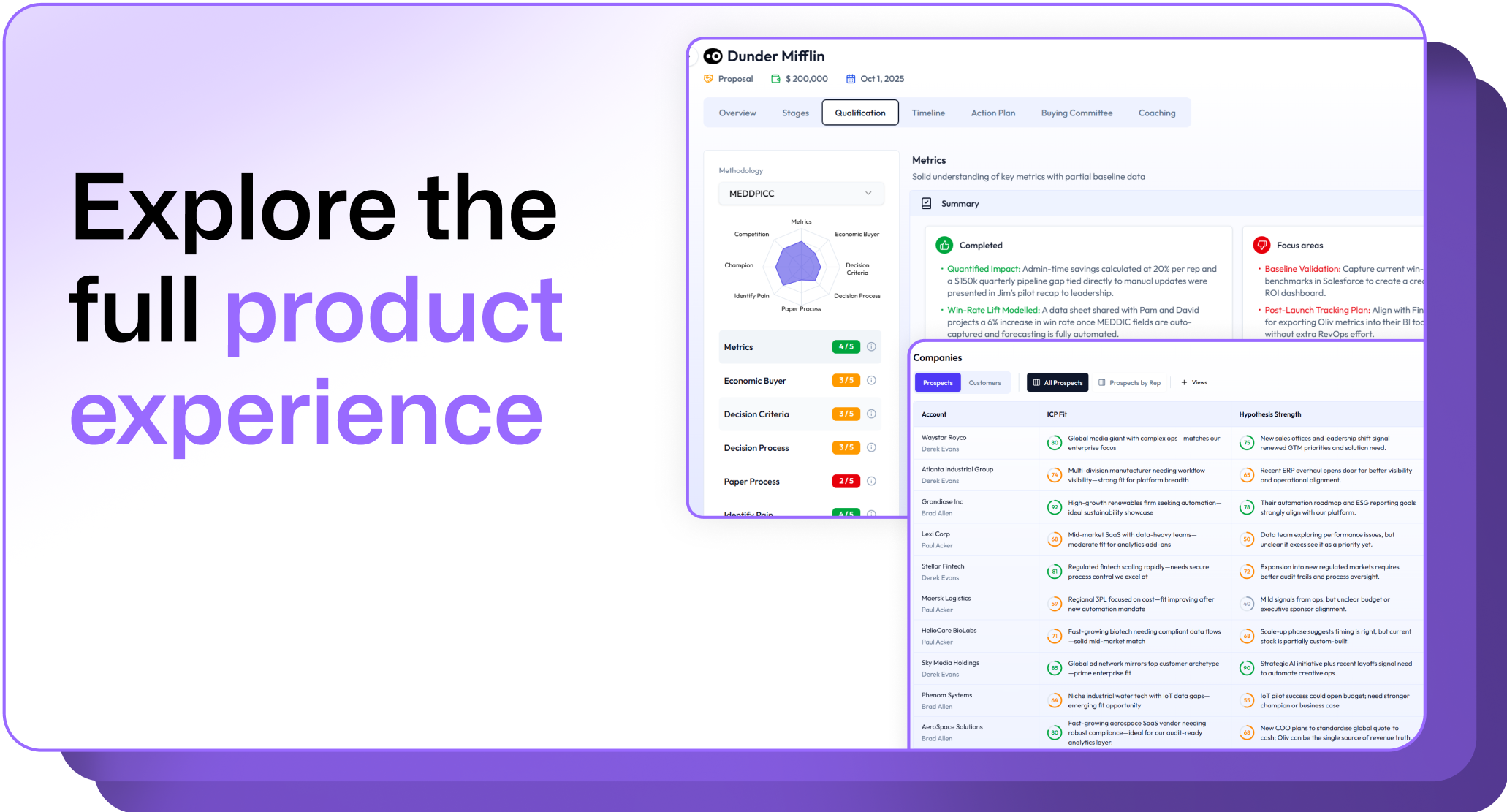
.avif)
.png)



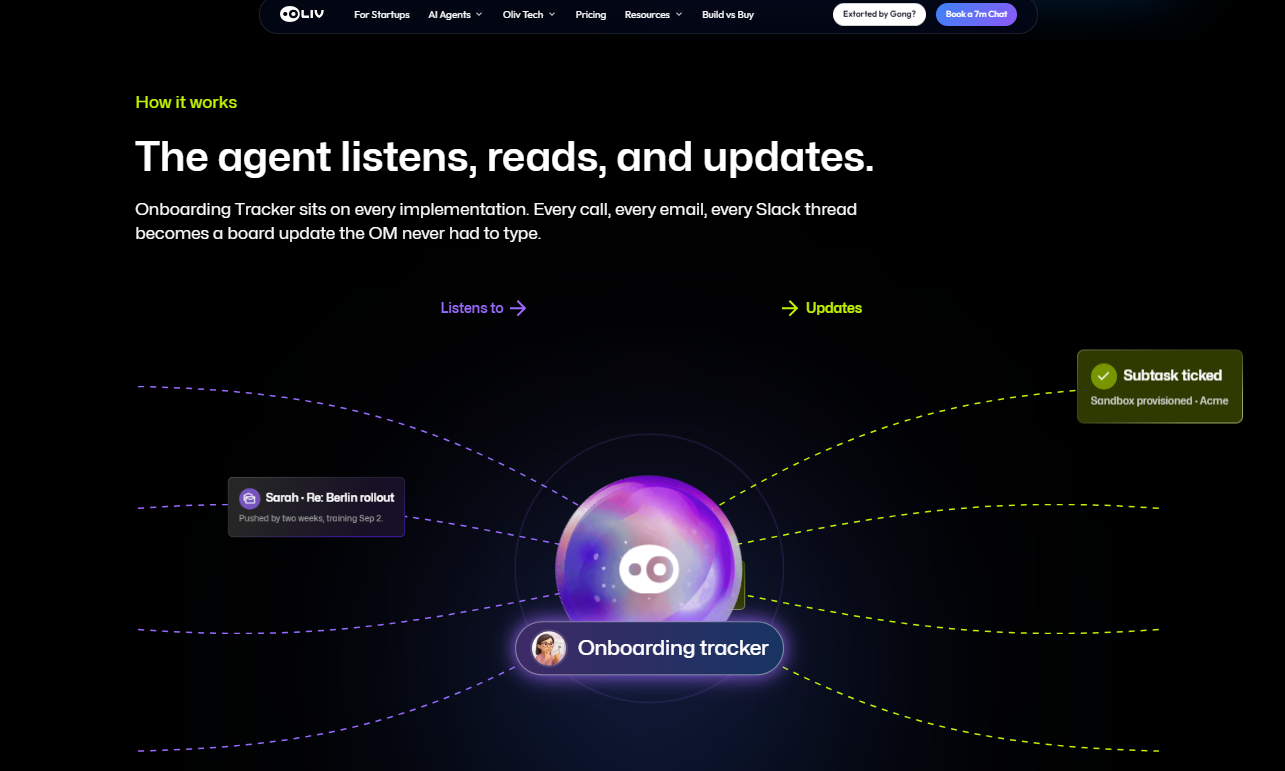
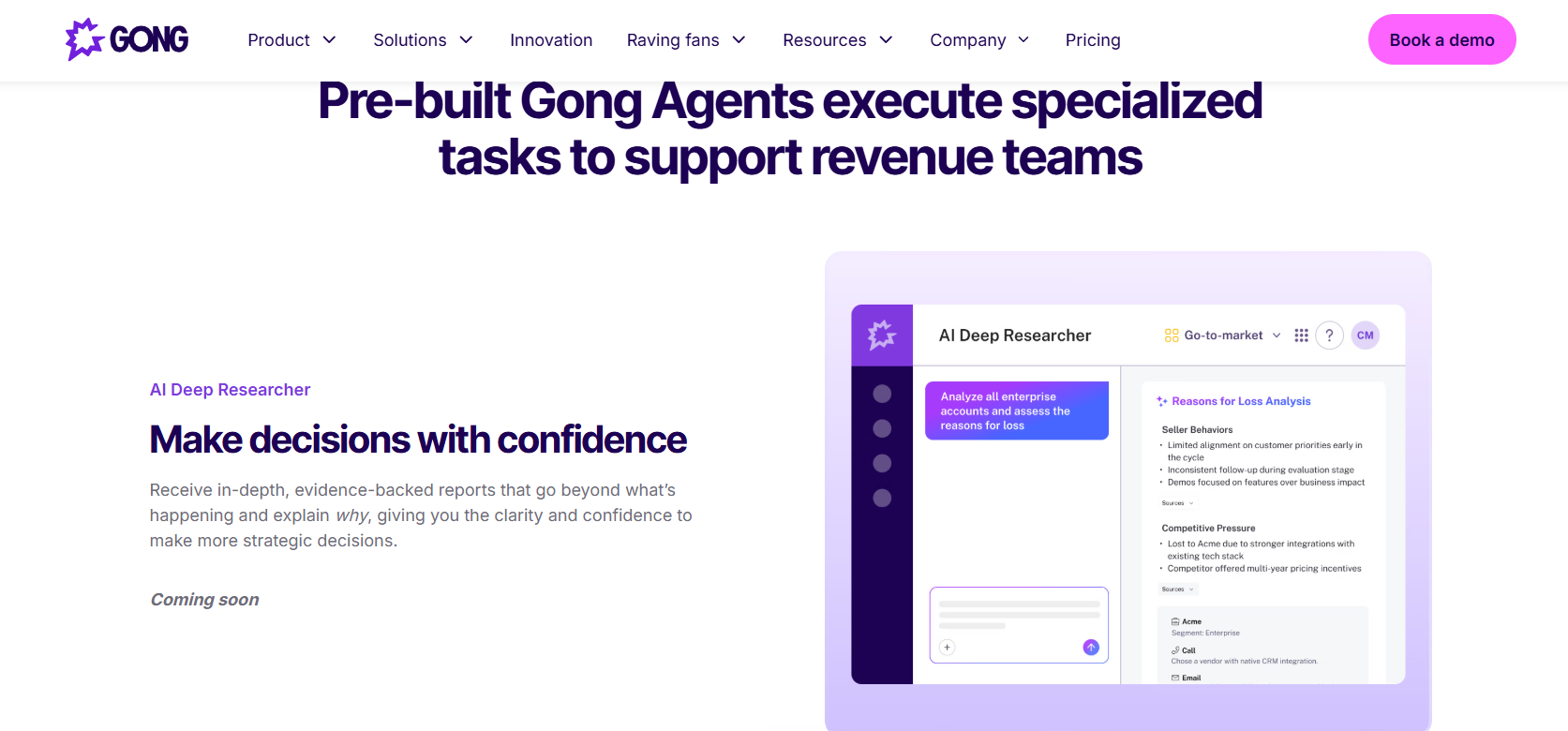
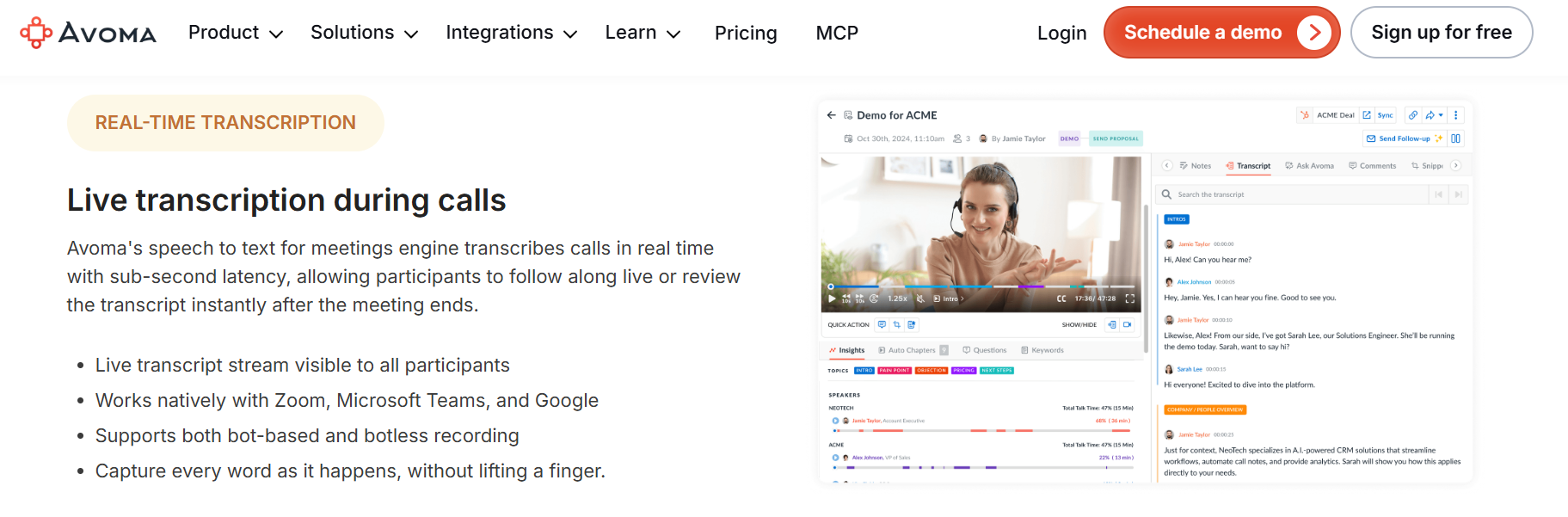
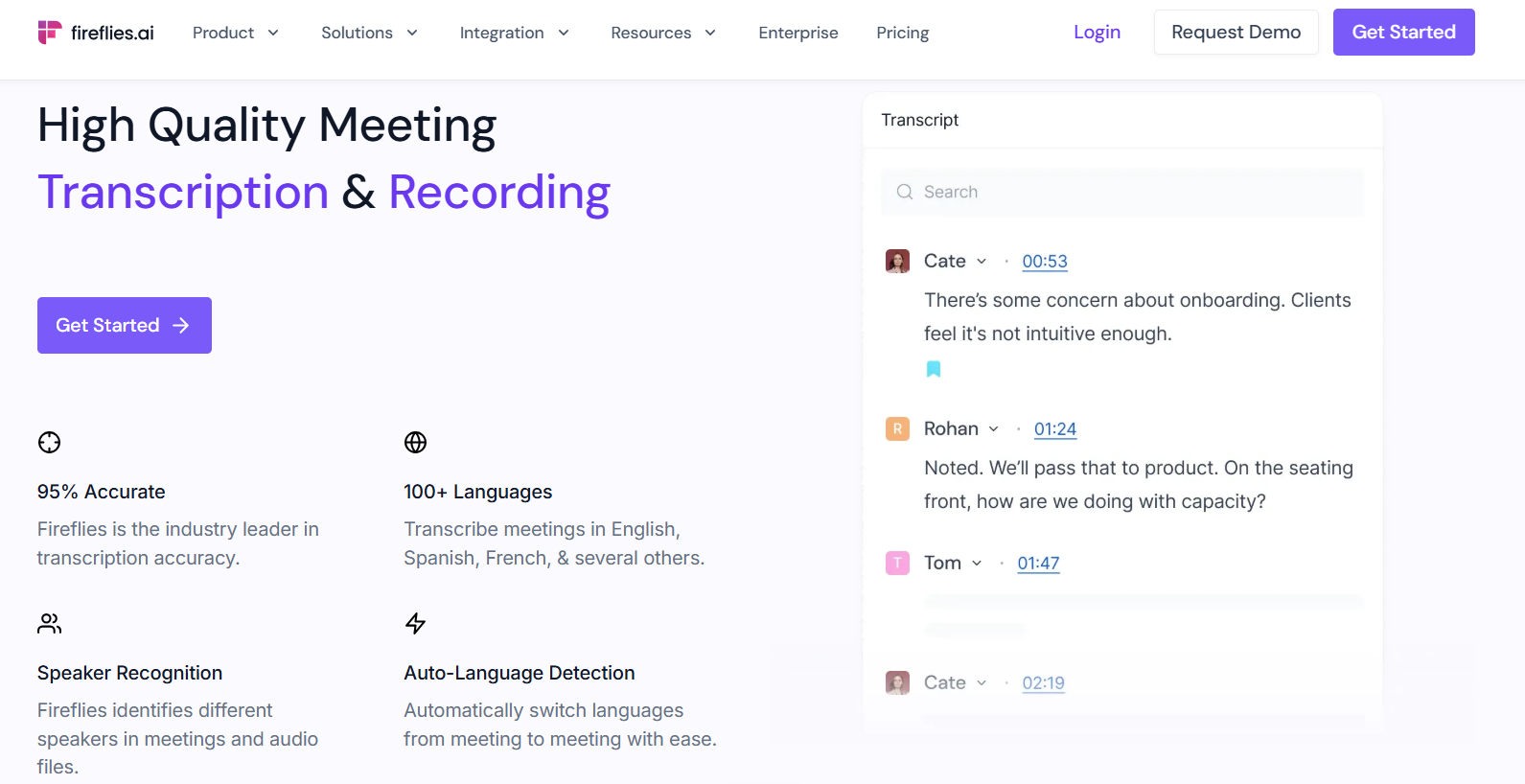

.png)
.png)
.png)

