10 Best AI Note-Taking Tools in 2026: Transcription, Summary Quality, Search, and Integrations
Written by
Ishan Chhabra
Last Updated :
August 3, 2026
Skim in :
13
mins
In this article
Revenue teams love Oliv
Here’s why:
All your deal data unified (from 30+ tools and tabs).
Insights are delivered to you directly, no digging.
AI agents automate tasks for you.
Thank you! Your submission has been received!
Oops! Something went wrong while submitting the form.
Meet Oliv’s AI Agents
Hi! I’m, Deal Driver
I track deals, flag risks, send weekly pipeline updates and give sales managers full visibility into deal progress
Hi! I’m, CRM Manager
I maintain CRM hygiene by updating core, custom and qualification fields all without your team lifting a finger
Hi! I’m, Forecaster
I build accurate forecasts based on real deal movement and tell you which deals to pull in to hit your number
Hi! I’m, Coach
I believe performance fuels revenue. I spot skill gaps, score calls and build coaching plans to help every rep level up
Hi! I’m, Prospector
I dig into target accounts to surface the right contacts, tailor and time outreach so you always strike when it counts
Hi! I’m, Pipeline tracker
I call reps to get deal updates, and deliver a real-time, CRM-synced roll-up view of deal progress
Hi! I’m, Analyst
I answer complex pipeline questions, uncover deal patterns, and build reports that guide strategic decisions
TL;DR
The 10 best AI note-taking tools in 2026 are Oliv AI, Avoma, Fathom, Fireflies.ai, Gong, Granola, Otter.ai, tl;dv, Jamie, and Read AI.
Transcription accuracy on clean audio is effectively solved, so we weighted summary quality at 30 percent and cross-meeting search at 20 percent instead.
The market has three layers: capture, intelligence, and agents. Most tools stop at layer two, which is why teams run five note-takers and still rebuild pipeline by hand.
Real writeback means structured CRM fields like stage, next step, and MEDDIC values, not a transcript attached to an activity record.
Paid entry plans cluster between 10 and 30 dollars per user monthly, but module stacking and free-tier storage purges decide actual three-year cost.
EU AI Act Article 50 transparency duties apply from 2 August 2026 and were not deferred, making disclosure behaviour a scoring column rather than a footnote.
Q1. What are the 10 best AI note-taking tools for revenue teams in 2026? [toc=1. Best Tools Ranked]
The 10 best AI note-taking tools in 2026 are Oliv AI, Avoma, Fathom, Fireflies.ai, Gong, Granola, Otter.ai, tl;dv, Jamie, and Read AI. Oliv AI leads for revenue teams because it works at deal level rather than meeting level, writing CRM fields, drafting follow-ups, and flagging deal risk from $19 per user per month.
🎧 Why five note-takers still leave you blind
Sit in any mid-market sales org today and count the bots in the participant list. There are usually three. Sometimes five.
A rep said something to me recently that stuck. "It's a wonderful world we live in when everyone's got five note-takers." Then came the honest part: "I'm bad at going back and reading the notes sometimes. And then sometimes mine just doesn't join."
That is the real state of the category. Capture is everywhere. Nobody reads the output.
🧱 The three-layer cake nobody prices correctly
I think about this market as three stacked layers, and most buyers pay for the wrong one.
Layer 1: capture. Recording and transcription. Zoom, Google Meet, and Microsoft Teams already do this natively. This layer should cost close to nothing.
Layer 2: intelligence. Summaries, topic tracking, and qualification fields like MEDDIC (a sales framework scoring metrics, economic buyer, decision criteria, and pain). This is table stakes in 2026.
Layer 3: agents. Something that writes to the CRM, drafts the follow-up, and tells a manager which deal is slipping before the forecast call.
Most tools on this list stop at layer two. That is why teams run five of them and still rebuild the pipeline picture by hand every Thursday.
📋 The 10 tools at a glance
Oliv AI, deal-level agents that update the CRM after every call
Avoma, meeting notes plus conversation intelligence in one subscription
Fathom, free unlimited recording with fast, clean summaries
Fireflies.ai, CRM-ready summaries and searchable call analytics
Gong, enterprise conversation intelligence with deep analytics
Granola, bot-free capture for sensitive client conversations
Otter.ai, live captions and collaborative meeting notes
tl;dv, highlight clips and video-first call review
Jamie, EU data residency with wide language coverage
Read AI, meeting analytics and engagement scoring
📊 Full comparison matrix
10 Best AI Note-Taking Tools Compared (2026)
#
Tool
Best for
Entry price
Capture method
CRM writeback
Rating
1
Oliv AI
Revenue teams needing deal-level execution, not notes
$19/user/mo
Bot joins Zoom, Meet, Teams
Field-level (MEDDIC, stage, next step)
⭐⭐⭐⭐⭐
2
Avoma
Teams wanting notes and coaching in one tool
$19/user/mo, up to $39
Bot-based
Native Salesforce and HubSpot sync
⭐⭐⭐⭐
3
Fathom
Solo AEs and small teams on a budget
Free tier, paid from ~$15/user/mo
Bot-based
Strong CRM sync, cited on G2
⭐⭐⭐⭐
4
Fireflies.ai
Searchable call libraries across a team
Free tier, paid ~$10 to $39/mo
Bot-based
Summary and note sync
⭐⭐⭐⭐
5
Gong
Enterprise analytics and large coaching programs
Custom, typically bundled
Bot-based
Deep, admin-heavy
⭐⭐⭐
6
Granola
Privacy-sensitive consulting and client calls
Paid, low per-seat
Bot-free, local audio
Limited
⭐⭐⭐⭐
7
Otter.ai
Live captions and internal collaboration
Free tier, paid entry tier
Bot-based
Light
⭐⭐⭐
8
tl;dv
Clip-driven review and async sharing
Free tier available
Bot-based
Moderate
⭐⭐⭐
9
Jamie
EU teams needing residency and many languages
Paid per seat
Bot-free
Light
⭐⭐⭐
10
Read AI
Managers tracking engagement signals
Free tier, paid tiers
Bot-based
Moderate
⭐⭐⭐
Ratings reflect the five-criteria rubric published in the next section, weighted toward summary quality and post-call action rather than transcript accuracy alone.
🧭 How to route yourself in one line
Solo AE with clean one-to-one calls: start on Fathom's free tier.
Consultant on sensitive client calls: Granola, because no bot appears.
Team drowning in CRM hygiene and forecast rework: an agentic platform, not a note-taker.
EU-heavy customer base: prioritise data residency before features.
Enterprise with a dedicated enablement team: Gong still earns its seat.
1.1 Oliv AI [toc=1.1 Oliv AI]
Oliv's evening voice agent phones revenue team members to fill capture gaps by voice, showing how AI note-taking tools recover context missed by recordings and integrations.
Oliv AI is an agentic revenue platform that starts as a note-taker and ends as a set of agents doing post-call work. It joins the call, transcribes it, then updates CRM properties, drafts the follow-up email, and flags deal risk without being asked.
⚙️ What it actually does
The distinction I keep coming back to is meeting level versus deal level.
Most tools understand one meeting. Oliv AI stitches conversations into a deal record, tracking pipeline movement, coaching gaps, and forecast confidence across the whole cycle. That is a different job from summarising a call.
Setup is fast. Train it on three meetings and it starts recognising your qualification methodology, whether that is MEDDIC, BANT, or a custom hybrid.
🔑 Key features
Deal-level context graph linking calls, emails, and CRM records to one opportunity
Field-level CRM writeback into Salesforce and HubSpot, including custom methodology fields
Pre-call briefs with account research and personalised talking points
Post-call follow-up drafts that split client to-dos from rep to-dos
Deal risk flagging surfaced before the weekly forecast review
No-sign-up shareable recording links, so prospects watch without creating an account
💰 Pricing and implementation
Entry pricing is $19 per user per month for the note-taker layer. Agents are added modularly rather than sold as one suite, so a 25-rep team can validate ROI on a single agent first.
Implementation is measured in minutes for basic setup. Full customisation, in my experience, still runs two to four weeks for teams with messy CRM schemas.
Multi-agent stack in production: CRM agent, Deal Driver, Forecast agent, Analyst, and Gold Digger for expansion opportunities
Expected next
Deeper autonomous forecasting and voice agent expansion, currently in early access, extending the AI sales tools stack
✅ Pros and ❌ cons
✅ Works at deal level, not just meeting level ✅ Writes structured CRM fields instead of attaching notes ✅ Learns your methodology from three meetings ✅ $19 entry price with modular agent add-ons ❌ Platform can be occasionally slow or glitchy under load ❌ Mobile app is basic compared to desktop ❌ Analytics dashboards need more customisation options ❌ Full customisation takes two to four weeks for complex setups
🎯 Best use case
Mid-market revenue teams of 25 to 200 reps where CRM hygiene is broken and managers spend Thursday and Friday manually scrubbing the forecast. That specific pain is what the agent layer removes.
It is not the right fit for B2C support teams or anyone who only needs call recording. If recording is the whole requirement, Zoom already does it free.
Oliv AI's read is that the standard advice gets this backwards. Buyers shop for transcript accuracy when the accuracy gaps closed two years ago. The unsolved problem is that nobody reads the notes, and we built the agent layer because reading was always the bottleneck.
🗣️ What users actually say
"I love how Oliv AI provides real-time deal risk insights and actionable steps to mitigate them... saving me over 10 hours a week on admin tasks with auto note-taking and call summarization. The only downside is that the platform can be a bit glitchy at times, but the support team is always quick to address and resolve any bugs." Verified User, SalesOliv AI G2 Verified Review, 2 July 2026 ⭐⭐⭐⭐⭐
"I also like how Oliv.ai joins all my meetings flawlessly and gets my transcripts absolutely right, which is more than I can say for other meeting tools I've tried... The meeting summaries are solid, dealing with tasks like separating to-dos between the client and myself. Additionally, setting up Oliv.ai was straightforward and could be done in just five to fifteen minutes." Verified User, SalesOliv AI G2 Verified Review, 15 June 2026 ⭐⭐⭐⭐⭐
"I'd love to see few more options to customize dashboards and reports for different teams." Verified User, SalesOliv AI G2 Verified Review, 26 June 2026 ⭐⭐⭐⭐
1.2 Avoma [toc=1.2 Avoma]
Avoma converts raw transcripts into structured summaries with decisions, objections, and owner-assigned action items, illustrating summary quality that separates strong AI meeting assistants from basic transcription.
Avoma is an AI meeting assistant that bundles note-taking, conversation intelligence, and revenue intelligence into tiered subscriptions. It sits between a pure note-taker and a full enterprise platform, which is exactly its appeal for teams that cannot justify Gong pricing.
⚙️ What it actually does
Avoma records and transcribes meetings, generates structured notes, and scores calls for coaching. Ask Avoma lets managers query across past conversations rather than scrubbing recordings.
Its scheduler and lead router extend it slightly beyond the meeting itself, which most note-takers do not attempt.
🔑 Key features
AI meeting notes with topic-based structure and action items
Conversation intelligence with keyword and talk-ratio analytics
Native Salesforce and HubSpot sync for notes and captured fields
Ask Avoma for cross-meeting retrieval
Scheduler and lead router as add-on modules
💰 Pricing and implementation
Avoma starts at $19 per user per month for the AI Meeting Assistant tier and scales through roughly $29 and $39 per user per month. Conversation Intelligence and Revenue Intelligence are priced as separate per-seat modules, which is where real cost climbs.
One breakdown puts the realistic all-in figure closer to $48 to $77 per seat once modules stack. Budget for that, not the headline number.
📅 Product evolution
Avoma Product Timeline
Period
What changed
Through 2025
Core AI meeting assistant, transcription, coaching scorecards, and CRM sync established across sales and CS teams, detailed in this Avoma features breakdown
2026 to date
Ask Avoma retrieval, expanded revenue intelligence tier, and continued monthly product updates through June 2026
Expected next
Deeper agentic workflows and broader CRM automation, based on the current product direction score of 9.5 on G2
✅ Pros and ❌ cons
✅ Strong G2 standing at 4.6/5 across 1,352 verified reviews ✅ Notes plus coaching in a single subscription ✅ Fast adoption with Zoom and Google Meet ✅ Product direction rated 9.5, ahead of Gong's 9.0 ❌ Transcription accuracy drops in high-noise environments and with strong accents ❌ Module stacking pushes real cost well past the $19 headline ❌ Reported around 95% accuracy on clean audio, falling to roughly 80% in difficult conditions ❌ Weaker at deal-level execution than at meeting-level analysis
🎯 Where Avoma fits best
Sales and customer success teams of 10 to 100 people who want coaching and notes from one vendor, and who run mostly clean audio calls. It performs well when the primary job is post-meeting review. More patterns are collected in this Avoma user feedback analysis.
The scaling ceiling is real, though. Avoma is strongest at analysing the meeting and weakest at driving what happens after it.
Oliv AI overlaps with Avoma on notes and coaching, then diverges at the agent layer, where G2 reviewers describe CRM properties updating automatically rather than transcripts being attached to a record.
🗣️ What Avoma users report
"Avoma helps us track discovery calls better and identify areas that need improvement. It captures requirements from discovery calls and syncs them directly to Salesforce." Satwick S., Co-Founder & CROAvoma G2 Verified Review ⭐⭐⭐⭐⭐
"What Avoma has also allowed us to do (primarily myself as Head of Sales) is quickly identify where my team needs coaching." Mark P., Head of Sales and PartnershipsAvoma G2 Verified Review ⭐⭐⭐⭐⭐
"Transcription accuracy can vary, particularly in challenging audio conditions. Sometimes the automatic notes are not perfectly accurate." Verified User, SalesAvoma G2 Verified Review ⭐⭐⭐
1.3 Fathom [toc=1.3 Fathom]
Fathom highlights bot-free recording, an Ask Fathom query interface across past meetings, and instant summaries, plus SOC 2, GDPR, and HIPAA compliance badges for enterprise buyers.
Fathom is a free AI note-taker that records, transcribes, and summarizes meetings, then pushes summaries into your CRM. It holds 4.8/5 across 6,600+ G2 reviews, making it the highest-volume satisfaction leader in the category.
⚙️ What it actually does
Fathom joins your call as a bot, records it, and produces a summary within minutes of hangup. The free tier is genuinely generous, which is rare here.
Ask Fathom lets you query past calls. Reviewers describe it as functional but not especially sharp.
🔑 Key features
Unlimited recording and transcription on the free plan
AI summaries with action items delivered minutes after the call
Ask Fathom for cross-meeting questions
CRM sync into Salesforce and HubSpot, its strongest G2 differentiator
Highlight clips for sharing key moments
Desktop app for in-person and non-calendar meetings
💰 Pricing and implementation
The free plan covers unlimited recordings for individuals. Paid tiers run roughly $15 to $29 per user per month, with advanced integrations locked behind higher plans.
Setup takes under ten minutes. That is the whole pitch.
📅 Product evolution
Fathom Product Timeline
Period
What changed
Through 2025
Bot-based capture across Zoom, Meet, and Teams, plus free unlimited recording and standard CRM push, the baseline for most AI tools for sales calls
2026 to date
Desktop app capture, Ask Fathom retrieval, and expanded integration tiers, reflected across 6,600+ G2 reviews
Expected next
Deeper native connectors, with users specifically requesting Monday.com support currently solved via external automation
✅ Pros and ❌ cons
✅ Free tier with unlimited recording, unusual at this quality level ✅ 4.8/5 on G2 from over 6,600 reviews ✅ Summaries land fast, often before you leave the call ✅ Strong CRM sync cited by G2 as a category differentiator ❌ 342 reviewers report recording glitches, including drops mid-meeting ❌ 195 reviewers flag AI inaccuracy and thin sales-specific features ❌ 212 reviewers raise concerns about unwanted recordings and compliance ❌ No data portability if your company email is deactivated
🎯 Best use case
Solo AEs, founders selling, and teams under 20 people who need reliable notes without a procurement cycle. Fathom is the correct default when budget is the constraint.
The ceiling shows up around 25 reps. At that point, you need field-level CRM writeback and deal-level context, and notes stop being enough.
🗣️ What users actually say
"Honestly, my biggest complaint is that I didn't discover Fathom sooner. It removes all my excuses to procrastinate because my meeting notes, summaries, and action items are handled." Verified User, SalesFathom G2 Verified Review, 2026 ⭐⭐⭐⭐⭐
"Fathom's summaries can occasionally miss important context or the nuance of certain discussions. I've also noticed that some of the more advanced features and integrations are limited to higher-tier plans." Verified User, SalesFathom G2 Verified Review, 2026 ⭐⭐⭐⭐
"Pricing is high for a regular user. Overall desktop app performance lags a bit. Once a meeting ended but the desktop app kept recording until the next morning. If my company email is closed, I can't take my notes with me." Verified User, SalesFathom G2 Verified Review, 2026 ⭐⭐⭐
1.4 Fireflies.ai [toc=1.4 Fireflies.ai]
Fireflies.ai displays searchable meeting transcripts with speaker labels and timestamps, alongside claims of 95% accuracy and 100-plus language support for multilingual automated note-taking.
Fireflies.ai is a meeting assistant built around a searchable transcript library. It records calls, generates summaries, and lets teams query conversations through its AskFred assistant.
⚙️ How Fireflies handles capture
Fireflies joins as a bot across Zoom, Meet, Teams, and dialers. It builds a central library where any rep can search what was said across the whole team.
The search layer is its real product. Notes are the byproduct.
🔑 Core capabilities
Searchable transcript library across all team meetings
AskFred for natural-language questions about past calls
Conversation analytics including talk time and sentiment
CRM-ready summaries pushed to Salesforce and HubSpot
Soundbites for clipping and sharing moments
60+ integrations including Slack and Notion
💰 What Fireflies costs
Fireflies runs a free tier with limits, then paid plans from roughly $10 to $39 per user per month. That makes it one of the cheaper team-wide options.
Rollout is fast. Getting a team to actually search the library is the harder part.
📅 Product evolution
Fireflies.ai Product Timeline
Period
What changed
Through 2025
Bot-based capture, searchable transcript library, AskFred queries, and conversation analytics across 60+ integrations
2026 to date
Refined summary formats, auto-join reliability improvements, and expanded CRM sync, tested across 10+ real meetings in independent reviews
Expected next
Deeper AI apps layer and workflow automation on top of the transcript library, moving it closer to a revenue intelligence platform
✅ Pros and ❌ cons
✅ Best-in-class searchable library for teams ✅ Low per-seat cost starting near $10 per month ✅ Wide integration surface across 60+ tools ✅ Free tier available for evaluation ❌ Summary depth is thinner than coaching-focused tools ❌ Analytics are descriptive, not prescriptive, so nobody acts on them ❌ Sales-specific methodology fields are not natively captured ❌ Value depends entirely on team adoption of search behaviour
🎯 Where Fireflies fits
Teams that need one shared, searchable record of every customer conversation across sales, support, and product. Fireflies is the cheapest credible way to build that.
It stops short of driving action. The library tells you what was said, not which deal is about to slip.
1.5 Gong [toc=1.5 Gong]
Gong is the enterprise conversation intelligence platform that defined the category. It records calls, analyzes patterns across thousands of conversations, and feeds deal and forecast dashboards.
⚙️ What Gong actually does
Gong understands conversations at a meeting level with genuine depth. Smart Trackers detect topics, competitor mentions, and methodology signals across a call library.
In 2026, it repositioned as a "Revenue AI Operating System," adding Gong Assistant, Agent Studio, AI Theme Spotter, and Data Extractor. Mission Andromeda in February 2026 added Gong Enable for coaching and enablement.
🔑 Platform features
Smart Trackers for topic and competitor detection at scale
AI Theme Spotter analyzing tens of thousands of calls
Data Extractor mapping AI-extracted fields into the CRM
Gong does not publish list pricing. Bundled deployments commonly land near $250 per user per year-equivalent seat cost once platform fees are included, which is the number I hear most often in mid-market renewals, and this Gong pricing analysis maps the tiers.
Implementation is not a ten-minute affair. Expect admin configuration, tracker tuning, and an enablement owner, as the Gong implementation timeline shows.
📅 Product evolution
Gong Product Timeline
Period
What changed
Through Dec 2025
Smart Trackers, AI briefs, Agent Studio, AI Call Reviewer, and Data Extractor for automatic CRM field mapping
Feb to May 2026
Mission Andromeda launched Gong Enable, conversational guidance, unified account management, plus AI coaching after AI Trainer practice
Expected next
Bidirectional MCP server support and briefs via API, both listed as coming soon
✅ Pros and ❌ cons
✅ Deepest conversation analytics available at enterprise scale ✅ Strong analyst and market validation, with ARR past $500M in May 2026 ✅ Mature integration ecosystem with 250+ partners ❌ Smart Trackers are keyword-era technology in a generative-model world ❌ Post-call processing runs roughly 20 to 30 minutes versus five minutes on newer platforms ❌ Recording links typically require recipients to sign up before viewing ❌ Activity dashboards show volume of emails and calls without showing what was actually said inside them ❌ Understands the meeting well, the deal less so
⚠️ The activity volume trap
Here is the pattern I see most in Gong-heavy orgs. The dashboard shows an AE and prospect exchanging lots of emails and calls.
Everything looks healthy. Then the deal dies, because volume was never the signal. Teams hitting this wall usually start evaluating Gong alternatives.
🎯 Who Gong suits
Enterprises with 200+ reps, a dedicated enablement team, and budget for a platform owner. Gong earns its price when someone is paid to run it.
For a 25 to 200 rep team without that headcount, the seat cost buys dashboards nobody opens.
1.6 Granola [toc=1.6 Granola]
Granola is a bot-free AI note-taker that captures system audio directly on your device. No bot appears in the participant list, and no recording prompt interrupts the call.
⚙️ How bot-free capture works
Granola listens through your Mac's audio, blends your typed notes with the full transcript, and produces a polished summary. Recipes let you run slash-command prompts across your meeting history.
Audio is deleted immediately after processing. That is a privacy feature and a real limitation at once.
🔑 Granola's feature set
Bot-free capture across Zoom, Teams, and Slack huddles
Enhance Notes blending your typed observations with the transcript
Recipes for slash-command prompts and cross-meeting patterns
Automatic meeting detection via calendar or active microphone
Zapier integration connecting to 8,000+ apps on paid plans
💰 Granola pricing
The free Basic plan allows 25 lifetime meetings with 14 days of history. The Business plan is $14 per user per month for unlimited notes and Zapier.
It is meaningfully cheaper than Jamie, its closest bot-free rival.
📅 Product evolution
Granola Product Timeline
Period
What changed
Through 2025
Mac-only bot-free capture with Enhance Notes merging user typing and device audio
2026 to date
Recipes slash commands, automatic microphone-based meeting detection, and Zapier connectivity on Business plans
Expected next
Android support remains absent, and audio playback is unlikely given the delete-after-processing design
✅ Pros and ❌ cons
✅ No bot means no awkwardness on sensitive client calls ✅ $14 per user per month for unlimited notes ✅ Top-quartile G2 satisfaction alongside Fathom ✅ Audio deleted after processing, a genuine privacy design choice ❌ No audio playback, so a missed detail is gone permanently ❌ Speaker identification uses generic labels, not names, on group calls ❌ Accuracy sits around 90 to 95% on clear audio, with custom jargon disabled in multi-language mode ❌ Battery drain on back-to-back calls, and no Android support
🎯 Granola's ideal buyer
Consultants, founders, and anyone running external client calls where a visible bot changes the conversation. Granola is the strongest option in that specific lane.
It is the wrong fit for a revenue team that needs shareable recordings, speaker-attributed coaching, or CRM writeback.
1.7 Otter.ai [toc=1.7 Otter.ai]
Otter.ai is one of the longest-running transcription tools in the category, built around live captions and collaborative notes. It holds 4.4/5 across 492 G2 reviews.
⚙️ Otter's live transcription model
Otter transcribes in real time, so you can read captions while the meeting runs. Teams can comment and highlight inside the live transcript.
Otter Chat answers questions about the meeting. Its sales-specific depth is limited.
🔑 What Otter includes
Real-time live transcription and captions
Collaborative highlighting and commenting in-transcript
Otter Chat for meeting questions
Automatic slide capture from screen shares
Zoom, Meet, and Teams integration
💰 Otter tiers and setup
Otter runs a free tier with monthly minute caps, then Pro and Business tiers per seat. The caps are where most teams hit friction.
Setup is trivial. Language support is comparatively narrow at around five languages.
✅ Pros and ❌ cons
✅ Best live-caption experience in the category ✅ Genuinely useful for accessibility and note-sharing in real time ✅ Long track record and familiar interface ❌ 4.4/5 on G2, the lowest of the major note-takers ❌ Free tier minute caps hit fast on a normal meeting load ❌ Narrow language coverage versus tools supporting 100+ ❌ Summaries lack the sales structure that revenue teams need ❌ Independent testers report it losing head-to-head against Fathom
🎯 Otter's strongest lane
Internal teams, education, journalism, and accessibility use cases where live captions matter more than post-call action. Otter still owns that job.
🗣️ What reviewers report
"In my opinion, Fathom is the best AI note taker on the market. Our internal team reviews tools like this before we roll them out to staff, and we tested several alternatives including read.ai and otter.ai. None of them come close to Fathom." Verified User, OperationsFathom G2 Verified Review, 2026 ⭐⭐⭐⭐⭐
1.8 tl;dv [toc=1.8 tl;dv]
tl;dv is a video-first meeting recorder built around clipping and async sharing. It holds 4.7/5 across 511 G2 reviews.
⚙️ The clip-first workflow
tl;dv records the call, timestamps key moments, and makes it easy to cut a 45-second clip. That clip goes to Slack, a customer, or a product team.
The clip is the unit of value here, not the transcript.
🔑 tl;dv capabilities
Timestamped highlight clips with one-click sharing
Multi-language transcription with wide coverage
CRM and Slack push for clips and notes
Speaker-level talk-time analytics
Generous free tier for individuals
💰 tl;dv cost structure
A free tier covers unlimited recordings with limits on AI features. Paid plans sit in the low per-seat range, below most competitors.
✅ Pros and ❌ cons
✅ 4.7/5 on G2 from 511 reviews ✅ Best clipping workflow in the category ✅ Strong multi-language transcription ✅ Cost-effective free tier for small teams ❌ Deal-level intelligence is minimal ❌ CRM writeback attaches notes rather than filling structured fields ❌ Analytics are lighter than dedicated conversation intelligence tools ❌ Clip culture requires team discipline to sustain
🎯 Who should pick tl;dv
Product, research, and customer success teams who need to circulate the exact 40 seconds a customer said something important. It is a sharing tool that happens to take notes.
1.9 Jamie [toc=1.9 Jamie]
Jamie is a bot-free, privacy-first note-taker built for European teams. Its differentiators are data residency and language breadth.
⚙️ Jamie's capture approach
Jamie captures device audio without joining as a participant. It supports well over 100 languages, against roughly five on Otter.
For EU-regulated buyers, the residency story does more selling than the feature list.
🔑 Jamie's differentiators
Bot-free capture with no participant visibility
Support for 100+ languages
EU data residency and GDPR-aligned handling
Structured summaries with action items
Works across in-person and virtual meetings
💰 Jamie's price position
Jamie is priced per seat and is notably more expensive than Granola, its closest bot-free competitor. That premium buys residency and language coverage.
✅ Pros and ❌ cons
✅ 100+ language support, widest in this list ✅ EU data residency, increasingly a procurement gate ✅ Bot-free, so no awkward participant in client calls ❌ Meaningfully pricier than Granola for similar bot-free capture ❌ Limited CRM writeback and no deal-level intelligence ❌ Smaller integration ecosystem than US-centric competitors ❌ No conversation analytics for coaching
🎯 Jamie's core market
EU-headquartered teams, multilingual sales orgs, and regulated industries where where the data lives is a gating question before features are even discussed.
1.10 Read AI [toc=1.10 Read AI]
Read AI adds meeting analytics on top of notes, scoring engagement, sentiment, and participation. It is the most manager-facing tool on this list.
⚙️ The analytics layer
Read AI produces a summary, then layers behavioural metrics: who spoke, who disengaged, and how sentiment moved. It extends into email and messaging for a broader activity view.
🔑 Read AI features
Engagement and sentiment scoring per participant
Meeting summaries with action items
Speaker coaching metrics on talk time and pacing, overlapping with dedicated sales coaching software
Cross-channel view spanning meetings, email, and messages
Calendar-based auto-join
💰 Read AI pricing
A free tier exists with meeting caps, scaling through per-seat paid tiers. It is mid-range on cost.
✅ Pros and ❌ cons
✅ Unique engagement analytics no other note-taker matches ✅ Useful for managers assessing meeting health ✅ Cross-channel activity view beyond calls ❌ Engagement scores are directional, not diagnostic ❌ Tested against Fathom by internal review teams and found weaker ❌ Sentiment scoring can misread cultural and communication differences ❌ No structured CRM field writeback for methodology tracking
🎯 Read AI's best fit
Managers who want to see meeting engagement patterns across a team. Treat the scores as a conversation starter, not evidence.
🧩 What this list actually shows
Nine of these ten tools solve capture and summarisation well. Accuracy differences on clean audio have basically closed.
The split that matters now is what happens after the call ends. Most of this list hands you a document and stops.
Oliv AI closes that gap by operating at deal level, updating CRM properties, drafting follow-ups, and flagging risk within about five minutes of hangup, which G2 reviewers cite as the reason admin time dropped by ten hours a week. That is the shift from notes to a working revenue orchestration platform, and it is where the best AI sales tools are heading next.
Q2. How were these tools tested and scored? [toc=2. Scoring Methodology]
Each tool was scored on five weighted criteria totalling 100: summary quality and action-item accuracy (30%), transcription accuracy under real conditions (25%), cross-meeting search (20%), CRM and workflow integrations (15%), and trust, pricing transparency, plus Article 50 readiness (10%). Scores of 81 to 100 earn 5 stars, 61 to 80 four, 41 to 60 three, 21 to 40 two, and 0 to 20 one.
⚖️ Why summary quality outweighs transcription
Transcription used to be the whole product. It is not anymore.
Verified reviews across the AI meeting assistant category average around 4.2 out of 5, and the recurring complaints are not about words being wrong. They are about background noise, multiple speakers, and summaries that miss what mattered.
So summary quality gets the heaviest weight at 30%. Transcription still matters at 25%, because a broken transcript poisons everything downstream.
🎙️ Test conditions: messy calls, not clean ones
Every tool was run on the same four call types: clean one-to-one, noisy six-person call with crosstalk, a call with two non-native accents, and an in-person meeting recorded on a laptop.
Vendors quote accuracy figures from clean audio. One independent test found Avoma at roughly 95% on clean audio, dropping to about 80% under technical jargon and difficult conditions. That 15-point gap is where buying decisions actually get made.
📚 Why vendor marketing was excluded
None of these scores came from vendor websites. That is deliberate.
If you feed an AI model a category's marketing pages, it credits whoever published the most content. Gong publishes a lot. That is a content budget, not a product advantage.
Scores were built from verified G2 reviews, independent hands-on tests, and published pricing pages only.
🧮 The scoring rubric
Weighted Scoring Rubric for AI Note-Taking Tools
Criterion
Weight
What it measures
Summary quality and action items
30%
Recall, owner attribution, numeric fidelity, and hallucinated commitments
Transcription accuracy
25%
Word error under noise, crosstalk, accents, and in-person audio
Cross-meeting search
20%
Factual recall across months, not keyword matching
CRM and workflow integrations
15%
Structured field writeback versus note attachment
Trust, pricing, and compliance
10%
Data residency, disclosure behaviour, and pricing transparency
⭐ Final scores by tool
Final Weighted Scores by Tool (2026)
Tool
Score
Stars
Oliv AI
91
⭐⭐⭐⭐⭐
Avoma
78
⭐⭐⭐⭐
Fathom
76
⭐⭐⭐⭐
Fireflies.ai
72
⭐⭐⭐⭐
Granola
69
⭐⭐⭐⭐
tl;dv
64
⭐⭐⭐⭐
Gong
58
⭐⭐⭐
Read AI
54
⭐⭐⭐
Jamie
52
⭐⭐⭐
Otter.ai
49
⭐⭐⭐
Gong scores lower than its market position suggests, and that deserves an honest note. It leads on analytics depth. It loses points on pricing opacity, admin overhead, and post-call processing speed.
🔁 How to re-run this on your own stack
Oliv AI measures methodology adherence by learning from three of your recorded meetings, which is also the cheapest way to test any vendor's claim about custom frameworks. Give each tool three real calls. Then check whether it can fill your MEDDIC or BANT fields without a human editing them.
That single test separates the shortlist faster than any feature grid.
Oliv AI scores 5 stars here on the strength of deal-level summary structure and field-level CRM writeback, not transcript accuracy, where the top six tools are effectively tied.
Q3. Bot or bot-free: which capture method is most accurate across Zoom, Teams, and Meet? [toc=3. Capture & Accuracy]
Bot-based tools join as a visible attendee. Bot-free tools capture system audio locally with nobody in the participant list. On clean audio, accuracy across leading tools is near-identical. Gaps reappear on noisy six-person calls with crosstalk and accents. Language coverage is the sharper split, with roughly five languages on some tools versus 100+ on others.
🤖 The trade-off nobody prices honestly
A bot in the participant list changes the room. People self-edit. That is a real cost on a sensitive negotiation call.
But bot-free capture takes something away too. Granola deletes audio immediately after processing, so if the transcript missed a number, it is gone permanently.
Bot-Based Versus Bot-Free Capture
Factor
Bot-based
Bot-free
Participant candour
Lower, bot is visible
Higher, invisible capture
Shareable recording
Yes, full playback
Usually none
Speaker attribution
Named speakers
Generic labels on group calls
In-person meetings
Weak
Strong
Disclosure compliance
Easier, bot announces itself
Manual disclosure required
CRM writeback
Common
Limited
🔊 What actually breaks accuracy
Clean audio is a solved problem. Every tool in the top six lands in the same narrow band.
Then you add four people talking over each other, a dog, and an accent the model has not heard much. Granola sits around 90 to 95% on clear audio, and its custom jargon feature disables itself in multi-language mode.
Accuracy by Test Condition
Test condition
Typical performance
Clean one-to-one
95%+ across all major tools
Noisy six-person call
Drops sharply, the top G2 complaint
Strong accents
Roughly 80% on some tools
In-person laptop audio
Bot-free tools lead here
⚠️ The failure mode nobody tests for
The bot not joining at all is more common than anyone admits. A rep put it to me plainly: it is roughly 50/50 whether their note-taker shows up, and they assume it did.
That assumption is expensive. You leave a discovery call thinking you have a record, then find nothing.
Fathom carries 342 reviews reporting recording glitches, including sessions that drop mid-meeting or keep recording afterwards. Reliability is a feature. Test it before you trust it.
🌍 Platform and language coverage
Platform and Language Coverage by Tool
Tool
Zoom
Meet
Teams
In-person
Languages
Oliv AI
✅
✅
✅
Limited
Multi-language
Fathom
✅
✅
✅
✅ desktop app
Wide
Granola
✅
✅
✅ Slack too
✅ strong
Multi, jargon off
Jamie
✅
✅
✅
✅
100+
Otter.ai
✅
✅
✅
Moderate
~5
🔗 The sign-up friction tax
Here is a small thing with a big effect on deals. If your recording link forces the prospect to create an account first, most of them never watch it. That friction is one reason teams start reviewing Gong alternatives.
Oliv AI issues two links after every call, a view link and a plain shareable link that needs no sign-up, which removes that friction entirely.
🗣️ What users actually say
"I also like how Oliv.ai joins all my meetings flawlessly and gets my transcripts absolutely right, which is more than I can say for other meeting tools I've tried." Verified User, SalesOliv AI G2 Verified Review, 15 Jun 2026 ⭐⭐⭐⭐⭐
"Once a meeting ended but the desktop app kept recording until the next morning." Verified User, SalesFathom G2 Verified Review, 2026 ⭐⭐⭐
"Transcription accuracy can vary, particularly in challenging audio conditions." Verified User, SalesAvoma G2 Verified Review, 2026 ⭐⭐⭐
Oliv AI runs bot-based capture across Zoom, Google Meet, and Microsoft Teams, and reviewers cite reliable auto-join as the difference they noticed against previous tools. Reliability, not raw accuracy, is where we saw the real switching trigger.
Q4. How do you measure summary quality, and when does a note-taker become a revenue agent? [toc=4. Summary Quality & Agents]
Score summaries on four checks: action-item recall against your own notes, correct owner attribution, numeric fidelity (did quoted prices and dates survive?), and hallucinated commitments per call. Tools that pass all four still stop at summarizing. Gartner projects 40% of enterprise applications will carry task-specific AI agents by 2026, up from under 5%, so the rung above summarizing is doing the work.
✅ The four checks, scored
Run these on one real discovery call. It takes twenty minutes and kills half your shortlist.
Four Summary Quality Checks and Pass Marks
Check
What to count
Pass mark
Action-item recall
Items you noted that the tool caught
90%+
Owner attribution
Correctly assigned to you or the client
95%+
Numeric fidelity
Prices, dates, and seat counts preserved exactly
100%
Hallucinated commitments
Promises nobody made
Zero
Numeric fidelity is the one people skip. A summary that turns "around $40,000" into "$40,000" has just created a commitment.
🧾 What the same call produces
Take one 45-minute discovery call with a CFO and a RevOps lead.
A basic note-taker returns a topic list and eight bullet points.
A coaching tool adds talk ratio and a competitor mention flag, similar to most sales coaching software.
An agentic platform returns a filled MEDDIC field set, a drafted follow-up, and a flag that no economic buyer was confirmed.
Oliv AI produces that third output within roughly five minutes of hangup, against the 20 to 30 minute processing window typical of older conversation intelligence platforms.
📊 The activity volume fallacy
This is the trap I see most in Gong-heavy orgs. The dashboard shows the AE and prospect exchanging calls and emails constantly.
Activity looks healthy. Nobody can tell you what was said inside any of it.
Volume was never the signal. A rep emailing daily into silence looks identical to a rep in an active negotiation.
🪜 The four-rung maturity ladder
Note-Taker to Revenue Agent Maturity Ladder
Rung
What it does
Example tools
1. Record
Capture audio and transcript
Zoom, Teams, Meet native
2. Summarize
Notes, action items, and topics
Fathom, Otter.ai, tl;dv
3. Sync
Push notes and analytics to CRM
Fireflies.ai, Avoma, Gong
4. Act
Write fields, draft follow-ups, and flag risk
Oliv AI
Most of the market lives on rungs two and three. That is fine if your problem is remembering what was said.
It is not fine if your problem is a CRM full of stale opportunities, which is the gap revenue intelligence platforms were built to close.
🔍 Why smart trackers are running out of road
Keyword trackers were smart in 2018. You listed terms, and the system flagged them.
Generative models do something different. You ask a question of the whole account and get an answer, without knowing in advance which word to track. That shift is what pushes teams from revenue intelligence into orchestration.
🗣️ What reviewers report on summaries
"The biggest value of Oliv AI is its ability to operationalize customer conversations. It doesn't just record meetings; it automatically captures key insights, updates systems of record, identifies next steps, and helps keep teams aligned." Verified User, Revenue OperationsOliv AI G2 Verified Review, 23 Jun 2026 ⭐⭐⭐⭐⭐
"The meeting summaries are solid, dealing with tasks like separating to-dos between the client and myself." Verified User, SalesOliv AI G2 Verified Review, 15 Jun 2026 ⭐⭐⭐⭐⭐
"Fathom's summaries can occasionally miss important context or the nuance of certain discussions." Verified User, SalesFathom G2 Verified Review, 2026 ⭐⭐⭐⭐
🗓️ What to do on Monday
Pull your last three closed-lost deals. Read what your current tool captured on the final call.
If the summary reads accurate but tells you nothing about why the deal died, you own a rung-two tool. Rescore your shortlist on post-call actions completed, not transcript quality, and weigh it against your AI sales forecasting software requirements.
Oliv AI sits on the fourth rung, and reviewers point to summaries that split client to-dos from rep to-dos and pre-draft the reply email. That owner-attribution test is the one most tools quietly fail.
Q5. Which tools have real cross-meeting search and genuine CRM writeback? [toc=5. Search & Integrations]
Ask one question: "What pricing did we quote Acme in March, and who objected?" Keyword search returns transcript fragments. Real retrieval returns the answer with deal context attached. Integrations split the same way. Tier one attaches a transcript to the activity record. Tier two writes structured fields like stage, next step, and MEDDIC values back to the CRM.
🔍 The Acme test, run properly
Run that exact query on your current tool. Time how long it takes you to get a usable answer.
Three outcomes are possible. You get transcript fragments to read yourself, a summary of one meeting, or the actual answer with the deal attached.
Oliv AI measures retrieval quality by whether the answer arrives with the opportunity record linked, not just the timestamp. Fragment-level search is fine for compliance. It is useless in a pipeline review.
Cross-Meeting Retrieval Results by Tool
Tool
Typical result for a cross-month query
Fireflies.ai
Strong fragment retrieval via AskFred
Fathom
Ask Fathom returns summaries, described as functional not sharp
Avoma
Ask Avoma searches across meetings well
Granola
Recipes surface patterns, but no audio to verify
Oliv AI
Answer tied to the deal record and stage
⚠️ Why "we'll build it internally" stalls at month six
I have watched several teams try this. They own the recordings, so they build their own summarizer.
Three or four months in, it works. They are getting insights. Then someone asks how those insights connect to the deal, and the project quietly dies.
Insight without deal linkage decays fast. That is the whole lesson, and it is the core argument for proper revenue intelligence platforms.
🔗 Writeback depth is where tools actually differ
Every vendor claims CRM integration. Almost all of them mean the same thing, which is attaching a note to an activity record.
That is not hygiene. Your CRM still has an empty next-step field and a stage nobody moved.
CRM Writeback Depth by Tool
Tool
Writeback type
Salesforce
HubSpot
Slack
Custom fields
Oliv AI
Structured properties, 70+ tools including Zoho
✅
✅
✅
✅
Fathom
Summary push, cited as a G2 strength
✅
✅
✅
Limited
Fireflies.ai
CRM-ready summaries
✅
✅
✅
Limited
Avoma
Native sync of notes and captured items
✅
✅
✅
Partial
Gong
Data Extractor maps AI fields, admin-heavy
✅
✅
✅
✅
Granola
Zapier only, on paid plans
Via Zapier
Via Zapier
Via Zapier
❌
Gong's own connector surface is broad, and this Gong integrations breakdown maps which objects it actually touches.
💾 What leaves with you when you switch
This is the question nobody asks during a trial. Check it before signing.
Some free tiers cap storage at around 800 minutes, then remove older recordings once you pass it. Fathom reviewers report that if a company email is deactivated, the notes do not come with you.
Ask each vendor for a bulk transcript export in a readable format. If the answer is vague, price that as switching cost.
🗣️ What users actually say
"It captures requirements from discovery calls and syncs them directly to Salesforce." Satwick S., Co-Founder & CROAvoma G2 Verified Review, 2026 ⭐⭐⭐⭐⭐
"It doesn't just record meetings; it automatically captures key insights, updates systems of record, identifies next steps, and helps keep teams aligned." Verified User, Revenue OperationsOliv AI G2 Verified Review, 23 Jun 2026 ⭐⭐⭐⭐⭐
"I'd love to see few more options to customize dashboards and reports for different teams." Verified User, SalesOliv AI G2 Verified Review, 26 Jun 2026 ⭐⭐⭐⭐
Oliv AI writes CRM properties rather than notes, and reviewers point to auto-filled MEDDIC qualification fields and stage movement in HubSpot and Salesforce as the reason hygiene finally improved. Notes-only sync is why most CRMs stay graveyards.
Q6. What do AI note-taking tools really cost for a 25-rep team? [toc=6. Pricing & True Cost]
Paid entry plans cluster between roughly $10 and $30 per user per month, but free tiers differ far more than paid ones. Some cap monthly AI summaries. Others purge recordings past a minute limit. Avoma runs $19 to $39 per user per month with conversation intelligence as a $29 add-on, while bundled enterprise conversation intelligence reaches around $250 per user.
💰 The headline price is not the price
List pricing tells you almost nothing here. Modules are where budgets break.
Avoma's entry tier is $19, but Conversation Intelligence and Revenue Intelligence are separate per-seat add-ons at $29 each. One independent breakdown puts the realistic all-in figure at $48 to $77 per seat, a pattern visible across Avoma user feedback.
📊 Three-year cost for 25 reps
Three-Year Total Cost for a 25-Rep Team
Tool
Year 1 licence
Add-ons
Implementation
3-year total
Oliv AI
$5,700
Modular, per agent
Minimal
~$17,100 base
Fathom
$4,500 to $8,700
Higher-tier integrations
Minimal
~$13,500 to $26,100
Fireflies.ai
$3,000 to $11,700
Storage tiers
Minimal
~$9,000 to $35,100
Avoma
$5,700
+$8,700 per module
Moderate
~$43,200 with two modules
Gong
~$75,000
Platform fee
Admin owner needed
~$225,000+
Oliv AI starts at $19 per user per month with agents added one at a time, so a 25-rep team can validate ROI on a single agent before expanding the contract.
🪤 The free-tier trapdoors
Free plans are not free. They are deferred decisions.
Minute caps with purge: around 800 stored minutes, after which older recordings are deleted.
Lifetime meeting caps: Granola's free plan allows 25 meetings ever, with 14 days of history.
Summary caps: unlimited recording, limited monthly AI summaries.
Portability loss: notes tied to a company email that may be deactivated.
💸 The two clauses that inflate year two
Read these before signing, not at renewal.
First, seat-count floors. You commit to 25 seats, hire slowly, and pay for empty chairs.
Second, auto-renewal with an uplift band. A 7% to 10% annual increase written into the contract is common in this category, and nobody notices until the invoice arrives. This is where Gong's pricing structure catches mid-market buyers.
⚠️ The $500 per seat stack problem
The default mid-market playbook is Gong plus Clari plus Salesloft. Each is defensible alone, and this Gong versus Clari comparison shows how much they overlap.
Together they quietly push total cost past $500 per user per month for a 25 to 200 rep team. I have never seen that stack fully adopted at that size.
Opaque credit pricing makes this worse. Per-action models charging fractions of a cent sound cheap until you cannot forecast the bill, which is a recurring theme in Agentforce pricing breakdowns.
🗣️ What buyers report on cost
"Pricing is high for a regular user. Overall desktop app performance lags a bit." Verified User, SalesFathom G2 Verified Review, 2026 ⭐⭐⭐
"Avoma helps us track discovery calls better and identify areas that need improvement." Satwick S., Co-Founder & CROAvoma G2 Verified Review, 2026 ⭐⭐⭐⭐⭐
"Saving me over 10 hours a week on admin tasks with auto note-taking and call summarization." Verified User, SalesOliv AI G2 Verified Review, 2 Jul 2026 ⭐⭐⭐⭐⭐
Oliv AI prices agents modularly rather than as a suite, and that is a deliberate stance. Buy one agent, fix one bottleneck, measure it, then decide. Nobody should buy the whole platform on day one.
Q7. Is it legal to record with an AI notetaker in 2026, and which tool should your team pick? [toc=7. Compliance & Choosing]
EU AI Act Article 50 transparency obligations apply from 2 August 2026, requiring that people are explicitly informed when interacting with an AI system, with machine-readable marking of AI-generated content. These duties were not deferred by the Digital Omnibus. Once compliance is settled, pick by what happens after the call.
⚖️ What actually applies on 2 August 2026
Article 50 covers four situations, and two of them touch note-takers directly. Systems that interact with people must disclose that they are AI. Generative outputs must be marked machine-readably.
Draft Commission guidelines confirm AI agents fall under Article 50(1). High-risk Annex III duties moved to 2 December 2027, which isolates Article 50 as the near-term deadline.
Generative systems already on the market before August get until 2 December 2026 for the marking requirement.
📋 What changes in your week
Disclosure must land at or before the first interaction. That is operationally specific.
Add a recording notice line to every calendar invite template.
Confirm each note-taker announces itself in-call, and enable that setting.
Mark AI-generated summaries shared externally as AI-generated.
Repeat disclosure in sensitive contexts, where one notice may be insufficient.
Bot-free tools create a gap here. Nobody sees a participant, so the disclosure has to come from you.
❓ Five questions for every vendor
Ask these before renewal, in writing.
Where does audio and transcript data reside, and can we choose EU servers?
Is audio deleted after transcription, and on what schedule?
Can we opt out of model training on our conversations?
Do you hold SOC 2 Type II, and will you sign a DPA? Vendor posture varies widely, as this Gong DPA and security review shows.
Can you provide a written Article 50 compliance statement?
Oliv AI holds SOC 2 Type II, GDPR, and CCPA certifications, which covers questions four and five for most procurement teams. Granola deletes audio immediately after processing, which answers question two well but removes playback entirely.
🎯 Six scenarios, one answer each
Which AI Note-Taking Tool Fits Your Situation
Your situation
Pick
Solo AE, tight budget, clean calls
Fathom free tier
Consultant on sensitive client calls
Granola, bot-free at $14/user
EU-regulated, multilingual team
Jamie, 100+ languages and EU residency
Cheap searchable library across teams
Fireflies.ai from ~$10/user
200+ reps with a dedicated enablement owner
Gong
25 to 200 reps, broken CRM hygiene and forecast rework
Oliv AI at $19/user
⚠️ Where each choice hurts
No tool on this list is free of trade-offs, and pretending otherwise is how buyers get burned.
Fathom carries 342 reported recording glitches. Avoma accuracy drops to roughly 80% in difficult audio. Oliv AI reviewers flag occasional platform glitches and a basic mobile app, and full customisation still takes two to four weeks for complex CRM schemas.
🗣️ What reviewers say about fit
"I love how Oliv AI provides real-time deal risk insights and actionable steps to mitigate them." Verified User, SalesOliv AI G2 Verified Review, 2 Jul 2026 ⭐⭐⭐⭐⭐
"Setting up Oliv.ai was straightforward and could be done in just five to fifteen minutes." Verified User, SalesOliv AI G2 Verified Review, 15 Jun 2026 ⭐⭐⭐⭐⭐
"Sometimes the automatic notes are not perfectly accurate." Verified User, SalesAvoma G2 Verified Review, 2026 ⭐⭐⭐
🔮 What I think shifts next
Compliance became a scoring column this year, not a footnote. I expect the next twelve months to make disclosure behaviour a procurement gate, the way SOC 2 became one.
The bigger shift is structural. SaaS you log into becomes agents that work for you, and revenue orchestration gives way to revenue engineering. I could be early on that timeline, but the direction feels settled.
Oliv AI learns a team's methodology from three meetings, then scores calls against it automatically, which is the cheapest way to test whether an agent layer actually fits your process. What is the one post-call task eating your team's week right now?
Q1. What are the 10 best AI note-taking tools for revenue teams in 2026? [toc=1. Best Tools Ranked]
The 10 best AI note-taking tools in 2026 are Oliv AI, Avoma, Fathom, Fireflies.ai, Gong, Granola, Otter.ai, tl;dv, Jamie, and Read AI. Oliv AI leads for revenue teams because it works at deal level rather than meeting level, writing CRM fields, drafting follow-ups, and flagging deal risk from $19 per user per month.
🎧 Why five note-takers still leave you blind
Sit in any mid-market sales org today and count the bots in the participant list. There are usually three. Sometimes five.
A rep said something to me recently that stuck. "It's a wonderful world we live in when everyone's got five note-takers." Then came the honest part: "I'm bad at going back and reading the notes sometimes. And then sometimes mine just doesn't join."
That is the real state of the category. Capture is everywhere. Nobody reads the output.
🧱 The three-layer cake nobody prices correctly
I think about this market as three stacked layers, and most buyers pay for the wrong one.
Layer 1: capture. Recording and transcription. Zoom, Google Meet, and Microsoft Teams already do this natively. This layer should cost close to nothing.
Layer 2: intelligence. Summaries, topic tracking, and qualification fields like MEDDIC (a sales framework scoring metrics, economic buyer, decision criteria, and pain). This is table stakes in 2026.
Layer 3: agents. Something that writes to the CRM, drafts the follow-up, and tells a manager which deal is slipping before the forecast call.
Most tools on this list stop at layer two. That is why teams run five of them and still rebuild the pipeline picture by hand every Thursday.
📋 The 10 tools at a glance
Oliv AI, deal-level agents that update the CRM after every call
Avoma, meeting notes plus conversation intelligence in one subscription
Fathom, free unlimited recording with fast, clean summaries
Fireflies.ai, CRM-ready summaries and searchable call analytics
Gong, enterprise conversation intelligence with deep analytics
Granola, bot-free capture for sensitive client conversations
Otter.ai, live captions and collaborative meeting notes
tl;dv, highlight clips and video-first call review
Jamie, EU data residency with wide language coverage
Read AI, meeting analytics and engagement scoring
📊 Full comparison matrix
10 Best AI Note-Taking Tools Compared (2026)
#
Tool
Best for
Entry price
Capture method
CRM writeback
Rating
1
Oliv AI
Revenue teams needing deal-level execution, not notes
$19/user/mo
Bot joins Zoom, Meet, Teams
Field-level (MEDDIC, stage, next step)
⭐⭐⭐⭐⭐
2
Avoma
Teams wanting notes and coaching in one tool
$19/user/mo, up to $39
Bot-based
Native Salesforce and HubSpot sync
⭐⭐⭐⭐
3
Fathom
Solo AEs and small teams on a budget
Free tier, paid from ~$15/user/mo
Bot-based
Strong CRM sync, cited on G2
⭐⭐⭐⭐
4
Fireflies.ai
Searchable call libraries across a team
Free tier, paid ~$10 to $39/mo
Bot-based
Summary and note sync
⭐⭐⭐⭐
5
Gong
Enterprise analytics and large coaching programs
Custom, typically bundled
Bot-based
Deep, admin-heavy
⭐⭐⭐
6
Granola
Privacy-sensitive consulting and client calls
Paid, low per-seat
Bot-free, local audio
Limited
⭐⭐⭐⭐
7
Otter.ai
Live captions and internal collaboration
Free tier, paid entry tier
Bot-based
Light
⭐⭐⭐
8
tl;dv
Clip-driven review and async sharing
Free tier available
Bot-based
Moderate
⭐⭐⭐
9
Jamie
EU teams needing residency and many languages
Paid per seat
Bot-free
Light
⭐⭐⭐
10
Read AI
Managers tracking engagement signals
Free tier, paid tiers
Bot-based
Moderate
⭐⭐⭐
Ratings reflect the five-criteria rubric published in the next section, weighted toward summary quality and post-call action rather than transcript accuracy alone.
🧭 How to route yourself in one line
Solo AE with clean one-to-one calls: start on Fathom's free tier.
Consultant on sensitive client calls: Granola, because no bot appears.
Team drowning in CRM hygiene and forecast rework: an agentic platform, not a note-taker.
EU-heavy customer base: prioritise data residency before features.
Enterprise with a dedicated enablement team: Gong still earns its seat.
1.1 Oliv AI [toc=1.1 Oliv AI]
Oliv's evening voice agent phones revenue team members to fill capture gaps by voice, showing how AI note-taking tools recover context missed by recordings and integrations.
Oliv AI is an agentic revenue platform that starts as a note-taker and ends as a set of agents doing post-call work. It joins the call, transcribes it, then updates CRM properties, drafts the follow-up email, and flags deal risk without being asked.
⚙️ What it actually does
The distinction I keep coming back to is meeting level versus deal level.
Most tools understand one meeting. Oliv AI stitches conversations into a deal record, tracking pipeline movement, coaching gaps, and forecast confidence across the whole cycle. That is a different job from summarising a call.
Setup is fast. Train it on three meetings and it starts recognising your qualification methodology, whether that is MEDDIC, BANT, or a custom hybrid.
🔑 Key features
Deal-level context graph linking calls, emails, and CRM records to one opportunity
Field-level CRM writeback into Salesforce and HubSpot, including custom methodology fields
Pre-call briefs with account research and personalised talking points
Post-call follow-up drafts that split client to-dos from rep to-dos
Deal risk flagging surfaced before the weekly forecast review
No-sign-up shareable recording links, so prospects watch without creating an account
💰 Pricing and implementation
Entry pricing is $19 per user per month for the note-taker layer. Agents are added modularly rather than sold as one suite, so a 25-rep team can validate ROI on a single agent first.
Implementation is measured in minutes for basic setup. Full customisation, in my experience, still runs two to four weeks for teams with messy CRM schemas.
Multi-agent stack in production: CRM agent, Deal Driver, Forecast agent, Analyst, and Gold Digger for expansion opportunities
Expected next
Deeper autonomous forecasting and voice agent expansion, currently in early access, extending the AI sales tools stack
✅ Pros and ❌ cons
✅ Works at deal level, not just meeting level ✅ Writes structured CRM fields instead of attaching notes ✅ Learns your methodology from three meetings ✅ $19 entry price with modular agent add-ons ❌ Platform can be occasionally slow or glitchy under load ❌ Mobile app is basic compared to desktop ❌ Analytics dashboards need more customisation options ❌ Full customisation takes two to four weeks for complex setups
🎯 Best use case
Mid-market revenue teams of 25 to 200 reps where CRM hygiene is broken and managers spend Thursday and Friday manually scrubbing the forecast. That specific pain is what the agent layer removes.
It is not the right fit for B2C support teams or anyone who only needs call recording. If recording is the whole requirement, Zoom already does it free.
Oliv AI's read is that the standard advice gets this backwards. Buyers shop for transcript accuracy when the accuracy gaps closed two years ago. The unsolved problem is that nobody reads the notes, and we built the agent layer because reading was always the bottleneck.
🗣️ What users actually say
"I love how Oliv AI provides real-time deal risk insights and actionable steps to mitigate them... saving me over 10 hours a week on admin tasks with auto note-taking and call summarization. The only downside is that the platform can be a bit glitchy at times, but the support team is always quick to address and resolve any bugs." Verified User, SalesOliv AI G2 Verified Review, 2 July 2026 ⭐⭐⭐⭐⭐
"I also like how Oliv.ai joins all my meetings flawlessly and gets my transcripts absolutely right, which is more than I can say for other meeting tools I've tried... The meeting summaries are solid, dealing with tasks like separating to-dos between the client and myself. Additionally, setting up Oliv.ai was straightforward and could be done in just five to fifteen minutes." Verified User, SalesOliv AI G2 Verified Review, 15 June 2026 ⭐⭐⭐⭐⭐
"I'd love to see few more options to customize dashboards and reports for different teams." Verified User, SalesOliv AI G2 Verified Review, 26 June 2026 ⭐⭐⭐⭐
1.2 Avoma [toc=1.2 Avoma]
Avoma converts raw transcripts into structured summaries with decisions, objections, and owner-assigned action items, illustrating summary quality that separates strong AI meeting assistants from basic transcription.
Avoma is an AI meeting assistant that bundles note-taking, conversation intelligence, and revenue intelligence into tiered subscriptions. It sits between a pure note-taker and a full enterprise platform, which is exactly its appeal for teams that cannot justify Gong pricing.
⚙️ What it actually does
Avoma records and transcribes meetings, generates structured notes, and scores calls for coaching. Ask Avoma lets managers query across past conversations rather than scrubbing recordings.
Its scheduler and lead router extend it slightly beyond the meeting itself, which most note-takers do not attempt.
🔑 Key features
AI meeting notes with topic-based structure and action items
Conversation intelligence with keyword and talk-ratio analytics
Native Salesforce and HubSpot sync for notes and captured fields
Ask Avoma for cross-meeting retrieval
Scheduler and lead router as add-on modules
💰 Pricing and implementation
Avoma starts at $19 per user per month for the AI Meeting Assistant tier and scales through roughly $29 and $39 per user per month. Conversation Intelligence and Revenue Intelligence are priced as separate per-seat modules, which is where real cost climbs.
One breakdown puts the realistic all-in figure closer to $48 to $77 per seat once modules stack. Budget for that, not the headline number.
📅 Product evolution
Avoma Product Timeline
Period
What changed
Through 2025
Core AI meeting assistant, transcription, coaching scorecards, and CRM sync established across sales and CS teams, detailed in this Avoma features breakdown
2026 to date
Ask Avoma retrieval, expanded revenue intelligence tier, and continued monthly product updates through June 2026
Expected next
Deeper agentic workflows and broader CRM automation, based on the current product direction score of 9.5 on G2
✅ Pros and ❌ cons
✅ Strong G2 standing at 4.6/5 across 1,352 verified reviews ✅ Notes plus coaching in a single subscription ✅ Fast adoption with Zoom and Google Meet ✅ Product direction rated 9.5, ahead of Gong's 9.0 ❌ Transcription accuracy drops in high-noise environments and with strong accents ❌ Module stacking pushes real cost well past the $19 headline ❌ Reported around 95% accuracy on clean audio, falling to roughly 80% in difficult conditions ❌ Weaker at deal-level execution than at meeting-level analysis
🎯 Where Avoma fits best
Sales and customer success teams of 10 to 100 people who want coaching and notes from one vendor, and who run mostly clean audio calls. It performs well when the primary job is post-meeting review. More patterns are collected in this Avoma user feedback analysis.
The scaling ceiling is real, though. Avoma is strongest at analysing the meeting and weakest at driving what happens after it.
Oliv AI overlaps with Avoma on notes and coaching, then diverges at the agent layer, where G2 reviewers describe CRM properties updating automatically rather than transcripts being attached to a record.
🗣️ What Avoma users report
"Avoma helps us track discovery calls better and identify areas that need improvement. It captures requirements from discovery calls and syncs them directly to Salesforce." Satwick S., Co-Founder & CROAvoma G2 Verified Review ⭐⭐⭐⭐⭐
"What Avoma has also allowed us to do (primarily myself as Head of Sales) is quickly identify where my team needs coaching." Mark P., Head of Sales and PartnershipsAvoma G2 Verified Review ⭐⭐⭐⭐⭐
"Transcription accuracy can vary, particularly in challenging audio conditions. Sometimes the automatic notes are not perfectly accurate." Verified User, SalesAvoma G2 Verified Review ⭐⭐⭐
1.3 Fathom [toc=1.3 Fathom]
Fathom highlights bot-free recording, an Ask Fathom query interface across past meetings, and instant summaries, plus SOC 2, GDPR, and HIPAA compliance badges for enterprise buyers.
Fathom is a free AI note-taker that records, transcribes, and summarizes meetings, then pushes summaries into your CRM. It holds 4.8/5 across 6,600+ G2 reviews, making it the highest-volume satisfaction leader in the category.
⚙️ What it actually does
Fathom joins your call as a bot, records it, and produces a summary within minutes of hangup. The free tier is genuinely generous, which is rare here.
Ask Fathom lets you query past calls. Reviewers describe it as functional but not especially sharp.
🔑 Key features
Unlimited recording and transcription on the free plan
AI summaries with action items delivered minutes after the call
Ask Fathom for cross-meeting questions
CRM sync into Salesforce and HubSpot, its strongest G2 differentiator
Highlight clips for sharing key moments
Desktop app for in-person and non-calendar meetings
💰 Pricing and implementation
The free plan covers unlimited recordings for individuals. Paid tiers run roughly $15 to $29 per user per month, with advanced integrations locked behind higher plans.
Setup takes under ten minutes. That is the whole pitch.
📅 Product evolution
Fathom Product Timeline
Period
What changed
Through 2025
Bot-based capture across Zoom, Meet, and Teams, plus free unlimited recording and standard CRM push, the baseline for most AI tools for sales calls
2026 to date
Desktop app capture, Ask Fathom retrieval, and expanded integration tiers, reflected across 6,600+ G2 reviews
Expected next
Deeper native connectors, with users specifically requesting Monday.com support currently solved via external automation
✅ Pros and ❌ cons
✅ Free tier with unlimited recording, unusual at this quality level ✅ 4.8/5 on G2 from over 6,600 reviews ✅ Summaries land fast, often before you leave the call ✅ Strong CRM sync cited by G2 as a category differentiator ❌ 342 reviewers report recording glitches, including drops mid-meeting ❌ 195 reviewers flag AI inaccuracy and thin sales-specific features ❌ 212 reviewers raise concerns about unwanted recordings and compliance ❌ No data portability if your company email is deactivated
🎯 Best use case
Solo AEs, founders selling, and teams under 20 people who need reliable notes without a procurement cycle. Fathom is the correct default when budget is the constraint.
The ceiling shows up around 25 reps. At that point, you need field-level CRM writeback and deal-level context, and notes stop being enough.
🗣️ What users actually say
"Honestly, my biggest complaint is that I didn't discover Fathom sooner. It removes all my excuses to procrastinate because my meeting notes, summaries, and action items are handled." Verified User, SalesFathom G2 Verified Review, 2026 ⭐⭐⭐⭐⭐
"Fathom's summaries can occasionally miss important context or the nuance of certain discussions. I've also noticed that some of the more advanced features and integrations are limited to higher-tier plans." Verified User, SalesFathom G2 Verified Review, 2026 ⭐⭐⭐⭐
"Pricing is high for a regular user. Overall desktop app performance lags a bit. Once a meeting ended but the desktop app kept recording until the next morning. If my company email is closed, I can't take my notes with me." Verified User, SalesFathom G2 Verified Review, 2026 ⭐⭐⭐
1.4 Fireflies.ai [toc=1.4 Fireflies.ai]
Fireflies.ai displays searchable meeting transcripts with speaker labels and timestamps, alongside claims of 95% accuracy and 100-plus language support for multilingual automated note-taking.
Fireflies.ai is a meeting assistant built around a searchable transcript library. It records calls, generates summaries, and lets teams query conversations through its AskFred assistant.
⚙️ How Fireflies handles capture
Fireflies joins as a bot across Zoom, Meet, Teams, and dialers. It builds a central library where any rep can search what was said across the whole team.
The search layer is its real product. Notes are the byproduct.
🔑 Core capabilities
Searchable transcript library across all team meetings
AskFred for natural-language questions about past calls
Conversation analytics including talk time and sentiment
CRM-ready summaries pushed to Salesforce and HubSpot
Soundbites for clipping and sharing moments
60+ integrations including Slack and Notion
💰 What Fireflies costs
Fireflies runs a free tier with limits, then paid plans from roughly $10 to $39 per user per month. That makes it one of the cheaper team-wide options.
Rollout is fast. Getting a team to actually search the library is the harder part.
📅 Product evolution
Fireflies.ai Product Timeline
Period
What changed
Through 2025
Bot-based capture, searchable transcript library, AskFred queries, and conversation analytics across 60+ integrations
2026 to date
Refined summary formats, auto-join reliability improvements, and expanded CRM sync, tested across 10+ real meetings in independent reviews
Expected next
Deeper AI apps layer and workflow automation on top of the transcript library, moving it closer to a revenue intelligence platform
✅ Pros and ❌ cons
✅ Best-in-class searchable library for teams ✅ Low per-seat cost starting near $10 per month ✅ Wide integration surface across 60+ tools ✅ Free tier available for evaluation ❌ Summary depth is thinner than coaching-focused tools ❌ Analytics are descriptive, not prescriptive, so nobody acts on them ❌ Sales-specific methodology fields are not natively captured ❌ Value depends entirely on team adoption of search behaviour
🎯 Where Fireflies fits
Teams that need one shared, searchable record of every customer conversation across sales, support, and product. Fireflies is the cheapest credible way to build that.
It stops short of driving action. The library tells you what was said, not which deal is about to slip.
1.5 Gong [toc=1.5 Gong]
Gong is the enterprise conversation intelligence platform that defined the category. It records calls, analyzes patterns across thousands of conversations, and feeds deal and forecast dashboards.
⚙️ What Gong actually does
Gong understands conversations at a meeting level with genuine depth. Smart Trackers detect topics, competitor mentions, and methodology signals across a call library.
In 2026, it repositioned as a "Revenue AI Operating System," adding Gong Assistant, Agent Studio, AI Theme Spotter, and Data Extractor. Mission Andromeda in February 2026 added Gong Enable for coaching and enablement.
🔑 Platform features
Smart Trackers for topic and competitor detection at scale
AI Theme Spotter analyzing tens of thousands of calls
Data Extractor mapping AI-extracted fields into the CRM
Gong does not publish list pricing. Bundled deployments commonly land near $250 per user per year-equivalent seat cost once platform fees are included, which is the number I hear most often in mid-market renewals, and this Gong pricing analysis maps the tiers.
Implementation is not a ten-minute affair. Expect admin configuration, tracker tuning, and an enablement owner, as the Gong implementation timeline shows.
📅 Product evolution
Gong Product Timeline
Period
What changed
Through Dec 2025
Smart Trackers, AI briefs, Agent Studio, AI Call Reviewer, and Data Extractor for automatic CRM field mapping
Feb to May 2026
Mission Andromeda launched Gong Enable, conversational guidance, unified account management, plus AI coaching after AI Trainer practice
Expected next
Bidirectional MCP server support and briefs via API, both listed as coming soon
✅ Pros and ❌ cons
✅ Deepest conversation analytics available at enterprise scale ✅ Strong analyst and market validation, with ARR past $500M in May 2026 ✅ Mature integration ecosystem with 250+ partners ❌ Smart Trackers are keyword-era technology in a generative-model world ❌ Post-call processing runs roughly 20 to 30 minutes versus five minutes on newer platforms ❌ Recording links typically require recipients to sign up before viewing ❌ Activity dashboards show volume of emails and calls without showing what was actually said inside them ❌ Understands the meeting well, the deal less so
⚠️ The activity volume trap
Here is the pattern I see most in Gong-heavy orgs. The dashboard shows an AE and prospect exchanging lots of emails and calls.
Everything looks healthy. Then the deal dies, because volume was never the signal. Teams hitting this wall usually start evaluating Gong alternatives.
🎯 Who Gong suits
Enterprises with 200+ reps, a dedicated enablement team, and budget for a platform owner. Gong earns its price when someone is paid to run it.
For a 25 to 200 rep team without that headcount, the seat cost buys dashboards nobody opens.
1.6 Granola [toc=1.6 Granola]
Granola is a bot-free AI note-taker that captures system audio directly on your device. No bot appears in the participant list, and no recording prompt interrupts the call.
⚙️ How bot-free capture works
Granola listens through your Mac's audio, blends your typed notes with the full transcript, and produces a polished summary. Recipes let you run slash-command prompts across your meeting history.
Audio is deleted immediately after processing. That is a privacy feature and a real limitation at once.
🔑 Granola's feature set
Bot-free capture across Zoom, Teams, and Slack huddles
Enhance Notes blending your typed observations with the transcript
Recipes for slash-command prompts and cross-meeting patterns
Automatic meeting detection via calendar or active microphone
Zapier integration connecting to 8,000+ apps on paid plans
💰 Granola pricing
The free Basic plan allows 25 lifetime meetings with 14 days of history. The Business plan is $14 per user per month for unlimited notes and Zapier.
It is meaningfully cheaper than Jamie, its closest bot-free rival.
📅 Product evolution
Granola Product Timeline
Period
What changed
Through 2025
Mac-only bot-free capture with Enhance Notes merging user typing and device audio
2026 to date
Recipes slash commands, automatic microphone-based meeting detection, and Zapier connectivity on Business plans
Expected next
Android support remains absent, and audio playback is unlikely given the delete-after-processing design
✅ Pros and ❌ cons
✅ No bot means no awkwardness on sensitive client calls ✅ $14 per user per month for unlimited notes ✅ Top-quartile G2 satisfaction alongside Fathom ✅ Audio deleted after processing, a genuine privacy design choice ❌ No audio playback, so a missed detail is gone permanently ❌ Speaker identification uses generic labels, not names, on group calls ❌ Accuracy sits around 90 to 95% on clear audio, with custom jargon disabled in multi-language mode ❌ Battery drain on back-to-back calls, and no Android support
🎯 Granola's ideal buyer
Consultants, founders, and anyone running external client calls where a visible bot changes the conversation. Granola is the strongest option in that specific lane.
It is the wrong fit for a revenue team that needs shareable recordings, speaker-attributed coaching, or CRM writeback.
1.7 Otter.ai [toc=1.7 Otter.ai]
Otter.ai is one of the longest-running transcription tools in the category, built around live captions and collaborative notes. It holds 4.4/5 across 492 G2 reviews.
⚙️ Otter's live transcription model
Otter transcribes in real time, so you can read captions while the meeting runs. Teams can comment and highlight inside the live transcript.
Otter Chat answers questions about the meeting. Its sales-specific depth is limited.
🔑 What Otter includes
Real-time live transcription and captions
Collaborative highlighting and commenting in-transcript
Otter Chat for meeting questions
Automatic slide capture from screen shares
Zoom, Meet, and Teams integration
💰 Otter tiers and setup
Otter runs a free tier with monthly minute caps, then Pro and Business tiers per seat. The caps are where most teams hit friction.
Setup is trivial. Language support is comparatively narrow at around five languages.
✅ Pros and ❌ cons
✅ Best live-caption experience in the category ✅ Genuinely useful for accessibility and note-sharing in real time ✅ Long track record and familiar interface ❌ 4.4/5 on G2, the lowest of the major note-takers ❌ Free tier minute caps hit fast on a normal meeting load ❌ Narrow language coverage versus tools supporting 100+ ❌ Summaries lack the sales structure that revenue teams need ❌ Independent testers report it losing head-to-head against Fathom
🎯 Otter's strongest lane
Internal teams, education, journalism, and accessibility use cases where live captions matter more than post-call action. Otter still owns that job.
🗣️ What reviewers report
"In my opinion, Fathom is the best AI note taker on the market. Our internal team reviews tools like this before we roll them out to staff, and we tested several alternatives including read.ai and otter.ai. None of them come close to Fathom." Verified User, OperationsFathom G2 Verified Review, 2026 ⭐⭐⭐⭐⭐
1.8 tl;dv [toc=1.8 tl;dv]
tl;dv is a video-first meeting recorder built around clipping and async sharing. It holds 4.7/5 across 511 G2 reviews.
⚙️ The clip-first workflow
tl;dv records the call, timestamps key moments, and makes it easy to cut a 45-second clip. That clip goes to Slack, a customer, or a product team.
The clip is the unit of value here, not the transcript.
🔑 tl;dv capabilities
Timestamped highlight clips with one-click sharing
Multi-language transcription with wide coverage
CRM and Slack push for clips and notes
Speaker-level talk-time analytics
Generous free tier for individuals
💰 tl;dv cost structure
A free tier covers unlimited recordings with limits on AI features. Paid plans sit in the low per-seat range, below most competitors.
✅ Pros and ❌ cons
✅ 4.7/5 on G2 from 511 reviews ✅ Best clipping workflow in the category ✅ Strong multi-language transcription ✅ Cost-effective free tier for small teams ❌ Deal-level intelligence is minimal ❌ CRM writeback attaches notes rather than filling structured fields ❌ Analytics are lighter than dedicated conversation intelligence tools ❌ Clip culture requires team discipline to sustain
🎯 Who should pick tl;dv
Product, research, and customer success teams who need to circulate the exact 40 seconds a customer said something important. It is a sharing tool that happens to take notes.
1.9 Jamie [toc=1.9 Jamie]
Jamie is a bot-free, privacy-first note-taker built for European teams. Its differentiators are data residency and language breadth.
⚙️ Jamie's capture approach
Jamie captures device audio without joining as a participant. It supports well over 100 languages, against roughly five on Otter.
For EU-regulated buyers, the residency story does more selling than the feature list.
🔑 Jamie's differentiators
Bot-free capture with no participant visibility
Support for 100+ languages
EU data residency and GDPR-aligned handling
Structured summaries with action items
Works across in-person and virtual meetings
💰 Jamie's price position
Jamie is priced per seat and is notably more expensive than Granola, its closest bot-free competitor. That premium buys residency and language coverage.
✅ Pros and ❌ cons
✅ 100+ language support, widest in this list ✅ EU data residency, increasingly a procurement gate ✅ Bot-free, so no awkward participant in client calls ❌ Meaningfully pricier than Granola for similar bot-free capture ❌ Limited CRM writeback and no deal-level intelligence ❌ Smaller integration ecosystem than US-centric competitors ❌ No conversation analytics for coaching
🎯 Jamie's core market
EU-headquartered teams, multilingual sales orgs, and regulated industries where where the data lives is a gating question before features are even discussed.
1.10 Read AI [toc=1.10 Read AI]
Read AI adds meeting analytics on top of notes, scoring engagement, sentiment, and participation. It is the most manager-facing tool on this list.
⚙️ The analytics layer
Read AI produces a summary, then layers behavioural metrics: who spoke, who disengaged, and how sentiment moved. It extends into email and messaging for a broader activity view.
🔑 Read AI features
Engagement and sentiment scoring per participant
Meeting summaries with action items
Speaker coaching metrics on talk time and pacing, overlapping with dedicated sales coaching software
Cross-channel view spanning meetings, email, and messages
Calendar-based auto-join
💰 Read AI pricing
A free tier exists with meeting caps, scaling through per-seat paid tiers. It is mid-range on cost.
✅ Pros and ❌ cons
✅ Unique engagement analytics no other note-taker matches ✅ Useful for managers assessing meeting health ✅ Cross-channel activity view beyond calls ❌ Engagement scores are directional, not diagnostic ❌ Tested against Fathom by internal review teams and found weaker ❌ Sentiment scoring can misread cultural and communication differences ❌ No structured CRM field writeback for methodology tracking
🎯 Read AI's best fit
Managers who want to see meeting engagement patterns across a team. Treat the scores as a conversation starter, not evidence.
🧩 What this list actually shows
Nine of these ten tools solve capture and summarisation well. Accuracy differences on clean audio have basically closed.
The split that matters now is what happens after the call ends. Most of this list hands you a document and stops.
Oliv AI closes that gap by operating at deal level, updating CRM properties, drafting follow-ups, and flagging risk within about five minutes of hangup, which G2 reviewers cite as the reason admin time dropped by ten hours a week. That is the shift from notes to a working revenue orchestration platform, and it is where the best AI sales tools are heading next.
Q2. How were these tools tested and scored? [toc=2. Scoring Methodology]
Each tool was scored on five weighted criteria totalling 100: summary quality and action-item accuracy (30%), transcription accuracy under real conditions (25%), cross-meeting search (20%), CRM and workflow integrations (15%), and trust, pricing transparency, plus Article 50 readiness (10%). Scores of 81 to 100 earn 5 stars, 61 to 80 four, 41 to 60 three, 21 to 40 two, and 0 to 20 one.
⚖️ Why summary quality outweighs transcription
Transcription used to be the whole product. It is not anymore.
Verified reviews across the AI meeting assistant category average around 4.2 out of 5, and the recurring complaints are not about words being wrong. They are about background noise, multiple speakers, and summaries that miss what mattered.
So summary quality gets the heaviest weight at 30%. Transcription still matters at 25%, because a broken transcript poisons everything downstream.
🎙️ Test conditions: messy calls, not clean ones
Every tool was run on the same four call types: clean one-to-one, noisy six-person call with crosstalk, a call with two non-native accents, and an in-person meeting recorded on a laptop.
Vendors quote accuracy figures from clean audio. One independent test found Avoma at roughly 95% on clean audio, dropping to about 80% under technical jargon and difficult conditions. That 15-point gap is where buying decisions actually get made.
📚 Why vendor marketing was excluded
None of these scores came from vendor websites. That is deliberate.
If you feed an AI model a category's marketing pages, it credits whoever published the most content. Gong publishes a lot. That is a content budget, not a product advantage.
Scores were built from verified G2 reviews, independent hands-on tests, and published pricing pages only.
🧮 The scoring rubric
Weighted Scoring Rubric for AI Note-Taking Tools
Criterion
Weight
What it measures
Summary quality and action items
30%
Recall, owner attribution, numeric fidelity, and hallucinated commitments
Transcription accuracy
25%
Word error under noise, crosstalk, accents, and in-person audio
Cross-meeting search
20%
Factual recall across months, not keyword matching
CRM and workflow integrations
15%
Structured field writeback versus note attachment
Trust, pricing, and compliance
10%
Data residency, disclosure behaviour, and pricing transparency
⭐ Final scores by tool
Final Weighted Scores by Tool (2026)
Tool
Score
Stars
Oliv AI
91
⭐⭐⭐⭐⭐
Avoma
78
⭐⭐⭐⭐
Fathom
76
⭐⭐⭐⭐
Fireflies.ai
72
⭐⭐⭐⭐
Granola
69
⭐⭐⭐⭐
tl;dv
64
⭐⭐⭐⭐
Gong
58
⭐⭐⭐
Read AI
54
⭐⭐⭐
Jamie
52
⭐⭐⭐
Otter.ai
49
⭐⭐⭐
Gong scores lower than its market position suggests, and that deserves an honest note. It leads on analytics depth. It loses points on pricing opacity, admin overhead, and post-call processing speed.
🔁 How to re-run this on your own stack
Oliv AI measures methodology adherence by learning from three of your recorded meetings, which is also the cheapest way to test any vendor's claim about custom frameworks. Give each tool three real calls. Then check whether it can fill your MEDDIC or BANT fields without a human editing them.
That single test separates the shortlist faster than any feature grid.
Oliv AI scores 5 stars here on the strength of deal-level summary structure and field-level CRM writeback, not transcript accuracy, where the top six tools are effectively tied.
Q3. Bot or bot-free: which capture method is most accurate across Zoom, Teams, and Meet? [toc=3. Capture & Accuracy]
Bot-based tools join as a visible attendee. Bot-free tools capture system audio locally with nobody in the participant list. On clean audio, accuracy across leading tools is near-identical. Gaps reappear on noisy six-person calls with crosstalk and accents. Language coverage is the sharper split, with roughly five languages on some tools versus 100+ on others.
🤖 The trade-off nobody prices honestly
A bot in the participant list changes the room. People self-edit. That is a real cost on a sensitive negotiation call.
But bot-free capture takes something away too. Granola deletes audio immediately after processing, so if the transcript missed a number, it is gone permanently.
Bot-Based Versus Bot-Free Capture
Factor
Bot-based
Bot-free
Participant candour
Lower, bot is visible
Higher, invisible capture
Shareable recording
Yes, full playback
Usually none
Speaker attribution
Named speakers
Generic labels on group calls
In-person meetings
Weak
Strong
Disclosure compliance
Easier, bot announces itself
Manual disclosure required
CRM writeback
Common
Limited
🔊 What actually breaks accuracy
Clean audio is a solved problem. Every tool in the top six lands in the same narrow band.
Then you add four people talking over each other, a dog, and an accent the model has not heard much. Granola sits around 90 to 95% on clear audio, and its custom jargon feature disables itself in multi-language mode.
Accuracy by Test Condition
Test condition
Typical performance
Clean one-to-one
95%+ across all major tools
Noisy six-person call
Drops sharply, the top G2 complaint
Strong accents
Roughly 80% on some tools
In-person laptop audio
Bot-free tools lead here
⚠️ The failure mode nobody tests for
The bot not joining at all is more common than anyone admits. A rep put it to me plainly: it is roughly 50/50 whether their note-taker shows up, and they assume it did.
That assumption is expensive. You leave a discovery call thinking you have a record, then find nothing.
Fathom carries 342 reviews reporting recording glitches, including sessions that drop mid-meeting or keep recording afterwards. Reliability is a feature. Test it before you trust it.
🌍 Platform and language coverage
Platform and Language Coverage by Tool
Tool
Zoom
Meet
Teams
In-person
Languages
Oliv AI
✅
✅
✅
Limited
Multi-language
Fathom
✅
✅
✅
✅ desktop app
Wide
Granola
✅
✅
✅ Slack too
✅ strong
Multi, jargon off
Jamie
✅
✅
✅
✅
100+
Otter.ai
✅
✅
✅
Moderate
~5
🔗 The sign-up friction tax
Here is a small thing with a big effect on deals. If your recording link forces the prospect to create an account first, most of them never watch it. That friction is one reason teams start reviewing Gong alternatives.
Oliv AI issues two links after every call, a view link and a plain shareable link that needs no sign-up, which removes that friction entirely.
🗣️ What users actually say
"I also like how Oliv.ai joins all my meetings flawlessly and gets my transcripts absolutely right, which is more than I can say for other meeting tools I've tried." Verified User, SalesOliv AI G2 Verified Review, 15 Jun 2026 ⭐⭐⭐⭐⭐
"Once a meeting ended but the desktop app kept recording until the next morning." Verified User, SalesFathom G2 Verified Review, 2026 ⭐⭐⭐
"Transcription accuracy can vary, particularly in challenging audio conditions." Verified User, SalesAvoma G2 Verified Review, 2026 ⭐⭐⭐
Oliv AI runs bot-based capture across Zoom, Google Meet, and Microsoft Teams, and reviewers cite reliable auto-join as the difference they noticed against previous tools. Reliability, not raw accuracy, is where we saw the real switching trigger.
Q4. How do you measure summary quality, and when does a note-taker become a revenue agent? [toc=4. Summary Quality & Agents]
Score summaries on four checks: action-item recall against your own notes, correct owner attribution, numeric fidelity (did quoted prices and dates survive?), and hallucinated commitments per call. Tools that pass all four still stop at summarizing. Gartner projects 40% of enterprise applications will carry task-specific AI agents by 2026, up from under 5%, so the rung above summarizing is doing the work.
✅ The four checks, scored
Run these on one real discovery call. It takes twenty minutes and kills half your shortlist.
Four Summary Quality Checks and Pass Marks
Check
What to count
Pass mark
Action-item recall
Items you noted that the tool caught
90%+
Owner attribution
Correctly assigned to you or the client
95%+
Numeric fidelity
Prices, dates, and seat counts preserved exactly
100%
Hallucinated commitments
Promises nobody made
Zero
Numeric fidelity is the one people skip. A summary that turns "around $40,000" into "$40,000" has just created a commitment.
🧾 What the same call produces
Take one 45-minute discovery call with a CFO and a RevOps lead.
A basic note-taker returns a topic list and eight bullet points.
A coaching tool adds talk ratio and a competitor mention flag, similar to most sales coaching software.
An agentic platform returns a filled MEDDIC field set, a drafted follow-up, and a flag that no economic buyer was confirmed.
Oliv AI produces that third output within roughly five minutes of hangup, against the 20 to 30 minute processing window typical of older conversation intelligence platforms.
📊 The activity volume fallacy
This is the trap I see most in Gong-heavy orgs. The dashboard shows the AE and prospect exchanging calls and emails constantly.
Activity looks healthy. Nobody can tell you what was said inside any of it.
Volume was never the signal. A rep emailing daily into silence looks identical to a rep in an active negotiation.
🪜 The four-rung maturity ladder
Note-Taker to Revenue Agent Maturity Ladder
Rung
What it does
Example tools
1. Record
Capture audio and transcript
Zoom, Teams, Meet native
2. Summarize
Notes, action items, and topics
Fathom, Otter.ai, tl;dv
3. Sync
Push notes and analytics to CRM
Fireflies.ai, Avoma, Gong
4. Act
Write fields, draft follow-ups, and flag risk
Oliv AI
Most of the market lives on rungs two and three. That is fine if your problem is remembering what was said.
It is not fine if your problem is a CRM full of stale opportunities, which is the gap revenue intelligence platforms were built to close.
🔍 Why smart trackers are running out of road
Keyword trackers were smart in 2018. You listed terms, and the system flagged them.
Generative models do something different. You ask a question of the whole account and get an answer, without knowing in advance which word to track. That shift is what pushes teams from revenue intelligence into orchestration.
🗣️ What reviewers report on summaries
"The biggest value of Oliv AI is its ability to operationalize customer conversations. It doesn't just record meetings; it automatically captures key insights, updates systems of record, identifies next steps, and helps keep teams aligned." Verified User, Revenue OperationsOliv AI G2 Verified Review, 23 Jun 2026 ⭐⭐⭐⭐⭐
"The meeting summaries are solid, dealing with tasks like separating to-dos between the client and myself." Verified User, SalesOliv AI G2 Verified Review, 15 Jun 2026 ⭐⭐⭐⭐⭐
"Fathom's summaries can occasionally miss important context or the nuance of certain discussions." Verified User, SalesFathom G2 Verified Review, 2026 ⭐⭐⭐⭐
🗓️ What to do on Monday
Pull your last three closed-lost deals. Read what your current tool captured on the final call.
If the summary reads accurate but tells you nothing about why the deal died, you own a rung-two tool. Rescore your shortlist on post-call actions completed, not transcript quality, and weigh it against your AI sales forecasting software requirements.
Oliv AI sits on the fourth rung, and reviewers point to summaries that split client to-dos from rep to-dos and pre-draft the reply email. That owner-attribution test is the one most tools quietly fail.
Q5. Which tools have real cross-meeting search and genuine CRM writeback? [toc=5. Search & Integrations]
Ask one question: "What pricing did we quote Acme in March, and who objected?" Keyword search returns transcript fragments. Real retrieval returns the answer with deal context attached. Integrations split the same way. Tier one attaches a transcript to the activity record. Tier two writes structured fields like stage, next step, and MEDDIC values back to the CRM.
🔍 The Acme test, run properly
Run that exact query on your current tool. Time how long it takes you to get a usable answer.
Three outcomes are possible. You get transcript fragments to read yourself, a summary of one meeting, or the actual answer with the deal attached.
Oliv AI measures retrieval quality by whether the answer arrives with the opportunity record linked, not just the timestamp. Fragment-level search is fine for compliance. It is useless in a pipeline review.
Cross-Meeting Retrieval Results by Tool
Tool
Typical result for a cross-month query
Fireflies.ai
Strong fragment retrieval via AskFred
Fathom
Ask Fathom returns summaries, described as functional not sharp
Avoma
Ask Avoma searches across meetings well
Granola
Recipes surface patterns, but no audio to verify
Oliv AI
Answer tied to the deal record and stage
⚠️ Why "we'll build it internally" stalls at month six
I have watched several teams try this. They own the recordings, so they build their own summarizer.
Three or four months in, it works. They are getting insights. Then someone asks how those insights connect to the deal, and the project quietly dies.
Insight without deal linkage decays fast. That is the whole lesson, and it is the core argument for proper revenue intelligence platforms.
🔗 Writeback depth is where tools actually differ
Every vendor claims CRM integration. Almost all of them mean the same thing, which is attaching a note to an activity record.
That is not hygiene. Your CRM still has an empty next-step field and a stage nobody moved.
CRM Writeback Depth by Tool
Tool
Writeback type
Salesforce
HubSpot
Slack
Custom fields
Oliv AI
Structured properties, 70+ tools including Zoho
✅
✅
✅
✅
Fathom
Summary push, cited as a G2 strength
✅
✅
✅
Limited
Fireflies.ai
CRM-ready summaries
✅
✅
✅
Limited
Avoma
Native sync of notes and captured items
✅
✅
✅
Partial
Gong
Data Extractor maps AI fields, admin-heavy
✅
✅
✅
✅
Granola
Zapier only, on paid plans
Via Zapier
Via Zapier
Via Zapier
❌
Gong's own connector surface is broad, and this Gong integrations breakdown maps which objects it actually touches.
💾 What leaves with you when you switch
This is the question nobody asks during a trial. Check it before signing.
Some free tiers cap storage at around 800 minutes, then remove older recordings once you pass it. Fathom reviewers report that if a company email is deactivated, the notes do not come with you.
Ask each vendor for a bulk transcript export in a readable format. If the answer is vague, price that as switching cost.
🗣️ What users actually say
"It captures requirements from discovery calls and syncs them directly to Salesforce." Satwick S., Co-Founder & CROAvoma G2 Verified Review, 2026 ⭐⭐⭐⭐⭐
"It doesn't just record meetings; it automatically captures key insights, updates systems of record, identifies next steps, and helps keep teams aligned." Verified User, Revenue OperationsOliv AI G2 Verified Review, 23 Jun 2026 ⭐⭐⭐⭐⭐
"I'd love to see few more options to customize dashboards and reports for different teams." Verified User, SalesOliv AI G2 Verified Review, 26 Jun 2026 ⭐⭐⭐⭐
Oliv AI writes CRM properties rather than notes, and reviewers point to auto-filled MEDDIC qualification fields and stage movement in HubSpot and Salesforce as the reason hygiene finally improved. Notes-only sync is why most CRMs stay graveyards.
Q6. What do AI note-taking tools really cost for a 25-rep team? [toc=6. Pricing & True Cost]
Paid entry plans cluster between roughly $10 and $30 per user per month, but free tiers differ far more than paid ones. Some cap monthly AI summaries. Others purge recordings past a minute limit. Avoma runs $19 to $39 per user per month with conversation intelligence as a $29 add-on, while bundled enterprise conversation intelligence reaches around $250 per user.
💰 The headline price is not the price
List pricing tells you almost nothing here. Modules are where budgets break.
Avoma's entry tier is $19, but Conversation Intelligence and Revenue Intelligence are separate per-seat add-ons at $29 each. One independent breakdown puts the realistic all-in figure at $48 to $77 per seat, a pattern visible across Avoma user feedback.
📊 Three-year cost for 25 reps
Three-Year Total Cost for a 25-Rep Team
Tool
Year 1 licence
Add-ons
Implementation
3-year total
Oliv AI
$5,700
Modular, per agent
Minimal
~$17,100 base
Fathom
$4,500 to $8,700
Higher-tier integrations
Minimal
~$13,500 to $26,100
Fireflies.ai
$3,000 to $11,700
Storage tiers
Minimal
~$9,000 to $35,100
Avoma
$5,700
+$8,700 per module
Moderate
~$43,200 with two modules
Gong
~$75,000
Platform fee
Admin owner needed
~$225,000+
Oliv AI starts at $19 per user per month with agents added one at a time, so a 25-rep team can validate ROI on a single agent before expanding the contract.
🪤 The free-tier trapdoors
Free plans are not free. They are deferred decisions.
Minute caps with purge: around 800 stored minutes, after which older recordings are deleted.
Lifetime meeting caps: Granola's free plan allows 25 meetings ever, with 14 days of history.
Summary caps: unlimited recording, limited monthly AI summaries.
Portability loss: notes tied to a company email that may be deactivated.
💸 The two clauses that inflate year two
Read these before signing, not at renewal.
First, seat-count floors. You commit to 25 seats, hire slowly, and pay for empty chairs.
Second, auto-renewal with an uplift band. A 7% to 10% annual increase written into the contract is common in this category, and nobody notices until the invoice arrives. This is where Gong's pricing structure catches mid-market buyers.
⚠️ The $500 per seat stack problem
The default mid-market playbook is Gong plus Clari plus Salesloft. Each is defensible alone, and this Gong versus Clari comparison shows how much they overlap.
Together they quietly push total cost past $500 per user per month for a 25 to 200 rep team. I have never seen that stack fully adopted at that size.
Opaque credit pricing makes this worse. Per-action models charging fractions of a cent sound cheap until you cannot forecast the bill, which is a recurring theme in Agentforce pricing breakdowns.
🗣️ What buyers report on cost
"Pricing is high for a regular user. Overall desktop app performance lags a bit." Verified User, SalesFathom G2 Verified Review, 2026 ⭐⭐⭐
"Avoma helps us track discovery calls better and identify areas that need improvement." Satwick S., Co-Founder & CROAvoma G2 Verified Review, 2026 ⭐⭐⭐⭐⭐
"Saving me over 10 hours a week on admin tasks with auto note-taking and call summarization." Verified User, SalesOliv AI G2 Verified Review, 2 Jul 2026 ⭐⭐⭐⭐⭐
Oliv AI prices agents modularly rather than as a suite, and that is a deliberate stance. Buy one agent, fix one bottleneck, measure it, then decide. Nobody should buy the whole platform on day one.
Q7. Is it legal to record with an AI notetaker in 2026, and which tool should your team pick? [toc=7. Compliance & Choosing]
EU AI Act Article 50 transparency obligations apply from 2 August 2026, requiring that people are explicitly informed when interacting with an AI system, with machine-readable marking of AI-generated content. These duties were not deferred by the Digital Omnibus. Once compliance is settled, pick by what happens after the call.
⚖️ What actually applies on 2 August 2026
Article 50 covers four situations, and two of them touch note-takers directly. Systems that interact with people must disclose that they are AI. Generative outputs must be marked machine-readably.
Draft Commission guidelines confirm AI agents fall under Article 50(1). High-risk Annex III duties moved to 2 December 2027, which isolates Article 50 as the near-term deadline.
Generative systems already on the market before August get until 2 December 2026 for the marking requirement.
📋 What changes in your week
Disclosure must land at or before the first interaction. That is operationally specific.
Add a recording notice line to every calendar invite template.
Confirm each note-taker announces itself in-call, and enable that setting.
Mark AI-generated summaries shared externally as AI-generated.
Repeat disclosure in sensitive contexts, where one notice may be insufficient.
Bot-free tools create a gap here. Nobody sees a participant, so the disclosure has to come from you.
❓ Five questions for every vendor
Ask these before renewal, in writing.
Where does audio and transcript data reside, and can we choose EU servers?
Is audio deleted after transcription, and on what schedule?
Can we opt out of model training on our conversations?
Do you hold SOC 2 Type II, and will you sign a DPA? Vendor posture varies widely, as this Gong DPA and security review shows.
Can you provide a written Article 50 compliance statement?
Oliv AI holds SOC 2 Type II, GDPR, and CCPA certifications, which covers questions four and five for most procurement teams. Granola deletes audio immediately after processing, which answers question two well but removes playback entirely.
🎯 Six scenarios, one answer each
Which AI Note-Taking Tool Fits Your Situation
Your situation
Pick
Solo AE, tight budget, clean calls
Fathom free tier
Consultant on sensitive client calls
Granola, bot-free at $14/user
EU-regulated, multilingual team
Jamie, 100+ languages and EU residency
Cheap searchable library across teams
Fireflies.ai from ~$10/user
200+ reps with a dedicated enablement owner
Gong
25 to 200 reps, broken CRM hygiene and forecast rework
Oliv AI at $19/user
⚠️ Where each choice hurts
No tool on this list is free of trade-offs, and pretending otherwise is how buyers get burned.
Fathom carries 342 reported recording glitches. Avoma accuracy drops to roughly 80% in difficult audio. Oliv AI reviewers flag occasional platform glitches and a basic mobile app, and full customisation still takes two to four weeks for complex CRM schemas.
🗣️ What reviewers say about fit
"I love how Oliv AI provides real-time deal risk insights and actionable steps to mitigate them." Verified User, SalesOliv AI G2 Verified Review, 2 Jul 2026 ⭐⭐⭐⭐⭐
"Setting up Oliv.ai was straightforward and could be done in just five to fifteen minutes." Verified User, SalesOliv AI G2 Verified Review, 15 Jun 2026 ⭐⭐⭐⭐⭐
"Sometimes the automatic notes are not perfectly accurate." Verified User, SalesAvoma G2 Verified Review, 2026 ⭐⭐⭐
🔮 What I think shifts next
Compliance became a scoring column this year, not a footnote. I expect the next twelve months to make disclosure behaviour a procurement gate, the way SOC 2 became one.
The bigger shift is structural. SaaS you log into becomes agents that work for you, and revenue orchestration gives way to revenue engineering. I could be early on that timeline, but the direction feels settled.
Oliv AI learns a team's methodology from three meetings, then scores calls against it automatically, which is the cheapest way to test whether an agent layer actually fits your process. What is the one post-call task eating your team's week right now?
Q1. What are the 10 best AI note-taking tools for revenue teams in 2026? [toc=1. Best Tools Ranked]
The 10 best AI note-taking tools in 2026 are Oliv AI, Avoma, Fathom, Fireflies.ai, Gong, Granola, Otter.ai, tl;dv, Jamie, and Read AI. Oliv AI leads for revenue teams because it works at deal level rather than meeting level, writing CRM fields, drafting follow-ups, and flagging deal risk from $19 per user per month.
🎧 Why five note-takers still leave you blind
Sit in any mid-market sales org today and count the bots in the participant list. There are usually three. Sometimes five.
A rep said something to me recently that stuck. "It's a wonderful world we live in when everyone's got five note-takers." Then came the honest part: "I'm bad at going back and reading the notes sometimes. And then sometimes mine just doesn't join."
That is the real state of the category. Capture is everywhere. Nobody reads the output.
🧱 The three-layer cake nobody prices correctly
I think about this market as three stacked layers, and most buyers pay for the wrong one.
Layer 1: capture. Recording and transcription. Zoom, Google Meet, and Microsoft Teams already do this natively. This layer should cost close to nothing.
Layer 2: intelligence. Summaries, topic tracking, and qualification fields like MEDDIC (a sales framework scoring metrics, economic buyer, decision criteria, and pain). This is table stakes in 2026.
Layer 3: agents. Something that writes to the CRM, drafts the follow-up, and tells a manager which deal is slipping before the forecast call.
Most tools on this list stop at layer two. That is why teams run five of them and still rebuild the pipeline picture by hand every Thursday.
📋 The 10 tools at a glance
Oliv AI, deal-level agents that update the CRM after every call
Avoma, meeting notes plus conversation intelligence in one subscription
Fathom, free unlimited recording with fast, clean summaries
Fireflies.ai, CRM-ready summaries and searchable call analytics
Gong, enterprise conversation intelligence with deep analytics
Granola, bot-free capture for sensitive client conversations
Otter.ai, live captions and collaborative meeting notes
tl;dv, highlight clips and video-first call review
Jamie, EU data residency with wide language coverage
Read AI, meeting analytics and engagement scoring
📊 Full comparison matrix
10 Best AI Note-Taking Tools Compared (2026)
#
Tool
Best for
Entry price
Capture method
CRM writeback
Rating
1
Oliv AI
Revenue teams needing deal-level execution, not notes
$19/user/mo
Bot joins Zoom, Meet, Teams
Field-level (MEDDIC, stage, next step)
⭐⭐⭐⭐⭐
2
Avoma
Teams wanting notes and coaching in one tool
$19/user/mo, up to $39
Bot-based
Native Salesforce and HubSpot sync
⭐⭐⭐⭐
3
Fathom
Solo AEs and small teams on a budget
Free tier, paid from ~$15/user/mo
Bot-based
Strong CRM sync, cited on G2
⭐⭐⭐⭐
4
Fireflies.ai
Searchable call libraries across a team
Free tier, paid ~$10 to $39/mo
Bot-based
Summary and note sync
⭐⭐⭐⭐
5
Gong
Enterprise analytics and large coaching programs
Custom, typically bundled
Bot-based
Deep, admin-heavy
⭐⭐⭐
6
Granola
Privacy-sensitive consulting and client calls
Paid, low per-seat
Bot-free, local audio
Limited
⭐⭐⭐⭐
7
Otter.ai
Live captions and internal collaboration
Free tier, paid entry tier
Bot-based
Light
⭐⭐⭐
8
tl;dv
Clip-driven review and async sharing
Free tier available
Bot-based
Moderate
⭐⭐⭐
9
Jamie
EU teams needing residency and many languages
Paid per seat
Bot-free
Light
⭐⭐⭐
10
Read AI
Managers tracking engagement signals
Free tier, paid tiers
Bot-based
Moderate
⭐⭐⭐
Ratings reflect the five-criteria rubric published in the next section, weighted toward summary quality and post-call action rather than transcript accuracy alone.
🧭 How to route yourself in one line
Solo AE with clean one-to-one calls: start on Fathom's free tier.
Consultant on sensitive client calls: Granola, because no bot appears.
Team drowning in CRM hygiene and forecast rework: an agentic platform, not a note-taker.
EU-heavy customer base: prioritise data residency before features.
Enterprise with a dedicated enablement team: Gong still earns its seat.
1.1 Oliv AI [toc=1.1 Oliv AI]
Oliv's evening voice agent phones revenue team members to fill capture gaps by voice, showing how AI note-taking tools recover context missed by recordings and integrations.
Oliv AI is an agentic revenue platform that starts as a note-taker and ends as a set of agents doing post-call work. It joins the call, transcribes it, then updates CRM properties, drafts the follow-up email, and flags deal risk without being asked.
⚙️ What it actually does
The distinction I keep coming back to is meeting level versus deal level.
Most tools understand one meeting. Oliv AI stitches conversations into a deal record, tracking pipeline movement, coaching gaps, and forecast confidence across the whole cycle. That is a different job from summarising a call.
Setup is fast. Train it on three meetings and it starts recognising your qualification methodology, whether that is MEDDIC, BANT, or a custom hybrid.
🔑 Key features
Deal-level context graph linking calls, emails, and CRM records to one opportunity
Field-level CRM writeback into Salesforce and HubSpot, including custom methodology fields
Pre-call briefs with account research and personalised talking points
Post-call follow-up drafts that split client to-dos from rep to-dos
Deal risk flagging surfaced before the weekly forecast review
No-sign-up shareable recording links, so prospects watch without creating an account
💰 Pricing and implementation
Entry pricing is $19 per user per month for the note-taker layer. Agents are added modularly rather than sold as one suite, so a 25-rep team can validate ROI on a single agent first.
Implementation is measured in minutes for basic setup. Full customisation, in my experience, still runs two to four weeks for teams with messy CRM schemas.
Multi-agent stack in production: CRM agent, Deal Driver, Forecast agent, Analyst, and Gold Digger for expansion opportunities
Expected next
Deeper autonomous forecasting and voice agent expansion, currently in early access, extending the AI sales tools stack
✅ Pros and ❌ cons
✅ Works at deal level, not just meeting level ✅ Writes structured CRM fields instead of attaching notes ✅ Learns your methodology from three meetings ✅ $19 entry price with modular agent add-ons ❌ Platform can be occasionally slow or glitchy under load ❌ Mobile app is basic compared to desktop ❌ Analytics dashboards need more customisation options ❌ Full customisation takes two to four weeks for complex setups
🎯 Best use case
Mid-market revenue teams of 25 to 200 reps where CRM hygiene is broken and managers spend Thursday and Friday manually scrubbing the forecast. That specific pain is what the agent layer removes.
It is not the right fit for B2C support teams or anyone who only needs call recording. If recording is the whole requirement, Zoom already does it free.
Oliv AI's read is that the standard advice gets this backwards. Buyers shop for transcript accuracy when the accuracy gaps closed two years ago. The unsolved problem is that nobody reads the notes, and we built the agent layer because reading was always the bottleneck.
🗣️ What users actually say
"I love how Oliv AI provides real-time deal risk insights and actionable steps to mitigate them... saving me over 10 hours a week on admin tasks with auto note-taking and call summarization. The only downside is that the platform can be a bit glitchy at times, but the support team is always quick to address and resolve any bugs." Verified User, SalesOliv AI G2 Verified Review, 2 July 2026 ⭐⭐⭐⭐⭐
"I also like how Oliv.ai joins all my meetings flawlessly and gets my transcripts absolutely right, which is more than I can say for other meeting tools I've tried... The meeting summaries are solid, dealing with tasks like separating to-dos between the client and myself. Additionally, setting up Oliv.ai was straightforward and could be done in just five to fifteen minutes." Verified User, SalesOliv AI G2 Verified Review, 15 June 2026 ⭐⭐⭐⭐⭐
"I'd love to see few more options to customize dashboards and reports for different teams." Verified User, SalesOliv AI G2 Verified Review, 26 June 2026 ⭐⭐⭐⭐
1.2 Avoma [toc=1.2 Avoma]
Avoma converts raw transcripts into structured summaries with decisions, objections, and owner-assigned action items, illustrating summary quality that separates strong AI meeting assistants from basic transcription.
Avoma is an AI meeting assistant that bundles note-taking, conversation intelligence, and revenue intelligence into tiered subscriptions. It sits between a pure note-taker and a full enterprise platform, which is exactly its appeal for teams that cannot justify Gong pricing.
⚙️ What it actually does
Avoma records and transcribes meetings, generates structured notes, and scores calls for coaching. Ask Avoma lets managers query across past conversations rather than scrubbing recordings.
Its scheduler and lead router extend it slightly beyond the meeting itself, which most note-takers do not attempt.
🔑 Key features
AI meeting notes with topic-based structure and action items
Conversation intelligence with keyword and talk-ratio analytics
Native Salesforce and HubSpot sync for notes and captured fields
Ask Avoma for cross-meeting retrieval
Scheduler and lead router as add-on modules
💰 Pricing and implementation
Avoma starts at $19 per user per month for the AI Meeting Assistant tier and scales through roughly $29 and $39 per user per month. Conversation Intelligence and Revenue Intelligence are priced as separate per-seat modules, which is where real cost climbs.
One breakdown puts the realistic all-in figure closer to $48 to $77 per seat once modules stack. Budget for that, not the headline number.
📅 Product evolution
Avoma Product Timeline
Period
What changed
Through 2025
Core AI meeting assistant, transcription, coaching scorecards, and CRM sync established across sales and CS teams, detailed in this Avoma features breakdown
2026 to date
Ask Avoma retrieval, expanded revenue intelligence tier, and continued monthly product updates through June 2026
Expected next
Deeper agentic workflows and broader CRM automation, based on the current product direction score of 9.5 on G2
✅ Pros and ❌ cons
✅ Strong G2 standing at 4.6/5 across 1,352 verified reviews ✅ Notes plus coaching in a single subscription ✅ Fast adoption with Zoom and Google Meet ✅ Product direction rated 9.5, ahead of Gong's 9.0 ❌ Transcription accuracy drops in high-noise environments and with strong accents ❌ Module stacking pushes real cost well past the $19 headline ❌ Reported around 95% accuracy on clean audio, falling to roughly 80% in difficult conditions ❌ Weaker at deal-level execution than at meeting-level analysis
🎯 Where Avoma fits best
Sales and customer success teams of 10 to 100 people who want coaching and notes from one vendor, and who run mostly clean audio calls. It performs well when the primary job is post-meeting review. More patterns are collected in this Avoma user feedback analysis.
The scaling ceiling is real, though. Avoma is strongest at analysing the meeting and weakest at driving what happens after it.
Oliv AI overlaps with Avoma on notes and coaching, then diverges at the agent layer, where G2 reviewers describe CRM properties updating automatically rather than transcripts being attached to a record.
🗣️ What Avoma users report
"Avoma helps us track discovery calls better and identify areas that need improvement. It captures requirements from discovery calls and syncs them directly to Salesforce." Satwick S., Co-Founder & CROAvoma G2 Verified Review ⭐⭐⭐⭐⭐
"What Avoma has also allowed us to do (primarily myself as Head of Sales) is quickly identify where my team needs coaching." Mark P., Head of Sales and PartnershipsAvoma G2 Verified Review ⭐⭐⭐⭐⭐
"Transcription accuracy can vary, particularly in challenging audio conditions. Sometimes the automatic notes are not perfectly accurate." Verified User, SalesAvoma G2 Verified Review ⭐⭐⭐
1.3 Fathom [toc=1.3 Fathom]
Fathom highlights bot-free recording, an Ask Fathom query interface across past meetings, and instant summaries, plus SOC 2, GDPR, and HIPAA compliance badges for enterprise buyers.
Fathom is a free AI note-taker that records, transcribes, and summarizes meetings, then pushes summaries into your CRM. It holds 4.8/5 across 6,600+ G2 reviews, making it the highest-volume satisfaction leader in the category.
⚙️ What it actually does
Fathom joins your call as a bot, records it, and produces a summary within minutes of hangup. The free tier is genuinely generous, which is rare here.
Ask Fathom lets you query past calls. Reviewers describe it as functional but not especially sharp.
🔑 Key features
Unlimited recording and transcription on the free plan
AI summaries with action items delivered minutes after the call
Ask Fathom for cross-meeting questions
CRM sync into Salesforce and HubSpot, its strongest G2 differentiator
Highlight clips for sharing key moments
Desktop app for in-person and non-calendar meetings
💰 Pricing and implementation
The free plan covers unlimited recordings for individuals. Paid tiers run roughly $15 to $29 per user per month, with advanced integrations locked behind higher plans.
Setup takes under ten minutes. That is the whole pitch.
📅 Product evolution
Fathom Product Timeline
Period
What changed
Through 2025
Bot-based capture across Zoom, Meet, and Teams, plus free unlimited recording and standard CRM push, the baseline for most AI tools for sales calls
2026 to date
Desktop app capture, Ask Fathom retrieval, and expanded integration tiers, reflected across 6,600+ G2 reviews
Expected next
Deeper native connectors, with users specifically requesting Monday.com support currently solved via external automation
✅ Pros and ❌ cons
✅ Free tier with unlimited recording, unusual at this quality level ✅ 4.8/5 on G2 from over 6,600 reviews ✅ Summaries land fast, often before you leave the call ✅ Strong CRM sync cited by G2 as a category differentiator ❌ 342 reviewers report recording glitches, including drops mid-meeting ❌ 195 reviewers flag AI inaccuracy and thin sales-specific features ❌ 212 reviewers raise concerns about unwanted recordings and compliance ❌ No data portability if your company email is deactivated
🎯 Best use case
Solo AEs, founders selling, and teams under 20 people who need reliable notes without a procurement cycle. Fathom is the correct default when budget is the constraint.
The ceiling shows up around 25 reps. At that point, you need field-level CRM writeback and deal-level context, and notes stop being enough.
🗣️ What users actually say
"Honestly, my biggest complaint is that I didn't discover Fathom sooner. It removes all my excuses to procrastinate because my meeting notes, summaries, and action items are handled." Verified User, SalesFathom G2 Verified Review, 2026 ⭐⭐⭐⭐⭐
"Fathom's summaries can occasionally miss important context or the nuance of certain discussions. I've also noticed that some of the more advanced features and integrations are limited to higher-tier plans." Verified User, SalesFathom G2 Verified Review, 2026 ⭐⭐⭐⭐
"Pricing is high for a regular user. Overall desktop app performance lags a bit. Once a meeting ended but the desktop app kept recording until the next morning. If my company email is closed, I can't take my notes with me." Verified User, SalesFathom G2 Verified Review, 2026 ⭐⭐⭐
1.4 Fireflies.ai [toc=1.4 Fireflies.ai]
Fireflies.ai displays searchable meeting transcripts with speaker labels and timestamps, alongside claims of 95% accuracy and 100-plus language support for multilingual automated note-taking.
Fireflies.ai is a meeting assistant built around a searchable transcript library. It records calls, generates summaries, and lets teams query conversations through its AskFred assistant.
⚙️ How Fireflies handles capture
Fireflies joins as a bot across Zoom, Meet, Teams, and dialers. It builds a central library where any rep can search what was said across the whole team.
The search layer is its real product. Notes are the byproduct.
🔑 Core capabilities
Searchable transcript library across all team meetings
AskFred for natural-language questions about past calls
Conversation analytics including talk time and sentiment
CRM-ready summaries pushed to Salesforce and HubSpot
Soundbites for clipping and sharing moments
60+ integrations including Slack and Notion
💰 What Fireflies costs
Fireflies runs a free tier with limits, then paid plans from roughly $10 to $39 per user per month. That makes it one of the cheaper team-wide options.
Rollout is fast. Getting a team to actually search the library is the harder part.
📅 Product evolution
Fireflies.ai Product Timeline
Period
What changed
Through 2025
Bot-based capture, searchable transcript library, AskFred queries, and conversation analytics across 60+ integrations
2026 to date
Refined summary formats, auto-join reliability improvements, and expanded CRM sync, tested across 10+ real meetings in independent reviews
Expected next
Deeper AI apps layer and workflow automation on top of the transcript library, moving it closer to a revenue intelligence platform
✅ Pros and ❌ cons
✅ Best-in-class searchable library for teams ✅ Low per-seat cost starting near $10 per month ✅ Wide integration surface across 60+ tools ✅ Free tier available for evaluation ❌ Summary depth is thinner than coaching-focused tools ❌ Analytics are descriptive, not prescriptive, so nobody acts on them ❌ Sales-specific methodology fields are not natively captured ❌ Value depends entirely on team adoption of search behaviour
🎯 Where Fireflies fits
Teams that need one shared, searchable record of every customer conversation across sales, support, and product. Fireflies is the cheapest credible way to build that.
It stops short of driving action. The library tells you what was said, not which deal is about to slip.
1.5 Gong [toc=1.5 Gong]
Gong is the enterprise conversation intelligence platform that defined the category. It records calls, analyzes patterns across thousands of conversations, and feeds deal and forecast dashboards.
⚙️ What Gong actually does
Gong understands conversations at a meeting level with genuine depth. Smart Trackers detect topics, competitor mentions, and methodology signals across a call library.
In 2026, it repositioned as a "Revenue AI Operating System," adding Gong Assistant, Agent Studio, AI Theme Spotter, and Data Extractor. Mission Andromeda in February 2026 added Gong Enable for coaching and enablement.
🔑 Platform features
Smart Trackers for topic and competitor detection at scale
AI Theme Spotter analyzing tens of thousands of calls
Data Extractor mapping AI-extracted fields into the CRM
Gong does not publish list pricing. Bundled deployments commonly land near $250 per user per year-equivalent seat cost once platform fees are included, which is the number I hear most often in mid-market renewals, and this Gong pricing analysis maps the tiers.
Implementation is not a ten-minute affair. Expect admin configuration, tracker tuning, and an enablement owner, as the Gong implementation timeline shows.
📅 Product evolution
Gong Product Timeline
Period
What changed
Through Dec 2025
Smart Trackers, AI briefs, Agent Studio, AI Call Reviewer, and Data Extractor for automatic CRM field mapping
Feb to May 2026
Mission Andromeda launched Gong Enable, conversational guidance, unified account management, plus AI coaching after AI Trainer practice
Expected next
Bidirectional MCP server support and briefs via API, both listed as coming soon
✅ Pros and ❌ cons
✅ Deepest conversation analytics available at enterprise scale ✅ Strong analyst and market validation, with ARR past $500M in May 2026 ✅ Mature integration ecosystem with 250+ partners ❌ Smart Trackers are keyword-era technology in a generative-model world ❌ Post-call processing runs roughly 20 to 30 minutes versus five minutes on newer platforms ❌ Recording links typically require recipients to sign up before viewing ❌ Activity dashboards show volume of emails and calls without showing what was actually said inside them ❌ Understands the meeting well, the deal less so
⚠️ The activity volume trap
Here is the pattern I see most in Gong-heavy orgs. The dashboard shows an AE and prospect exchanging lots of emails and calls.
Everything looks healthy. Then the deal dies, because volume was never the signal. Teams hitting this wall usually start evaluating Gong alternatives.
🎯 Who Gong suits
Enterprises with 200+ reps, a dedicated enablement team, and budget for a platform owner. Gong earns its price when someone is paid to run it.
For a 25 to 200 rep team without that headcount, the seat cost buys dashboards nobody opens.
1.6 Granola [toc=1.6 Granola]
Granola is a bot-free AI note-taker that captures system audio directly on your device. No bot appears in the participant list, and no recording prompt interrupts the call.
⚙️ How bot-free capture works
Granola listens through your Mac's audio, blends your typed notes with the full transcript, and produces a polished summary. Recipes let you run slash-command prompts across your meeting history.
Audio is deleted immediately after processing. That is a privacy feature and a real limitation at once.
🔑 Granola's feature set
Bot-free capture across Zoom, Teams, and Slack huddles
Enhance Notes blending your typed observations with the transcript
Recipes for slash-command prompts and cross-meeting patterns
Automatic meeting detection via calendar or active microphone
Zapier integration connecting to 8,000+ apps on paid plans
💰 Granola pricing
The free Basic plan allows 25 lifetime meetings with 14 days of history. The Business plan is $14 per user per month for unlimited notes and Zapier.
It is meaningfully cheaper than Jamie, its closest bot-free rival.
📅 Product evolution
Granola Product Timeline
Period
What changed
Through 2025
Mac-only bot-free capture with Enhance Notes merging user typing and device audio
2026 to date
Recipes slash commands, automatic microphone-based meeting detection, and Zapier connectivity on Business plans
Expected next
Android support remains absent, and audio playback is unlikely given the delete-after-processing design
✅ Pros and ❌ cons
✅ No bot means no awkwardness on sensitive client calls ✅ $14 per user per month for unlimited notes ✅ Top-quartile G2 satisfaction alongside Fathom ✅ Audio deleted after processing, a genuine privacy design choice ❌ No audio playback, so a missed detail is gone permanently ❌ Speaker identification uses generic labels, not names, on group calls ❌ Accuracy sits around 90 to 95% on clear audio, with custom jargon disabled in multi-language mode ❌ Battery drain on back-to-back calls, and no Android support
🎯 Granola's ideal buyer
Consultants, founders, and anyone running external client calls where a visible bot changes the conversation. Granola is the strongest option in that specific lane.
It is the wrong fit for a revenue team that needs shareable recordings, speaker-attributed coaching, or CRM writeback.
1.7 Otter.ai [toc=1.7 Otter.ai]
Otter.ai is one of the longest-running transcription tools in the category, built around live captions and collaborative notes. It holds 4.4/5 across 492 G2 reviews.
⚙️ Otter's live transcription model
Otter transcribes in real time, so you can read captions while the meeting runs. Teams can comment and highlight inside the live transcript.
Otter Chat answers questions about the meeting. Its sales-specific depth is limited.
🔑 What Otter includes
Real-time live transcription and captions
Collaborative highlighting and commenting in-transcript
Otter Chat for meeting questions
Automatic slide capture from screen shares
Zoom, Meet, and Teams integration
💰 Otter tiers and setup
Otter runs a free tier with monthly minute caps, then Pro and Business tiers per seat. The caps are where most teams hit friction.
Setup is trivial. Language support is comparatively narrow at around five languages.
✅ Pros and ❌ cons
✅ Best live-caption experience in the category ✅ Genuinely useful for accessibility and note-sharing in real time ✅ Long track record and familiar interface ❌ 4.4/5 on G2, the lowest of the major note-takers ❌ Free tier minute caps hit fast on a normal meeting load ❌ Narrow language coverage versus tools supporting 100+ ❌ Summaries lack the sales structure that revenue teams need ❌ Independent testers report it losing head-to-head against Fathom
🎯 Otter's strongest lane
Internal teams, education, journalism, and accessibility use cases where live captions matter more than post-call action. Otter still owns that job.
🗣️ What reviewers report
"In my opinion, Fathom is the best AI note taker on the market. Our internal team reviews tools like this before we roll them out to staff, and we tested several alternatives including read.ai and otter.ai. None of them come close to Fathom." Verified User, OperationsFathom G2 Verified Review, 2026 ⭐⭐⭐⭐⭐
1.8 tl;dv [toc=1.8 tl;dv]
tl;dv is a video-first meeting recorder built around clipping and async sharing. It holds 4.7/5 across 511 G2 reviews.
⚙️ The clip-first workflow
tl;dv records the call, timestamps key moments, and makes it easy to cut a 45-second clip. That clip goes to Slack, a customer, or a product team.
The clip is the unit of value here, not the transcript.
🔑 tl;dv capabilities
Timestamped highlight clips with one-click sharing
Multi-language transcription with wide coverage
CRM and Slack push for clips and notes
Speaker-level talk-time analytics
Generous free tier for individuals
💰 tl;dv cost structure
A free tier covers unlimited recordings with limits on AI features. Paid plans sit in the low per-seat range, below most competitors.
✅ Pros and ❌ cons
✅ 4.7/5 on G2 from 511 reviews ✅ Best clipping workflow in the category ✅ Strong multi-language transcription ✅ Cost-effective free tier for small teams ❌ Deal-level intelligence is minimal ❌ CRM writeback attaches notes rather than filling structured fields ❌ Analytics are lighter than dedicated conversation intelligence tools ❌ Clip culture requires team discipline to sustain
🎯 Who should pick tl;dv
Product, research, and customer success teams who need to circulate the exact 40 seconds a customer said something important. It is a sharing tool that happens to take notes.
1.9 Jamie [toc=1.9 Jamie]
Jamie is a bot-free, privacy-first note-taker built for European teams. Its differentiators are data residency and language breadth.
⚙️ Jamie's capture approach
Jamie captures device audio without joining as a participant. It supports well over 100 languages, against roughly five on Otter.
For EU-regulated buyers, the residency story does more selling than the feature list.
🔑 Jamie's differentiators
Bot-free capture with no participant visibility
Support for 100+ languages
EU data residency and GDPR-aligned handling
Structured summaries with action items
Works across in-person and virtual meetings
💰 Jamie's price position
Jamie is priced per seat and is notably more expensive than Granola, its closest bot-free competitor. That premium buys residency and language coverage.
✅ Pros and ❌ cons
✅ 100+ language support, widest in this list ✅ EU data residency, increasingly a procurement gate ✅ Bot-free, so no awkward participant in client calls ❌ Meaningfully pricier than Granola for similar bot-free capture ❌ Limited CRM writeback and no deal-level intelligence ❌ Smaller integration ecosystem than US-centric competitors ❌ No conversation analytics for coaching
🎯 Jamie's core market
EU-headquartered teams, multilingual sales orgs, and regulated industries where where the data lives is a gating question before features are even discussed.
1.10 Read AI [toc=1.10 Read AI]
Read AI adds meeting analytics on top of notes, scoring engagement, sentiment, and participation. It is the most manager-facing tool on this list.
⚙️ The analytics layer
Read AI produces a summary, then layers behavioural metrics: who spoke, who disengaged, and how sentiment moved. It extends into email and messaging for a broader activity view.
🔑 Read AI features
Engagement and sentiment scoring per participant
Meeting summaries with action items
Speaker coaching metrics on talk time and pacing, overlapping with dedicated sales coaching software
Cross-channel view spanning meetings, email, and messages
Calendar-based auto-join
💰 Read AI pricing
A free tier exists with meeting caps, scaling through per-seat paid tiers. It is mid-range on cost.
✅ Pros and ❌ cons
✅ Unique engagement analytics no other note-taker matches ✅ Useful for managers assessing meeting health ✅ Cross-channel activity view beyond calls ❌ Engagement scores are directional, not diagnostic ❌ Tested against Fathom by internal review teams and found weaker ❌ Sentiment scoring can misread cultural and communication differences ❌ No structured CRM field writeback for methodology tracking
🎯 Read AI's best fit
Managers who want to see meeting engagement patterns across a team. Treat the scores as a conversation starter, not evidence.
🧩 What this list actually shows
Nine of these ten tools solve capture and summarisation well. Accuracy differences on clean audio have basically closed.
The split that matters now is what happens after the call ends. Most of this list hands you a document and stops.
Oliv AI closes that gap by operating at deal level, updating CRM properties, drafting follow-ups, and flagging risk within about five minutes of hangup, which G2 reviewers cite as the reason admin time dropped by ten hours a week. That is the shift from notes to a working revenue orchestration platform, and it is where the best AI sales tools are heading next.
Q2. How were these tools tested and scored? [toc=2. Scoring Methodology]
Each tool was scored on five weighted criteria totalling 100: summary quality and action-item accuracy (30%), transcription accuracy under real conditions (25%), cross-meeting search (20%), CRM and workflow integrations (15%), and trust, pricing transparency, plus Article 50 readiness (10%). Scores of 81 to 100 earn 5 stars, 61 to 80 four, 41 to 60 three, 21 to 40 two, and 0 to 20 one.
⚖️ Why summary quality outweighs transcription
Transcription used to be the whole product. It is not anymore.
Verified reviews across the AI meeting assistant category average around 4.2 out of 5, and the recurring complaints are not about words being wrong. They are about background noise, multiple speakers, and summaries that miss what mattered.
So summary quality gets the heaviest weight at 30%. Transcription still matters at 25%, because a broken transcript poisons everything downstream.
🎙️ Test conditions: messy calls, not clean ones
Every tool was run on the same four call types: clean one-to-one, noisy six-person call with crosstalk, a call with two non-native accents, and an in-person meeting recorded on a laptop.
Vendors quote accuracy figures from clean audio. One independent test found Avoma at roughly 95% on clean audio, dropping to about 80% under technical jargon and difficult conditions. That 15-point gap is where buying decisions actually get made.
📚 Why vendor marketing was excluded
None of these scores came from vendor websites. That is deliberate.
If you feed an AI model a category's marketing pages, it credits whoever published the most content. Gong publishes a lot. That is a content budget, not a product advantage.
Scores were built from verified G2 reviews, independent hands-on tests, and published pricing pages only.
🧮 The scoring rubric
Weighted Scoring Rubric for AI Note-Taking Tools
Criterion
Weight
What it measures
Summary quality and action items
30%
Recall, owner attribution, numeric fidelity, and hallucinated commitments
Transcription accuracy
25%
Word error under noise, crosstalk, accents, and in-person audio
Cross-meeting search
20%
Factual recall across months, not keyword matching
CRM and workflow integrations
15%
Structured field writeback versus note attachment
Trust, pricing, and compliance
10%
Data residency, disclosure behaviour, and pricing transparency
⭐ Final scores by tool
Final Weighted Scores by Tool (2026)
Tool
Score
Stars
Oliv AI
91
⭐⭐⭐⭐⭐
Avoma
78
⭐⭐⭐⭐
Fathom
76
⭐⭐⭐⭐
Fireflies.ai
72
⭐⭐⭐⭐
Granola
69
⭐⭐⭐⭐
tl;dv
64
⭐⭐⭐⭐
Gong
58
⭐⭐⭐
Read AI
54
⭐⭐⭐
Jamie
52
⭐⭐⭐
Otter.ai
49
⭐⭐⭐
Gong scores lower than its market position suggests, and that deserves an honest note. It leads on analytics depth. It loses points on pricing opacity, admin overhead, and post-call processing speed.
🔁 How to re-run this on your own stack
Oliv AI measures methodology adherence by learning from three of your recorded meetings, which is also the cheapest way to test any vendor's claim about custom frameworks. Give each tool three real calls. Then check whether it can fill your MEDDIC or BANT fields without a human editing them.
That single test separates the shortlist faster than any feature grid.
Oliv AI scores 5 stars here on the strength of deal-level summary structure and field-level CRM writeback, not transcript accuracy, where the top six tools are effectively tied.
Q3. Bot or bot-free: which capture method is most accurate across Zoom, Teams, and Meet? [toc=3. Capture & Accuracy]
Bot-based tools join as a visible attendee. Bot-free tools capture system audio locally with nobody in the participant list. On clean audio, accuracy across leading tools is near-identical. Gaps reappear on noisy six-person calls with crosstalk and accents. Language coverage is the sharper split, with roughly five languages on some tools versus 100+ on others.
🤖 The trade-off nobody prices honestly
A bot in the participant list changes the room. People self-edit. That is a real cost on a sensitive negotiation call.
But bot-free capture takes something away too. Granola deletes audio immediately after processing, so if the transcript missed a number, it is gone permanently.
Bot-Based Versus Bot-Free Capture
Factor
Bot-based
Bot-free
Participant candour
Lower, bot is visible
Higher, invisible capture
Shareable recording
Yes, full playback
Usually none
Speaker attribution
Named speakers
Generic labels on group calls
In-person meetings
Weak
Strong
Disclosure compliance
Easier, bot announces itself
Manual disclosure required
CRM writeback
Common
Limited
🔊 What actually breaks accuracy
Clean audio is a solved problem. Every tool in the top six lands in the same narrow band.
Then you add four people talking over each other, a dog, and an accent the model has not heard much. Granola sits around 90 to 95% on clear audio, and its custom jargon feature disables itself in multi-language mode.
Accuracy by Test Condition
Test condition
Typical performance
Clean one-to-one
95%+ across all major tools
Noisy six-person call
Drops sharply, the top G2 complaint
Strong accents
Roughly 80% on some tools
In-person laptop audio
Bot-free tools lead here
⚠️ The failure mode nobody tests for
The bot not joining at all is more common than anyone admits. A rep put it to me plainly: it is roughly 50/50 whether their note-taker shows up, and they assume it did.
That assumption is expensive. You leave a discovery call thinking you have a record, then find nothing.
Fathom carries 342 reviews reporting recording glitches, including sessions that drop mid-meeting or keep recording afterwards. Reliability is a feature. Test it before you trust it.
🌍 Platform and language coverage
Platform and Language Coverage by Tool
Tool
Zoom
Meet
Teams
In-person
Languages
Oliv AI
✅
✅
✅
Limited
Multi-language
Fathom
✅
✅
✅
✅ desktop app
Wide
Granola
✅
✅
✅ Slack too
✅ strong
Multi, jargon off
Jamie
✅
✅
✅
✅
100+
Otter.ai
✅
✅
✅
Moderate
~5
🔗 The sign-up friction tax
Here is a small thing with a big effect on deals. If your recording link forces the prospect to create an account first, most of them never watch it. That friction is one reason teams start reviewing Gong alternatives.
Oliv AI issues two links after every call, a view link and a plain shareable link that needs no sign-up, which removes that friction entirely.
🗣️ What users actually say
"I also like how Oliv.ai joins all my meetings flawlessly and gets my transcripts absolutely right, which is more than I can say for other meeting tools I've tried." Verified User, SalesOliv AI G2 Verified Review, 15 Jun 2026 ⭐⭐⭐⭐⭐
"Once a meeting ended but the desktop app kept recording until the next morning." Verified User, SalesFathom G2 Verified Review, 2026 ⭐⭐⭐
"Transcription accuracy can vary, particularly in challenging audio conditions." Verified User, SalesAvoma G2 Verified Review, 2026 ⭐⭐⭐
Oliv AI runs bot-based capture across Zoom, Google Meet, and Microsoft Teams, and reviewers cite reliable auto-join as the difference they noticed against previous tools. Reliability, not raw accuracy, is where we saw the real switching trigger.
Q4. How do you measure summary quality, and when does a note-taker become a revenue agent? [toc=4. Summary Quality & Agents]
Score summaries on four checks: action-item recall against your own notes, correct owner attribution, numeric fidelity (did quoted prices and dates survive?), and hallucinated commitments per call. Tools that pass all four still stop at summarizing. Gartner projects 40% of enterprise applications will carry task-specific AI agents by 2026, up from under 5%, so the rung above summarizing is doing the work.
✅ The four checks, scored
Run these on one real discovery call. It takes twenty minutes and kills half your shortlist.
Four Summary Quality Checks and Pass Marks
Check
What to count
Pass mark
Action-item recall
Items you noted that the tool caught
90%+
Owner attribution
Correctly assigned to you or the client
95%+
Numeric fidelity
Prices, dates, and seat counts preserved exactly
100%
Hallucinated commitments
Promises nobody made
Zero
Numeric fidelity is the one people skip. A summary that turns "around $40,000" into "$40,000" has just created a commitment.
🧾 What the same call produces
Take one 45-minute discovery call with a CFO and a RevOps lead.
A basic note-taker returns a topic list and eight bullet points.
A coaching tool adds talk ratio and a competitor mention flag, similar to most sales coaching software.
An agentic platform returns a filled MEDDIC field set, a drafted follow-up, and a flag that no economic buyer was confirmed.
Oliv AI produces that third output within roughly five minutes of hangup, against the 20 to 30 minute processing window typical of older conversation intelligence platforms.
📊 The activity volume fallacy
This is the trap I see most in Gong-heavy orgs. The dashboard shows the AE and prospect exchanging calls and emails constantly.
Activity looks healthy. Nobody can tell you what was said inside any of it.
Volume was never the signal. A rep emailing daily into silence looks identical to a rep in an active negotiation.
🪜 The four-rung maturity ladder
Note-Taker to Revenue Agent Maturity Ladder
Rung
What it does
Example tools
1. Record
Capture audio and transcript
Zoom, Teams, Meet native
2. Summarize
Notes, action items, and topics
Fathom, Otter.ai, tl;dv
3. Sync
Push notes and analytics to CRM
Fireflies.ai, Avoma, Gong
4. Act
Write fields, draft follow-ups, and flag risk
Oliv AI
Most of the market lives on rungs two and three. That is fine if your problem is remembering what was said.
It is not fine if your problem is a CRM full of stale opportunities, which is the gap revenue intelligence platforms were built to close.
🔍 Why smart trackers are running out of road
Keyword trackers were smart in 2018. You listed terms, and the system flagged them.
Generative models do something different. You ask a question of the whole account and get an answer, without knowing in advance which word to track. That shift is what pushes teams from revenue intelligence into orchestration.
🗣️ What reviewers report on summaries
"The biggest value of Oliv AI is its ability to operationalize customer conversations. It doesn't just record meetings; it automatically captures key insights, updates systems of record, identifies next steps, and helps keep teams aligned." Verified User, Revenue OperationsOliv AI G2 Verified Review, 23 Jun 2026 ⭐⭐⭐⭐⭐
"The meeting summaries are solid, dealing with tasks like separating to-dos between the client and myself." Verified User, SalesOliv AI G2 Verified Review, 15 Jun 2026 ⭐⭐⭐⭐⭐
"Fathom's summaries can occasionally miss important context or the nuance of certain discussions." Verified User, SalesFathom G2 Verified Review, 2026 ⭐⭐⭐⭐
🗓️ What to do on Monday
Pull your last three closed-lost deals. Read what your current tool captured on the final call.
If the summary reads accurate but tells you nothing about why the deal died, you own a rung-two tool. Rescore your shortlist on post-call actions completed, not transcript quality, and weigh it against your AI sales forecasting software requirements.
Oliv AI sits on the fourth rung, and reviewers point to summaries that split client to-dos from rep to-dos and pre-draft the reply email. That owner-attribution test is the one most tools quietly fail.
Q5. Which tools have real cross-meeting search and genuine CRM writeback? [toc=5. Search & Integrations]
Ask one question: "What pricing did we quote Acme in March, and who objected?" Keyword search returns transcript fragments. Real retrieval returns the answer with deal context attached. Integrations split the same way. Tier one attaches a transcript to the activity record. Tier two writes structured fields like stage, next step, and MEDDIC values back to the CRM.
🔍 The Acme test, run properly
Run that exact query on your current tool. Time how long it takes you to get a usable answer.
Three outcomes are possible. You get transcript fragments to read yourself, a summary of one meeting, or the actual answer with the deal attached.
Oliv AI measures retrieval quality by whether the answer arrives with the opportunity record linked, not just the timestamp. Fragment-level search is fine for compliance. It is useless in a pipeline review.
Cross-Meeting Retrieval Results by Tool
Tool
Typical result for a cross-month query
Fireflies.ai
Strong fragment retrieval via AskFred
Fathom
Ask Fathom returns summaries, described as functional not sharp
Avoma
Ask Avoma searches across meetings well
Granola
Recipes surface patterns, but no audio to verify
Oliv AI
Answer tied to the deal record and stage
⚠️ Why "we'll build it internally" stalls at month six
I have watched several teams try this. They own the recordings, so they build their own summarizer.
Three or four months in, it works. They are getting insights. Then someone asks how those insights connect to the deal, and the project quietly dies.
Insight without deal linkage decays fast. That is the whole lesson, and it is the core argument for proper revenue intelligence platforms.
🔗 Writeback depth is where tools actually differ
Every vendor claims CRM integration. Almost all of them mean the same thing, which is attaching a note to an activity record.
That is not hygiene. Your CRM still has an empty next-step field and a stage nobody moved.
CRM Writeback Depth by Tool
Tool
Writeback type
Salesforce
HubSpot
Slack
Custom fields
Oliv AI
Structured properties, 70+ tools including Zoho
✅
✅
✅
✅
Fathom
Summary push, cited as a G2 strength
✅
✅
✅
Limited
Fireflies.ai
CRM-ready summaries
✅
✅
✅
Limited
Avoma
Native sync of notes and captured items
✅
✅
✅
Partial
Gong
Data Extractor maps AI fields, admin-heavy
✅
✅
✅
✅
Granola
Zapier only, on paid plans
Via Zapier
Via Zapier
Via Zapier
❌
Gong's own connector surface is broad, and this Gong integrations breakdown maps which objects it actually touches.
💾 What leaves with you when you switch
This is the question nobody asks during a trial. Check it before signing.
Some free tiers cap storage at around 800 minutes, then remove older recordings once you pass it. Fathom reviewers report that if a company email is deactivated, the notes do not come with you.
Ask each vendor for a bulk transcript export in a readable format. If the answer is vague, price that as switching cost.
🗣️ What users actually say
"It captures requirements from discovery calls and syncs them directly to Salesforce." Satwick S., Co-Founder & CROAvoma G2 Verified Review, 2026 ⭐⭐⭐⭐⭐
"It doesn't just record meetings; it automatically captures key insights, updates systems of record, identifies next steps, and helps keep teams aligned." Verified User, Revenue OperationsOliv AI G2 Verified Review, 23 Jun 2026 ⭐⭐⭐⭐⭐
"I'd love to see few more options to customize dashboards and reports for different teams." Verified User, SalesOliv AI G2 Verified Review, 26 Jun 2026 ⭐⭐⭐⭐
Oliv AI writes CRM properties rather than notes, and reviewers point to auto-filled MEDDIC qualification fields and stage movement in HubSpot and Salesforce as the reason hygiene finally improved. Notes-only sync is why most CRMs stay graveyards.
Q6. What do AI note-taking tools really cost for a 25-rep team? [toc=6. Pricing & True Cost]
Paid entry plans cluster between roughly $10 and $30 per user per month, but free tiers differ far more than paid ones. Some cap monthly AI summaries. Others purge recordings past a minute limit. Avoma runs $19 to $39 per user per month with conversation intelligence as a $29 add-on, while bundled enterprise conversation intelligence reaches around $250 per user.
💰 The headline price is not the price
List pricing tells you almost nothing here. Modules are where budgets break.
Avoma's entry tier is $19, but Conversation Intelligence and Revenue Intelligence are separate per-seat add-ons at $29 each. One independent breakdown puts the realistic all-in figure at $48 to $77 per seat, a pattern visible across Avoma user feedback.
📊 Three-year cost for 25 reps
Three-Year Total Cost for a 25-Rep Team
Tool
Year 1 licence
Add-ons
Implementation
3-year total
Oliv AI
$5,700
Modular, per agent
Minimal
~$17,100 base
Fathom
$4,500 to $8,700
Higher-tier integrations
Minimal
~$13,500 to $26,100
Fireflies.ai
$3,000 to $11,700
Storage tiers
Minimal
~$9,000 to $35,100
Avoma
$5,700
+$8,700 per module
Moderate
~$43,200 with two modules
Gong
~$75,000
Platform fee
Admin owner needed
~$225,000+
Oliv AI starts at $19 per user per month with agents added one at a time, so a 25-rep team can validate ROI on a single agent before expanding the contract.
🪤 The free-tier trapdoors
Free plans are not free. They are deferred decisions.
Minute caps with purge: around 800 stored minutes, after which older recordings are deleted.
Lifetime meeting caps: Granola's free plan allows 25 meetings ever, with 14 days of history.
Summary caps: unlimited recording, limited monthly AI summaries.
Portability loss: notes tied to a company email that may be deactivated.
💸 The two clauses that inflate year two
Read these before signing, not at renewal.
First, seat-count floors. You commit to 25 seats, hire slowly, and pay for empty chairs.
Second, auto-renewal with an uplift band. A 7% to 10% annual increase written into the contract is common in this category, and nobody notices until the invoice arrives. This is where Gong's pricing structure catches mid-market buyers.
⚠️ The $500 per seat stack problem
The default mid-market playbook is Gong plus Clari plus Salesloft. Each is defensible alone, and this Gong versus Clari comparison shows how much they overlap.
Together they quietly push total cost past $500 per user per month for a 25 to 200 rep team. I have never seen that stack fully adopted at that size.
Opaque credit pricing makes this worse. Per-action models charging fractions of a cent sound cheap until you cannot forecast the bill, which is a recurring theme in Agentforce pricing breakdowns.
🗣️ What buyers report on cost
"Pricing is high for a regular user. Overall desktop app performance lags a bit." Verified User, SalesFathom G2 Verified Review, 2026 ⭐⭐⭐
"Avoma helps us track discovery calls better and identify areas that need improvement." Satwick S., Co-Founder & CROAvoma G2 Verified Review, 2026 ⭐⭐⭐⭐⭐
"Saving me over 10 hours a week on admin tasks with auto note-taking and call summarization." Verified User, SalesOliv AI G2 Verified Review, 2 Jul 2026 ⭐⭐⭐⭐⭐
Oliv AI prices agents modularly rather than as a suite, and that is a deliberate stance. Buy one agent, fix one bottleneck, measure it, then decide. Nobody should buy the whole platform on day one.
Q7. Is it legal to record with an AI notetaker in 2026, and which tool should your team pick? [toc=7. Compliance & Choosing]
EU AI Act Article 50 transparency obligations apply from 2 August 2026, requiring that people are explicitly informed when interacting with an AI system, with machine-readable marking of AI-generated content. These duties were not deferred by the Digital Omnibus. Once compliance is settled, pick by what happens after the call.
⚖️ What actually applies on 2 August 2026
Article 50 covers four situations, and two of them touch note-takers directly. Systems that interact with people must disclose that they are AI. Generative outputs must be marked machine-readably.
Draft Commission guidelines confirm AI agents fall under Article 50(1). High-risk Annex III duties moved to 2 December 2027, which isolates Article 50 as the near-term deadline.
Generative systems already on the market before August get until 2 December 2026 for the marking requirement.
📋 What changes in your week
Disclosure must land at or before the first interaction. That is operationally specific.
Add a recording notice line to every calendar invite template.
Confirm each note-taker announces itself in-call, and enable that setting.
Mark AI-generated summaries shared externally as AI-generated.
Repeat disclosure in sensitive contexts, where one notice may be insufficient.
Bot-free tools create a gap here. Nobody sees a participant, so the disclosure has to come from you.
❓ Five questions for every vendor
Ask these before renewal, in writing.
Where does audio and transcript data reside, and can we choose EU servers?
Is audio deleted after transcription, and on what schedule?
Can we opt out of model training on our conversations?
Do you hold SOC 2 Type II, and will you sign a DPA? Vendor posture varies widely, as this Gong DPA and security review shows.
Can you provide a written Article 50 compliance statement?
Oliv AI holds SOC 2 Type II, GDPR, and CCPA certifications, which covers questions four and five for most procurement teams. Granola deletes audio immediately after processing, which answers question two well but removes playback entirely.
🎯 Six scenarios, one answer each
Which AI Note-Taking Tool Fits Your Situation
Your situation
Pick
Solo AE, tight budget, clean calls
Fathom free tier
Consultant on sensitive client calls
Granola, bot-free at $14/user
EU-regulated, multilingual team
Jamie, 100+ languages and EU residency
Cheap searchable library across teams
Fireflies.ai from ~$10/user
200+ reps with a dedicated enablement owner
Gong
25 to 200 reps, broken CRM hygiene and forecast rework
Oliv AI at $19/user
⚠️ Where each choice hurts
No tool on this list is free of trade-offs, and pretending otherwise is how buyers get burned.
Fathom carries 342 reported recording glitches. Avoma accuracy drops to roughly 80% in difficult audio. Oliv AI reviewers flag occasional platform glitches and a basic mobile app, and full customisation still takes two to four weeks for complex CRM schemas.
🗣️ What reviewers say about fit
"I love how Oliv AI provides real-time deal risk insights and actionable steps to mitigate them." Verified User, SalesOliv AI G2 Verified Review, 2 Jul 2026 ⭐⭐⭐⭐⭐
"Setting up Oliv.ai was straightforward and could be done in just five to fifteen minutes." Verified User, SalesOliv AI G2 Verified Review, 15 Jun 2026 ⭐⭐⭐⭐⭐
"Sometimes the automatic notes are not perfectly accurate." Verified User, SalesAvoma G2 Verified Review, 2026 ⭐⭐⭐
🔮 What I think shifts next
Compliance became a scoring column this year, not a footnote. I expect the next twelve months to make disclosure behaviour a procurement gate, the way SOC 2 became one.
The bigger shift is structural. SaaS you log into becomes agents that work for you, and revenue orchestration gives way to revenue engineering. I could be early on that timeline, but the direction feels settled.
Oliv AI learns a team's methodology from three meetings, then scores calls against it automatically, which is the cheapest way to test whether an agent layer actually fits your process. What is the one post-call task eating your team's week right now?
Q1. What are the 10 best AI note-taking tools for revenue teams in 2026? [toc=1. Best Tools Ranked]
The 10 best AI note-taking tools in 2026 are Oliv AI, Avoma, Fathom, Fireflies.ai, Gong, Granola, Otter.ai, tl;dv, Jamie, and Read AI. Oliv AI leads for revenue teams because it works at deal level rather than meeting level, writing CRM fields, drafting follow-ups, and flagging deal risk from $19 per user per month.
🎧 Why five note-takers still leave you blind
Sit in any mid-market sales org today and count the bots in the participant list. There are usually three. Sometimes five.
A rep said something to me recently that stuck. "It's a wonderful world we live in when everyone's got five note-takers." Then came the honest part: "I'm bad at going back and reading the notes sometimes. And then sometimes mine just doesn't join."
That is the real state of the category. Capture is everywhere. Nobody reads the output.
🧱 The three-layer cake nobody prices correctly
I think about this market as three stacked layers, and most buyers pay for the wrong one.
Layer 1: capture. Recording and transcription. Zoom, Google Meet, and Microsoft Teams already do this natively. This layer should cost close to nothing.
Layer 2: intelligence. Summaries, topic tracking, and qualification fields like MEDDIC (a sales framework scoring metrics, economic buyer, decision criteria, and pain). This is table stakes in 2026.
Layer 3: agents. Something that writes to the CRM, drafts the follow-up, and tells a manager which deal is slipping before the forecast call.
Most tools on this list stop at layer two. That is why teams run five of them and still rebuild the pipeline picture by hand every Thursday.
📋 The 10 tools at a glance
Oliv AI, deal-level agents that update the CRM after every call
Avoma, meeting notes plus conversation intelligence in one subscription
Fathom, free unlimited recording with fast, clean summaries
Fireflies.ai, CRM-ready summaries and searchable call analytics
Gong, enterprise conversation intelligence with deep analytics
Granola, bot-free capture for sensitive client conversations
Otter.ai, live captions and collaborative meeting notes
tl;dv, highlight clips and video-first call review
Jamie, EU data residency with wide language coverage
Read AI, meeting analytics and engagement scoring
📊 Full comparison matrix
10 Best AI Note-Taking Tools Compared (2026)
#
Tool
Best for
Entry price
Capture method
CRM writeback
Rating
1
Oliv AI
Revenue teams needing deal-level execution, not notes
$19/user/mo
Bot joins Zoom, Meet, Teams
Field-level (MEDDIC, stage, next step)
⭐⭐⭐⭐⭐
2
Avoma
Teams wanting notes and coaching in one tool
$19/user/mo, up to $39
Bot-based
Native Salesforce and HubSpot sync
⭐⭐⭐⭐
3
Fathom
Solo AEs and small teams on a budget
Free tier, paid from ~$15/user/mo
Bot-based
Strong CRM sync, cited on G2
⭐⭐⭐⭐
4
Fireflies.ai
Searchable call libraries across a team
Free tier, paid ~$10 to $39/mo
Bot-based
Summary and note sync
⭐⭐⭐⭐
5
Gong
Enterprise analytics and large coaching programs
Custom, typically bundled
Bot-based
Deep, admin-heavy
⭐⭐⭐
6
Granola
Privacy-sensitive consulting and client calls
Paid, low per-seat
Bot-free, local audio
Limited
⭐⭐⭐⭐
7
Otter.ai
Live captions and internal collaboration
Free tier, paid entry tier
Bot-based
Light
⭐⭐⭐
8
tl;dv
Clip-driven review and async sharing
Free tier available
Bot-based
Moderate
⭐⭐⭐
9
Jamie
EU teams needing residency and many languages
Paid per seat
Bot-free
Light
⭐⭐⭐
10
Read AI
Managers tracking engagement signals
Free tier, paid tiers
Bot-based
Moderate
⭐⭐⭐
Ratings reflect the five-criteria rubric published in the next section, weighted toward summary quality and post-call action rather than transcript accuracy alone.
🧭 How to route yourself in one line
Solo AE with clean one-to-one calls: start on Fathom's free tier.
Consultant on sensitive client calls: Granola, because no bot appears.
Team drowning in CRM hygiene and forecast rework: an agentic platform, not a note-taker.
EU-heavy customer base: prioritise data residency before features.
Enterprise with a dedicated enablement team: Gong still earns its seat.
1.1 Oliv AI [toc=1.1 Oliv AI]
Oliv's evening voice agent phones revenue team members to fill capture gaps by voice, showing how AI note-taking tools recover context missed by recordings and integrations.
Oliv AI is an agentic revenue platform that starts as a note-taker and ends as a set of agents doing post-call work. It joins the call, transcribes it, then updates CRM properties, drafts the follow-up email, and flags deal risk without being asked.
⚙️ What it actually does
The distinction I keep coming back to is meeting level versus deal level.
Most tools understand one meeting. Oliv AI stitches conversations into a deal record, tracking pipeline movement, coaching gaps, and forecast confidence across the whole cycle. That is a different job from summarising a call.
Setup is fast. Train it on three meetings and it starts recognising your qualification methodology, whether that is MEDDIC, BANT, or a custom hybrid.
🔑 Key features
Deal-level context graph linking calls, emails, and CRM records to one opportunity
Field-level CRM writeback into Salesforce and HubSpot, including custom methodology fields
Pre-call briefs with account research and personalised talking points
Post-call follow-up drafts that split client to-dos from rep to-dos
Deal risk flagging surfaced before the weekly forecast review
No-sign-up shareable recording links, so prospects watch without creating an account
💰 Pricing and implementation
Entry pricing is $19 per user per month for the note-taker layer. Agents are added modularly rather than sold as one suite, so a 25-rep team can validate ROI on a single agent first.
Implementation is measured in minutes for basic setup. Full customisation, in my experience, still runs two to four weeks for teams with messy CRM schemas.
Multi-agent stack in production: CRM agent, Deal Driver, Forecast agent, Analyst, and Gold Digger for expansion opportunities
Expected next
Deeper autonomous forecasting and voice agent expansion, currently in early access, extending the AI sales tools stack
✅ Pros and ❌ cons
✅ Works at deal level, not just meeting level ✅ Writes structured CRM fields instead of attaching notes ✅ Learns your methodology from three meetings ✅ $19 entry price with modular agent add-ons ❌ Platform can be occasionally slow or glitchy under load ❌ Mobile app is basic compared to desktop ❌ Analytics dashboards need more customisation options ❌ Full customisation takes two to four weeks for complex setups
🎯 Best use case
Mid-market revenue teams of 25 to 200 reps where CRM hygiene is broken and managers spend Thursday and Friday manually scrubbing the forecast. That specific pain is what the agent layer removes.
It is not the right fit for B2C support teams or anyone who only needs call recording. If recording is the whole requirement, Zoom already does it free.
Oliv AI's read is that the standard advice gets this backwards. Buyers shop for transcript accuracy when the accuracy gaps closed two years ago. The unsolved problem is that nobody reads the notes, and we built the agent layer because reading was always the bottleneck.
🗣️ What users actually say
"I love how Oliv AI provides real-time deal risk insights and actionable steps to mitigate them... saving me over 10 hours a week on admin tasks with auto note-taking and call summarization. The only downside is that the platform can be a bit glitchy at times, but the support team is always quick to address and resolve any bugs." Verified User, SalesOliv AI G2 Verified Review, 2 July 2026 ⭐⭐⭐⭐⭐
"I also like how Oliv.ai joins all my meetings flawlessly and gets my transcripts absolutely right, which is more than I can say for other meeting tools I've tried... The meeting summaries are solid, dealing with tasks like separating to-dos between the client and myself. Additionally, setting up Oliv.ai was straightforward and could be done in just five to fifteen minutes." Verified User, SalesOliv AI G2 Verified Review, 15 June 2026 ⭐⭐⭐⭐⭐
"I'd love to see few more options to customize dashboards and reports for different teams." Verified User, SalesOliv AI G2 Verified Review, 26 June 2026 ⭐⭐⭐⭐
1.2 Avoma [toc=1.2 Avoma]
Avoma converts raw transcripts into structured summaries with decisions, objections, and owner-assigned action items, illustrating summary quality that separates strong AI meeting assistants from basic transcription.
Avoma is an AI meeting assistant that bundles note-taking, conversation intelligence, and revenue intelligence into tiered subscriptions. It sits between a pure note-taker and a full enterprise platform, which is exactly its appeal for teams that cannot justify Gong pricing.
⚙️ What it actually does
Avoma records and transcribes meetings, generates structured notes, and scores calls for coaching. Ask Avoma lets managers query across past conversations rather than scrubbing recordings.
Its scheduler and lead router extend it slightly beyond the meeting itself, which most note-takers do not attempt.
🔑 Key features
AI meeting notes with topic-based structure and action items
Conversation intelligence with keyword and talk-ratio analytics
Native Salesforce and HubSpot sync for notes and captured fields
Ask Avoma for cross-meeting retrieval
Scheduler and lead router as add-on modules
💰 Pricing and implementation
Avoma starts at $19 per user per month for the AI Meeting Assistant tier and scales through roughly $29 and $39 per user per month. Conversation Intelligence and Revenue Intelligence are priced as separate per-seat modules, which is where real cost climbs.
One breakdown puts the realistic all-in figure closer to $48 to $77 per seat once modules stack. Budget for that, not the headline number.
📅 Product evolution
Avoma Product Timeline
Period
What changed
Through 2025
Core AI meeting assistant, transcription, coaching scorecards, and CRM sync established across sales and CS teams, detailed in this Avoma features breakdown
2026 to date
Ask Avoma retrieval, expanded revenue intelligence tier, and continued monthly product updates through June 2026
Expected next
Deeper agentic workflows and broader CRM automation, based on the current product direction score of 9.5 on G2
✅ Pros and ❌ cons
✅ Strong G2 standing at 4.6/5 across 1,352 verified reviews ✅ Notes plus coaching in a single subscription ✅ Fast adoption with Zoom and Google Meet ✅ Product direction rated 9.5, ahead of Gong's 9.0 ❌ Transcription accuracy drops in high-noise environments and with strong accents ❌ Module stacking pushes real cost well past the $19 headline ❌ Reported around 95% accuracy on clean audio, falling to roughly 80% in difficult conditions ❌ Weaker at deal-level execution than at meeting-level analysis
🎯 Where Avoma fits best
Sales and customer success teams of 10 to 100 people who want coaching and notes from one vendor, and who run mostly clean audio calls. It performs well when the primary job is post-meeting review. More patterns are collected in this Avoma user feedback analysis.
The scaling ceiling is real, though. Avoma is strongest at analysing the meeting and weakest at driving what happens after it.
Oliv AI overlaps with Avoma on notes and coaching, then diverges at the agent layer, where G2 reviewers describe CRM properties updating automatically rather than transcripts being attached to a record.
🗣️ What Avoma users report
"Avoma helps us track discovery calls better and identify areas that need improvement. It captures requirements from discovery calls and syncs them directly to Salesforce." Satwick S., Co-Founder & CROAvoma G2 Verified Review ⭐⭐⭐⭐⭐
"What Avoma has also allowed us to do (primarily myself as Head of Sales) is quickly identify where my team needs coaching." Mark P., Head of Sales and PartnershipsAvoma G2 Verified Review ⭐⭐⭐⭐⭐
"Transcription accuracy can vary, particularly in challenging audio conditions. Sometimes the automatic notes are not perfectly accurate." Verified User, SalesAvoma G2 Verified Review ⭐⭐⭐
1.3 Fathom [toc=1.3 Fathom]
Fathom highlights bot-free recording, an Ask Fathom query interface across past meetings, and instant summaries, plus SOC 2, GDPR, and HIPAA compliance badges for enterprise buyers.
Fathom is a free AI note-taker that records, transcribes, and summarizes meetings, then pushes summaries into your CRM. It holds 4.8/5 across 6,600+ G2 reviews, making it the highest-volume satisfaction leader in the category.
⚙️ What it actually does
Fathom joins your call as a bot, records it, and produces a summary within minutes of hangup. The free tier is genuinely generous, which is rare here.
Ask Fathom lets you query past calls. Reviewers describe it as functional but not especially sharp.
🔑 Key features
Unlimited recording and transcription on the free plan
AI summaries with action items delivered minutes after the call
Ask Fathom for cross-meeting questions
CRM sync into Salesforce and HubSpot, its strongest G2 differentiator
Highlight clips for sharing key moments
Desktop app for in-person and non-calendar meetings
💰 Pricing and implementation
The free plan covers unlimited recordings for individuals. Paid tiers run roughly $15 to $29 per user per month, with advanced integrations locked behind higher plans.
Setup takes under ten minutes. That is the whole pitch.
📅 Product evolution
Fathom Product Timeline
Period
What changed
Through 2025
Bot-based capture across Zoom, Meet, and Teams, plus free unlimited recording and standard CRM push, the baseline for most AI tools for sales calls
2026 to date
Desktop app capture, Ask Fathom retrieval, and expanded integration tiers, reflected across 6,600+ G2 reviews
Expected next
Deeper native connectors, with users specifically requesting Monday.com support currently solved via external automation
✅ Pros and ❌ cons
✅ Free tier with unlimited recording, unusual at this quality level ✅ 4.8/5 on G2 from over 6,600 reviews ✅ Summaries land fast, often before you leave the call ✅ Strong CRM sync cited by G2 as a category differentiator ❌ 342 reviewers report recording glitches, including drops mid-meeting ❌ 195 reviewers flag AI inaccuracy and thin sales-specific features ❌ 212 reviewers raise concerns about unwanted recordings and compliance ❌ No data portability if your company email is deactivated
🎯 Best use case
Solo AEs, founders selling, and teams under 20 people who need reliable notes without a procurement cycle. Fathom is the correct default when budget is the constraint.
The ceiling shows up around 25 reps. At that point, you need field-level CRM writeback and deal-level context, and notes stop being enough.
🗣️ What users actually say
"Honestly, my biggest complaint is that I didn't discover Fathom sooner. It removes all my excuses to procrastinate because my meeting notes, summaries, and action items are handled." Verified User, SalesFathom G2 Verified Review, 2026 ⭐⭐⭐⭐⭐
"Fathom's summaries can occasionally miss important context or the nuance of certain discussions. I've also noticed that some of the more advanced features and integrations are limited to higher-tier plans." Verified User, SalesFathom G2 Verified Review, 2026 ⭐⭐⭐⭐
"Pricing is high for a regular user. Overall desktop app performance lags a bit. Once a meeting ended but the desktop app kept recording until the next morning. If my company email is closed, I can't take my notes with me." Verified User, SalesFathom G2 Verified Review, 2026 ⭐⭐⭐
1.4 Fireflies.ai [toc=1.4 Fireflies.ai]
Fireflies.ai displays searchable meeting transcripts with speaker labels and timestamps, alongside claims of 95% accuracy and 100-plus language support for multilingual automated note-taking.
Fireflies.ai is a meeting assistant built around a searchable transcript library. It records calls, generates summaries, and lets teams query conversations through its AskFred assistant.
⚙️ How Fireflies handles capture
Fireflies joins as a bot across Zoom, Meet, Teams, and dialers. It builds a central library where any rep can search what was said across the whole team.
The search layer is its real product. Notes are the byproduct.
🔑 Core capabilities
Searchable transcript library across all team meetings
AskFred for natural-language questions about past calls
Conversation analytics including talk time and sentiment
CRM-ready summaries pushed to Salesforce and HubSpot
Soundbites for clipping and sharing moments
60+ integrations including Slack and Notion
💰 What Fireflies costs
Fireflies runs a free tier with limits, then paid plans from roughly $10 to $39 per user per month. That makes it one of the cheaper team-wide options.
Rollout is fast. Getting a team to actually search the library is the harder part.
📅 Product evolution
Fireflies.ai Product Timeline
Period
What changed
Through 2025
Bot-based capture, searchable transcript library, AskFred queries, and conversation analytics across 60+ integrations
2026 to date
Refined summary formats, auto-join reliability improvements, and expanded CRM sync, tested across 10+ real meetings in independent reviews
Expected next
Deeper AI apps layer and workflow automation on top of the transcript library, moving it closer to a revenue intelligence platform
✅ Pros and ❌ cons
✅ Best-in-class searchable library for teams ✅ Low per-seat cost starting near $10 per month ✅ Wide integration surface across 60+ tools ✅ Free tier available for evaluation ❌ Summary depth is thinner than coaching-focused tools ❌ Analytics are descriptive, not prescriptive, so nobody acts on them ❌ Sales-specific methodology fields are not natively captured ❌ Value depends entirely on team adoption of search behaviour
🎯 Where Fireflies fits
Teams that need one shared, searchable record of every customer conversation across sales, support, and product. Fireflies is the cheapest credible way to build that.
It stops short of driving action. The library tells you what was said, not which deal is about to slip.
1.5 Gong [toc=1.5 Gong]
Gong is the enterprise conversation intelligence platform that defined the category. It records calls, analyzes patterns across thousands of conversations, and feeds deal and forecast dashboards.
⚙️ What Gong actually does
Gong understands conversations at a meeting level with genuine depth. Smart Trackers detect topics, competitor mentions, and methodology signals across a call library.
In 2026, it repositioned as a "Revenue AI Operating System," adding Gong Assistant, Agent Studio, AI Theme Spotter, and Data Extractor. Mission Andromeda in February 2026 added Gong Enable for coaching and enablement.
🔑 Platform features
Smart Trackers for topic and competitor detection at scale
AI Theme Spotter analyzing tens of thousands of calls
Data Extractor mapping AI-extracted fields into the CRM
Gong does not publish list pricing. Bundled deployments commonly land near $250 per user per year-equivalent seat cost once platform fees are included, which is the number I hear most often in mid-market renewals, and this Gong pricing analysis maps the tiers.
Implementation is not a ten-minute affair. Expect admin configuration, tracker tuning, and an enablement owner, as the Gong implementation timeline shows.
📅 Product evolution
Gong Product Timeline
Period
What changed
Through Dec 2025
Smart Trackers, AI briefs, Agent Studio, AI Call Reviewer, and Data Extractor for automatic CRM field mapping
Feb to May 2026
Mission Andromeda launched Gong Enable, conversational guidance, unified account management, plus AI coaching after AI Trainer practice
Expected next
Bidirectional MCP server support and briefs via API, both listed as coming soon
✅ Pros and ❌ cons
✅ Deepest conversation analytics available at enterprise scale ✅ Strong analyst and market validation, with ARR past $500M in May 2026 ✅ Mature integration ecosystem with 250+ partners ❌ Smart Trackers are keyword-era technology in a generative-model world ❌ Post-call processing runs roughly 20 to 30 minutes versus five minutes on newer platforms ❌ Recording links typically require recipients to sign up before viewing ❌ Activity dashboards show volume of emails and calls without showing what was actually said inside them ❌ Understands the meeting well, the deal less so
⚠️ The activity volume trap
Here is the pattern I see most in Gong-heavy orgs. The dashboard shows an AE and prospect exchanging lots of emails and calls.
Everything looks healthy. Then the deal dies, because volume was never the signal. Teams hitting this wall usually start evaluating Gong alternatives.
🎯 Who Gong suits
Enterprises with 200+ reps, a dedicated enablement team, and budget for a platform owner. Gong earns its price when someone is paid to run it.
For a 25 to 200 rep team without that headcount, the seat cost buys dashboards nobody opens.
1.6 Granola [toc=1.6 Granola]
Granola is a bot-free AI note-taker that captures system audio directly on your device. No bot appears in the participant list, and no recording prompt interrupts the call.
⚙️ How bot-free capture works
Granola listens through your Mac's audio, blends your typed notes with the full transcript, and produces a polished summary. Recipes let you run slash-command prompts across your meeting history.
Audio is deleted immediately after processing. That is a privacy feature and a real limitation at once.
🔑 Granola's feature set
Bot-free capture across Zoom, Teams, and Slack huddles
Enhance Notes blending your typed observations with the transcript
Recipes for slash-command prompts and cross-meeting patterns
Automatic meeting detection via calendar or active microphone
Zapier integration connecting to 8,000+ apps on paid plans
💰 Granola pricing
The free Basic plan allows 25 lifetime meetings with 14 days of history. The Business plan is $14 per user per month for unlimited notes and Zapier.
It is meaningfully cheaper than Jamie, its closest bot-free rival.
📅 Product evolution
Granola Product Timeline
Period
What changed
Through 2025
Mac-only bot-free capture with Enhance Notes merging user typing and device audio
2026 to date
Recipes slash commands, automatic microphone-based meeting detection, and Zapier connectivity on Business plans
Expected next
Android support remains absent, and audio playback is unlikely given the delete-after-processing design
✅ Pros and ❌ cons
✅ No bot means no awkwardness on sensitive client calls ✅ $14 per user per month for unlimited notes ✅ Top-quartile G2 satisfaction alongside Fathom ✅ Audio deleted after processing, a genuine privacy design choice ❌ No audio playback, so a missed detail is gone permanently ❌ Speaker identification uses generic labels, not names, on group calls ❌ Accuracy sits around 90 to 95% on clear audio, with custom jargon disabled in multi-language mode ❌ Battery drain on back-to-back calls, and no Android support
🎯 Granola's ideal buyer
Consultants, founders, and anyone running external client calls where a visible bot changes the conversation. Granola is the strongest option in that specific lane.
It is the wrong fit for a revenue team that needs shareable recordings, speaker-attributed coaching, or CRM writeback.
1.7 Otter.ai [toc=1.7 Otter.ai]
Otter.ai is one of the longest-running transcription tools in the category, built around live captions and collaborative notes. It holds 4.4/5 across 492 G2 reviews.
⚙️ Otter's live transcription model
Otter transcribes in real time, so you can read captions while the meeting runs. Teams can comment and highlight inside the live transcript.
Otter Chat answers questions about the meeting. Its sales-specific depth is limited.
🔑 What Otter includes
Real-time live transcription and captions
Collaborative highlighting and commenting in-transcript
Otter Chat for meeting questions
Automatic slide capture from screen shares
Zoom, Meet, and Teams integration
💰 Otter tiers and setup
Otter runs a free tier with monthly minute caps, then Pro and Business tiers per seat. The caps are where most teams hit friction.
Setup is trivial. Language support is comparatively narrow at around five languages.
✅ Pros and ❌ cons
✅ Best live-caption experience in the category ✅ Genuinely useful for accessibility and note-sharing in real time ✅ Long track record and familiar interface ❌ 4.4/5 on G2, the lowest of the major note-takers ❌ Free tier minute caps hit fast on a normal meeting load ❌ Narrow language coverage versus tools supporting 100+ ❌ Summaries lack the sales structure that revenue teams need ❌ Independent testers report it losing head-to-head against Fathom
🎯 Otter's strongest lane
Internal teams, education, journalism, and accessibility use cases where live captions matter more than post-call action. Otter still owns that job.
🗣️ What reviewers report
"In my opinion, Fathom is the best AI note taker on the market. Our internal team reviews tools like this before we roll them out to staff, and we tested several alternatives including read.ai and otter.ai. None of them come close to Fathom." Verified User, OperationsFathom G2 Verified Review, 2026 ⭐⭐⭐⭐⭐
1.8 tl;dv [toc=1.8 tl;dv]
tl;dv is a video-first meeting recorder built around clipping and async sharing. It holds 4.7/5 across 511 G2 reviews.
⚙️ The clip-first workflow
tl;dv records the call, timestamps key moments, and makes it easy to cut a 45-second clip. That clip goes to Slack, a customer, or a product team.
The clip is the unit of value here, not the transcript.
🔑 tl;dv capabilities
Timestamped highlight clips with one-click sharing
Multi-language transcription with wide coverage
CRM and Slack push for clips and notes
Speaker-level talk-time analytics
Generous free tier for individuals
💰 tl;dv cost structure
A free tier covers unlimited recordings with limits on AI features. Paid plans sit in the low per-seat range, below most competitors.
✅ Pros and ❌ cons
✅ 4.7/5 on G2 from 511 reviews ✅ Best clipping workflow in the category ✅ Strong multi-language transcription ✅ Cost-effective free tier for small teams ❌ Deal-level intelligence is minimal ❌ CRM writeback attaches notes rather than filling structured fields ❌ Analytics are lighter than dedicated conversation intelligence tools ❌ Clip culture requires team discipline to sustain
🎯 Who should pick tl;dv
Product, research, and customer success teams who need to circulate the exact 40 seconds a customer said something important. It is a sharing tool that happens to take notes.
1.9 Jamie [toc=1.9 Jamie]
Jamie is a bot-free, privacy-first note-taker built for European teams. Its differentiators are data residency and language breadth.
⚙️ Jamie's capture approach
Jamie captures device audio without joining as a participant. It supports well over 100 languages, against roughly five on Otter.
For EU-regulated buyers, the residency story does more selling than the feature list.
🔑 Jamie's differentiators
Bot-free capture with no participant visibility
Support for 100+ languages
EU data residency and GDPR-aligned handling
Structured summaries with action items
Works across in-person and virtual meetings
💰 Jamie's price position
Jamie is priced per seat and is notably more expensive than Granola, its closest bot-free competitor. That premium buys residency and language coverage.
✅ Pros and ❌ cons
✅ 100+ language support, widest in this list ✅ EU data residency, increasingly a procurement gate ✅ Bot-free, so no awkward participant in client calls ❌ Meaningfully pricier than Granola for similar bot-free capture ❌ Limited CRM writeback and no deal-level intelligence ❌ Smaller integration ecosystem than US-centric competitors ❌ No conversation analytics for coaching
🎯 Jamie's core market
EU-headquartered teams, multilingual sales orgs, and regulated industries where where the data lives is a gating question before features are even discussed.
1.10 Read AI [toc=1.10 Read AI]
Read AI adds meeting analytics on top of notes, scoring engagement, sentiment, and participation. It is the most manager-facing tool on this list.
⚙️ The analytics layer
Read AI produces a summary, then layers behavioural metrics: who spoke, who disengaged, and how sentiment moved. It extends into email and messaging for a broader activity view.
🔑 Read AI features
Engagement and sentiment scoring per participant
Meeting summaries with action items
Speaker coaching metrics on talk time and pacing, overlapping with dedicated sales coaching software
Cross-channel view spanning meetings, email, and messages
Calendar-based auto-join
💰 Read AI pricing
A free tier exists with meeting caps, scaling through per-seat paid tiers. It is mid-range on cost.
✅ Pros and ❌ cons
✅ Unique engagement analytics no other note-taker matches ✅ Useful for managers assessing meeting health ✅ Cross-channel activity view beyond calls ❌ Engagement scores are directional, not diagnostic ❌ Tested against Fathom by internal review teams and found weaker ❌ Sentiment scoring can misread cultural and communication differences ❌ No structured CRM field writeback for methodology tracking
🎯 Read AI's best fit
Managers who want to see meeting engagement patterns across a team. Treat the scores as a conversation starter, not evidence.
🧩 What this list actually shows
Nine of these ten tools solve capture and summarisation well. Accuracy differences on clean audio have basically closed.
The split that matters now is what happens after the call ends. Most of this list hands you a document and stops.
Oliv AI closes that gap by operating at deal level, updating CRM properties, drafting follow-ups, and flagging risk within about five minutes of hangup, which G2 reviewers cite as the reason admin time dropped by ten hours a week. That is the shift from notes to a working revenue orchestration platform, and it is where the best AI sales tools are heading next.
Q2. How were these tools tested and scored? [toc=2. Scoring Methodology]
Each tool was scored on five weighted criteria totalling 100: summary quality and action-item accuracy (30%), transcription accuracy under real conditions (25%), cross-meeting search (20%), CRM and workflow integrations (15%), and trust, pricing transparency, plus Article 50 readiness (10%). Scores of 81 to 100 earn 5 stars, 61 to 80 four, 41 to 60 three, 21 to 40 two, and 0 to 20 one.
⚖️ Why summary quality outweighs transcription
Transcription used to be the whole product. It is not anymore.
Verified reviews across the AI meeting assistant category average around 4.2 out of 5, and the recurring complaints are not about words being wrong. They are about background noise, multiple speakers, and summaries that miss what mattered.
So summary quality gets the heaviest weight at 30%. Transcription still matters at 25%, because a broken transcript poisons everything downstream.
🎙️ Test conditions: messy calls, not clean ones
Every tool was run on the same four call types: clean one-to-one, noisy six-person call with crosstalk, a call with two non-native accents, and an in-person meeting recorded on a laptop.
Vendors quote accuracy figures from clean audio. One independent test found Avoma at roughly 95% on clean audio, dropping to about 80% under technical jargon and difficult conditions. That 15-point gap is where buying decisions actually get made.
📚 Why vendor marketing was excluded
None of these scores came from vendor websites. That is deliberate.
If you feed an AI model a category's marketing pages, it credits whoever published the most content. Gong publishes a lot. That is a content budget, not a product advantage.
Scores were built from verified G2 reviews, independent hands-on tests, and published pricing pages only.
🧮 The scoring rubric
Weighted Scoring Rubric for AI Note-Taking Tools
Criterion
Weight
What it measures
Summary quality and action items
30%
Recall, owner attribution, numeric fidelity, and hallucinated commitments
Transcription accuracy
25%
Word error under noise, crosstalk, accents, and in-person audio
Cross-meeting search
20%
Factual recall across months, not keyword matching
CRM and workflow integrations
15%
Structured field writeback versus note attachment
Trust, pricing, and compliance
10%
Data residency, disclosure behaviour, and pricing transparency
⭐ Final scores by tool
Final Weighted Scores by Tool (2026)
Tool
Score
Stars
Oliv AI
91
⭐⭐⭐⭐⭐
Avoma
78
⭐⭐⭐⭐
Fathom
76
⭐⭐⭐⭐
Fireflies.ai
72
⭐⭐⭐⭐
Granola
69
⭐⭐⭐⭐
tl;dv
64
⭐⭐⭐⭐
Gong
58
⭐⭐⭐
Read AI
54
⭐⭐⭐
Jamie
52
⭐⭐⭐
Otter.ai
49
⭐⭐⭐
Gong scores lower than its market position suggests, and that deserves an honest note. It leads on analytics depth. It loses points on pricing opacity, admin overhead, and post-call processing speed.
🔁 How to re-run this on your own stack
Oliv AI measures methodology adherence by learning from three of your recorded meetings, which is also the cheapest way to test any vendor's claim about custom frameworks. Give each tool three real calls. Then check whether it can fill your MEDDIC or BANT fields without a human editing them.
That single test separates the shortlist faster than any feature grid.
Oliv AI scores 5 stars here on the strength of deal-level summary structure and field-level CRM writeback, not transcript accuracy, where the top six tools are effectively tied.
Q3. Bot or bot-free: which capture method is most accurate across Zoom, Teams, and Meet? [toc=3. Capture & Accuracy]
Bot-based tools join as a visible attendee. Bot-free tools capture system audio locally with nobody in the participant list. On clean audio, accuracy across leading tools is near-identical. Gaps reappear on noisy six-person calls with crosstalk and accents. Language coverage is the sharper split, with roughly five languages on some tools versus 100+ on others.
🤖 The trade-off nobody prices honestly
A bot in the participant list changes the room. People self-edit. That is a real cost on a sensitive negotiation call.
But bot-free capture takes something away too. Granola deletes audio immediately after processing, so if the transcript missed a number, it is gone permanently.
Bot-Based Versus Bot-Free Capture
Factor
Bot-based
Bot-free
Participant candour
Lower, bot is visible
Higher, invisible capture
Shareable recording
Yes, full playback
Usually none
Speaker attribution
Named speakers
Generic labels on group calls
In-person meetings
Weak
Strong
Disclosure compliance
Easier, bot announces itself
Manual disclosure required
CRM writeback
Common
Limited
🔊 What actually breaks accuracy
Clean audio is a solved problem. Every tool in the top six lands in the same narrow band.
Then you add four people talking over each other, a dog, and an accent the model has not heard much. Granola sits around 90 to 95% on clear audio, and its custom jargon feature disables itself in multi-language mode.
Accuracy by Test Condition
Test condition
Typical performance
Clean one-to-one
95%+ across all major tools
Noisy six-person call
Drops sharply, the top G2 complaint
Strong accents
Roughly 80% on some tools
In-person laptop audio
Bot-free tools lead here
⚠️ The failure mode nobody tests for
The bot not joining at all is more common than anyone admits. A rep put it to me plainly: it is roughly 50/50 whether their note-taker shows up, and they assume it did.
That assumption is expensive. You leave a discovery call thinking you have a record, then find nothing.
Fathom carries 342 reviews reporting recording glitches, including sessions that drop mid-meeting or keep recording afterwards. Reliability is a feature. Test it before you trust it.
🌍 Platform and language coverage
Platform and Language Coverage by Tool
Tool
Zoom
Meet
Teams
In-person
Languages
Oliv AI
✅
✅
✅
Limited
Multi-language
Fathom
✅
✅
✅
✅ desktop app
Wide
Granola
✅
✅
✅ Slack too
✅ strong
Multi, jargon off
Jamie
✅
✅
✅
✅
100+
Otter.ai
✅
✅
✅
Moderate
~5
🔗 The sign-up friction tax
Here is a small thing with a big effect on deals. If your recording link forces the prospect to create an account first, most of them never watch it. That friction is one reason teams start reviewing Gong alternatives.
Oliv AI issues two links after every call, a view link and a plain shareable link that needs no sign-up, which removes that friction entirely.
🗣️ What users actually say
"I also like how Oliv.ai joins all my meetings flawlessly and gets my transcripts absolutely right, which is more than I can say for other meeting tools I've tried." Verified User, SalesOliv AI G2 Verified Review, 15 Jun 2026 ⭐⭐⭐⭐⭐
"Once a meeting ended but the desktop app kept recording until the next morning." Verified User, SalesFathom G2 Verified Review, 2026 ⭐⭐⭐
"Transcription accuracy can vary, particularly in challenging audio conditions." Verified User, SalesAvoma G2 Verified Review, 2026 ⭐⭐⭐
Oliv AI runs bot-based capture across Zoom, Google Meet, and Microsoft Teams, and reviewers cite reliable auto-join as the difference they noticed against previous tools. Reliability, not raw accuracy, is where we saw the real switching trigger.
Q4. How do you measure summary quality, and when does a note-taker become a revenue agent? [toc=4. Summary Quality & Agents]
Score summaries on four checks: action-item recall against your own notes, correct owner attribution, numeric fidelity (did quoted prices and dates survive?), and hallucinated commitments per call. Tools that pass all four still stop at summarizing. Gartner projects 40% of enterprise applications will carry task-specific AI agents by 2026, up from under 5%, so the rung above summarizing is doing the work.
✅ The four checks, scored
Run these on one real discovery call. It takes twenty minutes and kills half your shortlist.
Four Summary Quality Checks and Pass Marks
Check
What to count
Pass mark
Action-item recall
Items you noted that the tool caught
90%+
Owner attribution
Correctly assigned to you or the client
95%+
Numeric fidelity
Prices, dates, and seat counts preserved exactly
100%
Hallucinated commitments
Promises nobody made
Zero
Numeric fidelity is the one people skip. A summary that turns "around $40,000" into "$40,000" has just created a commitment.
🧾 What the same call produces
Take one 45-minute discovery call with a CFO and a RevOps lead.
A basic note-taker returns a topic list and eight bullet points.
A coaching tool adds talk ratio and a competitor mention flag, similar to most sales coaching software.
An agentic platform returns a filled MEDDIC field set, a drafted follow-up, and a flag that no economic buyer was confirmed.
Oliv AI produces that third output within roughly five minutes of hangup, against the 20 to 30 minute processing window typical of older conversation intelligence platforms.
📊 The activity volume fallacy
This is the trap I see most in Gong-heavy orgs. The dashboard shows the AE and prospect exchanging calls and emails constantly.
Activity looks healthy. Nobody can tell you what was said inside any of it.
Volume was never the signal. A rep emailing daily into silence looks identical to a rep in an active negotiation.
🪜 The four-rung maturity ladder
Note-Taker to Revenue Agent Maturity Ladder
Rung
What it does
Example tools
1. Record
Capture audio and transcript
Zoom, Teams, Meet native
2. Summarize
Notes, action items, and topics
Fathom, Otter.ai, tl;dv
3. Sync
Push notes and analytics to CRM
Fireflies.ai, Avoma, Gong
4. Act
Write fields, draft follow-ups, and flag risk
Oliv AI
Most of the market lives on rungs two and three. That is fine if your problem is remembering what was said.
It is not fine if your problem is a CRM full of stale opportunities, which is the gap revenue intelligence platforms were built to close.
🔍 Why smart trackers are running out of road
Keyword trackers were smart in 2018. You listed terms, and the system flagged them.
Generative models do something different. You ask a question of the whole account and get an answer, without knowing in advance which word to track. That shift is what pushes teams from revenue intelligence into orchestration.
🗣️ What reviewers report on summaries
"The biggest value of Oliv AI is its ability to operationalize customer conversations. It doesn't just record meetings; it automatically captures key insights, updates systems of record, identifies next steps, and helps keep teams aligned." Verified User, Revenue OperationsOliv AI G2 Verified Review, 23 Jun 2026 ⭐⭐⭐⭐⭐
"The meeting summaries are solid, dealing with tasks like separating to-dos between the client and myself." Verified User, SalesOliv AI G2 Verified Review, 15 Jun 2026 ⭐⭐⭐⭐⭐
"Fathom's summaries can occasionally miss important context or the nuance of certain discussions." Verified User, SalesFathom G2 Verified Review, 2026 ⭐⭐⭐⭐
🗓️ What to do on Monday
Pull your last three closed-lost deals. Read what your current tool captured on the final call.
If the summary reads accurate but tells you nothing about why the deal died, you own a rung-two tool. Rescore your shortlist on post-call actions completed, not transcript quality, and weigh it against your AI sales forecasting software requirements.
Oliv AI sits on the fourth rung, and reviewers point to summaries that split client to-dos from rep to-dos and pre-draft the reply email. That owner-attribution test is the one most tools quietly fail.
Q5. Which tools have real cross-meeting search and genuine CRM writeback? [toc=5. Search & Integrations]
Ask one question: "What pricing did we quote Acme in March, and who objected?" Keyword search returns transcript fragments. Real retrieval returns the answer with deal context attached. Integrations split the same way. Tier one attaches a transcript to the activity record. Tier two writes structured fields like stage, next step, and MEDDIC values back to the CRM.
🔍 The Acme test, run properly
Run that exact query on your current tool. Time how long it takes you to get a usable answer.
Three outcomes are possible. You get transcript fragments to read yourself, a summary of one meeting, or the actual answer with the deal attached.
Oliv AI measures retrieval quality by whether the answer arrives with the opportunity record linked, not just the timestamp. Fragment-level search is fine for compliance. It is useless in a pipeline review.
Cross-Meeting Retrieval Results by Tool
Tool
Typical result for a cross-month query
Fireflies.ai
Strong fragment retrieval via AskFred
Fathom
Ask Fathom returns summaries, described as functional not sharp
Avoma
Ask Avoma searches across meetings well
Granola
Recipes surface patterns, but no audio to verify
Oliv AI
Answer tied to the deal record and stage
⚠️ Why "we'll build it internally" stalls at month six
I have watched several teams try this. They own the recordings, so they build their own summarizer.
Three or four months in, it works. They are getting insights. Then someone asks how those insights connect to the deal, and the project quietly dies.
Insight without deal linkage decays fast. That is the whole lesson, and it is the core argument for proper revenue intelligence platforms.
🔗 Writeback depth is where tools actually differ
Every vendor claims CRM integration. Almost all of them mean the same thing, which is attaching a note to an activity record.
That is not hygiene. Your CRM still has an empty next-step field and a stage nobody moved.
CRM Writeback Depth by Tool
Tool
Writeback type
Salesforce
HubSpot
Slack
Custom fields
Oliv AI
Structured properties, 70+ tools including Zoho
✅
✅
✅
✅
Fathom
Summary push, cited as a G2 strength
✅
✅
✅
Limited
Fireflies.ai
CRM-ready summaries
✅
✅
✅
Limited
Avoma
Native sync of notes and captured items
✅
✅
✅
Partial
Gong
Data Extractor maps AI fields, admin-heavy
✅
✅
✅
✅
Granola
Zapier only, on paid plans
Via Zapier
Via Zapier
Via Zapier
❌
Gong's own connector surface is broad, and this Gong integrations breakdown maps which objects it actually touches.
💾 What leaves with you when you switch
This is the question nobody asks during a trial. Check it before signing.
Some free tiers cap storage at around 800 minutes, then remove older recordings once you pass it. Fathom reviewers report that if a company email is deactivated, the notes do not come with you.
Ask each vendor for a bulk transcript export in a readable format. If the answer is vague, price that as switching cost.
🗣️ What users actually say
"It captures requirements from discovery calls and syncs them directly to Salesforce." Satwick S., Co-Founder & CROAvoma G2 Verified Review, 2026 ⭐⭐⭐⭐⭐
"It doesn't just record meetings; it automatically captures key insights, updates systems of record, identifies next steps, and helps keep teams aligned." Verified User, Revenue OperationsOliv AI G2 Verified Review, 23 Jun 2026 ⭐⭐⭐⭐⭐
"I'd love to see few more options to customize dashboards and reports for different teams." Verified User, SalesOliv AI G2 Verified Review, 26 Jun 2026 ⭐⭐⭐⭐
Oliv AI writes CRM properties rather than notes, and reviewers point to auto-filled MEDDIC qualification fields and stage movement in HubSpot and Salesforce as the reason hygiene finally improved. Notes-only sync is why most CRMs stay graveyards.
Q6. What do AI note-taking tools really cost for a 25-rep team? [toc=6. Pricing & True Cost]
Paid entry plans cluster between roughly $10 and $30 per user per month, but free tiers differ far more than paid ones. Some cap monthly AI summaries. Others purge recordings past a minute limit. Avoma runs $19 to $39 per user per month with conversation intelligence as a $29 add-on, while bundled enterprise conversation intelligence reaches around $250 per user.
💰 The headline price is not the price
List pricing tells you almost nothing here. Modules are where budgets break.
Avoma's entry tier is $19, but Conversation Intelligence and Revenue Intelligence are separate per-seat add-ons at $29 each. One independent breakdown puts the realistic all-in figure at $48 to $77 per seat, a pattern visible across Avoma user feedback.
📊 Three-year cost for 25 reps
Three-Year Total Cost for a 25-Rep Team
Tool
Year 1 licence
Add-ons
Implementation
3-year total
Oliv AI
$5,700
Modular, per agent
Minimal
~$17,100 base
Fathom
$4,500 to $8,700
Higher-tier integrations
Minimal
~$13,500 to $26,100
Fireflies.ai
$3,000 to $11,700
Storage tiers
Minimal
~$9,000 to $35,100
Avoma
$5,700
+$8,700 per module
Moderate
~$43,200 with two modules
Gong
~$75,000
Platform fee
Admin owner needed
~$225,000+
Oliv AI starts at $19 per user per month with agents added one at a time, so a 25-rep team can validate ROI on a single agent before expanding the contract.
🪤 The free-tier trapdoors
Free plans are not free. They are deferred decisions.
Minute caps with purge: around 800 stored minutes, after which older recordings are deleted.
Lifetime meeting caps: Granola's free plan allows 25 meetings ever, with 14 days of history.
Summary caps: unlimited recording, limited monthly AI summaries.
Portability loss: notes tied to a company email that may be deactivated.
💸 The two clauses that inflate year two
Read these before signing, not at renewal.
First, seat-count floors. You commit to 25 seats, hire slowly, and pay for empty chairs.
Second, auto-renewal with an uplift band. A 7% to 10% annual increase written into the contract is common in this category, and nobody notices until the invoice arrives. This is where Gong's pricing structure catches mid-market buyers.
⚠️ The $500 per seat stack problem
The default mid-market playbook is Gong plus Clari plus Salesloft. Each is defensible alone, and this Gong versus Clari comparison shows how much they overlap.
Together they quietly push total cost past $500 per user per month for a 25 to 200 rep team. I have never seen that stack fully adopted at that size.
Opaque credit pricing makes this worse. Per-action models charging fractions of a cent sound cheap until you cannot forecast the bill, which is a recurring theme in Agentforce pricing breakdowns.
🗣️ What buyers report on cost
"Pricing is high for a regular user. Overall desktop app performance lags a bit." Verified User, SalesFathom G2 Verified Review, 2026 ⭐⭐⭐
"Avoma helps us track discovery calls better and identify areas that need improvement." Satwick S., Co-Founder & CROAvoma G2 Verified Review, 2026 ⭐⭐⭐⭐⭐
"Saving me over 10 hours a week on admin tasks with auto note-taking and call summarization." Verified User, SalesOliv AI G2 Verified Review, 2 Jul 2026 ⭐⭐⭐⭐⭐
Oliv AI prices agents modularly rather than as a suite, and that is a deliberate stance. Buy one agent, fix one bottleneck, measure it, then decide. Nobody should buy the whole platform on day one.
Q7. Is it legal to record with an AI notetaker in 2026, and which tool should your team pick? [toc=7. Compliance & Choosing]
EU AI Act Article 50 transparency obligations apply from 2 August 2026, requiring that people are explicitly informed when interacting with an AI system, with machine-readable marking of AI-generated content. These duties were not deferred by the Digital Omnibus. Once compliance is settled, pick by what happens after the call.
⚖️ What actually applies on 2 August 2026
Article 50 covers four situations, and two of them touch note-takers directly. Systems that interact with people must disclose that they are AI. Generative outputs must be marked machine-readably.
Draft Commission guidelines confirm AI agents fall under Article 50(1). High-risk Annex III duties moved to 2 December 2027, which isolates Article 50 as the near-term deadline.
Generative systems already on the market before August get until 2 December 2026 for the marking requirement.
📋 What changes in your week
Disclosure must land at or before the first interaction. That is operationally specific.
Add a recording notice line to every calendar invite template.
Confirm each note-taker announces itself in-call, and enable that setting.
Mark AI-generated summaries shared externally as AI-generated.
Repeat disclosure in sensitive contexts, where one notice may be insufficient.
Bot-free tools create a gap here. Nobody sees a participant, so the disclosure has to come from you.
❓ Five questions for every vendor
Ask these before renewal, in writing.
Where does audio and transcript data reside, and can we choose EU servers?
Is audio deleted after transcription, and on what schedule?
Can we opt out of model training on our conversations?
Do you hold SOC 2 Type II, and will you sign a DPA? Vendor posture varies widely, as this Gong DPA and security review shows.
Can you provide a written Article 50 compliance statement?
Oliv AI holds SOC 2 Type II, GDPR, and CCPA certifications, which covers questions four and five for most procurement teams. Granola deletes audio immediately after processing, which answers question two well but removes playback entirely.
🎯 Six scenarios, one answer each
Which AI Note-Taking Tool Fits Your Situation
Your situation
Pick
Solo AE, tight budget, clean calls
Fathom free tier
Consultant on sensitive client calls
Granola, bot-free at $14/user
EU-regulated, multilingual team
Jamie, 100+ languages and EU residency
Cheap searchable library across teams
Fireflies.ai from ~$10/user
200+ reps with a dedicated enablement owner
Gong
25 to 200 reps, broken CRM hygiene and forecast rework
Oliv AI at $19/user
⚠️ Where each choice hurts
No tool on this list is free of trade-offs, and pretending otherwise is how buyers get burned.
Fathom carries 342 reported recording glitches. Avoma accuracy drops to roughly 80% in difficult audio. Oliv AI reviewers flag occasional platform glitches and a basic mobile app, and full customisation still takes two to four weeks for complex CRM schemas.
🗣️ What reviewers say about fit
"I love how Oliv AI provides real-time deal risk insights and actionable steps to mitigate them." Verified User, SalesOliv AI G2 Verified Review, 2 Jul 2026 ⭐⭐⭐⭐⭐
"Setting up Oliv.ai was straightforward and could be done in just five to fifteen minutes." Verified User, SalesOliv AI G2 Verified Review, 15 Jun 2026 ⭐⭐⭐⭐⭐
"Sometimes the automatic notes are not perfectly accurate." Verified User, SalesAvoma G2 Verified Review, 2026 ⭐⭐⭐
🔮 What I think shifts next
Compliance became a scoring column this year, not a footnote. I expect the next twelve months to make disclosure behaviour a procurement gate, the way SOC 2 became one.
The bigger shift is structural. SaaS you log into becomes agents that work for you, and revenue orchestration gives way to revenue engineering. I could be early on that timeline, but the direction feels settled.
Oliv AI learns a team's methodology from three meetings, then scores calls against it automatically, which is the cheapest way to test whether an agent layer actually fits your process. What is the one post-call task eating your team's week right now?
FAQ's
What are the best AI note-taking tools for sales teams in 2026?
The ten strongest options in 2026 are Oliv AI, Avoma, Fathom, Fireflies.ai, Gong, Granola, Otter.ai, tl;dv, Jamie, and Read AI. Each wins a different job, so the honest answer depends on what breaks after your calls end.
Solo AEs and founders selling: Fathom, for a free tier with unlimited recording.
Searchable team libraries: Fireflies.ai, cheapest credible way to build one.
Notes plus coaching in one subscription: Avoma.
Sensitive client calls: Granola, because no bot joins the participant list.
Enterprise analytics with a dedicated owner: Gong.
Broken CRM hygiene and forecast rework: an agentic platform, not a note-taker.
Oliv AI ranks first for revenue teams because it operates at deal level rather than meeting level, writing CRM properties, drafting follow-ups, and flagging deal risk from 19 dollars per user per month. We think most buyers over-index on transcript quality when the real gap is that nobody reads the notes afterwards. If you want the wider category view, our roundup of the best AI sales tools maps where note-takers sit against forecasting and coaching software.
How accurate are AI note-taking tools on noisy calls with multiple speakers?
On clean one-to-one audio, every leading tool lands above 95 percent, so accuracy is no longer a differentiator. The gaps reopen the moment conditions get realistic.
Clean one-to-one: 95 percent or better across all major tools.
Noisy six-person call with crosstalk: accuracy drops sharply, and this is the top recurring G2 complaint in the category.
Strong or non-native accents: roughly 80 percent on some tools, including independent tests of Avoma.
Technical jargon: Granola sits around 90 to 95 percent, and its custom vocabulary feature disables itself in multi-language mode.
That 15-point gap between marketing figures and messy reality is where buying decisions actually get made. Vendors quote clean-audio numbers, so test on your worst call type, not your best.
The failure nobody scores for is the bot simply not joining. One rep told us it was roughly 50/50 whether their note-taker showed up, and they assumed it had. Oliv AI runs bot-based capture across Zoom, Google Meet, and Microsoft Teams, and reviewers cite reliable auto-join as the difference they noticed against previous tools. Reliability, not raw word error rate, is the switching trigger we see most often in AI tools for sales calls.
What is the difference between bot-based and bot-free meeting capture?
Bot-based tools join your call as a visible attendee and record from the meeting platform. Bot-free tools capture system audio locally, so nobody appears in the participant list.
Both carry real costs, and neither is universally better.
Participant candour: higher with bot-free capture, because nobody self-edits in front of a visible recorder.
Shareable recording: bot-based gives full playback, bot-free usually gives none.
Speaker attribution: bot-based names speakers, bot-free often falls back to generic labels on group calls.
In-person meetings: bot-free tools lead comfortably here.
Disclosure compliance: easier with a bot that announces itself, manual with bot-free capture.
CRM writeback: common in bot-based tools, limited in bot-free ones.
Granola deletes audio immediately after processing, which is a genuine privacy design choice and a permanent limitation at once. If the transcript missed a number, that number is gone.
Choose bot-free for consulting and sensitive negotiations. Choose bot-based when coaching, shareable recordings, and structured CRM updates matter, which is the pattern across most revenue intelligence platforms.
Which AI note-taking tools actually write data back to Salesforce and HubSpot?
Almost every vendor claims CRM integration, but the claim splits into two very different tiers.
Tier one: attaches a transcript or summary to the activity record. Fathom, Fireflies.ai, and tl;dv sit here.
Tier two: writes structured fields back, including stage, next step, and qualification values. Gong does this through Data Extractor, though configuration is admin-heavy.
Zapier-only: Granola connects through automation rather than native objects, on paid plans.
Tier one is not CRM hygiene. Your opportunity still shows an empty next-step field and a stage nobody moved.
Oliv AI writes CRM properties rather than notes across Salesforce, HubSpot, Zoho, and 70-plus tools, and reviewers point to auto-filled qualification fields and automatic stage movement as the reason hygiene finally improved. We built it that way because notes-only sync is exactly why most CRMs become graveyards.
One practical test before you sign: ask whether the tool can populate your MEDDIC qualification fields without a human editing them afterwards. That single question separates a shortlist faster than any feature grid.
What do AI note-taking tools really cost for a 25-rep sales team?
Paid entry plans cluster between roughly 10 and 30 dollars per user per month. The list price is rarely the real number.
Module stacking: Avoma starts at 19 dollars, but Conversation Intelligence and Revenue Intelligence are separate add-ons at 29 dollars each, pushing realistic cost to 48 to 77 dollars per seat.
Bundled enterprise platforms: conversation intelligence suites reach around 250 dollars per user, plus platform fees and an admin owner.
Free-tier trapdoors: minute caps around 800 stored minutes with older recordings purged, lifetime meeting caps, and monthly summary limits.
Renewal clauses: seat-count floors and 7 to 10 percent annual uplift bands that nobody notices until the invoice lands.
The default mid-market playbook of Gong plus Clari plus Salesloft quietly pushes total cost past 500 dollars per user per month for a 25 to 200 rep team. We have never seen that stack fully adopted at that size.
Oliv AI starts at 19 dollars per user per month with agents added one at a time, so a 25-rep team can prove ROI on a single agent before committing wider budget. Compare that against the tiering in our Gong pricing breakdown before you model year two.
Is it legal to record meetings with an AI notetaker in 2026?
Recording remains legal in most jurisdictions, but the disclosure bar rose this year. EU AI Act Article 50 transparency obligations apply from 2 August 2026, requiring that people are explicitly informed when they interact with an AI system, with machine-readable marking of AI-generated content.
These duties were not deferred by the Digital Omnibus. High-risk Annex III obligations moved to 2 December 2027, which leaves Article 50 as the near-term deadline. Generative systems already on the market before August get until 2 December 2026 for the marking requirement.
What changes operationally:
Add a recording notice line to every calendar invite template.
Confirm each note-taker announces itself in-call, and enable that setting.
Mark AI-generated summaries as AI-generated when sharing them externally.
Repeat disclosure in sensitive contexts, where a single notice may not be sufficient.
Bot-free tools create a gap, because nobody sees a participant and the disclosure has to come from you. Oliv AI holds SOC 2 Type II, GDPR, and CCPA certifications, which covers most procurement questionnaires, though vendor security posture varies widely, as our Gong DPA and security review shows.
When should a team upgrade from an AI note-taker to an agentic revenue platform?
The trigger is not dissatisfaction with notes. It is discovering that accurate notes changed nothing about pipeline outcomes.
Think of the market as a four-rung ladder:
Record: Zoom, Teams, and Meet already do this natively.
Summarize: Fathom, Otter.ai, and tl;dv.
Sync: Fireflies.ai, Avoma, and Gong push notes and analytics into the CRM.
Act: write structured fields, draft the follow-up, and flag deal risk before the forecast call.
Most of the market lives on rungs two and three. That is fine if your problem is remembering what was said, and inadequate if your problem is a CRM full of stale opportunities.
Run this test on Monday. Pull your last three closed-lost deals and read what your current tool captured on the final call. If the summary reads accurate but tells you nothing about why the deal died, you own a rung-two tool.
Oliv AI produces filled qualification fields, a drafted follow-up, and a risk flag within roughly five minutes of hangup, against the 20 to 30 minute processing window typical of older platforms. Rescore your shortlist on post-call actions completed, then weigh it against your AI sales forecasting software requirements.
Enjoyed the read? Join our founder for a quick 7-minute chat — no pitch, just a real conversation on how we’re rethinking RevOps with AI.
Revenue teams love Oliv
Here’s why:
All your deal data unified (from 30+ tools and tabs).
Insights are delivered to you directly, no digging.
AI agents automate tasks for you.
Thank you! Your submission has been received!
Oops! Something went wrong while submitting the form.
Meet Oliv’s AI Agents
Hi! I’m, Deal Driver
I track deals, flag risks, send weekly pipeline updates and give sales managers full visibility into deal progress
Hi! I’m, CRM Manager
I maintain CRM hygiene by updating core, custom and qualification fields, all without your team lifting a finger
Hi! I’m, Forecaster
I build accurate forecasts based on real deal movement and tell you which deals to pull in to hit your number
Hi! I’m, Coach
I believe performance fuels revenue. I spot skill gaps, score calls and build coaching plans to help every rep level up
Hi! I’m, Prospector
I dig into target accounts to surface the right contacts, tailor and time outreach so you always strike when it counts
Hi! I’m, Pipeline tracker
I call reps to get deal updates, and deliver a real-time, CRM-synced roll-up view of deal progress
Hi! I’m, Analyst
I answer complex pipeline questions, uncover deal patterns, and build reports that guide strategic decisions
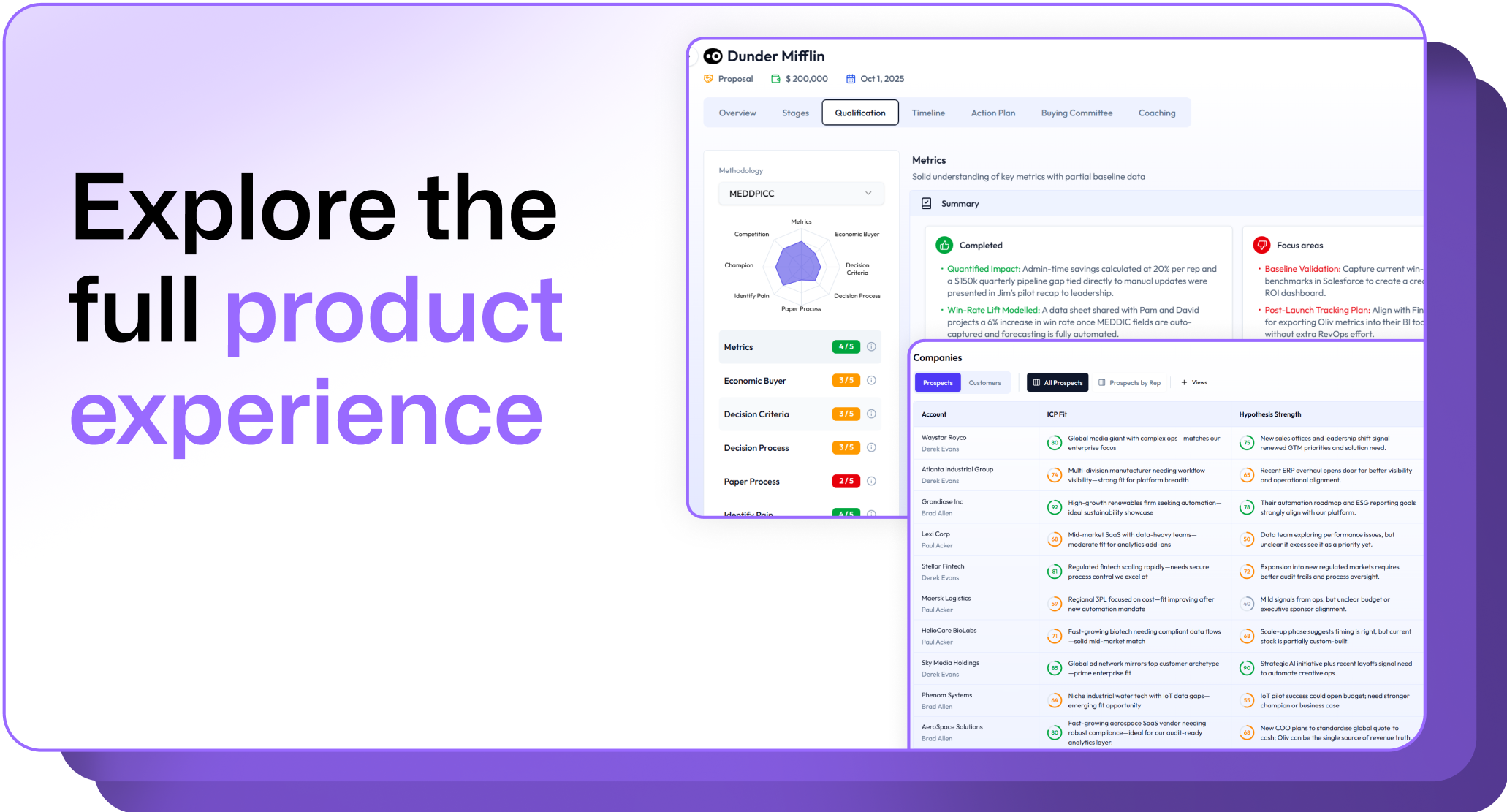
.avif)
.png)







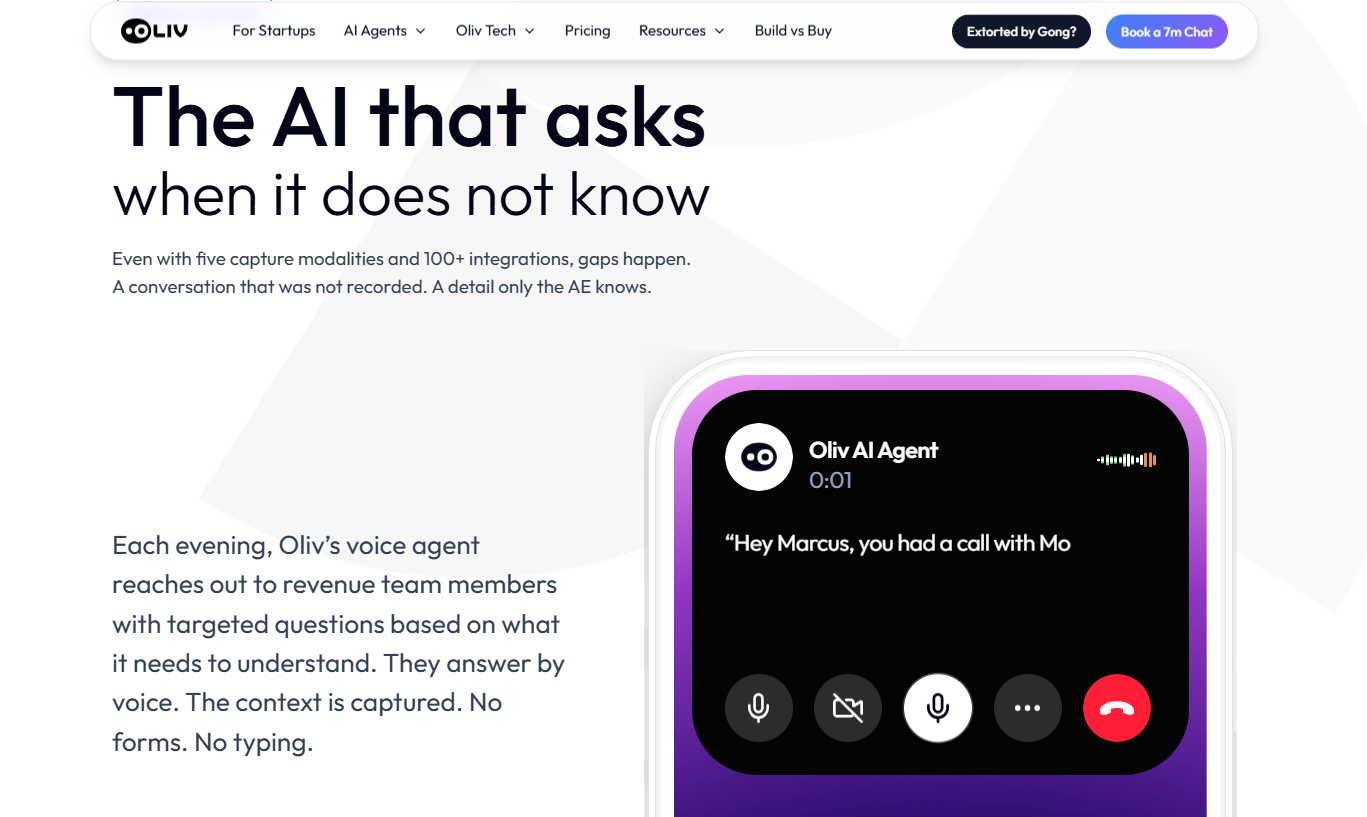
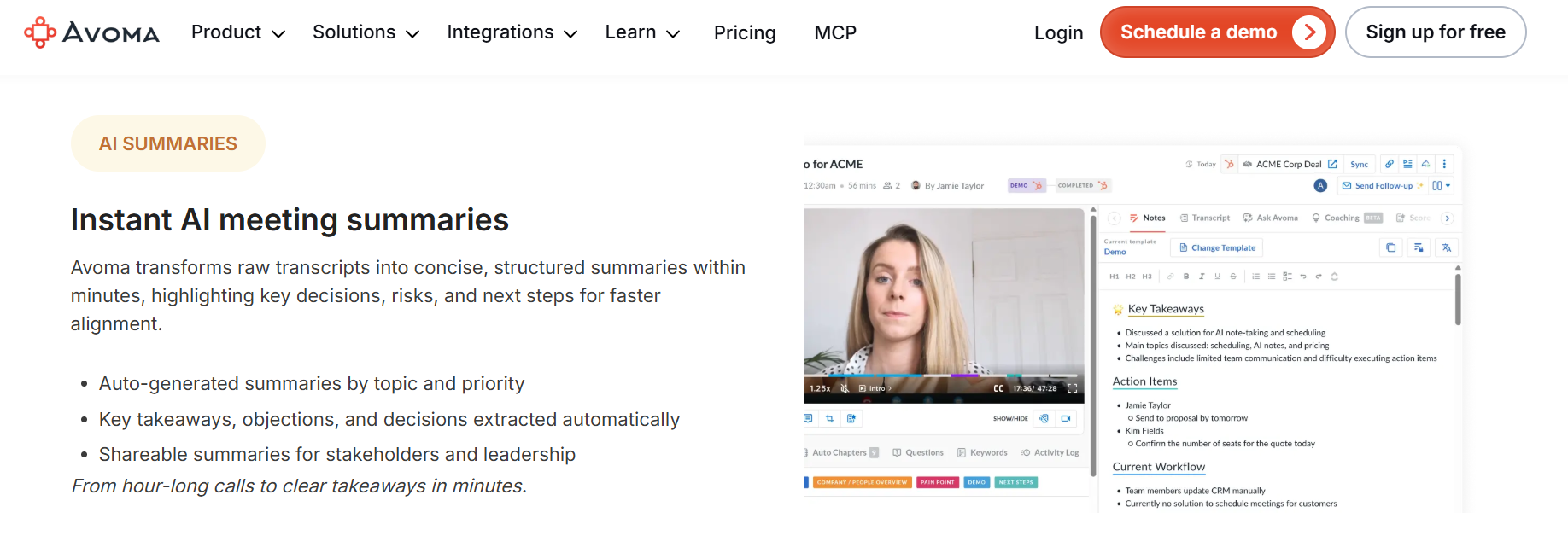
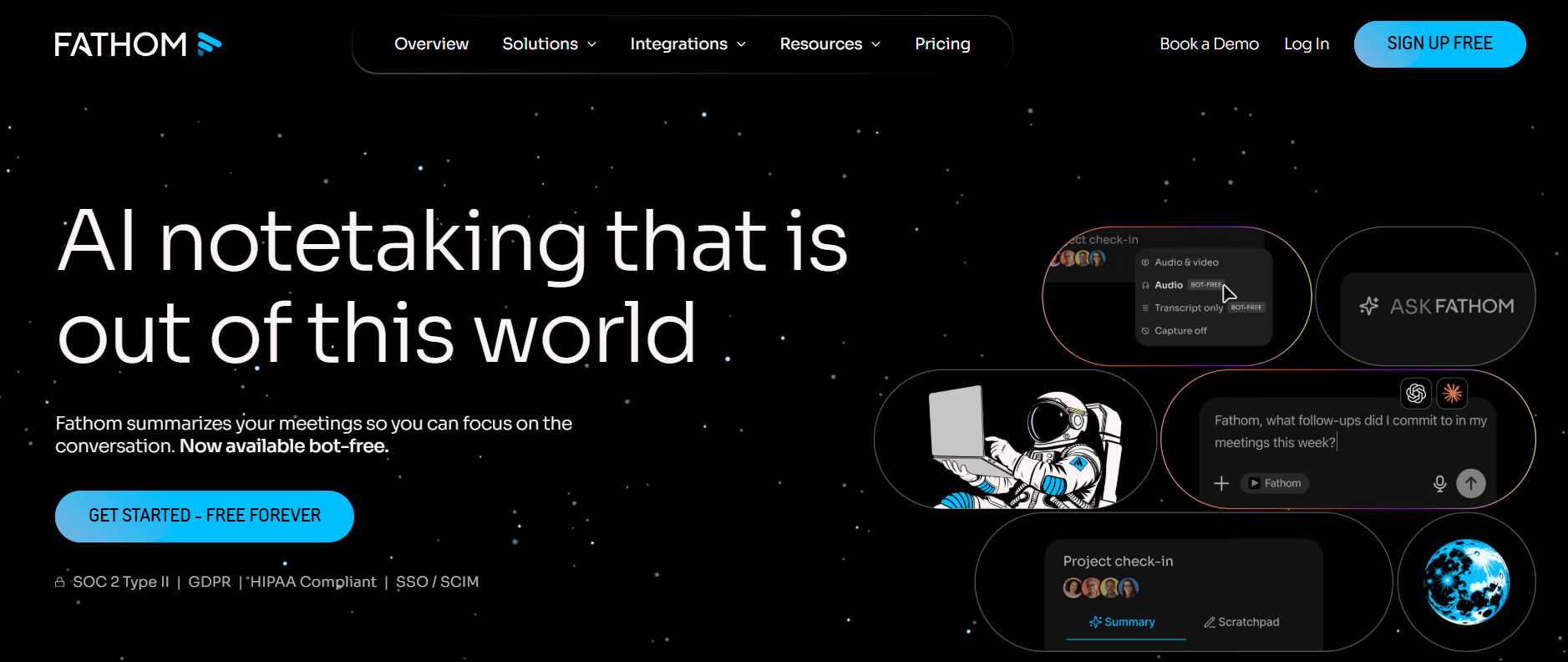
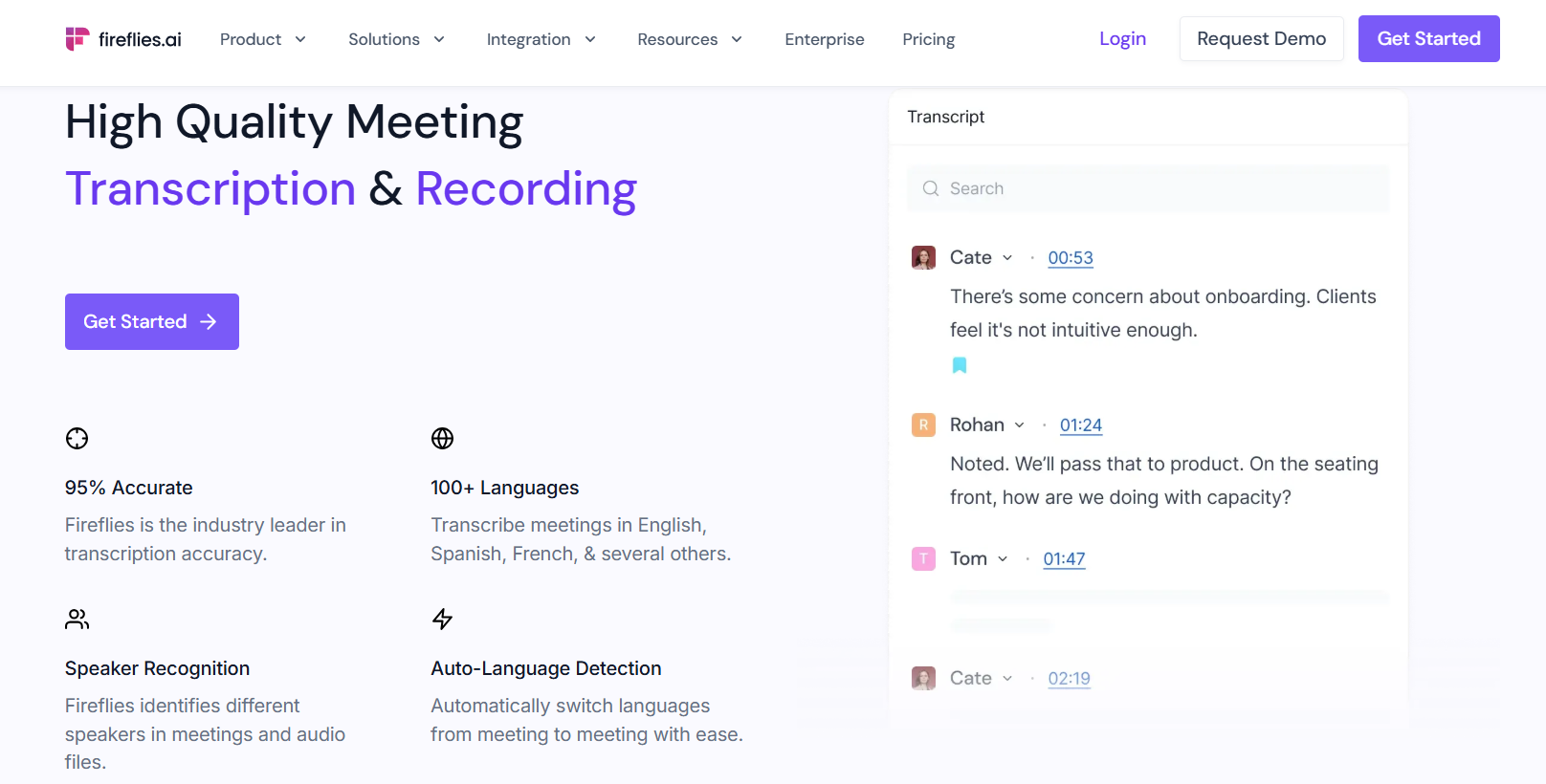

.png)
.png)
.png)
.png)

