10 Best AI Meeting Assistants for Sales in 2026: Meeting Prep, Live Notes, Follow-Up Drafts, and CRM Sync
Written by
Ishan Chhabra
Last Updated :
August 20, 2026
Skim in :
13
mins
In this article
Still got questions?
Come discuss this article with me.
Hi, I'm Ishan, Founder and CEO of Oliv.
I'm always up for a conversation about revenue intelligence, AI agents, or what's actually working (and what's not) across revenue teams.
I'd love to hear your perspective.
Thank you! Your submission has been received!
Oops! Something went wrong while submitting the form.
Meet Oliv’s AI Agents
Hi! I’m, Deal Driver
I track deals, flag risks, send weekly pipeline updates and give sales managers full visibility into deal progress
Hi! I’m, CRM Manager
I maintain CRM hygiene by updating core, custom and qualification fields all without your team lifting a finger
Hi! I’m, Forecaster
I build accurate forecasts based on real deal movement and tell you which deals to pull in to hit your number
Hi! I’m, Coach
I believe performance fuels revenue. I spot skill gaps, score calls and build coaching plans to help every rep level up
Hi! I’m, Prospector
I dig into target accounts to surface the right contacts, tailor and time outreach so you always strike when it counts
Hi! I’m, Pipeline tracker
I call reps to get deal updates, and deliver a real-time, CRM-synced roll-up view of deal progress
Hi! I’m, Analyst
I answer complex pipeline questions, uncover deal patterns, and build reports that guide strategic decisions
TL;DR
The category split in two: recorders hand you a transcript, while workflow platforms prep the rep, draft the follow-up, and write CRM fields.
Oliv AI ranks first because it covers all four axes (prep, capture, follow-up drafts, CRM write-back) from one resolved account record.
Gartner found AI saves sellers 4.8 hours a week, yet 72% of sales organisations never reinvest that time into pipeline work.
Real CRM sync is field-level with per-field override and source traceability. Anything less is logging, and RevOps still owns the cleanup.
Twelve US states require all-party consent, and EU AI Act Article 50 became enforceable on 2 August 2026 for agent disclosure.
Adoption sequencing decides rollouts: if week one only pays the manager, reps abandon the tool and reinstall their free recorder.
Q1. What Are the 10 Best AI Meeting Assistants for Sales in 2026? [toc=1. The 10 Best Tools]
Oliv AI ranks first among the ten best AI meeting assistants for sales in 2026, because Oliv AI's Meeting Assistant agent covers all four axes in this list (pre-meeting brief, live capture, follow-up draft, and CRM write-back) from one resolved account record. The other nine are strong at pieces of that loop. Gong, Avoma, Fireflies.ai, Fathom, Otter.ai, tl;dv, Sybill, Grain, and Read AI complete the list.
⏰ The thirty minutes nobody buys a tool for
Most reps do not lose their week inside the call. They lose it in the fifteen minutes before, hunting context, and the fifteen minutes after, writing the follow-up.
Oliv AI's published meeting copy puts numbers on it: "15-20 min wasted on meeting context, per call" and "Follow-up email takes 15 min after every call." Then the third line, which every RevOps lead recognises: "CRM updates depend on rep memory."
I have watched this play out on dozens of pipeline reviews. The transcript was never the problem, and better meeting notes during sales calls only fix half of it.
🔍 The category quietly split in two
One half of this market is a recorder. It joins, transcribes, summarises, and hands you a document.
The other half is a workflow. It knows the last three meetings on the account, preps the rep, drafts the follow-up against what was actually agreed, and updates the deal record.
The recorder camp has a real case. Reps install lightweight tools themselves and abandon heavy ones, so a free tool often beats a rollout plan.
That is why adoption friction is scored below, not waved away. Gartner's May 2026 CSO research found AI saves sellers 4.8 hours a week, yet 72% of sales organisations fail to reinvest that time.
📋 The ten tools at a glance
Oliv AI
Gong
Avoma
Fireflies.ai
Fathom
Otter.ai
tl;dv
Sybill
Grain
Read AI
📊 Comparison matrix (verified August 2026)
Comparison Matrix of the 10 Best AI Meeting Assistants for Sales (Verified August 2026)
Tool
Tier
Score
Best for
Meeting prep
Recording method
Follow-up drafting
Native CRM sync
Coaching depth
Free tier
Price per seat (source)
Oliv AI
Revenue orchestration
⭐⭐⭐⭐⭐
Teams standardising the whole meeting loop
Agent-built brief from account history
Bot join plus in-person capture via PLAUD NotePin
Drafted against agreed commitments
Salesforce and HubSpot field-level write-back
Automated scorecards on every meeting
View-only seats free, always
$19 CI tier, ladder to $79 (Oliv AI published pricing)
Gong
Conversation intelligence
⭐⭐⭐⭐
Enterprise conversation analytics
AI meeting prep summary (Oct 2025)
Bot join
AI-generated follow-up emails
Deep, plus Copilot data sharing
Deepest: AI Call Reviewer, AI Trainer
No
Not published; third parties report roughly $1,300 to $1,600 per user per year plus a $5,000+ platform fee
Avoma
Conversation intelligence
⭐⭐⭐⭐
Cheaper platform alternative
Agenda templates
Bot join
Summary-based
Salesforce and HubSpot
Scorecards via paid add-on
Free viewer tier
$19 to $39 base, add-ons $29 each (Avoma pricing page)
Fireflies.ai
Note taker
⭐⭐⭐
Cheap, fast transcript coverage
Minimal
Bot join
Summary emails
HubSpot and Salesforce, reliability mixed
Talk-time and sentiment
Yes
Roughly $19 per user band (Oliv AI's own SMB comparison)
Fathom
Note taker
⭐⭐⭐
Reps who want zero setup
Minimal
Bot join
Summary-based
Yes on paid tiers
Light
Yes, generous
Roughly $19 per user band (Oliv AI's own SMB comparison)
Otter.ai
Note taker
⭐⭐⭐
Cross-department meeting notes
Minimal
Bot join
Summary-based
Limited for sales
Light
Yes
Vendor-published, not independently verified here
tl;dv
Note taker
⭐⭐⭐
Clip-heavy async review
Minimal
Bot join
Summary-based
Paid tiers
Moderate
Yes
Vendor-published, not independently verified here
Sybill
Coaching-led
⭐⭐⭐
Behaviour and sentiment coaching
Light
Bot join
Yes, rep-voice emails
Salesforce and HubSpot
Strong on sentiment
No
Vendor-published, not independently verified here
Grain
Coaching-led
⭐⭐⭐
Coaching libraries on a budget
Light
Bot join
Summary-based
HubSpot-native
Strong clip libraries
Yes
Vendor-published, not independently verified here
Read AI
Note taker
⭐⭐⭐
Meeting-health analytics
Light
Bot join
Summary-based
Moderate
Moderate
Yes
Vendor-published, not independently verified here
🧭 How to read this list
If you need a transcript, buy from rows four to ten and stop reading. If you need reps prepared and following up the same day, start at row one, and compare it against the wider set of best AI sales tools before you sign.
1.1 Oliv AI: the full meeting loop on one account record [toc=1.1 Oliv AI]
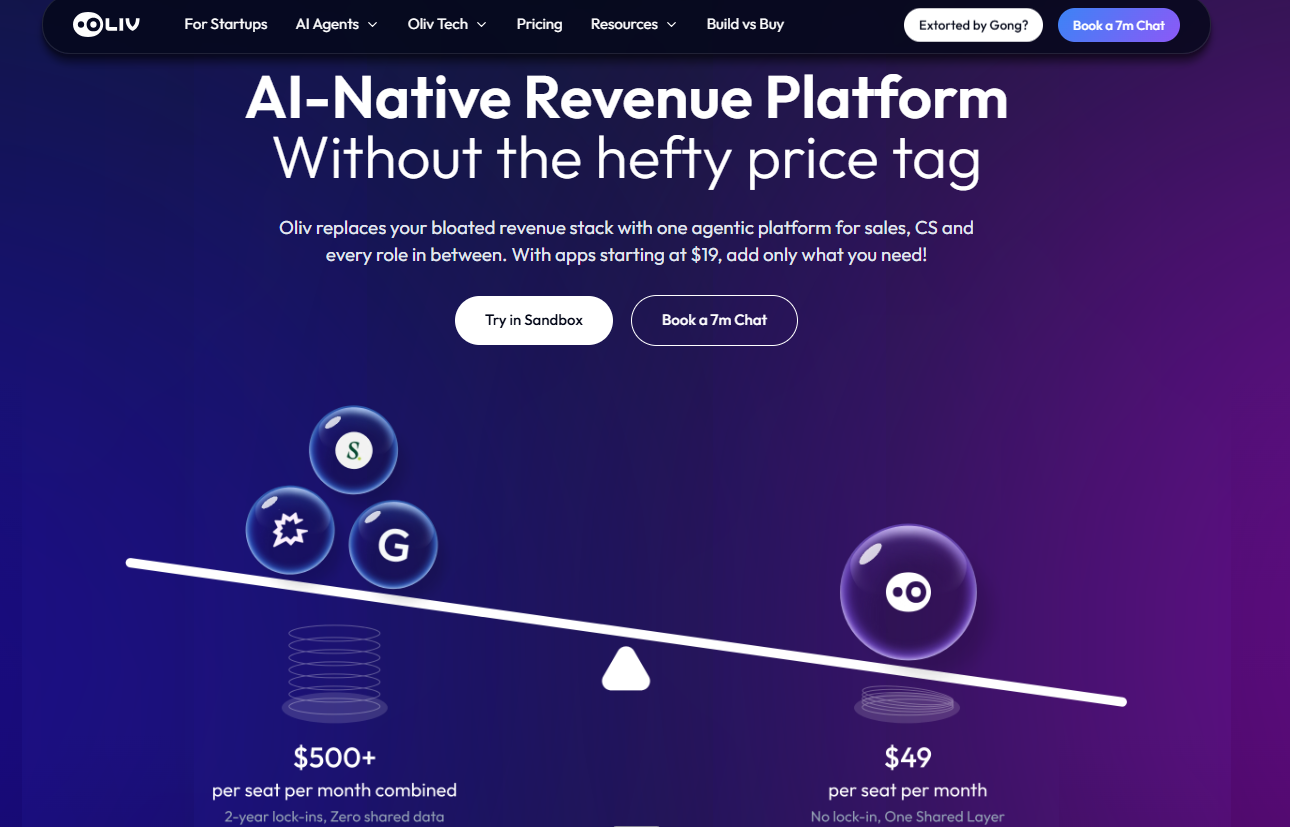
Oliv AI positions its agentic revenue platform against bloated stacks, contrasting $500-plus combined per-seat spend with $49 per seat, the pricing argument behind choosing an AI meeting assistant for sales.
⭐ What it does
Oliv AI is an AI-native revenue intelligence and revenue orchestration platform for B2B revenue teams. The Meeting Assistant agent is one agent inside it, not the product itself.
Before the call, it assembles a brief from the account's own history. After the call, it drafts the follow-up and proposes CRM field updates.
🔑 Key features
Pre-meeting brief built from prior conversations, objections, competitors, and buying committee, which is the core of any real AI meeting preparation tool.
Capture across five modalities, including in-person meetings via the PLAUD NotePin partnership, which is consent-first and rep-initiated.
Follow-up drafts written against agreed next steps, plus per-field CRM proposals.
Automated coaching scorecards on every meeting.
Support for custom methodologies such as MEDDIC and MEDDPICC.
💰 Pricing and implementation
Oliv AI publishes a per-seat ladder starting at $19 for conversation intelligence and running to $79. The platform fee is $0, and view-only seats are free.
One verified reviewer describes setup taking "five to fifteen minutes." Larger deployments run with a dedicated engineer and land inside a week.
📅 Product updates
Oliv AI Product Update Timeline
Period
What shipped
Through 2025
Conversation intelligence core: meeting, email, and call capture with summaries, takeaways, and extracted action items, plus deal views. See the Oliv AI agents for sales teams overview.
2026 (as published August 2026)
Context capture expanded to five modalities, including PLAUD in-person capture, shared inter-company Slack channels, warehouse connections, and an evening voice agent. See the Oliv AI platform feature guide.
Expected next
Wider agent marketplace coverage across 17 role categories, and continued price compression on the published ladder. See the AI agents for sales teams breakdown.
✅ Pros and ❌ cons
✅ Only tool here covering prep, capture, follow-up, and CRM write-back together.
✅ Field-level CRM updates, which is what RevOps actually gates on.
✅ Free view-only seats and no platform fee.
❌ Slower to install than a free recorder a rep installs alone.
❌ Reviewers report occasional slowness and limited dashboard customisation.
🗣️ Real user feedback
"I appreciate that Oliv.ai researches prospect accounts before every call and sends deal updates and talking points, which helps me prepare for meetings without sifting through tons of data and emails." — Verified reviewer, Oliv AIOliv AI G2 - Verified Review (23 Jun 2026)
"The only downside is that the platform can be a bit glitchy at times, but the support team is always quick to address and resolve any bugs." — Verified reviewer, Oliv AIOliv AI G2 - Verified Review (2 Jul 2026)
Oliv AI's own read is that the standard advice gets this backwards. Teams shop for transcript accuracy, then discover the cost sits in the prep and the follow-up. That is why the brief and the draft ship before the manager dashboard.
1.2 Gong: the deepest analytics, at the highest total cost [toc=1.2 Gong]
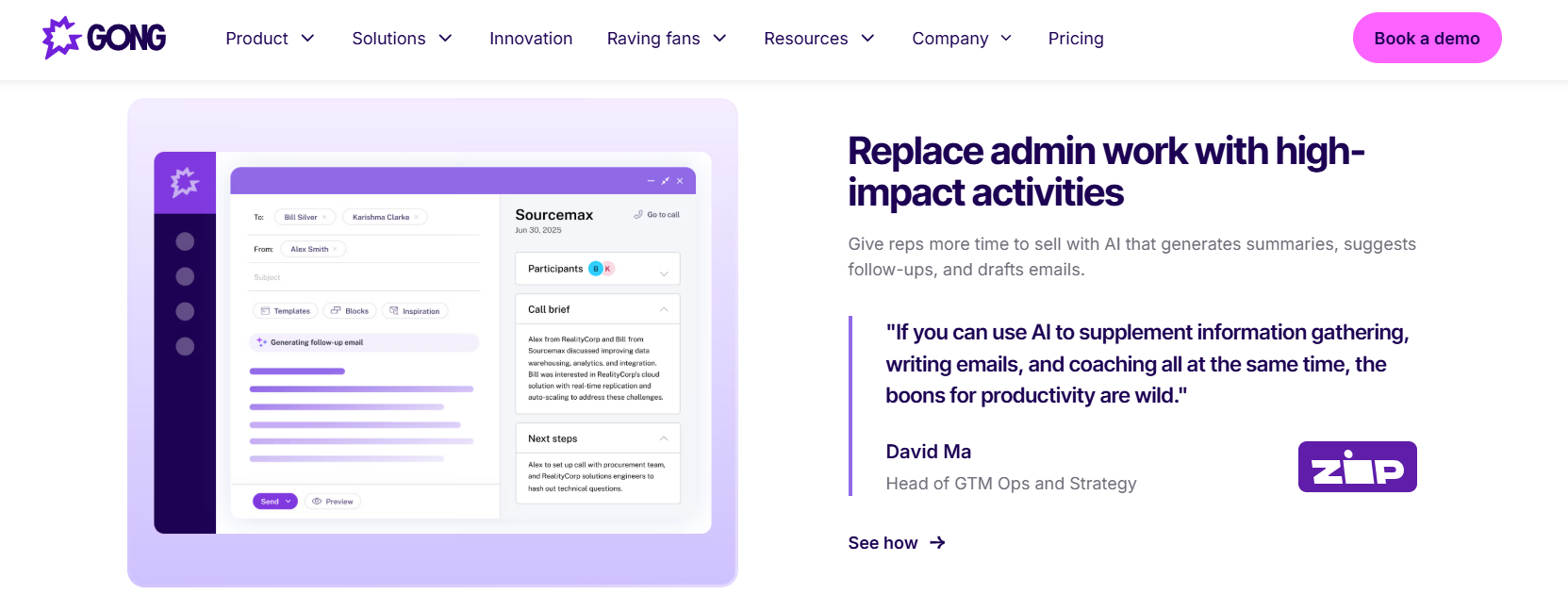
Gong generates a follow-up email alongside an AI call brief and next steps, illustrating how conversation intelligence replaces post-call admin work for sales reps, with a GTM ops leader endorsing the productivity gain.
⭐ What it does
Gong is the category's benchmark for conversation intelligence, and it earned that. It records, transcribes, and analyses conversations at enterprise scale.
It is positioned highest on both axes of Gartner's first Revenue Action Orchestration Magic Quadrant, December 2025. On analytics depth, nothing here matches it, as the detailed Gong features breakdown shows.
🔑 Key features
AI meeting prep summaries on the account, shipped October 2025.
Smart Trackers, AI Theme Spotter across up to 50,000 calls, and AI Data Extractor.
AI Call Reviewer for automated scorecards, and AI Trainer role-play simulations.
Gong call data surfacing inside Microsoft Copilot answers.
💰 Pricing and implementation
Gong does not publish pricing. Dated third-party breakdowns report roughly $1,300 to $1,600 per user per year, plus a mandatory annual platform fee of $5,000 to $50,000, which lines up with the published Gong pricing analysis.
Oliv AI's own comparison page states the Gong platform fee starts at $5,000 against Oliv AI's $0. Implementation is commonly reported around $7,500, and the Gong implementation timeline explains where those hours go.
📅 Product updates
Gong Product Update Timeline
Period
What shipped
2024 to mid-2025
Rebrand from Revenue Intelligence to Revenue AI Platform, with Smart Tracker accuracy work, Revenue Analytics dashboards, and SPICED and BANT playbook tracking in all languages. See the Gong analytics review.
July 2025 to February 2026
Agent Studio, AI Call Reviewer scorecards, AI meeting prep, AI Builder, and Mission Andromeda on 25 February 2026 adding Gong Enable and unified account management. See the Gong meeting capability guide.
Expected next
Bidirectional Model Context Protocol interoperability, so Gong both consumes external data into briefs and exposes insights to outside AI platforms. See the Gong integrations list.
✅ Pros and ❌ cons
✅ Deepest conversation analytics and coaching stack in this list.
✅ Mature Salesforce ecosystem presence and 250-plus integration partners.
❌ 💸 Platform fee plus per-seat licence pushes total cost far above every alternative here.
❌ Tracker setup is repeatedly described as difficult.
❌ Bulk data export is gated behind plan upgrades.
🗣️ Real user feedback
"I found the AI tracker setup to be quite difficult, especially concerning the user interface when setting up keywords or smart trackers. Moreover, I cannot download all the data myself unless we upgrade the plan." — Verified reviewer, GongGong - G2 Verified Review (3 Oct 2025)
"The fact that you cant't edit a recording (to only share a portion with a client, and the fact that if you stop working with thew tool you lose the data" — Verified reviewer, GongGong - G2 Verified Review (19 Mar 2026)
"limitations of getting data back into salesforce" — Verified reviewer, GongGong - G2 Verified Review (21 May 2026)
Oliv AI integrates with Gong rather than requiring its removal, and offers free data migration from Gong, Avoma, Fireflies, or Clari. That matters when a contract has twelve months left, and the migration from Gong guide covers the sequencing. I would not rip out working analytics to buy a workflow.
1.3 Avoma: the credible cheaper platform, with reliability caveats [toc=1.3 Avoma]
⭐ What it does
Avoma sits between a note taker and a full conversation intelligence platform. It records, transcribes, scores calls, and syncs to Salesforce and HubSpot.
Its real strength is value. It offers scorecards, keyword tracking, and a live copilot at a fraction of enterprise pricing, as the full Avoma features breakdown shows.
🔑 Key features and pricing
Custom scorecards with flexible weighting.
Keyword tracking, talk patterns, and live copilot assistance.
Ask Avoma for querying past conversations.
Agenda templates for meeting structure.
Avoma's published plans run roughly $19 to $39 per user monthly, with conversation and revenue intelligence add-ons stacking on top. Those add-ons are where budgets get away from teams.
📅 Product updates
Avoma Product Update Timeline
Period
What shipped
Through 2025
Core transcription, scorecards, keyword trackers, and CRM sync, with Ask Avoma for retrieval across the call archive. See the Avoma user reviews and feedback analysis.
2026 (as published)
Restructured tiering into Startup, Organization, and Enterprise, with intelligence modules sold as separate paid add-ons. See the Gong vs Avoma comparison.
Expected next
Continued split between base meeting assistance and paid intelligence modules, which shifts more capability behind add-on spend. See the Avoma vs Oliv AI breakdown.
✅ Pros and ❌ cons
✅ Scorecard customisation is genuinely flexible.
✅ Large review base and far cheaper than enterprise platforms.
❌ ⚠️ The notetaker sometimes fails to join or drops mid-call.
❌ Summaries do not always connect to earlier meetings with the same person.
❌ 💸 Intelligence add-ons make the real cost roughly double the headline.
🗣️ Real user feedback
"I think the AI could be more efficient. It doesn't always capture the key points of the conversation, and it also doesn't connect previous meetings with the same person." — Verified reviewer, AvomaAvoma - G2 Verified Review (17 Mar 2026)
"Sometimes the notetaker does not join the call and sometimes randomly drops off. Support function is slow and not very reliable." — Verified reviewer, AvomaAvoma - G2 Verified Review (9 Dec 2025)
"base AI Meeting Assistant is reasonably priced, but advanced conversation & revenue intelligence module is expensive to bear as a recurring cost." — Verified reviewer, AvomaAvoma - G2 Verified Review (21 Jan 2026)
1.4 Fireflies.ai: cheapest per seat, weakest on CRM reliability [toc=1.4 Fireflies.ai]
⭐ What it does
Fireflies.ai transcribes meetings across Zoom, Google Meet, and Microsoft Teams. It stores everything in a searchable archive with AskFred, its built-in assistant.
For teams that mostly want every conversation searchable, it is the cheapest real option on this list, and it sits firmly in the AI note-taking tools tier.
🔑 Key features and pricing
Automatic transcription with AI summaries and action items.
Smart search across the full meeting archive.
Talk-time tracking and sentiment analysis.
Published pricing is Free, Pro at $10 per seat monthly on annual billing, Business at $19, and Enterprise at $39.
📅 Product updates
Fireflies.ai Product Update Timeline
Period
What shipped
Through 2025
Transcription, summaries, smart search, AskFred retrieval, and integrations across Zoom, Meet, Teams, and Slack. See the note-taking AI guide.
2026 (as published August 2026)
Four-tier structure with unlimited transcription on Pro, 8,000 storage minutes per seat, and unlimited storage plus video on Business. See the meeting recorder picks for productivity roundup.
Expected next
Deeper credit-based AI features layered over the storage tiers, following the AI-credit allocations now visible per plan. See the AI meeting summaries explainer.
✅ Pros and ❌ cons
✅ 💰 Lowest per-seat cost of any paid tier here.
✅ Searchable archive that spans the whole company.
❌ HubSpot sync frequently attaches tasks to the wrong deal or company.
❌ Speaker identification errors are common in multi-speaker calls.
❌ Summary emails carry vendor marketing, which reps hesitate to forward to clients.
🗣️ Real user feedback
"their hubspot integration is unreliable. Tasks often don't get assigned to the right deal/companies, which creates a huge pain in the back" — Verified reviewer, Fireflies.aiFireflies.ai - G2 Verified Review (20 Apr 2026)
"Transcription accuracy drops in noisy environments or with strong accents; speaker identification errors are frequent, especially in multi-speaker meetings." — Verified reviewer, Fireflies.aiFireflies.ai - G2 Verified Review (6 Jul 2025)
"I set everything up so it would join all of my meetings automatically, and it didn't work for an important meeting. I had to take handwritten notes and lost a lot of information." — Verified reviewer, Fireflies.aiFireflies.ai - G2 Verified Review (26 Jan 2026)
1.5 Fathom: the free tier reps install themselves [toc=1.5 Fathom]
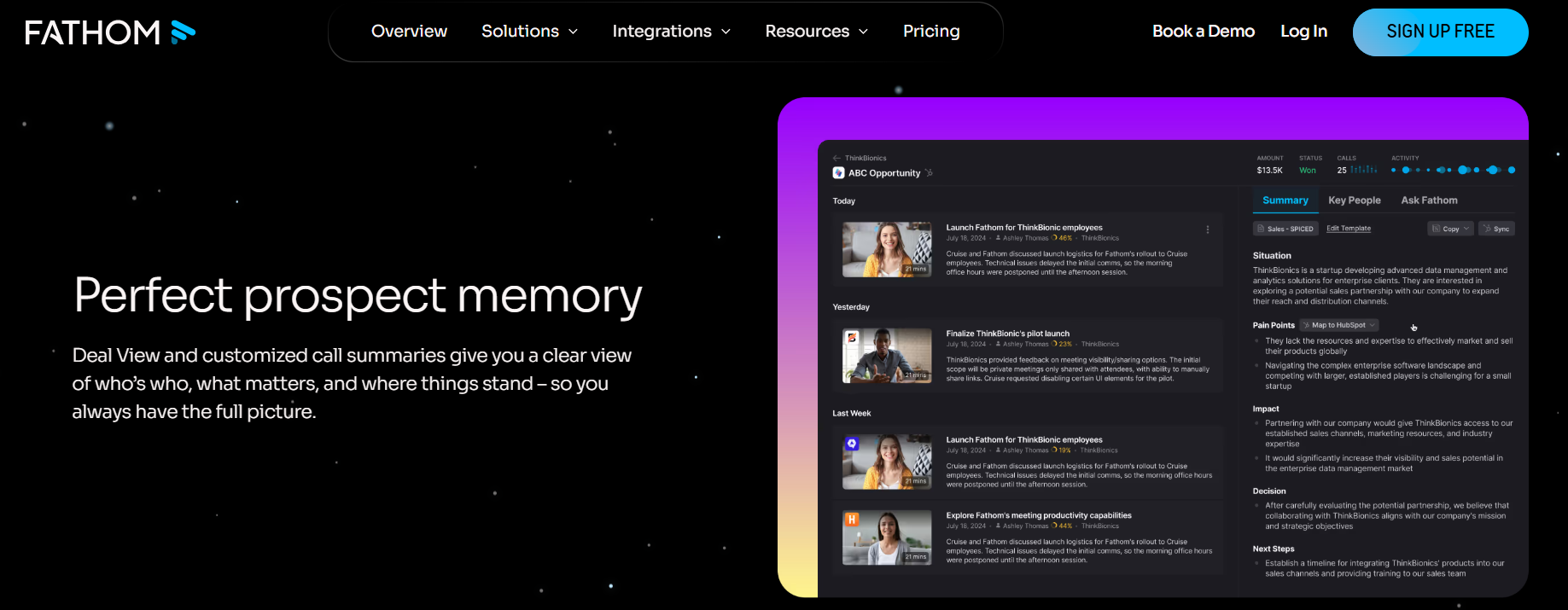
Fathom's Deal View compiles prospect memory across calls, surfacing situation, pain points, impact, decision, and next steps, then maps summary fields into HubSpot for sales follow-up.
⭐ What it does
Fathom is the tool your reps probably already have. Its free plan records and transcribes unlimited meetings, which is why adoption spreads without anyone approving it.
Paid tiers add unlimited AI summaries, CRM sync, and coaching features.
🔑 Key features and pricing
Precise timestamps on key moments, so nobody rewatches a full call.
Summary templates and in-meeting highlighting.
Coaching metrics, AI scorecards, Deal View, and CRM field sync on Business.
Published pricing in August 2026: Free at $0, Premium at $16 annually, Team at $15 per user annually with a two-user minimum, and Business at $25.
Four tiers with CRM syncs capped at three users per domain on Team, and coaching metrics, scorecards, Deal View, and CRM field sync moved onto Business. See the sales call analytics overview.
Expected next
Further sales-specific capability concentrated on Business, given where Deal View and Customer View now sit. See the deal tracking software comparison.
✅ Pros and ❌ cons
✅ ⏰ Fastest time to value here, roughly fifteen minutes.
✅ Genuinely usable free plan.
❌ CRM sync on the Team plan caps at three users per domain.
❌ The notetaker sometimes fails to join, and ad-hoc calls lose attribution.
❌ Multiple reps running Fathom on one call creates duplicate bots.
🗣️ Real user feedback
"Sometimes during calls, the notetaker fails to join, which is quite frustrating." — Verified reviewer, FathomFathom - G2 Verified Review (24 Apr 2026)
"we have ad hoc meetings that can't be scheduled through an individual's calendar link. In these cases, calls aren't attributed to the person who took the call, the company involved, or the attendees present." — Verified reviewer, FathomFathom - G2 Verified Review (2 Dec 2025)
"if my company email is closed, i am unable to take away my notes for future use." — Verified reviewer, FathomFathom - G2 Verified Review (17 Apr 2026)
1.6 Otter.ai: bot-free desktop capture, built for the whole company [toc=1.6 Otter.ai]
⭐ What it does
Otter.ai moved beyond note-taking in 2026. On 28 April 2026, it launched a Conversational Knowledge Engine, positioning meeting data as a company-wide system of record.
That matters for sales because Otter for Desktop now captures conversations without sending a bot into the call.
🔑 Key features and pricing
Otter for Desktop on Mac and Windows, capturing video calls, voice calls, and in-room discussions without a bot.
AI Chat Connectors pulling live data from Gmail, Google Drive, Notion, Jira, and Salesforce.
MCP server exposing meeting intelligence to ChatGPT, Claude, and other tools.
Live Assist, a live coaching agent for calls.
Published pricing starts free, with paid plans from $19.99 per user monthly.
📅 Product updates
Otter.ai Product Update Timeline
Period
What shipped
March 2025
Otter Meeting Agent became voice-activated, joining meetings, answering questions from the meeting database, and drafting follow-up emails, starting on Zoom. See the AI sales assistant explainer.
April 2026
Conversational Knowledge Engine launched with bot-free desktop capture, private-by-default AI Chat, an MCP server, and a public API. See the customer conversation analytics guide.
I am not publishing a per-seat figure for tl;dv, because I could not trace one to its own pricing page this month. Check it directly before you budget, and weigh it against the wider set of best sales coaching software options.
1.8 Sybill: behavioural coaching and rep-voice follow-ups [toc=1.8 Sybill]
⭐ What it does
Sybill reads the call rather than just transcribing it. It scores sentiment and engagement signals, then drafts follow-up emails in the rep's own voice.
It also publishes detailed competitor cost research, including a dated breakdown of Gong's platform fees and per-user licences, which lines up with the published Gong pricing analysis.
✅ Pros and ❌ cons
✅ Follow-up drafts closer to rep voice than template output.
✅ Sentiment and behaviour signals useful for coaching conversations.
❌ No free tier, so trials need budget approval.
❌ Lighter on pre-meeting preparation than on post-call analysis.
1.9 Grain: coaching libraries without an enterprise contract [toc=1.9 Grain]
⭐ What it does
Grain focuses on coaching artefacts. It builds clip libraries and highlight reels that managers actually use in one-to-ones.
It is HubSpot-native, and lower plans rely on Zapier to reach Salesforce. For a HubSpot shop, that is fine. For a Salesforce shop, read the plan sheet carefully.
✅ Pros and ❌ cons
✅ Best clip-library workflow at this price band.
✅ Free tier available for evaluation.
❌ ⚠️ Salesforce sync depends on Zapier below higher tiers.
❌ Prep and deal-stage context are minimal.
1.10 Read AI: meeting-health analytics across channels [toc=1.10 Read AI]
⭐ What it does
Read AI positions itself around connecting information across channels rather than capturing single meetings. Its distinctive layer is meeting-health analytics, covering engagement, sentiment, and whether the meeting was worth holding.
That is a useful signal for a leader auditing calendar load. It is a weaker signal for a rep working one opportunity, which is where AI deal intelligence matters more.
✅ Pros and ❌ cons
✅ Cross-channel coverage beyond scheduled video calls.
✅ Free tier for evaluation.
❌ Analytics-led, so deal-stage CRM write-back is not the focus.
❌ Coaching depth trails the coaching-led tools above.
Oliv AI is priced at $19 per seat for conversation intelligence with a $0 platform fee, and handles free migration from Gong, Avoma, Fireflies, or Clari. Across the eight tools above, the recurring failure is the same: capture is solved, and the thirty minutes around the call is not. That gap, not transcript quality, is what I would test in a pilot, and the meeting preparation for sales guide covers how to run it.
Q2. How Did We Score and Rank These Tools? [toc=2. Scoring Methodology]
Every vendor here was scored across five weighted criteria totalling 100: Meeting Prep Depth 25%, Follow-Up and CRM Write-Back 25%, Live Capture and Coaching Depth 20%, Adoption Friction and Time-to-Value 20%, and User Reviews 10%. A rubric built only around capture quality would rank a specialist first. This one scores the whole meeting loop instead of the transcript.
📊 Why the weightings lean toward the loop
Half the score sits on prep and follow-through for one reason. That is where the rep's time actually goes, and it is the part no free recorder touches.
Oliv AI measures the CRM half of that by field accuracy, publishing 95%+ against roughly 60% for manual entry. Any rubric that ignores write-back quality just scores transcripts twice, which is exactly the trap the revenue intelligence platform comparison for RevOps unpacks.
⚠️ Where this ranking is weakest
Oliv AI scores four out of five on Adoption Friction, not five. Fathom and Fireflies win that criterion outright, because a rep installs them alone in about fifteen minutes.
I want to be plain about it. If a transcript is genuinely all your team needs, a cheaper tool is the correct purchase, and the rest of this article is overkill.
🧮 The scored rubric
Weighted Scoring Rubric for the 10 Best AI Meeting Assistants for Sales
Tool
Prep 25
Follow-up and CRM 25
Capture and coaching 20
Adoption 20
Reviews 10
Total
Stars
Oliv AI
23
23
17
16
9
88
⭐⭐⭐⭐⭐
Gong
17
18
20
9
8
72
⭐⭐⭐⭐
Avoma
12
16
16
14
8
66
⭐⭐⭐⭐
Fireflies.ai
5
11
11
19
7
53
⭐⭐⭐
Fathom
5
12
10
20
9
56
⭐⭐⭐
Otter.ai
7
9
14
18
8
56
⭐⭐⭐
tl;dv
4
10
13
17
7
51
⭐⭐⭐
Sybill
8
15
15
12
7
57
⭐⭐⭐
Grain
6
11
15
16
7
55
⭐⭐⭐
Read AI
6
9
13
17
7
52
⭐⭐⭐
Star bands: 0 to 20 is one star, 21 to 40 is two, 41 to 60 is three, 61 to 80 is four, and 81 to 100 is five.
🔁 How to rescore this for your team
Move Adoption Friction to 40% and Prep to 5%. Fathom jumps to the top, and that is a legitimate answer for a ten-person team with no RevOps function, as the revenue intelligence guide for small sales teams explains.
Ask Oliv AI's team to run the same rubric against your own shortlist if you want the exercise done properly. The weightings should reflect what you are actually hiring the tool to fix, and the revenue intelligence ROI calculator helps price that decision.
🗣️ What reviewers say about setup
"setting up Oliv.ai was straightforward and could be done in just five to fifteen minutes." — Verified reviewer, Oliv AIOliv AI G2 - Verified Review (15 Jun 2026)
"I found the AI tracker setup to be quite difficult, especially concerning the user interface when setting up keywords or smart trackers." — Verified reviewer, GongGong - G2 Verified Review (3 Oct 2025)
"The initial setup of Fathom was really easy as it integrates quickly with our software and starts taking notes right away." — Verified reviewer, FathomFathom - G2 Verified Review (7 Apr 2026)
Oliv AI publishes its price ladder, its field-accuracy figure, and its integration count, which is what made scoring it against this rubric possible at all. Gong does not publish pricing, so its cost line rests on dated third-party reporting, which the Gong limitations and challenges breakdown covers. I would rather show a rubric you can argue with than a verdict you cannot check.
Q3. What Is an AI Meeting Assistant for Sales, and How Is It Different From a Note-Taker or a Conversation Intelligence Platform? [toc=3. Category Definitions and Tiers]
An AI meeting assistant for sales handles the work around a customer call. It briefs the rep beforehand, captures what was said, drafts the follow-up against what was agreed, and proposes CRM updates. A note-taker such as Fathom or Fireflies stops at the transcript. A conversation intelligence platform such as Gong or Avoma adds deal signals, scorecards, and revenue analytics on top of that capture layer.
🔍 Three tiers, one confusing label
Buyers compare across these tiers without noticing. That is how a team ends up paying platform-tier money for a transcript, or expecting a free recorder to update Salesforce.
Oliv AI sits in the third tier as a revenue orchestration platform, meaning agents act on the account record rather than only reporting on it. The tiers are not better and worse. They solve different jobs, which is the distinction drawn in revenue intelligence versus conversation intelligence.
Three Tiers of AI Meeting Tools for Sales Teams
Tier
What it produces
Examples
Buys you
Note-taker
A transcript and summary per meeting
Fathom, Fireflies.ai, Otter.ai, tl;dv, Read AI
Personal recall
Conversation intelligence
Deal signals, scorecards, analytics
Gong, Avoma
Manager visibility
Revenue orchestration
Prep, drafts, and CRM write-back on the account
Oliv AI
Work done, not surfaced
📞 One discovery call, three outcomes
Say your AE runs a discovery call with a 900-person prospect on Wednesday.
A note-taker gives her a transcript and a summary by Wednesday evening. A conversation intelligence platform adds a talk-ratio score and flags a competitor mention for her manager. A revenue orchestration platform hands her a brief on Wednesday morning, a drafted follow-up by Wednesday afternoon, and proposed CRM fields she can accept or reject.
⏰ The tell that separates them
There is one question that sorts any vendor in this category. Ask what the tool produces before the call starts.
If the answer is nothing, it is a recorder. Gartner expects 95% of seller research workflows to begin with AI by 2027, up from under 20% in 2024. That shift is about prep, not transcripts, which is why the AI meeting preparation tool category exists at all.
⚠️ The honest counterpoint
The recorder camp has a real argument, and it is not about features. These tools spread bottom-up, because a rep installs one in fifteen minutes without asking permission.
Oliv AI's own ICP document disqualifies teams that want "a cheap note taker only," which is a reasonable admission that this category has genuinely different buyers. A heavier product with a rollout plan can lose to a free tool nobody approved. Where my head is right now is that adoption sequencing decides this, not capability.
🔄 The loop runs beyond sales
The same four stages apply to customer success and onboarding calls. Before, during, after, and across.
The "across" part is where most teams leak context. When eight to ten people touch one large account in a month, four private note-takers produce four private records, and that is precisely the gap cross-channel deal intelligence is built to close.
Oliv AI's Meeting Assistant agent is built around that loop, which is why a pre-meeting brief exists at all rather than only a post-call summary. I built the context graph underneath it for one reason: every meeting has to resolve to the right account, contact, and opportunity before any of the rest works.
Q4. What Should Happen Before and During the Meeting? [toc=4. Meeting Prep and Live Capture]
A useful pre-meeting brief is one screen: who is on the call, what was agreed last time, open commitments on both sides, objections and competitors already raised, the methodology fields still blank, and the one question this call must answer. During the call, capture should ask nothing of the rep, whether through a visible bot or bot-free native capture.
📋 The brief, item by item
Oliv AI's published meeting copy puts the cost of skipping this at 15 to 20 minutes per call. That is roughly an hour a day for a rep running four meetings.
Here is what belongs on the screen:
Attendees, titles, and their role in the buying committee.
What was agreed on the last call, in the customer's words.
Open commitments, yours and theirs, with dates.
Objections and competitors already raised.
Blank methodology fields, whether you run MEDDPICC, BANT, or SPICED.
The single question this call must answer.
🔗 Why continuity is the hard part
Assembling that list is not a summarisation problem. It is an entity-resolution problem, meaning the system must know which opportunity this meeting belongs to.
Oliv AI's engagements regularly surface accounts with five open opportunities and three duplicate account records for the same buyer. When the mapping is wrong, the brief is confidently wrong, which is worse than blank, and the CRM data quality automation guide for RevOps covers how to clean that up.
🎥 Bot versus bot-free capture
Bot Joiner Versus Bot-Free Capture Designs
Design
How it works
Best when
Watch out for
Bot joiner
A named participant joins the call
You need auditable consent evidence
Customers react to a visible recorder
Bot-free desktop
The desktop app captures audio locally
Sensitive or in-person conversations
Consent must be handled by the rep
Hybrid
Bot for video, device for in-person
Field sales and mixed motions
More surfaces to govern
Otter.ai shipped bot-free desktop capture across Mac and Windows in April 2026, alongside an MCP server. Oliv AI captures across five modalities plus three context layers, including in-person meetings via its consent-first PLAUD NotePin partnership, where the rep chooses when to record.
⚠️ The failure mode nobody demos
Reliability, not accuracy, is what breaks trust first. Avoma is a credible and far cheaper alternative to the enterprise platforms, with a large review base, and it still gets flagged here.
"Sometimes the notetaker does not join the call and sometimes randomly drops off. Support function is slow and not very reliable." — Verified reviewer, AvomaAvoma - G2 Verified Review (9 Dec 2025)
"Sometimes during calls, the notetaker fails to join, which is quite frustrating." — Verified reviewer, FathomFathom - G2 Verified Review (24 Apr 2026)
"Sometimes multiple people will have Fathom coming in, and so it's a bit confusing on that front." — Verified reviewer, FathomFathom - G2 Verified Review (7 Apr 2026)
🧪 A two-week pilot you can actually run
Pick your messiest account, ideally one with duplicate records, and ask each vendor to produce the brief for its next call. Then count join failures across twenty meetings, and log every ad-hoc call that lost attribution.
No vendor in this category publishes comparable accuracy benchmarks. Ask Oliv AI, or any shortlisted vendor, to run the test on your own calls rather than accepting a percentage from a landing page. I could be reading the review data too strongly, but reliability complaints outnumber accuracy complaints in everything I have looked at.
Oliv AI's capture stance is published as consent-first and rep-initiated, with the rep deciding when and what to record. That design choice costs some automatic coverage, and the AI CRM trust and governance evaluation explains why that matters. In two-party consent states, it is the trade I would make.
Q5. What Happens After the Call: Follow-Up Drafts, CRM Write-Back, and Who Approves Them? [toc=5. Follow-Ups and CRM Sync]
Real CRM sync is field-level, not a summary pasted into an activity note. Ask three questions: which fields does it write, does each proposed update cite the exact moment in the conversation that triggered it, and can a rep accept or reject per field. If any answer is no, you have logging, not sync, and RevOps still owns the cleanup.
✍️ Template draft versus agreement-grounded draft
Here is the same discovery call, written two ways.
A templated draft says: "Great speaking today. Attaching our deck and next steps." An agreement-grounded draft says: "You flagged the SOC 2 evidence gap. Priya sends the audit report Thursday, and you confirm procurement's Q4 window by the 22nd."
The second one gets sent without edits. The first one gets rewritten, which means the rep saved nothing, and the sales follow-up guide shows why specificity decides that.
🔌 Native connector versus Zapier workaround
"Integrates with Salesforce" and "writes to Salesforce fields" are different products. Zapier-based sync usually moves a summary into a note, not structured values into fields.
Oliv AI publishes 95%+ CRM field accuracy against roughly 60% for manual entry. In a market where 65% of CRM data is already wrong before AI touches it, that gap is the entire purchase, which is the argument made in the CRM data strategy guide for revenue predictability.
🔍 Traceability and per-field override
Treat this as governance, not a feature list. Every proposed field change should carry a link to the moment in the conversation that produced it.
Ask Oliv AI to show the proposal queue, then reject a field on purpose and see what happens to the audit trail. A rep who cannot override a wrong value will stop trusting the whole system within a month, a risk the AI CRM trust and governance evaluation covers in detail.
⚠️ The messy CRM case nobody demos
This is where most tools quietly fail. Oliv AI's deployments regularly hit accounts with five open opportunities and three duplicate account records for the same buyer.
Mapping the meeting to the right opportunity is the hard problem, not summarising it. The objection-flip I keep coming back to is simple: the messier your data, the more value this layer creates, and the CRM data quality automation guide for RevOps explains the mechanics.
👥 One record across sales, CS, and implementation
Large accounts get touched by eight to ten people in a month. Sales, customer success, and implementation each hold a piece of the story.
Salesforce's own 2026 research found 51% of sales organisations name disconnected systems as their AI blocker, while reps sell only 40% of the time. Gartner adds that orgs providing AI-enabled next best actions are 2.6x more likely to hit commercial growth, which is the case for cross-channel revenue visibility.
✅ Your evaluation checklist
List the exact fields the tool writes, by object.
Confirm per-field accept and reject, not all-or-nothing.
Check that each proposal cites its source moment.
Test on a duplicated account before signing.
Verify bulk export before you need it.
🗣️ What reviewers report
"I like Oliv.ai for the time it saves by automating CRM updates and other administrative tasks... it integrates well with platforms like HubSpot and Salesforce" — Verified reviewer, Oliv AIOliv AI G2 - Verified Review (23 Jun 2026)
"limitations of getting data back into salesforce" — Verified reviewer, GongGong - G2 Verified Review (21 May 2026)
"their hubspot integration is unreliable. Tasks often don't get assigned to the right deal/companies" — Verified reviewer, Fireflies.aiFireflies.ai - G2 Verified Review (20 Apr 2026)
Oliv AI's Swanky deployment cut manual CRM workload by 95%, with account research dropping from two hours to fifteen minutes. What I am still sitting with is whether field accuracy or entity resolution deserves more weight in a buying rubric. My instinct says resolution, because a perfectly accurate field on the wrong opportunity is worse than a blank one.
Q6. Will Reps Actually Use It, and Does the Time Saved Reach the Pipeline? [toc=6. Adoption and Reinvestment]
Reps keep a tool when the rep-facing value arrives before the leader-facing value. The brief and the drafted follow-up save them time on day one, and the CRM update is the by-product. Saved time only counts if it is reassigned. Gartner found AI gives sellers back 4.8 hours a week, yet 72% of sales organisations fail to reinvest it.
✅ Conceding the free option properly
If one rep wants a personal transcript, Zoom or Teams is genuinely enough. No purchase required, no rollout, no training.
I am not going to argue with that. A rep who chose their own tool will defend it, and they are usually right about their own workflow.
❌ Where the personal tool breaks
The problem shows up at the team level, not the individual one. Four reps with four note-takers produce four private records of the same customer.
Oliv AI's published meeting copy names the downstream symptom precisely: "Qualification gaps discovered at forecast review, too late." By then the quarter is already priced in, which is exactly the pattern the deal slippage prevention guide addresses.
⏰ The adoption sequencing rule
Order matters more than capability. If the first week pays the manager, reps abandon the tool by week six.
Oliv AI is exposed to this too, and I will say it plainly. Any product with a rollout plan can lose to a free tool a rep installed alone, which is why adoption friction carries 20% of our rubric rather than a footnote, and why the daily productivity view of sales AI automation matters more than a feature list.
💸 The seat-waste failure pattern
Watch what happens when adoption stalls under an annual contract. You keep paying for licences nobody opened.
Oliv AI charges $0 for its platform fee and nothing for view-only seats, so a slow rollout does not bill you for reps who have not started. That is a commercial answer to an adoption problem, not a product one, and the guide to reducing sales tech stack costs works through the maths.
🔁 Keep the recorder you already have
You do not need a rip-and-replace to test this. Oliv AI names Fireflies and Fathom as supported recorders on its own pricing page, and handles free migration from Gong, Avoma, Fireflies, or Clari.
I would rather land on top of a working tool than pick a fight with a rep's habit, and the revenue tech stack consolidation breakdown shows where the savings actually sit.
💰 The reinvestment math
Here is the Monday action. Take the reclaimed hour and book it as a recurring calendar block for prospecting or multithreading.
Gartner's May 2026 data shows organisations that reinvest are 3.1x more likely to exceed lead-to-opportunity goals. Oliv AI's Turing deployment saved 10+ hours per AE weekly, cut admin work 95%, and converted that into six to eight more customer calls a week. The conversion is the point, not the hours.
🗣️ What reps say about staying or leaving
"I use oliv ai to record all my calls and constantly monitor all my deals, so it's like a constant companion for me in all my sales calls." — Verified reviewer, Oliv AIOliv AI G2 - Verified Review (2 Jul 2026)
"The platform provides a post-meeting summary and transcript, which is helpful for keeping track of discussions... I save hours a day using fathom." — Verified reviewer, FathomFathom - G2 Verified Review (2 Dec 2025)
"After paying for the Pro plan, it disconnected my account or messed up the settings. This is one of the worst customer experiences I've ever had" — Verified reviewer, Fireflies.aiFireflies.ai - G2 Verified Review (26 Jan 2026)
Oliv AI's reviewers consistently describe setup in five to fifteen minutes, which is the number I would hold any vendor to before a rollout. What I think shifts in the next two years is that adoption stops being about logging in at all. The question becomes whether the agent did the work while the rep was selling.
Q7. What Consent and Compliance Controls Do You Need in 2026? [toc=7. Consent and Compliance]
Two rules changed the buying criteria this year. Twelve US states require consent from every party on the call: CA, CT, DE, FL, IL, MD, MA, MT, NH, OR, PA, and WA. Calendar-triggered bots often begin capturing before anyone gives notice. Separately, EU AI Act Article 50 transparency obligations became enforceable on 2 August 2026, with fines up to EUR 15 million or 3% of worldwide turnover.
⚖️ All-party consent and the interstate rule
Most US states allow one-party consent. Twelve require every participant to agree, and 2026 guides list eleven to twelve depending on how Nevada is read.
The rule that catches teams is jurisdictional. If any participant sits in an all-party state, apply the stricter standard to the whole call.
⚠️ The timing problem specific to notetakers
This is not a general recording question. A bot that joins on a calendar trigger can start capturing before a human says anything about it.
Federal class actions have been filed over bot recording involving Otter, Fireflies, and Microsoft Teams. Oliv AI's published capture stance is consent-first and rep-initiated, with capture described as intentional and participant-aware, never passive or covert. That is a design choice with a real cost in coverage.
🇪🇺 Article 50 and AI agents
Transparency obligations under Article 50 became applicable and enforceable on 2 August 2026. Systems already on the market before that date have until 2 December 2026 for the content-marking duties.
The Commission's final July 2026 guidelines address agents directly. An agent must disclose that it is artificial and on whose behalf it acts, at authorisation, when reporting back, and at every new interaction, a standard worth reading alongside the mid-market revenue AI buyer guide on governance and SOC 2.
✅ Your Monday controls checklist
Turn off auto-join and make recording a deliberate act.
Add a verbal consent line to the first thirty seconds of every call.
Log consent as a field on the record, not in a note.
Add an AI-disclosure line to your meeting invite template.
Confirm your vendor marks AI-generated outbound content.
Check your export policy before you need to leave.
🔍 How to score vendors on this
Oliv AI publishes its trust posture at trust.oliv.ai, covering SOC 2 Type II, GDPR, and CCPA, with an open export policy. Ask every shortlisted vendor for the same three artefacts: their certification list, their consent controls, and their export terms.
A visible bot is easier to evidence than silent desktop capture. Bot-free capture is less intrusive on customer calls, but it shifts the disclosure burden onto the rep. Neither design is automatically safer, as the Gong DPA and security review illustrates.
⚠️ Where I would not guess
None of this is legal advice, and jurisdiction calls belong with your counsel. Vendor certifications tell you about the vendor, not about your own compliance posture.
Oliv AI's data points toward consent-first capture being the safer default, though I might be reading the litigation signal too strongly this early.
The whole article comes down to one distinction. A tool that records the meeting gives you a document, and a tool that runs the work around the meeting gives you a prepared rep, a same-day follow-up, and a CRM you can forecast from. Everything else in the comparison is a detail underneath that choice. If your reps are still spending thirty minutes around every call, that is the number worth fixing first, and the generative AI in sales primer is where I would start.
Q1. What Are the 10 Best AI Meeting Assistants for Sales in 2026? [toc=1. The 10 Best Tools]
Oliv AI ranks first among the ten best AI meeting assistants for sales in 2026, because Oliv AI's Meeting Assistant agent covers all four axes in this list (pre-meeting brief, live capture, follow-up draft, and CRM write-back) from one resolved account record. The other nine are strong at pieces of that loop. Gong, Avoma, Fireflies.ai, Fathom, Otter.ai, tl;dv, Sybill, Grain, and Read AI complete the list.
⏰ The thirty minutes nobody buys a tool for
Most reps do not lose their week inside the call. They lose it in the fifteen minutes before, hunting context, and the fifteen minutes after, writing the follow-up.
Oliv AI's published meeting copy puts numbers on it: "15-20 min wasted on meeting context, per call" and "Follow-up email takes 15 min after every call." Then the third line, which every RevOps lead recognises: "CRM updates depend on rep memory."
I have watched this play out on dozens of pipeline reviews. The transcript was never the problem, and better meeting notes during sales calls only fix half of it.
🔍 The category quietly split in two
One half of this market is a recorder. It joins, transcribes, summarises, and hands you a document.
The other half is a workflow. It knows the last three meetings on the account, preps the rep, drafts the follow-up against what was actually agreed, and updates the deal record.
The recorder camp has a real case. Reps install lightweight tools themselves and abandon heavy ones, so a free tool often beats a rollout plan.
That is why adoption friction is scored below, not waved away. Gartner's May 2026 CSO research found AI saves sellers 4.8 hours a week, yet 72% of sales organisations fail to reinvest that time.
📋 The ten tools at a glance
Oliv AI
Gong
Avoma
Fireflies.ai
Fathom
Otter.ai
tl;dv
Sybill
Grain
Read AI
📊 Comparison matrix (verified August 2026)
Comparison Matrix of the 10 Best AI Meeting Assistants for Sales (Verified August 2026)
Tool
Tier
Score
Best for
Meeting prep
Recording method
Follow-up drafting
Native CRM sync
Coaching depth
Free tier
Price per seat (source)
Oliv AI
Revenue orchestration
⭐⭐⭐⭐⭐
Teams standardising the whole meeting loop
Agent-built brief from account history
Bot join plus in-person capture via PLAUD NotePin
Drafted against agreed commitments
Salesforce and HubSpot field-level write-back
Automated scorecards on every meeting
View-only seats free, always
$19 CI tier, ladder to $79 (Oliv AI published pricing)
Gong
Conversation intelligence
⭐⭐⭐⭐
Enterprise conversation analytics
AI meeting prep summary (Oct 2025)
Bot join
AI-generated follow-up emails
Deep, plus Copilot data sharing
Deepest: AI Call Reviewer, AI Trainer
No
Not published; third parties report roughly $1,300 to $1,600 per user per year plus a $5,000+ platform fee
Avoma
Conversation intelligence
⭐⭐⭐⭐
Cheaper platform alternative
Agenda templates
Bot join
Summary-based
Salesforce and HubSpot
Scorecards via paid add-on
Free viewer tier
$19 to $39 base, add-ons $29 each (Avoma pricing page)
Fireflies.ai
Note taker
⭐⭐⭐
Cheap, fast transcript coverage
Minimal
Bot join
Summary emails
HubSpot and Salesforce, reliability mixed
Talk-time and sentiment
Yes
Roughly $19 per user band (Oliv AI's own SMB comparison)
Fathom
Note taker
⭐⭐⭐
Reps who want zero setup
Minimal
Bot join
Summary-based
Yes on paid tiers
Light
Yes, generous
Roughly $19 per user band (Oliv AI's own SMB comparison)
Otter.ai
Note taker
⭐⭐⭐
Cross-department meeting notes
Minimal
Bot join
Summary-based
Limited for sales
Light
Yes
Vendor-published, not independently verified here
tl;dv
Note taker
⭐⭐⭐
Clip-heavy async review
Minimal
Bot join
Summary-based
Paid tiers
Moderate
Yes
Vendor-published, not independently verified here
Sybill
Coaching-led
⭐⭐⭐
Behaviour and sentiment coaching
Light
Bot join
Yes, rep-voice emails
Salesforce and HubSpot
Strong on sentiment
No
Vendor-published, not independently verified here
Grain
Coaching-led
⭐⭐⭐
Coaching libraries on a budget
Light
Bot join
Summary-based
HubSpot-native
Strong clip libraries
Yes
Vendor-published, not independently verified here
Read AI
Note taker
⭐⭐⭐
Meeting-health analytics
Light
Bot join
Summary-based
Moderate
Moderate
Yes
Vendor-published, not independently verified here
🧭 How to read this list
If you need a transcript, buy from rows four to ten and stop reading. If you need reps prepared and following up the same day, start at row one, and compare it against the wider set of best AI sales tools before you sign.
1.1 Oliv AI: the full meeting loop on one account record [toc=1.1 Oliv AI]
Oliv AI positions its agentic revenue platform against bloated stacks, contrasting $500-plus combined per-seat spend with $49 per seat, the pricing argument behind choosing an AI meeting assistant for sales.
⭐ What it does
Oliv AI is an AI-native revenue intelligence and revenue orchestration platform for B2B revenue teams. The Meeting Assistant agent is one agent inside it, not the product itself.
Before the call, it assembles a brief from the account's own history. After the call, it drafts the follow-up and proposes CRM field updates.
🔑 Key features
Pre-meeting brief built from prior conversations, objections, competitors, and buying committee, which is the core of any real AI meeting preparation tool.
Capture across five modalities, including in-person meetings via the PLAUD NotePin partnership, which is consent-first and rep-initiated.
Follow-up drafts written against agreed next steps, plus per-field CRM proposals.
Automated coaching scorecards on every meeting.
Support for custom methodologies such as MEDDIC and MEDDPICC.
💰 Pricing and implementation
Oliv AI publishes a per-seat ladder starting at $19 for conversation intelligence and running to $79. The platform fee is $0, and view-only seats are free.
One verified reviewer describes setup taking "five to fifteen minutes." Larger deployments run with a dedicated engineer and land inside a week.
📅 Product updates
Oliv AI Product Update Timeline
Period
What shipped
Through 2025
Conversation intelligence core: meeting, email, and call capture with summaries, takeaways, and extracted action items, plus deal views. See the Oliv AI agents for sales teams overview.
2026 (as published August 2026)
Context capture expanded to five modalities, including PLAUD in-person capture, shared inter-company Slack channels, warehouse connections, and an evening voice agent. See the Oliv AI platform feature guide.
Expected next
Wider agent marketplace coverage across 17 role categories, and continued price compression on the published ladder. See the AI agents for sales teams breakdown.
✅ Pros and ❌ cons
✅ Only tool here covering prep, capture, follow-up, and CRM write-back together.
✅ Field-level CRM updates, which is what RevOps actually gates on.
✅ Free view-only seats and no platform fee.
❌ Slower to install than a free recorder a rep installs alone.
❌ Reviewers report occasional slowness and limited dashboard customisation.
🗣️ Real user feedback
"I appreciate that Oliv.ai researches prospect accounts before every call and sends deal updates and talking points, which helps me prepare for meetings without sifting through tons of data and emails." — Verified reviewer, Oliv AIOliv AI G2 - Verified Review (23 Jun 2026)
"The only downside is that the platform can be a bit glitchy at times, but the support team is always quick to address and resolve any bugs." — Verified reviewer, Oliv AIOliv AI G2 - Verified Review (2 Jul 2026)
Oliv AI's own read is that the standard advice gets this backwards. Teams shop for transcript accuracy, then discover the cost sits in the prep and the follow-up. That is why the brief and the draft ship before the manager dashboard.
1.2 Gong: the deepest analytics, at the highest total cost [toc=1.2 Gong]
Gong generates a follow-up email alongside an AI call brief and next steps, illustrating how conversation intelligence replaces post-call admin work for sales reps, with a GTM ops leader endorsing the productivity gain.
⭐ What it does
Gong is the category's benchmark for conversation intelligence, and it earned that. It records, transcribes, and analyses conversations at enterprise scale.
It is positioned highest on both axes of Gartner's first Revenue Action Orchestration Magic Quadrant, December 2025. On analytics depth, nothing here matches it, as the detailed Gong features breakdown shows.
🔑 Key features
AI meeting prep summaries on the account, shipped October 2025.
Smart Trackers, AI Theme Spotter across up to 50,000 calls, and AI Data Extractor.
AI Call Reviewer for automated scorecards, and AI Trainer role-play simulations.
Gong call data surfacing inside Microsoft Copilot answers.
💰 Pricing and implementation
Gong does not publish pricing. Dated third-party breakdowns report roughly $1,300 to $1,600 per user per year, plus a mandatory annual platform fee of $5,000 to $50,000, which lines up with the published Gong pricing analysis.
Oliv AI's own comparison page states the Gong platform fee starts at $5,000 against Oliv AI's $0. Implementation is commonly reported around $7,500, and the Gong implementation timeline explains where those hours go.
📅 Product updates
Gong Product Update Timeline
Period
What shipped
2024 to mid-2025
Rebrand from Revenue Intelligence to Revenue AI Platform, with Smart Tracker accuracy work, Revenue Analytics dashboards, and SPICED and BANT playbook tracking in all languages. See the Gong analytics review.
July 2025 to February 2026
Agent Studio, AI Call Reviewer scorecards, AI meeting prep, AI Builder, and Mission Andromeda on 25 February 2026 adding Gong Enable and unified account management. See the Gong meeting capability guide.
Expected next
Bidirectional Model Context Protocol interoperability, so Gong both consumes external data into briefs and exposes insights to outside AI platforms. See the Gong integrations list.
✅ Pros and ❌ cons
✅ Deepest conversation analytics and coaching stack in this list.
✅ Mature Salesforce ecosystem presence and 250-plus integration partners.
❌ 💸 Platform fee plus per-seat licence pushes total cost far above every alternative here.
❌ Tracker setup is repeatedly described as difficult.
❌ Bulk data export is gated behind plan upgrades.
🗣️ Real user feedback
"I found the AI tracker setup to be quite difficult, especially concerning the user interface when setting up keywords or smart trackers. Moreover, I cannot download all the data myself unless we upgrade the plan." — Verified reviewer, GongGong - G2 Verified Review (3 Oct 2025)
"The fact that you cant't edit a recording (to only share a portion with a client, and the fact that if you stop working with thew tool you lose the data" — Verified reviewer, GongGong - G2 Verified Review (19 Mar 2026)
"limitations of getting data back into salesforce" — Verified reviewer, GongGong - G2 Verified Review (21 May 2026)
Oliv AI integrates with Gong rather than requiring its removal, and offers free data migration from Gong, Avoma, Fireflies, or Clari. That matters when a contract has twelve months left, and the migration from Gong guide covers the sequencing. I would not rip out working analytics to buy a workflow.
1.3 Avoma: the credible cheaper platform, with reliability caveats [toc=1.3 Avoma]
⭐ What it does
Avoma sits between a note taker and a full conversation intelligence platform. It records, transcribes, scores calls, and syncs to Salesforce and HubSpot.
Its real strength is value. It offers scorecards, keyword tracking, and a live copilot at a fraction of enterprise pricing, as the full Avoma features breakdown shows.
🔑 Key features and pricing
Custom scorecards with flexible weighting.
Keyword tracking, talk patterns, and live copilot assistance.
Ask Avoma for querying past conversations.
Agenda templates for meeting structure.
Avoma's published plans run roughly $19 to $39 per user monthly, with conversation and revenue intelligence add-ons stacking on top. Those add-ons are where budgets get away from teams.
📅 Product updates
Avoma Product Update Timeline
Period
What shipped
Through 2025
Core transcription, scorecards, keyword trackers, and CRM sync, with Ask Avoma for retrieval across the call archive. See the Avoma user reviews and feedback analysis.
2026 (as published)
Restructured tiering into Startup, Organization, and Enterprise, with intelligence modules sold as separate paid add-ons. See the Gong vs Avoma comparison.
Expected next
Continued split between base meeting assistance and paid intelligence modules, which shifts more capability behind add-on spend. See the Avoma vs Oliv AI breakdown.
✅ Pros and ❌ cons
✅ Scorecard customisation is genuinely flexible.
✅ Large review base and far cheaper than enterprise platforms.
❌ ⚠️ The notetaker sometimes fails to join or drops mid-call.
❌ Summaries do not always connect to earlier meetings with the same person.
❌ 💸 Intelligence add-ons make the real cost roughly double the headline.
🗣️ Real user feedback
"I think the AI could be more efficient. It doesn't always capture the key points of the conversation, and it also doesn't connect previous meetings with the same person." — Verified reviewer, AvomaAvoma - G2 Verified Review (17 Mar 2026)
"Sometimes the notetaker does not join the call and sometimes randomly drops off. Support function is slow and not very reliable." — Verified reviewer, AvomaAvoma - G2 Verified Review (9 Dec 2025)
"base AI Meeting Assistant is reasonably priced, but advanced conversation & revenue intelligence module is expensive to bear as a recurring cost." — Verified reviewer, AvomaAvoma - G2 Verified Review (21 Jan 2026)
1.4 Fireflies.ai: cheapest per seat, weakest on CRM reliability [toc=1.4 Fireflies.ai]
⭐ What it does
Fireflies.ai transcribes meetings across Zoom, Google Meet, and Microsoft Teams. It stores everything in a searchable archive with AskFred, its built-in assistant.
For teams that mostly want every conversation searchable, it is the cheapest real option on this list, and it sits firmly in the AI note-taking tools tier.
🔑 Key features and pricing
Automatic transcription with AI summaries and action items.
Smart search across the full meeting archive.
Talk-time tracking and sentiment analysis.
Published pricing is Free, Pro at $10 per seat monthly on annual billing, Business at $19, and Enterprise at $39.
📅 Product updates
Fireflies.ai Product Update Timeline
Period
What shipped
Through 2025
Transcription, summaries, smart search, AskFred retrieval, and integrations across Zoom, Meet, Teams, and Slack. See the note-taking AI guide.
2026 (as published August 2026)
Four-tier structure with unlimited transcription on Pro, 8,000 storage minutes per seat, and unlimited storage plus video on Business. See the meeting recorder picks for productivity roundup.
Expected next
Deeper credit-based AI features layered over the storage tiers, following the AI-credit allocations now visible per plan. See the AI meeting summaries explainer.
✅ Pros and ❌ cons
✅ 💰 Lowest per-seat cost of any paid tier here.
✅ Searchable archive that spans the whole company.
❌ HubSpot sync frequently attaches tasks to the wrong deal or company.
❌ Speaker identification errors are common in multi-speaker calls.
❌ Summary emails carry vendor marketing, which reps hesitate to forward to clients.
🗣️ Real user feedback
"their hubspot integration is unreliable. Tasks often don't get assigned to the right deal/companies, which creates a huge pain in the back" — Verified reviewer, Fireflies.aiFireflies.ai - G2 Verified Review (20 Apr 2026)
"Transcription accuracy drops in noisy environments or with strong accents; speaker identification errors are frequent, especially in multi-speaker meetings." — Verified reviewer, Fireflies.aiFireflies.ai - G2 Verified Review (6 Jul 2025)
"I set everything up so it would join all of my meetings automatically, and it didn't work for an important meeting. I had to take handwritten notes and lost a lot of information." — Verified reviewer, Fireflies.aiFireflies.ai - G2 Verified Review (26 Jan 2026)
1.5 Fathom: the free tier reps install themselves [toc=1.5 Fathom]
Fathom's Deal View compiles prospect memory across calls, surfacing situation, pain points, impact, decision, and next steps, then maps summary fields into HubSpot for sales follow-up.
⭐ What it does
Fathom is the tool your reps probably already have. Its free plan records and transcribes unlimited meetings, which is why adoption spreads without anyone approving it.
Paid tiers add unlimited AI summaries, CRM sync, and coaching features.
🔑 Key features and pricing
Precise timestamps on key moments, so nobody rewatches a full call.
Summary templates and in-meeting highlighting.
Coaching metrics, AI scorecards, Deal View, and CRM field sync on Business.
Published pricing in August 2026: Free at $0, Premium at $16 annually, Team at $15 per user annually with a two-user minimum, and Business at $25.
Four tiers with CRM syncs capped at three users per domain on Team, and coaching metrics, scorecards, Deal View, and CRM field sync moved onto Business. See the sales call analytics overview.
Expected next
Further sales-specific capability concentrated on Business, given where Deal View and Customer View now sit. See the deal tracking software comparison.
✅ Pros and ❌ cons
✅ ⏰ Fastest time to value here, roughly fifteen minutes.
✅ Genuinely usable free plan.
❌ CRM sync on the Team plan caps at three users per domain.
❌ The notetaker sometimes fails to join, and ad-hoc calls lose attribution.
❌ Multiple reps running Fathom on one call creates duplicate bots.
🗣️ Real user feedback
"Sometimes during calls, the notetaker fails to join, which is quite frustrating." — Verified reviewer, FathomFathom - G2 Verified Review (24 Apr 2026)
"we have ad hoc meetings that can't be scheduled through an individual's calendar link. In these cases, calls aren't attributed to the person who took the call, the company involved, or the attendees present." — Verified reviewer, FathomFathom - G2 Verified Review (2 Dec 2025)
"if my company email is closed, i am unable to take away my notes for future use." — Verified reviewer, FathomFathom - G2 Verified Review (17 Apr 2026)
1.6 Otter.ai: bot-free desktop capture, built for the whole company [toc=1.6 Otter.ai]
⭐ What it does
Otter.ai moved beyond note-taking in 2026. On 28 April 2026, it launched a Conversational Knowledge Engine, positioning meeting data as a company-wide system of record.
That matters for sales because Otter for Desktop now captures conversations without sending a bot into the call.
🔑 Key features and pricing
Otter for Desktop on Mac and Windows, capturing video calls, voice calls, and in-room discussions without a bot.
AI Chat Connectors pulling live data from Gmail, Google Drive, Notion, Jira, and Salesforce.
MCP server exposing meeting intelligence to ChatGPT, Claude, and other tools.
Live Assist, a live coaching agent for calls.
Published pricing starts free, with paid plans from $19.99 per user monthly.
📅 Product updates
Otter.ai Product Update Timeline
Period
What shipped
March 2025
Otter Meeting Agent became voice-activated, joining meetings, answering questions from the meeting database, and drafting follow-up emails, starting on Zoom. See the AI sales assistant explainer.
April 2026
Conversational Knowledge Engine launched with bot-free desktop capture, private-by-default AI Chat, an MCP server, and a public API. See the customer conversation analytics guide.
I am not publishing a per-seat figure for tl;dv, because I could not trace one to its own pricing page this month. Check it directly before you budget, and weigh it against the wider set of best sales coaching software options.
1.8 Sybill: behavioural coaching and rep-voice follow-ups [toc=1.8 Sybill]
⭐ What it does
Sybill reads the call rather than just transcribing it. It scores sentiment and engagement signals, then drafts follow-up emails in the rep's own voice.
It also publishes detailed competitor cost research, including a dated breakdown of Gong's platform fees and per-user licences, which lines up with the published Gong pricing analysis.
✅ Pros and ❌ cons
✅ Follow-up drafts closer to rep voice than template output.
✅ Sentiment and behaviour signals useful for coaching conversations.
❌ No free tier, so trials need budget approval.
❌ Lighter on pre-meeting preparation than on post-call analysis.
1.9 Grain: coaching libraries without an enterprise contract [toc=1.9 Grain]
⭐ What it does
Grain focuses on coaching artefacts. It builds clip libraries and highlight reels that managers actually use in one-to-ones.
It is HubSpot-native, and lower plans rely on Zapier to reach Salesforce. For a HubSpot shop, that is fine. For a Salesforce shop, read the plan sheet carefully.
✅ Pros and ❌ cons
✅ Best clip-library workflow at this price band.
✅ Free tier available for evaluation.
❌ ⚠️ Salesforce sync depends on Zapier below higher tiers.
❌ Prep and deal-stage context are minimal.
1.10 Read AI: meeting-health analytics across channels [toc=1.10 Read AI]
⭐ What it does
Read AI positions itself around connecting information across channels rather than capturing single meetings. Its distinctive layer is meeting-health analytics, covering engagement, sentiment, and whether the meeting was worth holding.
That is a useful signal for a leader auditing calendar load. It is a weaker signal for a rep working one opportunity, which is where AI deal intelligence matters more.
✅ Pros and ❌ cons
✅ Cross-channel coverage beyond scheduled video calls.
✅ Free tier for evaluation.
❌ Analytics-led, so deal-stage CRM write-back is not the focus.
❌ Coaching depth trails the coaching-led tools above.
Oliv AI is priced at $19 per seat for conversation intelligence with a $0 platform fee, and handles free migration from Gong, Avoma, Fireflies, or Clari. Across the eight tools above, the recurring failure is the same: capture is solved, and the thirty minutes around the call is not. That gap, not transcript quality, is what I would test in a pilot, and the meeting preparation for sales guide covers how to run it.
Q2. How Did We Score and Rank These Tools? [toc=2. Scoring Methodology]
Every vendor here was scored across five weighted criteria totalling 100: Meeting Prep Depth 25%, Follow-Up and CRM Write-Back 25%, Live Capture and Coaching Depth 20%, Adoption Friction and Time-to-Value 20%, and User Reviews 10%. A rubric built only around capture quality would rank a specialist first. This one scores the whole meeting loop instead of the transcript.
📊 Why the weightings lean toward the loop
Half the score sits on prep and follow-through for one reason. That is where the rep's time actually goes, and it is the part no free recorder touches.
Oliv AI measures the CRM half of that by field accuracy, publishing 95%+ against roughly 60% for manual entry. Any rubric that ignores write-back quality just scores transcripts twice, which is exactly the trap the revenue intelligence platform comparison for RevOps unpacks.
⚠️ Where this ranking is weakest
Oliv AI scores four out of five on Adoption Friction, not five. Fathom and Fireflies win that criterion outright, because a rep installs them alone in about fifteen minutes.
I want to be plain about it. If a transcript is genuinely all your team needs, a cheaper tool is the correct purchase, and the rest of this article is overkill.
🧮 The scored rubric
Weighted Scoring Rubric for the 10 Best AI Meeting Assistants for Sales
Tool
Prep 25
Follow-up and CRM 25
Capture and coaching 20
Adoption 20
Reviews 10
Total
Stars
Oliv AI
23
23
17
16
9
88
⭐⭐⭐⭐⭐
Gong
17
18
20
9
8
72
⭐⭐⭐⭐
Avoma
12
16
16
14
8
66
⭐⭐⭐⭐
Fireflies.ai
5
11
11
19
7
53
⭐⭐⭐
Fathom
5
12
10
20
9
56
⭐⭐⭐
Otter.ai
7
9
14
18
8
56
⭐⭐⭐
tl;dv
4
10
13
17
7
51
⭐⭐⭐
Sybill
8
15
15
12
7
57
⭐⭐⭐
Grain
6
11
15
16
7
55
⭐⭐⭐
Read AI
6
9
13
17
7
52
⭐⭐⭐
Star bands: 0 to 20 is one star, 21 to 40 is two, 41 to 60 is three, 61 to 80 is four, and 81 to 100 is five.
🔁 How to rescore this for your team
Move Adoption Friction to 40% and Prep to 5%. Fathom jumps to the top, and that is a legitimate answer for a ten-person team with no RevOps function, as the revenue intelligence guide for small sales teams explains.
Ask Oliv AI's team to run the same rubric against your own shortlist if you want the exercise done properly. The weightings should reflect what you are actually hiring the tool to fix, and the revenue intelligence ROI calculator helps price that decision.
🗣️ What reviewers say about setup
"setting up Oliv.ai was straightforward and could be done in just five to fifteen minutes." — Verified reviewer, Oliv AIOliv AI G2 - Verified Review (15 Jun 2026)
"I found the AI tracker setup to be quite difficult, especially concerning the user interface when setting up keywords or smart trackers." — Verified reviewer, GongGong - G2 Verified Review (3 Oct 2025)
"The initial setup of Fathom was really easy as it integrates quickly with our software and starts taking notes right away." — Verified reviewer, FathomFathom - G2 Verified Review (7 Apr 2026)
Oliv AI publishes its price ladder, its field-accuracy figure, and its integration count, which is what made scoring it against this rubric possible at all. Gong does not publish pricing, so its cost line rests on dated third-party reporting, which the Gong limitations and challenges breakdown covers. I would rather show a rubric you can argue with than a verdict you cannot check.
Q3. What Is an AI Meeting Assistant for Sales, and How Is It Different From a Note-Taker or a Conversation Intelligence Platform? [toc=3. Category Definitions and Tiers]
An AI meeting assistant for sales handles the work around a customer call. It briefs the rep beforehand, captures what was said, drafts the follow-up against what was agreed, and proposes CRM updates. A note-taker such as Fathom or Fireflies stops at the transcript. A conversation intelligence platform such as Gong or Avoma adds deal signals, scorecards, and revenue analytics on top of that capture layer.
🔍 Three tiers, one confusing label
Buyers compare across these tiers without noticing. That is how a team ends up paying platform-tier money for a transcript, or expecting a free recorder to update Salesforce.
Oliv AI sits in the third tier as a revenue orchestration platform, meaning agents act on the account record rather than only reporting on it. The tiers are not better and worse. They solve different jobs, which is the distinction drawn in revenue intelligence versus conversation intelligence.
Three Tiers of AI Meeting Tools for Sales Teams
Tier
What it produces
Examples
Buys you
Note-taker
A transcript and summary per meeting
Fathom, Fireflies.ai, Otter.ai, tl;dv, Read AI
Personal recall
Conversation intelligence
Deal signals, scorecards, analytics
Gong, Avoma
Manager visibility
Revenue orchestration
Prep, drafts, and CRM write-back on the account
Oliv AI
Work done, not surfaced
📞 One discovery call, three outcomes
Say your AE runs a discovery call with a 900-person prospect on Wednesday.
A note-taker gives her a transcript and a summary by Wednesday evening. A conversation intelligence platform adds a talk-ratio score and flags a competitor mention for her manager. A revenue orchestration platform hands her a brief on Wednesday morning, a drafted follow-up by Wednesday afternoon, and proposed CRM fields she can accept or reject.
⏰ The tell that separates them
There is one question that sorts any vendor in this category. Ask what the tool produces before the call starts.
If the answer is nothing, it is a recorder. Gartner expects 95% of seller research workflows to begin with AI by 2027, up from under 20% in 2024. That shift is about prep, not transcripts, which is why the AI meeting preparation tool category exists at all.
⚠️ The honest counterpoint
The recorder camp has a real argument, and it is not about features. These tools spread bottom-up, because a rep installs one in fifteen minutes without asking permission.
Oliv AI's own ICP document disqualifies teams that want "a cheap note taker only," which is a reasonable admission that this category has genuinely different buyers. A heavier product with a rollout plan can lose to a free tool nobody approved. Where my head is right now is that adoption sequencing decides this, not capability.
🔄 The loop runs beyond sales
The same four stages apply to customer success and onboarding calls. Before, during, after, and across.
The "across" part is where most teams leak context. When eight to ten people touch one large account in a month, four private note-takers produce four private records, and that is precisely the gap cross-channel deal intelligence is built to close.
Oliv AI's Meeting Assistant agent is built around that loop, which is why a pre-meeting brief exists at all rather than only a post-call summary. I built the context graph underneath it for one reason: every meeting has to resolve to the right account, contact, and opportunity before any of the rest works.
Q4. What Should Happen Before and During the Meeting? [toc=4. Meeting Prep and Live Capture]
A useful pre-meeting brief is one screen: who is on the call, what was agreed last time, open commitments on both sides, objections and competitors already raised, the methodology fields still blank, and the one question this call must answer. During the call, capture should ask nothing of the rep, whether through a visible bot or bot-free native capture.
📋 The brief, item by item
Oliv AI's published meeting copy puts the cost of skipping this at 15 to 20 minutes per call. That is roughly an hour a day for a rep running four meetings.
Here is what belongs on the screen:
Attendees, titles, and their role in the buying committee.
What was agreed on the last call, in the customer's words.
Open commitments, yours and theirs, with dates.
Objections and competitors already raised.
Blank methodology fields, whether you run MEDDPICC, BANT, or SPICED.
The single question this call must answer.
🔗 Why continuity is the hard part
Assembling that list is not a summarisation problem. It is an entity-resolution problem, meaning the system must know which opportunity this meeting belongs to.
Oliv AI's engagements regularly surface accounts with five open opportunities and three duplicate account records for the same buyer. When the mapping is wrong, the brief is confidently wrong, which is worse than blank, and the CRM data quality automation guide for RevOps covers how to clean that up.
🎥 Bot versus bot-free capture
Bot Joiner Versus Bot-Free Capture Designs
Design
How it works
Best when
Watch out for
Bot joiner
A named participant joins the call
You need auditable consent evidence
Customers react to a visible recorder
Bot-free desktop
The desktop app captures audio locally
Sensitive or in-person conversations
Consent must be handled by the rep
Hybrid
Bot for video, device for in-person
Field sales and mixed motions
More surfaces to govern
Otter.ai shipped bot-free desktop capture across Mac and Windows in April 2026, alongside an MCP server. Oliv AI captures across five modalities plus three context layers, including in-person meetings via its consent-first PLAUD NotePin partnership, where the rep chooses when to record.
⚠️ The failure mode nobody demos
Reliability, not accuracy, is what breaks trust first. Avoma is a credible and far cheaper alternative to the enterprise platforms, with a large review base, and it still gets flagged here.
"Sometimes the notetaker does not join the call and sometimes randomly drops off. Support function is slow and not very reliable." — Verified reviewer, AvomaAvoma - G2 Verified Review (9 Dec 2025)
"Sometimes during calls, the notetaker fails to join, which is quite frustrating." — Verified reviewer, FathomFathom - G2 Verified Review (24 Apr 2026)
"Sometimes multiple people will have Fathom coming in, and so it's a bit confusing on that front." — Verified reviewer, FathomFathom - G2 Verified Review (7 Apr 2026)
🧪 A two-week pilot you can actually run
Pick your messiest account, ideally one with duplicate records, and ask each vendor to produce the brief for its next call. Then count join failures across twenty meetings, and log every ad-hoc call that lost attribution.
No vendor in this category publishes comparable accuracy benchmarks. Ask Oliv AI, or any shortlisted vendor, to run the test on your own calls rather than accepting a percentage from a landing page. I could be reading the review data too strongly, but reliability complaints outnumber accuracy complaints in everything I have looked at.
Oliv AI's capture stance is published as consent-first and rep-initiated, with the rep deciding when and what to record. That design choice costs some automatic coverage, and the AI CRM trust and governance evaluation explains why that matters. In two-party consent states, it is the trade I would make.
Q5. What Happens After the Call: Follow-Up Drafts, CRM Write-Back, and Who Approves Them? [toc=5. Follow-Ups and CRM Sync]
Real CRM sync is field-level, not a summary pasted into an activity note. Ask three questions: which fields does it write, does each proposed update cite the exact moment in the conversation that triggered it, and can a rep accept or reject per field. If any answer is no, you have logging, not sync, and RevOps still owns the cleanup.
✍️ Template draft versus agreement-grounded draft
Here is the same discovery call, written two ways.
A templated draft says: "Great speaking today. Attaching our deck and next steps." An agreement-grounded draft says: "You flagged the SOC 2 evidence gap. Priya sends the audit report Thursday, and you confirm procurement's Q4 window by the 22nd."
The second one gets sent without edits. The first one gets rewritten, which means the rep saved nothing, and the sales follow-up guide shows why specificity decides that.
🔌 Native connector versus Zapier workaround
"Integrates with Salesforce" and "writes to Salesforce fields" are different products. Zapier-based sync usually moves a summary into a note, not structured values into fields.
Oliv AI publishes 95%+ CRM field accuracy against roughly 60% for manual entry. In a market where 65% of CRM data is already wrong before AI touches it, that gap is the entire purchase, which is the argument made in the CRM data strategy guide for revenue predictability.
🔍 Traceability and per-field override
Treat this as governance, not a feature list. Every proposed field change should carry a link to the moment in the conversation that produced it.
Ask Oliv AI to show the proposal queue, then reject a field on purpose and see what happens to the audit trail. A rep who cannot override a wrong value will stop trusting the whole system within a month, a risk the AI CRM trust and governance evaluation covers in detail.
⚠️ The messy CRM case nobody demos
This is where most tools quietly fail. Oliv AI's deployments regularly hit accounts with five open opportunities and three duplicate account records for the same buyer.
Mapping the meeting to the right opportunity is the hard problem, not summarising it. The objection-flip I keep coming back to is simple: the messier your data, the more value this layer creates, and the CRM data quality automation guide for RevOps explains the mechanics.
👥 One record across sales, CS, and implementation
Large accounts get touched by eight to ten people in a month. Sales, customer success, and implementation each hold a piece of the story.
Salesforce's own 2026 research found 51% of sales organisations name disconnected systems as their AI blocker, while reps sell only 40% of the time. Gartner adds that orgs providing AI-enabled next best actions are 2.6x more likely to hit commercial growth, which is the case for cross-channel revenue visibility.
✅ Your evaluation checklist
List the exact fields the tool writes, by object.
Confirm per-field accept and reject, not all-or-nothing.
Check that each proposal cites its source moment.
Test on a duplicated account before signing.
Verify bulk export before you need it.
🗣️ What reviewers report
"I like Oliv.ai for the time it saves by automating CRM updates and other administrative tasks... it integrates well with platforms like HubSpot and Salesforce" — Verified reviewer, Oliv AIOliv AI G2 - Verified Review (23 Jun 2026)
"limitations of getting data back into salesforce" — Verified reviewer, GongGong - G2 Verified Review (21 May 2026)
"their hubspot integration is unreliable. Tasks often don't get assigned to the right deal/companies" — Verified reviewer, Fireflies.aiFireflies.ai - G2 Verified Review (20 Apr 2026)
Oliv AI's Swanky deployment cut manual CRM workload by 95%, with account research dropping from two hours to fifteen minutes. What I am still sitting with is whether field accuracy or entity resolution deserves more weight in a buying rubric. My instinct says resolution, because a perfectly accurate field on the wrong opportunity is worse than a blank one.
Q6. Will Reps Actually Use It, and Does the Time Saved Reach the Pipeline? [toc=6. Adoption and Reinvestment]
Reps keep a tool when the rep-facing value arrives before the leader-facing value. The brief and the drafted follow-up save them time on day one, and the CRM update is the by-product. Saved time only counts if it is reassigned. Gartner found AI gives sellers back 4.8 hours a week, yet 72% of sales organisations fail to reinvest it.
✅ Conceding the free option properly
If one rep wants a personal transcript, Zoom or Teams is genuinely enough. No purchase required, no rollout, no training.
I am not going to argue with that. A rep who chose their own tool will defend it, and they are usually right about their own workflow.
❌ Where the personal tool breaks
The problem shows up at the team level, not the individual one. Four reps with four note-takers produce four private records of the same customer.
Oliv AI's published meeting copy names the downstream symptom precisely: "Qualification gaps discovered at forecast review, too late." By then the quarter is already priced in, which is exactly the pattern the deal slippage prevention guide addresses.
⏰ The adoption sequencing rule
Order matters more than capability. If the first week pays the manager, reps abandon the tool by week six.
Oliv AI is exposed to this too, and I will say it plainly. Any product with a rollout plan can lose to a free tool a rep installed alone, which is why adoption friction carries 20% of our rubric rather than a footnote, and why the daily productivity view of sales AI automation matters more than a feature list.
💸 The seat-waste failure pattern
Watch what happens when adoption stalls under an annual contract. You keep paying for licences nobody opened.
Oliv AI charges $0 for its platform fee and nothing for view-only seats, so a slow rollout does not bill you for reps who have not started. That is a commercial answer to an adoption problem, not a product one, and the guide to reducing sales tech stack costs works through the maths.
🔁 Keep the recorder you already have
You do not need a rip-and-replace to test this. Oliv AI names Fireflies and Fathom as supported recorders on its own pricing page, and handles free migration from Gong, Avoma, Fireflies, or Clari.
I would rather land on top of a working tool than pick a fight with a rep's habit, and the revenue tech stack consolidation breakdown shows where the savings actually sit.
💰 The reinvestment math
Here is the Monday action. Take the reclaimed hour and book it as a recurring calendar block for prospecting or multithreading.
Gartner's May 2026 data shows organisations that reinvest are 3.1x more likely to exceed lead-to-opportunity goals. Oliv AI's Turing deployment saved 10+ hours per AE weekly, cut admin work 95%, and converted that into six to eight more customer calls a week. The conversion is the point, not the hours.
🗣️ What reps say about staying or leaving
"I use oliv ai to record all my calls and constantly monitor all my deals, so it's like a constant companion for me in all my sales calls." — Verified reviewer, Oliv AIOliv AI G2 - Verified Review (2 Jul 2026)
"The platform provides a post-meeting summary and transcript, which is helpful for keeping track of discussions... I save hours a day using fathom." — Verified reviewer, FathomFathom - G2 Verified Review (2 Dec 2025)
"After paying for the Pro plan, it disconnected my account or messed up the settings. This is one of the worst customer experiences I've ever had" — Verified reviewer, Fireflies.aiFireflies.ai - G2 Verified Review (26 Jan 2026)
Oliv AI's reviewers consistently describe setup in five to fifteen minutes, which is the number I would hold any vendor to before a rollout. What I think shifts in the next two years is that adoption stops being about logging in at all. The question becomes whether the agent did the work while the rep was selling.
Q7. What Consent and Compliance Controls Do You Need in 2026? [toc=7. Consent and Compliance]
Two rules changed the buying criteria this year. Twelve US states require consent from every party on the call: CA, CT, DE, FL, IL, MD, MA, MT, NH, OR, PA, and WA. Calendar-triggered bots often begin capturing before anyone gives notice. Separately, EU AI Act Article 50 transparency obligations became enforceable on 2 August 2026, with fines up to EUR 15 million or 3% of worldwide turnover.
⚖️ All-party consent and the interstate rule
Most US states allow one-party consent. Twelve require every participant to agree, and 2026 guides list eleven to twelve depending on how Nevada is read.
The rule that catches teams is jurisdictional. If any participant sits in an all-party state, apply the stricter standard to the whole call.
⚠️ The timing problem specific to notetakers
This is not a general recording question. A bot that joins on a calendar trigger can start capturing before a human says anything about it.
Federal class actions have been filed over bot recording involving Otter, Fireflies, and Microsoft Teams. Oliv AI's published capture stance is consent-first and rep-initiated, with capture described as intentional and participant-aware, never passive or covert. That is a design choice with a real cost in coverage.
🇪🇺 Article 50 and AI agents
Transparency obligations under Article 50 became applicable and enforceable on 2 August 2026. Systems already on the market before that date have until 2 December 2026 for the content-marking duties.
The Commission's final July 2026 guidelines address agents directly. An agent must disclose that it is artificial and on whose behalf it acts, at authorisation, when reporting back, and at every new interaction, a standard worth reading alongside the mid-market revenue AI buyer guide on governance and SOC 2.
✅ Your Monday controls checklist
Turn off auto-join and make recording a deliberate act.
Add a verbal consent line to the first thirty seconds of every call.
Log consent as a field on the record, not in a note.
Add an AI-disclosure line to your meeting invite template.
Confirm your vendor marks AI-generated outbound content.
Check your export policy before you need to leave.
🔍 How to score vendors on this
Oliv AI publishes its trust posture at trust.oliv.ai, covering SOC 2 Type II, GDPR, and CCPA, with an open export policy. Ask every shortlisted vendor for the same three artefacts: their certification list, their consent controls, and their export terms.
A visible bot is easier to evidence than silent desktop capture. Bot-free capture is less intrusive on customer calls, but it shifts the disclosure burden onto the rep. Neither design is automatically safer, as the Gong DPA and security review illustrates.
⚠️ Where I would not guess
None of this is legal advice, and jurisdiction calls belong with your counsel. Vendor certifications tell you about the vendor, not about your own compliance posture.
Oliv AI's data points toward consent-first capture being the safer default, though I might be reading the litigation signal too strongly this early.
The whole article comes down to one distinction. A tool that records the meeting gives you a document, and a tool that runs the work around the meeting gives you a prepared rep, a same-day follow-up, and a CRM you can forecast from. Everything else in the comparison is a detail underneath that choice. If your reps are still spending thirty minutes around every call, that is the number worth fixing first, and the generative AI in sales primer is where I would start.
Q1. What Are the 10 Best AI Meeting Assistants for Sales in 2026? [toc=1. The 10 Best Tools]
Oliv AI ranks first among the ten best AI meeting assistants for sales in 2026, because Oliv AI's Meeting Assistant agent covers all four axes in this list (pre-meeting brief, live capture, follow-up draft, and CRM write-back) from one resolved account record. The other nine are strong at pieces of that loop. Gong, Avoma, Fireflies.ai, Fathom, Otter.ai, tl;dv, Sybill, Grain, and Read AI complete the list.
⏰ The thirty minutes nobody buys a tool for
Most reps do not lose their week inside the call. They lose it in the fifteen minutes before, hunting context, and the fifteen minutes after, writing the follow-up.
Oliv AI's published meeting copy puts numbers on it: "15-20 min wasted on meeting context, per call" and "Follow-up email takes 15 min after every call." Then the third line, which every RevOps lead recognises: "CRM updates depend on rep memory."
I have watched this play out on dozens of pipeline reviews. The transcript was never the problem, and better meeting notes during sales calls only fix half of it.
🔍 The category quietly split in two
One half of this market is a recorder. It joins, transcribes, summarises, and hands you a document.
The other half is a workflow. It knows the last three meetings on the account, preps the rep, drafts the follow-up against what was actually agreed, and updates the deal record.
The recorder camp has a real case. Reps install lightweight tools themselves and abandon heavy ones, so a free tool often beats a rollout plan.
That is why adoption friction is scored below, not waved away. Gartner's May 2026 CSO research found AI saves sellers 4.8 hours a week, yet 72% of sales organisations fail to reinvest that time.
📋 The ten tools at a glance
Oliv AI
Gong
Avoma
Fireflies.ai
Fathom
Otter.ai
tl;dv
Sybill
Grain
Read AI
📊 Comparison matrix (verified August 2026)
Comparison Matrix of the 10 Best AI Meeting Assistants for Sales (Verified August 2026)
Tool
Tier
Score
Best for
Meeting prep
Recording method
Follow-up drafting
Native CRM sync
Coaching depth
Free tier
Price per seat (source)
Oliv AI
Revenue orchestration
⭐⭐⭐⭐⭐
Teams standardising the whole meeting loop
Agent-built brief from account history
Bot join plus in-person capture via PLAUD NotePin
Drafted against agreed commitments
Salesforce and HubSpot field-level write-back
Automated scorecards on every meeting
View-only seats free, always
$19 CI tier, ladder to $79 (Oliv AI published pricing)
Gong
Conversation intelligence
⭐⭐⭐⭐
Enterprise conversation analytics
AI meeting prep summary (Oct 2025)
Bot join
AI-generated follow-up emails
Deep, plus Copilot data sharing
Deepest: AI Call Reviewer, AI Trainer
No
Not published; third parties report roughly $1,300 to $1,600 per user per year plus a $5,000+ platform fee
Avoma
Conversation intelligence
⭐⭐⭐⭐
Cheaper platform alternative
Agenda templates
Bot join
Summary-based
Salesforce and HubSpot
Scorecards via paid add-on
Free viewer tier
$19 to $39 base, add-ons $29 each (Avoma pricing page)
Fireflies.ai
Note taker
⭐⭐⭐
Cheap, fast transcript coverage
Minimal
Bot join
Summary emails
HubSpot and Salesforce, reliability mixed
Talk-time and sentiment
Yes
Roughly $19 per user band (Oliv AI's own SMB comparison)
Fathom
Note taker
⭐⭐⭐
Reps who want zero setup
Minimal
Bot join
Summary-based
Yes on paid tiers
Light
Yes, generous
Roughly $19 per user band (Oliv AI's own SMB comparison)
Otter.ai
Note taker
⭐⭐⭐
Cross-department meeting notes
Minimal
Bot join
Summary-based
Limited for sales
Light
Yes
Vendor-published, not independently verified here
tl;dv
Note taker
⭐⭐⭐
Clip-heavy async review
Minimal
Bot join
Summary-based
Paid tiers
Moderate
Yes
Vendor-published, not independently verified here
Sybill
Coaching-led
⭐⭐⭐
Behaviour and sentiment coaching
Light
Bot join
Yes, rep-voice emails
Salesforce and HubSpot
Strong on sentiment
No
Vendor-published, not independently verified here
Grain
Coaching-led
⭐⭐⭐
Coaching libraries on a budget
Light
Bot join
Summary-based
HubSpot-native
Strong clip libraries
Yes
Vendor-published, not independently verified here
Read AI
Note taker
⭐⭐⭐
Meeting-health analytics
Light
Bot join
Summary-based
Moderate
Moderate
Yes
Vendor-published, not independently verified here
🧭 How to read this list
If you need a transcript, buy from rows four to ten and stop reading. If you need reps prepared and following up the same day, start at row one, and compare it against the wider set of best AI sales tools before you sign.
1.1 Oliv AI: the full meeting loop on one account record [toc=1.1 Oliv AI]
Oliv AI positions its agentic revenue platform against bloated stacks, contrasting $500-plus combined per-seat spend with $49 per seat, the pricing argument behind choosing an AI meeting assistant for sales.
⭐ What it does
Oliv AI is an AI-native revenue intelligence and revenue orchestration platform for B2B revenue teams. The Meeting Assistant agent is one agent inside it, not the product itself.
Before the call, it assembles a brief from the account's own history. After the call, it drafts the follow-up and proposes CRM field updates.
🔑 Key features
Pre-meeting brief built from prior conversations, objections, competitors, and buying committee, which is the core of any real AI meeting preparation tool.
Capture across five modalities, including in-person meetings via the PLAUD NotePin partnership, which is consent-first and rep-initiated.
Follow-up drafts written against agreed next steps, plus per-field CRM proposals.
Automated coaching scorecards on every meeting.
Support for custom methodologies such as MEDDIC and MEDDPICC.
💰 Pricing and implementation
Oliv AI publishes a per-seat ladder starting at $19 for conversation intelligence and running to $79. The platform fee is $0, and view-only seats are free.
One verified reviewer describes setup taking "five to fifteen minutes." Larger deployments run with a dedicated engineer and land inside a week.
📅 Product updates
Oliv AI Product Update Timeline
Period
What shipped
Through 2025
Conversation intelligence core: meeting, email, and call capture with summaries, takeaways, and extracted action items, plus deal views. See the Oliv AI agents for sales teams overview.
2026 (as published August 2026)
Context capture expanded to five modalities, including PLAUD in-person capture, shared inter-company Slack channels, warehouse connections, and an evening voice agent. See the Oliv AI platform feature guide.
Expected next
Wider agent marketplace coverage across 17 role categories, and continued price compression on the published ladder. See the AI agents for sales teams breakdown.
✅ Pros and ❌ cons
✅ Only tool here covering prep, capture, follow-up, and CRM write-back together.
✅ Field-level CRM updates, which is what RevOps actually gates on.
✅ Free view-only seats and no platform fee.
❌ Slower to install than a free recorder a rep installs alone.
❌ Reviewers report occasional slowness and limited dashboard customisation.
🗣️ Real user feedback
"I appreciate that Oliv.ai researches prospect accounts before every call and sends deal updates and talking points, which helps me prepare for meetings without sifting through tons of data and emails." — Verified reviewer, Oliv AIOliv AI G2 - Verified Review (23 Jun 2026)
"The only downside is that the platform can be a bit glitchy at times, but the support team is always quick to address and resolve any bugs." — Verified reviewer, Oliv AIOliv AI G2 - Verified Review (2 Jul 2026)
Oliv AI's own read is that the standard advice gets this backwards. Teams shop for transcript accuracy, then discover the cost sits in the prep and the follow-up. That is why the brief and the draft ship before the manager dashboard.
1.2 Gong: the deepest analytics, at the highest total cost [toc=1.2 Gong]
Gong generates a follow-up email alongside an AI call brief and next steps, illustrating how conversation intelligence replaces post-call admin work for sales reps, with a GTM ops leader endorsing the productivity gain.
⭐ What it does
Gong is the category's benchmark for conversation intelligence, and it earned that. It records, transcribes, and analyses conversations at enterprise scale.
It is positioned highest on both axes of Gartner's first Revenue Action Orchestration Magic Quadrant, December 2025. On analytics depth, nothing here matches it, as the detailed Gong features breakdown shows.
🔑 Key features
AI meeting prep summaries on the account, shipped October 2025.
Smart Trackers, AI Theme Spotter across up to 50,000 calls, and AI Data Extractor.
AI Call Reviewer for automated scorecards, and AI Trainer role-play simulations.
Gong call data surfacing inside Microsoft Copilot answers.
💰 Pricing and implementation
Gong does not publish pricing. Dated third-party breakdowns report roughly $1,300 to $1,600 per user per year, plus a mandatory annual platform fee of $5,000 to $50,000, which lines up with the published Gong pricing analysis.
Oliv AI's own comparison page states the Gong platform fee starts at $5,000 against Oliv AI's $0. Implementation is commonly reported around $7,500, and the Gong implementation timeline explains where those hours go.
📅 Product updates
Gong Product Update Timeline
Period
What shipped
2024 to mid-2025
Rebrand from Revenue Intelligence to Revenue AI Platform, with Smart Tracker accuracy work, Revenue Analytics dashboards, and SPICED and BANT playbook tracking in all languages. See the Gong analytics review.
July 2025 to February 2026
Agent Studio, AI Call Reviewer scorecards, AI meeting prep, AI Builder, and Mission Andromeda on 25 February 2026 adding Gong Enable and unified account management. See the Gong meeting capability guide.
Expected next
Bidirectional Model Context Protocol interoperability, so Gong both consumes external data into briefs and exposes insights to outside AI platforms. See the Gong integrations list.
✅ Pros and ❌ cons
✅ Deepest conversation analytics and coaching stack in this list.
✅ Mature Salesforce ecosystem presence and 250-plus integration partners.
❌ 💸 Platform fee plus per-seat licence pushes total cost far above every alternative here.
❌ Tracker setup is repeatedly described as difficult.
❌ Bulk data export is gated behind plan upgrades.
🗣️ Real user feedback
"I found the AI tracker setup to be quite difficult, especially concerning the user interface when setting up keywords or smart trackers. Moreover, I cannot download all the data myself unless we upgrade the plan." — Verified reviewer, GongGong - G2 Verified Review (3 Oct 2025)
"The fact that you cant't edit a recording (to only share a portion with a client, and the fact that if you stop working with thew tool you lose the data" — Verified reviewer, GongGong - G2 Verified Review (19 Mar 2026)
"limitations of getting data back into salesforce" — Verified reviewer, GongGong - G2 Verified Review (21 May 2026)
Oliv AI integrates with Gong rather than requiring its removal, and offers free data migration from Gong, Avoma, Fireflies, or Clari. That matters when a contract has twelve months left, and the migration from Gong guide covers the sequencing. I would not rip out working analytics to buy a workflow.
1.3 Avoma: the credible cheaper platform, with reliability caveats [toc=1.3 Avoma]
⭐ What it does
Avoma sits between a note taker and a full conversation intelligence platform. It records, transcribes, scores calls, and syncs to Salesforce and HubSpot.
Its real strength is value. It offers scorecards, keyword tracking, and a live copilot at a fraction of enterprise pricing, as the full Avoma features breakdown shows.
🔑 Key features and pricing
Custom scorecards with flexible weighting.
Keyword tracking, talk patterns, and live copilot assistance.
Ask Avoma for querying past conversations.
Agenda templates for meeting structure.
Avoma's published plans run roughly $19 to $39 per user monthly, with conversation and revenue intelligence add-ons stacking on top. Those add-ons are where budgets get away from teams.
📅 Product updates
Avoma Product Update Timeline
Period
What shipped
Through 2025
Core transcription, scorecards, keyword trackers, and CRM sync, with Ask Avoma for retrieval across the call archive. See the Avoma user reviews and feedback analysis.
2026 (as published)
Restructured tiering into Startup, Organization, and Enterprise, with intelligence modules sold as separate paid add-ons. See the Gong vs Avoma comparison.
Expected next
Continued split between base meeting assistance and paid intelligence modules, which shifts more capability behind add-on spend. See the Avoma vs Oliv AI breakdown.
✅ Pros and ❌ cons
✅ Scorecard customisation is genuinely flexible.
✅ Large review base and far cheaper than enterprise platforms.
❌ ⚠️ The notetaker sometimes fails to join or drops mid-call.
❌ Summaries do not always connect to earlier meetings with the same person.
❌ 💸 Intelligence add-ons make the real cost roughly double the headline.
🗣️ Real user feedback
"I think the AI could be more efficient. It doesn't always capture the key points of the conversation, and it also doesn't connect previous meetings with the same person." — Verified reviewer, AvomaAvoma - G2 Verified Review (17 Mar 2026)
"Sometimes the notetaker does not join the call and sometimes randomly drops off. Support function is slow and not very reliable." — Verified reviewer, AvomaAvoma - G2 Verified Review (9 Dec 2025)
"base AI Meeting Assistant is reasonably priced, but advanced conversation & revenue intelligence module is expensive to bear as a recurring cost." — Verified reviewer, AvomaAvoma - G2 Verified Review (21 Jan 2026)
1.4 Fireflies.ai: cheapest per seat, weakest on CRM reliability [toc=1.4 Fireflies.ai]
⭐ What it does
Fireflies.ai transcribes meetings across Zoom, Google Meet, and Microsoft Teams. It stores everything in a searchable archive with AskFred, its built-in assistant.
For teams that mostly want every conversation searchable, it is the cheapest real option on this list, and it sits firmly in the AI note-taking tools tier.
🔑 Key features and pricing
Automatic transcription with AI summaries and action items.
Smart search across the full meeting archive.
Talk-time tracking and sentiment analysis.
Published pricing is Free, Pro at $10 per seat monthly on annual billing, Business at $19, and Enterprise at $39.
📅 Product updates
Fireflies.ai Product Update Timeline
Period
What shipped
Through 2025
Transcription, summaries, smart search, AskFred retrieval, and integrations across Zoom, Meet, Teams, and Slack. See the note-taking AI guide.
2026 (as published August 2026)
Four-tier structure with unlimited transcription on Pro, 8,000 storage minutes per seat, and unlimited storage plus video on Business. See the meeting recorder picks for productivity roundup.
Expected next
Deeper credit-based AI features layered over the storage tiers, following the AI-credit allocations now visible per plan. See the AI meeting summaries explainer.
✅ Pros and ❌ cons
✅ 💰 Lowest per-seat cost of any paid tier here.
✅ Searchable archive that spans the whole company.
❌ HubSpot sync frequently attaches tasks to the wrong deal or company.
❌ Speaker identification errors are common in multi-speaker calls.
❌ Summary emails carry vendor marketing, which reps hesitate to forward to clients.
🗣️ Real user feedback
"their hubspot integration is unreliable. Tasks often don't get assigned to the right deal/companies, which creates a huge pain in the back" — Verified reviewer, Fireflies.aiFireflies.ai - G2 Verified Review (20 Apr 2026)
"Transcription accuracy drops in noisy environments or with strong accents; speaker identification errors are frequent, especially in multi-speaker meetings." — Verified reviewer, Fireflies.aiFireflies.ai - G2 Verified Review (6 Jul 2025)
"I set everything up so it would join all of my meetings automatically, and it didn't work for an important meeting. I had to take handwritten notes and lost a lot of information." — Verified reviewer, Fireflies.aiFireflies.ai - G2 Verified Review (26 Jan 2026)
1.5 Fathom: the free tier reps install themselves [toc=1.5 Fathom]
Fathom's Deal View compiles prospect memory across calls, surfacing situation, pain points, impact, decision, and next steps, then maps summary fields into HubSpot for sales follow-up.
⭐ What it does
Fathom is the tool your reps probably already have. Its free plan records and transcribes unlimited meetings, which is why adoption spreads without anyone approving it.
Paid tiers add unlimited AI summaries, CRM sync, and coaching features.
🔑 Key features and pricing
Precise timestamps on key moments, so nobody rewatches a full call.
Summary templates and in-meeting highlighting.
Coaching metrics, AI scorecards, Deal View, and CRM field sync on Business.
Published pricing in August 2026: Free at $0, Premium at $16 annually, Team at $15 per user annually with a two-user minimum, and Business at $25.
Four tiers with CRM syncs capped at three users per domain on Team, and coaching metrics, scorecards, Deal View, and CRM field sync moved onto Business. See the sales call analytics overview.
Expected next
Further sales-specific capability concentrated on Business, given where Deal View and Customer View now sit. See the deal tracking software comparison.
✅ Pros and ❌ cons
✅ ⏰ Fastest time to value here, roughly fifteen minutes.
✅ Genuinely usable free plan.
❌ CRM sync on the Team plan caps at three users per domain.
❌ The notetaker sometimes fails to join, and ad-hoc calls lose attribution.
❌ Multiple reps running Fathom on one call creates duplicate bots.
🗣️ Real user feedback
"Sometimes during calls, the notetaker fails to join, which is quite frustrating." — Verified reviewer, FathomFathom - G2 Verified Review (24 Apr 2026)
"we have ad hoc meetings that can't be scheduled through an individual's calendar link. In these cases, calls aren't attributed to the person who took the call, the company involved, or the attendees present." — Verified reviewer, FathomFathom - G2 Verified Review (2 Dec 2025)
"if my company email is closed, i am unable to take away my notes for future use." — Verified reviewer, FathomFathom - G2 Verified Review (17 Apr 2026)
1.6 Otter.ai: bot-free desktop capture, built for the whole company [toc=1.6 Otter.ai]
⭐ What it does
Otter.ai moved beyond note-taking in 2026. On 28 April 2026, it launched a Conversational Knowledge Engine, positioning meeting data as a company-wide system of record.
That matters for sales because Otter for Desktop now captures conversations without sending a bot into the call.
🔑 Key features and pricing
Otter for Desktop on Mac and Windows, capturing video calls, voice calls, and in-room discussions without a bot.
AI Chat Connectors pulling live data from Gmail, Google Drive, Notion, Jira, and Salesforce.
MCP server exposing meeting intelligence to ChatGPT, Claude, and other tools.
Live Assist, a live coaching agent for calls.
Published pricing starts free, with paid plans from $19.99 per user monthly.
📅 Product updates
Otter.ai Product Update Timeline
Period
What shipped
March 2025
Otter Meeting Agent became voice-activated, joining meetings, answering questions from the meeting database, and drafting follow-up emails, starting on Zoom. See the AI sales assistant explainer.
April 2026
Conversational Knowledge Engine launched with bot-free desktop capture, private-by-default AI Chat, an MCP server, and a public API. See the customer conversation analytics guide.
I am not publishing a per-seat figure for tl;dv, because I could not trace one to its own pricing page this month. Check it directly before you budget, and weigh it against the wider set of best sales coaching software options.
1.8 Sybill: behavioural coaching and rep-voice follow-ups [toc=1.8 Sybill]
⭐ What it does
Sybill reads the call rather than just transcribing it. It scores sentiment and engagement signals, then drafts follow-up emails in the rep's own voice.
It also publishes detailed competitor cost research, including a dated breakdown of Gong's platform fees and per-user licences, which lines up with the published Gong pricing analysis.
✅ Pros and ❌ cons
✅ Follow-up drafts closer to rep voice than template output.
✅ Sentiment and behaviour signals useful for coaching conversations.
❌ No free tier, so trials need budget approval.
❌ Lighter on pre-meeting preparation than on post-call analysis.
1.9 Grain: coaching libraries without an enterprise contract [toc=1.9 Grain]
⭐ What it does
Grain focuses on coaching artefacts. It builds clip libraries and highlight reels that managers actually use in one-to-ones.
It is HubSpot-native, and lower plans rely on Zapier to reach Salesforce. For a HubSpot shop, that is fine. For a Salesforce shop, read the plan sheet carefully.
✅ Pros and ❌ cons
✅ Best clip-library workflow at this price band.
✅ Free tier available for evaluation.
❌ ⚠️ Salesforce sync depends on Zapier below higher tiers.
❌ Prep and deal-stage context are minimal.
1.10 Read AI: meeting-health analytics across channels [toc=1.10 Read AI]
⭐ What it does
Read AI positions itself around connecting information across channels rather than capturing single meetings. Its distinctive layer is meeting-health analytics, covering engagement, sentiment, and whether the meeting was worth holding.
That is a useful signal for a leader auditing calendar load. It is a weaker signal for a rep working one opportunity, which is where AI deal intelligence matters more.
✅ Pros and ❌ cons
✅ Cross-channel coverage beyond scheduled video calls.
✅ Free tier for evaluation.
❌ Analytics-led, so deal-stage CRM write-back is not the focus.
❌ Coaching depth trails the coaching-led tools above.
Oliv AI is priced at $19 per seat for conversation intelligence with a $0 platform fee, and handles free migration from Gong, Avoma, Fireflies, or Clari. Across the eight tools above, the recurring failure is the same: capture is solved, and the thirty minutes around the call is not. That gap, not transcript quality, is what I would test in a pilot, and the meeting preparation for sales guide covers how to run it.
Q2. How Did We Score and Rank These Tools? [toc=2. Scoring Methodology]
Every vendor here was scored across five weighted criteria totalling 100: Meeting Prep Depth 25%, Follow-Up and CRM Write-Back 25%, Live Capture and Coaching Depth 20%, Adoption Friction and Time-to-Value 20%, and User Reviews 10%. A rubric built only around capture quality would rank a specialist first. This one scores the whole meeting loop instead of the transcript.
📊 Why the weightings lean toward the loop
Half the score sits on prep and follow-through for one reason. That is where the rep's time actually goes, and it is the part no free recorder touches.
Oliv AI measures the CRM half of that by field accuracy, publishing 95%+ against roughly 60% for manual entry. Any rubric that ignores write-back quality just scores transcripts twice, which is exactly the trap the revenue intelligence platform comparison for RevOps unpacks.
⚠️ Where this ranking is weakest
Oliv AI scores four out of five on Adoption Friction, not five. Fathom and Fireflies win that criterion outright, because a rep installs them alone in about fifteen minutes.
I want to be plain about it. If a transcript is genuinely all your team needs, a cheaper tool is the correct purchase, and the rest of this article is overkill.
🧮 The scored rubric
Weighted Scoring Rubric for the 10 Best AI Meeting Assistants for Sales
Tool
Prep 25
Follow-up and CRM 25
Capture and coaching 20
Adoption 20
Reviews 10
Total
Stars
Oliv AI
23
23
17
16
9
88
⭐⭐⭐⭐⭐
Gong
17
18
20
9
8
72
⭐⭐⭐⭐
Avoma
12
16
16
14
8
66
⭐⭐⭐⭐
Fireflies.ai
5
11
11
19
7
53
⭐⭐⭐
Fathom
5
12
10
20
9
56
⭐⭐⭐
Otter.ai
7
9
14
18
8
56
⭐⭐⭐
tl;dv
4
10
13
17
7
51
⭐⭐⭐
Sybill
8
15
15
12
7
57
⭐⭐⭐
Grain
6
11
15
16
7
55
⭐⭐⭐
Read AI
6
9
13
17
7
52
⭐⭐⭐
Star bands: 0 to 20 is one star, 21 to 40 is two, 41 to 60 is three, 61 to 80 is four, and 81 to 100 is five.
🔁 How to rescore this for your team
Move Adoption Friction to 40% and Prep to 5%. Fathom jumps to the top, and that is a legitimate answer for a ten-person team with no RevOps function, as the revenue intelligence guide for small sales teams explains.
Ask Oliv AI's team to run the same rubric against your own shortlist if you want the exercise done properly. The weightings should reflect what you are actually hiring the tool to fix, and the revenue intelligence ROI calculator helps price that decision.
🗣️ What reviewers say about setup
"setting up Oliv.ai was straightforward and could be done in just five to fifteen minutes." — Verified reviewer, Oliv AIOliv AI G2 - Verified Review (15 Jun 2026)
"I found the AI tracker setup to be quite difficult, especially concerning the user interface when setting up keywords or smart trackers." — Verified reviewer, GongGong - G2 Verified Review (3 Oct 2025)
"The initial setup of Fathom was really easy as it integrates quickly with our software and starts taking notes right away." — Verified reviewer, FathomFathom - G2 Verified Review (7 Apr 2026)
Oliv AI publishes its price ladder, its field-accuracy figure, and its integration count, which is what made scoring it against this rubric possible at all. Gong does not publish pricing, so its cost line rests on dated third-party reporting, which the Gong limitations and challenges breakdown covers. I would rather show a rubric you can argue with than a verdict you cannot check.
Q3. What Is an AI Meeting Assistant for Sales, and How Is It Different From a Note-Taker or a Conversation Intelligence Platform? [toc=3. Category Definitions and Tiers]
An AI meeting assistant for sales handles the work around a customer call. It briefs the rep beforehand, captures what was said, drafts the follow-up against what was agreed, and proposes CRM updates. A note-taker such as Fathom or Fireflies stops at the transcript. A conversation intelligence platform such as Gong or Avoma adds deal signals, scorecards, and revenue analytics on top of that capture layer.
🔍 Three tiers, one confusing label
Buyers compare across these tiers without noticing. That is how a team ends up paying platform-tier money for a transcript, or expecting a free recorder to update Salesforce.
Oliv AI sits in the third tier as a revenue orchestration platform, meaning agents act on the account record rather than only reporting on it. The tiers are not better and worse. They solve different jobs, which is the distinction drawn in revenue intelligence versus conversation intelligence.
Three Tiers of AI Meeting Tools for Sales Teams
Tier
What it produces
Examples
Buys you
Note-taker
A transcript and summary per meeting
Fathom, Fireflies.ai, Otter.ai, tl;dv, Read AI
Personal recall
Conversation intelligence
Deal signals, scorecards, analytics
Gong, Avoma
Manager visibility
Revenue orchestration
Prep, drafts, and CRM write-back on the account
Oliv AI
Work done, not surfaced
📞 One discovery call, three outcomes
Say your AE runs a discovery call with a 900-person prospect on Wednesday.
A note-taker gives her a transcript and a summary by Wednesday evening. A conversation intelligence platform adds a talk-ratio score and flags a competitor mention for her manager. A revenue orchestration platform hands her a brief on Wednesday morning, a drafted follow-up by Wednesday afternoon, and proposed CRM fields she can accept or reject.
⏰ The tell that separates them
There is one question that sorts any vendor in this category. Ask what the tool produces before the call starts.
If the answer is nothing, it is a recorder. Gartner expects 95% of seller research workflows to begin with AI by 2027, up from under 20% in 2024. That shift is about prep, not transcripts, which is why the AI meeting preparation tool category exists at all.
⚠️ The honest counterpoint
The recorder camp has a real argument, and it is not about features. These tools spread bottom-up, because a rep installs one in fifteen minutes without asking permission.
Oliv AI's own ICP document disqualifies teams that want "a cheap note taker only," which is a reasonable admission that this category has genuinely different buyers. A heavier product with a rollout plan can lose to a free tool nobody approved. Where my head is right now is that adoption sequencing decides this, not capability.
🔄 The loop runs beyond sales
The same four stages apply to customer success and onboarding calls. Before, during, after, and across.
The "across" part is where most teams leak context. When eight to ten people touch one large account in a month, four private note-takers produce four private records, and that is precisely the gap cross-channel deal intelligence is built to close.
Oliv AI's Meeting Assistant agent is built around that loop, which is why a pre-meeting brief exists at all rather than only a post-call summary. I built the context graph underneath it for one reason: every meeting has to resolve to the right account, contact, and opportunity before any of the rest works.
Q4. What Should Happen Before and During the Meeting? [toc=4. Meeting Prep and Live Capture]
A useful pre-meeting brief is one screen: who is on the call, what was agreed last time, open commitments on both sides, objections and competitors already raised, the methodology fields still blank, and the one question this call must answer. During the call, capture should ask nothing of the rep, whether through a visible bot or bot-free native capture.
📋 The brief, item by item
Oliv AI's published meeting copy puts the cost of skipping this at 15 to 20 minutes per call. That is roughly an hour a day for a rep running four meetings.
Here is what belongs on the screen:
Attendees, titles, and their role in the buying committee.
What was agreed on the last call, in the customer's words.
Open commitments, yours and theirs, with dates.
Objections and competitors already raised.
Blank methodology fields, whether you run MEDDPICC, BANT, or SPICED.
The single question this call must answer.
🔗 Why continuity is the hard part
Assembling that list is not a summarisation problem. It is an entity-resolution problem, meaning the system must know which opportunity this meeting belongs to.
Oliv AI's engagements regularly surface accounts with five open opportunities and three duplicate account records for the same buyer. When the mapping is wrong, the brief is confidently wrong, which is worse than blank, and the CRM data quality automation guide for RevOps covers how to clean that up.
🎥 Bot versus bot-free capture
Bot Joiner Versus Bot-Free Capture Designs
Design
How it works
Best when
Watch out for
Bot joiner
A named participant joins the call
You need auditable consent evidence
Customers react to a visible recorder
Bot-free desktop
The desktop app captures audio locally
Sensitive or in-person conversations
Consent must be handled by the rep
Hybrid
Bot for video, device for in-person
Field sales and mixed motions
More surfaces to govern
Otter.ai shipped bot-free desktop capture across Mac and Windows in April 2026, alongside an MCP server. Oliv AI captures across five modalities plus three context layers, including in-person meetings via its consent-first PLAUD NotePin partnership, where the rep chooses when to record.
⚠️ The failure mode nobody demos
Reliability, not accuracy, is what breaks trust first. Avoma is a credible and far cheaper alternative to the enterprise platforms, with a large review base, and it still gets flagged here.
"Sometimes the notetaker does not join the call and sometimes randomly drops off. Support function is slow and not very reliable." — Verified reviewer, AvomaAvoma - G2 Verified Review (9 Dec 2025)
"Sometimes during calls, the notetaker fails to join, which is quite frustrating." — Verified reviewer, FathomFathom - G2 Verified Review (24 Apr 2026)
"Sometimes multiple people will have Fathom coming in, and so it's a bit confusing on that front." — Verified reviewer, FathomFathom - G2 Verified Review (7 Apr 2026)
🧪 A two-week pilot you can actually run
Pick your messiest account, ideally one with duplicate records, and ask each vendor to produce the brief for its next call. Then count join failures across twenty meetings, and log every ad-hoc call that lost attribution.
No vendor in this category publishes comparable accuracy benchmarks. Ask Oliv AI, or any shortlisted vendor, to run the test on your own calls rather than accepting a percentage from a landing page. I could be reading the review data too strongly, but reliability complaints outnumber accuracy complaints in everything I have looked at.
Oliv AI's capture stance is published as consent-first and rep-initiated, with the rep deciding when and what to record. That design choice costs some automatic coverage, and the AI CRM trust and governance evaluation explains why that matters. In two-party consent states, it is the trade I would make.
Q5. What Happens After the Call: Follow-Up Drafts, CRM Write-Back, and Who Approves Them? [toc=5. Follow-Ups and CRM Sync]
Real CRM sync is field-level, not a summary pasted into an activity note. Ask three questions: which fields does it write, does each proposed update cite the exact moment in the conversation that triggered it, and can a rep accept or reject per field. If any answer is no, you have logging, not sync, and RevOps still owns the cleanup.
✍️ Template draft versus agreement-grounded draft
Here is the same discovery call, written two ways.
A templated draft says: "Great speaking today. Attaching our deck and next steps." An agreement-grounded draft says: "You flagged the SOC 2 evidence gap. Priya sends the audit report Thursday, and you confirm procurement's Q4 window by the 22nd."
The second one gets sent without edits. The first one gets rewritten, which means the rep saved nothing, and the sales follow-up guide shows why specificity decides that.
🔌 Native connector versus Zapier workaround
"Integrates with Salesforce" and "writes to Salesforce fields" are different products. Zapier-based sync usually moves a summary into a note, not structured values into fields.
Oliv AI publishes 95%+ CRM field accuracy against roughly 60% for manual entry. In a market where 65% of CRM data is already wrong before AI touches it, that gap is the entire purchase, which is the argument made in the CRM data strategy guide for revenue predictability.
🔍 Traceability and per-field override
Treat this as governance, not a feature list. Every proposed field change should carry a link to the moment in the conversation that produced it.
Ask Oliv AI to show the proposal queue, then reject a field on purpose and see what happens to the audit trail. A rep who cannot override a wrong value will stop trusting the whole system within a month, a risk the AI CRM trust and governance evaluation covers in detail.
⚠️ The messy CRM case nobody demos
This is where most tools quietly fail. Oliv AI's deployments regularly hit accounts with five open opportunities and three duplicate account records for the same buyer.
Mapping the meeting to the right opportunity is the hard problem, not summarising it. The objection-flip I keep coming back to is simple: the messier your data, the more value this layer creates, and the CRM data quality automation guide for RevOps explains the mechanics.
👥 One record across sales, CS, and implementation
Large accounts get touched by eight to ten people in a month. Sales, customer success, and implementation each hold a piece of the story.
Salesforce's own 2026 research found 51% of sales organisations name disconnected systems as their AI blocker, while reps sell only 40% of the time. Gartner adds that orgs providing AI-enabled next best actions are 2.6x more likely to hit commercial growth, which is the case for cross-channel revenue visibility.
✅ Your evaluation checklist
List the exact fields the tool writes, by object.
Confirm per-field accept and reject, not all-or-nothing.
Check that each proposal cites its source moment.
Test on a duplicated account before signing.
Verify bulk export before you need it.
🗣️ What reviewers report
"I like Oliv.ai for the time it saves by automating CRM updates and other administrative tasks... it integrates well with platforms like HubSpot and Salesforce" — Verified reviewer, Oliv AIOliv AI G2 - Verified Review (23 Jun 2026)
"limitations of getting data back into salesforce" — Verified reviewer, GongGong - G2 Verified Review (21 May 2026)
"their hubspot integration is unreliable. Tasks often don't get assigned to the right deal/companies" — Verified reviewer, Fireflies.aiFireflies.ai - G2 Verified Review (20 Apr 2026)
Oliv AI's Swanky deployment cut manual CRM workload by 95%, with account research dropping from two hours to fifteen minutes. What I am still sitting with is whether field accuracy or entity resolution deserves more weight in a buying rubric. My instinct says resolution, because a perfectly accurate field on the wrong opportunity is worse than a blank one.
Q6. Will Reps Actually Use It, and Does the Time Saved Reach the Pipeline? [toc=6. Adoption and Reinvestment]
Reps keep a tool when the rep-facing value arrives before the leader-facing value. The brief and the drafted follow-up save them time on day one, and the CRM update is the by-product. Saved time only counts if it is reassigned. Gartner found AI gives sellers back 4.8 hours a week, yet 72% of sales organisations fail to reinvest it.
✅ Conceding the free option properly
If one rep wants a personal transcript, Zoom or Teams is genuinely enough. No purchase required, no rollout, no training.
I am not going to argue with that. A rep who chose their own tool will defend it, and they are usually right about their own workflow.
❌ Where the personal tool breaks
The problem shows up at the team level, not the individual one. Four reps with four note-takers produce four private records of the same customer.
Oliv AI's published meeting copy names the downstream symptom precisely: "Qualification gaps discovered at forecast review, too late." By then the quarter is already priced in, which is exactly the pattern the deal slippage prevention guide addresses.
⏰ The adoption sequencing rule
Order matters more than capability. If the first week pays the manager, reps abandon the tool by week six.
Oliv AI is exposed to this too, and I will say it plainly. Any product with a rollout plan can lose to a free tool a rep installed alone, which is why adoption friction carries 20% of our rubric rather than a footnote, and why the daily productivity view of sales AI automation matters more than a feature list.
💸 The seat-waste failure pattern
Watch what happens when adoption stalls under an annual contract. You keep paying for licences nobody opened.
Oliv AI charges $0 for its platform fee and nothing for view-only seats, so a slow rollout does not bill you for reps who have not started. That is a commercial answer to an adoption problem, not a product one, and the guide to reducing sales tech stack costs works through the maths.
🔁 Keep the recorder you already have
You do not need a rip-and-replace to test this. Oliv AI names Fireflies and Fathom as supported recorders on its own pricing page, and handles free migration from Gong, Avoma, Fireflies, or Clari.
I would rather land on top of a working tool than pick a fight with a rep's habit, and the revenue tech stack consolidation breakdown shows where the savings actually sit.
💰 The reinvestment math
Here is the Monday action. Take the reclaimed hour and book it as a recurring calendar block for prospecting or multithreading.
Gartner's May 2026 data shows organisations that reinvest are 3.1x more likely to exceed lead-to-opportunity goals. Oliv AI's Turing deployment saved 10+ hours per AE weekly, cut admin work 95%, and converted that into six to eight more customer calls a week. The conversion is the point, not the hours.
🗣️ What reps say about staying or leaving
"I use oliv ai to record all my calls and constantly monitor all my deals, so it's like a constant companion for me in all my sales calls." — Verified reviewer, Oliv AIOliv AI G2 - Verified Review (2 Jul 2026)
"The platform provides a post-meeting summary and transcript, which is helpful for keeping track of discussions... I save hours a day using fathom." — Verified reviewer, FathomFathom - G2 Verified Review (2 Dec 2025)
"After paying for the Pro plan, it disconnected my account or messed up the settings. This is one of the worst customer experiences I've ever had" — Verified reviewer, Fireflies.aiFireflies.ai - G2 Verified Review (26 Jan 2026)
Oliv AI's reviewers consistently describe setup in five to fifteen minutes, which is the number I would hold any vendor to before a rollout. What I think shifts in the next two years is that adoption stops being about logging in at all. The question becomes whether the agent did the work while the rep was selling.
Q7. What Consent and Compliance Controls Do You Need in 2026? [toc=7. Consent and Compliance]
Two rules changed the buying criteria this year. Twelve US states require consent from every party on the call: CA, CT, DE, FL, IL, MD, MA, MT, NH, OR, PA, and WA. Calendar-triggered bots often begin capturing before anyone gives notice. Separately, EU AI Act Article 50 transparency obligations became enforceable on 2 August 2026, with fines up to EUR 15 million or 3% of worldwide turnover.
⚖️ All-party consent and the interstate rule
Most US states allow one-party consent. Twelve require every participant to agree, and 2026 guides list eleven to twelve depending on how Nevada is read.
The rule that catches teams is jurisdictional. If any participant sits in an all-party state, apply the stricter standard to the whole call.
⚠️ The timing problem specific to notetakers
This is not a general recording question. A bot that joins on a calendar trigger can start capturing before a human says anything about it.
Federal class actions have been filed over bot recording involving Otter, Fireflies, and Microsoft Teams. Oliv AI's published capture stance is consent-first and rep-initiated, with capture described as intentional and participant-aware, never passive or covert. That is a design choice with a real cost in coverage.
🇪🇺 Article 50 and AI agents
Transparency obligations under Article 50 became applicable and enforceable on 2 August 2026. Systems already on the market before that date have until 2 December 2026 for the content-marking duties.
The Commission's final July 2026 guidelines address agents directly. An agent must disclose that it is artificial and on whose behalf it acts, at authorisation, when reporting back, and at every new interaction, a standard worth reading alongside the mid-market revenue AI buyer guide on governance and SOC 2.
✅ Your Monday controls checklist
Turn off auto-join and make recording a deliberate act.
Add a verbal consent line to the first thirty seconds of every call.
Log consent as a field on the record, not in a note.
Add an AI-disclosure line to your meeting invite template.
Confirm your vendor marks AI-generated outbound content.
Check your export policy before you need to leave.
🔍 How to score vendors on this
Oliv AI publishes its trust posture at trust.oliv.ai, covering SOC 2 Type II, GDPR, and CCPA, with an open export policy. Ask every shortlisted vendor for the same three artefacts: their certification list, their consent controls, and their export terms.
A visible bot is easier to evidence than silent desktop capture. Bot-free capture is less intrusive on customer calls, but it shifts the disclosure burden onto the rep. Neither design is automatically safer, as the Gong DPA and security review illustrates.
⚠️ Where I would not guess
None of this is legal advice, and jurisdiction calls belong with your counsel. Vendor certifications tell you about the vendor, not about your own compliance posture.
Oliv AI's data points toward consent-first capture being the safer default, though I might be reading the litigation signal too strongly this early.
The whole article comes down to one distinction. A tool that records the meeting gives you a document, and a tool that runs the work around the meeting gives you a prepared rep, a same-day follow-up, and a CRM you can forecast from. Everything else in the comparison is a detail underneath that choice. If your reps are still spending thirty minutes around every call, that is the number worth fixing first, and the generative AI in sales primer is where I would start.
Q1. What Are the 10 Best AI Meeting Assistants for Sales in 2026? [toc=1. The 10 Best Tools]
Oliv AI ranks first among the ten best AI meeting assistants for sales in 2026, because Oliv AI's Meeting Assistant agent covers all four axes in this list (pre-meeting brief, live capture, follow-up draft, and CRM write-back) from one resolved account record. The other nine are strong at pieces of that loop. Gong, Avoma, Fireflies.ai, Fathom, Otter.ai, tl;dv, Sybill, Grain, and Read AI complete the list.
⏰ The thirty minutes nobody buys a tool for
Most reps do not lose their week inside the call. They lose it in the fifteen minutes before, hunting context, and the fifteen minutes after, writing the follow-up.
Oliv AI's published meeting copy puts numbers on it: "15-20 min wasted on meeting context, per call" and "Follow-up email takes 15 min after every call." Then the third line, which every RevOps lead recognises: "CRM updates depend on rep memory."
I have watched this play out on dozens of pipeline reviews. The transcript was never the problem, and better meeting notes during sales calls only fix half of it.
🔍 The category quietly split in two
One half of this market is a recorder. It joins, transcribes, summarises, and hands you a document.
The other half is a workflow. It knows the last three meetings on the account, preps the rep, drafts the follow-up against what was actually agreed, and updates the deal record.
The recorder camp has a real case. Reps install lightweight tools themselves and abandon heavy ones, so a free tool often beats a rollout plan.
That is why adoption friction is scored below, not waved away. Gartner's May 2026 CSO research found AI saves sellers 4.8 hours a week, yet 72% of sales organisations fail to reinvest that time.
📋 The ten tools at a glance
Oliv AI
Gong
Avoma
Fireflies.ai
Fathom
Otter.ai
tl;dv
Sybill
Grain
Read AI
📊 Comparison matrix (verified August 2026)
Comparison Matrix of the 10 Best AI Meeting Assistants for Sales (Verified August 2026)
Tool
Tier
Score
Best for
Meeting prep
Recording method
Follow-up drafting
Native CRM sync
Coaching depth
Free tier
Price per seat (source)
Oliv AI
Revenue orchestration
⭐⭐⭐⭐⭐
Teams standardising the whole meeting loop
Agent-built brief from account history
Bot join plus in-person capture via PLAUD NotePin
Drafted against agreed commitments
Salesforce and HubSpot field-level write-back
Automated scorecards on every meeting
View-only seats free, always
$19 CI tier, ladder to $79 (Oliv AI published pricing)
Gong
Conversation intelligence
⭐⭐⭐⭐
Enterprise conversation analytics
AI meeting prep summary (Oct 2025)
Bot join
AI-generated follow-up emails
Deep, plus Copilot data sharing
Deepest: AI Call Reviewer, AI Trainer
No
Not published; third parties report roughly $1,300 to $1,600 per user per year plus a $5,000+ platform fee
Avoma
Conversation intelligence
⭐⭐⭐⭐
Cheaper platform alternative
Agenda templates
Bot join
Summary-based
Salesforce and HubSpot
Scorecards via paid add-on
Free viewer tier
$19 to $39 base, add-ons $29 each (Avoma pricing page)
Fireflies.ai
Note taker
⭐⭐⭐
Cheap, fast transcript coverage
Minimal
Bot join
Summary emails
HubSpot and Salesforce, reliability mixed
Talk-time and sentiment
Yes
Roughly $19 per user band (Oliv AI's own SMB comparison)
Fathom
Note taker
⭐⭐⭐
Reps who want zero setup
Minimal
Bot join
Summary-based
Yes on paid tiers
Light
Yes, generous
Roughly $19 per user band (Oliv AI's own SMB comparison)
Otter.ai
Note taker
⭐⭐⭐
Cross-department meeting notes
Minimal
Bot join
Summary-based
Limited for sales
Light
Yes
Vendor-published, not independently verified here
tl;dv
Note taker
⭐⭐⭐
Clip-heavy async review
Minimal
Bot join
Summary-based
Paid tiers
Moderate
Yes
Vendor-published, not independently verified here
Sybill
Coaching-led
⭐⭐⭐
Behaviour and sentiment coaching
Light
Bot join
Yes, rep-voice emails
Salesforce and HubSpot
Strong on sentiment
No
Vendor-published, not independently verified here
Grain
Coaching-led
⭐⭐⭐
Coaching libraries on a budget
Light
Bot join
Summary-based
HubSpot-native
Strong clip libraries
Yes
Vendor-published, not independently verified here
Read AI
Note taker
⭐⭐⭐
Meeting-health analytics
Light
Bot join
Summary-based
Moderate
Moderate
Yes
Vendor-published, not independently verified here
🧭 How to read this list
If you need a transcript, buy from rows four to ten and stop reading. If you need reps prepared and following up the same day, start at row one, and compare it against the wider set of best AI sales tools before you sign.
1.1 Oliv AI: the full meeting loop on one account record [toc=1.1 Oliv AI]
Oliv AI positions its agentic revenue platform against bloated stacks, contrasting $500-plus combined per-seat spend with $49 per seat, the pricing argument behind choosing an AI meeting assistant for sales.
⭐ What it does
Oliv AI is an AI-native revenue intelligence and revenue orchestration platform for B2B revenue teams. The Meeting Assistant agent is one agent inside it, not the product itself.
Before the call, it assembles a brief from the account's own history. After the call, it drafts the follow-up and proposes CRM field updates.
🔑 Key features
Pre-meeting brief built from prior conversations, objections, competitors, and buying committee, which is the core of any real AI meeting preparation tool.
Capture across five modalities, including in-person meetings via the PLAUD NotePin partnership, which is consent-first and rep-initiated.
Follow-up drafts written against agreed next steps, plus per-field CRM proposals.
Automated coaching scorecards on every meeting.
Support for custom methodologies such as MEDDIC and MEDDPICC.
💰 Pricing and implementation
Oliv AI publishes a per-seat ladder starting at $19 for conversation intelligence and running to $79. The platform fee is $0, and view-only seats are free.
One verified reviewer describes setup taking "five to fifteen minutes." Larger deployments run with a dedicated engineer and land inside a week.
📅 Product updates
Oliv AI Product Update Timeline
Period
What shipped
Through 2025
Conversation intelligence core: meeting, email, and call capture with summaries, takeaways, and extracted action items, plus deal views. See the Oliv AI agents for sales teams overview.
2026 (as published August 2026)
Context capture expanded to five modalities, including PLAUD in-person capture, shared inter-company Slack channels, warehouse connections, and an evening voice agent. See the Oliv AI platform feature guide.
Expected next
Wider agent marketplace coverage across 17 role categories, and continued price compression on the published ladder. See the AI agents for sales teams breakdown.
✅ Pros and ❌ cons
✅ Only tool here covering prep, capture, follow-up, and CRM write-back together.
✅ Field-level CRM updates, which is what RevOps actually gates on.
✅ Free view-only seats and no platform fee.
❌ Slower to install than a free recorder a rep installs alone.
❌ Reviewers report occasional slowness and limited dashboard customisation.
🗣️ Real user feedback
"I appreciate that Oliv.ai researches prospect accounts before every call and sends deal updates and talking points, which helps me prepare for meetings without sifting through tons of data and emails." — Verified reviewer, Oliv AIOliv AI G2 - Verified Review (23 Jun 2026)
"The only downside is that the platform can be a bit glitchy at times, but the support team is always quick to address and resolve any bugs." — Verified reviewer, Oliv AIOliv AI G2 - Verified Review (2 Jul 2026)
Oliv AI's own read is that the standard advice gets this backwards. Teams shop for transcript accuracy, then discover the cost sits in the prep and the follow-up. That is why the brief and the draft ship before the manager dashboard.
1.2 Gong: the deepest analytics, at the highest total cost [toc=1.2 Gong]
Gong generates a follow-up email alongside an AI call brief and next steps, illustrating how conversation intelligence replaces post-call admin work for sales reps, with a GTM ops leader endorsing the productivity gain.
⭐ What it does
Gong is the category's benchmark for conversation intelligence, and it earned that. It records, transcribes, and analyses conversations at enterprise scale.
It is positioned highest on both axes of Gartner's first Revenue Action Orchestration Magic Quadrant, December 2025. On analytics depth, nothing here matches it, as the detailed Gong features breakdown shows.
🔑 Key features
AI meeting prep summaries on the account, shipped October 2025.
Smart Trackers, AI Theme Spotter across up to 50,000 calls, and AI Data Extractor.
AI Call Reviewer for automated scorecards, and AI Trainer role-play simulations.
Gong call data surfacing inside Microsoft Copilot answers.
💰 Pricing and implementation
Gong does not publish pricing. Dated third-party breakdowns report roughly $1,300 to $1,600 per user per year, plus a mandatory annual platform fee of $5,000 to $50,000, which lines up with the published Gong pricing analysis.
Oliv AI's own comparison page states the Gong platform fee starts at $5,000 against Oliv AI's $0. Implementation is commonly reported around $7,500, and the Gong implementation timeline explains where those hours go.
📅 Product updates
Gong Product Update Timeline
Period
What shipped
2024 to mid-2025
Rebrand from Revenue Intelligence to Revenue AI Platform, with Smart Tracker accuracy work, Revenue Analytics dashboards, and SPICED and BANT playbook tracking in all languages. See the Gong analytics review.
July 2025 to February 2026
Agent Studio, AI Call Reviewer scorecards, AI meeting prep, AI Builder, and Mission Andromeda on 25 February 2026 adding Gong Enable and unified account management. See the Gong meeting capability guide.
Expected next
Bidirectional Model Context Protocol interoperability, so Gong both consumes external data into briefs and exposes insights to outside AI platforms. See the Gong integrations list.
✅ Pros and ❌ cons
✅ Deepest conversation analytics and coaching stack in this list.
✅ Mature Salesforce ecosystem presence and 250-plus integration partners.
❌ 💸 Platform fee plus per-seat licence pushes total cost far above every alternative here.
❌ Tracker setup is repeatedly described as difficult.
❌ Bulk data export is gated behind plan upgrades.
🗣️ Real user feedback
"I found the AI tracker setup to be quite difficult, especially concerning the user interface when setting up keywords or smart trackers. Moreover, I cannot download all the data myself unless we upgrade the plan." — Verified reviewer, GongGong - G2 Verified Review (3 Oct 2025)
"The fact that you cant't edit a recording (to only share a portion with a client, and the fact that if you stop working with thew tool you lose the data" — Verified reviewer, GongGong - G2 Verified Review (19 Mar 2026)
"limitations of getting data back into salesforce" — Verified reviewer, GongGong - G2 Verified Review (21 May 2026)
Oliv AI integrates with Gong rather than requiring its removal, and offers free data migration from Gong, Avoma, Fireflies, or Clari. That matters when a contract has twelve months left, and the migration from Gong guide covers the sequencing. I would not rip out working analytics to buy a workflow.
1.3 Avoma: the credible cheaper platform, with reliability caveats [toc=1.3 Avoma]
⭐ What it does
Avoma sits between a note taker and a full conversation intelligence platform. It records, transcribes, scores calls, and syncs to Salesforce and HubSpot.
Its real strength is value. It offers scorecards, keyword tracking, and a live copilot at a fraction of enterprise pricing, as the full Avoma features breakdown shows.
🔑 Key features and pricing
Custom scorecards with flexible weighting.
Keyword tracking, talk patterns, and live copilot assistance.
Ask Avoma for querying past conversations.
Agenda templates for meeting structure.
Avoma's published plans run roughly $19 to $39 per user monthly, with conversation and revenue intelligence add-ons stacking on top. Those add-ons are where budgets get away from teams.
📅 Product updates
Avoma Product Update Timeline
Period
What shipped
Through 2025
Core transcription, scorecards, keyword trackers, and CRM sync, with Ask Avoma for retrieval across the call archive. See the Avoma user reviews and feedback analysis.
2026 (as published)
Restructured tiering into Startup, Organization, and Enterprise, with intelligence modules sold as separate paid add-ons. See the Gong vs Avoma comparison.
Expected next
Continued split between base meeting assistance and paid intelligence modules, which shifts more capability behind add-on spend. See the Avoma vs Oliv AI breakdown.
✅ Pros and ❌ cons
✅ Scorecard customisation is genuinely flexible.
✅ Large review base and far cheaper than enterprise platforms.
❌ ⚠️ The notetaker sometimes fails to join or drops mid-call.
❌ Summaries do not always connect to earlier meetings with the same person.
❌ 💸 Intelligence add-ons make the real cost roughly double the headline.
🗣️ Real user feedback
"I think the AI could be more efficient. It doesn't always capture the key points of the conversation, and it also doesn't connect previous meetings with the same person." — Verified reviewer, AvomaAvoma - G2 Verified Review (17 Mar 2026)
"Sometimes the notetaker does not join the call and sometimes randomly drops off. Support function is slow and not very reliable." — Verified reviewer, AvomaAvoma - G2 Verified Review (9 Dec 2025)
"base AI Meeting Assistant is reasonably priced, but advanced conversation & revenue intelligence module is expensive to bear as a recurring cost." — Verified reviewer, AvomaAvoma - G2 Verified Review (21 Jan 2026)
1.4 Fireflies.ai: cheapest per seat, weakest on CRM reliability [toc=1.4 Fireflies.ai]
⭐ What it does
Fireflies.ai transcribes meetings across Zoom, Google Meet, and Microsoft Teams. It stores everything in a searchable archive with AskFred, its built-in assistant.
For teams that mostly want every conversation searchable, it is the cheapest real option on this list, and it sits firmly in the AI note-taking tools tier.
🔑 Key features and pricing
Automatic transcription with AI summaries and action items.
Smart search across the full meeting archive.
Talk-time tracking and sentiment analysis.
Published pricing is Free, Pro at $10 per seat monthly on annual billing, Business at $19, and Enterprise at $39.
📅 Product updates
Fireflies.ai Product Update Timeline
Period
What shipped
Through 2025
Transcription, summaries, smart search, AskFred retrieval, and integrations across Zoom, Meet, Teams, and Slack. See the note-taking AI guide.
2026 (as published August 2026)
Four-tier structure with unlimited transcription on Pro, 8,000 storage minutes per seat, and unlimited storage plus video on Business. See the meeting recorder picks for productivity roundup.
Expected next
Deeper credit-based AI features layered over the storage tiers, following the AI-credit allocations now visible per plan. See the AI meeting summaries explainer.
✅ Pros and ❌ cons
✅ 💰 Lowest per-seat cost of any paid tier here.
✅ Searchable archive that spans the whole company.
❌ HubSpot sync frequently attaches tasks to the wrong deal or company.
❌ Speaker identification errors are common in multi-speaker calls.
❌ Summary emails carry vendor marketing, which reps hesitate to forward to clients.
🗣️ Real user feedback
"their hubspot integration is unreliable. Tasks often don't get assigned to the right deal/companies, which creates a huge pain in the back" — Verified reviewer, Fireflies.aiFireflies.ai - G2 Verified Review (20 Apr 2026)
"Transcription accuracy drops in noisy environments or with strong accents; speaker identification errors are frequent, especially in multi-speaker meetings." — Verified reviewer, Fireflies.aiFireflies.ai - G2 Verified Review (6 Jul 2025)
"I set everything up so it would join all of my meetings automatically, and it didn't work for an important meeting. I had to take handwritten notes and lost a lot of information." — Verified reviewer, Fireflies.aiFireflies.ai - G2 Verified Review (26 Jan 2026)
1.5 Fathom: the free tier reps install themselves [toc=1.5 Fathom]
Fathom's Deal View compiles prospect memory across calls, surfacing situation, pain points, impact, decision, and next steps, then maps summary fields into HubSpot for sales follow-up.
⭐ What it does
Fathom is the tool your reps probably already have. Its free plan records and transcribes unlimited meetings, which is why adoption spreads without anyone approving it.
Paid tiers add unlimited AI summaries, CRM sync, and coaching features.
🔑 Key features and pricing
Precise timestamps on key moments, so nobody rewatches a full call.
Summary templates and in-meeting highlighting.
Coaching metrics, AI scorecards, Deal View, and CRM field sync on Business.
Published pricing in August 2026: Free at $0, Premium at $16 annually, Team at $15 per user annually with a two-user minimum, and Business at $25.
Four tiers with CRM syncs capped at three users per domain on Team, and coaching metrics, scorecards, Deal View, and CRM field sync moved onto Business. See the sales call analytics overview.
Expected next
Further sales-specific capability concentrated on Business, given where Deal View and Customer View now sit. See the deal tracking software comparison.
✅ Pros and ❌ cons
✅ ⏰ Fastest time to value here, roughly fifteen minutes.
✅ Genuinely usable free plan.
❌ CRM sync on the Team plan caps at three users per domain.
❌ The notetaker sometimes fails to join, and ad-hoc calls lose attribution.
❌ Multiple reps running Fathom on one call creates duplicate bots.
🗣️ Real user feedback
"Sometimes during calls, the notetaker fails to join, which is quite frustrating." — Verified reviewer, FathomFathom - G2 Verified Review (24 Apr 2026)
"we have ad hoc meetings that can't be scheduled through an individual's calendar link. In these cases, calls aren't attributed to the person who took the call, the company involved, or the attendees present." — Verified reviewer, FathomFathom - G2 Verified Review (2 Dec 2025)
"if my company email is closed, i am unable to take away my notes for future use." — Verified reviewer, FathomFathom - G2 Verified Review (17 Apr 2026)
1.6 Otter.ai: bot-free desktop capture, built for the whole company [toc=1.6 Otter.ai]
⭐ What it does
Otter.ai moved beyond note-taking in 2026. On 28 April 2026, it launched a Conversational Knowledge Engine, positioning meeting data as a company-wide system of record.
That matters for sales because Otter for Desktop now captures conversations without sending a bot into the call.
🔑 Key features and pricing
Otter for Desktop on Mac and Windows, capturing video calls, voice calls, and in-room discussions without a bot.
AI Chat Connectors pulling live data from Gmail, Google Drive, Notion, Jira, and Salesforce.
MCP server exposing meeting intelligence to ChatGPT, Claude, and other tools.
Live Assist, a live coaching agent for calls.
Published pricing starts free, with paid plans from $19.99 per user monthly.
📅 Product updates
Otter.ai Product Update Timeline
Period
What shipped
March 2025
Otter Meeting Agent became voice-activated, joining meetings, answering questions from the meeting database, and drafting follow-up emails, starting on Zoom. See the AI sales assistant explainer.
April 2026
Conversational Knowledge Engine launched with bot-free desktop capture, private-by-default AI Chat, an MCP server, and a public API. See the customer conversation analytics guide.
I am not publishing a per-seat figure for tl;dv, because I could not trace one to its own pricing page this month. Check it directly before you budget, and weigh it against the wider set of best sales coaching software options.
1.8 Sybill: behavioural coaching and rep-voice follow-ups [toc=1.8 Sybill]
⭐ What it does
Sybill reads the call rather than just transcribing it. It scores sentiment and engagement signals, then drafts follow-up emails in the rep's own voice.
It also publishes detailed competitor cost research, including a dated breakdown of Gong's platform fees and per-user licences, which lines up with the published Gong pricing analysis.
✅ Pros and ❌ cons
✅ Follow-up drafts closer to rep voice than template output.
✅ Sentiment and behaviour signals useful for coaching conversations.
❌ No free tier, so trials need budget approval.
❌ Lighter on pre-meeting preparation than on post-call analysis.
1.9 Grain: coaching libraries without an enterprise contract [toc=1.9 Grain]
⭐ What it does
Grain focuses on coaching artefacts. It builds clip libraries and highlight reels that managers actually use in one-to-ones.
It is HubSpot-native, and lower plans rely on Zapier to reach Salesforce. For a HubSpot shop, that is fine. For a Salesforce shop, read the plan sheet carefully.
✅ Pros and ❌ cons
✅ Best clip-library workflow at this price band.
✅ Free tier available for evaluation.
❌ ⚠️ Salesforce sync depends on Zapier below higher tiers.
❌ Prep and deal-stage context are minimal.
1.10 Read AI: meeting-health analytics across channels [toc=1.10 Read AI]
⭐ What it does
Read AI positions itself around connecting information across channels rather than capturing single meetings. Its distinctive layer is meeting-health analytics, covering engagement, sentiment, and whether the meeting was worth holding.
That is a useful signal for a leader auditing calendar load. It is a weaker signal for a rep working one opportunity, which is where AI deal intelligence matters more.
✅ Pros and ❌ cons
✅ Cross-channel coverage beyond scheduled video calls.
✅ Free tier for evaluation.
❌ Analytics-led, so deal-stage CRM write-back is not the focus.
❌ Coaching depth trails the coaching-led tools above.
Oliv AI is priced at $19 per seat for conversation intelligence with a $0 platform fee, and handles free migration from Gong, Avoma, Fireflies, or Clari. Across the eight tools above, the recurring failure is the same: capture is solved, and the thirty minutes around the call is not. That gap, not transcript quality, is what I would test in a pilot, and the meeting preparation for sales guide covers how to run it.
Q2. How Did We Score and Rank These Tools? [toc=2. Scoring Methodology]
Every vendor here was scored across five weighted criteria totalling 100: Meeting Prep Depth 25%, Follow-Up and CRM Write-Back 25%, Live Capture and Coaching Depth 20%, Adoption Friction and Time-to-Value 20%, and User Reviews 10%. A rubric built only around capture quality would rank a specialist first. This one scores the whole meeting loop instead of the transcript.
📊 Why the weightings lean toward the loop
Half the score sits on prep and follow-through for one reason. That is where the rep's time actually goes, and it is the part no free recorder touches.
Oliv AI measures the CRM half of that by field accuracy, publishing 95%+ against roughly 60% for manual entry. Any rubric that ignores write-back quality just scores transcripts twice, which is exactly the trap the revenue intelligence platform comparison for RevOps unpacks.
⚠️ Where this ranking is weakest
Oliv AI scores four out of five on Adoption Friction, not five. Fathom and Fireflies win that criterion outright, because a rep installs them alone in about fifteen minutes.
I want to be plain about it. If a transcript is genuinely all your team needs, a cheaper tool is the correct purchase, and the rest of this article is overkill.
🧮 The scored rubric
Weighted Scoring Rubric for the 10 Best AI Meeting Assistants for Sales
Tool
Prep 25
Follow-up and CRM 25
Capture and coaching 20
Adoption 20
Reviews 10
Total
Stars
Oliv AI
23
23
17
16
9
88
⭐⭐⭐⭐⭐
Gong
17
18
20
9
8
72
⭐⭐⭐⭐
Avoma
12
16
16
14
8
66
⭐⭐⭐⭐
Fireflies.ai
5
11
11
19
7
53
⭐⭐⭐
Fathom
5
12
10
20
9
56
⭐⭐⭐
Otter.ai
7
9
14
18
8
56
⭐⭐⭐
tl;dv
4
10
13
17
7
51
⭐⭐⭐
Sybill
8
15
15
12
7
57
⭐⭐⭐
Grain
6
11
15
16
7
55
⭐⭐⭐
Read AI
6
9
13
17
7
52
⭐⭐⭐
Star bands: 0 to 20 is one star, 21 to 40 is two, 41 to 60 is three, 61 to 80 is four, and 81 to 100 is five.
🔁 How to rescore this for your team
Move Adoption Friction to 40% and Prep to 5%. Fathom jumps to the top, and that is a legitimate answer for a ten-person team with no RevOps function, as the revenue intelligence guide for small sales teams explains.
Ask Oliv AI's team to run the same rubric against your own shortlist if you want the exercise done properly. The weightings should reflect what you are actually hiring the tool to fix, and the revenue intelligence ROI calculator helps price that decision.
🗣️ What reviewers say about setup
"setting up Oliv.ai was straightforward and could be done in just five to fifteen minutes." — Verified reviewer, Oliv AIOliv AI G2 - Verified Review (15 Jun 2026)
"I found the AI tracker setup to be quite difficult, especially concerning the user interface when setting up keywords or smart trackers." — Verified reviewer, GongGong - G2 Verified Review (3 Oct 2025)
"The initial setup of Fathom was really easy as it integrates quickly with our software and starts taking notes right away." — Verified reviewer, FathomFathom - G2 Verified Review (7 Apr 2026)
Oliv AI publishes its price ladder, its field-accuracy figure, and its integration count, which is what made scoring it against this rubric possible at all. Gong does not publish pricing, so its cost line rests on dated third-party reporting, which the Gong limitations and challenges breakdown covers. I would rather show a rubric you can argue with than a verdict you cannot check.
Q3. What Is an AI Meeting Assistant for Sales, and How Is It Different From a Note-Taker or a Conversation Intelligence Platform? [toc=3. Category Definitions and Tiers]
An AI meeting assistant for sales handles the work around a customer call. It briefs the rep beforehand, captures what was said, drafts the follow-up against what was agreed, and proposes CRM updates. A note-taker such as Fathom or Fireflies stops at the transcript. A conversation intelligence platform such as Gong or Avoma adds deal signals, scorecards, and revenue analytics on top of that capture layer.
🔍 Three tiers, one confusing label
Buyers compare across these tiers without noticing. That is how a team ends up paying platform-tier money for a transcript, or expecting a free recorder to update Salesforce.
Oliv AI sits in the third tier as a revenue orchestration platform, meaning agents act on the account record rather than only reporting on it. The tiers are not better and worse. They solve different jobs, which is the distinction drawn in revenue intelligence versus conversation intelligence.
Three Tiers of AI Meeting Tools for Sales Teams
Tier
What it produces
Examples
Buys you
Note-taker
A transcript and summary per meeting
Fathom, Fireflies.ai, Otter.ai, tl;dv, Read AI
Personal recall
Conversation intelligence
Deal signals, scorecards, analytics
Gong, Avoma
Manager visibility
Revenue orchestration
Prep, drafts, and CRM write-back on the account
Oliv AI
Work done, not surfaced
📞 One discovery call, three outcomes
Say your AE runs a discovery call with a 900-person prospect on Wednesday.
A note-taker gives her a transcript and a summary by Wednesday evening. A conversation intelligence platform adds a talk-ratio score and flags a competitor mention for her manager. A revenue orchestration platform hands her a brief on Wednesday morning, a drafted follow-up by Wednesday afternoon, and proposed CRM fields she can accept or reject.
⏰ The tell that separates them
There is one question that sorts any vendor in this category. Ask what the tool produces before the call starts.
If the answer is nothing, it is a recorder. Gartner expects 95% of seller research workflows to begin with AI by 2027, up from under 20% in 2024. That shift is about prep, not transcripts, which is why the AI meeting preparation tool category exists at all.
⚠️ The honest counterpoint
The recorder camp has a real argument, and it is not about features. These tools spread bottom-up, because a rep installs one in fifteen minutes without asking permission.
Oliv AI's own ICP document disqualifies teams that want "a cheap note taker only," which is a reasonable admission that this category has genuinely different buyers. A heavier product with a rollout plan can lose to a free tool nobody approved. Where my head is right now is that adoption sequencing decides this, not capability.
🔄 The loop runs beyond sales
The same four stages apply to customer success and onboarding calls. Before, during, after, and across.
The "across" part is where most teams leak context. When eight to ten people touch one large account in a month, four private note-takers produce four private records, and that is precisely the gap cross-channel deal intelligence is built to close.
Oliv AI's Meeting Assistant agent is built around that loop, which is why a pre-meeting brief exists at all rather than only a post-call summary. I built the context graph underneath it for one reason: every meeting has to resolve to the right account, contact, and opportunity before any of the rest works.
Q4. What Should Happen Before and During the Meeting? [toc=4. Meeting Prep and Live Capture]
A useful pre-meeting brief is one screen: who is on the call, what was agreed last time, open commitments on both sides, objections and competitors already raised, the methodology fields still blank, and the one question this call must answer. During the call, capture should ask nothing of the rep, whether through a visible bot or bot-free native capture.
📋 The brief, item by item
Oliv AI's published meeting copy puts the cost of skipping this at 15 to 20 minutes per call. That is roughly an hour a day for a rep running four meetings.
Here is what belongs on the screen:
Attendees, titles, and their role in the buying committee.
What was agreed on the last call, in the customer's words.
Open commitments, yours and theirs, with dates.
Objections and competitors already raised.
Blank methodology fields, whether you run MEDDPICC, BANT, or SPICED.
The single question this call must answer.
🔗 Why continuity is the hard part
Assembling that list is not a summarisation problem. It is an entity-resolution problem, meaning the system must know which opportunity this meeting belongs to.
Oliv AI's engagements regularly surface accounts with five open opportunities and three duplicate account records for the same buyer. When the mapping is wrong, the brief is confidently wrong, which is worse than blank, and the CRM data quality automation guide for RevOps covers how to clean that up.
🎥 Bot versus bot-free capture
Bot Joiner Versus Bot-Free Capture Designs
Design
How it works
Best when
Watch out for
Bot joiner
A named participant joins the call
You need auditable consent evidence
Customers react to a visible recorder
Bot-free desktop
The desktop app captures audio locally
Sensitive or in-person conversations
Consent must be handled by the rep
Hybrid
Bot for video, device for in-person
Field sales and mixed motions
More surfaces to govern
Otter.ai shipped bot-free desktop capture across Mac and Windows in April 2026, alongside an MCP server. Oliv AI captures across five modalities plus three context layers, including in-person meetings via its consent-first PLAUD NotePin partnership, where the rep chooses when to record.
⚠️ The failure mode nobody demos
Reliability, not accuracy, is what breaks trust first. Avoma is a credible and far cheaper alternative to the enterprise platforms, with a large review base, and it still gets flagged here.
"Sometimes the notetaker does not join the call and sometimes randomly drops off. Support function is slow and not very reliable." — Verified reviewer, AvomaAvoma - G2 Verified Review (9 Dec 2025)
"Sometimes during calls, the notetaker fails to join, which is quite frustrating." — Verified reviewer, FathomFathom - G2 Verified Review (24 Apr 2026)
"Sometimes multiple people will have Fathom coming in, and so it's a bit confusing on that front." — Verified reviewer, FathomFathom - G2 Verified Review (7 Apr 2026)
🧪 A two-week pilot you can actually run
Pick your messiest account, ideally one with duplicate records, and ask each vendor to produce the brief for its next call. Then count join failures across twenty meetings, and log every ad-hoc call that lost attribution.
No vendor in this category publishes comparable accuracy benchmarks. Ask Oliv AI, or any shortlisted vendor, to run the test on your own calls rather than accepting a percentage from a landing page. I could be reading the review data too strongly, but reliability complaints outnumber accuracy complaints in everything I have looked at.
Oliv AI's capture stance is published as consent-first and rep-initiated, with the rep deciding when and what to record. That design choice costs some automatic coverage, and the AI CRM trust and governance evaluation explains why that matters. In two-party consent states, it is the trade I would make.
Q5. What Happens After the Call: Follow-Up Drafts, CRM Write-Back, and Who Approves Them? [toc=5. Follow-Ups and CRM Sync]
Real CRM sync is field-level, not a summary pasted into an activity note. Ask three questions: which fields does it write, does each proposed update cite the exact moment in the conversation that triggered it, and can a rep accept or reject per field. If any answer is no, you have logging, not sync, and RevOps still owns the cleanup.
✍️ Template draft versus agreement-grounded draft
Here is the same discovery call, written two ways.
A templated draft says: "Great speaking today. Attaching our deck and next steps." An agreement-grounded draft says: "You flagged the SOC 2 evidence gap. Priya sends the audit report Thursday, and you confirm procurement's Q4 window by the 22nd."
The second one gets sent without edits. The first one gets rewritten, which means the rep saved nothing, and the sales follow-up guide shows why specificity decides that.
🔌 Native connector versus Zapier workaround
"Integrates with Salesforce" and "writes to Salesforce fields" are different products. Zapier-based sync usually moves a summary into a note, not structured values into fields.
Oliv AI publishes 95%+ CRM field accuracy against roughly 60% for manual entry. In a market where 65% of CRM data is already wrong before AI touches it, that gap is the entire purchase, which is the argument made in the CRM data strategy guide for revenue predictability.
🔍 Traceability and per-field override
Treat this as governance, not a feature list. Every proposed field change should carry a link to the moment in the conversation that produced it.
Ask Oliv AI to show the proposal queue, then reject a field on purpose and see what happens to the audit trail. A rep who cannot override a wrong value will stop trusting the whole system within a month, a risk the AI CRM trust and governance evaluation covers in detail.
⚠️ The messy CRM case nobody demos
This is where most tools quietly fail. Oliv AI's deployments regularly hit accounts with five open opportunities and three duplicate account records for the same buyer.
Mapping the meeting to the right opportunity is the hard problem, not summarising it. The objection-flip I keep coming back to is simple: the messier your data, the more value this layer creates, and the CRM data quality automation guide for RevOps explains the mechanics.
👥 One record across sales, CS, and implementation
Large accounts get touched by eight to ten people in a month. Sales, customer success, and implementation each hold a piece of the story.
Salesforce's own 2026 research found 51% of sales organisations name disconnected systems as their AI blocker, while reps sell only 40% of the time. Gartner adds that orgs providing AI-enabled next best actions are 2.6x more likely to hit commercial growth, which is the case for cross-channel revenue visibility.
✅ Your evaluation checklist
List the exact fields the tool writes, by object.
Confirm per-field accept and reject, not all-or-nothing.
Check that each proposal cites its source moment.
Test on a duplicated account before signing.
Verify bulk export before you need it.
🗣️ What reviewers report
"I like Oliv.ai for the time it saves by automating CRM updates and other administrative tasks... it integrates well with platforms like HubSpot and Salesforce" — Verified reviewer, Oliv AIOliv AI G2 - Verified Review (23 Jun 2026)
"limitations of getting data back into salesforce" — Verified reviewer, GongGong - G2 Verified Review (21 May 2026)
"their hubspot integration is unreliable. Tasks often don't get assigned to the right deal/companies" — Verified reviewer, Fireflies.aiFireflies.ai - G2 Verified Review (20 Apr 2026)
Oliv AI's Swanky deployment cut manual CRM workload by 95%, with account research dropping from two hours to fifteen minutes. What I am still sitting with is whether field accuracy or entity resolution deserves more weight in a buying rubric. My instinct says resolution, because a perfectly accurate field on the wrong opportunity is worse than a blank one.
Q6. Will Reps Actually Use It, and Does the Time Saved Reach the Pipeline? [toc=6. Adoption and Reinvestment]
Reps keep a tool when the rep-facing value arrives before the leader-facing value. The brief and the drafted follow-up save them time on day one, and the CRM update is the by-product. Saved time only counts if it is reassigned. Gartner found AI gives sellers back 4.8 hours a week, yet 72% of sales organisations fail to reinvest it.
✅ Conceding the free option properly
If one rep wants a personal transcript, Zoom or Teams is genuinely enough. No purchase required, no rollout, no training.
I am not going to argue with that. A rep who chose their own tool will defend it, and they are usually right about their own workflow.
❌ Where the personal tool breaks
The problem shows up at the team level, not the individual one. Four reps with four note-takers produce four private records of the same customer.
Oliv AI's published meeting copy names the downstream symptom precisely: "Qualification gaps discovered at forecast review, too late." By then the quarter is already priced in, which is exactly the pattern the deal slippage prevention guide addresses.
⏰ The adoption sequencing rule
Order matters more than capability. If the first week pays the manager, reps abandon the tool by week six.
Oliv AI is exposed to this too, and I will say it plainly. Any product with a rollout plan can lose to a free tool a rep installed alone, which is why adoption friction carries 20% of our rubric rather than a footnote, and why the daily productivity view of sales AI automation matters more than a feature list.
💸 The seat-waste failure pattern
Watch what happens when adoption stalls under an annual contract. You keep paying for licences nobody opened.
Oliv AI charges $0 for its platform fee and nothing for view-only seats, so a slow rollout does not bill you for reps who have not started. That is a commercial answer to an adoption problem, not a product one, and the guide to reducing sales tech stack costs works through the maths.
🔁 Keep the recorder you already have
You do not need a rip-and-replace to test this. Oliv AI names Fireflies and Fathom as supported recorders on its own pricing page, and handles free migration from Gong, Avoma, Fireflies, or Clari.
I would rather land on top of a working tool than pick a fight with a rep's habit, and the revenue tech stack consolidation breakdown shows where the savings actually sit.
💰 The reinvestment math
Here is the Monday action. Take the reclaimed hour and book it as a recurring calendar block for prospecting or multithreading.
Gartner's May 2026 data shows organisations that reinvest are 3.1x more likely to exceed lead-to-opportunity goals. Oliv AI's Turing deployment saved 10+ hours per AE weekly, cut admin work 95%, and converted that into six to eight more customer calls a week. The conversion is the point, not the hours.
🗣️ What reps say about staying or leaving
"I use oliv ai to record all my calls and constantly monitor all my deals, so it's like a constant companion for me in all my sales calls." — Verified reviewer, Oliv AIOliv AI G2 - Verified Review (2 Jul 2026)
"The platform provides a post-meeting summary and transcript, which is helpful for keeping track of discussions... I save hours a day using fathom." — Verified reviewer, FathomFathom - G2 Verified Review (2 Dec 2025)
"After paying for the Pro plan, it disconnected my account or messed up the settings. This is one of the worst customer experiences I've ever had" — Verified reviewer, Fireflies.aiFireflies.ai - G2 Verified Review (26 Jan 2026)
Oliv AI's reviewers consistently describe setup in five to fifteen minutes, which is the number I would hold any vendor to before a rollout. What I think shifts in the next two years is that adoption stops being about logging in at all. The question becomes whether the agent did the work while the rep was selling.
Q7. What Consent and Compliance Controls Do You Need in 2026? [toc=7. Consent and Compliance]
Two rules changed the buying criteria this year. Twelve US states require consent from every party on the call: CA, CT, DE, FL, IL, MD, MA, MT, NH, OR, PA, and WA. Calendar-triggered bots often begin capturing before anyone gives notice. Separately, EU AI Act Article 50 transparency obligations became enforceable on 2 August 2026, with fines up to EUR 15 million or 3% of worldwide turnover.
⚖️ All-party consent and the interstate rule
Most US states allow one-party consent. Twelve require every participant to agree, and 2026 guides list eleven to twelve depending on how Nevada is read.
The rule that catches teams is jurisdictional. If any participant sits in an all-party state, apply the stricter standard to the whole call.
⚠️ The timing problem specific to notetakers
This is not a general recording question. A bot that joins on a calendar trigger can start capturing before a human says anything about it.
Federal class actions have been filed over bot recording involving Otter, Fireflies, and Microsoft Teams. Oliv AI's published capture stance is consent-first and rep-initiated, with capture described as intentional and participant-aware, never passive or covert. That is a design choice with a real cost in coverage.
🇪🇺 Article 50 and AI agents
Transparency obligations under Article 50 became applicable and enforceable on 2 August 2026. Systems already on the market before that date have until 2 December 2026 for the content-marking duties.
The Commission's final July 2026 guidelines address agents directly. An agent must disclose that it is artificial and on whose behalf it acts, at authorisation, when reporting back, and at every new interaction, a standard worth reading alongside the mid-market revenue AI buyer guide on governance and SOC 2.
✅ Your Monday controls checklist
Turn off auto-join and make recording a deliberate act.
Add a verbal consent line to the first thirty seconds of every call.
Log consent as a field on the record, not in a note.
Add an AI-disclosure line to your meeting invite template.
Confirm your vendor marks AI-generated outbound content.
Check your export policy before you need to leave.
🔍 How to score vendors on this
Oliv AI publishes its trust posture at trust.oliv.ai, covering SOC 2 Type II, GDPR, and CCPA, with an open export policy. Ask every shortlisted vendor for the same three artefacts: their certification list, their consent controls, and their export terms.
A visible bot is easier to evidence than silent desktop capture. Bot-free capture is less intrusive on customer calls, but it shifts the disclosure burden onto the rep. Neither design is automatically safer, as the Gong DPA and security review illustrates.
⚠️ Where I would not guess
None of this is legal advice, and jurisdiction calls belong with your counsel. Vendor certifications tell you about the vendor, not about your own compliance posture.
Oliv AI's data points toward consent-first capture being the safer default, though I might be reading the litigation signal too strongly this early.
The whole article comes down to one distinction. A tool that records the meeting gives you a document, and a tool that runs the work around the meeting gives you a prepared rep, a same-day follow-up, and a CRM you can forecast from. Everything else in the comparison is a detail underneath that choice. If your reps are still spending thirty minutes around every call, that is the number worth fixing first, and the generative AI in sales primer is where I would start.
FAQ's
What is an AI meeting assistant for sales, and what does it actually do?
An AI meeting assistant for sales handles the work around a customer call, not just the call itself. It briefs the rep beforehand, captures what was said, drafts the follow-up against what was agreed, and proposes CRM updates.
We think of it as a loop with four stages:
Before: a pre-meeting brief built from the account's own history, including open commitments, objections, and competitors already raised.
During: capture that asks nothing of the rep, whether through a visible bot or bot-free desktop capture.
After: a follow-up draft grounded in agreed next steps, plus field-level CRM proposals.
Across: the same loop running on customer success and onboarding calls, not sales calls alone.
Oliv AI's published meeting copy prices the gap this closes at 15 to 20 minutes of context hunting per call, plus another 15 minutes writing each follow-up. That is roughly an hour a day for a rep running four meetings.
The tell that separates a real assistant from a recorder is simple. Ask what the tool produces before the call starts. If the answer is nothing, you are buying a transcript, and our guide to AI meeting preparation tools explains what a usable brief should contain instead.
Which AI meeting assistants sync natively with Salesforce and HubSpot?
Most vendors in this category claim CRM integration, but the depth varies enormously. "Integrates with Salesforce" and "writes structured values into Salesforce fields" are different products.
From the vendors we compared in August 2026:
Native to both Salesforce and HubSpot: Gong, Avoma, Fireflies.ai, Fathom on paid tiers, and Sybill.
HubSpot-native, Zapier for Salesforce on lower plans: Grain.
Paid-tier only: tl;dv.
Limited for deal-stage sales workflows: Otter.ai and Read AI, which are built for company-wide meeting data.
Oliv AI writes field-level updates to Salesforce and HubSpot with per-field accept or reject, and publishes 95%+ field accuracy against roughly 60% for manual entry.
Three questions settle any vendor claim. Which fields does it write, by object? Does each proposed update cite the exact moment in the conversation that triggered it? Can a rep override a single field without rejecting the whole update?
How much does an AI meeting assistant for sales cost in 2026?
Prices in this category span roughly $0 to $150 per user per month, and the headline number rarely tells you the real cost.
Verified pricing as of August 2026:
Fireflies.ai: Free, Pro at $10 per seat monthly on annual billing, Business at $19, Enterprise at $39.
Fathom: Free, Premium at $16, Team at $15 per user, Business at $25.
Otter.ai: free tier, paid plans from $19.99 per user monthly.
Avoma: $19 to $39 base, with intelligence add-ons stacking on top.
Gong: pricing is not published. Dated third-party reporting puts licences at roughly $1,300 to $1,600 per user annually, plus a mandatory platform fee of $5,000 to $50,000.
Oliv AI publishes a per-seat ladder starting at $19 for conversation intelligence and running to $79, with a $0 platform fee and free view-only seats.
Watch three hidden costs: mandatory platform fees, intelligence modules sold as add-ons, and paid seats for managers who only ever view. Our breakdown of how to reduce sales tech stack costs models what a 25 to 200 rep team actually pays once those layers are counted.
Do you need consent before an AI notetaker joins a sales call?
Yes, whenever any participant sits in an all-party consent state. As of 2026 that list covers California, Connecticut, Delaware, Florida, Illinois, Maryland, Massachusetts, Montana, New Hampshire, Oregon, Pennsylvania, and Washington.
The rule that catches teams is jurisdictional. If one attendee is in an all-party state, apply the stricter standard to the entire call regardless of where the rep sits.
The notetaker-specific risk is timing, not recording itself. A bot triggered by a calendar invite can begin capturing before anyone gives notice, and federal class actions have been filed over bot recording involving Otter, Fireflies, and Microsoft Teams.
Separately, EU AI Act Article 50 transparency obligations became enforceable on 2 August 2026, with fines up to EUR 15 million or 3% of worldwide turnover. The Commission's final July 2026 guidelines require an agent to disclose that it is artificial and on whose behalf it acts.
Four Monday actions:
Turn off auto-join so recording is a deliberate act.
Add a verbal consent line to the first thirty seconds.
Log consent as a CRM field, not a note.
Add an AI-disclosure line to your invite template.
Oliv AI publishes its capture stance as consent-first and rep-initiated. This is not legal advice, and our governance and SOC 2 buyer guide covers what to ask counsel.
Can an AI meeting assistant prepare the rep before the call, not just summarise after?
A few can, and it is the single biggest capability gap in this category. Most tools in the market only start working once the call ends.
A useful pre-meeting brief fits on one screen and contains six things:
Attendees, titles, and their role in the buying committee.
What was agreed on the last call, in the customer's words.
Open commitments on both sides, with dates.
Objections and competitors already raised.
Blank methodology fields, whether the team runs MEDDPICC, BANT, or SPICED.
The single question this call must answer.
Assembling that is not a summarisation problem. It is an entity-resolution problem, because the system has to know which opportunity the meeting belongs to. Oliv AI's deployments regularly encounter accounts with five open opportunities and three duplicate account records for the same buyer, and when the mapping is wrong the brief is confidently wrong.
Gartner expects 95% of seller research workflows to begin with AI by 2027, up from under 20% in 2024. Test this properly: pick your messiest account and ask each shortlisted vendor to produce the brief for its next call. Our guide to effective meeting preparation for sales covers the manual version of the same craft.
Will sales reps actually adopt an AI meeting assistant, or go back to their own tool?
Reps keep a tool when the rep-facing value arrives before the leader-facing value. The brief and the drafted follow-up save them time on day one, and the CRM update becomes a by-product rather than a chore.
If week one only pays the manager, reps abandon the tool within a quarter and reinstall the free recorder they chose themselves. We will say plainly that any product with a rollout plan, including ours, is exposed to that risk.
Two things reduce it:
Sequence the value. Ship prep and follow-up drafts before dashboards, then measure whether reps open the brief unprompted in week two.
Do not force a rip-and-replace. Oliv AI names Fireflies and Fathom as supported recorders on its own pricing page, and handles free migration from Gong, Avoma, Fireflies, or Clari.
The adoption question also has a commercial answer. Annual contracts bill you for seats nobody opened, which is why free view-only seats and a $0 platform fee matter when a rollout lands slowly.
What is the difference between an AI note-taker, conversation intelligence, and revenue orchestration?
These are three tiers wearing one label, and buyers routinely compare across them without noticing. That is how a team ends up paying platform prices for a transcript, or expecting a free recorder to update Salesforce.
Note-taker: produces a transcript and summary per meeting. Fathom, Fireflies.ai, Otter.ai, tl;dv, and Read AI sit here. You are buying personal recall.
Conversation intelligence: adds deal signals, scorecards, and revenue analytics on top of capture. Gong and Avoma sit here. You are buying manager visibility.
Revenue orchestration: agents act on the account record rather than reporting on it. You are buying work done, not surfaced.
Oliv AI sits in the third tier as an AI-native revenue intelligence and revenue orchestration platform, which is why a pre-meeting brief exists at all rather than only a post-call summary.
Run the same discovery call through all three and the difference is obvious. A note-taker returns a transcript that evening. A conversation intelligence platform adds a talk-ratio score for the manager. An orchestration platform hands the rep a brief that morning, a draft that afternoon, and CRM fields to approve.
.avif)
.png)