All your deal data unified (from 30+ tools and tabs).
Insights are delivered to you directly, no digging.
AI agents automate tasks for you.
Thank you! Your submission has been received!
Oops! Something went wrong while submitting the form.
Meet Oliv’s AI Agents
Hi! I’m, Deal Driver
I track deals, flag risks, send weekly pipeline updates and give sales managers full visibility into deal progress
Hi! I’m, CRM Manager
I maintain CRM hygiene by updating core, custom and qualification fields all without your team lifting a finger
Hi! I’m, Forecaster
I build accurate forecasts based on real deal movement and tell you which deals to pull in to hit your number
Hi! I’m, Coach
I believe performance fuels revenue. I spot skill gaps, score calls and build coaching plans to help every rep level up
Hi! I’m, Prospector
I dig into target accounts to surface the right contacts, tailor and time outreach so you always strike when it counts
Hi! I’m, Pipeline tracker
I call reps to get deal updates, and deliver a real-time, CRM-synced roll-up view of deal progress
Hi! I’m, Analyst
I answer complex pipeline questions, uncover deal patterns, and build reports that guide strategic decisions
TL;DR
RevOps automation is not just more rules. It spans task, data, and process layers, and agents chase outcomes instead of following fixed steps that break.
Most stacks fail from bad sequencing. Adding tools onto dirty data and broken handoffs makes the system more brittle, not more reliable.
Automate in dependency order: enrichment first, then routing, then forecasting, then renewals. Each stage inherits the data quality of the one before it.
Forecasts drift because teams measure activity, not deal advancement. Clean data plus post-call signal capture replaces the two-hour Friday scrub.
Roll out in phases on a 10/80/10 cadence, train agents daily for 30 days, and buy rather than build a stack that ages out in months.
The 2026 end state is lean: a few humans directing a fleet of governed, born-observable agents that route, enrich, forecast, and chase renewals around the clock.
Q1: What is RevOps automation, and why isn't it just 'more automation'? [toc=1. What Is RevOps Automation]
Last quarter, a RevOps lead pulled up her Salesforce dashboard and showed me a field that 40 reps were supposed to update. Most of it was blank. The rest was stale. "They only touch it on Friday," she said, "because I make them." That is the quiet failure most revenue teams live with, and it is exactly what RevOps automation is meant to end.
RevOps automation uses software, and increasingly AI agents, to run revenue workflows like routing, enrichment, forecasting, and renewals with minimal manual touch. It spans three layers: task automation (alerts, follow-ups), data automation (enrichment, dedupe), and process automation (end-to-end handoffs). The shift that matters: a vending machine follows fixed steps and breaks; an agent picks a goal and improvises until it reaches it.
⚙️ The three layers, in plain English
Think of it as a stack you build upward, not a single button.
Task automation: the small stuff. A lead comes in, an alert fires, a follow-up drafts itself.
Data automation: the cleanup. Records get enriched, deduped, and validated without a human typing.
Process automation: the whole relay. A deal moves stages and the handoff, the brief, the next action all trigger together.
Each layer leans on the one below it. Skip the data layer and you are automating on top of garbage.
❌ Why your CRM became dead air
Here is the part the category avoids saying out loud. The CRM stopped being a tool reps want to use.
It became a logging chore. Reps update it weekly because management requires it, not because it makes their day lighter. So the data is thin, and thin data poisons every report built on top.
Old-school automation does not fix this. It is a vending machine: fixed input, fixed output. The moment a deal does not match the rule, say the payment field is empty, the whole flow jams and a human has to step in.
✅ The agent difference
An agent behaves less like a vending machine and more like a smart employee. It picks a goal, reads the context, and reworks the plan when something breaks. It junks what is not working and improvises what is.
The core distinction behind RevOps automation: rules-based tools follow fixed steps, while agents chase outcomes.
That is the real line between "more automation" and RevOps automation. One follows steps. The other chases an outcome.
This is the bet we are making at Oliv. Instead of bolting another rules engine onto a CRM nobody trusts, we treat the CRM as a data layer that an agent acts on, capturing, structuring, and moving revenue work so the system does the logging instead of your reps. I will get into how that compares to Gong, Clari, and Agentforce later in this piece. For now, hold onto the frame: routing, enrichment, forecasting, and renewals are the four workflows we will compare, and each one breaks the same way when you automate the steps instead of the goal.
Q2: Why do most RevOps automation stacks make things worse, not better? [toc=2. The Resilience Paradox]
Every Thursday and Friday, in thousands of mid-market sales orgs, the same ritual plays out. A manager sits with each rep for an hour or two, walks the pipeline, asks what moved, then manually keys the answers into a forecast deck for Monday. I have watched managers lose entire Friday afternoons to it. It is skilled people doing data entry.
Most stacks fail because teams bolt automation onto broken data and broken handoffs, so the system gets more brittle with every tool added. The tell is "Hello [First_Name]" mail-merge gone wrong. Bad systems get amplified, not fixed. With 87% of enterprises missing 2025 revenue targets despite record AI spend, the problem is not effort. It is sequencing: clean data and clear ownership before any AI layer.
⏰ The Friday forecast scrub nobody questions
That two-hour manager-rep ritual is not forecasting. It is re-keying.
The rep already knows what moved. The CRM half-knows. The manager re-asks, re-types, and ships a deck that is stale by Monday afternoon. Then the cycle repeats, every single week, on top of the actual selling.
🔁 The follow-up loop reps quietly abandon
Watch how a single follow-up email gets made today. A rep pulls the transcript from Gong, pastes it into ChatGPT, writes a prompt, copies the draft into Outlook, then hunts for a relevant PDF to attach.
That is six steps for one email. So most reps just skip it. The follow-up that would have advanced the deal never gets sent, and nobody logs the gap. This is exactly the friction that the best AI for sales calls is built to remove.
⚠️ The Resilience Paradox
Here is the counterintuitive part. The more tools you add to fix a process problem, the more brittle the whole machine gets.
The Resilience Paradox: visible forecast misses sit atop a far larger mass of hidden data and ownership failures.
Each new integration is another thing that breaks. Another sync that fails at 2 a.m. Another "Hello [First_Name]" going out because one field was empty. If you do not have good systems underneath, automation does not save you. It amplifies the mess and makes your process worse.
I see this most in the pilot trap. A team buys an exciting agent, runs a flashy pilot, and then it quietly fades because nobody fixed the data it sits on. The promise was real. The foundation was not.
So the order matters more than the tooling. Clean data first. Clear ownership of who fixes what. Then, and only then, the AI layer. Automate forecasting on dirty data and you do not get a better forecast. You get a wrong number, faster, with more confidence behind it. The teams that get this right tend to start by choosing the best AI sales tools for one workflow, not all of them at once.
Q3: How does automated lead routing work, and where does it break? [toc=3. Lead Routing]
A founder I work with timed her own inbound once. A high-intent demo request landed at 4:55 p.m. on a Friday. Round-robin assigned it to a rep who was already logged off. By the time anyone replied Monday, the prospect had booked with a competitor. The routing "worked." The deal still died.
Automated lead routing scores inbound leads and assigns them to the right rep in real time using fit, intent, territory, and capacity rules. Done well, high-intent leads stop slipping through the cracks. Done badly, round-robin misfires the moment an edge case appears. The upgrade is signal-aware routing that reads context, not just fields, so a hot lead never waits on a Monday queue.
🎯 How routing actually works
Strip away the jargon and routing is just matching, done fast. A lead comes in, the system reads a few things about it, then hands it to the best-fit rep.
Most engines route on some mix of these triggers:
Fit: does the company match your ideal customer profile (the type of buyer you win most)?
Intent: did they request a demo, or just download a guide?
Territory: which region or segment owns this account?
Capacity: which rep actually has room to work it now?
Get those four right and speed-to-lead climbs on its own.
❌ Where round-robin breaks
Round-robin is the vending machine version of routing. Fixed input, fixed output, no judgment.
It breaks on edge cases. The rep is on PTO. The account is already owned. The lead is a current customer, not a new logo. The rule does not know any of that, so it assigns blindly and a human has to catch it later, if they catch it at all.
The deeper cost is latency. Every minute a hot lead sits unrouted is a minute a competitor can answer first.
⏱️ The handoff is a closing window, not a checkbox
Here is where the standard read gets it backwards. Routing is treated as an internal admin step. It is actually a closing window.
From what surfaces when you actually run this, the gap that kills deals is not "who got assigned." It is how long the rep waits for usable context after assignment. A name and an email is not context. The rep still has to dig.
Signal-aware routing fixes that by reading the full picture, the calls, the emails, the prior touches, and routing on meaning, not just form fields. This is the same context advantage you see in the best sales intelligence platform category.
This is the part we obsess over at Oliv. When a lead or deal gets handed off, an Oliv agent delivers a context-rich brief at the moment of assignment, not 20 to 30 minutes later. The rep opens the account and already knows the story, so the first reply is fast and informed instead of cold and generic. I will put hard numbers next to that latency claim when I compare platforms later, because speed-to-context is where most "routing" tools quietly fall short. It is also why the move from RevOps to revenue intelligence to orchestration matters so much here.
Sequence by dependency: clean enrichment first, because forecasting and renewals inherit whatever data quality precedes them.
Q4: How do you build a data enrichment and CRM-hygiene workflow that stays clean? [toc=4. Enrichment And Hygiene]
The first time a RevOps manager showed me her "clean" Salesforce, we found four versions of the same enterprise account, each with a different owner and a different ARR. None was wrong on purpose. They just accreted, week after week, because nothing reconciled them. That is the real enrichment problem. It is not getting data in. It is keeping it from rotting.
A durable enrichment workflow runs as a five-stage supply chain: capture inputs, validate fields, enrich from external sources, resolve identities (dedupe plus survivorship), then publish clean records back to the CRM. Skip survivorship logic and you re-pollute the database weekly. The payoff is not "tidy data." It is the forecast accuracy and attribution that only clean records can support.
🔧 The five-stage supply chain
Think of clean data like a manufacturing line. Each stage feeds the next, and a defect early on multiplies downstream.
Capture inputs. Pull from forms, calls, emails, and enrichment vendors into one staging layer.
Validate. Check formats, required fields, and obvious junk before anything touches the live CRM.
Enrich. Append firmographics, contacts, and intent signals from external sources.
Resolve identities. Dedupe matching records, then apply survivorship logic (rules that decide which value wins when two records disagree).
Publish back. Write the clean, merged record into the CRM as the single source of truth.
Skip stage four and you get my four-version account problem on repeat.
⚠️ When capture tools hide your own data
Here is a trap I see constantly. Teams assume their capture tool is giving them the full picture. Sometimes it is quietly doing the opposite.
Salesforce's Einstein Activity Capture, for example, redacts a chunk of activity, flagging emails as "sensitive" even when they are not. The result is you cannot build a complete customer picture from your own captured data. The deeper issues show up across the Salesforce Einstein reviews. One enterprise reviewer named the exact pain:
"Its biggest handicap is that it does not allow for data storage or data migration. You cant really input the data from Einstein into another platform... This is another huge issue because the sales department has a high employee turnover rate." Verified User, Education (5,000+ emp.) Salesforce Einstein Gartner Verified Review
That is enrichment theater: automation that looks like capture but leaves holes.
💾 Where clean data actually pays off
Reps feel this even with strong tools. The pattern is they stop trusting the system and start keeping a private spreadsheet. As the Clari features breakdown shows, even capable platforms hit this wall. A Clari user put it plainly:
"I have to maintain my own separate spreadsheet to track deals because I can only capture what my leaders want to see... I need to have fields like product interest, last activity notes, key contacts, deal challenges or blockers, etc." Verified User, Human Resources (1,000+ emp.) Clari G2 Verified Review
When the data is genuinely two-way and complete, that shadow-spreadsheet habit dies. Another Clari user described the upside of real CRM sync:
"My favorite part of Clari is the two-way integration with our CRM... I use Clari for all overviews of my portfolio of renewals, expansion opportunities, risk cases." Dexter L., Customer Success Executive Clari G2 Verified Review
The lesson across all three: hygiene is not a vanity metric. Dirty, redacted, or one-way data is the root cause of forecast drift downstream, which is why it sits at the heart of every serious revenue intelligence software platform.
This is exactly the gap we built Oliv to close. Oliv captures activity across calls, emails, and messages without silently redacting it, then exposes it in a spreadsheet-like surface RevOps can actually query, so you get the complete customer picture instead of a redacted slice. The point is not to add another dashboard. It is to make the underlying record trustworthy enough that the forecast built on it holds up, the same standard we hold in our AI sales forecasting software work.
Q5: Why does forecasting drift, and can automation actually fix it? [toc=5. Forecasting Drift]
Here is a claim the category quietly avoids: most forecast misses are not a sales problem. They are a measurement problem. Teams forecast off activity (calls made, emails sent) instead of evidence that a deal actually moved. That is why the number on Monday rarely survives to Friday.
Forecasts drift because managers forecast off activity metrics and weekly manual scrubs instead of real deal-advancement signals. Activity without advancement context produces hollow KPIs and "glorified scorekeeper" managers who forecast poorly. Automation fixes drift only when it sits on clean data and surfaces movement automatically, replacing the two-hour Thursday and Friday roll-up with continuously instrumented pipeline.
📉 The activity-metric trap
Activity is easy to count, so teams over-trust it. A rep logged 40 calls, so the deal looks healthy. It usually is not.
A manager who only tracks activity becomes a scorekeeper, not a forecaster. The number gets re-keyed by hand, every week, and stales by Monday. With 87% of enterprises missing 2025 revenue targets despite record AI spend, the manual scrub clearly is not the fix. This is the exact gap the best AI sales forecasting software is meant to close.
🏭 Treat the pipeline like a factory
I find it useful to think of revenue as a factory line: volume times conversion rate equals output. When you instrument each stage, drift becomes visible instead of mysterious.
That is the shift automation should buy you. Not a prettier dashboard, but a forecast that updates itself as deals advance. The Reddit threads back this up: Clari helps once it sits on a clean Salesforce setup.
"It is really just a glorified SFDC overlay. Actually, Salesforce has built most of the forecasting functionality by now anyway... I think it can be useful if you have a complex GTM motion but definitely overkill for most companies." u/conaldinho11, r/SalesOperations Reddit Thread
"4 months later every one of my reps loves it because it makes updating salesforce 10x easier... Forecasting for the quarter is so much simpler and cleaner now." u/ChimpDaddy2015, r/sales Reddit Thread
The pattern is clear. The tool only helps when the underlying data is clean and the config is right, which is the core promise of a modern revenue intelligence platform.
✅ What instrumented forecasting changes
This is where I want to be precise about Oliv, because the honest version matters. We deliberately do not chase real-time, in-call forecasting. We do not do anything live on the call.
Instead, Oliv agents tie each activity to deal-advancement signals after the conversation, then push that movement into the forecast automatically. The two-hour Friday scrub shrinks because the pipeline is already current. I could be wrong on where the market lands, but my bet is that post-call instrumentation, not live coaching theater, is what actually kills forecast drift. It is also why teams comparing Gong forecasting options keep coming back to data quality first.
Q6: How do you automate renewal and expansion before churn surprises you? [toc=6. Renewals And Churn]
A CS leader once told me her renewal process was "hope plus a calendar reminder." The reminder fired the week the contract expired. By then the customer had already half-decided. Renewal automation exists to move that moment 60 days earlier, when you can still change the outcome.
Renewal automation ties triggers to contract dates and usage signals so account managers get alerted 60 days out, not the week of expiry. At-risk scoring quantifies churn, for example +25 points if query volume drops over 50%, +30 if zero queries for seven straight days, turning vague worry into a ranked save list. The payoff: protected net revenue retention (the percentage of revenue you keep and grow from existing customers) and expansion caught while the window is open.
🧮 A churn-scoring framework you can copy
You do not need a data science team to start. You need a few signals and point values. Here is a simple at-risk model operators actually run:
Usage drop: if product query volume falls more than 50%, add 25 points.
Silence: if there are zero queries for seven consecutive days, add 30 points.
Support friction: rising ticket volume or unresolved escalations, add points by severity.
Stakeholder loss: your champion leaves the account, add a heavy flag.
Sum the points, sort descending, and you have a ranked list of who to call first.
⏰ Triggers, not vibes
The point is to replace gut feel with triggers. A 60-day alert gives the AM real time to act, not a fire drill.
This is also where renewals and expansion overlap. The same usage signals that flag risk also flag growth: a team blowing past its seat count is an upsell, not a churn case. One Clari user described exactly this two-way view of renewals and expansion.
"I use Clari for all overviews of my portfolio of renewals, expansion opportunities, risk cases, etc., and I need to move something to a new stage... I can do so from my view in Clari. It's great!" Dexter L., Customer Success Executive Clari G2 Verified Review
💰 From discovery to a worklist
The shift is small but real. Renewals stop being discovered at expiry and start showing up as a daily worklist. This is where the move from revenue ops to intelligence to orchestration pays off.
This is the workflow we automate at Oliv. Instead of an AM digging through dashboards, Oliv agents generate at-risk and expansion one-pagers automatically, ranked by signal, so the team works the riskiest and richest accounts first. The calendar reminder becomes a prioritized save list, which is a very different way to spend a Tuesday. It is one reason teams evaluating a revenue orchestration platform look beyond simple reminders.
Q7: Routing vs enrichment vs forecasting vs renewals, which do you automate first? [toc=7. Workflow Sequencing]
Most teams automate the workflow that excites them, usually forecasting, because the dashboard looks impressive in a board deck. That is backwards. You automate in dependency order, because each workflow inherits the quality of the one before it.
Sequence by dependency, not excitement. Enrichment comes first because everything downstream inherits its quality. Routing is next for fast speed-to-lead wins. Forecasting only pays off once data is clean. Renewals layer on usage signals last. Automate in that order and each stage compounds. Automate forecasting on dirty data and you just ship wrong numbers faster.
📊 The four workflows, compared
Here is how the four stack up on the dimensions that actually decide your sequence.
The Four RevOps Workflows, Compared
Workflow
Setup Effort
Data Dependency
Time to ROI
Primary Risk
Must-Have Feature
Enrichment and hygiene
High
Low (it creates the data)
Medium
Re-pollution without survivorship logic
Dedupe plus survivorship rules
Lead routing
Low
Medium
Fast
Round-robin misfires on edge cases
Signal-aware assignment
Forecasting
Medium
High (needs clean data)
Medium
Drift from activity-only metrics
Deal-advancement signals
Renewals and churn
Medium
High (needs usage data)
Slower
Late alerts, discovered at expiry
60-day triggers, at-risk scoring
Read it top to bottom. That is roughly your build order.
🔁 The 10/80/10 cadence
For each workflow, I run what I call the 10/80/10 split. It keeps humans on the parts that need judgment.
10% ideation: you define the ideal version of the workflow.
80% execution: the agent does the heavy lifting.
10% integration: a quick quality check before it ships.
It scales because the human owns the bookends, not the grind in the middle.
⚠️ Where this breaks
Here is the caveat. If your data is a mess, do not start with forecasting or renewals. Fix enrichment first, or the fancy stuff just amplifies the chaos.
This sequencing is also why I am skeptical of the four-point-tool stack. When routing, enrichment, forecasting, and renewals each live in a different vendor, you rebuild the brittleness you were trying to escape. At Oliv, we run all four on one data layer, so the output of enrichment feeds routing, forecasting, and renewals without four separate syncs to break. That is the boring infrastructure choice that makes the sequence actually hold, and it is what the best revenue orchestration platform tools get right.
Q8: How do Oliv, Gong, Clari, and Salesforce Agentforce compare on features and pricing? [toc=8. Platform And Pricing]
The "just buy Gong plus Clari plus Salesloft" playbook quietly drags total cost of ownership past $500 per user per month for a 25 to 200 rep team. Before you sign that stack, it helps to see what each tool is actually built to do, and where it stops.
The tools split by philosophy. Gong centralizes data but limits export, stranding insight outside your CRM. Agentforce stays chat-centric and prices opaquely. Clari is forecasting-strong but activity-dependent. Oliv positions as agentic-native, with clean data and one-pagers pushed into the workflow on a roughly 5-minute post-call window, versus Gong's typical 20 to 30 minute delay.
🔍 The four tools at a glance
The Four Platforms at a Glance: Oliv, Gong, Clari, Agentforce
Tool
Built For
Core Strength
Key Limitation
Pricing Model
Gong
Conversation intelligence
Call insight, coaching, trackers
One-way data, hard bulk export
Premium, multi-year, add-ons cost extra
Clari
Forecasting
Clean forecast roll-ups
Activity-dependent, SFDC overlay
Per-seat, node licenses add up
Agentforce
Service automation
Native Salesforce agents
Chat-centric, steep setup
Opaque, usage-based, ramps fast
Oliv
Agentic RevOps
Two-way data, fast post-call briefs
Full customization takes 2 to 4 weeks
Modular per-user tiers
✅ Where each one wins
Each tool has a real, earned strength. I will not pretend otherwise.
Gong genuinely owns conversation intelligence. Reps and managers rely on it daily, as the broader Gong reviews consistently show.
"Gong has become the single source of truth for our sales team. From deal management to forecasting it's been really easy to gain adoption." Scott T., Director of Sales Gong G2 Verified Review
❌ Where the drawbacks show
The trade-offs are just as real, and they hit RevOps hardest. Gong's data portability is a recurring complaint, and it shapes many Gong alternatives evaluations.
"Our experience has been impacted by significant data access limitations, especially concerning data portability and bulk export... it requires downloading calls individually, which is impractical." Neel P., Sales Operations Manager Gong G2 Verified Review
"The pricing caught us off guard. Once we started scaling to more users and use cases, the cost ramped up pretty quickly... It's definitely not plug-and-play." Verified User Salesforce Agentforce G2 Verified Review
⚖️ When an incumbent is the better call
Let me be fair. If your only job is best-in-class call recording and coaching for a well-funded enterprise team, Gong is a defensible buy. If you live entirely inside Salesforce and want native service agents, Agentforce makes sense, though it is worth weighing the best Agentforce alternatives and competitors first.
Where Oliv fits is the team tired of stitching four tools and four syncs. We are built generative-AI-native and agent-first, with two-way CRM data and a roughly 5-minute post-call window, so insight lands while the deal is still warm instead of 30 minutes later. The honest trade-off: full customization takes 2 to 4 weeks, and our Voice Agent is still in alpha. Oliv is not the pick for pure B2C support or call-recording-only use cases, and I would rather say that now than waste your evaluation cycle. For a head-to-head, the Gong vs Oliv breakdown goes deeper.
Q9: What data and AI governance must RevOps automation pass before you deploy it? [toc=9. Governance And Trust]
The standard read treats governance as the boring slide at the end of the deck. From where I sit, it is the part that decides whether your agents become a quiet asset or a liability nobody can explain to an auditor. Governance is not paperwork. It is the difference between an agent fleet you trust and one you fear.
Governance has two halves. Data governance sets ownership, validation rules, dedupe and survivorship logic, and drift monitoring (watching for records that silently degrade) so records stay trustworthy. AI governance registers every agent, defines approval gates, sets review intervals, and keeps an audit trail. Agents should be "born observable." Budget the human review load too, because teams running many agents report 10 to 15 hours a week just checking outputs.
🗂️ The data governance checklist
Start here, because no agent is smarter than the data under it. Each item answers a simple question: can you trust this record?
Ownership: name one human accountable for each data domain.
Validation: enforce format and required-field rules before write.
Dedupe and survivorship: decide which value wins when two records clash.
Drift monitoring: alert when fields go stale or coverage drops.
Skip drift monitoring and your "clean" database rots without anyone noticing. This is the discipline that separates a real revenue intelligence software platform from a dashboard.
🤖 The AI governance checklist
Autonomous agents need their own controls. You would not let a new hire act unsupervised, and an agent works nights and weekends.
Register every agent and what it is allowed to touch.
Approve: put gates on high-stakes actions before they fire.
Review: set intervals to inspect outputs, not just trust them.
Audit: log every action so you can reconstruct what happened.
In finance especially, you have to physically link the data so the customer, and their auditor, are comfortable everything ties out. This is also why data security and DPA controls matter as much as features.
⚠️ The honest part nobody markets
Here is the uncomfortable truth. Agents are not "set and forget." They will say dumb things, and someone has to catch it.
The fix is unglamorous: spend an hour a day correcting an agent for 30 days, and by day 30 it is genuinely good. This is also why silent capture bugs are dangerous. When a tool redacts activity it should not, like flagging plain emails as sensitive, your audit trail has holes you cannot see, a problem documented across the Salesforce Einstein reviews.
This is the bar we hold ourselves to at Oliv. Because Oliv agents act on the data fabric directly, their actions are born observable: logged, reviewable, and reconstructable, with capture that does not silently redact your own activity. SOC 2 Type II, GDPR, and CCPA compliance are table stakes for us, not a roadmap promise. Governance is where I think most agentic pilots quietly fail, and it is the part I would not let any vendor wave away, whether you are weighing the best Salesforce Einstein competitors and alternatives or building in-house.
Q10: How do you roll this out, a phased, 30-day, 10/80/10 implementation roadmap? [toc=10. Phased Rollout Roadmap]
By the end of this section, you will have a rollout plan you could start Monday. Not a transformation program. A sequence of small, shippable wins that compound. The teams that succeed do not boil the ocean. They fix one workflow, prove it, and move to the next.
Roll out in phases, not all at once. Phase 1: fix enrichment and hygiene. Phase 2: automate routing and follow-up for fast wins. Phase 3: layer forecasting once data is clean. Phase 4: add renewals and governance. Run each on the 10/80/10 rule and train the agent daily for 30 days. Correct it an hour a day and it is production-grade by day 30. Do not build it yourself; you are not Vercel.
A phased rollout: each phase carries one workflow, one owner, and one metric, with agents trained daily to production-grade in 30 days.
🗺️ The four phases
Each phase has one workflow, one owner, and one success metric. That focus is the whole point.
The Four-Phase Rollout Plan
Phase
Workflow
Owner
Success Metric
1
Enrichment and hygiene
RevOps lead
Duplicate rate down, fields complete
2
Routing and follow-up
Sales ops
Speed-to-lead under 5 minutes
3
Forecasting
Sales leadership
Forecast accuracy lift
4
Renewals and governance
CS plus RevOps
Net revenue retention, audit pass
Do not jump to Phase 3 before Phase 1 holds. Forecasting on dirty data just ships wrong numbers faster, a lesson clear in any honest Gong forecasting review.
⏰ The 30-day training rule
Pick one workflow and run the 10/80/10 split: 10% defining the ideal, 80% agent execution, 10% your quality check. Then train daily for a month.
Each day the agent will make a mistake. You correct it, an hour at most, and the error rate drops. A simple trick that helps: keep a "memory" note in the agent's instructions, so when you correct it, the lesson sticks for next time. This is the kind of fast ramp that long implementation timelines rarely match.
💰 Build or buy?
I will be blunt here, because it is where teams burn cash. Do not build this yourself.
Even strong internal builds go obsolete in a couple of months as models change. I once sat on a call with a $10 billion company widely seen as an AI leader, asked how much they had built themselves, and got crickets from 20 people. Buying is not the weak choice. Maintaining a custom agent stack against a moving model frontier usually is.
This is the path we designed Oliv for. You instrument one workflow, prove it in 30 days, and expand, without a 28-rep hiring cycle or a homegrown stack that ages out by next quarter. Most of our enterprise deployments start as a narrow pilot on a single workflow, then widen once the team trusts the output. That is the safe way to get the agentic gains without betting the budget, and it is how the best revenue orchestration platform tools earn trust.
Q11: What does an agentic RevOps team look like in 2026, and how do you get there? [toc=11. The Agentic RevOps Team]
I keep thinking about a founder who showed me his sales floor. Ten desks that used to hold go-to-market hires now sit labeled with agent names. The agents work all night, on weekends, on Christmas. He told me, flatly, that the era of hiring junior reps just to grind out follow-ups was over for his team.
An agentic RevOps team runs lean: a few humans directing a fleet of agents that route, enrich, forecast, and chase renewals around the clock. Operators now report teams of "1.2 humans and 20 agents" and a target of 3 to 5 million revenue per rep, up from the old 300 to 500K. You get there by automating in dependency order, governing the agents, and correcting them daily for the first month.
🔄 From note-takers to revenue engineering
This is the real shift, and it closes the loop I opened earlier. The Friday forecast scrub, the abandoned follow-up loop, the dirty Salesforce, all of it was symptom, not cause.
The cause was a stack built to log work instead of do it. One founder rebuilt a team of 28 reps who kept quitting into roughly one human and twenty agents. When the AI took over the grind, the rep who had not closed anything in 30 days quit the day it launched, because the system finally made his inactivity visible. This is the leap a true revenue orchestration platform is built to enable.
⭐ The accidental proof
Here is the moment that stuck with me. A general-purpose agent, not even built for sales, autonomously closed a $70,000 sponsorship deal.
It was not magic. It was an agent that picked a goal and chased it, the smart-employee model from the very start of this piece, not the vending machine. That is the line I think the next two years run along: the software you log into becomes agents that work for you. Revenue orchestration gives way to revenue engineering, the arc traced in our revenue ops to intelligence to orchestration piece.
💬 Where my head is right now
I could be early on the exact timeline, but I do not think I am wrong on the direction. The teams instrumenting their data now will compound; the ones waiting will keep re-keying forecasts on Friday afternoons. The ones who win tend to pick the best AI sales tools early and commit.
We built Oliv to be that bridge, from note-takers to an agentic revenue engine, with 30-plus specialized agents already in production doing the routing, enrichment, forecasting, and renewal work this article walked through. So here is my actual ask, not a demo pitch: tell me which of the four workflows is costing your team the most hours right now. That is the one I would instrument first, and I would genuinely like to hear what is breaking in your pipeline before I would tell you what to do about it. If call workflows top your list, the best AI for sales calls is where I would start.
Q1: What is RevOps automation, and why isn't it just 'more automation'? [toc=1. What Is RevOps Automation]
Last quarter, a RevOps lead pulled up her Salesforce dashboard and showed me a field that 40 reps were supposed to update. Most of it was blank. The rest was stale. "They only touch it on Friday," she said, "because I make them." That is the quiet failure most revenue teams live with, and it is exactly what RevOps automation is meant to end.
RevOps automation uses software, and increasingly AI agents, to run revenue workflows like routing, enrichment, forecasting, and renewals with minimal manual touch. It spans three layers: task automation (alerts, follow-ups), data automation (enrichment, dedupe), and process automation (end-to-end handoffs). The shift that matters: a vending machine follows fixed steps and breaks; an agent picks a goal and improvises until it reaches it.
⚙️ The three layers, in plain English
Think of it as a stack you build upward, not a single button.
Task automation: the small stuff. A lead comes in, an alert fires, a follow-up drafts itself.
Data automation: the cleanup. Records get enriched, deduped, and validated without a human typing.
Process automation: the whole relay. A deal moves stages and the handoff, the brief, the next action all trigger together.
Each layer leans on the one below it. Skip the data layer and you are automating on top of garbage.
❌ Why your CRM became dead air
Here is the part the category avoids saying out loud. The CRM stopped being a tool reps want to use.
It became a logging chore. Reps update it weekly because management requires it, not because it makes their day lighter. So the data is thin, and thin data poisons every report built on top.
Old-school automation does not fix this. It is a vending machine: fixed input, fixed output. The moment a deal does not match the rule, say the payment field is empty, the whole flow jams and a human has to step in.
✅ The agent difference
An agent behaves less like a vending machine and more like a smart employee. It picks a goal, reads the context, and reworks the plan when something breaks. It junks what is not working and improvises what is.
The core distinction behind RevOps automation: rules-based tools follow fixed steps, while agents chase outcomes.
That is the real line between "more automation" and RevOps automation. One follows steps. The other chases an outcome.
This is the bet we are making at Oliv. Instead of bolting another rules engine onto a CRM nobody trusts, we treat the CRM as a data layer that an agent acts on, capturing, structuring, and moving revenue work so the system does the logging instead of your reps. I will get into how that compares to Gong, Clari, and Agentforce later in this piece. For now, hold onto the frame: routing, enrichment, forecasting, and renewals are the four workflows we will compare, and each one breaks the same way when you automate the steps instead of the goal.
Q2: Why do most RevOps automation stacks make things worse, not better? [toc=2. The Resilience Paradox]
Every Thursday and Friday, in thousands of mid-market sales orgs, the same ritual plays out. A manager sits with each rep for an hour or two, walks the pipeline, asks what moved, then manually keys the answers into a forecast deck for Monday. I have watched managers lose entire Friday afternoons to it. It is skilled people doing data entry.
Most stacks fail because teams bolt automation onto broken data and broken handoffs, so the system gets more brittle with every tool added. The tell is "Hello [First_Name]" mail-merge gone wrong. Bad systems get amplified, not fixed. With 87% of enterprises missing 2025 revenue targets despite record AI spend, the problem is not effort. It is sequencing: clean data and clear ownership before any AI layer.
⏰ The Friday forecast scrub nobody questions
That two-hour manager-rep ritual is not forecasting. It is re-keying.
The rep already knows what moved. The CRM half-knows. The manager re-asks, re-types, and ships a deck that is stale by Monday afternoon. Then the cycle repeats, every single week, on top of the actual selling.
🔁 The follow-up loop reps quietly abandon
Watch how a single follow-up email gets made today. A rep pulls the transcript from Gong, pastes it into ChatGPT, writes a prompt, copies the draft into Outlook, then hunts for a relevant PDF to attach.
That is six steps for one email. So most reps just skip it. The follow-up that would have advanced the deal never gets sent, and nobody logs the gap. This is exactly the friction that the best AI for sales calls is built to remove.
⚠️ The Resilience Paradox
Here is the counterintuitive part. The more tools you add to fix a process problem, the more brittle the whole machine gets.
The Resilience Paradox: visible forecast misses sit atop a far larger mass of hidden data and ownership failures.
Each new integration is another thing that breaks. Another sync that fails at 2 a.m. Another "Hello [First_Name]" going out because one field was empty. If you do not have good systems underneath, automation does not save you. It amplifies the mess and makes your process worse.
I see this most in the pilot trap. A team buys an exciting agent, runs a flashy pilot, and then it quietly fades because nobody fixed the data it sits on. The promise was real. The foundation was not.
So the order matters more than the tooling. Clean data first. Clear ownership of who fixes what. Then, and only then, the AI layer. Automate forecasting on dirty data and you do not get a better forecast. You get a wrong number, faster, with more confidence behind it. The teams that get this right tend to start by choosing the best AI sales tools for one workflow, not all of them at once.
Q3: How does automated lead routing work, and where does it break? [toc=3. Lead Routing]
A founder I work with timed her own inbound once. A high-intent demo request landed at 4:55 p.m. on a Friday. Round-robin assigned it to a rep who was already logged off. By the time anyone replied Monday, the prospect had booked with a competitor. The routing "worked." The deal still died.
Automated lead routing scores inbound leads and assigns them to the right rep in real time using fit, intent, territory, and capacity rules. Done well, high-intent leads stop slipping through the cracks. Done badly, round-robin misfires the moment an edge case appears. The upgrade is signal-aware routing that reads context, not just fields, so a hot lead never waits on a Monday queue.
🎯 How routing actually works
Strip away the jargon and routing is just matching, done fast. A lead comes in, the system reads a few things about it, then hands it to the best-fit rep.
Most engines route on some mix of these triggers:
Fit: does the company match your ideal customer profile (the type of buyer you win most)?
Intent: did they request a demo, or just download a guide?
Territory: which region or segment owns this account?
Capacity: which rep actually has room to work it now?
Get those four right and speed-to-lead climbs on its own.
❌ Where round-robin breaks
Round-robin is the vending machine version of routing. Fixed input, fixed output, no judgment.
It breaks on edge cases. The rep is on PTO. The account is already owned. The lead is a current customer, not a new logo. The rule does not know any of that, so it assigns blindly and a human has to catch it later, if they catch it at all.
The deeper cost is latency. Every minute a hot lead sits unrouted is a minute a competitor can answer first.
⏱️ The handoff is a closing window, not a checkbox
Here is where the standard read gets it backwards. Routing is treated as an internal admin step. It is actually a closing window.
From what surfaces when you actually run this, the gap that kills deals is not "who got assigned." It is how long the rep waits for usable context after assignment. A name and an email is not context. The rep still has to dig.
Signal-aware routing fixes that by reading the full picture, the calls, the emails, the prior touches, and routing on meaning, not just form fields. This is the same context advantage you see in the best sales intelligence platform category.
This is the part we obsess over at Oliv. When a lead or deal gets handed off, an Oliv agent delivers a context-rich brief at the moment of assignment, not 20 to 30 minutes later. The rep opens the account and already knows the story, so the first reply is fast and informed instead of cold and generic. I will put hard numbers next to that latency claim when I compare platforms later, because speed-to-context is where most "routing" tools quietly fall short. It is also why the move from RevOps to revenue intelligence to orchestration matters so much here.
Sequence by dependency: clean enrichment first, because forecasting and renewals inherit whatever data quality precedes them.
Q4: How do you build a data enrichment and CRM-hygiene workflow that stays clean? [toc=4. Enrichment And Hygiene]
The first time a RevOps manager showed me her "clean" Salesforce, we found four versions of the same enterprise account, each with a different owner and a different ARR. None was wrong on purpose. They just accreted, week after week, because nothing reconciled them. That is the real enrichment problem. It is not getting data in. It is keeping it from rotting.
A durable enrichment workflow runs as a five-stage supply chain: capture inputs, validate fields, enrich from external sources, resolve identities (dedupe plus survivorship), then publish clean records back to the CRM. Skip survivorship logic and you re-pollute the database weekly. The payoff is not "tidy data." It is the forecast accuracy and attribution that only clean records can support.
🔧 The five-stage supply chain
Think of clean data like a manufacturing line. Each stage feeds the next, and a defect early on multiplies downstream.
Capture inputs. Pull from forms, calls, emails, and enrichment vendors into one staging layer.
Validate. Check formats, required fields, and obvious junk before anything touches the live CRM.
Enrich. Append firmographics, contacts, and intent signals from external sources.
Resolve identities. Dedupe matching records, then apply survivorship logic (rules that decide which value wins when two records disagree).
Publish back. Write the clean, merged record into the CRM as the single source of truth.
Skip stage four and you get my four-version account problem on repeat.
⚠️ When capture tools hide your own data
Here is a trap I see constantly. Teams assume their capture tool is giving them the full picture. Sometimes it is quietly doing the opposite.
Salesforce's Einstein Activity Capture, for example, redacts a chunk of activity, flagging emails as "sensitive" even when they are not. The result is you cannot build a complete customer picture from your own captured data. The deeper issues show up across the Salesforce Einstein reviews. One enterprise reviewer named the exact pain:
"Its biggest handicap is that it does not allow for data storage or data migration. You cant really input the data from Einstein into another platform... This is another huge issue because the sales department has a high employee turnover rate." Verified User, Education (5,000+ emp.) Salesforce Einstein Gartner Verified Review
That is enrichment theater: automation that looks like capture but leaves holes.
💾 Where clean data actually pays off
Reps feel this even with strong tools. The pattern is they stop trusting the system and start keeping a private spreadsheet. As the Clari features breakdown shows, even capable platforms hit this wall. A Clari user put it plainly:
"I have to maintain my own separate spreadsheet to track deals because I can only capture what my leaders want to see... I need to have fields like product interest, last activity notes, key contacts, deal challenges or blockers, etc." Verified User, Human Resources (1,000+ emp.) Clari G2 Verified Review
When the data is genuinely two-way and complete, that shadow-spreadsheet habit dies. Another Clari user described the upside of real CRM sync:
"My favorite part of Clari is the two-way integration with our CRM... I use Clari for all overviews of my portfolio of renewals, expansion opportunities, risk cases." Dexter L., Customer Success Executive Clari G2 Verified Review
The lesson across all three: hygiene is not a vanity metric. Dirty, redacted, or one-way data is the root cause of forecast drift downstream, which is why it sits at the heart of every serious revenue intelligence software platform.
This is exactly the gap we built Oliv to close. Oliv captures activity across calls, emails, and messages without silently redacting it, then exposes it in a spreadsheet-like surface RevOps can actually query, so you get the complete customer picture instead of a redacted slice. The point is not to add another dashboard. It is to make the underlying record trustworthy enough that the forecast built on it holds up, the same standard we hold in our AI sales forecasting software work.
Q5: Why does forecasting drift, and can automation actually fix it? [toc=5. Forecasting Drift]
Here is a claim the category quietly avoids: most forecast misses are not a sales problem. They are a measurement problem. Teams forecast off activity (calls made, emails sent) instead of evidence that a deal actually moved. That is why the number on Monday rarely survives to Friday.
Forecasts drift because managers forecast off activity metrics and weekly manual scrubs instead of real deal-advancement signals. Activity without advancement context produces hollow KPIs and "glorified scorekeeper" managers who forecast poorly. Automation fixes drift only when it sits on clean data and surfaces movement automatically, replacing the two-hour Thursday and Friday roll-up with continuously instrumented pipeline.
📉 The activity-metric trap
Activity is easy to count, so teams over-trust it. A rep logged 40 calls, so the deal looks healthy. It usually is not.
A manager who only tracks activity becomes a scorekeeper, not a forecaster. The number gets re-keyed by hand, every week, and stales by Monday. With 87% of enterprises missing 2025 revenue targets despite record AI spend, the manual scrub clearly is not the fix. This is the exact gap the best AI sales forecasting software is meant to close.
🏭 Treat the pipeline like a factory
I find it useful to think of revenue as a factory line: volume times conversion rate equals output. When you instrument each stage, drift becomes visible instead of mysterious.
That is the shift automation should buy you. Not a prettier dashboard, but a forecast that updates itself as deals advance. The Reddit threads back this up: Clari helps once it sits on a clean Salesforce setup.
"It is really just a glorified SFDC overlay. Actually, Salesforce has built most of the forecasting functionality by now anyway... I think it can be useful if you have a complex GTM motion but definitely overkill for most companies." u/conaldinho11, r/SalesOperations Reddit Thread
"4 months later every one of my reps loves it because it makes updating salesforce 10x easier... Forecasting for the quarter is so much simpler and cleaner now." u/ChimpDaddy2015, r/sales Reddit Thread
The pattern is clear. The tool only helps when the underlying data is clean and the config is right, which is the core promise of a modern revenue intelligence platform.
✅ What instrumented forecasting changes
This is where I want to be precise about Oliv, because the honest version matters. We deliberately do not chase real-time, in-call forecasting. We do not do anything live on the call.
Instead, Oliv agents tie each activity to deal-advancement signals after the conversation, then push that movement into the forecast automatically. The two-hour Friday scrub shrinks because the pipeline is already current. I could be wrong on where the market lands, but my bet is that post-call instrumentation, not live coaching theater, is what actually kills forecast drift. It is also why teams comparing Gong forecasting options keep coming back to data quality first.
Q6: How do you automate renewal and expansion before churn surprises you? [toc=6. Renewals And Churn]
A CS leader once told me her renewal process was "hope plus a calendar reminder." The reminder fired the week the contract expired. By then the customer had already half-decided. Renewal automation exists to move that moment 60 days earlier, when you can still change the outcome.
Renewal automation ties triggers to contract dates and usage signals so account managers get alerted 60 days out, not the week of expiry. At-risk scoring quantifies churn, for example +25 points if query volume drops over 50%, +30 if zero queries for seven straight days, turning vague worry into a ranked save list. The payoff: protected net revenue retention (the percentage of revenue you keep and grow from existing customers) and expansion caught while the window is open.
🧮 A churn-scoring framework you can copy
You do not need a data science team to start. You need a few signals and point values. Here is a simple at-risk model operators actually run:
Usage drop: if product query volume falls more than 50%, add 25 points.
Silence: if there are zero queries for seven consecutive days, add 30 points.
Support friction: rising ticket volume or unresolved escalations, add points by severity.
Stakeholder loss: your champion leaves the account, add a heavy flag.
Sum the points, sort descending, and you have a ranked list of who to call first.
⏰ Triggers, not vibes
The point is to replace gut feel with triggers. A 60-day alert gives the AM real time to act, not a fire drill.
This is also where renewals and expansion overlap. The same usage signals that flag risk also flag growth: a team blowing past its seat count is an upsell, not a churn case. One Clari user described exactly this two-way view of renewals and expansion.
"I use Clari for all overviews of my portfolio of renewals, expansion opportunities, risk cases, etc., and I need to move something to a new stage... I can do so from my view in Clari. It's great!" Dexter L., Customer Success Executive Clari G2 Verified Review
💰 From discovery to a worklist
The shift is small but real. Renewals stop being discovered at expiry and start showing up as a daily worklist. This is where the move from revenue ops to intelligence to orchestration pays off.
This is the workflow we automate at Oliv. Instead of an AM digging through dashboards, Oliv agents generate at-risk and expansion one-pagers automatically, ranked by signal, so the team works the riskiest and richest accounts first. The calendar reminder becomes a prioritized save list, which is a very different way to spend a Tuesday. It is one reason teams evaluating a revenue orchestration platform look beyond simple reminders.
Q7: Routing vs enrichment vs forecasting vs renewals, which do you automate first? [toc=7. Workflow Sequencing]
Most teams automate the workflow that excites them, usually forecasting, because the dashboard looks impressive in a board deck. That is backwards. You automate in dependency order, because each workflow inherits the quality of the one before it.
Sequence by dependency, not excitement. Enrichment comes first because everything downstream inherits its quality. Routing is next for fast speed-to-lead wins. Forecasting only pays off once data is clean. Renewals layer on usage signals last. Automate in that order and each stage compounds. Automate forecasting on dirty data and you just ship wrong numbers faster.
📊 The four workflows, compared
Here is how the four stack up on the dimensions that actually decide your sequence.
The Four RevOps Workflows, Compared
Workflow
Setup Effort
Data Dependency
Time to ROI
Primary Risk
Must-Have Feature
Enrichment and hygiene
High
Low (it creates the data)
Medium
Re-pollution without survivorship logic
Dedupe plus survivorship rules
Lead routing
Low
Medium
Fast
Round-robin misfires on edge cases
Signal-aware assignment
Forecasting
Medium
High (needs clean data)
Medium
Drift from activity-only metrics
Deal-advancement signals
Renewals and churn
Medium
High (needs usage data)
Slower
Late alerts, discovered at expiry
60-day triggers, at-risk scoring
Read it top to bottom. That is roughly your build order.
🔁 The 10/80/10 cadence
For each workflow, I run what I call the 10/80/10 split. It keeps humans on the parts that need judgment.
10% ideation: you define the ideal version of the workflow.
80% execution: the agent does the heavy lifting.
10% integration: a quick quality check before it ships.
It scales because the human owns the bookends, not the grind in the middle.
⚠️ Where this breaks
Here is the caveat. If your data is a mess, do not start with forecasting or renewals. Fix enrichment first, or the fancy stuff just amplifies the chaos.
This sequencing is also why I am skeptical of the four-point-tool stack. When routing, enrichment, forecasting, and renewals each live in a different vendor, you rebuild the brittleness you were trying to escape. At Oliv, we run all four on one data layer, so the output of enrichment feeds routing, forecasting, and renewals without four separate syncs to break. That is the boring infrastructure choice that makes the sequence actually hold, and it is what the best revenue orchestration platform tools get right.
Q8: How do Oliv, Gong, Clari, and Salesforce Agentforce compare on features and pricing? [toc=8. Platform And Pricing]
The "just buy Gong plus Clari plus Salesloft" playbook quietly drags total cost of ownership past $500 per user per month for a 25 to 200 rep team. Before you sign that stack, it helps to see what each tool is actually built to do, and where it stops.
The tools split by philosophy. Gong centralizes data but limits export, stranding insight outside your CRM. Agentforce stays chat-centric and prices opaquely. Clari is forecasting-strong but activity-dependent. Oliv positions as agentic-native, with clean data and one-pagers pushed into the workflow on a roughly 5-minute post-call window, versus Gong's typical 20 to 30 minute delay.
🔍 The four tools at a glance
The Four Platforms at a Glance: Oliv, Gong, Clari, Agentforce
Tool
Built For
Core Strength
Key Limitation
Pricing Model
Gong
Conversation intelligence
Call insight, coaching, trackers
One-way data, hard bulk export
Premium, multi-year, add-ons cost extra
Clari
Forecasting
Clean forecast roll-ups
Activity-dependent, SFDC overlay
Per-seat, node licenses add up
Agentforce
Service automation
Native Salesforce agents
Chat-centric, steep setup
Opaque, usage-based, ramps fast
Oliv
Agentic RevOps
Two-way data, fast post-call briefs
Full customization takes 2 to 4 weeks
Modular per-user tiers
✅ Where each one wins
Each tool has a real, earned strength. I will not pretend otherwise.
Gong genuinely owns conversation intelligence. Reps and managers rely on it daily, as the broader Gong reviews consistently show.
"Gong has become the single source of truth for our sales team. From deal management to forecasting it's been really easy to gain adoption." Scott T., Director of Sales Gong G2 Verified Review
❌ Where the drawbacks show
The trade-offs are just as real, and they hit RevOps hardest. Gong's data portability is a recurring complaint, and it shapes many Gong alternatives evaluations.
"Our experience has been impacted by significant data access limitations, especially concerning data portability and bulk export... it requires downloading calls individually, which is impractical." Neel P., Sales Operations Manager Gong G2 Verified Review
"The pricing caught us off guard. Once we started scaling to more users and use cases, the cost ramped up pretty quickly... It's definitely not plug-and-play." Verified User Salesforce Agentforce G2 Verified Review
⚖️ When an incumbent is the better call
Let me be fair. If your only job is best-in-class call recording and coaching for a well-funded enterprise team, Gong is a defensible buy. If you live entirely inside Salesforce and want native service agents, Agentforce makes sense, though it is worth weighing the best Agentforce alternatives and competitors first.
Where Oliv fits is the team tired of stitching four tools and four syncs. We are built generative-AI-native and agent-first, with two-way CRM data and a roughly 5-minute post-call window, so insight lands while the deal is still warm instead of 30 minutes later. The honest trade-off: full customization takes 2 to 4 weeks, and our Voice Agent is still in alpha. Oliv is not the pick for pure B2C support or call-recording-only use cases, and I would rather say that now than waste your evaluation cycle. For a head-to-head, the Gong vs Oliv breakdown goes deeper.
Q9: What data and AI governance must RevOps automation pass before you deploy it? [toc=9. Governance And Trust]
The standard read treats governance as the boring slide at the end of the deck. From where I sit, it is the part that decides whether your agents become a quiet asset or a liability nobody can explain to an auditor. Governance is not paperwork. It is the difference between an agent fleet you trust and one you fear.
Governance has two halves. Data governance sets ownership, validation rules, dedupe and survivorship logic, and drift monitoring (watching for records that silently degrade) so records stay trustworthy. AI governance registers every agent, defines approval gates, sets review intervals, and keeps an audit trail. Agents should be "born observable." Budget the human review load too, because teams running many agents report 10 to 15 hours a week just checking outputs.
🗂️ The data governance checklist
Start here, because no agent is smarter than the data under it. Each item answers a simple question: can you trust this record?
Ownership: name one human accountable for each data domain.
Validation: enforce format and required-field rules before write.
Dedupe and survivorship: decide which value wins when two records clash.
Drift monitoring: alert when fields go stale or coverage drops.
Skip drift monitoring and your "clean" database rots without anyone noticing. This is the discipline that separates a real revenue intelligence software platform from a dashboard.
🤖 The AI governance checklist
Autonomous agents need their own controls. You would not let a new hire act unsupervised, and an agent works nights and weekends.
Register every agent and what it is allowed to touch.
Approve: put gates on high-stakes actions before they fire.
Review: set intervals to inspect outputs, not just trust them.
Audit: log every action so you can reconstruct what happened.
In finance especially, you have to physically link the data so the customer, and their auditor, are comfortable everything ties out. This is also why data security and DPA controls matter as much as features.
⚠️ The honest part nobody markets
Here is the uncomfortable truth. Agents are not "set and forget." They will say dumb things, and someone has to catch it.
The fix is unglamorous: spend an hour a day correcting an agent for 30 days, and by day 30 it is genuinely good. This is also why silent capture bugs are dangerous. When a tool redacts activity it should not, like flagging plain emails as sensitive, your audit trail has holes you cannot see, a problem documented across the Salesforce Einstein reviews.
This is the bar we hold ourselves to at Oliv. Because Oliv agents act on the data fabric directly, their actions are born observable: logged, reviewable, and reconstructable, with capture that does not silently redact your own activity. SOC 2 Type II, GDPR, and CCPA compliance are table stakes for us, not a roadmap promise. Governance is where I think most agentic pilots quietly fail, and it is the part I would not let any vendor wave away, whether you are weighing the best Salesforce Einstein competitors and alternatives or building in-house.
Q10: How do you roll this out, a phased, 30-day, 10/80/10 implementation roadmap? [toc=10. Phased Rollout Roadmap]
By the end of this section, you will have a rollout plan you could start Monday. Not a transformation program. A sequence of small, shippable wins that compound. The teams that succeed do not boil the ocean. They fix one workflow, prove it, and move to the next.
Roll out in phases, not all at once. Phase 1: fix enrichment and hygiene. Phase 2: automate routing and follow-up for fast wins. Phase 3: layer forecasting once data is clean. Phase 4: add renewals and governance. Run each on the 10/80/10 rule and train the agent daily for 30 days. Correct it an hour a day and it is production-grade by day 30. Do not build it yourself; you are not Vercel.
A phased rollout: each phase carries one workflow, one owner, and one metric, with agents trained daily to production-grade in 30 days.
🗺️ The four phases
Each phase has one workflow, one owner, and one success metric. That focus is the whole point.
The Four-Phase Rollout Plan
Phase
Workflow
Owner
Success Metric
1
Enrichment and hygiene
RevOps lead
Duplicate rate down, fields complete
2
Routing and follow-up
Sales ops
Speed-to-lead under 5 minutes
3
Forecasting
Sales leadership
Forecast accuracy lift
4
Renewals and governance
CS plus RevOps
Net revenue retention, audit pass
Do not jump to Phase 3 before Phase 1 holds. Forecasting on dirty data just ships wrong numbers faster, a lesson clear in any honest Gong forecasting review.
⏰ The 30-day training rule
Pick one workflow and run the 10/80/10 split: 10% defining the ideal, 80% agent execution, 10% your quality check. Then train daily for a month.
Each day the agent will make a mistake. You correct it, an hour at most, and the error rate drops. A simple trick that helps: keep a "memory" note in the agent's instructions, so when you correct it, the lesson sticks for next time. This is the kind of fast ramp that long implementation timelines rarely match.
💰 Build or buy?
I will be blunt here, because it is where teams burn cash. Do not build this yourself.
Even strong internal builds go obsolete in a couple of months as models change. I once sat on a call with a $10 billion company widely seen as an AI leader, asked how much they had built themselves, and got crickets from 20 people. Buying is not the weak choice. Maintaining a custom agent stack against a moving model frontier usually is.
This is the path we designed Oliv for. You instrument one workflow, prove it in 30 days, and expand, without a 28-rep hiring cycle or a homegrown stack that ages out by next quarter. Most of our enterprise deployments start as a narrow pilot on a single workflow, then widen once the team trusts the output. That is the safe way to get the agentic gains without betting the budget, and it is how the best revenue orchestration platform tools earn trust.
Q11: What does an agentic RevOps team look like in 2026, and how do you get there? [toc=11. The Agentic RevOps Team]
I keep thinking about a founder who showed me his sales floor. Ten desks that used to hold go-to-market hires now sit labeled with agent names. The agents work all night, on weekends, on Christmas. He told me, flatly, that the era of hiring junior reps just to grind out follow-ups was over for his team.
An agentic RevOps team runs lean: a few humans directing a fleet of agents that route, enrich, forecast, and chase renewals around the clock. Operators now report teams of "1.2 humans and 20 agents" and a target of 3 to 5 million revenue per rep, up from the old 300 to 500K. You get there by automating in dependency order, governing the agents, and correcting them daily for the first month.
🔄 From note-takers to revenue engineering
This is the real shift, and it closes the loop I opened earlier. The Friday forecast scrub, the abandoned follow-up loop, the dirty Salesforce, all of it was symptom, not cause.
The cause was a stack built to log work instead of do it. One founder rebuilt a team of 28 reps who kept quitting into roughly one human and twenty agents. When the AI took over the grind, the rep who had not closed anything in 30 days quit the day it launched, because the system finally made his inactivity visible. This is the leap a true revenue orchestration platform is built to enable.
⭐ The accidental proof
Here is the moment that stuck with me. A general-purpose agent, not even built for sales, autonomously closed a $70,000 sponsorship deal.
It was not magic. It was an agent that picked a goal and chased it, the smart-employee model from the very start of this piece, not the vending machine. That is the line I think the next two years run along: the software you log into becomes agents that work for you. Revenue orchestration gives way to revenue engineering, the arc traced in our revenue ops to intelligence to orchestration piece.
💬 Where my head is right now
I could be early on the exact timeline, but I do not think I am wrong on the direction. The teams instrumenting their data now will compound; the ones waiting will keep re-keying forecasts on Friday afternoons. The ones who win tend to pick the best AI sales tools early and commit.
We built Oliv to be that bridge, from note-takers to an agentic revenue engine, with 30-plus specialized agents already in production doing the routing, enrichment, forecasting, and renewal work this article walked through. So here is my actual ask, not a demo pitch: tell me which of the four workflows is costing your team the most hours right now. That is the one I would instrument first, and I would genuinely like to hear what is breaking in your pipeline before I would tell you what to do about it. If call workflows top your list, the best AI for sales calls is where I would start.
Q1: What is RevOps automation, and why isn't it just 'more automation'? [toc=1. What Is RevOps Automation]
Last quarter, a RevOps lead pulled up her Salesforce dashboard and showed me a field that 40 reps were supposed to update. Most of it was blank. The rest was stale. "They only touch it on Friday," she said, "because I make them." That is the quiet failure most revenue teams live with, and it is exactly what RevOps automation is meant to end.
RevOps automation uses software, and increasingly AI agents, to run revenue workflows like routing, enrichment, forecasting, and renewals with minimal manual touch. It spans three layers: task automation (alerts, follow-ups), data automation (enrichment, dedupe), and process automation (end-to-end handoffs). The shift that matters: a vending machine follows fixed steps and breaks; an agent picks a goal and improvises until it reaches it.
⚙️ The three layers, in plain English
Think of it as a stack you build upward, not a single button.
Task automation: the small stuff. A lead comes in, an alert fires, a follow-up drafts itself.
Data automation: the cleanup. Records get enriched, deduped, and validated without a human typing.
Process automation: the whole relay. A deal moves stages and the handoff, the brief, the next action all trigger together.
Each layer leans on the one below it. Skip the data layer and you are automating on top of garbage.
❌ Why your CRM became dead air
Here is the part the category avoids saying out loud. The CRM stopped being a tool reps want to use.
It became a logging chore. Reps update it weekly because management requires it, not because it makes their day lighter. So the data is thin, and thin data poisons every report built on top.
Old-school automation does not fix this. It is a vending machine: fixed input, fixed output. The moment a deal does not match the rule, say the payment field is empty, the whole flow jams and a human has to step in.
✅ The agent difference
An agent behaves less like a vending machine and more like a smart employee. It picks a goal, reads the context, and reworks the plan when something breaks. It junks what is not working and improvises what is.
The core distinction behind RevOps automation: rules-based tools follow fixed steps, while agents chase outcomes.
That is the real line between "more automation" and RevOps automation. One follows steps. The other chases an outcome.
This is the bet we are making at Oliv. Instead of bolting another rules engine onto a CRM nobody trusts, we treat the CRM as a data layer that an agent acts on, capturing, structuring, and moving revenue work so the system does the logging instead of your reps. I will get into how that compares to Gong, Clari, and Agentforce later in this piece. For now, hold onto the frame: routing, enrichment, forecasting, and renewals are the four workflows we will compare, and each one breaks the same way when you automate the steps instead of the goal.
Q2: Why do most RevOps automation stacks make things worse, not better? [toc=2. The Resilience Paradox]
Every Thursday and Friday, in thousands of mid-market sales orgs, the same ritual plays out. A manager sits with each rep for an hour or two, walks the pipeline, asks what moved, then manually keys the answers into a forecast deck for Monday. I have watched managers lose entire Friday afternoons to it. It is skilled people doing data entry.
Most stacks fail because teams bolt automation onto broken data and broken handoffs, so the system gets more brittle with every tool added. The tell is "Hello [First_Name]" mail-merge gone wrong. Bad systems get amplified, not fixed. With 87% of enterprises missing 2025 revenue targets despite record AI spend, the problem is not effort. It is sequencing: clean data and clear ownership before any AI layer.
⏰ The Friday forecast scrub nobody questions
That two-hour manager-rep ritual is not forecasting. It is re-keying.
The rep already knows what moved. The CRM half-knows. The manager re-asks, re-types, and ships a deck that is stale by Monday afternoon. Then the cycle repeats, every single week, on top of the actual selling.
🔁 The follow-up loop reps quietly abandon
Watch how a single follow-up email gets made today. A rep pulls the transcript from Gong, pastes it into ChatGPT, writes a prompt, copies the draft into Outlook, then hunts for a relevant PDF to attach.
That is six steps for one email. So most reps just skip it. The follow-up that would have advanced the deal never gets sent, and nobody logs the gap. This is exactly the friction that the best AI for sales calls is built to remove.
⚠️ The Resilience Paradox
Here is the counterintuitive part. The more tools you add to fix a process problem, the more brittle the whole machine gets.
The Resilience Paradox: visible forecast misses sit atop a far larger mass of hidden data and ownership failures.
Each new integration is another thing that breaks. Another sync that fails at 2 a.m. Another "Hello [First_Name]" going out because one field was empty. If you do not have good systems underneath, automation does not save you. It amplifies the mess and makes your process worse.
I see this most in the pilot trap. A team buys an exciting agent, runs a flashy pilot, and then it quietly fades because nobody fixed the data it sits on. The promise was real. The foundation was not.
So the order matters more than the tooling. Clean data first. Clear ownership of who fixes what. Then, and only then, the AI layer. Automate forecasting on dirty data and you do not get a better forecast. You get a wrong number, faster, with more confidence behind it. The teams that get this right tend to start by choosing the best AI sales tools for one workflow, not all of them at once.
Q3: How does automated lead routing work, and where does it break? [toc=3. Lead Routing]
A founder I work with timed her own inbound once. A high-intent demo request landed at 4:55 p.m. on a Friday. Round-robin assigned it to a rep who was already logged off. By the time anyone replied Monday, the prospect had booked with a competitor. The routing "worked." The deal still died.
Automated lead routing scores inbound leads and assigns them to the right rep in real time using fit, intent, territory, and capacity rules. Done well, high-intent leads stop slipping through the cracks. Done badly, round-robin misfires the moment an edge case appears. The upgrade is signal-aware routing that reads context, not just fields, so a hot lead never waits on a Monday queue.
🎯 How routing actually works
Strip away the jargon and routing is just matching, done fast. A lead comes in, the system reads a few things about it, then hands it to the best-fit rep.
Most engines route on some mix of these triggers:
Fit: does the company match your ideal customer profile (the type of buyer you win most)?
Intent: did they request a demo, or just download a guide?
Territory: which region or segment owns this account?
Capacity: which rep actually has room to work it now?
Get those four right and speed-to-lead climbs on its own.
❌ Where round-robin breaks
Round-robin is the vending machine version of routing. Fixed input, fixed output, no judgment.
It breaks on edge cases. The rep is on PTO. The account is already owned. The lead is a current customer, not a new logo. The rule does not know any of that, so it assigns blindly and a human has to catch it later, if they catch it at all.
The deeper cost is latency. Every minute a hot lead sits unrouted is a minute a competitor can answer first.
⏱️ The handoff is a closing window, not a checkbox
Here is where the standard read gets it backwards. Routing is treated as an internal admin step. It is actually a closing window.
From what surfaces when you actually run this, the gap that kills deals is not "who got assigned." It is how long the rep waits for usable context after assignment. A name and an email is not context. The rep still has to dig.
Signal-aware routing fixes that by reading the full picture, the calls, the emails, the prior touches, and routing on meaning, not just form fields. This is the same context advantage you see in the best sales intelligence platform category.
This is the part we obsess over at Oliv. When a lead or deal gets handed off, an Oliv agent delivers a context-rich brief at the moment of assignment, not 20 to 30 minutes later. The rep opens the account and already knows the story, so the first reply is fast and informed instead of cold and generic. I will put hard numbers next to that latency claim when I compare platforms later, because speed-to-context is where most "routing" tools quietly fall short. It is also why the move from RevOps to revenue intelligence to orchestration matters so much here.
Sequence by dependency: clean enrichment first, because forecasting and renewals inherit whatever data quality precedes them.
Q4: How do you build a data enrichment and CRM-hygiene workflow that stays clean? [toc=4. Enrichment And Hygiene]
The first time a RevOps manager showed me her "clean" Salesforce, we found four versions of the same enterprise account, each with a different owner and a different ARR. None was wrong on purpose. They just accreted, week after week, because nothing reconciled them. That is the real enrichment problem. It is not getting data in. It is keeping it from rotting.
A durable enrichment workflow runs as a five-stage supply chain: capture inputs, validate fields, enrich from external sources, resolve identities (dedupe plus survivorship), then publish clean records back to the CRM. Skip survivorship logic and you re-pollute the database weekly. The payoff is not "tidy data." It is the forecast accuracy and attribution that only clean records can support.
🔧 The five-stage supply chain
Think of clean data like a manufacturing line. Each stage feeds the next, and a defect early on multiplies downstream.
Capture inputs. Pull from forms, calls, emails, and enrichment vendors into one staging layer.
Validate. Check formats, required fields, and obvious junk before anything touches the live CRM.
Enrich. Append firmographics, contacts, and intent signals from external sources.
Resolve identities. Dedupe matching records, then apply survivorship logic (rules that decide which value wins when two records disagree).
Publish back. Write the clean, merged record into the CRM as the single source of truth.
Skip stage four and you get my four-version account problem on repeat.
⚠️ When capture tools hide your own data
Here is a trap I see constantly. Teams assume their capture tool is giving them the full picture. Sometimes it is quietly doing the opposite.
Salesforce's Einstein Activity Capture, for example, redacts a chunk of activity, flagging emails as "sensitive" even when they are not. The result is you cannot build a complete customer picture from your own captured data. The deeper issues show up across the Salesforce Einstein reviews. One enterprise reviewer named the exact pain:
"Its biggest handicap is that it does not allow for data storage or data migration. You cant really input the data from Einstein into another platform... This is another huge issue because the sales department has a high employee turnover rate." Verified User, Education (5,000+ emp.) Salesforce Einstein Gartner Verified Review
That is enrichment theater: automation that looks like capture but leaves holes.
💾 Where clean data actually pays off
Reps feel this even with strong tools. The pattern is they stop trusting the system and start keeping a private spreadsheet. As the Clari features breakdown shows, even capable platforms hit this wall. A Clari user put it plainly:
"I have to maintain my own separate spreadsheet to track deals because I can only capture what my leaders want to see... I need to have fields like product interest, last activity notes, key contacts, deal challenges or blockers, etc." Verified User, Human Resources (1,000+ emp.) Clari G2 Verified Review
When the data is genuinely two-way and complete, that shadow-spreadsheet habit dies. Another Clari user described the upside of real CRM sync:
"My favorite part of Clari is the two-way integration with our CRM... I use Clari for all overviews of my portfolio of renewals, expansion opportunities, risk cases." Dexter L., Customer Success Executive Clari G2 Verified Review
The lesson across all three: hygiene is not a vanity metric. Dirty, redacted, or one-way data is the root cause of forecast drift downstream, which is why it sits at the heart of every serious revenue intelligence software platform.
This is exactly the gap we built Oliv to close. Oliv captures activity across calls, emails, and messages without silently redacting it, then exposes it in a spreadsheet-like surface RevOps can actually query, so you get the complete customer picture instead of a redacted slice. The point is not to add another dashboard. It is to make the underlying record trustworthy enough that the forecast built on it holds up, the same standard we hold in our AI sales forecasting software work.
Q5: Why does forecasting drift, and can automation actually fix it? [toc=5. Forecasting Drift]
Here is a claim the category quietly avoids: most forecast misses are not a sales problem. They are a measurement problem. Teams forecast off activity (calls made, emails sent) instead of evidence that a deal actually moved. That is why the number on Monday rarely survives to Friday.
Forecasts drift because managers forecast off activity metrics and weekly manual scrubs instead of real deal-advancement signals. Activity without advancement context produces hollow KPIs and "glorified scorekeeper" managers who forecast poorly. Automation fixes drift only when it sits on clean data and surfaces movement automatically, replacing the two-hour Thursday and Friday roll-up with continuously instrumented pipeline.
📉 The activity-metric trap
Activity is easy to count, so teams over-trust it. A rep logged 40 calls, so the deal looks healthy. It usually is not.
A manager who only tracks activity becomes a scorekeeper, not a forecaster. The number gets re-keyed by hand, every week, and stales by Monday. With 87% of enterprises missing 2025 revenue targets despite record AI spend, the manual scrub clearly is not the fix. This is the exact gap the best AI sales forecasting software is meant to close.
🏭 Treat the pipeline like a factory
I find it useful to think of revenue as a factory line: volume times conversion rate equals output. When you instrument each stage, drift becomes visible instead of mysterious.
That is the shift automation should buy you. Not a prettier dashboard, but a forecast that updates itself as deals advance. The Reddit threads back this up: Clari helps once it sits on a clean Salesforce setup.
"It is really just a glorified SFDC overlay. Actually, Salesforce has built most of the forecasting functionality by now anyway... I think it can be useful if you have a complex GTM motion but definitely overkill for most companies." u/conaldinho11, r/SalesOperations Reddit Thread
"4 months later every one of my reps loves it because it makes updating salesforce 10x easier... Forecasting for the quarter is so much simpler and cleaner now." u/ChimpDaddy2015, r/sales Reddit Thread
The pattern is clear. The tool only helps when the underlying data is clean and the config is right, which is the core promise of a modern revenue intelligence platform.
✅ What instrumented forecasting changes
This is where I want to be precise about Oliv, because the honest version matters. We deliberately do not chase real-time, in-call forecasting. We do not do anything live on the call.
Instead, Oliv agents tie each activity to deal-advancement signals after the conversation, then push that movement into the forecast automatically. The two-hour Friday scrub shrinks because the pipeline is already current. I could be wrong on where the market lands, but my bet is that post-call instrumentation, not live coaching theater, is what actually kills forecast drift. It is also why teams comparing Gong forecasting options keep coming back to data quality first.
Q6: How do you automate renewal and expansion before churn surprises you? [toc=6. Renewals And Churn]
A CS leader once told me her renewal process was "hope plus a calendar reminder." The reminder fired the week the contract expired. By then the customer had already half-decided. Renewal automation exists to move that moment 60 days earlier, when you can still change the outcome.
Renewal automation ties triggers to contract dates and usage signals so account managers get alerted 60 days out, not the week of expiry. At-risk scoring quantifies churn, for example +25 points if query volume drops over 50%, +30 if zero queries for seven straight days, turning vague worry into a ranked save list. The payoff: protected net revenue retention (the percentage of revenue you keep and grow from existing customers) and expansion caught while the window is open.
🧮 A churn-scoring framework you can copy
You do not need a data science team to start. You need a few signals and point values. Here is a simple at-risk model operators actually run:
Usage drop: if product query volume falls more than 50%, add 25 points.
Silence: if there are zero queries for seven consecutive days, add 30 points.
Support friction: rising ticket volume or unresolved escalations, add points by severity.
Stakeholder loss: your champion leaves the account, add a heavy flag.
Sum the points, sort descending, and you have a ranked list of who to call first.
⏰ Triggers, not vibes
The point is to replace gut feel with triggers. A 60-day alert gives the AM real time to act, not a fire drill.
This is also where renewals and expansion overlap. The same usage signals that flag risk also flag growth: a team blowing past its seat count is an upsell, not a churn case. One Clari user described exactly this two-way view of renewals and expansion.
"I use Clari for all overviews of my portfolio of renewals, expansion opportunities, risk cases, etc., and I need to move something to a new stage... I can do so from my view in Clari. It's great!" Dexter L., Customer Success Executive Clari G2 Verified Review
💰 From discovery to a worklist
The shift is small but real. Renewals stop being discovered at expiry and start showing up as a daily worklist. This is where the move from revenue ops to intelligence to orchestration pays off.
This is the workflow we automate at Oliv. Instead of an AM digging through dashboards, Oliv agents generate at-risk and expansion one-pagers automatically, ranked by signal, so the team works the riskiest and richest accounts first. The calendar reminder becomes a prioritized save list, which is a very different way to spend a Tuesday. It is one reason teams evaluating a revenue orchestration platform look beyond simple reminders.
Q7: Routing vs enrichment vs forecasting vs renewals, which do you automate first? [toc=7. Workflow Sequencing]
Most teams automate the workflow that excites them, usually forecasting, because the dashboard looks impressive in a board deck. That is backwards. You automate in dependency order, because each workflow inherits the quality of the one before it.
Sequence by dependency, not excitement. Enrichment comes first because everything downstream inherits its quality. Routing is next for fast speed-to-lead wins. Forecasting only pays off once data is clean. Renewals layer on usage signals last. Automate in that order and each stage compounds. Automate forecasting on dirty data and you just ship wrong numbers faster.
📊 The four workflows, compared
Here is how the four stack up on the dimensions that actually decide your sequence.
The Four RevOps Workflows, Compared
Workflow
Setup Effort
Data Dependency
Time to ROI
Primary Risk
Must-Have Feature
Enrichment and hygiene
High
Low (it creates the data)
Medium
Re-pollution without survivorship logic
Dedupe plus survivorship rules
Lead routing
Low
Medium
Fast
Round-robin misfires on edge cases
Signal-aware assignment
Forecasting
Medium
High (needs clean data)
Medium
Drift from activity-only metrics
Deal-advancement signals
Renewals and churn
Medium
High (needs usage data)
Slower
Late alerts, discovered at expiry
60-day triggers, at-risk scoring
Read it top to bottom. That is roughly your build order.
🔁 The 10/80/10 cadence
For each workflow, I run what I call the 10/80/10 split. It keeps humans on the parts that need judgment.
10% ideation: you define the ideal version of the workflow.
80% execution: the agent does the heavy lifting.
10% integration: a quick quality check before it ships.
It scales because the human owns the bookends, not the grind in the middle.
⚠️ Where this breaks
Here is the caveat. If your data is a mess, do not start with forecasting or renewals. Fix enrichment first, or the fancy stuff just amplifies the chaos.
This sequencing is also why I am skeptical of the four-point-tool stack. When routing, enrichment, forecasting, and renewals each live in a different vendor, you rebuild the brittleness you were trying to escape. At Oliv, we run all four on one data layer, so the output of enrichment feeds routing, forecasting, and renewals without four separate syncs to break. That is the boring infrastructure choice that makes the sequence actually hold, and it is what the best revenue orchestration platform tools get right.
Q8: How do Oliv, Gong, Clari, and Salesforce Agentforce compare on features and pricing? [toc=8. Platform And Pricing]
The "just buy Gong plus Clari plus Salesloft" playbook quietly drags total cost of ownership past $500 per user per month for a 25 to 200 rep team. Before you sign that stack, it helps to see what each tool is actually built to do, and where it stops.
The tools split by philosophy. Gong centralizes data but limits export, stranding insight outside your CRM. Agentforce stays chat-centric and prices opaquely. Clari is forecasting-strong but activity-dependent. Oliv positions as agentic-native, with clean data and one-pagers pushed into the workflow on a roughly 5-minute post-call window, versus Gong's typical 20 to 30 minute delay.
🔍 The four tools at a glance
The Four Platforms at a Glance: Oliv, Gong, Clari, Agentforce
Tool
Built For
Core Strength
Key Limitation
Pricing Model
Gong
Conversation intelligence
Call insight, coaching, trackers
One-way data, hard bulk export
Premium, multi-year, add-ons cost extra
Clari
Forecasting
Clean forecast roll-ups
Activity-dependent, SFDC overlay
Per-seat, node licenses add up
Agentforce
Service automation
Native Salesforce agents
Chat-centric, steep setup
Opaque, usage-based, ramps fast
Oliv
Agentic RevOps
Two-way data, fast post-call briefs
Full customization takes 2 to 4 weeks
Modular per-user tiers
✅ Where each one wins
Each tool has a real, earned strength. I will not pretend otherwise.
Gong genuinely owns conversation intelligence. Reps and managers rely on it daily, as the broader Gong reviews consistently show.
"Gong has become the single source of truth for our sales team. From deal management to forecasting it's been really easy to gain adoption." Scott T., Director of Sales Gong G2 Verified Review
❌ Where the drawbacks show
The trade-offs are just as real, and they hit RevOps hardest. Gong's data portability is a recurring complaint, and it shapes many Gong alternatives evaluations.
"Our experience has been impacted by significant data access limitations, especially concerning data portability and bulk export... it requires downloading calls individually, which is impractical." Neel P., Sales Operations Manager Gong G2 Verified Review
"The pricing caught us off guard. Once we started scaling to more users and use cases, the cost ramped up pretty quickly... It's definitely not plug-and-play." Verified User Salesforce Agentforce G2 Verified Review
⚖️ When an incumbent is the better call
Let me be fair. If your only job is best-in-class call recording and coaching for a well-funded enterprise team, Gong is a defensible buy. If you live entirely inside Salesforce and want native service agents, Agentforce makes sense, though it is worth weighing the best Agentforce alternatives and competitors first.
Where Oliv fits is the team tired of stitching four tools and four syncs. We are built generative-AI-native and agent-first, with two-way CRM data and a roughly 5-minute post-call window, so insight lands while the deal is still warm instead of 30 minutes later. The honest trade-off: full customization takes 2 to 4 weeks, and our Voice Agent is still in alpha. Oliv is not the pick for pure B2C support or call-recording-only use cases, and I would rather say that now than waste your evaluation cycle. For a head-to-head, the Gong vs Oliv breakdown goes deeper.
Q9: What data and AI governance must RevOps automation pass before you deploy it? [toc=9. Governance And Trust]
The standard read treats governance as the boring slide at the end of the deck. From where I sit, it is the part that decides whether your agents become a quiet asset or a liability nobody can explain to an auditor. Governance is not paperwork. It is the difference between an agent fleet you trust and one you fear.
Governance has two halves. Data governance sets ownership, validation rules, dedupe and survivorship logic, and drift monitoring (watching for records that silently degrade) so records stay trustworthy. AI governance registers every agent, defines approval gates, sets review intervals, and keeps an audit trail. Agents should be "born observable." Budget the human review load too, because teams running many agents report 10 to 15 hours a week just checking outputs.
🗂️ The data governance checklist
Start here, because no agent is smarter than the data under it. Each item answers a simple question: can you trust this record?
Ownership: name one human accountable for each data domain.
Validation: enforce format and required-field rules before write.
Dedupe and survivorship: decide which value wins when two records clash.
Drift monitoring: alert when fields go stale or coverage drops.
Skip drift monitoring and your "clean" database rots without anyone noticing. This is the discipline that separates a real revenue intelligence software platform from a dashboard.
🤖 The AI governance checklist
Autonomous agents need their own controls. You would not let a new hire act unsupervised, and an agent works nights and weekends.
Register every agent and what it is allowed to touch.
Approve: put gates on high-stakes actions before they fire.
Review: set intervals to inspect outputs, not just trust them.
Audit: log every action so you can reconstruct what happened.
In finance especially, you have to physically link the data so the customer, and their auditor, are comfortable everything ties out. This is also why data security and DPA controls matter as much as features.
⚠️ The honest part nobody markets
Here is the uncomfortable truth. Agents are not "set and forget." They will say dumb things, and someone has to catch it.
The fix is unglamorous: spend an hour a day correcting an agent for 30 days, and by day 30 it is genuinely good. This is also why silent capture bugs are dangerous. When a tool redacts activity it should not, like flagging plain emails as sensitive, your audit trail has holes you cannot see, a problem documented across the Salesforce Einstein reviews.
This is the bar we hold ourselves to at Oliv. Because Oliv agents act on the data fabric directly, their actions are born observable: logged, reviewable, and reconstructable, with capture that does not silently redact your own activity. SOC 2 Type II, GDPR, and CCPA compliance are table stakes for us, not a roadmap promise. Governance is where I think most agentic pilots quietly fail, and it is the part I would not let any vendor wave away, whether you are weighing the best Salesforce Einstein competitors and alternatives or building in-house.
Q10: How do you roll this out, a phased, 30-day, 10/80/10 implementation roadmap? [toc=10. Phased Rollout Roadmap]
By the end of this section, you will have a rollout plan you could start Monday. Not a transformation program. A sequence of small, shippable wins that compound. The teams that succeed do not boil the ocean. They fix one workflow, prove it, and move to the next.
Roll out in phases, not all at once. Phase 1: fix enrichment and hygiene. Phase 2: automate routing and follow-up for fast wins. Phase 3: layer forecasting once data is clean. Phase 4: add renewals and governance. Run each on the 10/80/10 rule and train the agent daily for 30 days. Correct it an hour a day and it is production-grade by day 30. Do not build it yourself; you are not Vercel.
A phased rollout: each phase carries one workflow, one owner, and one metric, with agents trained daily to production-grade in 30 days.
🗺️ The four phases
Each phase has one workflow, one owner, and one success metric. That focus is the whole point.
The Four-Phase Rollout Plan
Phase
Workflow
Owner
Success Metric
1
Enrichment and hygiene
RevOps lead
Duplicate rate down, fields complete
2
Routing and follow-up
Sales ops
Speed-to-lead under 5 minutes
3
Forecasting
Sales leadership
Forecast accuracy lift
4
Renewals and governance
CS plus RevOps
Net revenue retention, audit pass
Do not jump to Phase 3 before Phase 1 holds. Forecasting on dirty data just ships wrong numbers faster, a lesson clear in any honest Gong forecasting review.
⏰ The 30-day training rule
Pick one workflow and run the 10/80/10 split: 10% defining the ideal, 80% agent execution, 10% your quality check. Then train daily for a month.
Each day the agent will make a mistake. You correct it, an hour at most, and the error rate drops. A simple trick that helps: keep a "memory" note in the agent's instructions, so when you correct it, the lesson sticks for next time. This is the kind of fast ramp that long implementation timelines rarely match.
💰 Build or buy?
I will be blunt here, because it is where teams burn cash. Do not build this yourself.
Even strong internal builds go obsolete in a couple of months as models change. I once sat on a call with a $10 billion company widely seen as an AI leader, asked how much they had built themselves, and got crickets from 20 people. Buying is not the weak choice. Maintaining a custom agent stack against a moving model frontier usually is.
This is the path we designed Oliv for. You instrument one workflow, prove it in 30 days, and expand, without a 28-rep hiring cycle or a homegrown stack that ages out by next quarter. Most of our enterprise deployments start as a narrow pilot on a single workflow, then widen once the team trusts the output. That is the safe way to get the agentic gains without betting the budget, and it is how the best revenue orchestration platform tools earn trust.
Q11: What does an agentic RevOps team look like in 2026, and how do you get there? [toc=11. The Agentic RevOps Team]
I keep thinking about a founder who showed me his sales floor. Ten desks that used to hold go-to-market hires now sit labeled with agent names. The agents work all night, on weekends, on Christmas. He told me, flatly, that the era of hiring junior reps just to grind out follow-ups was over for his team.
An agentic RevOps team runs lean: a few humans directing a fleet of agents that route, enrich, forecast, and chase renewals around the clock. Operators now report teams of "1.2 humans and 20 agents" and a target of 3 to 5 million revenue per rep, up from the old 300 to 500K. You get there by automating in dependency order, governing the agents, and correcting them daily for the first month.
🔄 From note-takers to revenue engineering
This is the real shift, and it closes the loop I opened earlier. The Friday forecast scrub, the abandoned follow-up loop, the dirty Salesforce, all of it was symptom, not cause.
The cause was a stack built to log work instead of do it. One founder rebuilt a team of 28 reps who kept quitting into roughly one human and twenty agents. When the AI took over the grind, the rep who had not closed anything in 30 days quit the day it launched, because the system finally made his inactivity visible. This is the leap a true revenue orchestration platform is built to enable.
⭐ The accidental proof
Here is the moment that stuck with me. A general-purpose agent, not even built for sales, autonomously closed a $70,000 sponsorship deal.
It was not magic. It was an agent that picked a goal and chased it, the smart-employee model from the very start of this piece, not the vending machine. That is the line I think the next two years run along: the software you log into becomes agents that work for you. Revenue orchestration gives way to revenue engineering, the arc traced in our revenue ops to intelligence to orchestration piece.
💬 Where my head is right now
I could be early on the exact timeline, but I do not think I am wrong on the direction. The teams instrumenting their data now will compound; the ones waiting will keep re-keying forecasts on Friday afternoons. The ones who win tend to pick the best AI sales tools early and commit.
We built Oliv to be that bridge, from note-takers to an agentic revenue engine, with 30-plus specialized agents already in production doing the routing, enrichment, forecasting, and renewal work this article walked through. So here is my actual ask, not a demo pitch: tell me which of the four workflows is costing your team the most hours right now. That is the one I would instrument first, and I would genuinely like to hear what is breaking in your pipeline before I would tell you what to do about it. If call workflows top your list, the best AI for sales calls is where I would start.
Q1: What is RevOps automation, and why isn't it just 'more automation'? [toc=1. What Is RevOps Automation]
Last quarter, a RevOps lead pulled up her Salesforce dashboard and showed me a field that 40 reps were supposed to update. Most of it was blank. The rest was stale. "They only touch it on Friday," she said, "because I make them." That is the quiet failure most revenue teams live with, and it is exactly what RevOps automation is meant to end.
RevOps automation uses software, and increasingly AI agents, to run revenue workflows like routing, enrichment, forecasting, and renewals with minimal manual touch. It spans three layers: task automation (alerts, follow-ups), data automation (enrichment, dedupe), and process automation (end-to-end handoffs). The shift that matters: a vending machine follows fixed steps and breaks; an agent picks a goal and improvises until it reaches it.
⚙️ The three layers, in plain English
Think of it as a stack you build upward, not a single button.
Task automation: the small stuff. A lead comes in, an alert fires, a follow-up drafts itself.
Data automation: the cleanup. Records get enriched, deduped, and validated without a human typing.
Process automation: the whole relay. A deal moves stages and the handoff, the brief, the next action all trigger together.
Each layer leans on the one below it. Skip the data layer and you are automating on top of garbage.
❌ Why your CRM became dead air
Here is the part the category avoids saying out loud. The CRM stopped being a tool reps want to use.
It became a logging chore. Reps update it weekly because management requires it, not because it makes their day lighter. So the data is thin, and thin data poisons every report built on top.
Old-school automation does not fix this. It is a vending machine: fixed input, fixed output. The moment a deal does not match the rule, say the payment field is empty, the whole flow jams and a human has to step in.
✅ The agent difference
An agent behaves less like a vending machine and more like a smart employee. It picks a goal, reads the context, and reworks the plan when something breaks. It junks what is not working and improvises what is.
The core distinction behind RevOps automation: rules-based tools follow fixed steps, while agents chase outcomes.
That is the real line between "more automation" and RevOps automation. One follows steps. The other chases an outcome.
This is the bet we are making at Oliv. Instead of bolting another rules engine onto a CRM nobody trusts, we treat the CRM as a data layer that an agent acts on, capturing, structuring, and moving revenue work so the system does the logging instead of your reps. I will get into how that compares to Gong, Clari, and Agentforce later in this piece. For now, hold onto the frame: routing, enrichment, forecasting, and renewals are the four workflows we will compare, and each one breaks the same way when you automate the steps instead of the goal.
Q2: Why do most RevOps automation stacks make things worse, not better? [toc=2. The Resilience Paradox]
Every Thursday and Friday, in thousands of mid-market sales orgs, the same ritual plays out. A manager sits with each rep for an hour or two, walks the pipeline, asks what moved, then manually keys the answers into a forecast deck for Monday. I have watched managers lose entire Friday afternoons to it. It is skilled people doing data entry.
Most stacks fail because teams bolt automation onto broken data and broken handoffs, so the system gets more brittle with every tool added. The tell is "Hello [First_Name]" mail-merge gone wrong. Bad systems get amplified, not fixed. With 87% of enterprises missing 2025 revenue targets despite record AI spend, the problem is not effort. It is sequencing: clean data and clear ownership before any AI layer.
⏰ The Friday forecast scrub nobody questions
That two-hour manager-rep ritual is not forecasting. It is re-keying.
The rep already knows what moved. The CRM half-knows. The manager re-asks, re-types, and ships a deck that is stale by Monday afternoon. Then the cycle repeats, every single week, on top of the actual selling.
🔁 The follow-up loop reps quietly abandon
Watch how a single follow-up email gets made today. A rep pulls the transcript from Gong, pastes it into ChatGPT, writes a prompt, copies the draft into Outlook, then hunts for a relevant PDF to attach.
That is six steps for one email. So most reps just skip it. The follow-up that would have advanced the deal never gets sent, and nobody logs the gap. This is exactly the friction that the best AI for sales calls is built to remove.
⚠️ The Resilience Paradox
Here is the counterintuitive part. The more tools you add to fix a process problem, the more brittle the whole machine gets.
The Resilience Paradox: visible forecast misses sit atop a far larger mass of hidden data and ownership failures.
Each new integration is another thing that breaks. Another sync that fails at 2 a.m. Another "Hello [First_Name]" going out because one field was empty. If you do not have good systems underneath, automation does not save you. It amplifies the mess and makes your process worse.
I see this most in the pilot trap. A team buys an exciting agent, runs a flashy pilot, and then it quietly fades because nobody fixed the data it sits on. The promise was real. The foundation was not.
So the order matters more than the tooling. Clean data first. Clear ownership of who fixes what. Then, and only then, the AI layer. Automate forecasting on dirty data and you do not get a better forecast. You get a wrong number, faster, with more confidence behind it. The teams that get this right tend to start by choosing the best AI sales tools for one workflow, not all of them at once.
Q3: How does automated lead routing work, and where does it break? [toc=3. Lead Routing]
A founder I work with timed her own inbound once. A high-intent demo request landed at 4:55 p.m. on a Friday. Round-robin assigned it to a rep who was already logged off. By the time anyone replied Monday, the prospect had booked with a competitor. The routing "worked." The deal still died.
Automated lead routing scores inbound leads and assigns them to the right rep in real time using fit, intent, territory, and capacity rules. Done well, high-intent leads stop slipping through the cracks. Done badly, round-robin misfires the moment an edge case appears. The upgrade is signal-aware routing that reads context, not just fields, so a hot lead never waits on a Monday queue.
🎯 How routing actually works
Strip away the jargon and routing is just matching, done fast. A lead comes in, the system reads a few things about it, then hands it to the best-fit rep.
Most engines route on some mix of these triggers:
Fit: does the company match your ideal customer profile (the type of buyer you win most)?
Intent: did they request a demo, or just download a guide?
Territory: which region or segment owns this account?
Capacity: which rep actually has room to work it now?
Get those four right and speed-to-lead climbs on its own.
❌ Where round-robin breaks
Round-robin is the vending machine version of routing. Fixed input, fixed output, no judgment.
It breaks on edge cases. The rep is on PTO. The account is already owned. The lead is a current customer, not a new logo. The rule does not know any of that, so it assigns blindly and a human has to catch it later, if they catch it at all.
The deeper cost is latency. Every minute a hot lead sits unrouted is a minute a competitor can answer first.
⏱️ The handoff is a closing window, not a checkbox
Here is where the standard read gets it backwards. Routing is treated as an internal admin step. It is actually a closing window.
From what surfaces when you actually run this, the gap that kills deals is not "who got assigned." It is how long the rep waits for usable context after assignment. A name and an email is not context. The rep still has to dig.
Signal-aware routing fixes that by reading the full picture, the calls, the emails, the prior touches, and routing on meaning, not just form fields. This is the same context advantage you see in the best sales intelligence platform category.
This is the part we obsess over at Oliv. When a lead or deal gets handed off, an Oliv agent delivers a context-rich brief at the moment of assignment, not 20 to 30 minutes later. The rep opens the account and already knows the story, so the first reply is fast and informed instead of cold and generic. I will put hard numbers next to that latency claim when I compare platforms later, because speed-to-context is where most "routing" tools quietly fall short. It is also why the move from RevOps to revenue intelligence to orchestration matters so much here.
Sequence by dependency: clean enrichment first, because forecasting and renewals inherit whatever data quality precedes them.
Q4: How do you build a data enrichment and CRM-hygiene workflow that stays clean? [toc=4. Enrichment And Hygiene]
The first time a RevOps manager showed me her "clean" Salesforce, we found four versions of the same enterprise account, each with a different owner and a different ARR. None was wrong on purpose. They just accreted, week after week, because nothing reconciled them. That is the real enrichment problem. It is not getting data in. It is keeping it from rotting.
A durable enrichment workflow runs as a five-stage supply chain: capture inputs, validate fields, enrich from external sources, resolve identities (dedupe plus survivorship), then publish clean records back to the CRM. Skip survivorship logic and you re-pollute the database weekly. The payoff is not "tidy data." It is the forecast accuracy and attribution that only clean records can support.
🔧 The five-stage supply chain
Think of clean data like a manufacturing line. Each stage feeds the next, and a defect early on multiplies downstream.
Capture inputs. Pull from forms, calls, emails, and enrichment vendors into one staging layer.
Validate. Check formats, required fields, and obvious junk before anything touches the live CRM.
Enrich. Append firmographics, contacts, and intent signals from external sources.
Resolve identities. Dedupe matching records, then apply survivorship logic (rules that decide which value wins when two records disagree).
Publish back. Write the clean, merged record into the CRM as the single source of truth.
Skip stage four and you get my four-version account problem on repeat.
⚠️ When capture tools hide your own data
Here is a trap I see constantly. Teams assume their capture tool is giving them the full picture. Sometimes it is quietly doing the opposite.
Salesforce's Einstein Activity Capture, for example, redacts a chunk of activity, flagging emails as "sensitive" even when they are not. The result is you cannot build a complete customer picture from your own captured data. The deeper issues show up across the Salesforce Einstein reviews. One enterprise reviewer named the exact pain:
"Its biggest handicap is that it does not allow for data storage or data migration. You cant really input the data from Einstein into another platform... This is another huge issue because the sales department has a high employee turnover rate." Verified User, Education (5,000+ emp.) Salesforce Einstein Gartner Verified Review
That is enrichment theater: automation that looks like capture but leaves holes.
💾 Where clean data actually pays off
Reps feel this even with strong tools. The pattern is they stop trusting the system and start keeping a private spreadsheet. As the Clari features breakdown shows, even capable platforms hit this wall. A Clari user put it plainly:
"I have to maintain my own separate spreadsheet to track deals because I can only capture what my leaders want to see... I need to have fields like product interest, last activity notes, key contacts, deal challenges or blockers, etc." Verified User, Human Resources (1,000+ emp.) Clari G2 Verified Review
When the data is genuinely two-way and complete, that shadow-spreadsheet habit dies. Another Clari user described the upside of real CRM sync:
"My favorite part of Clari is the two-way integration with our CRM... I use Clari for all overviews of my portfolio of renewals, expansion opportunities, risk cases." Dexter L., Customer Success Executive Clari G2 Verified Review
The lesson across all three: hygiene is not a vanity metric. Dirty, redacted, or one-way data is the root cause of forecast drift downstream, which is why it sits at the heart of every serious revenue intelligence software platform.
This is exactly the gap we built Oliv to close. Oliv captures activity across calls, emails, and messages without silently redacting it, then exposes it in a spreadsheet-like surface RevOps can actually query, so you get the complete customer picture instead of a redacted slice. The point is not to add another dashboard. It is to make the underlying record trustworthy enough that the forecast built on it holds up, the same standard we hold in our AI sales forecasting software work.
Q5: Why does forecasting drift, and can automation actually fix it? [toc=5. Forecasting Drift]
Here is a claim the category quietly avoids: most forecast misses are not a sales problem. They are a measurement problem. Teams forecast off activity (calls made, emails sent) instead of evidence that a deal actually moved. That is why the number on Monday rarely survives to Friday.
Forecasts drift because managers forecast off activity metrics and weekly manual scrubs instead of real deal-advancement signals. Activity without advancement context produces hollow KPIs and "glorified scorekeeper" managers who forecast poorly. Automation fixes drift only when it sits on clean data and surfaces movement automatically, replacing the two-hour Thursday and Friday roll-up with continuously instrumented pipeline.
📉 The activity-metric trap
Activity is easy to count, so teams over-trust it. A rep logged 40 calls, so the deal looks healthy. It usually is not.
A manager who only tracks activity becomes a scorekeeper, not a forecaster. The number gets re-keyed by hand, every week, and stales by Monday. With 87% of enterprises missing 2025 revenue targets despite record AI spend, the manual scrub clearly is not the fix. This is the exact gap the best AI sales forecasting software is meant to close.
🏭 Treat the pipeline like a factory
I find it useful to think of revenue as a factory line: volume times conversion rate equals output. When you instrument each stage, drift becomes visible instead of mysterious.
That is the shift automation should buy you. Not a prettier dashboard, but a forecast that updates itself as deals advance. The Reddit threads back this up: Clari helps once it sits on a clean Salesforce setup.
"It is really just a glorified SFDC overlay. Actually, Salesforce has built most of the forecasting functionality by now anyway... I think it can be useful if you have a complex GTM motion but definitely overkill for most companies." u/conaldinho11, r/SalesOperations Reddit Thread
"4 months later every one of my reps loves it because it makes updating salesforce 10x easier... Forecasting for the quarter is so much simpler and cleaner now." u/ChimpDaddy2015, r/sales Reddit Thread
The pattern is clear. The tool only helps when the underlying data is clean and the config is right, which is the core promise of a modern revenue intelligence platform.
✅ What instrumented forecasting changes
This is where I want to be precise about Oliv, because the honest version matters. We deliberately do not chase real-time, in-call forecasting. We do not do anything live on the call.
Instead, Oliv agents tie each activity to deal-advancement signals after the conversation, then push that movement into the forecast automatically. The two-hour Friday scrub shrinks because the pipeline is already current. I could be wrong on where the market lands, but my bet is that post-call instrumentation, not live coaching theater, is what actually kills forecast drift. It is also why teams comparing Gong forecasting options keep coming back to data quality first.
Q6: How do you automate renewal and expansion before churn surprises you? [toc=6. Renewals And Churn]
A CS leader once told me her renewal process was "hope plus a calendar reminder." The reminder fired the week the contract expired. By then the customer had already half-decided. Renewal automation exists to move that moment 60 days earlier, when you can still change the outcome.
Renewal automation ties triggers to contract dates and usage signals so account managers get alerted 60 days out, not the week of expiry. At-risk scoring quantifies churn, for example +25 points if query volume drops over 50%, +30 if zero queries for seven straight days, turning vague worry into a ranked save list. The payoff: protected net revenue retention (the percentage of revenue you keep and grow from existing customers) and expansion caught while the window is open.
🧮 A churn-scoring framework you can copy
You do not need a data science team to start. You need a few signals and point values. Here is a simple at-risk model operators actually run:
Usage drop: if product query volume falls more than 50%, add 25 points.
Silence: if there are zero queries for seven consecutive days, add 30 points.
Support friction: rising ticket volume or unresolved escalations, add points by severity.
Stakeholder loss: your champion leaves the account, add a heavy flag.
Sum the points, sort descending, and you have a ranked list of who to call first.
⏰ Triggers, not vibes
The point is to replace gut feel with triggers. A 60-day alert gives the AM real time to act, not a fire drill.
This is also where renewals and expansion overlap. The same usage signals that flag risk also flag growth: a team blowing past its seat count is an upsell, not a churn case. One Clari user described exactly this two-way view of renewals and expansion.
"I use Clari for all overviews of my portfolio of renewals, expansion opportunities, risk cases, etc., and I need to move something to a new stage... I can do so from my view in Clari. It's great!" Dexter L., Customer Success Executive Clari G2 Verified Review
💰 From discovery to a worklist
The shift is small but real. Renewals stop being discovered at expiry and start showing up as a daily worklist. This is where the move from revenue ops to intelligence to orchestration pays off.
This is the workflow we automate at Oliv. Instead of an AM digging through dashboards, Oliv agents generate at-risk and expansion one-pagers automatically, ranked by signal, so the team works the riskiest and richest accounts first. The calendar reminder becomes a prioritized save list, which is a very different way to spend a Tuesday. It is one reason teams evaluating a revenue orchestration platform look beyond simple reminders.
Q7: Routing vs enrichment vs forecasting vs renewals, which do you automate first? [toc=7. Workflow Sequencing]
Most teams automate the workflow that excites them, usually forecasting, because the dashboard looks impressive in a board deck. That is backwards. You automate in dependency order, because each workflow inherits the quality of the one before it.
Sequence by dependency, not excitement. Enrichment comes first because everything downstream inherits its quality. Routing is next for fast speed-to-lead wins. Forecasting only pays off once data is clean. Renewals layer on usage signals last. Automate in that order and each stage compounds. Automate forecasting on dirty data and you just ship wrong numbers faster.
📊 The four workflows, compared
Here is how the four stack up on the dimensions that actually decide your sequence.
The Four RevOps Workflows, Compared
Workflow
Setup Effort
Data Dependency
Time to ROI
Primary Risk
Must-Have Feature
Enrichment and hygiene
High
Low (it creates the data)
Medium
Re-pollution without survivorship logic
Dedupe plus survivorship rules
Lead routing
Low
Medium
Fast
Round-robin misfires on edge cases
Signal-aware assignment
Forecasting
Medium
High (needs clean data)
Medium
Drift from activity-only metrics
Deal-advancement signals
Renewals and churn
Medium
High (needs usage data)
Slower
Late alerts, discovered at expiry
60-day triggers, at-risk scoring
Read it top to bottom. That is roughly your build order.
🔁 The 10/80/10 cadence
For each workflow, I run what I call the 10/80/10 split. It keeps humans on the parts that need judgment.
10% ideation: you define the ideal version of the workflow.
80% execution: the agent does the heavy lifting.
10% integration: a quick quality check before it ships.
It scales because the human owns the bookends, not the grind in the middle.
⚠️ Where this breaks
Here is the caveat. If your data is a mess, do not start with forecasting or renewals. Fix enrichment first, or the fancy stuff just amplifies the chaos.
This sequencing is also why I am skeptical of the four-point-tool stack. When routing, enrichment, forecasting, and renewals each live in a different vendor, you rebuild the brittleness you were trying to escape. At Oliv, we run all four on one data layer, so the output of enrichment feeds routing, forecasting, and renewals without four separate syncs to break. That is the boring infrastructure choice that makes the sequence actually hold, and it is what the best revenue orchestration platform tools get right.
Q8: How do Oliv, Gong, Clari, and Salesforce Agentforce compare on features and pricing? [toc=8. Platform And Pricing]
The "just buy Gong plus Clari plus Salesloft" playbook quietly drags total cost of ownership past $500 per user per month for a 25 to 200 rep team. Before you sign that stack, it helps to see what each tool is actually built to do, and where it stops.
The tools split by philosophy. Gong centralizes data but limits export, stranding insight outside your CRM. Agentforce stays chat-centric and prices opaquely. Clari is forecasting-strong but activity-dependent. Oliv positions as agentic-native, with clean data and one-pagers pushed into the workflow on a roughly 5-minute post-call window, versus Gong's typical 20 to 30 minute delay.
🔍 The four tools at a glance
The Four Platforms at a Glance: Oliv, Gong, Clari, Agentforce
Tool
Built For
Core Strength
Key Limitation
Pricing Model
Gong
Conversation intelligence
Call insight, coaching, trackers
One-way data, hard bulk export
Premium, multi-year, add-ons cost extra
Clari
Forecasting
Clean forecast roll-ups
Activity-dependent, SFDC overlay
Per-seat, node licenses add up
Agentforce
Service automation
Native Salesforce agents
Chat-centric, steep setup
Opaque, usage-based, ramps fast
Oliv
Agentic RevOps
Two-way data, fast post-call briefs
Full customization takes 2 to 4 weeks
Modular per-user tiers
✅ Where each one wins
Each tool has a real, earned strength. I will not pretend otherwise.
Gong genuinely owns conversation intelligence. Reps and managers rely on it daily, as the broader Gong reviews consistently show.
"Gong has become the single source of truth for our sales team. From deal management to forecasting it's been really easy to gain adoption." Scott T., Director of Sales Gong G2 Verified Review
❌ Where the drawbacks show
The trade-offs are just as real, and they hit RevOps hardest. Gong's data portability is a recurring complaint, and it shapes many Gong alternatives evaluations.
"Our experience has been impacted by significant data access limitations, especially concerning data portability and bulk export... it requires downloading calls individually, which is impractical." Neel P., Sales Operations Manager Gong G2 Verified Review
"The pricing caught us off guard. Once we started scaling to more users and use cases, the cost ramped up pretty quickly... It's definitely not plug-and-play." Verified User Salesforce Agentforce G2 Verified Review
⚖️ When an incumbent is the better call
Let me be fair. If your only job is best-in-class call recording and coaching for a well-funded enterprise team, Gong is a defensible buy. If you live entirely inside Salesforce and want native service agents, Agentforce makes sense, though it is worth weighing the best Agentforce alternatives and competitors first.
Where Oliv fits is the team tired of stitching four tools and four syncs. We are built generative-AI-native and agent-first, with two-way CRM data and a roughly 5-minute post-call window, so insight lands while the deal is still warm instead of 30 minutes later. The honest trade-off: full customization takes 2 to 4 weeks, and our Voice Agent is still in alpha. Oliv is not the pick for pure B2C support or call-recording-only use cases, and I would rather say that now than waste your evaluation cycle. For a head-to-head, the Gong vs Oliv breakdown goes deeper.
Q9: What data and AI governance must RevOps automation pass before you deploy it? [toc=9. Governance And Trust]
The standard read treats governance as the boring slide at the end of the deck. From where I sit, it is the part that decides whether your agents become a quiet asset or a liability nobody can explain to an auditor. Governance is not paperwork. It is the difference between an agent fleet you trust and one you fear.
Governance has two halves. Data governance sets ownership, validation rules, dedupe and survivorship logic, and drift monitoring (watching for records that silently degrade) so records stay trustworthy. AI governance registers every agent, defines approval gates, sets review intervals, and keeps an audit trail. Agents should be "born observable." Budget the human review load too, because teams running many agents report 10 to 15 hours a week just checking outputs.
🗂️ The data governance checklist
Start here, because no agent is smarter than the data under it. Each item answers a simple question: can you trust this record?
Ownership: name one human accountable for each data domain.
Validation: enforce format and required-field rules before write.
Dedupe and survivorship: decide which value wins when two records clash.
Drift monitoring: alert when fields go stale or coverage drops.
Skip drift monitoring and your "clean" database rots without anyone noticing. This is the discipline that separates a real revenue intelligence software platform from a dashboard.
🤖 The AI governance checklist
Autonomous agents need their own controls. You would not let a new hire act unsupervised, and an agent works nights and weekends.
Register every agent and what it is allowed to touch.
Approve: put gates on high-stakes actions before they fire.
Review: set intervals to inspect outputs, not just trust them.
Audit: log every action so you can reconstruct what happened.
In finance especially, you have to physically link the data so the customer, and their auditor, are comfortable everything ties out. This is also why data security and DPA controls matter as much as features.
⚠️ The honest part nobody markets
Here is the uncomfortable truth. Agents are not "set and forget." They will say dumb things, and someone has to catch it.
The fix is unglamorous: spend an hour a day correcting an agent for 30 days, and by day 30 it is genuinely good. This is also why silent capture bugs are dangerous. When a tool redacts activity it should not, like flagging plain emails as sensitive, your audit trail has holes you cannot see, a problem documented across the Salesforce Einstein reviews.
This is the bar we hold ourselves to at Oliv. Because Oliv agents act on the data fabric directly, their actions are born observable: logged, reviewable, and reconstructable, with capture that does not silently redact your own activity. SOC 2 Type II, GDPR, and CCPA compliance are table stakes for us, not a roadmap promise. Governance is where I think most agentic pilots quietly fail, and it is the part I would not let any vendor wave away, whether you are weighing the best Salesforce Einstein competitors and alternatives or building in-house.
Q10: How do you roll this out, a phased, 30-day, 10/80/10 implementation roadmap? [toc=10. Phased Rollout Roadmap]
By the end of this section, you will have a rollout plan you could start Monday. Not a transformation program. A sequence of small, shippable wins that compound. The teams that succeed do not boil the ocean. They fix one workflow, prove it, and move to the next.
Roll out in phases, not all at once. Phase 1: fix enrichment and hygiene. Phase 2: automate routing and follow-up for fast wins. Phase 3: layer forecasting once data is clean. Phase 4: add renewals and governance. Run each on the 10/80/10 rule and train the agent daily for 30 days. Correct it an hour a day and it is production-grade by day 30. Do not build it yourself; you are not Vercel.
A phased rollout: each phase carries one workflow, one owner, and one metric, with agents trained daily to production-grade in 30 days.
🗺️ The four phases
Each phase has one workflow, one owner, and one success metric. That focus is the whole point.
The Four-Phase Rollout Plan
Phase
Workflow
Owner
Success Metric
1
Enrichment and hygiene
RevOps lead
Duplicate rate down, fields complete
2
Routing and follow-up
Sales ops
Speed-to-lead under 5 minutes
3
Forecasting
Sales leadership
Forecast accuracy lift
4
Renewals and governance
CS plus RevOps
Net revenue retention, audit pass
Do not jump to Phase 3 before Phase 1 holds. Forecasting on dirty data just ships wrong numbers faster, a lesson clear in any honest Gong forecasting review.
⏰ The 30-day training rule
Pick one workflow and run the 10/80/10 split: 10% defining the ideal, 80% agent execution, 10% your quality check. Then train daily for a month.
Each day the agent will make a mistake. You correct it, an hour at most, and the error rate drops. A simple trick that helps: keep a "memory" note in the agent's instructions, so when you correct it, the lesson sticks for next time. This is the kind of fast ramp that long implementation timelines rarely match.
💰 Build or buy?
I will be blunt here, because it is where teams burn cash. Do not build this yourself.
Even strong internal builds go obsolete in a couple of months as models change. I once sat on a call with a $10 billion company widely seen as an AI leader, asked how much they had built themselves, and got crickets from 20 people. Buying is not the weak choice. Maintaining a custom agent stack against a moving model frontier usually is.
This is the path we designed Oliv for. You instrument one workflow, prove it in 30 days, and expand, without a 28-rep hiring cycle or a homegrown stack that ages out by next quarter. Most of our enterprise deployments start as a narrow pilot on a single workflow, then widen once the team trusts the output. That is the safe way to get the agentic gains without betting the budget, and it is how the best revenue orchestration platform tools earn trust.
Q11: What does an agentic RevOps team look like in 2026, and how do you get there? [toc=11. The Agentic RevOps Team]
I keep thinking about a founder who showed me his sales floor. Ten desks that used to hold go-to-market hires now sit labeled with agent names. The agents work all night, on weekends, on Christmas. He told me, flatly, that the era of hiring junior reps just to grind out follow-ups was over for his team.
An agentic RevOps team runs lean: a few humans directing a fleet of agents that route, enrich, forecast, and chase renewals around the clock. Operators now report teams of "1.2 humans and 20 agents" and a target of 3 to 5 million revenue per rep, up from the old 300 to 500K. You get there by automating in dependency order, governing the agents, and correcting them daily for the first month.
🔄 From note-takers to revenue engineering
This is the real shift, and it closes the loop I opened earlier. The Friday forecast scrub, the abandoned follow-up loop, the dirty Salesforce, all of it was symptom, not cause.
The cause was a stack built to log work instead of do it. One founder rebuilt a team of 28 reps who kept quitting into roughly one human and twenty agents. When the AI took over the grind, the rep who had not closed anything in 30 days quit the day it launched, because the system finally made his inactivity visible. This is the leap a true revenue orchestration platform is built to enable.
⭐ The accidental proof
Here is the moment that stuck with me. A general-purpose agent, not even built for sales, autonomously closed a $70,000 sponsorship deal.
It was not magic. It was an agent that picked a goal and chased it, the smart-employee model from the very start of this piece, not the vending machine. That is the line I think the next two years run along: the software you log into becomes agents that work for you. Revenue orchestration gives way to revenue engineering, the arc traced in our revenue ops to intelligence to orchestration piece.
💬 Where my head is right now
I could be early on the exact timeline, but I do not think I am wrong on the direction. The teams instrumenting their data now will compound; the ones waiting will keep re-keying forecasts on Friday afternoons. The ones who win tend to pick the best AI sales tools early and commit.
We built Oliv to be that bridge, from note-takers to an agentic revenue engine, with 30-plus specialized agents already in production doing the routing, enrichment, forecasting, and renewal work this article walked through. So here is my actual ask, not a demo pitch: tell me which of the four workflows is costing your team the most hours right now. That is the one I would instrument first, and I would genuinely like to hear what is breaking in your pipeline before I would tell you what to do about it. If call workflows top your list, the best AI for sales calls is where I would start.
FAQ's
What is RevOps automation, and how is it different from basic workflow automation?
We define RevOps automation as software, and increasingly AI agents, running revenue workflows like routing, enrichment, forecasting, and renewals with minimal manual touch. It works across three layers: task automation (alerts, follow-ups), data automation (enrichment, dedupe), and process automation (end-to-end handoffs).
The real difference is behavioral. Basic automation is a vending machine. It follows fixed steps, and the moment a deal breaks the rule, say an empty payment field, the whole flow jams and a human steps in.
An agent behaves more like a smart employee:
It picks a goal instead of a script.
It reads context and reworks the plan when something breaks.
It junks what is not working and improvises what is.
That is why we treat the CRM as a data layer an agent acts on, not a logging chore reps dread. For a wider view of how this category is shifting, we walk through the move from RevOps to intelligence to orchestration in detail.
Why do most RevOps automation stacks make things worse instead of better?
We see the same pattern constantly. Teams bolt automation onto broken data and unclear handoffs, so the system gets more brittle with every tool added. We call this the resilience paradox.
Each new integration is one more thing that breaks:
Another sync that fails at 2 a.m.
Another "Hello [First_Name]" email because one field was empty.
Another flashy pilot that quietly fades because nobody fixed the underlying data.
With 87% of enterprises missing 2025 revenue targets despite record AI spend, the problem is rarely effort. It is sequencing. Bad systems get amplified, not fixed.
The fix is unglamorous but reliable: clean the data first, assign clear ownership of who fixes what, then add the AI layer. If you automate forecasting on dirty data, you do not get a better forecast. You get a wrong number, faster, with more confidence behind it. We recommend starting by choosing the best AI sales tools for one workflow rather than rolling out everything at once.
Which RevOps workflow should we automate first: routing, enrichment, forecasting, or renewals?
We always sequence by dependency, not by excitement. Most teams reach for forecasting first because it looks impressive in a board deck. That is backwards, because every workflow inherits the data quality of the one before it.
Here is the order we recommend:
Enrichment and hygiene first. Everything downstream relies on clean records.
Routing next. It delivers fast speed-to-lead wins with low setup effort.
Forecasting third. It only pays off once the data is trustworthy.
Renewals last. They layer usage signals onto an already-clean foundation.
Run each workflow on a 10/80/10 cadence: you define the ideal (10%), the agent executes (80%), and you quality-check the output (10%). If your data is a mess, do not start with forecasting or renewals; fix enrichment, or the fancy stuff just amplifies the chaos. We go deeper on consolidating these four workflows in our guide to the best revenue orchestration platform tools.
Why does sales forecasting drift, and can automation actually fix it?
We think most forecast misses are a measurement problem, not a sales problem. Teams forecast off activity metrics (calls made, emails sent) instead of evidence that a deal actually moved. Activity without advancement context produces hollow KPIs and managers who act as scorekeepers, not forecasters.
Automation only fixes drift under two conditions:
It sits on clean, trustworthy data.
It surfaces real deal-advancement signals automatically.
When those hold, the two-hour Thursday and Friday roll-up shrinks because the pipeline is already current. We are deliberate here: we do not chase live, in-call forecasting theater. Instead, our agents tie each activity to deal-advancement signals after the conversation, then push that movement into the forecast automatically.
That post-call instrumentation, in our experience, is what genuinely reduces drift. For a closer look at how this compares to incumbent approaches, we break down Gong forecasting and where clean data has to come first.
How do Oliv, Gong, Clari, and Salesforce Agentforce compare for RevOps automation?
We see the tools split by philosophy, and the popular "just buy Gong plus Clari plus Salesloft" playbook quietly drags total cost past $500 per user per month for a 25 to 200 rep team.
Gong owns conversation intelligence but limits bulk data export, stranding insight outside your CRM.
Clari is forecasting-strong but activity-dependent and often functions as a Salesforce overlay.
Agentforce stays chat-centric, prices opaquely, and ramps cost fast as you scale.
Oliv is agentic-native, with two-way data and one-pagers pushed into the workflow on a roughly 5-minute post-call window.
To be fair, if your only job is best-in-class call recording for a funded enterprise team, Gong is defensible. Our honest trade-off is that full customization takes 2 to 4 weeks, and our Voice Agent is in alpha. For a direct head-to-head, our Gong vs Oliv breakdown goes deeper, and we also cover the best Agentforce alternatives.
What data and AI governance does RevOps automation need before deployment?
We split governance into two halves, and neither is optional. Data governance keeps records trustworthy. AI governance keeps agents accountable.
On the data side, we set:
Ownership, so one human is accountable for each domain.
Validation rules, dedupe, and survivorship logic.
Drift monitoring to catch records that silently degrade.
On the AI side, we register every agent, define approval gates, set review intervals, and keep an audit trail. We believe agents should be born observable: logged, reviewable, and reconstructable.
Here is the honest part nobody markets. Agents are not set-and-forget. Teams running many agents report 10 to 15 hours a week just QA-ing outputs, and correcting an agent an hour a day for 30 days is what makes it production-grade. Silent capture bugs, like a tool flagging plain emails as sensitive, leave holes you cannot see. We hold ourselves to SOC 2 Type II, GDPR, and CCPA standards, and you can see why capture quality matters in the Salesforce Einstein reviews.
How do we roll out RevOps automation without disrupting our existing sales motion?
We roll out in phases, never all at once. The goal is a sequence of small, shippable wins that compound, not a risky big-bang transformation.
Our four-phase roadmap:
Phase 1: fix enrichment and hygiene.
Phase 2: automate routing and follow-up for fast wins.
Phase 3: layer forecasting once data is clean.
Phase 4: add renewals and governance.
Each phase gets one workflow, one owner, and one success metric. We train the agent daily for 30 days, correcting it about an hour a day until it is production-grade by day 30. A simple memory note in the agent's instructions makes corrections stick.
On build versus buy, we are blunt: do not build it yourself. Even strong internal builds go obsolete in months as models change. Most of our enterprise deployments start as a narrow pilot, then expand once the team trusts the output. If call workflows top your list, the best AI for sales calls is where we would start.
Enjoyed the read? Join our founder for a quick 7-minute chat — no pitch, just a real conversation on how we’re rethinking RevOps with AI.
Revenue teams love Oliv
Here’s why:
All your deal data unified (from 30+ tools and tabs).
Insights are delivered to you directly, no digging.
AI agents automate tasks for you.
Thank you! Your submission has been received!
Oops! Something went wrong while submitting the form.
Meet Oliv’s AI Agents
Hi! I’m, Deal Driver
I track deals, flag risks, send weekly pipeline updates and give sales managers full visibility into deal progress
Hi! I’m, CRM Manager
I maintain CRM hygiene by updating core, custom and qualification fields, all without your team lifting a finger
Hi! I’m, Forecaster
I build accurate forecasts based on real deal movement and tell you which deals to pull in to hit your number
Hi! I’m, Coach
I believe performance fuels revenue. I spot skill gaps, score calls and build coaching plans to help every rep level up
Hi! I’m, Prospector
I dig into target accounts to surface the right contacts, tailor and time outreach so you always strike when it counts
Hi! I’m, Pipeline tracker
I call reps to get deal updates, and deliver a real-time, CRM-synced roll-up view of deal progress
Hi! I’m, Analyst
I answer complex pipeline questions, uncover deal patterns, and build reports that guide strategic decisions
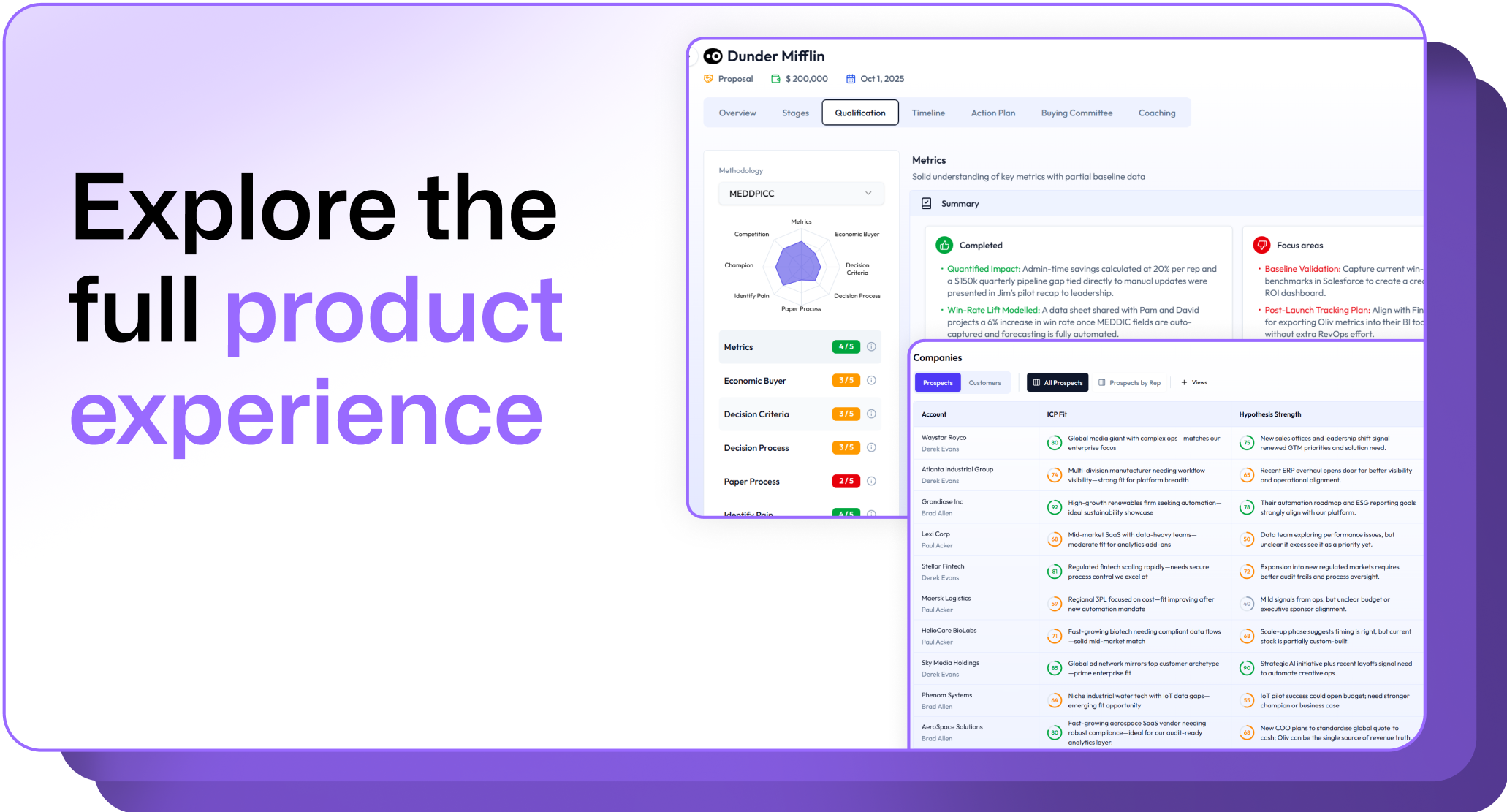
.avif)
.png)







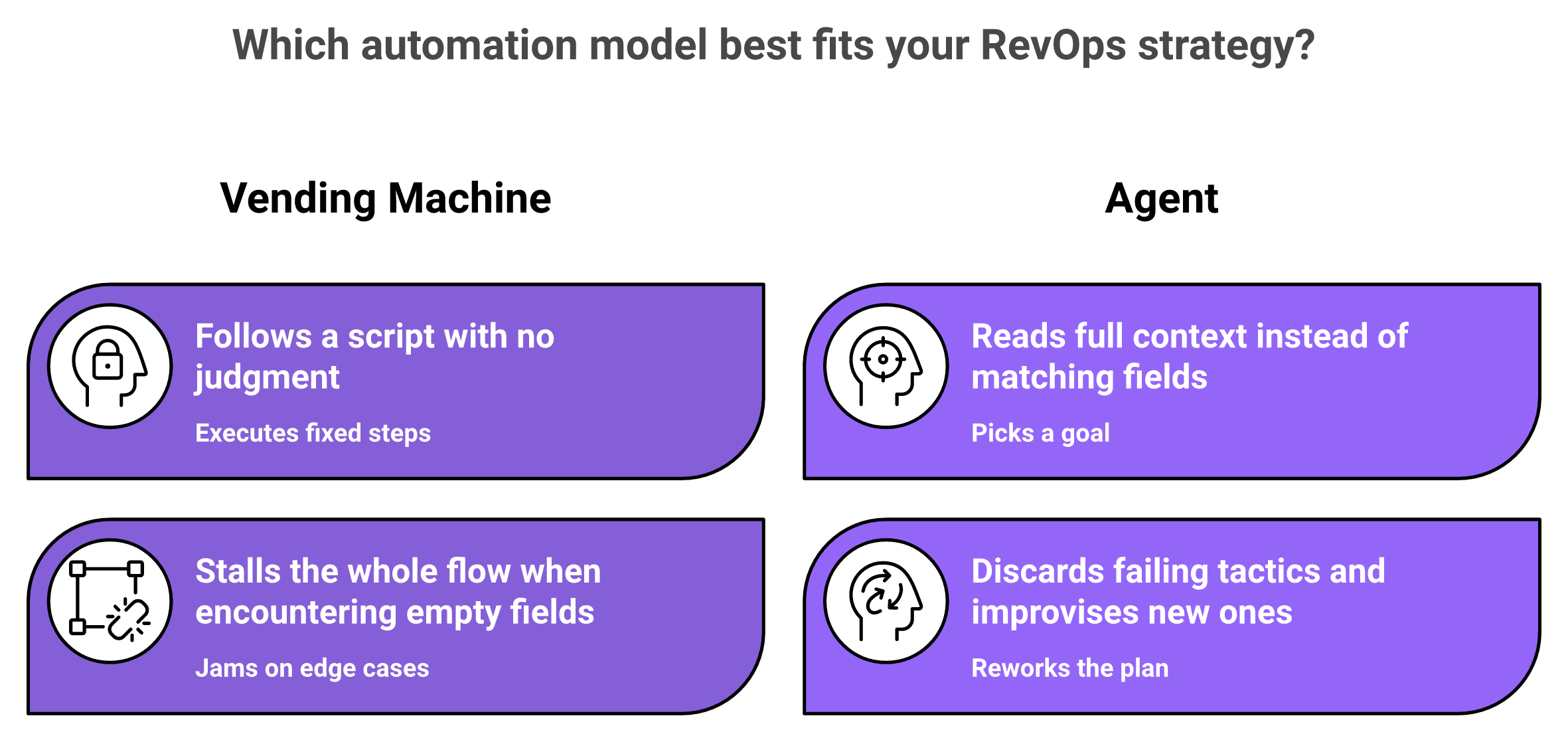
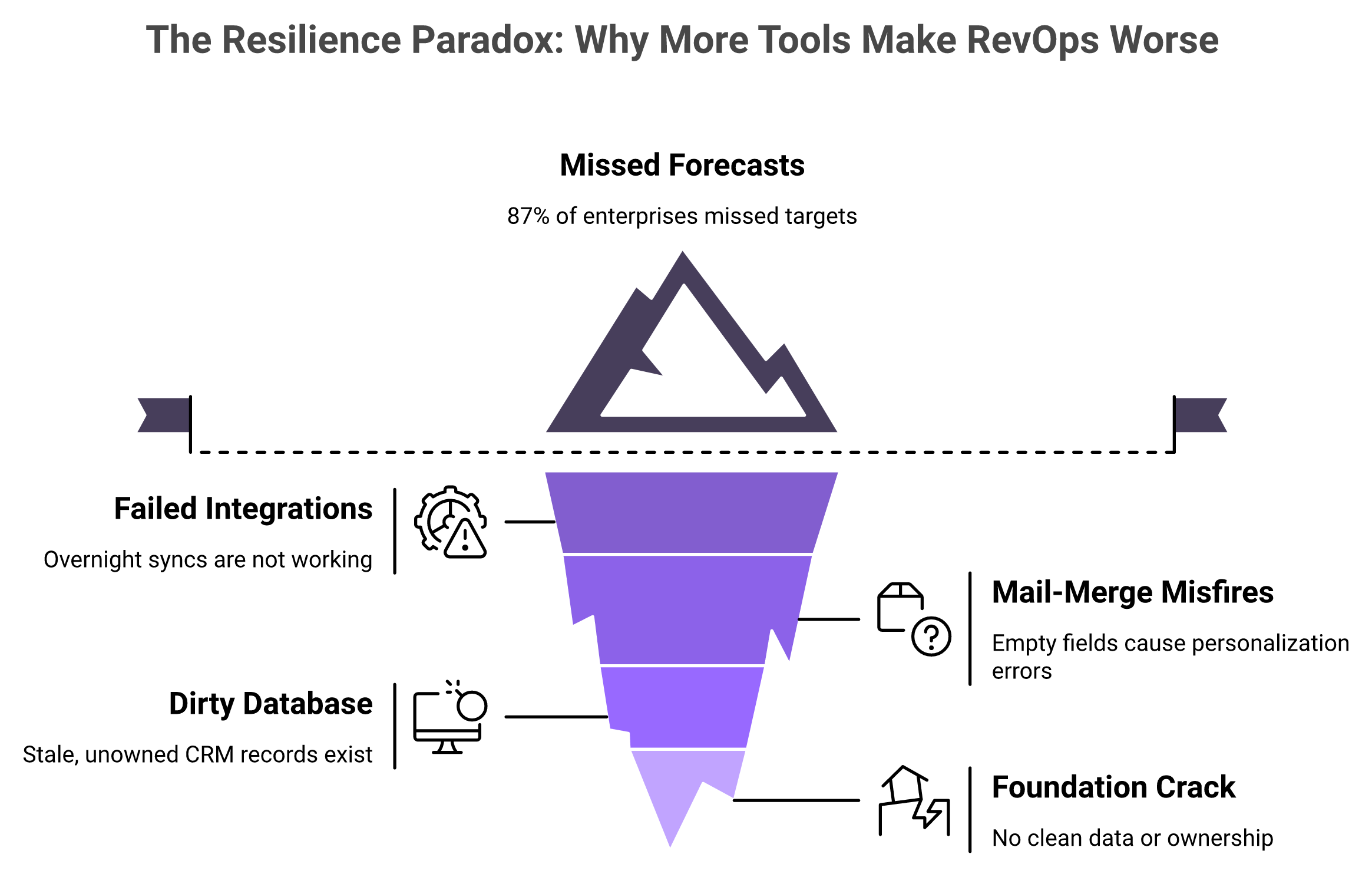
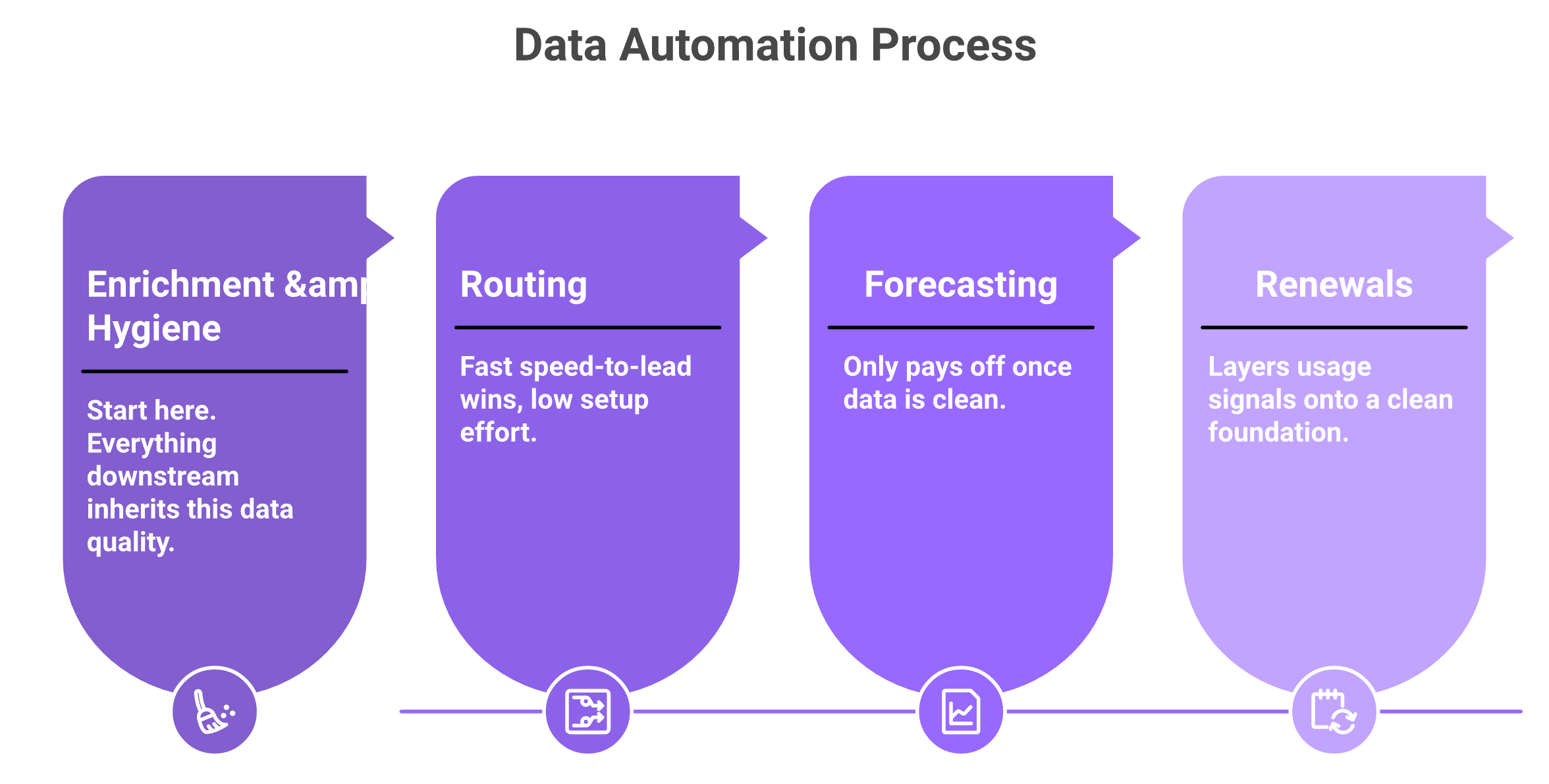
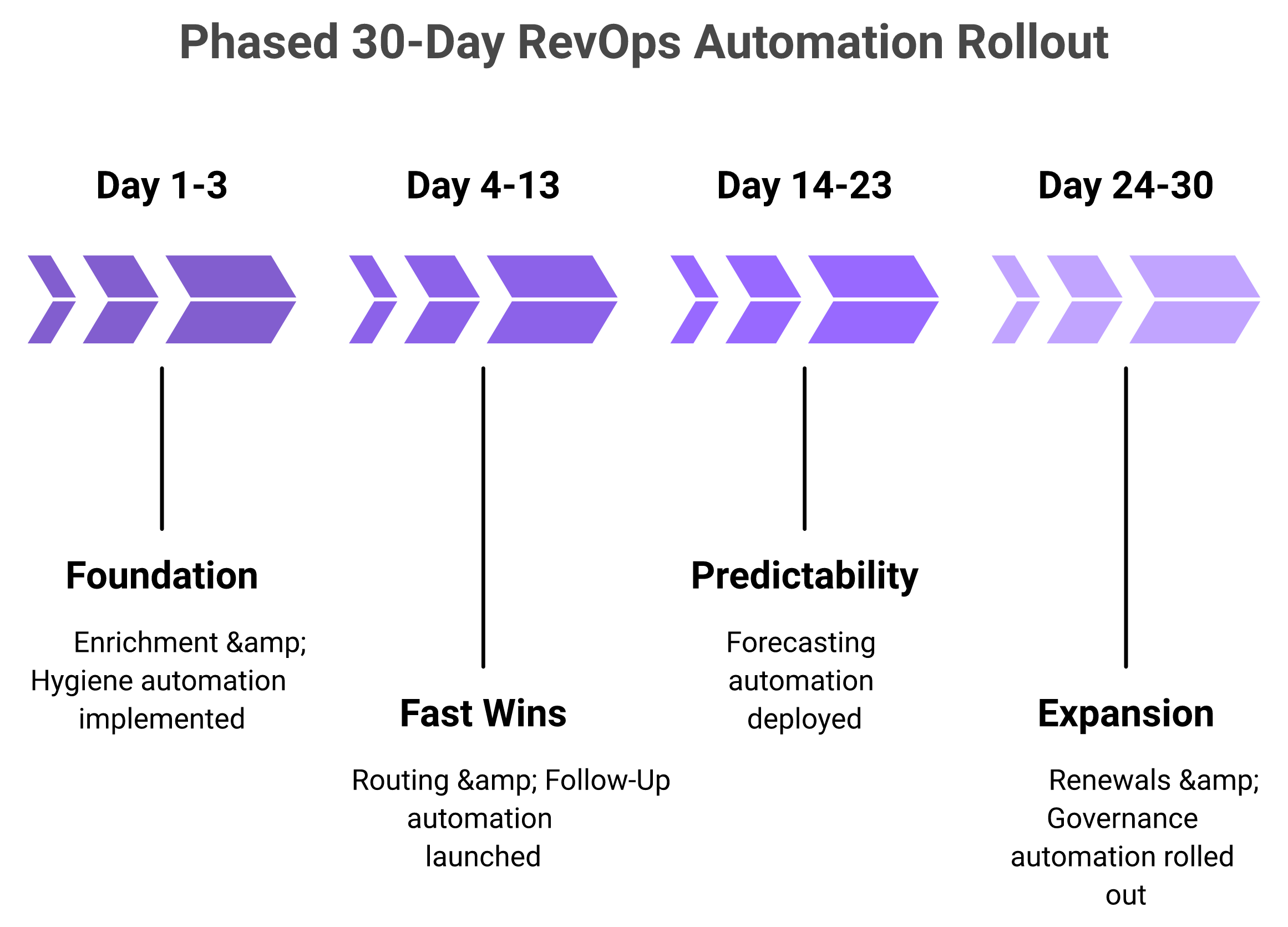

.png)
.png)
.png)
.png)

