Beyond the Single-Player Chatbot: Why Revenue Teams Need an Always-On Multiplayer Agent Harness
Written by
Ishan Chhabra
Last Updated :
September 22, 2026
Skim in :
13
mins
In this article
Revenue teams love Oliv
Here’s why:
All your deal data unified (from 30+ tools and tabs).
Insights are delivered to you directly, no digging.
AI agents automate tasks for you.
Thank you! Your submission has been received!
Oops! Something went wrong while submitting the form.
Meet Oliv’s AI Agents
Hi! I’m, Deal Driver
I track deals, flag risks, send weekly pipeline updates and give sales managers full visibility into deal progress
Hi! I’m, CRM Manager
I maintain CRM hygiene by updating core, custom and qualification fields all without your team lifting a finger
Hi! I’m, Forecaster
I build accurate forecasts based on real deal movement and tell you which deals to pull in to hit your number
Hi! I’m, Coach
I believe performance fuels revenue. I spot skill gaps, score calls and build coaching plans to help every rep level up
Hi! I’m, Prospector
I dig into target accounts to surface the right contacts, tailor and time outreach so you always strike when it counts
Hi! I’m, Pipeline tracker
I call reps to get deal updates, and deliver a real-time, CRM-synced roll-up view of deal progress
Hi! I’m, Analyst
I answer complex pipeline questions, uncover deal patterns, and build reports that guide strategic decisions
TL;DR
A prompting tool only helps with work someone thought to ask about, so value tracks individual initiative and rollouts produce enthusiastic users with flat forecast numbers.
Copilots wait for a prompt; agents start from schedules and signals. The real test is what arrives on a Tuesday when nobody opens the tool.
Alert-only proactive systems make things worse. Prepared work awaiting sign-off removes triage; notifications hand judgement back without context.
Delegate repetitive, cross-system, reversible work like CRM hygiene and research. Fix capture coverage first, because agent output inherits your CRM gaps.
Coordination depends on a shared object layer, a signal layer, and a coordinator. Judge multi-agent claims on context, not agent count.
Replace adoption reporting with coverage: unprompted output rate, initiation concentration, sign-off latency, and reclaimed hours.
Q1. Why does your team like the AI rollout while none of your numbers move? [toc=1. The Adoption Asymmetry]
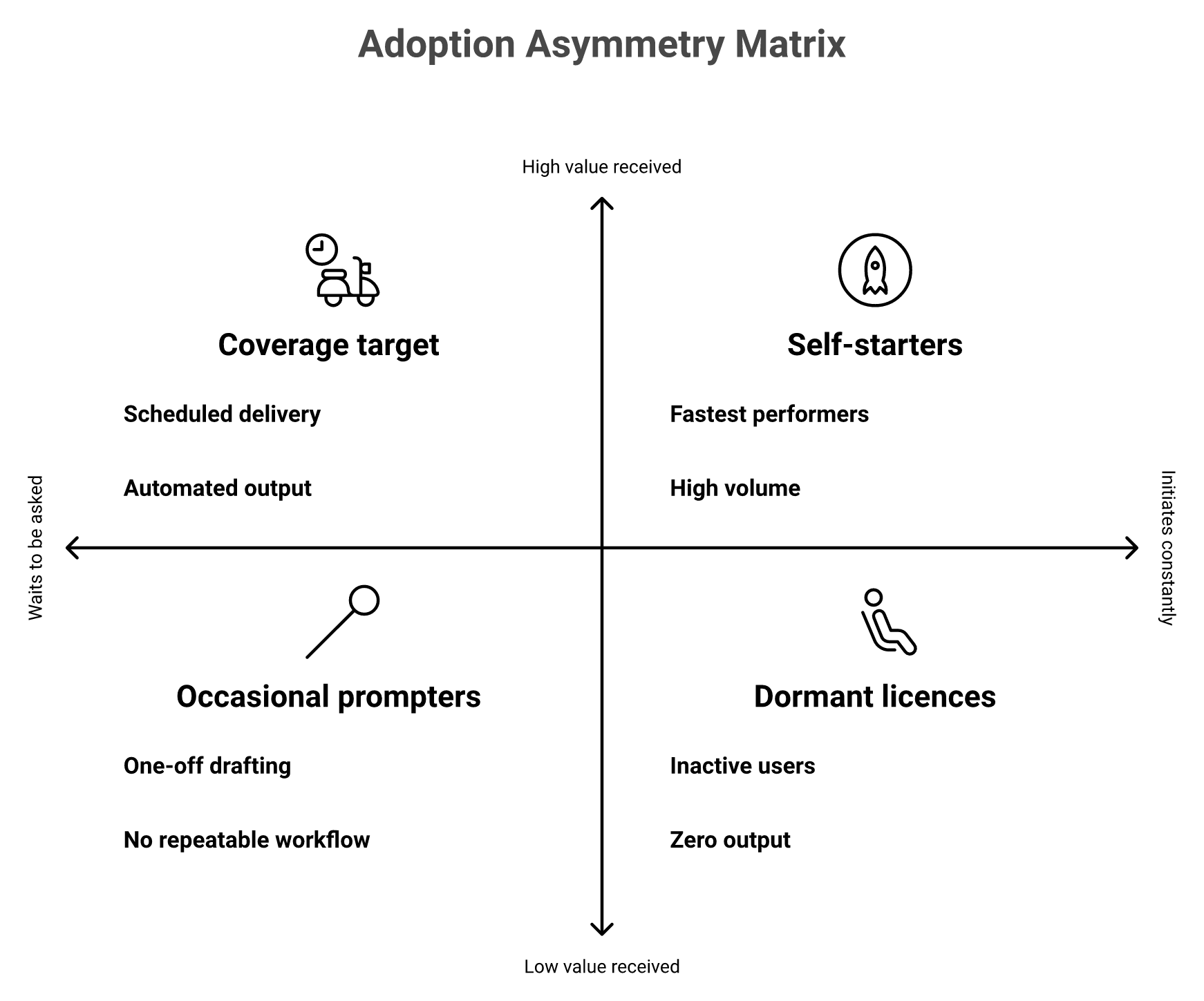
A prompting tool only helps with the work someone thought to ask about. So the value lands wherever initiative already lives. Your three sharpest reps got faster. The middle of the bench did not move. The average held flat, and your forecast looks the same as it did two quarters ago. The rollout worked at the individual level and failed at the distribution level. One diagnostic tells you which you have: what share of your team produced anything with AI last week without being asked to?
⭐ The scene I keep walking into
A VP of RevOps shows me a licence report. Ninety-two seats assigned, sixty-one active in the last thirty days. Everyone in the room agrees the tool is good.
Then we open the forecast. Cycle length, stage conversion, and slippage all sit within noise of last year. Nobody in that room is lying. They measured the wrong thing.
❌ Why seat reports hide the problem
Value from prompt-driven tools lands where initiative already is, which is why seat reports look healthy while the forecast stays flat.
Seat-based rollouts assume initiative is evenly spread across a team. It never is. Enablement measures training completion, because completion is easy to count.
Nobody counts outputs produced per rep per week. That is the number that would have shown you the gap in week three. I have made this mistake myself, and I made it because the dashboard flattered us. This is the same gap that shows up in most RevOps automation programmes.
⚠️ The constraint is distribution, not capability
The models are good enough. That part of the argument is over. Salesforce's 2026 State of Sales survey found 87% of sellers now use AI somewhere in prospecting, forecasting, scoring, or drafting, while data quality and admin friction still block the return.
Read that carefully. Broad usage, blocked return. Usage spread out. Value did not.
✅ Your team is not wrong to like ChatGPT and Claude
I want to concede this fully, because the objection is fair. A rep who prompts well gets real leverage from a general assistant. Oliv AI's own homepage describes the mechanism plainly: "In an individual desktop session, Claude works when someone asks. Each person runs their own prompts and coordinates the next steps, instead of agents starting work in the background and collaborating across the team" (2026).
Keep those tools. The problem is not quality. The problem is that a prompt-driven system distributes value in proportion to who types, and the people who type most are usually the people who needed help least. If you are weighing that trade, our build versus buy guide for revenue AI walks through it.
Coverage asks a harder question: what fraction of the team received usable work they did not request? Pull last week's data and count two things. First, how many reps produced any AI output at all. Second, what share of total prompts came from your top five users.
When I run this with teams, the concentration surprises them every time. Five people, most of the volume. That is not an adoption problem you can train your way out of. It is a design problem in how the software starts work.
The rest of this article is about that design choice, and about the honest limits of fixing it.
Q2. What actually separates an AI agent from an AI copilot once you stop typing? [toc=2. Agents vs Copilots]
A copilot waits for a prompt and returns an answer. An agent starts from a signal or a schedule, runs multi-step work, and hands you something to approve. The useful test is not autonomy on a spec sheet. It is what arrives on a Tuesday when nobody opens the tool. Copilots produce nothing. Agents produce prepared work. That single behavioural difference decides whether value reaches a whole bench or only the people who type.
⭐ The behavioural test, not the label
Microsoft's own documentation frames a copilot as the assistant interface and agents as specialised tools that handle specific processes through it. That distinction is honest, and it is also easy to fake in marketing.
So ignore the label. Ask what the system did last week with no human input. If the answer is nothing, you bought a copilot, whatever the pricing page says. The same test separates real AI sales agents from renamed assistants.
❌ What prompted tools cost operationally
The cost is not the licence. It is that the manager becomes the scheduler.
Somebody has to remember to run the pipeline review prompt on Thursday. Somebody has to remember which account needed research. That remembering is unpaid coordination work, and it lands on your best people. Reviews of first-generation tools show the same friction, where the insight exists but retrieving it stays manual, a pattern we catalogued in our breakdown of Gong's limitations and challenges.
"I found the AI tracker setup to be quite difficult, especially concerning the user interface when setting up keywords or smart trackers. The requirement to download snippets one by one using copy and paste is particularly annoying." — Verified User, Gong - G2 Verified Review [3 Oct 2025]
"limitations of getting data back into salesforce" — Verified User, Gong - G2 Verified Review [21 May 2026]
⚠️ What actually changed
Three things, and none of them is model intelligence. Triggers moved from human attention to schedules and signals. Tools became callable, so the system can write to a CRM instead of suggesting text. Memory became persistent, so work carries across days.
Field comparisons put agent deployments at 20 to 50% efficiency gains against 5 to 10% for copilots, with the caveat that the gain only shows up on well-defined workflows. I read that number as a ceiling, not a promise.
✅ Decision rights, side by side
AI Copilot Versus AI Agent Decision Rights
Dimension
AI copilot
AI agent
Trigger
Human prompt
Schedule or signal
Initiator
The rep
The system
Decision maker
Human, every step
Human, at sign-off
Oversight model
Per action
Per outcome
Memory
Session-bound
Persistent across days
Latency
Seconds, when asked
Continuous, arrives on time
Throughput
Limited by who types
Limited by signal volume
Risk profile
Low, nothing executes
Higher, needs guardrails
Failure mode
Never used
Noise, or wrong action
Best-fit revenue work
Drafting, thinking aloud
CRM hygiene, renewal watch, pipeline inspection
⏰ One honest note on vocabulary
"Multiplayer" is our framing for a coordinated set of agents. It is not a category term, and buyers do not search it. Use it as a mental model, then judge vendors on the table above, or on the working definitions in our guide to agentic sales automation.
Q3. Which revenue work should an agent own, and what has to be true of your data first? [toc=3. What To Delegate]
Delegate work that is repetitive, cross-system, and well defined: CRM hygiene, account research, meeting capture, renewal monitoring, and pipeline inspection. Keep negotiation, discovery, and pricing judgement with humans. Before any of it pays, fix the input, because agent output inherits your CRM's gaps. Salesforce's 2026 State of Sales reports 54% of teams already run agents somewhere in the cycle, with data quality and admin friction named as the top blockers to return. Ambiguous work stays with a copilot and a person.
⭐ Score the work before you assign it
Rate each workflow on four axes. Repetition, cross-system scope, ambiguity, and reversibility. High repetition and low ambiguity are green lights. High ambiguity is where agents embarrass you.
Which Revenue Workflows To Delegate To Agents
Workflow
Repetition
Cross-system
Ambiguity
Reversible
Verdict
CRM field hygiene
High
High
Low
Yes
Agent
Account research briefs
High
High
Low
Yes
Agent
Meeting capture and next steps
High
Medium
Low
Yes
Agent
Renewal risk monitoring
High
High
Medium
Yes
Agent, with sign-off
Pipeline inspection
High
Medium
Medium
Yes
Agent, with sign-off
Discovery questioning
Medium
Low
High
No
Human
Pricing and terms
Low
Medium
High
No
Human
❌ The mistake almost every team makes first
Teams pilot agents on their messiest workflow, because that is what hurts most. Then they blame the model when the real problem was the record.
I have done this. We pointed agents at a pipeline where half the opportunities had no activity history. The output was confident and useless. That is why CRM data quality automation comes before agent design.
⚠️ Data readiness checklist
Run these four checks before the pilot, not after.
Field completeness. What percentage of open opportunities have close date, stage, and amount populated this quarter?
Activity capture coverage. What share of customer conversations exists as a transcript or logged email, rather than living in a rep's memory?
Stage definitions. Can two managers independently place the same deal in the same stage?
Duplicate rate. How many accounts appear more than once?
If capture coverage is below half, fix capture first. Everything downstream inherits it. Buyers say this out loud in reviews when the export or sync layer fights them.
"The fact that you can't edit a recording (to only share a portion with a client), and the fact that if you stop working with the tool you lose the data." — Verified User, Gong - G2 Verified Review [19 Mar 2026]
✅ Where the hygiene problem actually gets solved
Oliv AI attacks the precondition instead of assuming it. Meeting, email, and call capture feed the CRM automatically, so the agents downstream inspect records that reflect what happened rather than what a rep remembered to log. Customers describe that sequence directly, and the same logic drives how we auto-score MEDDIC, BANT, and SPICED from calls.
"It doesn't just record meetings; it automatically captures key insights, updates systems of record, identifies next steps, and helps keep teams aligned. As a result, we've seen better CRM hygiene, less administrative overhead, and more consistent execution across our customer-facing teams." — Verified User, Oliv AI G2 - Verified Review [23 Jun 2026]
That is the order of operations I would hold any vendor to, including us. Capture, then context, then agents.
Q4. Isn't software that acts on its own how you end up with alerts nobody reads? [toc=4. Alerts vs Drafts]
Often, yes. A team that has learned to ignore its notifications is worse off than a team asking good questions. The distinction that survives a busy quarter is acting versus preparing. A proactive system that sends alerts adds triage work. One that delivers a drafted brief, an updated plan, or a pre-filled record awaiting sign-off removes it. Ask any vendor which of the two arrives on a Tuesday, then judge on that answer.
⭐ Granting the objection completely
I have deployed tools that died of alert fatigue. Not because the signals were wrong, but because every signal became a red badge in Slack.
Within six weeks the badges were muted. The tool stayed in the stack for another year, paid for and ignored. That is the real failure mode, and it is more common than the scary version people worry about.
❌ Why alerts fail on their own
An alert transfers judgement back to you without transferring context. "This deal is at risk" means a rep now has to reconstruct why, which takes twenty minutes she does not have.
Gartner's June 2025 forecast put more than 40% of agentic AI projects on track for cancellation by the end of 2027, and named escalating costs, unclear business value, and inadequate risk controls rather than weak models. Noise is how "unclear business value" actually feels from the inside, and it is the failure mode our agentic AI implementation guide for RevOps is built to avoid.
⚠️ The same signal, two outputs
The same risk signal can arrive as an alert that adds triage or as a draft that removes it. Only the second survives a busy quarter.
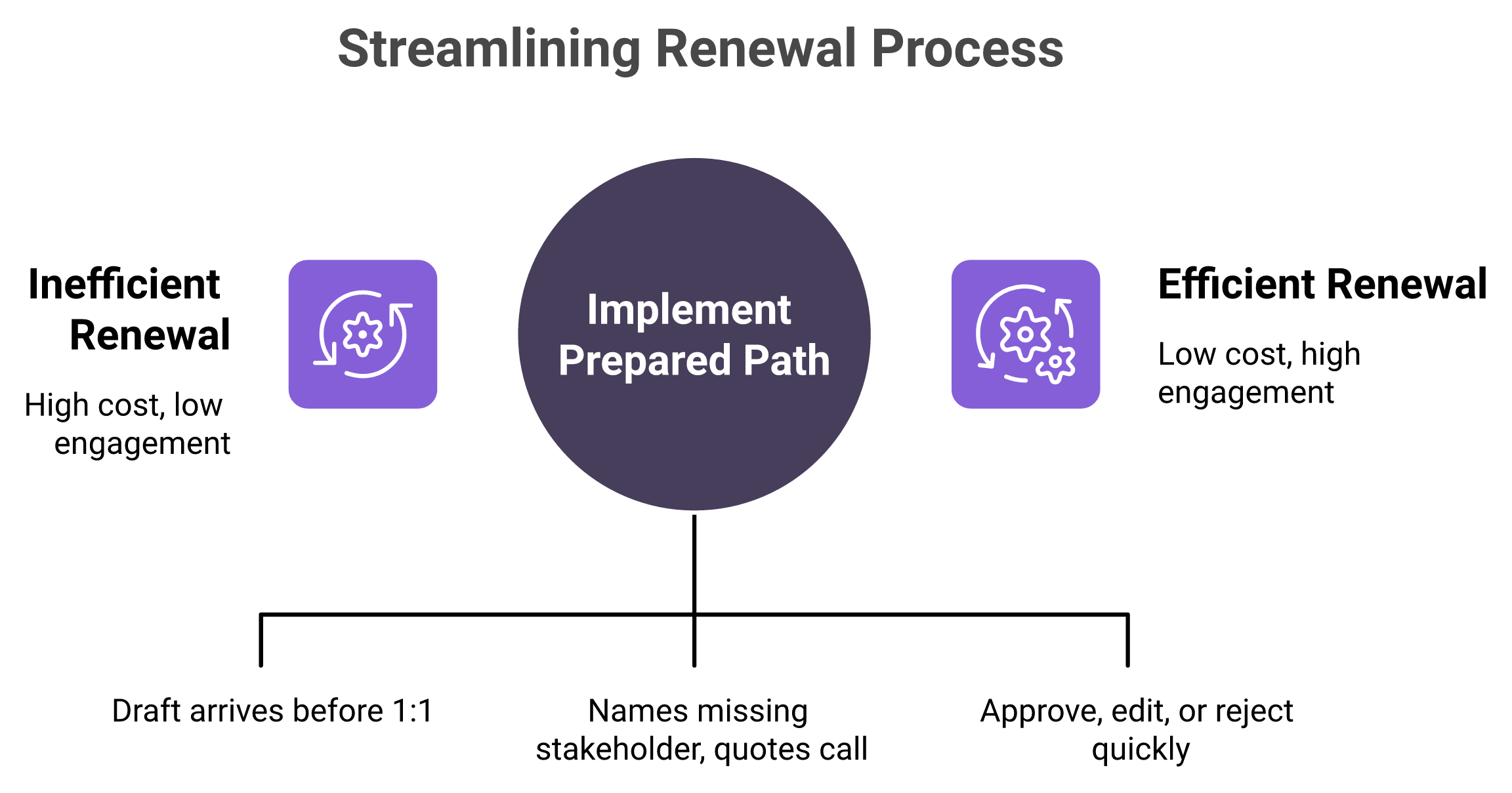
Take one renewal, ninety days out, with no executive contact engaged in six weeks.
Notification version. A red flag appears on the account. Someone opens it, reads the score, and closes it. Nothing changes.
Prepared version. A draft arrives before the CSM's next scheduled 1:1. It names the missing stakeholder, quotes the last relevant call moment, proposes two next steps, and pre-fills the mutual plan. The human approves, edits, or rejects in two minutes.
Same signal. Completely different cost to the team. Reviewers describe this shift in plain terms when it works, and it is the core of deal slippage prevention.
"The Driver agent watches all my deals and flags any that are at risk, so I don't have to spend hours listening to recordings in tools like Gong and Clari." — Verified User, Oliv AI G2 - Verified Review [17 Jun 2026]
And when the experience is imperfect, buyers say that too, which is worth reading before any purchase.
"The only downside is that the platform can be a bit glitchy at times, but the support team is always quick to address and resolve any bugs." — Verified User, Oliv AI G2 - Verified Review [2 Jul 2026]
✅ Turn it into a purchasing criterion
The permission boundary should be published, not promised. Oliv AI documents its split as two named super-agents, Olivia set to "ask before acting" and Oliver set to "act without asking", so a buyer can see where sign-off sits before signing anything. You can read the full catalogue in our introduction to Oliv AI agents for sales teams.
Ask every shortlisted vendor three questions. What arrives when nobody logs in for a week? Is that a notification or a draft awaiting approval? Where is the permission boundary documented? Our notes on AI CRM trust and governance evaluation cover how to score the answers.
⏰ The limit I will not hide
Prepared work still needs a human who reads it. If your managers will not open a Monday brief, no cadence saves you. Autonomy does not fix an attention problem, and I would rather say that now than let you find it in month four.
Q5. What does "always-on" actually look like on a calendar? [toc=5. Always-On Cadence]
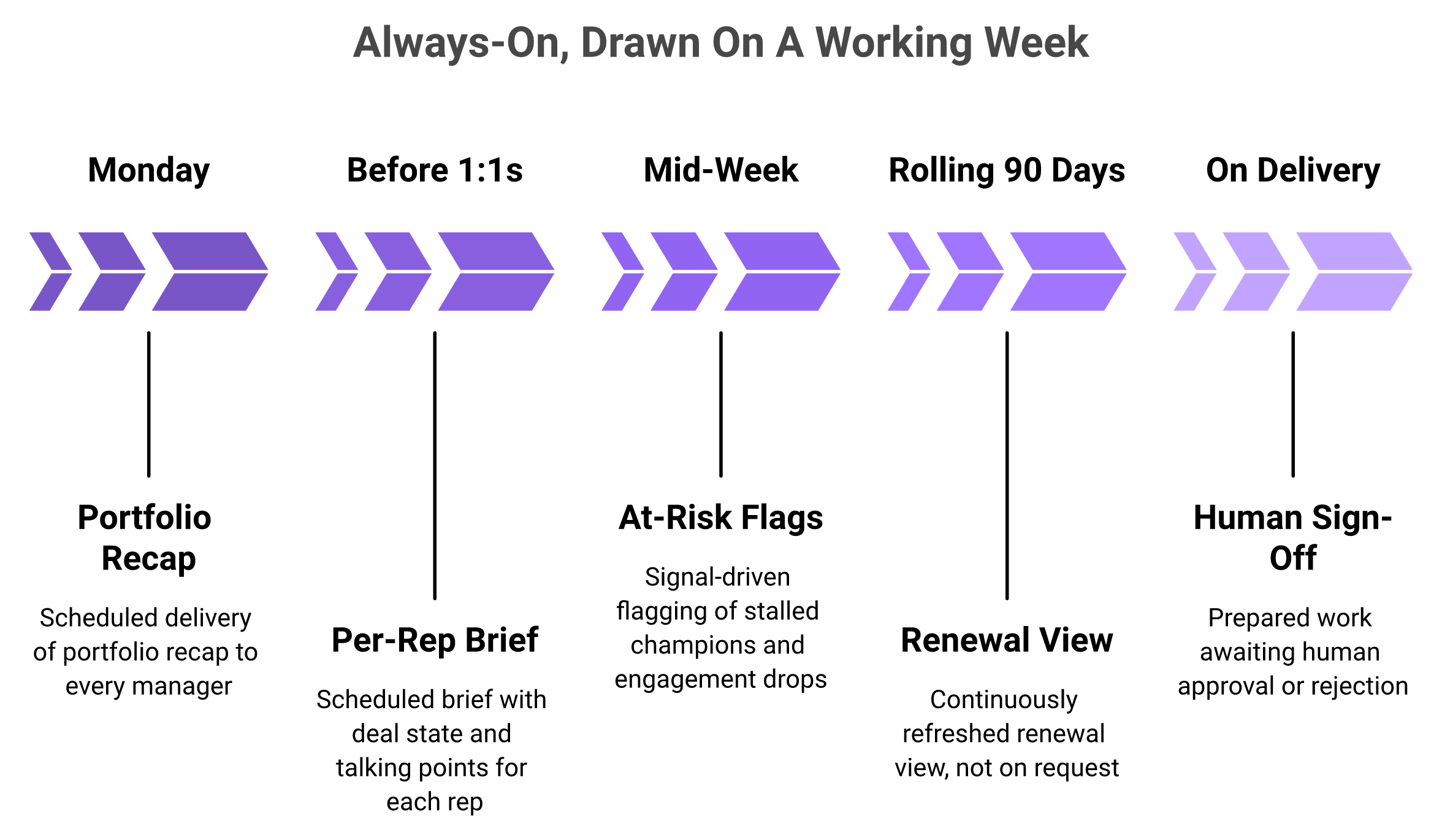
Always-on is a cadence, not an adjective. Oliv AI's agents are built so scheduled and signal-triggered work arrives without anyone typing: a brief for a manager before each scheduled 1:1, a portfolio recap every Monday, a rolling 90-day renewal view, and at-risk flags as signals surface. The permission boundary is published and split, with Olivia set to ask before acting and Oliver set to act without asking. That makes autonomy checkable instead of aspirational.
⭐ Put it on a calendar, not a spec sheet
Always-on is a cadence you can draw on a week. If a vendor cannot draw it, the system is prompt-driven with extra steps.
Ask a vendor for the cadence in calendar form. Monday at 8am, this arrives. Before every 1:1, this arrives. When a renewal crosses ninety days, this arrives.
If nobody can draw that calendar, the system is prompt-driven with extra steps. I use this question in every product review we run internally, and it is the same test we apply in our guide to AI agents versus SaaS dashboards.
❌ Dashboards and copilots share one flaw
Both wait for a visit. A dashboard is a place you go. A copilot is a box you type into.
Neither produces anything on a Tuesday when the manager is in back-to-back calls. That is exactly when a pipeline slips quietly. Reviews of first-generation tools keep circling this retrieval cost, a pattern covered in our breakdown of limitations beyond meeting intelligence.
"I cannot download all the data myself unless we upgrade the plan, which isn't ideal and results in me not fully utilizing Gong." — Verified User, Gong - G2 Verified Review [3 Oct 2025]
⚠️ What the trigger change actually does
Moving the trigger from human attention to schedules and signals changes who carries the coordination load. The system remembers Thursday. The manager does not have to.
Oliv AI runs this through named agents rather than one general assistant, with a CRM agent, a deal driver agent, and a forecast agent handling separate jobs. Users describe the division of labour in their own words, and the full set is listed in our post on Oliv AI agents for sales teams.
"Oliv.ai has agents like the CRM agent, deal driver agent, and forecast agent, which are invaluable. The deal driver agent keeps tabs on all my deals and tells me where each deal is and which one needs my focus." — Verified User, Oliv AI G2 - Verified Review [15 Jun 2026]
✅ Sign-off is the feature, not the compromise
I want to be blunt about the design choice here. Prepared work awaiting approval is the honest promise. Full autonomy across a revenue team is not something I would sell you today.
One pricing note matters for coverage. Oliv AI's Amplify tier is priced at $0, which means scheduled output can reach finance, product, or support without a seat decision. Reach is usually where coverage dies, and the economics are laid out in our analysis of revenue tech stack consolidation costs.
⏰ The honest ledger
Oliv AI's answer to the initiative problem is cadence plus permission: work produced on schedule and on signal, delivered for sign-off, with SOC 2 Type II certification, GDPR and CCPA compliance, role-based access control, and audit logs underneath. Our mid-market buyer guide to governance and SOC 2 walks through what to verify.
Now the part vendors skip. Oliv is not the first or only multi-agent platform. Our public review record is thin and recent, with G2 entries clustered in mid-2026 and several case studies still email-gated. Some agent cadences in our internal register are written at a high level, and we hold them back until they are confirmed as shipped.
So do not take the cadence on faith. Run a two-week trial, open nothing, and count what arrived.
Q6. How do several agents work the same account without stepping on each other? [toc=6. Agent Coordination]
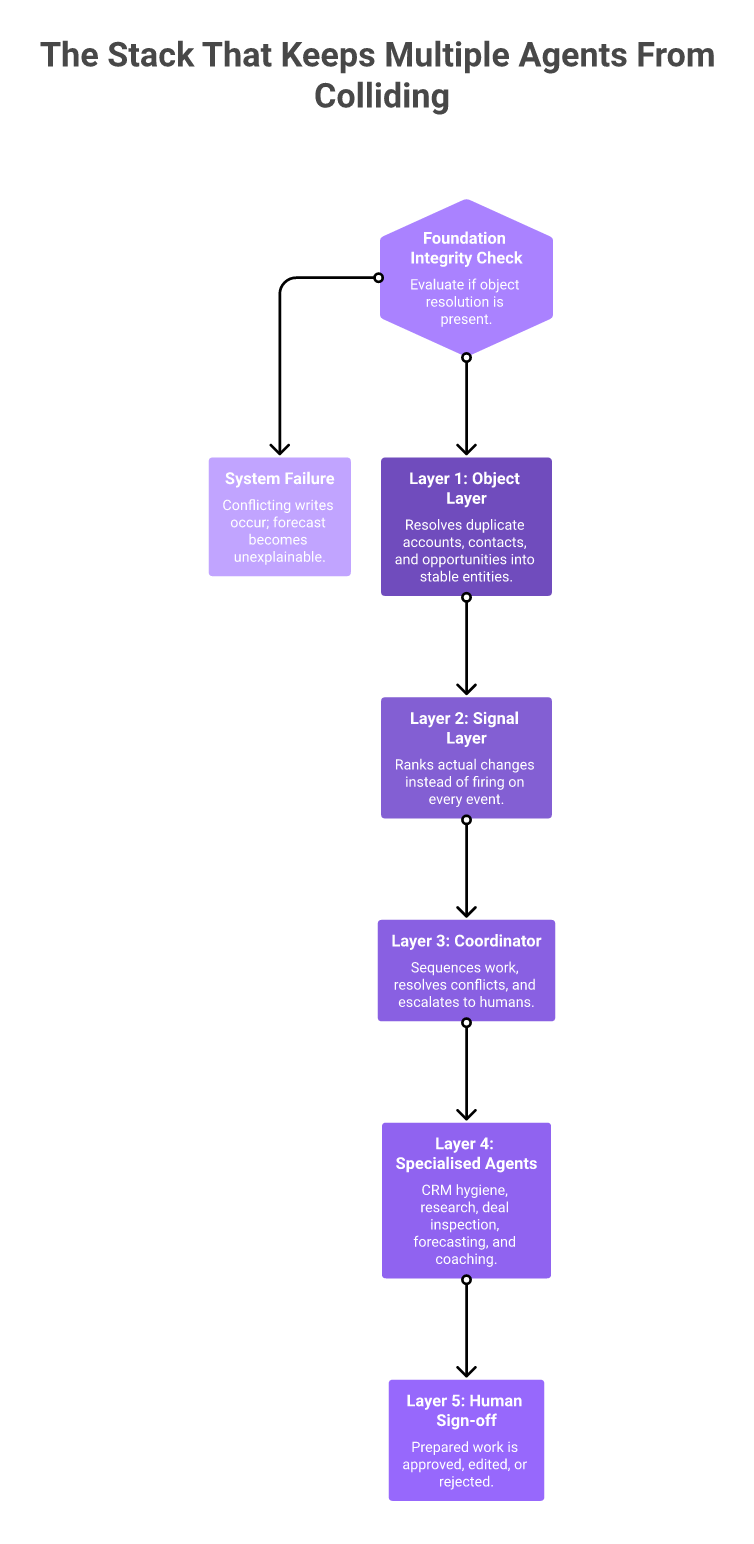
Coordination needs three layers. A shared object layer, so every agent means the same account and the same opportunity. A signal layer, so the system ranks what actually changed. And a coordinator, which sequences work and escalates to a human. Without the object layer, parallel agents write contradictory updates to one deal. This is infrastructure work, covering guardrails, memory management, object association, and opportunity context. Judge multi-agent claims on that layer, not on how many agents appear in a catalogue.
⭐ The failure I would worry about
Two agents, one opportunity, two versions of the truth. One agent pushes the close date out because the champion went quiet. Another pulls it in because a pricing page visit spiked.
Both wrote to Salesforce. Your forecast now has a number nobody can explain. I have watched this happen with lightly wired automation, and the damage is trust, not data. Our notes on agentic AI implementation and data architecture cover how to prevent it.
❌ Why agent count is a bad buying signal
Coordination is infrastructure, not a feature. Without the object layer at the bottom, parallel agents write contradictory updates to the same deal.
A catalogue of thirty agents on a weak context layer is thirty ways to create conflicting records. A smaller set on a solid layer behaves predictably.
Oliv AI publishes its catalogue on the agents marketplace, and I would rather you read that page than trust a number quoted in a blog, including ours. Our own internal registers have disagreed on the count, which is exactly why the source page matters. The same scrutiny applies when you compare revenue intelligence platforms for RevOps.
⚠️ What shared context has to hold
Three things, at minimum.
Identity resolution. Which records point to the same company, including the duplicate Salesforce accounts every mid-market team carries.
Opportunity state. Stage, amount, close date, and the methodology fields your team actually uses, whether that is MEDDPICC, BANT, or SPICED.
Conversation history. The calls, emails, and messages attached to that opportunity, not floating in a separate recording tool.
Meeting-level keyword tracking cannot do this. Keywords tell you a competitor was mentioned. Deal-level context tells you which opportunity, which stakeholder, and which stage it happened in. That difference is the whole reason I built the context graph layer first, and it is why revenue intelligence differs from conversation intelligence.
✅ Two layers, one sentence each
The object layer resolves accounts, contacts, and opportunities into stable entities that agents can safely write to. Oliv AI calls this the context graph, and the process graph documentation covers how signals are ranked and sequenced on top of it.
I will not re-argue either layer here, because they deserve their own explanations. The point for a buyer is narrower. Ask to see the entity resolution and the signal ranking before you ask about agents, using the checks in our CRM data strategy guide for CROs.
⏰ What to ask on the call
Make the vendor open a real account record and answer four questions.
How did you decide these two records are the same company?
Which agent wrote this field, and when?
What happens when two agents disagree on close date?
Who gets escalated to, and how fast?
If the answers are vague, the agent catalogue is a front end on a thin foundation. Coordination is not a feature you can bolt on later, and I say that as someone who tried.
Q7. How do you control what an agent may do, and what does the law now require? [toc=7. Guardrails And Compliance]
Score each task on two axes: reversibility and customer visibility. Reversible, internal work can run unattended with audit logs. Irreversible or customer-facing work needs human sign-off. Write the rule per task, name an owner, set a monthly cost ceiling, and log every action. Since 2 August 2026, EU AI Act Article 50 also requires an agent interacting with a person to disclose that it is artificial and whom it acts for, and each agent in a multi-agent stack must comply independently.
⭐ The five-step permission procedure
List the tasks, not the tools. "Update close date" is a task. "Agentic AI" is not.
Score each task on reversibility and customer visibility using the table below.
Assign an owner by name for every task that runs unattended.
Set a monthly cost ceiling per agent, because action-based pricing scales with volume.
Turn on logging before the first run, not after the first incident.
Agent Permission Rubric By Task
Task
Reversible
Customer-facing
Permission
Update CRM fields
Yes
No
Run unattended, log it
Generate account research
Yes
No
Run unattended
Draft follow-up email
Yes
Yes, once sent
Prepare, human sends
Advance deal stage
Yes
No
Prepare, manager approves
Send outbound sequence
No
Yes
Human approval, every time
Change pricing or terms
No
Yes
Human only
❌ The step teams skip
Nobody sets the cost ceiling. Action-based pricing looks tiny per unit, and Oliv AI publishes agent actions at $0.01 per credit, which reads as harmless until volume triples.
Then month three arrives and finance asks a pointed question. Gartner's June 2025 forecast tied the projected cancellation of more than 40% of agentic AI projects by end-2027 to escalating costs, unclear business value, and inadequate risk controls. Two of those three are budget hygiene, not technology, which is why we built a revenue intelligence ROI calculator.
⚠️ What Article 50 now requires
The European Commission adopted its final Article 50 guidelines on 20 July 2026, with obligations enforceable from 2 August 2026 and a marking grace period to 2 December 2026.
Three practical points for a revenue team.
Disclosure moments. An agent must disclose its artificial nature and its principal, including at authorisation, reporting, and validation steps.
Per-agent duty. In a multi-agent setup, each interacting agent carries the obligation on its own.
Penalties. Non-compliance can reach 15 million euros or 3% of worldwide turnover.
Also check your meeting recording consent language if you sell into the EU. That is a separate obligation, and legal should read it before your agents do. Our AI CRM trust and governance evaluation covers the review questions.
✅ Making the decision once
Oliv AI ships this rubric as two named super-agents rather than a settings matrix, with Olivia asking before acting and Oliver acting without asking, and role-based access control plus audit logs underneath. So the permission decision gets made once per agent, not once per workflow.
I still recommend running the table above yourself. Our defaults will not match your risk tolerance, and you are the one who signs the audit. The implementation steps sit in our RevOps implementation and admin guide.
Q8. When is a prompting tool still the right answer? [toc=8. When Copilots Suffice]
When everyone who needs value already initiates it. A ten-person revenue team where every rep is prompt-literate does not have a coverage problem. Buying a platform there means paying for governance the team does not yet need. The argument starts to bite when the team grows past the point where a manager can see everyone's work. That is when value stops distributing itself, and you begin paying for initiative you cannot observe.
⭐ Saying the thing that costs the sale
If you run eight AEs, sit near them, and read their calls yourself, stay where you are. Keep ChatGPT and Claude. Both are genuinely good at individual work, and I use them daily.
The rule I keep coming back to is simple. Build while it is personal. Buy when the team depends on it. Our build versus buy analysis for revenue AI runs the numbers on both paths.
❌ What actually breaks at scale
Not capability. Visibility.
At twenty-five reps a manager still roughly knows who is struggling. At sixty, the manager knows who talks loudest in pipeline reviews. Salesforce's 2026 State of Sales found top performers were 1.7 times more likely to use AI agents for prospecting, which tells you where the value pools when nothing distributes it.
That gap is the whole problem. Your best reps compound. Your middle does not, and it is your middle that determines the forecast. That is the case for coaching at scale using AI.
⚠️ The build-versus-buy line, drawn plainly
Three questions decide it.
Can your manager still see every rep's work in a week? If yes, prompting tools are enough.
Does anything break when one person goes on holiday? If a workflow only runs because Priya remembers it, you have a dependency, not a system.
Is anyone paying for coordination in unpaid hours? Evening CRM cleanup is the classic symptom.
One yes to questions two or three is where I would start looking at agents. Not before. If you are still below that line, our guide to revenue intelligence for small sales teams is the better read.
💰 The TCO point nobody puts on a slide
The reflex playbook is Gong plus Clari plus Salesloft. For a 25 to 200 rep team, that stack quietly drifts past $500 per user per month once you add seats, add-ons, and renewal uplift.
The money is real, and the frustration shows up in reviews when buyers hit the wall between what a tool records and what it returns. We break the line items down in how to reduce sales tech stack costs.
"Gong Engage is awful in every single way compared to outreach. Would not recommend at all, flows are hard to get into, information is not readily available, sequencing is difficult to create and track." — Verified User, Gong - G2 Verified Review [9 Jun 2025]
Agent platforms are not automatically cheaper. They are differently priced, and a small team often cannot use the difference.
✅ The anti-buyer list, including for us
I would rather lose a deal than sell into these three situations. B2C support teams. Buyers who only want call recording. Teams under ten reps where everyone already prompts well.
Our own reviewers flag rough edges too, and those matter more at small scale where there is no RevOps to absorb them.
"The only downside is that the platform can be a bit glitchy at times, but the support team is always quick to address and resolve any bugs." — Verified User, Oliv AI G2 - Verified Review [2 Jul 2026]
Where my head is right now: the threshold sits somewhere between fifteen and thirty reps. I could be off by ten either way.
Q9. How do you measure AI coverage instead of AI enthusiasm? [toc=9. Measuring Coverage]
Track four numbers monthly. Unprompted output rate, which is the share of the team receiving usable AI work they did not request. Initiation concentration, which is the share of prompts coming from your top five users. Sign-off latency, which is how long prepared work waits for approval. And reclaimed hours on research and admin. Seats activated tells you what you bought. Coverage tells you what the team actually received.
⭐ The four metrics, defined for RevOps
Four Coverage Metrics For Revenue Teams
Metric
Definition
Formula
Source
Starting benchmark
Unprompted output rate
Reps who got usable AI work without asking
Recipients of scheduled output ÷ total reps
Agent delivery logs
Below 30% means the rollout is still individual
Initiation concentration
How centralised prompting is
Prompts from top 5 users ÷ all prompts
Tool usage export
Above 60% signals a distribution problem
Sign-off latency
Speed from delivery to human decision
Median hours from delivery to approve or reject
Approval logs
Over 48 hours means nobody is reading
Reclaimed hours
Time given back per rep
Baseline admin hours minus current
Time study or activity logs
Track the delta, not the absolute
Salesforce's 2026 State of Sales reported research time down 34% and content creation down 36% for AI-using sellers. Those are the categories where reclaimed hours actually show up first, and our list of sales productivity metrics covers how to log them.
❌ Why baselining is non-negotiable
Measure before the rollout, not after. Otherwise the first report has nothing to compare against, and every number becomes a story.
Two weeks of manual sampling is enough. Ask ten reps to log research and CRM admin hours for ten working days. Crude data beats no data, and I have never regretted having the before number. The sampling method sits inside our RevOps implementation and admin guide.
⚠️ The CFO translation
A CFO does not ask about adoption. The question is what the seats returned.
Coverage answers it in the same language as spend. Divide total AI cost by the number of people receiving usable output each month. That is coverage per dollar, and it is a far harder number to fake than a usage chart. Run it alongside our revenue intelligence ROI calculator.
✅ Making the count objective
Oliv AI's scheduled deliveries make coverage countable rather than surveyed. If a Monday portfolio recap and a pre-1:1 brief land for every manager, the unprompted output rate is a recipient count from the delivery log. The daily shape of that cadence is detailed in our sales manager daily use guide.
That is the part I care about most. Self-reported usage surveys drift upward because people want to be helpful. Delivery logs do not.
⏰ One manager's Monday as the unit
Here is the smallest useful test I know. Pick one sales manager with eight reps. Run the four metrics for that manager alone for thirty days.
Count what arrived before her Monday pipeline review. Count how long it sat before she acted. Count what she still built by hand. If she still built the pipeline summary herself, coverage is zero for her, regardless of what the licence report says. Our guide to evidence-based forecast commits shows what that review should look like instead.
Then scale the test. Five managers, sixty days, same four numbers. That is the whole measurement programme, and it fits on one page.
Where I would hedge: reclaimed hours is the softest of the four, because reps estimate generously. Oliv AI's delivery logs are the number I trust, and I weight the other three accordingly.
Q10. What should you ask a vendor before buying an always-on system? [toc=10. Vendor Diligence Checklist]
Ask six things. What arrives when nobody logs in for a week. Whether that is a notification or a draft awaiting approval. Which actions run without asking, and where that is documented. What the shared context layer associates to an account. Show me the audit log. And what this costs at real action volume. Anything a vendor cannot answer live on a screen share is roadmap, not capability.
⭐ The six questions, and the answers that should worry you
What arrives when nobody logs in for a week? Worry if the answer describes a dashboard you can visit.
Notification or draft? Worry if they say "smart alerts". Alerts transfer work back to your team.
Which actions run without asking, and where is that published? Worry if permissions live in a slide, not documentation.
What does the context layer associate to an account? Worry if they cannot show entity resolution on a real record with duplicates.
Show me the audit log. Worry if the log only records logins, not agent actions.
What does this cost at real volume? Worry if per-action pricing has no ceiling or usage forecast.
Gartner's June 2025 forecast on agentic AI cancellations named inadequate risk controls and unclear business value alongside cost, and also warned about agent washing, where existing features are renamed as agents. Question three and question five are your washing detector, and our VP of sales guide to what agents can actually do separates shipped work from hype.
❌ The rule I hold every vendor to, including us
Screen share or it does not exist. Not a recorded demo, not a sandbox seeded with clean data, and not a slide of agent logos.
Ask them to open a messy account with two duplicate records and run the workflow live. I have sat through polished demos that fell apart the moment someone typed a real company name. Use the scoring sheet in our CRO platform evaluation for mid-market.
⚠️ Your buyers are running agents too
This changes procurement in both directions. G2's 2026 Buyer Behavior Report found 40% of buyers say evaluation is now the longest stage, and IT security review is the top post-selection delay at 39%, rising to 50% in enterprise.
The same report found more than 60% of buyers use or plan to use AI agents in buying, while only 9% would let an agent execute a purchase inside guardrails. So publish your security proof where a research agent can read it. Waiting for procurement to ask costs you weeks, which is the argument in our buyer guide to governance and SOC 2.
"The Analyst agent allows me to understand everything I need with just one click, eliminating the long wait time I used to have with RevOps to get answers." — Verified User, Oliv AI G2 - Verified Review [17 Jun 2026]
"I'd love to see few more options to customize dashboards and reports for different teams." — Verified User, Oliv AI G2 - Verified Review [26 Jun 2026]
✅ Published, not promised
Oliv AI's answers to these six sit in public: the catalogue and cadences on the agents marketplace, the permission split on the Oliver page, the credit model on the pricing page, and the security posture in the trust centre. Hold every shortlisted vendor to that standard, and hold us to it first. The full agent set is listed in our introduction to Oliv AI agents for sales teams.
Two quarters from now, the difference between the teams that got value and the teams that got enthusiasm will not be model quality. It will be whether work arrived for people who never asked for it. Run the coverage count on one manager's Monday and you will know which camp you are in. Then ask your shortlist what their system produces when nobody opens it. If you want to see the cadence on your own pipeline rather than a demo account, book a demo and bring your messiest opportunity.
Q1. Why does your team like the AI rollout while none of your numbers move? [toc=1. The Adoption Asymmetry]
A prompting tool only helps with the work someone thought to ask about. So the value lands wherever initiative already lives. Your three sharpest reps got faster. The middle of the bench did not move. The average held flat, and your forecast looks the same as it did two quarters ago. The rollout worked at the individual level and failed at the distribution level. One diagnostic tells you which you have: what share of your team produced anything with AI last week without being asked to?
⭐ The scene I keep walking into
A VP of RevOps shows me a licence report. Ninety-two seats assigned, sixty-one active in the last thirty days. Everyone in the room agrees the tool is good.
Then we open the forecast. Cycle length, stage conversion, and slippage all sit within noise of last year. Nobody in that room is lying. They measured the wrong thing.
❌ Why seat reports hide the problem
Value from prompt-driven tools lands where initiative already is, which is why seat reports look healthy while the forecast stays flat.
Seat-based rollouts assume initiative is evenly spread across a team. It never is. Enablement measures training completion, because completion is easy to count.
Nobody counts outputs produced per rep per week. That is the number that would have shown you the gap in week three. I have made this mistake myself, and I made it because the dashboard flattered us. This is the same gap that shows up in most RevOps automation programmes.
⚠️ The constraint is distribution, not capability
The models are good enough. That part of the argument is over. Salesforce's 2026 State of Sales survey found 87% of sellers now use AI somewhere in prospecting, forecasting, scoring, or drafting, while data quality and admin friction still block the return.
Read that carefully. Broad usage, blocked return. Usage spread out. Value did not.
✅ Your team is not wrong to like ChatGPT and Claude
I want to concede this fully, because the objection is fair. A rep who prompts well gets real leverage from a general assistant. Oliv AI's own homepage describes the mechanism plainly: "In an individual desktop session, Claude works when someone asks. Each person runs their own prompts and coordinates the next steps, instead of agents starting work in the background and collaborating across the team" (2026).
Keep those tools. The problem is not quality. The problem is that a prompt-driven system distributes value in proportion to who types, and the people who type most are usually the people who needed help least. If you are weighing that trade, our build versus buy guide for revenue AI walks through it.
Coverage asks a harder question: what fraction of the team received usable work they did not request? Pull last week's data and count two things. First, how many reps produced any AI output at all. Second, what share of total prompts came from your top five users.
When I run this with teams, the concentration surprises them every time. Five people, most of the volume. That is not an adoption problem you can train your way out of. It is a design problem in how the software starts work.
The rest of this article is about that design choice, and about the honest limits of fixing it.
Q2. What actually separates an AI agent from an AI copilot once you stop typing? [toc=2. Agents vs Copilots]
A copilot waits for a prompt and returns an answer. An agent starts from a signal or a schedule, runs multi-step work, and hands you something to approve. The useful test is not autonomy on a spec sheet. It is what arrives on a Tuesday when nobody opens the tool. Copilots produce nothing. Agents produce prepared work. That single behavioural difference decides whether value reaches a whole bench or only the people who type.
⭐ The behavioural test, not the label
Microsoft's own documentation frames a copilot as the assistant interface and agents as specialised tools that handle specific processes through it. That distinction is honest, and it is also easy to fake in marketing.
So ignore the label. Ask what the system did last week with no human input. If the answer is nothing, you bought a copilot, whatever the pricing page says. The same test separates real AI sales agents from renamed assistants.
❌ What prompted tools cost operationally
The cost is not the licence. It is that the manager becomes the scheduler.
Somebody has to remember to run the pipeline review prompt on Thursday. Somebody has to remember which account needed research. That remembering is unpaid coordination work, and it lands on your best people. Reviews of first-generation tools show the same friction, where the insight exists but retrieving it stays manual, a pattern we catalogued in our breakdown of Gong's limitations and challenges.
"I found the AI tracker setup to be quite difficult, especially concerning the user interface when setting up keywords or smart trackers. The requirement to download snippets one by one using copy and paste is particularly annoying." — Verified User, Gong - G2 Verified Review [3 Oct 2025]
"limitations of getting data back into salesforce" — Verified User, Gong - G2 Verified Review [21 May 2026]
⚠️ What actually changed
Three things, and none of them is model intelligence. Triggers moved from human attention to schedules and signals. Tools became callable, so the system can write to a CRM instead of suggesting text. Memory became persistent, so work carries across days.
Field comparisons put agent deployments at 20 to 50% efficiency gains against 5 to 10% for copilots, with the caveat that the gain only shows up on well-defined workflows. I read that number as a ceiling, not a promise.
✅ Decision rights, side by side
AI Copilot Versus AI Agent Decision Rights
Dimension
AI copilot
AI agent
Trigger
Human prompt
Schedule or signal
Initiator
The rep
The system
Decision maker
Human, every step
Human, at sign-off
Oversight model
Per action
Per outcome
Memory
Session-bound
Persistent across days
Latency
Seconds, when asked
Continuous, arrives on time
Throughput
Limited by who types
Limited by signal volume
Risk profile
Low, nothing executes
Higher, needs guardrails
Failure mode
Never used
Noise, or wrong action
Best-fit revenue work
Drafting, thinking aloud
CRM hygiene, renewal watch, pipeline inspection
⏰ One honest note on vocabulary
"Multiplayer" is our framing for a coordinated set of agents. It is not a category term, and buyers do not search it. Use it as a mental model, then judge vendors on the table above, or on the working definitions in our guide to agentic sales automation.
Q3. Which revenue work should an agent own, and what has to be true of your data first? [toc=3. What To Delegate]
Delegate work that is repetitive, cross-system, and well defined: CRM hygiene, account research, meeting capture, renewal monitoring, and pipeline inspection. Keep negotiation, discovery, and pricing judgement with humans. Before any of it pays, fix the input, because agent output inherits your CRM's gaps. Salesforce's 2026 State of Sales reports 54% of teams already run agents somewhere in the cycle, with data quality and admin friction named as the top blockers to return. Ambiguous work stays with a copilot and a person.
⭐ Score the work before you assign it
Rate each workflow on four axes. Repetition, cross-system scope, ambiguity, and reversibility. High repetition and low ambiguity are green lights. High ambiguity is where agents embarrass you.
Which Revenue Workflows To Delegate To Agents
Workflow
Repetition
Cross-system
Ambiguity
Reversible
Verdict
CRM field hygiene
High
High
Low
Yes
Agent
Account research briefs
High
High
Low
Yes
Agent
Meeting capture and next steps
High
Medium
Low
Yes
Agent
Renewal risk monitoring
High
High
Medium
Yes
Agent, with sign-off
Pipeline inspection
High
Medium
Medium
Yes
Agent, with sign-off
Discovery questioning
Medium
Low
High
No
Human
Pricing and terms
Low
Medium
High
No
Human
❌ The mistake almost every team makes first
Teams pilot agents on their messiest workflow, because that is what hurts most. Then they blame the model when the real problem was the record.
I have done this. We pointed agents at a pipeline where half the opportunities had no activity history. The output was confident and useless. That is why CRM data quality automation comes before agent design.
⚠️ Data readiness checklist
Run these four checks before the pilot, not after.
Field completeness. What percentage of open opportunities have close date, stage, and amount populated this quarter?
Activity capture coverage. What share of customer conversations exists as a transcript or logged email, rather than living in a rep's memory?
Stage definitions. Can two managers independently place the same deal in the same stage?
Duplicate rate. How many accounts appear more than once?
If capture coverage is below half, fix capture first. Everything downstream inherits it. Buyers say this out loud in reviews when the export or sync layer fights them.
"The fact that you can't edit a recording (to only share a portion with a client), and the fact that if you stop working with the tool you lose the data." — Verified User, Gong - G2 Verified Review [19 Mar 2026]
✅ Where the hygiene problem actually gets solved
Oliv AI attacks the precondition instead of assuming it. Meeting, email, and call capture feed the CRM automatically, so the agents downstream inspect records that reflect what happened rather than what a rep remembered to log. Customers describe that sequence directly, and the same logic drives how we auto-score MEDDIC, BANT, and SPICED from calls.
"It doesn't just record meetings; it automatically captures key insights, updates systems of record, identifies next steps, and helps keep teams aligned. As a result, we've seen better CRM hygiene, less administrative overhead, and more consistent execution across our customer-facing teams." — Verified User, Oliv AI G2 - Verified Review [23 Jun 2026]
That is the order of operations I would hold any vendor to, including us. Capture, then context, then agents.
Q4. Isn't software that acts on its own how you end up with alerts nobody reads? [toc=4. Alerts vs Drafts]
Often, yes. A team that has learned to ignore its notifications is worse off than a team asking good questions. The distinction that survives a busy quarter is acting versus preparing. A proactive system that sends alerts adds triage work. One that delivers a drafted brief, an updated plan, or a pre-filled record awaiting sign-off removes it. Ask any vendor which of the two arrives on a Tuesday, then judge on that answer.
⭐ Granting the objection completely
I have deployed tools that died of alert fatigue. Not because the signals were wrong, but because every signal became a red badge in Slack.
Within six weeks the badges were muted. The tool stayed in the stack for another year, paid for and ignored. That is the real failure mode, and it is more common than the scary version people worry about.
❌ Why alerts fail on their own
An alert transfers judgement back to you without transferring context. "This deal is at risk" means a rep now has to reconstruct why, which takes twenty minutes she does not have.
Gartner's June 2025 forecast put more than 40% of agentic AI projects on track for cancellation by the end of 2027, and named escalating costs, unclear business value, and inadequate risk controls rather than weak models. Noise is how "unclear business value" actually feels from the inside, and it is the failure mode our agentic AI implementation guide for RevOps is built to avoid.
⚠️ The same signal, two outputs
The same risk signal can arrive as an alert that adds triage or as a draft that removes it. Only the second survives a busy quarter.
Take one renewal, ninety days out, with no executive contact engaged in six weeks.
Notification version. A red flag appears on the account. Someone opens it, reads the score, and closes it. Nothing changes.
Prepared version. A draft arrives before the CSM's next scheduled 1:1. It names the missing stakeholder, quotes the last relevant call moment, proposes two next steps, and pre-fills the mutual plan. The human approves, edits, or rejects in two minutes.
Same signal. Completely different cost to the team. Reviewers describe this shift in plain terms when it works, and it is the core of deal slippage prevention.
"The Driver agent watches all my deals and flags any that are at risk, so I don't have to spend hours listening to recordings in tools like Gong and Clari." — Verified User, Oliv AI G2 - Verified Review [17 Jun 2026]
And when the experience is imperfect, buyers say that too, which is worth reading before any purchase.
"The only downside is that the platform can be a bit glitchy at times, but the support team is always quick to address and resolve any bugs." — Verified User, Oliv AI G2 - Verified Review [2 Jul 2026]
✅ Turn it into a purchasing criterion
The permission boundary should be published, not promised. Oliv AI documents its split as two named super-agents, Olivia set to "ask before acting" and Oliver set to "act without asking", so a buyer can see where sign-off sits before signing anything. You can read the full catalogue in our introduction to Oliv AI agents for sales teams.
Ask every shortlisted vendor three questions. What arrives when nobody logs in for a week? Is that a notification or a draft awaiting approval? Where is the permission boundary documented? Our notes on AI CRM trust and governance evaluation cover how to score the answers.
⏰ The limit I will not hide
Prepared work still needs a human who reads it. If your managers will not open a Monday brief, no cadence saves you. Autonomy does not fix an attention problem, and I would rather say that now than let you find it in month four.
Q5. What does "always-on" actually look like on a calendar? [toc=5. Always-On Cadence]
Always-on is a cadence, not an adjective. Oliv AI's agents are built so scheduled and signal-triggered work arrives without anyone typing: a brief for a manager before each scheduled 1:1, a portfolio recap every Monday, a rolling 90-day renewal view, and at-risk flags as signals surface. The permission boundary is published and split, with Olivia set to ask before acting and Oliver set to act without asking. That makes autonomy checkable instead of aspirational.
⭐ Put it on a calendar, not a spec sheet
Always-on is a cadence you can draw on a week. If a vendor cannot draw it, the system is prompt-driven with extra steps.
Ask a vendor for the cadence in calendar form. Monday at 8am, this arrives. Before every 1:1, this arrives. When a renewal crosses ninety days, this arrives.
If nobody can draw that calendar, the system is prompt-driven with extra steps. I use this question in every product review we run internally, and it is the same test we apply in our guide to AI agents versus SaaS dashboards.
❌ Dashboards and copilots share one flaw
Both wait for a visit. A dashboard is a place you go. A copilot is a box you type into.
Neither produces anything on a Tuesday when the manager is in back-to-back calls. That is exactly when a pipeline slips quietly. Reviews of first-generation tools keep circling this retrieval cost, a pattern covered in our breakdown of limitations beyond meeting intelligence.
"I cannot download all the data myself unless we upgrade the plan, which isn't ideal and results in me not fully utilizing Gong." — Verified User, Gong - G2 Verified Review [3 Oct 2025]
⚠️ What the trigger change actually does
Moving the trigger from human attention to schedules and signals changes who carries the coordination load. The system remembers Thursday. The manager does not have to.
Oliv AI runs this through named agents rather than one general assistant, with a CRM agent, a deal driver agent, and a forecast agent handling separate jobs. Users describe the division of labour in their own words, and the full set is listed in our post on Oliv AI agents for sales teams.
"Oliv.ai has agents like the CRM agent, deal driver agent, and forecast agent, which are invaluable. The deal driver agent keeps tabs on all my deals and tells me where each deal is and which one needs my focus." — Verified User, Oliv AI G2 - Verified Review [15 Jun 2026]
✅ Sign-off is the feature, not the compromise
I want to be blunt about the design choice here. Prepared work awaiting approval is the honest promise. Full autonomy across a revenue team is not something I would sell you today.
One pricing note matters for coverage. Oliv AI's Amplify tier is priced at $0, which means scheduled output can reach finance, product, or support without a seat decision. Reach is usually where coverage dies, and the economics are laid out in our analysis of revenue tech stack consolidation costs.
⏰ The honest ledger
Oliv AI's answer to the initiative problem is cadence plus permission: work produced on schedule and on signal, delivered for sign-off, with SOC 2 Type II certification, GDPR and CCPA compliance, role-based access control, and audit logs underneath. Our mid-market buyer guide to governance and SOC 2 walks through what to verify.
Now the part vendors skip. Oliv is not the first or only multi-agent platform. Our public review record is thin and recent, with G2 entries clustered in mid-2026 and several case studies still email-gated. Some agent cadences in our internal register are written at a high level, and we hold them back until they are confirmed as shipped.
So do not take the cadence on faith. Run a two-week trial, open nothing, and count what arrived.
Q6. How do several agents work the same account without stepping on each other? [toc=6. Agent Coordination]
Coordination needs three layers. A shared object layer, so every agent means the same account and the same opportunity. A signal layer, so the system ranks what actually changed. And a coordinator, which sequences work and escalates to a human. Without the object layer, parallel agents write contradictory updates to one deal. This is infrastructure work, covering guardrails, memory management, object association, and opportunity context. Judge multi-agent claims on that layer, not on how many agents appear in a catalogue.
⭐ The failure I would worry about
Two agents, one opportunity, two versions of the truth. One agent pushes the close date out because the champion went quiet. Another pulls it in because a pricing page visit spiked.
Both wrote to Salesforce. Your forecast now has a number nobody can explain. I have watched this happen with lightly wired automation, and the damage is trust, not data. Our notes on agentic AI implementation and data architecture cover how to prevent it.
❌ Why agent count is a bad buying signal
Coordination is infrastructure, not a feature. Without the object layer at the bottom, parallel agents write contradictory updates to the same deal.
A catalogue of thirty agents on a weak context layer is thirty ways to create conflicting records. A smaller set on a solid layer behaves predictably.
Oliv AI publishes its catalogue on the agents marketplace, and I would rather you read that page than trust a number quoted in a blog, including ours. Our own internal registers have disagreed on the count, which is exactly why the source page matters. The same scrutiny applies when you compare revenue intelligence platforms for RevOps.
⚠️ What shared context has to hold
Three things, at minimum.
Identity resolution. Which records point to the same company, including the duplicate Salesforce accounts every mid-market team carries.
Opportunity state. Stage, amount, close date, and the methodology fields your team actually uses, whether that is MEDDPICC, BANT, or SPICED.
Conversation history. The calls, emails, and messages attached to that opportunity, not floating in a separate recording tool.
Meeting-level keyword tracking cannot do this. Keywords tell you a competitor was mentioned. Deal-level context tells you which opportunity, which stakeholder, and which stage it happened in. That difference is the whole reason I built the context graph layer first, and it is why revenue intelligence differs from conversation intelligence.
✅ Two layers, one sentence each
The object layer resolves accounts, contacts, and opportunities into stable entities that agents can safely write to. Oliv AI calls this the context graph, and the process graph documentation covers how signals are ranked and sequenced on top of it.
I will not re-argue either layer here, because they deserve their own explanations. The point for a buyer is narrower. Ask to see the entity resolution and the signal ranking before you ask about agents, using the checks in our CRM data strategy guide for CROs.
⏰ What to ask on the call
Make the vendor open a real account record and answer four questions.
How did you decide these two records are the same company?
Which agent wrote this field, and when?
What happens when two agents disagree on close date?
Who gets escalated to, and how fast?
If the answers are vague, the agent catalogue is a front end on a thin foundation. Coordination is not a feature you can bolt on later, and I say that as someone who tried.
Q7. How do you control what an agent may do, and what does the law now require? [toc=7. Guardrails And Compliance]
Score each task on two axes: reversibility and customer visibility. Reversible, internal work can run unattended with audit logs. Irreversible or customer-facing work needs human sign-off. Write the rule per task, name an owner, set a monthly cost ceiling, and log every action. Since 2 August 2026, EU AI Act Article 50 also requires an agent interacting with a person to disclose that it is artificial and whom it acts for, and each agent in a multi-agent stack must comply independently.
⭐ The five-step permission procedure
List the tasks, not the tools. "Update close date" is a task. "Agentic AI" is not.
Score each task on reversibility and customer visibility using the table below.
Assign an owner by name for every task that runs unattended.
Set a monthly cost ceiling per agent, because action-based pricing scales with volume.
Turn on logging before the first run, not after the first incident.
Agent Permission Rubric By Task
Task
Reversible
Customer-facing
Permission
Update CRM fields
Yes
No
Run unattended, log it
Generate account research
Yes
No
Run unattended
Draft follow-up email
Yes
Yes, once sent
Prepare, human sends
Advance deal stage
Yes
No
Prepare, manager approves
Send outbound sequence
No
Yes
Human approval, every time
Change pricing or terms
No
Yes
Human only
❌ The step teams skip
Nobody sets the cost ceiling. Action-based pricing looks tiny per unit, and Oliv AI publishes agent actions at $0.01 per credit, which reads as harmless until volume triples.
Then month three arrives and finance asks a pointed question. Gartner's June 2025 forecast tied the projected cancellation of more than 40% of agentic AI projects by end-2027 to escalating costs, unclear business value, and inadequate risk controls. Two of those three are budget hygiene, not technology, which is why we built a revenue intelligence ROI calculator.
⚠️ What Article 50 now requires
The European Commission adopted its final Article 50 guidelines on 20 July 2026, with obligations enforceable from 2 August 2026 and a marking grace period to 2 December 2026.
Three practical points for a revenue team.
Disclosure moments. An agent must disclose its artificial nature and its principal, including at authorisation, reporting, and validation steps.
Per-agent duty. In a multi-agent setup, each interacting agent carries the obligation on its own.
Penalties. Non-compliance can reach 15 million euros or 3% of worldwide turnover.
Also check your meeting recording consent language if you sell into the EU. That is a separate obligation, and legal should read it before your agents do. Our AI CRM trust and governance evaluation covers the review questions.
✅ Making the decision once
Oliv AI ships this rubric as two named super-agents rather than a settings matrix, with Olivia asking before acting and Oliver acting without asking, and role-based access control plus audit logs underneath. So the permission decision gets made once per agent, not once per workflow.
I still recommend running the table above yourself. Our defaults will not match your risk tolerance, and you are the one who signs the audit. The implementation steps sit in our RevOps implementation and admin guide.
Q8. When is a prompting tool still the right answer? [toc=8. When Copilots Suffice]
When everyone who needs value already initiates it. A ten-person revenue team where every rep is prompt-literate does not have a coverage problem. Buying a platform there means paying for governance the team does not yet need. The argument starts to bite when the team grows past the point where a manager can see everyone's work. That is when value stops distributing itself, and you begin paying for initiative you cannot observe.
⭐ Saying the thing that costs the sale
If you run eight AEs, sit near them, and read their calls yourself, stay where you are. Keep ChatGPT and Claude. Both are genuinely good at individual work, and I use them daily.
The rule I keep coming back to is simple. Build while it is personal. Buy when the team depends on it. Our build versus buy analysis for revenue AI runs the numbers on both paths.
❌ What actually breaks at scale
Not capability. Visibility.
At twenty-five reps a manager still roughly knows who is struggling. At sixty, the manager knows who talks loudest in pipeline reviews. Salesforce's 2026 State of Sales found top performers were 1.7 times more likely to use AI agents for prospecting, which tells you where the value pools when nothing distributes it.
That gap is the whole problem. Your best reps compound. Your middle does not, and it is your middle that determines the forecast. That is the case for coaching at scale using AI.
⚠️ The build-versus-buy line, drawn plainly
Three questions decide it.
Can your manager still see every rep's work in a week? If yes, prompting tools are enough.
Does anything break when one person goes on holiday? If a workflow only runs because Priya remembers it, you have a dependency, not a system.
Is anyone paying for coordination in unpaid hours? Evening CRM cleanup is the classic symptom.
One yes to questions two or three is where I would start looking at agents. Not before. If you are still below that line, our guide to revenue intelligence for small sales teams is the better read.
💰 The TCO point nobody puts on a slide
The reflex playbook is Gong plus Clari plus Salesloft. For a 25 to 200 rep team, that stack quietly drifts past $500 per user per month once you add seats, add-ons, and renewal uplift.
The money is real, and the frustration shows up in reviews when buyers hit the wall between what a tool records and what it returns. We break the line items down in how to reduce sales tech stack costs.
"Gong Engage is awful in every single way compared to outreach. Would not recommend at all, flows are hard to get into, information is not readily available, sequencing is difficult to create and track." — Verified User, Gong - G2 Verified Review [9 Jun 2025]
Agent platforms are not automatically cheaper. They are differently priced, and a small team often cannot use the difference.
✅ The anti-buyer list, including for us
I would rather lose a deal than sell into these three situations. B2C support teams. Buyers who only want call recording. Teams under ten reps where everyone already prompts well.
Our own reviewers flag rough edges too, and those matter more at small scale where there is no RevOps to absorb them.
"The only downside is that the platform can be a bit glitchy at times, but the support team is always quick to address and resolve any bugs." — Verified User, Oliv AI G2 - Verified Review [2 Jul 2026]
Where my head is right now: the threshold sits somewhere between fifteen and thirty reps. I could be off by ten either way.
Q9. How do you measure AI coverage instead of AI enthusiasm? [toc=9. Measuring Coverage]
Track four numbers monthly. Unprompted output rate, which is the share of the team receiving usable AI work they did not request. Initiation concentration, which is the share of prompts coming from your top five users. Sign-off latency, which is how long prepared work waits for approval. And reclaimed hours on research and admin. Seats activated tells you what you bought. Coverage tells you what the team actually received.
⭐ The four metrics, defined for RevOps
Four Coverage Metrics For Revenue Teams
Metric
Definition
Formula
Source
Starting benchmark
Unprompted output rate
Reps who got usable AI work without asking
Recipients of scheduled output ÷ total reps
Agent delivery logs
Below 30% means the rollout is still individual
Initiation concentration
How centralised prompting is
Prompts from top 5 users ÷ all prompts
Tool usage export
Above 60% signals a distribution problem
Sign-off latency
Speed from delivery to human decision
Median hours from delivery to approve or reject
Approval logs
Over 48 hours means nobody is reading
Reclaimed hours
Time given back per rep
Baseline admin hours minus current
Time study or activity logs
Track the delta, not the absolute
Salesforce's 2026 State of Sales reported research time down 34% and content creation down 36% for AI-using sellers. Those are the categories where reclaimed hours actually show up first, and our list of sales productivity metrics covers how to log them.
❌ Why baselining is non-negotiable
Measure before the rollout, not after. Otherwise the first report has nothing to compare against, and every number becomes a story.
Two weeks of manual sampling is enough. Ask ten reps to log research and CRM admin hours for ten working days. Crude data beats no data, and I have never regretted having the before number. The sampling method sits inside our RevOps implementation and admin guide.
⚠️ The CFO translation
A CFO does not ask about adoption. The question is what the seats returned.
Coverage answers it in the same language as spend. Divide total AI cost by the number of people receiving usable output each month. That is coverage per dollar, and it is a far harder number to fake than a usage chart. Run it alongside our revenue intelligence ROI calculator.
✅ Making the count objective
Oliv AI's scheduled deliveries make coverage countable rather than surveyed. If a Monday portfolio recap and a pre-1:1 brief land for every manager, the unprompted output rate is a recipient count from the delivery log. The daily shape of that cadence is detailed in our sales manager daily use guide.
That is the part I care about most. Self-reported usage surveys drift upward because people want to be helpful. Delivery logs do not.
⏰ One manager's Monday as the unit
Here is the smallest useful test I know. Pick one sales manager with eight reps. Run the four metrics for that manager alone for thirty days.
Count what arrived before her Monday pipeline review. Count how long it sat before she acted. Count what she still built by hand. If she still built the pipeline summary herself, coverage is zero for her, regardless of what the licence report says. Our guide to evidence-based forecast commits shows what that review should look like instead.
Then scale the test. Five managers, sixty days, same four numbers. That is the whole measurement programme, and it fits on one page.
Where I would hedge: reclaimed hours is the softest of the four, because reps estimate generously. Oliv AI's delivery logs are the number I trust, and I weight the other three accordingly.
Q10. What should you ask a vendor before buying an always-on system? [toc=10. Vendor Diligence Checklist]
Ask six things. What arrives when nobody logs in for a week. Whether that is a notification or a draft awaiting approval. Which actions run without asking, and where that is documented. What the shared context layer associates to an account. Show me the audit log. And what this costs at real action volume. Anything a vendor cannot answer live on a screen share is roadmap, not capability.
⭐ The six questions, and the answers that should worry you
What arrives when nobody logs in for a week? Worry if the answer describes a dashboard you can visit.
Notification or draft? Worry if they say "smart alerts". Alerts transfer work back to your team.
Which actions run without asking, and where is that published? Worry if permissions live in a slide, not documentation.
What does the context layer associate to an account? Worry if they cannot show entity resolution on a real record with duplicates.
Show me the audit log. Worry if the log only records logins, not agent actions.
What does this cost at real volume? Worry if per-action pricing has no ceiling or usage forecast.
Gartner's June 2025 forecast on agentic AI cancellations named inadequate risk controls and unclear business value alongside cost, and also warned about agent washing, where existing features are renamed as agents. Question three and question five are your washing detector, and our VP of sales guide to what agents can actually do separates shipped work from hype.
❌ The rule I hold every vendor to, including us
Screen share or it does not exist. Not a recorded demo, not a sandbox seeded with clean data, and not a slide of agent logos.
Ask them to open a messy account with two duplicate records and run the workflow live. I have sat through polished demos that fell apart the moment someone typed a real company name. Use the scoring sheet in our CRO platform evaluation for mid-market.
⚠️ Your buyers are running agents too
This changes procurement in both directions. G2's 2026 Buyer Behavior Report found 40% of buyers say evaluation is now the longest stage, and IT security review is the top post-selection delay at 39%, rising to 50% in enterprise.
The same report found more than 60% of buyers use or plan to use AI agents in buying, while only 9% would let an agent execute a purchase inside guardrails. So publish your security proof where a research agent can read it. Waiting for procurement to ask costs you weeks, which is the argument in our buyer guide to governance and SOC 2.
"The Analyst agent allows me to understand everything I need with just one click, eliminating the long wait time I used to have with RevOps to get answers." — Verified User, Oliv AI G2 - Verified Review [17 Jun 2026]
"I'd love to see few more options to customize dashboards and reports for different teams." — Verified User, Oliv AI G2 - Verified Review [26 Jun 2026]
✅ Published, not promised
Oliv AI's answers to these six sit in public: the catalogue and cadences on the agents marketplace, the permission split on the Oliver page, the credit model on the pricing page, and the security posture in the trust centre. Hold every shortlisted vendor to that standard, and hold us to it first. The full agent set is listed in our introduction to Oliv AI agents for sales teams.
Two quarters from now, the difference between the teams that got value and the teams that got enthusiasm will not be model quality. It will be whether work arrived for people who never asked for it. Run the coverage count on one manager's Monday and you will know which camp you are in. Then ask your shortlist what their system produces when nobody opens it. If you want to see the cadence on your own pipeline rather than a demo account, book a demo and bring your messiest opportunity.
Q1. Why does your team like the AI rollout while none of your numbers move? [toc=1. The Adoption Asymmetry]
A prompting tool only helps with the work someone thought to ask about. So the value lands wherever initiative already lives. Your three sharpest reps got faster. The middle of the bench did not move. The average held flat, and your forecast looks the same as it did two quarters ago. The rollout worked at the individual level and failed at the distribution level. One diagnostic tells you which you have: what share of your team produced anything with AI last week without being asked to?
⭐ The scene I keep walking into
A VP of RevOps shows me a licence report. Ninety-two seats assigned, sixty-one active in the last thirty days. Everyone in the room agrees the tool is good.
Then we open the forecast. Cycle length, stage conversion, and slippage all sit within noise of last year. Nobody in that room is lying. They measured the wrong thing.
❌ Why seat reports hide the problem
Value from prompt-driven tools lands where initiative already is, which is why seat reports look healthy while the forecast stays flat.
Seat-based rollouts assume initiative is evenly spread across a team. It never is. Enablement measures training completion, because completion is easy to count.
Nobody counts outputs produced per rep per week. That is the number that would have shown you the gap in week three. I have made this mistake myself, and I made it because the dashboard flattered us. This is the same gap that shows up in most RevOps automation programmes.
⚠️ The constraint is distribution, not capability
The models are good enough. That part of the argument is over. Salesforce's 2026 State of Sales survey found 87% of sellers now use AI somewhere in prospecting, forecasting, scoring, or drafting, while data quality and admin friction still block the return.
Read that carefully. Broad usage, blocked return. Usage spread out. Value did not.
✅ Your team is not wrong to like ChatGPT and Claude
I want to concede this fully, because the objection is fair. A rep who prompts well gets real leverage from a general assistant. Oliv AI's own homepage describes the mechanism plainly: "In an individual desktop session, Claude works when someone asks. Each person runs their own prompts and coordinates the next steps, instead of agents starting work in the background and collaborating across the team" (2026).
Keep those tools. The problem is not quality. The problem is that a prompt-driven system distributes value in proportion to who types, and the people who type most are usually the people who needed help least. If you are weighing that trade, our build versus buy guide for revenue AI walks through it.
Coverage asks a harder question: what fraction of the team received usable work they did not request? Pull last week's data and count two things. First, how many reps produced any AI output at all. Second, what share of total prompts came from your top five users.
When I run this with teams, the concentration surprises them every time. Five people, most of the volume. That is not an adoption problem you can train your way out of. It is a design problem in how the software starts work.
The rest of this article is about that design choice, and about the honest limits of fixing it.
Q2. What actually separates an AI agent from an AI copilot once you stop typing? [toc=2. Agents vs Copilots]
A copilot waits for a prompt and returns an answer. An agent starts from a signal or a schedule, runs multi-step work, and hands you something to approve. The useful test is not autonomy on a spec sheet. It is what arrives on a Tuesday when nobody opens the tool. Copilots produce nothing. Agents produce prepared work. That single behavioural difference decides whether value reaches a whole bench or only the people who type.
⭐ The behavioural test, not the label
Microsoft's own documentation frames a copilot as the assistant interface and agents as specialised tools that handle specific processes through it. That distinction is honest, and it is also easy to fake in marketing.
So ignore the label. Ask what the system did last week with no human input. If the answer is nothing, you bought a copilot, whatever the pricing page says. The same test separates real AI sales agents from renamed assistants.
❌ What prompted tools cost operationally
The cost is not the licence. It is that the manager becomes the scheduler.
Somebody has to remember to run the pipeline review prompt on Thursday. Somebody has to remember which account needed research. That remembering is unpaid coordination work, and it lands on your best people. Reviews of first-generation tools show the same friction, where the insight exists but retrieving it stays manual, a pattern we catalogued in our breakdown of Gong's limitations and challenges.
"I found the AI tracker setup to be quite difficult, especially concerning the user interface when setting up keywords or smart trackers. The requirement to download snippets one by one using copy and paste is particularly annoying." — Verified User, Gong - G2 Verified Review [3 Oct 2025]
"limitations of getting data back into salesforce" — Verified User, Gong - G2 Verified Review [21 May 2026]
⚠️ What actually changed
Three things, and none of them is model intelligence. Triggers moved from human attention to schedules and signals. Tools became callable, so the system can write to a CRM instead of suggesting text. Memory became persistent, so work carries across days.
Field comparisons put agent deployments at 20 to 50% efficiency gains against 5 to 10% for copilots, with the caveat that the gain only shows up on well-defined workflows. I read that number as a ceiling, not a promise.
✅ Decision rights, side by side
AI Copilot Versus AI Agent Decision Rights
Dimension
AI copilot
AI agent
Trigger
Human prompt
Schedule or signal
Initiator
The rep
The system
Decision maker
Human, every step
Human, at sign-off
Oversight model
Per action
Per outcome
Memory
Session-bound
Persistent across days
Latency
Seconds, when asked
Continuous, arrives on time
Throughput
Limited by who types
Limited by signal volume
Risk profile
Low, nothing executes
Higher, needs guardrails
Failure mode
Never used
Noise, or wrong action
Best-fit revenue work
Drafting, thinking aloud
CRM hygiene, renewal watch, pipeline inspection
⏰ One honest note on vocabulary
"Multiplayer" is our framing for a coordinated set of agents. It is not a category term, and buyers do not search it. Use it as a mental model, then judge vendors on the table above, or on the working definitions in our guide to agentic sales automation.
Q3. Which revenue work should an agent own, and what has to be true of your data first? [toc=3. What To Delegate]
Delegate work that is repetitive, cross-system, and well defined: CRM hygiene, account research, meeting capture, renewal monitoring, and pipeline inspection. Keep negotiation, discovery, and pricing judgement with humans. Before any of it pays, fix the input, because agent output inherits your CRM's gaps. Salesforce's 2026 State of Sales reports 54% of teams already run agents somewhere in the cycle, with data quality and admin friction named as the top blockers to return. Ambiguous work stays with a copilot and a person.
⭐ Score the work before you assign it
Rate each workflow on four axes. Repetition, cross-system scope, ambiguity, and reversibility. High repetition and low ambiguity are green lights. High ambiguity is where agents embarrass you.
Which Revenue Workflows To Delegate To Agents
Workflow
Repetition
Cross-system
Ambiguity
Reversible
Verdict
CRM field hygiene
High
High
Low
Yes
Agent
Account research briefs
High
High
Low
Yes
Agent
Meeting capture and next steps
High
Medium
Low
Yes
Agent
Renewal risk monitoring
High
High
Medium
Yes
Agent, with sign-off
Pipeline inspection
High
Medium
Medium
Yes
Agent, with sign-off
Discovery questioning
Medium
Low
High
No
Human
Pricing and terms
Low
Medium
High
No
Human
❌ The mistake almost every team makes first
Teams pilot agents on their messiest workflow, because that is what hurts most. Then they blame the model when the real problem was the record.
I have done this. We pointed agents at a pipeline where half the opportunities had no activity history. The output was confident and useless. That is why CRM data quality automation comes before agent design.
⚠️ Data readiness checklist
Run these four checks before the pilot, not after.
Field completeness. What percentage of open opportunities have close date, stage, and amount populated this quarter?
Activity capture coverage. What share of customer conversations exists as a transcript or logged email, rather than living in a rep's memory?
Stage definitions. Can two managers independently place the same deal in the same stage?
Duplicate rate. How many accounts appear more than once?
If capture coverage is below half, fix capture first. Everything downstream inherits it. Buyers say this out loud in reviews when the export or sync layer fights them.
"The fact that you can't edit a recording (to only share a portion with a client), and the fact that if you stop working with the tool you lose the data." — Verified User, Gong - G2 Verified Review [19 Mar 2026]
✅ Where the hygiene problem actually gets solved
Oliv AI attacks the precondition instead of assuming it. Meeting, email, and call capture feed the CRM automatically, so the agents downstream inspect records that reflect what happened rather than what a rep remembered to log. Customers describe that sequence directly, and the same logic drives how we auto-score MEDDIC, BANT, and SPICED from calls.
"It doesn't just record meetings; it automatically captures key insights, updates systems of record, identifies next steps, and helps keep teams aligned. As a result, we've seen better CRM hygiene, less administrative overhead, and more consistent execution across our customer-facing teams." — Verified User, Oliv AI G2 - Verified Review [23 Jun 2026]
That is the order of operations I would hold any vendor to, including us. Capture, then context, then agents.
Q4. Isn't software that acts on its own how you end up with alerts nobody reads? [toc=4. Alerts vs Drafts]
Often, yes. A team that has learned to ignore its notifications is worse off than a team asking good questions. The distinction that survives a busy quarter is acting versus preparing. A proactive system that sends alerts adds triage work. One that delivers a drafted brief, an updated plan, or a pre-filled record awaiting sign-off removes it. Ask any vendor which of the two arrives on a Tuesday, then judge on that answer.
⭐ Granting the objection completely
I have deployed tools that died of alert fatigue. Not because the signals were wrong, but because every signal became a red badge in Slack.
Within six weeks the badges were muted. The tool stayed in the stack for another year, paid for and ignored. That is the real failure mode, and it is more common than the scary version people worry about.
❌ Why alerts fail on their own
An alert transfers judgement back to you without transferring context. "This deal is at risk" means a rep now has to reconstruct why, which takes twenty minutes she does not have.
Gartner's June 2025 forecast put more than 40% of agentic AI projects on track for cancellation by the end of 2027, and named escalating costs, unclear business value, and inadequate risk controls rather than weak models. Noise is how "unclear business value" actually feels from the inside, and it is the failure mode our agentic AI implementation guide for RevOps is built to avoid.
⚠️ The same signal, two outputs
The same risk signal can arrive as an alert that adds triage or as a draft that removes it. Only the second survives a busy quarter.
Take one renewal, ninety days out, with no executive contact engaged in six weeks.
Notification version. A red flag appears on the account. Someone opens it, reads the score, and closes it. Nothing changes.
Prepared version. A draft arrives before the CSM's next scheduled 1:1. It names the missing stakeholder, quotes the last relevant call moment, proposes two next steps, and pre-fills the mutual plan. The human approves, edits, or rejects in two minutes.
Same signal. Completely different cost to the team. Reviewers describe this shift in plain terms when it works, and it is the core of deal slippage prevention.
"The Driver agent watches all my deals and flags any that are at risk, so I don't have to spend hours listening to recordings in tools like Gong and Clari." — Verified User, Oliv AI G2 - Verified Review [17 Jun 2026]
And when the experience is imperfect, buyers say that too, which is worth reading before any purchase.
"The only downside is that the platform can be a bit glitchy at times, but the support team is always quick to address and resolve any bugs." — Verified User, Oliv AI G2 - Verified Review [2 Jul 2026]
✅ Turn it into a purchasing criterion
The permission boundary should be published, not promised. Oliv AI documents its split as two named super-agents, Olivia set to "ask before acting" and Oliver set to "act without asking", so a buyer can see where sign-off sits before signing anything. You can read the full catalogue in our introduction to Oliv AI agents for sales teams.
Ask every shortlisted vendor three questions. What arrives when nobody logs in for a week? Is that a notification or a draft awaiting approval? Where is the permission boundary documented? Our notes on AI CRM trust and governance evaluation cover how to score the answers.
⏰ The limit I will not hide
Prepared work still needs a human who reads it. If your managers will not open a Monday brief, no cadence saves you. Autonomy does not fix an attention problem, and I would rather say that now than let you find it in month four.
Q5. What does "always-on" actually look like on a calendar? [toc=5. Always-On Cadence]
Always-on is a cadence, not an adjective. Oliv AI's agents are built so scheduled and signal-triggered work arrives without anyone typing: a brief for a manager before each scheduled 1:1, a portfolio recap every Monday, a rolling 90-day renewal view, and at-risk flags as signals surface. The permission boundary is published and split, with Olivia set to ask before acting and Oliver set to act without asking. That makes autonomy checkable instead of aspirational.
⭐ Put it on a calendar, not a spec sheet
Always-on is a cadence you can draw on a week. If a vendor cannot draw it, the system is prompt-driven with extra steps.
Ask a vendor for the cadence in calendar form. Monday at 8am, this arrives. Before every 1:1, this arrives. When a renewal crosses ninety days, this arrives.
If nobody can draw that calendar, the system is prompt-driven with extra steps. I use this question in every product review we run internally, and it is the same test we apply in our guide to AI agents versus SaaS dashboards.
❌ Dashboards and copilots share one flaw
Both wait for a visit. A dashboard is a place you go. A copilot is a box you type into.
Neither produces anything on a Tuesday when the manager is in back-to-back calls. That is exactly when a pipeline slips quietly. Reviews of first-generation tools keep circling this retrieval cost, a pattern covered in our breakdown of limitations beyond meeting intelligence.
"I cannot download all the data myself unless we upgrade the plan, which isn't ideal and results in me not fully utilizing Gong." — Verified User, Gong - G2 Verified Review [3 Oct 2025]
⚠️ What the trigger change actually does
Moving the trigger from human attention to schedules and signals changes who carries the coordination load. The system remembers Thursday. The manager does not have to.
Oliv AI runs this through named agents rather than one general assistant, with a CRM agent, a deal driver agent, and a forecast agent handling separate jobs. Users describe the division of labour in their own words, and the full set is listed in our post on Oliv AI agents for sales teams.
"Oliv.ai has agents like the CRM agent, deal driver agent, and forecast agent, which are invaluable. The deal driver agent keeps tabs on all my deals and tells me where each deal is and which one needs my focus." — Verified User, Oliv AI G2 - Verified Review [15 Jun 2026]
✅ Sign-off is the feature, not the compromise
I want to be blunt about the design choice here. Prepared work awaiting approval is the honest promise. Full autonomy across a revenue team is not something I would sell you today.
One pricing note matters for coverage. Oliv AI's Amplify tier is priced at $0, which means scheduled output can reach finance, product, or support without a seat decision. Reach is usually where coverage dies, and the economics are laid out in our analysis of revenue tech stack consolidation costs.
⏰ The honest ledger
Oliv AI's answer to the initiative problem is cadence plus permission: work produced on schedule and on signal, delivered for sign-off, with SOC 2 Type II certification, GDPR and CCPA compliance, role-based access control, and audit logs underneath. Our mid-market buyer guide to governance and SOC 2 walks through what to verify.
Now the part vendors skip. Oliv is not the first or only multi-agent platform. Our public review record is thin and recent, with G2 entries clustered in mid-2026 and several case studies still email-gated. Some agent cadences in our internal register are written at a high level, and we hold them back until they are confirmed as shipped.
So do not take the cadence on faith. Run a two-week trial, open nothing, and count what arrived.
Q6. How do several agents work the same account without stepping on each other? [toc=6. Agent Coordination]
Coordination needs three layers. A shared object layer, so every agent means the same account and the same opportunity. A signal layer, so the system ranks what actually changed. And a coordinator, which sequences work and escalates to a human. Without the object layer, parallel agents write contradictory updates to one deal. This is infrastructure work, covering guardrails, memory management, object association, and opportunity context. Judge multi-agent claims on that layer, not on how many agents appear in a catalogue.
⭐ The failure I would worry about
Two agents, one opportunity, two versions of the truth. One agent pushes the close date out because the champion went quiet. Another pulls it in because a pricing page visit spiked.
Both wrote to Salesforce. Your forecast now has a number nobody can explain. I have watched this happen with lightly wired automation, and the damage is trust, not data. Our notes on agentic AI implementation and data architecture cover how to prevent it.
❌ Why agent count is a bad buying signal
Coordination is infrastructure, not a feature. Without the object layer at the bottom, parallel agents write contradictory updates to the same deal.
A catalogue of thirty agents on a weak context layer is thirty ways to create conflicting records. A smaller set on a solid layer behaves predictably.
Oliv AI publishes its catalogue on the agents marketplace, and I would rather you read that page than trust a number quoted in a blog, including ours. Our own internal registers have disagreed on the count, which is exactly why the source page matters. The same scrutiny applies when you compare revenue intelligence platforms for RevOps.
⚠️ What shared context has to hold
Three things, at minimum.
Identity resolution. Which records point to the same company, including the duplicate Salesforce accounts every mid-market team carries.
Opportunity state. Stage, amount, close date, and the methodology fields your team actually uses, whether that is MEDDPICC, BANT, or SPICED.
Conversation history. The calls, emails, and messages attached to that opportunity, not floating in a separate recording tool.
Meeting-level keyword tracking cannot do this. Keywords tell you a competitor was mentioned. Deal-level context tells you which opportunity, which stakeholder, and which stage it happened in. That difference is the whole reason I built the context graph layer first, and it is why revenue intelligence differs from conversation intelligence.
✅ Two layers, one sentence each
The object layer resolves accounts, contacts, and opportunities into stable entities that agents can safely write to. Oliv AI calls this the context graph, and the process graph documentation covers how signals are ranked and sequenced on top of it.
I will not re-argue either layer here, because they deserve their own explanations. The point for a buyer is narrower. Ask to see the entity resolution and the signal ranking before you ask about agents, using the checks in our CRM data strategy guide for CROs.
⏰ What to ask on the call
Make the vendor open a real account record and answer four questions.
How did you decide these two records are the same company?
Which agent wrote this field, and when?
What happens when two agents disagree on close date?
Who gets escalated to, and how fast?
If the answers are vague, the agent catalogue is a front end on a thin foundation. Coordination is not a feature you can bolt on later, and I say that as someone who tried.
Q7. How do you control what an agent may do, and what does the law now require? [toc=7. Guardrails And Compliance]
Score each task on two axes: reversibility and customer visibility. Reversible, internal work can run unattended with audit logs. Irreversible or customer-facing work needs human sign-off. Write the rule per task, name an owner, set a monthly cost ceiling, and log every action. Since 2 August 2026, EU AI Act Article 50 also requires an agent interacting with a person to disclose that it is artificial and whom it acts for, and each agent in a multi-agent stack must comply independently.
⭐ The five-step permission procedure
List the tasks, not the tools. "Update close date" is a task. "Agentic AI" is not.
Score each task on reversibility and customer visibility using the table below.
Assign an owner by name for every task that runs unattended.
Set a monthly cost ceiling per agent, because action-based pricing scales with volume.
Turn on logging before the first run, not after the first incident.
Agent Permission Rubric By Task
Task
Reversible
Customer-facing
Permission
Update CRM fields
Yes
No
Run unattended, log it
Generate account research
Yes
No
Run unattended
Draft follow-up email
Yes
Yes, once sent
Prepare, human sends
Advance deal stage
Yes
No
Prepare, manager approves
Send outbound sequence
No
Yes
Human approval, every time
Change pricing or terms
No
Yes
Human only
❌ The step teams skip
Nobody sets the cost ceiling. Action-based pricing looks tiny per unit, and Oliv AI publishes agent actions at $0.01 per credit, which reads as harmless until volume triples.
Then month three arrives and finance asks a pointed question. Gartner's June 2025 forecast tied the projected cancellation of more than 40% of agentic AI projects by end-2027 to escalating costs, unclear business value, and inadequate risk controls. Two of those three are budget hygiene, not technology, which is why we built a revenue intelligence ROI calculator.
⚠️ What Article 50 now requires
The European Commission adopted its final Article 50 guidelines on 20 July 2026, with obligations enforceable from 2 August 2026 and a marking grace period to 2 December 2026.
Three practical points for a revenue team.
Disclosure moments. An agent must disclose its artificial nature and its principal, including at authorisation, reporting, and validation steps.
Per-agent duty. In a multi-agent setup, each interacting agent carries the obligation on its own.
Penalties. Non-compliance can reach 15 million euros or 3% of worldwide turnover.
Also check your meeting recording consent language if you sell into the EU. That is a separate obligation, and legal should read it before your agents do. Our AI CRM trust and governance evaluation covers the review questions.
✅ Making the decision once
Oliv AI ships this rubric as two named super-agents rather than a settings matrix, with Olivia asking before acting and Oliver acting without asking, and role-based access control plus audit logs underneath. So the permission decision gets made once per agent, not once per workflow.
I still recommend running the table above yourself. Our defaults will not match your risk tolerance, and you are the one who signs the audit. The implementation steps sit in our RevOps implementation and admin guide.
Q8. When is a prompting tool still the right answer? [toc=8. When Copilots Suffice]
When everyone who needs value already initiates it. A ten-person revenue team where every rep is prompt-literate does not have a coverage problem. Buying a platform there means paying for governance the team does not yet need. The argument starts to bite when the team grows past the point where a manager can see everyone's work. That is when value stops distributing itself, and you begin paying for initiative you cannot observe.
⭐ Saying the thing that costs the sale
If you run eight AEs, sit near them, and read their calls yourself, stay where you are. Keep ChatGPT and Claude. Both are genuinely good at individual work, and I use them daily.
The rule I keep coming back to is simple. Build while it is personal. Buy when the team depends on it. Our build versus buy analysis for revenue AI runs the numbers on both paths.
❌ What actually breaks at scale
Not capability. Visibility.
At twenty-five reps a manager still roughly knows who is struggling. At sixty, the manager knows who talks loudest in pipeline reviews. Salesforce's 2026 State of Sales found top performers were 1.7 times more likely to use AI agents for prospecting, which tells you where the value pools when nothing distributes it.
That gap is the whole problem. Your best reps compound. Your middle does not, and it is your middle that determines the forecast. That is the case for coaching at scale using AI.
⚠️ The build-versus-buy line, drawn plainly
Three questions decide it.
Can your manager still see every rep's work in a week? If yes, prompting tools are enough.
Does anything break when one person goes on holiday? If a workflow only runs because Priya remembers it, you have a dependency, not a system.
Is anyone paying for coordination in unpaid hours? Evening CRM cleanup is the classic symptom.
One yes to questions two or three is where I would start looking at agents. Not before. If you are still below that line, our guide to revenue intelligence for small sales teams is the better read.
💰 The TCO point nobody puts on a slide
The reflex playbook is Gong plus Clari plus Salesloft. For a 25 to 200 rep team, that stack quietly drifts past $500 per user per month once you add seats, add-ons, and renewal uplift.
The money is real, and the frustration shows up in reviews when buyers hit the wall between what a tool records and what it returns. We break the line items down in how to reduce sales tech stack costs.
"Gong Engage is awful in every single way compared to outreach. Would not recommend at all, flows are hard to get into, information is not readily available, sequencing is difficult to create and track." — Verified User, Gong - G2 Verified Review [9 Jun 2025]
Agent platforms are not automatically cheaper. They are differently priced, and a small team often cannot use the difference.
✅ The anti-buyer list, including for us
I would rather lose a deal than sell into these three situations. B2C support teams. Buyers who only want call recording. Teams under ten reps where everyone already prompts well.
Our own reviewers flag rough edges too, and those matter more at small scale where there is no RevOps to absorb them.
"The only downside is that the platform can be a bit glitchy at times, but the support team is always quick to address and resolve any bugs." — Verified User, Oliv AI G2 - Verified Review [2 Jul 2026]
Where my head is right now: the threshold sits somewhere between fifteen and thirty reps. I could be off by ten either way.
Q9. How do you measure AI coverage instead of AI enthusiasm? [toc=9. Measuring Coverage]
Track four numbers monthly. Unprompted output rate, which is the share of the team receiving usable AI work they did not request. Initiation concentration, which is the share of prompts coming from your top five users. Sign-off latency, which is how long prepared work waits for approval. And reclaimed hours on research and admin. Seats activated tells you what you bought. Coverage tells you what the team actually received.
⭐ The four metrics, defined for RevOps
Four Coverage Metrics For Revenue Teams
Metric
Definition
Formula
Source
Starting benchmark
Unprompted output rate
Reps who got usable AI work without asking
Recipients of scheduled output ÷ total reps
Agent delivery logs
Below 30% means the rollout is still individual
Initiation concentration
How centralised prompting is
Prompts from top 5 users ÷ all prompts
Tool usage export
Above 60% signals a distribution problem
Sign-off latency
Speed from delivery to human decision
Median hours from delivery to approve or reject
Approval logs
Over 48 hours means nobody is reading
Reclaimed hours
Time given back per rep
Baseline admin hours minus current
Time study or activity logs
Track the delta, not the absolute
Salesforce's 2026 State of Sales reported research time down 34% and content creation down 36% for AI-using sellers. Those are the categories where reclaimed hours actually show up first, and our list of sales productivity metrics covers how to log them.
❌ Why baselining is non-negotiable
Measure before the rollout, not after. Otherwise the first report has nothing to compare against, and every number becomes a story.
Two weeks of manual sampling is enough. Ask ten reps to log research and CRM admin hours for ten working days. Crude data beats no data, and I have never regretted having the before number. The sampling method sits inside our RevOps implementation and admin guide.
⚠️ The CFO translation
A CFO does not ask about adoption. The question is what the seats returned.
Coverage answers it in the same language as spend. Divide total AI cost by the number of people receiving usable output each month. That is coverage per dollar, and it is a far harder number to fake than a usage chart. Run it alongside our revenue intelligence ROI calculator.
✅ Making the count objective
Oliv AI's scheduled deliveries make coverage countable rather than surveyed. If a Monday portfolio recap and a pre-1:1 brief land for every manager, the unprompted output rate is a recipient count from the delivery log. The daily shape of that cadence is detailed in our sales manager daily use guide.
That is the part I care about most. Self-reported usage surveys drift upward because people want to be helpful. Delivery logs do not.
⏰ One manager's Monday as the unit
Here is the smallest useful test I know. Pick one sales manager with eight reps. Run the four metrics for that manager alone for thirty days.
Count what arrived before her Monday pipeline review. Count how long it sat before she acted. Count what she still built by hand. If she still built the pipeline summary herself, coverage is zero for her, regardless of what the licence report says. Our guide to evidence-based forecast commits shows what that review should look like instead.
Then scale the test. Five managers, sixty days, same four numbers. That is the whole measurement programme, and it fits on one page.
Where I would hedge: reclaimed hours is the softest of the four, because reps estimate generously. Oliv AI's delivery logs are the number I trust, and I weight the other three accordingly.
Q10. What should you ask a vendor before buying an always-on system? [toc=10. Vendor Diligence Checklist]
Ask six things. What arrives when nobody logs in for a week. Whether that is a notification or a draft awaiting approval. Which actions run without asking, and where that is documented. What the shared context layer associates to an account. Show me the audit log. And what this costs at real action volume. Anything a vendor cannot answer live on a screen share is roadmap, not capability.
⭐ The six questions, and the answers that should worry you
What arrives when nobody logs in for a week? Worry if the answer describes a dashboard you can visit.
Notification or draft? Worry if they say "smart alerts". Alerts transfer work back to your team.
Which actions run without asking, and where is that published? Worry if permissions live in a slide, not documentation.
What does the context layer associate to an account? Worry if they cannot show entity resolution on a real record with duplicates.
Show me the audit log. Worry if the log only records logins, not agent actions.
What does this cost at real volume? Worry if per-action pricing has no ceiling or usage forecast.
Gartner's June 2025 forecast on agentic AI cancellations named inadequate risk controls and unclear business value alongside cost, and also warned about agent washing, where existing features are renamed as agents. Question three and question five are your washing detector, and our VP of sales guide to what agents can actually do separates shipped work from hype.
❌ The rule I hold every vendor to, including us
Screen share or it does not exist. Not a recorded demo, not a sandbox seeded with clean data, and not a slide of agent logos.
Ask them to open a messy account with two duplicate records and run the workflow live. I have sat through polished demos that fell apart the moment someone typed a real company name. Use the scoring sheet in our CRO platform evaluation for mid-market.
⚠️ Your buyers are running agents too
This changes procurement in both directions. G2's 2026 Buyer Behavior Report found 40% of buyers say evaluation is now the longest stage, and IT security review is the top post-selection delay at 39%, rising to 50% in enterprise.
The same report found more than 60% of buyers use or plan to use AI agents in buying, while only 9% would let an agent execute a purchase inside guardrails. So publish your security proof where a research agent can read it. Waiting for procurement to ask costs you weeks, which is the argument in our buyer guide to governance and SOC 2.
"The Analyst agent allows me to understand everything I need with just one click, eliminating the long wait time I used to have with RevOps to get answers." — Verified User, Oliv AI G2 - Verified Review [17 Jun 2026]
"I'd love to see few more options to customize dashboards and reports for different teams." — Verified User, Oliv AI G2 - Verified Review [26 Jun 2026]
✅ Published, not promised
Oliv AI's answers to these six sit in public: the catalogue and cadences on the agents marketplace, the permission split on the Oliver page, the credit model on the pricing page, and the security posture in the trust centre. Hold every shortlisted vendor to that standard, and hold us to it first. The full agent set is listed in our introduction to Oliv AI agents for sales teams.
Two quarters from now, the difference between the teams that got value and the teams that got enthusiasm will not be model quality. It will be whether work arrived for people who never asked for it. Run the coverage count on one manager's Monday and you will know which camp you are in. Then ask your shortlist what their system produces when nobody opens it. If you want to see the cadence on your own pipeline rather than a demo account, book a demo and bring your messiest opportunity.
Q1. Why does your team like the AI rollout while none of your numbers move? [toc=1. The Adoption Asymmetry]
A prompting tool only helps with the work someone thought to ask about. So the value lands wherever initiative already lives. Your three sharpest reps got faster. The middle of the bench did not move. The average held flat, and your forecast looks the same as it did two quarters ago. The rollout worked at the individual level and failed at the distribution level. One diagnostic tells you which you have: what share of your team produced anything with AI last week without being asked to?
⭐ The scene I keep walking into
A VP of RevOps shows me a licence report. Ninety-two seats assigned, sixty-one active in the last thirty days. Everyone in the room agrees the tool is good.
Then we open the forecast. Cycle length, stage conversion, and slippage all sit within noise of last year. Nobody in that room is lying. They measured the wrong thing.
❌ Why seat reports hide the problem
Value from prompt-driven tools lands where initiative already is, which is why seat reports look healthy while the forecast stays flat.
Seat-based rollouts assume initiative is evenly spread across a team. It never is. Enablement measures training completion, because completion is easy to count.
Nobody counts outputs produced per rep per week. That is the number that would have shown you the gap in week three. I have made this mistake myself, and I made it because the dashboard flattered us. This is the same gap that shows up in most RevOps automation programmes.
⚠️ The constraint is distribution, not capability
The models are good enough. That part of the argument is over. Salesforce's 2026 State of Sales survey found 87% of sellers now use AI somewhere in prospecting, forecasting, scoring, or drafting, while data quality and admin friction still block the return.
Read that carefully. Broad usage, blocked return. Usage spread out. Value did not.
✅ Your team is not wrong to like ChatGPT and Claude
I want to concede this fully, because the objection is fair. A rep who prompts well gets real leverage from a general assistant. Oliv AI's own homepage describes the mechanism plainly: "In an individual desktop session, Claude works when someone asks. Each person runs their own prompts and coordinates the next steps, instead of agents starting work in the background and collaborating across the team" (2026).
Keep those tools. The problem is not quality. The problem is that a prompt-driven system distributes value in proportion to who types, and the people who type most are usually the people who needed help least. If you are weighing that trade, our build versus buy guide for revenue AI walks through it.
Coverage asks a harder question: what fraction of the team received usable work they did not request? Pull last week's data and count two things. First, how many reps produced any AI output at all. Second, what share of total prompts came from your top five users.
When I run this with teams, the concentration surprises them every time. Five people, most of the volume. That is not an adoption problem you can train your way out of. It is a design problem in how the software starts work.
The rest of this article is about that design choice, and about the honest limits of fixing it.
Q2. What actually separates an AI agent from an AI copilot once you stop typing? [toc=2. Agents vs Copilots]
A copilot waits for a prompt and returns an answer. An agent starts from a signal or a schedule, runs multi-step work, and hands you something to approve. The useful test is not autonomy on a spec sheet. It is what arrives on a Tuesday when nobody opens the tool. Copilots produce nothing. Agents produce prepared work. That single behavioural difference decides whether value reaches a whole bench or only the people who type.
⭐ The behavioural test, not the label
Microsoft's own documentation frames a copilot as the assistant interface and agents as specialised tools that handle specific processes through it. That distinction is honest, and it is also easy to fake in marketing.
So ignore the label. Ask what the system did last week with no human input. If the answer is nothing, you bought a copilot, whatever the pricing page says. The same test separates real AI sales agents from renamed assistants.
❌ What prompted tools cost operationally
The cost is not the licence. It is that the manager becomes the scheduler.
Somebody has to remember to run the pipeline review prompt on Thursday. Somebody has to remember which account needed research. That remembering is unpaid coordination work, and it lands on your best people. Reviews of first-generation tools show the same friction, where the insight exists but retrieving it stays manual, a pattern we catalogued in our breakdown of Gong's limitations and challenges.
"I found the AI tracker setup to be quite difficult, especially concerning the user interface when setting up keywords or smart trackers. The requirement to download snippets one by one using copy and paste is particularly annoying." — Verified User, Gong - G2 Verified Review [3 Oct 2025]
"limitations of getting data back into salesforce" — Verified User, Gong - G2 Verified Review [21 May 2026]
⚠️ What actually changed
Three things, and none of them is model intelligence. Triggers moved from human attention to schedules and signals. Tools became callable, so the system can write to a CRM instead of suggesting text. Memory became persistent, so work carries across days.
Field comparisons put agent deployments at 20 to 50% efficiency gains against 5 to 10% for copilots, with the caveat that the gain only shows up on well-defined workflows. I read that number as a ceiling, not a promise.
✅ Decision rights, side by side
AI Copilot Versus AI Agent Decision Rights
Dimension
AI copilot
AI agent
Trigger
Human prompt
Schedule or signal
Initiator
The rep
The system
Decision maker
Human, every step
Human, at sign-off
Oversight model
Per action
Per outcome
Memory
Session-bound
Persistent across days
Latency
Seconds, when asked
Continuous, arrives on time
Throughput
Limited by who types
Limited by signal volume
Risk profile
Low, nothing executes
Higher, needs guardrails
Failure mode
Never used
Noise, or wrong action
Best-fit revenue work
Drafting, thinking aloud
CRM hygiene, renewal watch, pipeline inspection
⏰ One honest note on vocabulary
"Multiplayer" is our framing for a coordinated set of agents. It is not a category term, and buyers do not search it. Use it as a mental model, then judge vendors on the table above, or on the working definitions in our guide to agentic sales automation.
Q3. Which revenue work should an agent own, and what has to be true of your data first? [toc=3. What To Delegate]
Delegate work that is repetitive, cross-system, and well defined: CRM hygiene, account research, meeting capture, renewal monitoring, and pipeline inspection. Keep negotiation, discovery, and pricing judgement with humans. Before any of it pays, fix the input, because agent output inherits your CRM's gaps. Salesforce's 2026 State of Sales reports 54% of teams already run agents somewhere in the cycle, with data quality and admin friction named as the top blockers to return. Ambiguous work stays with a copilot and a person.
⭐ Score the work before you assign it
Rate each workflow on four axes. Repetition, cross-system scope, ambiguity, and reversibility. High repetition and low ambiguity are green lights. High ambiguity is where agents embarrass you.
Which Revenue Workflows To Delegate To Agents
Workflow
Repetition
Cross-system
Ambiguity
Reversible
Verdict
CRM field hygiene
High
High
Low
Yes
Agent
Account research briefs
High
High
Low
Yes
Agent
Meeting capture and next steps
High
Medium
Low
Yes
Agent
Renewal risk monitoring
High
High
Medium
Yes
Agent, with sign-off
Pipeline inspection
High
Medium
Medium
Yes
Agent, with sign-off
Discovery questioning
Medium
Low
High
No
Human
Pricing and terms
Low
Medium
High
No
Human
❌ The mistake almost every team makes first
Teams pilot agents on their messiest workflow, because that is what hurts most. Then they blame the model when the real problem was the record.
I have done this. We pointed agents at a pipeline where half the opportunities had no activity history. The output was confident and useless. That is why CRM data quality automation comes before agent design.
⚠️ Data readiness checklist
Run these four checks before the pilot, not after.
Field completeness. What percentage of open opportunities have close date, stage, and amount populated this quarter?
Activity capture coverage. What share of customer conversations exists as a transcript or logged email, rather than living in a rep's memory?
Stage definitions. Can two managers independently place the same deal in the same stage?
Duplicate rate. How many accounts appear more than once?
If capture coverage is below half, fix capture first. Everything downstream inherits it. Buyers say this out loud in reviews when the export or sync layer fights them.
"The fact that you can't edit a recording (to only share a portion with a client), and the fact that if you stop working with the tool you lose the data." — Verified User, Gong - G2 Verified Review [19 Mar 2026]
✅ Where the hygiene problem actually gets solved
Oliv AI attacks the precondition instead of assuming it. Meeting, email, and call capture feed the CRM automatically, so the agents downstream inspect records that reflect what happened rather than what a rep remembered to log. Customers describe that sequence directly, and the same logic drives how we auto-score MEDDIC, BANT, and SPICED from calls.
"It doesn't just record meetings; it automatically captures key insights, updates systems of record, identifies next steps, and helps keep teams aligned. As a result, we've seen better CRM hygiene, less administrative overhead, and more consistent execution across our customer-facing teams." — Verified User, Oliv AI G2 - Verified Review [23 Jun 2026]
That is the order of operations I would hold any vendor to, including us. Capture, then context, then agents.
Q4. Isn't software that acts on its own how you end up with alerts nobody reads? [toc=4. Alerts vs Drafts]
Often, yes. A team that has learned to ignore its notifications is worse off than a team asking good questions. The distinction that survives a busy quarter is acting versus preparing. A proactive system that sends alerts adds triage work. One that delivers a drafted brief, an updated plan, or a pre-filled record awaiting sign-off removes it. Ask any vendor which of the two arrives on a Tuesday, then judge on that answer.
⭐ Granting the objection completely
I have deployed tools that died of alert fatigue. Not because the signals were wrong, but because every signal became a red badge in Slack.
Within six weeks the badges were muted. The tool stayed in the stack for another year, paid for and ignored. That is the real failure mode, and it is more common than the scary version people worry about.
❌ Why alerts fail on their own
An alert transfers judgement back to you without transferring context. "This deal is at risk" means a rep now has to reconstruct why, which takes twenty minutes she does not have.
Gartner's June 2025 forecast put more than 40% of agentic AI projects on track for cancellation by the end of 2027, and named escalating costs, unclear business value, and inadequate risk controls rather than weak models. Noise is how "unclear business value" actually feels from the inside, and it is the failure mode our agentic AI implementation guide for RevOps is built to avoid.
⚠️ The same signal, two outputs
The same risk signal can arrive as an alert that adds triage or as a draft that removes it. Only the second survives a busy quarter.
Take one renewal, ninety days out, with no executive contact engaged in six weeks.
Notification version. A red flag appears on the account. Someone opens it, reads the score, and closes it. Nothing changes.
Prepared version. A draft arrives before the CSM's next scheduled 1:1. It names the missing stakeholder, quotes the last relevant call moment, proposes two next steps, and pre-fills the mutual plan. The human approves, edits, or rejects in two minutes.
Same signal. Completely different cost to the team. Reviewers describe this shift in plain terms when it works, and it is the core of deal slippage prevention.
"The Driver agent watches all my deals and flags any that are at risk, so I don't have to spend hours listening to recordings in tools like Gong and Clari." — Verified User, Oliv AI G2 - Verified Review [17 Jun 2026]
And when the experience is imperfect, buyers say that too, which is worth reading before any purchase.
"The only downside is that the platform can be a bit glitchy at times, but the support team is always quick to address and resolve any bugs." — Verified User, Oliv AI G2 - Verified Review [2 Jul 2026]
✅ Turn it into a purchasing criterion
The permission boundary should be published, not promised. Oliv AI documents its split as two named super-agents, Olivia set to "ask before acting" and Oliver set to "act without asking", so a buyer can see where sign-off sits before signing anything. You can read the full catalogue in our introduction to Oliv AI agents for sales teams.
Ask every shortlisted vendor three questions. What arrives when nobody logs in for a week? Is that a notification or a draft awaiting approval? Where is the permission boundary documented? Our notes on AI CRM trust and governance evaluation cover how to score the answers.
⏰ The limit I will not hide
Prepared work still needs a human who reads it. If your managers will not open a Monday brief, no cadence saves you. Autonomy does not fix an attention problem, and I would rather say that now than let you find it in month four.
Q5. What does "always-on" actually look like on a calendar? [toc=5. Always-On Cadence]
Always-on is a cadence, not an adjective. Oliv AI's agents are built so scheduled and signal-triggered work arrives without anyone typing: a brief for a manager before each scheduled 1:1, a portfolio recap every Monday, a rolling 90-day renewal view, and at-risk flags as signals surface. The permission boundary is published and split, with Olivia set to ask before acting and Oliver set to act without asking. That makes autonomy checkable instead of aspirational.
⭐ Put it on a calendar, not a spec sheet
Always-on is a cadence you can draw on a week. If a vendor cannot draw it, the system is prompt-driven with extra steps.
Ask a vendor for the cadence in calendar form. Monday at 8am, this arrives. Before every 1:1, this arrives. When a renewal crosses ninety days, this arrives.
If nobody can draw that calendar, the system is prompt-driven with extra steps. I use this question in every product review we run internally, and it is the same test we apply in our guide to AI agents versus SaaS dashboards.
❌ Dashboards and copilots share one flaw
Both wait for a visit. A dashboard is a place you go. A copilot is a box you type into.
Neither produces anything on a Tuesday when the manager is in back-to-back calls. That is exactly when a pipeline slips quietly. Reviews of first-generation tools keep circling this retrieval cost, a pattern covered in our breakdown of limitations beyond meeting intelligence.
"I cannot download all the data myself unless we upgrade the plan, which isn't ideal and results in me not fully utilizing Gong." — Verified User, Gong - G2 Verified Review [3 Oct 2025]
⚠️ What the trigger change actually does
Moving the trigger from human attention to schedules and signals changes who carries the coordination load. The system remembers Thursday. The manager does not have to.
Oliv AI runs this through named agents rather than one general assistant, with a CRM agent, a deal driver agent, and a forecast agent handling separate jobs. Users describe the division of labour in their own words, and the full set is listed in our post on Oliv AI agents for sales teams.
"Oliv.ai has agents like the CRM agent, deal driver agent, and forecast agent, which are invaluable. The deal driver agent keeps tabs on all my deals and tells me where each deal is and which one needs my focus." — Verified User, Oliv AI G2 - Verified Review [15 Jun 2026]
✅ Sign-off is the feature, not the compromise
I want to be blunt about the design choice here. Prepared work awaiting approval is the honest promise. Full autonomy across a revenue team is not something I would sell you today.
One pricing note matters for coverage. Oliv AI's Amplify tier is priced at $0, which means scheduled output can reach finance, product, or support without a seat decision. Reach is usually where coverage dies, and the economics are laid out in our analysis of revenue tech stack consolidation costs.
⏰ The honest ledger
Oliv AI's answer to the initiative problem is cadence plus permission: work produced on schedule and on signal, delivered for sign-off, with SOC 2 Type II certification, GDPR and CCPA compliance, role-based access control, and audit logs underneath. Our mid-market buyer guide to governance and SOC 2 walks through what to verify.
Now the part vendors skip. Oliv is not the first or only multi-agent platform. Our public review record is thin and recent, with G2 entries clustered in mid-2026 and several case studies still email-gated. Some agent cadences in our internal register are written at a high level, and we hold them back until they are confirmed as shipped.
So do not take the cadence on faith. Run a two-week trial, open nothing, and count what arrived.
Q6. How do several agents work the same account without stepping on each other? [toc=6. Agent Coordination]
Coordination needs three layers. A shared object layer, so every agent means the same account and the same opportunity. A signal layer, so the system ranks what actually changed. And a coordinator, which sequences work and escalates to a human. Without the object layer, parallel agents write contradictory updates to one deal. This is infrastructure work, covering guardrails, memory management, object association, and opportunity context. Judge multi-agent claims on that layer, not on how many agents appear in a catalogue.
⭐ The failure I would worry about
Two agents, one opportunity, two versions of the truth. One agent pushes the close date out because the champion went quiet. Another pulls it in because a pricing page visit spiked.
Both wrote to Salesforce. Your forecast now has a number nobody can explain. I have watched this happen with lightly wired automation, and the damage is trust, not data. Our notes on agentic AI implementation and data architecture cover how to prevent it.
❌ Why agent count is a bad buying signal
Coordination is infrastructure, not a feature. Without the object layer at the bottom, parallel agents write contradictory updates to the same deal.
A catalogue of thirty agents on a weak context layer is thirty ways to create conflicting records. A smaller set on a solid layer behaves predictably.
Oliv AI publishes its catalogue on the agents marketplace, and I would rather you read that page than trust a number quoted in a blog, including ours. Our own internal registers have disagreed on the count, which is exactly why the source page matters. The same scrutiny applies when you compare revenue intelligence platforms for RevOps.
⚠️ What shared context has to hold
Three things, at minimum.
Identity resolution. Which records point to the same company, including the duplicate Salesforce accounts every mid-market team carries.
Opportunity state. Stage, amount, close date, and the methodology fields your team actually uses, whether that is MEDDPICC, BANT, or SPICED.
Conversation history. The calls, emails, and messages attached to that opportunity, not floating in a separate recording tool.
Meeting-level keyword tracking cannot do this. Keywords tell you a competitor was mentioned. Deal-level context tells you which opportunity, which stakeholder, and which stage it happened in. That difference is the whole reason I built the context graph layer first, and it is why revenue intelligence differs from conversation intelligence.
✅ Two layers, one sentence each
The object layer resolves accounts, contacts, and opportunities into stable entities that agents can safely write to. Oliv AI calls this the context graph, and the process graph documentation covers how signals are ranked and sequenced on top of it.
I will not re-argue either layer here, because they deserve their own explanations. The point for a buyer is narrower. Ask to see the entity resolution and the signal ranking before you ask about agents, using the checks in our CRM data strategy guide for CROs.
⏰ What to ask on the call
Make the vendor open a real account record and answer four questions.
How did you decide these two records are the same company?
Which agent wrote this field, and when?
What happens when two agents disagree on close date?
Who gets escalated to, and how fast?
If the answers are vague, the agent catalogue is a front end on a thin foundation. Coordination is not a feature you can bolt on later, and I say that as someone who tried.
Q7. How do you control what an agent may do, and what does the law now require? [toc=7. Guardrails And Compliance]
Score each task on two axes: reversibility and customer visibility. Reversible, internal work can run unattended with audit logs. Irreversible or customer-facing work needs human sign-off. Write the rule per task, name an owner, set a monthly cost ceiling, and log every action. Since 2 August 2026, EU AI Act Article 50 also requires an agent interacting with a person to disclose that it is artificial and whom it acts for, and each agent in a multi-agent stack must comply independently.
⭐ The five-step permission procedure
List the tasks, not the tools. "Update close date" is a task. "Agentic AI" is not.
Score each task on reversibility and customer visibility using the table below.
Assign an owner by name for every task that runs unattended.
Set a monthly cost ceiling per agent, because action-based pricing scales with volume.
Turn on logging before the first run, not after the first incident.
Agent Permission Rubric By Task
Task
Reversible
Customer-facing
Permission
Update CRM fields
Yes
No
Run unattended, log it
Generate account research
Yes
No
Run unattended
Draft follow-up email
Yes
Yes, once sent
Prepare, human sends
Advance deal stage
Yes
No
Prepare, manager approves
Send outbound sequence
No
Yes
Human approval, every time
Change pricing or terms
No
Yes
Human only
❌ The step teams skip
Nobody sets the cost ceiling. Action-based pricing looks tiny per unit, and Oliv AI publishes agent actions at $0.01 per credit, which reads as harmless until volume triples.
Then month three arrives and finance asks a pointed question. Gartner's June 2025 forecast tied the projected cancellation of more than 40% of agentic AI projects by end-2027 to escalating costs, unclear business value, and inadequate risk controls. Two of those three are budget hygiene, not technology, which is why we built a revenue intelligence ROI calculator.
⚠️ What Article 50 now requires
The European Commission adopted its final Article 50 guidelines on 20 July 2026, with obligations enforceable from 2 August 2026 and a marking grace period to 2 December 2026.
Three practical points for a revenue team.
Disclosure moments. An agent must disclose its artificial nature and its principal, including at authorisation, reporting, and validation steps.
Per-agent duty. In a multi-agent setup, each interacting agent carries the obligation on its own.
Penalties. Non-compliance can reach 15 million euros or 3% of worldwide turnover.
Also check your meeting recording consent language if you sell into the EU. That is a separate obligation, and legal should read it before your agents do. Our AI CRM trust and governance evaluation covers the review questions.
✅ Making the decision once
Oliv AI ships this rubric as two named super-agents rather than a settings matrix, with Olivia asking before acting and Oliver acting without asking, and role-based access control plus audit logs underneath. So the permission decision gets made once per agent, not once per workflow.
I still recommend running the table above yourself. Our defaults will not match your risk tolerance, and you are the one who signs the audit. The implementation steps sit in our RevOps implementation and admin guide.
Q8. When is a prompting tool still the right answer? [toc=8. When Copilots Suffice]
When everyone who needs value already initiates it. A ten-person revenue team where every rep is prompt-literate does not have a coverage problem. Buying a platform there means paying for governance the team does not yet need. The argument starts to bite when the team grows past the point where a manager can see everyone's work. That is when value stops distributing itself, and you begin paying for initiative you cannot observe.
⭐ Saying the thing that costs the sale
If you run eight AEs, sit near them, and read their calls yourself, stay where you are. Keep ChatGPT and Claude. Both are genuinely good at individual work, and I use them daily.
The rule I keep coming back to is simple. Build while it is personal. Buy when the team depends on it. Our build versus buy analysis for revenue AI runs the numbers on both paths.
❌ What actually breaks at scale
Not capability. Visibility.
At twenty-five reps a manager still roughly knows who is struggling. At sixty, the manager knows who talks loudest in pipeline reviews. Salesforce's 2026 State of Sales found top performers were 1.7 times more likely to use AI agents for prospecting, which tells you where the value pools when nothing distributes it.
That gap is the whole problem. Your best reps compound. Your middle does not, and it is your middle that determines the forecast. That is the case for coaching at scale using AI.
⚠️ The build-versus-buy line, drawn plainly
Three questions decide it.
Can your manager still see every rep's work in a week? If yes, prompting tools are enough.
Does anything break when one person goes on holiday? If a workflow only runs because Priya remembers it, you have a dependency, not a system.
Is anyone paying for coordination in unpaid hours? Evening CRM cleanup is the classic symptom.
One yes to questions two or three is where I would start looking at agents. Not before. If you are still below that line, our guide to revenue intelligence for small sales teams is the better read.
💰 The TCO point nobody puts on a slide
The reflex playbook is Gong plus Clari plus Salesloft. For a 25 to 200 rep team, that stack quietly drifts past $500 per user per month once you add seats, add-ons, and renewal uplift.
The money is real, and the frustration shows up in reviews when buyers hit the wall between what a tool records and what it returns. We break the line items down in how to reduce sales tech stack costs.
"Gong Engage is awful in every single way compared to outreach. Would not recommend at all, flows are hard to get into, information is not readily available, sequencing is difficult to create and track." — Verified User, Gong - G2 Verified Review [9 Jun 2025]
Agent platforms are not automatically cheaper. They are differently priced, and a small team often cannot use the difference.
✅ The anti-buyer list, including for us
I would rather lose a deal than sell into these three situations. B2C support teams. Buyers who only want call recording. Teams under ten reps where everyone already prompts well.
Our own reviewers flag rough edges too, and those matter more at small scale where there is no RevOps to absorb them.
"The only downside is that the platform can be a bit glitchy at times, but the support team is always quick to address and resolve any bugs." — Verified User, Oliv AI G2 - Verified Review [2 Jul 2026]
Where my head is right now: the threshold sits somewhere between fifteen and thirty reps. I could be off by ten either way.
Q9. How do you measure AI coverage instead of AI enthusiasm? [toc=9. Measuring Coverage]
Track four numbers monthly. Unprompted output rate, which is the share of the team receiving usable AI work they did not request. Initiation concentration, which is the share of prompts coming from your top five users. Sign-off latency, which is how long prepared work waits for approval. And reclaimed hours on research and admin. Seats activated tells you what you bought. Coverage tells you what the team actually received.
⭐ The four metrics, defined for RevOps
Four Coverage Metrics For Revenue Teams
Metric
Definition
Formula
Source
Starting benchmark
Unprompted output rate
Reps who got usable AI work without asking
Recipients of scheduled output ÷ total reps
Agent delivery logs
Below 30% means the rollout is still individual
Initiation concentration
How centralised prompting is
Prompts from top 5 users ÷ all prompts
Tool usage export
Above 60% signals a distribution problem
Sign-off latency
Speed from delivery to human decision
Median hours from delivery to approve or reject
Approval logs
Over 48 hours means nobody is reading
Reclaimed hours
Time given back per rep
Baseline admin hours minus current
Time study or activity logs
Track the delta, not the absolute
Salesforce's 2026 State of Sales reported research time down 34% and content creation down 36% for AI-using sellers. Those are the categories where reclaimed hours actually show up first, and our list of sales productivity metrics covers how to log them.
❌ Why baselining is non-negotiable
Measure before the rollout, not after. Otherwise the first report has nothing to compare against, and every number becomes a story.
Two weeks of manual sampling is enough. Ask ten reps to log research and CRM admin hours for ten working days. Crude data beats no data, and I have never regretted having the before number. The sampling method sits inside our RevOps implementation and admin guide.
⚠️ The CFO translation
A CFO does not ask about adoption. The question is what the seats returned.
Coverage answers it in the same language as spend. Divide total AI cost by the number of people receiving usable output each month. That is coverage per dollar, and it is a far harder number to fake than a usage chart. Run it alongside our revenue intelligence ROI calculator.
✅ Making the count objective
Oliv AI's scheduled deliveries make coverage countable rather than surveyed. If a Monday portfolio recap and a pre-1:1 brief land for every manager, the unprompted output rate is a recipient count from the delivery log. The daily shape of that cadence is detailed in our sales manager daily use guide.
That is the part I care about most. Self-reported usage surveys drift upward because people want to be helpful. Delivery logs do not.
⏰ One manager's Monday as the unit
Here is the smallest useful test I know. Pick one sales manager with eight reps. Run the four metrics for that manager alone for thirty days.
Count what arrived before her Monday pipeline review. Count how long it sat before she acted. Count what she still built by hand. If she still built the pipeline summary herself, coverage is zero for her, regardless of what the licence report says. Our guide to evidence-based forecast commits shows what that review should look like instead.
Then scale the test. Five managers, sixty days, same four numbers. That is the whole measurement programme, and it fits on one page.
Where I would hedge: reclaimed hours is the softest of the four, because reps estimate generously. Oliv AI's delivery logs are the number I trust, and I weight the other three accordingly.
Q10. What should you ask a vendor before buying an always-on system? [toc=10. Vendor Diligence Checklist]
Ask six things. What arrives when nobody logs in for a week. Whether that is a notification or a draft awaiting approval. Which actions run without asking, and where that is documented. What the shared context layer associates to an account. Show me the audit log. And what this costs at real action volume. Anything a vendor cannot answer live on a screen share is roadmap, not capability.
⭐ The six questions, and the answers that should worry you
What arrives when nobody logs in for a week? Worry if the answer describes a dashboard you can visit.
Notification or draft? Worry if they say "smart alerts". Alerts transfer work back to your team.
Which actions run without asking, and where is that published? Worry if permissions live in a slide, not documentation.
What does the context layer associate to an account? Worry if they cannot show entity resolution on a real record with duplicates.
Show me the audit log. Worry if the log only records logins, not agent actions.
What does this cost at real volume? Worry if per-action pricing has no ceiling or usage forecast.
Gartner's June 2025 forecast on agentic AI cancellations named inadequate risk controls and unclear business value alongside cost, and also warned about agent washing, where existing features are renamed as agents. Question three and question five are your washing detector, and our VP of sales guide to what agents can actually do separates shipped work from hype.
❌ The rule I hold every vendor to, including us
Screen share or it does not exist. Not a recorded demo, not a sandbox seeded with clean data, and not a slide of agent logos.
Ask them to open a messy account with two duplicate records and run the workflow live. I have sat through polished demos that fell apart the moment someone typed a real company name. Use the scoring sheet in our CRO platform evaluation for mid-market.
⚠️ Your buyers are running agents too
This changes procurement in both directions. G2's 2026 Buyer Behavior Report found 40% of buyers say evaluation is now the longest stage, and IT security review is the top post-selection delay at 39%, rising to 50% in enterprise.
The same report found more than 60% of buyers use or plan to use AI agents in buying, while only 9% would let an agent execute a purchase inside guardrails. So publish your security proof where a research agent can read it. Waiting for procurement to ask costs you weeks, which is the argument in our buyer guide to governance and SOC 2.
"The Analyst agent allows me to understand everything I need with just one click, eliminating the long wait time I used to have with RevOps to get answers." — Verified User, Oliv AI G2 - Verified Review [17 Jun 2026]
"I'd love to see few more options to customize dashboards and reports for different teams." — Verified User, Oliv AI G2 - Verified Review [26 Jun 2026]
✅ Published, not promised
Oliv AI's answers to these six sit in public: the catalogue and cadences on the agents marketplace, the permission split on the Oliver page, the credit model on the pricing page, and the security posture in the trust centre. Hold every shortlisted vendor to that standard, and hold us to it first. The full agent set is listed in our introduction to Oliv AI agents for sales teams.
Two quarters from now, the difference between the teams that got value and the teams that got enthusiasm will not be model quality. It will be whether work arrived for people who never asked for it. Run the coverage count on one manager's Monday and you will know which camp you are in. Then ask your shortlist what their system produces when nobody opens it. If you want to see the cadence on your own pipeline rather than a demo account, book a demo and bring your messiest opportunity.
FAQ's
What is the difference between an AI agent and an AI copilot?
The difference is who starts the work. A copilot waits for a prompt and returns an answer inside your session. An agent starts from a signal or a schedule, runs multi-step work across systems, and hands you something to approve.
The practical test has nothing to do with how the vendor labels the product:
Trigger. Copilot: a human types. Agent: a schedule fires or a signal changes.
Memory. Copilot: session-bound. Agent: persistent across days.
Oversight. Copilot: you approve every step. Agent: you approve outcomes at sign-off.
Output when idle. Copilot: nothing. Agent: prepared work.
Oliv AI builds this as named agents with separate jobs, including a CRM agent, a deal driver agent, and a forecast agent, rather than one general assistant behind a chat box. We treat the behavioural test as the only honest one, because any chat feature can be renamed an agent on a pricing page.
If you want the operator version of this comparison with a decision-rights table, read our breakdown of AI agents versus SaaS dashboards.
Why do AI rollouts get high enthusiasm but flat results?
Because a prompt-driven tool distributes value in proportion to individual initiative, not team need. Your most self-directed reps prompt constantly and get faster. The middle of the bench never asks, so the average holds flat and the forecast looks unchanged.
Three symptoms show up together:
Seat reports look healthy, with most licences active in the last thirty days.
Prompt volume is concentrated, often with five users producing most of it.
Cycle length, stage conversion, and slippage sit within noise of last year.
The measurement mistake is counting adoption instead of coverage. Adoption tells you who logged in. Coverage tells you what share of the team received usable work they did not request.
Oliv AI measures this from agent delivery logs rather than usage surveys, because self-reported usage drifts upward while delivery counts do not. That is the number we would take into a forecast review.
What does always-on actually mean for an AI agent?
Always-on means a cadence you can put on a calendar, not an adjective on a feature page. If a vendor cannot tell you what arrives on Monday at 8am, what arrives before a scheduled 1:1, and what happens when a renewal crosses ninety days, the system is prompt-driven with extra steps.
A genuine always-on cadence has two trigger types:
Scheduled. A Monday portfolio recap, a weekly forecast roll-up, a pre-meeting brief.
Signal-triggered. A stalled champion, a pricing page visit, a renewal entering the risk window.
Oliv AI's agents are built so this work is produced without anyone typing, then delivered for human sign-off with role-based access control and audit logs underneath. We think that is checkable in a way that the word autonomous is not.
The honest test costs nothing. Run a two-week trial, open nothing yourself, and count what arrived and for how many people. If the answer is zero, coverage is zero.
How do AI agents avoid becoming notification noise?
By preparing work instead of merely acting on signals. An alert transfers judgement back to a human without transferring context, so someone still has to reconstruct why a deal is at risk. A prepared output does the reconstruction first.
The same renewal signal can produce two very different things:
A notification. A red flag on the account. Someone opens it, reads a score, closes it, and nothing changes.
A draft. A brief that names the missing stakeholder, quotes the relevant call moment, proposes two next steps, and pre-fills the plan for approval in two minutes.
Only the second survives a busy quarter. A team that has learned to mute its notifications is worse off than a team asking good questions, and plenty of proactive tools have died exactly that way.
Oliv AI draws the line with a published permission split, where Olivia asks before acting and Oliver acts without asking, so buyers can see where sign-off sits before they sign anything. We would rather publish that boundary than imply blanket autonomy.
Can multiple AI agents work the same account without conflicting?
Only if they share a context layer. Without one, two agents can write opposite updates to the same opportunity: one pushes the close date out because the champion went quiet, another pulls it in because a pricing page visit spiked. Both wrote to the CRM, and now the forecast has a number nobody can explain.
Safe coordination needs three things:
An object layer that resolves duplicate accounts, contacts, and opportunities into stable entities.
A signal layer that ranks what actually changed rather than firing on everything.
A coordinator that sequences work, resolves conflicts, and escalates to a human.
This is why agent count is a poor buying signal. Thirty agents on a weak context layer is thirty ways to create contradictory records.
Oliv AI runs its agents on a context graph that associates conversations, emails, and CRM objects to the same opportunity, which is what makes parallel agents safe to write. We built that layer before the agent catalogue, in that order, deliberately.
How do you measure AI coverage across a revenue team?
Replace seat reporting with four coverage numbers, tracked monthly:
Unprompted output rate. Recipients of scheduled output divided by total reps. Below 30% means the rollout is still individual.
Initiation concentration. Prompts from your top five users divided by all prompts. Above 60% signals a distribution problem.
Sign-off latency. Median hours from delivery to approve or reject. Over 48 hours means nobody is reading.
Reclaimed hours. Baseline research and admin hours minus current hours per rep.
Baseline before the rollout, not after. Two weeks of manual sampling with ten reps logging admin hours is enough to give you a before number worth comparing against.
The smallest useful test is one manager with eight reps over thirty days. If she still builds the pipeline summary by hand, coverage is zero for her team regardless of the licence report.
Oliv AI makes the first metric countable rather than surveyed, because scheduled deliveries produce a recipient list in the delivery log. We weight that number above self-reported time savings.
No, and any vendor promising that is selling a claim they cannot evidence. What agents change is who carries coordination work, not how many people you need on the team.
The realistic split looks like this:
Agents take repetitive, cross-system, reversible work: CRM field hygiene, account research, meeting capture, renewal monitoring, and pipeline inspection.
Humans keep ambiguous, irreversible, judgement-heavy work: discovery, negotiation, pricing, stage calls, and anything customer-facing that cannot be undone.
In practice, RevOps work moves up rather than away. Someone still owns permissions, cost ceilings, audit logs, and the escalation path, and those decisions get more consequential once software can write to the CRM unattended.
Oliv AI's position is that prepared work awaiting approval is the honest promise, which means a human reader is a requirement of the design rather than an optional extra. We say that plainly because AI SDR promises that ignored it have already burned this buyer.
For the practical redesign of the RevOps role around agents, see our guide to AI agents for RevOps.
Enjoyed the read? Join our founder for a quick 7-minute chat — no pitch, just a real conversation on how we’re rethinking RevOps with AI.
Revenue teams love Oliv
Here’s why:
All your deal data unified (from 30+ tools and tabs).
Insights are delivered to you directly, no digging.
AI agents automate tasks for you.
Thank you! Your submission has been received!
Oops! Something went wrong while submitting the form.
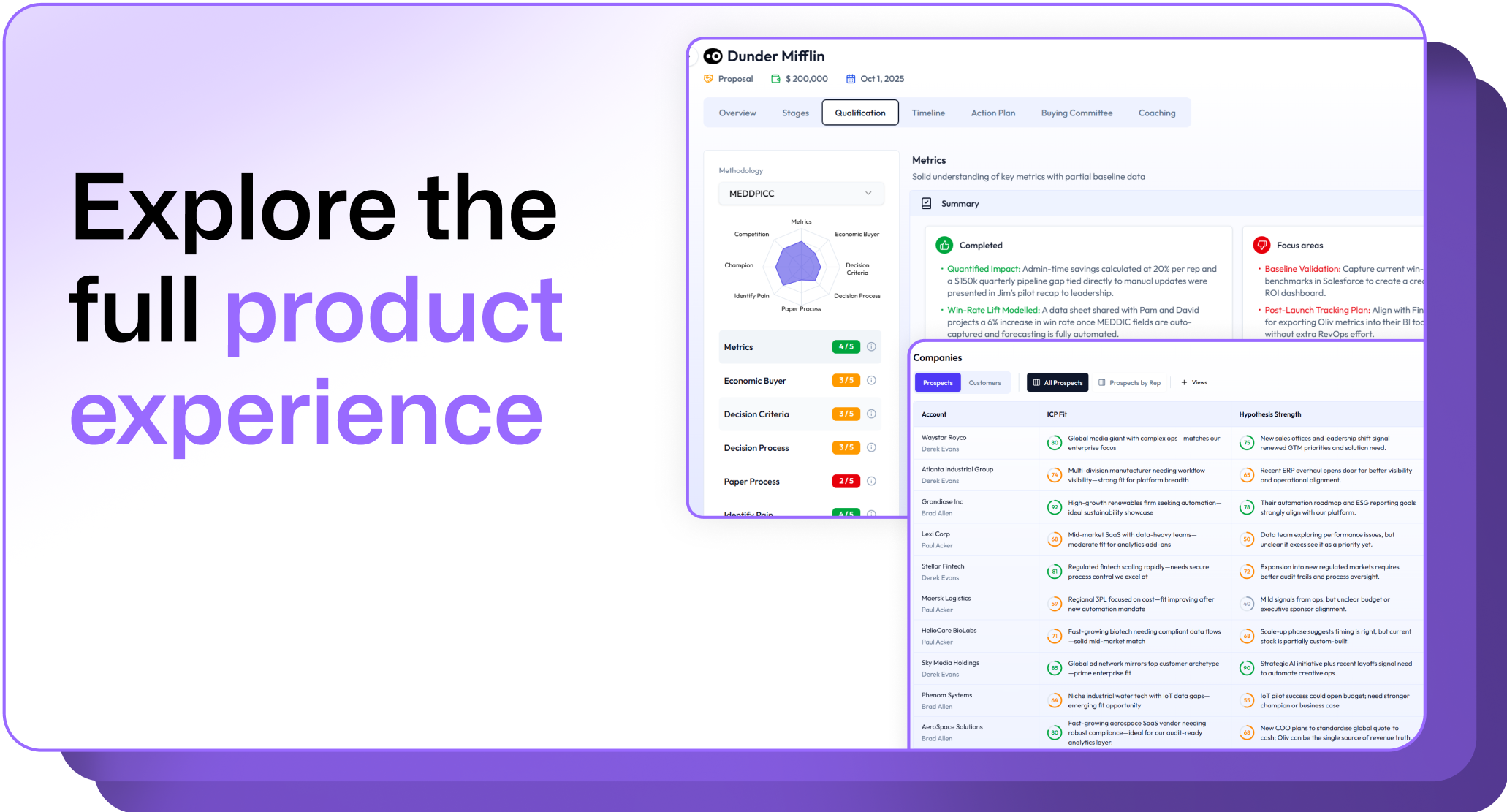
.avif)